
SolFlow




Read a Solidity contract the way it executes, not the way its files are organized.
The first job in any audit is reconstructing what actually happens when someone calls an entry point, and the answer is scattered across base contracts, libraries, and modifiers in a dozen files. SolFlow compiles a Solidity repository, extracts call-graph facts with Slither, and serves one interactive call-flow visualization (a Flow) per external entry point, laid out as a graph you can read. Every node renders the target function's real source, syntax-highlighted and line-numbered. Analysis runs entirely on your machine. Built for Web3 security auditing.
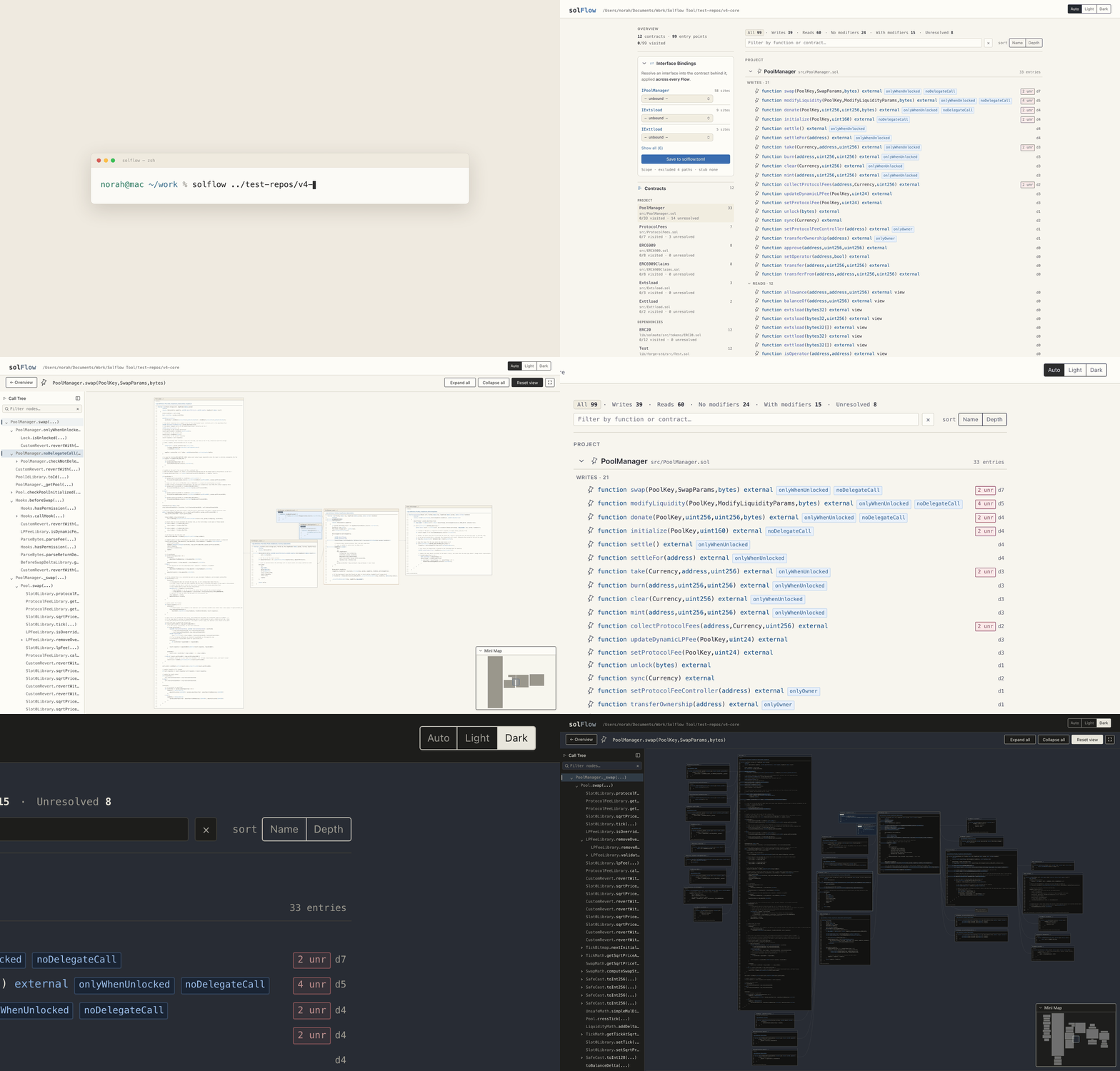
SolFlow on Uniswap V4: launch from the terminal, browse the entry-point index, expand the swap flow into its call tree, then flip to dark mode. Pausable stills are under Screenshots.
Features
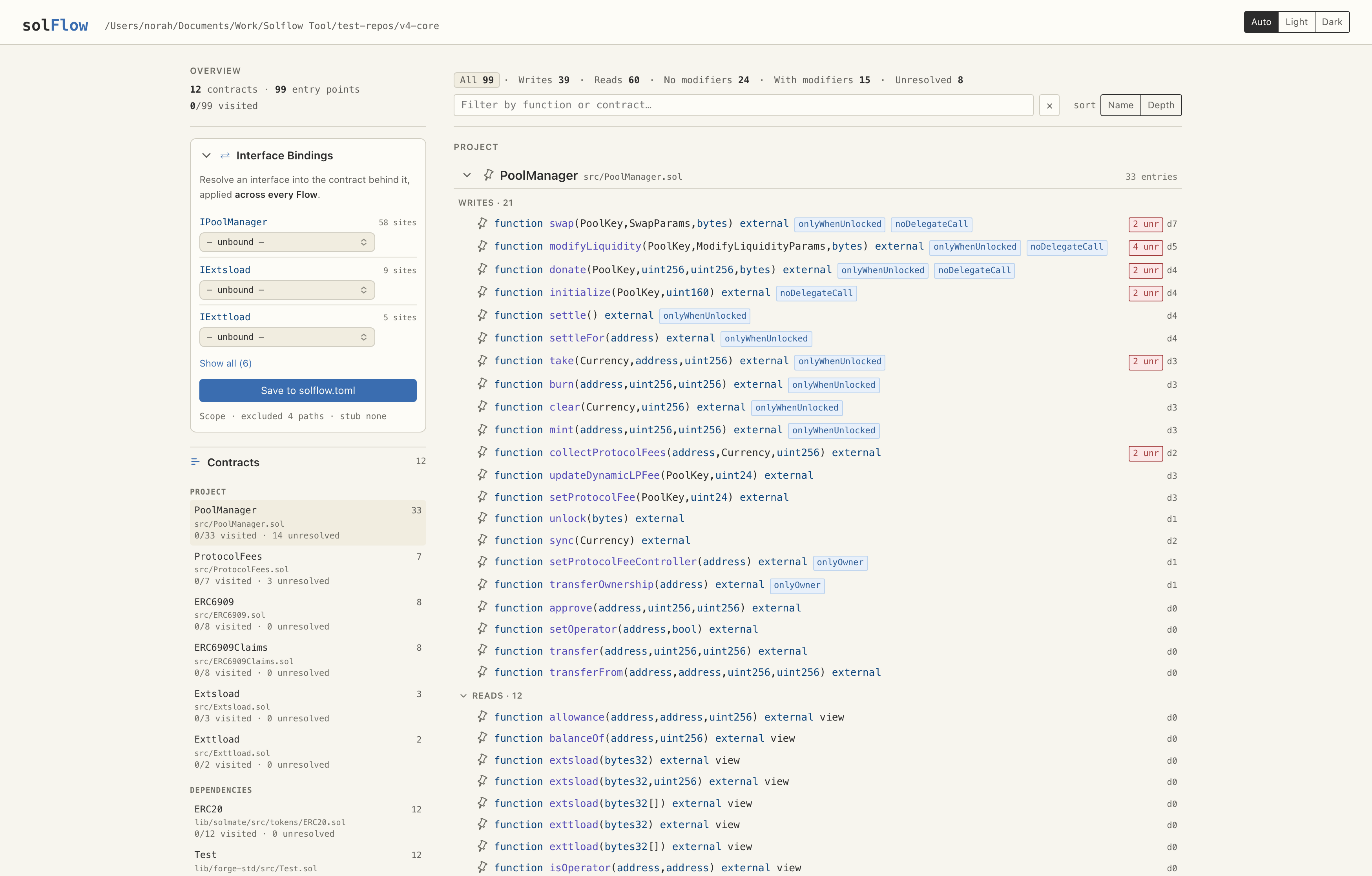
- One Flow per entry point. The index lists every externally callable function, grouped by contract and split into mutating vs. read-only, with modifier/depth/unresolved badges. A filter narrows the list as you type, so protocols with hundreds of entry points stay navigable.
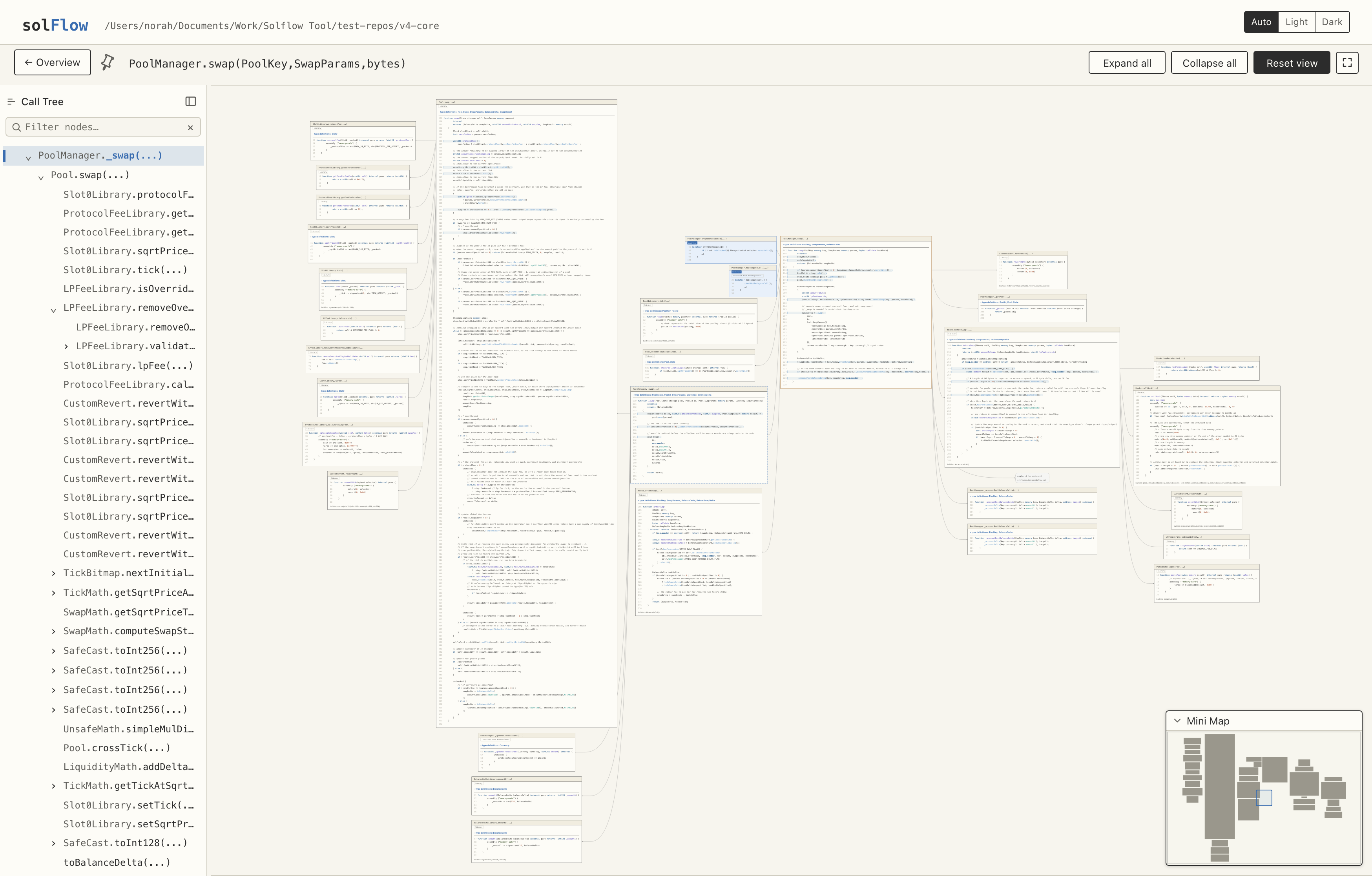
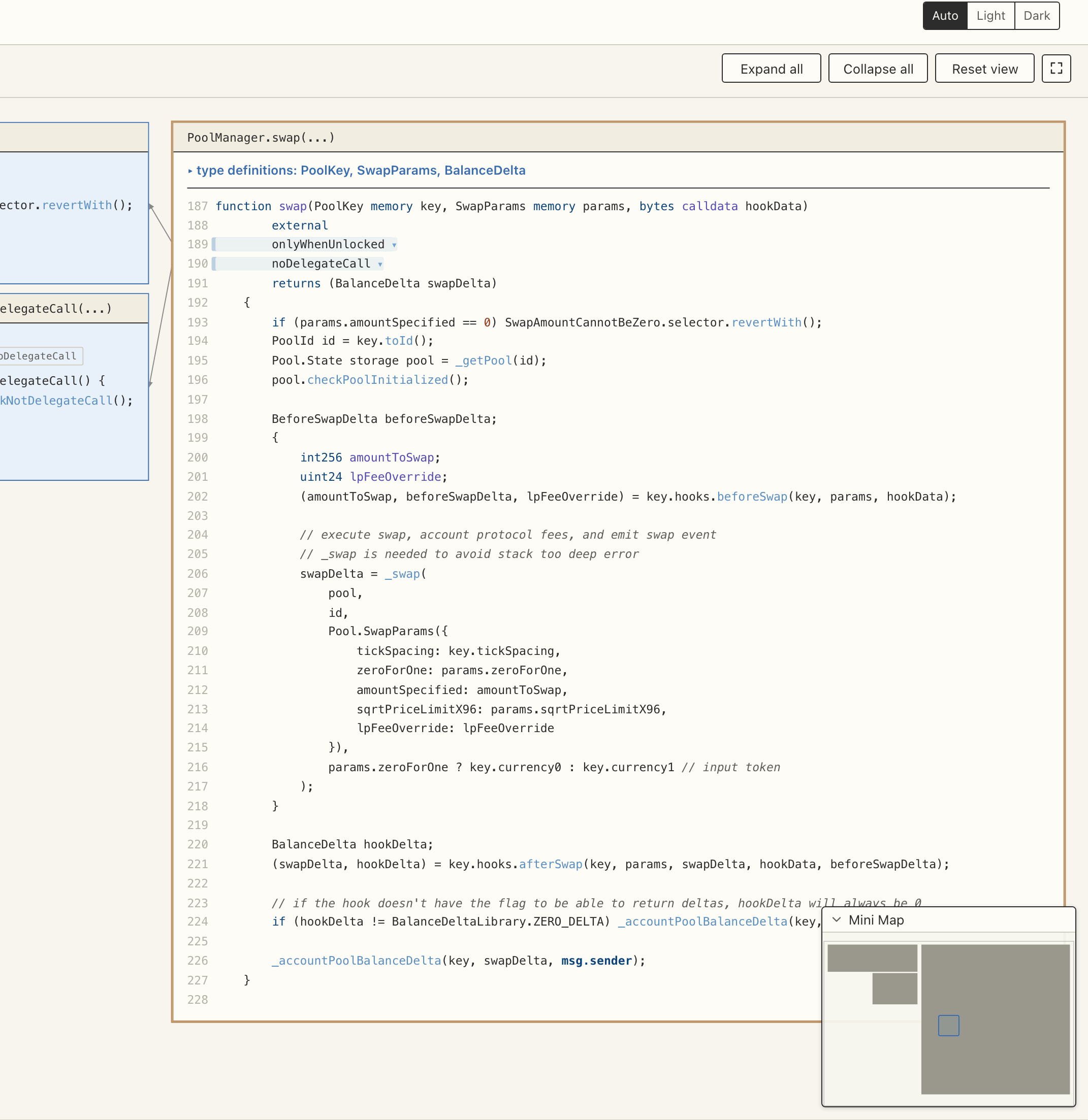
- Real source, not boxes. Every node renders the target function's actual code, syntax-highlighted and line-numbered. Click a call site and the callee expands beside it, the edge anchored to the exact line that makes the call.
- Types expanded inline. When a signature names a struct, enum, or user-defined value type, a type definitions panel gives you the full definition without leaving the Flow, resolved from wherever it's declared. Structs nest the types their fields reference; panels stay collapsed by default and remember what you opened.
- Progressive or bird's-eye. Flows open at the root and expand on demand, so you reveal only the paths you're tracing. Expand all / Collapse all flip the whole tree at once, or start with
--expand-all. Your expanded call sites are remembered per Flow. - Light or dark. A header toggle sets the palette to Auto (follows your OS), Light, or Dark. The choice is server-rendered, so there's no flash on load, and your preference never leaves the machine.
- Bookmarks & progress. Bookmark the entry points and contracts you keep returning to; they collect in a Bookmarked section atop the index, and entry points you've already opened are tinted so you can see your progress. It's a first-party localhost cookie (no accounts, nothing leaves the machine) and works with JavaScript disabled.
- It never silently lies. When a call target can't be resolved statically (an unbound interface,
addr.call(...), computed-target Yul), the node is explicitly marked unresolved, with the reason. No guessing, no silent omissions. The auditor's trust in a Flow's completeness within its declared scope is the load-bearing property. - Bind interfaces to implementations. When a call exits through an interface (
IOracle(addr).price()), pin the concrete contract that runs and SolFlow resolves into its body, at every call site across every Flow. Bind from any interface node or the Bindings panel on the index, then Save tosolflow.tomlso it persists. A bound edge stays badged as an asserted assumption, not a static proof. - Scope you control. Inline a dependency, stub a dense in-tree math library, or exclude test and mock contracts, via
solflow.tomlor CLI flags (see Configuration). - Local and private. Analysis runs entirely on your machine and the server binds only to
127.0.0.1. Code under NDA is never uploaded anywhere.
Installation
SolFlow needs Python 3.11+ and a solc matching your target, installed via solc-select, which Slither uses to compile the project.
pipx install solflow
pipx install solc-select
solc-select install <version> && solc-select use <version>
For the latest development build, install from git:
pipx install git+https://github.com/norah1499/solidity-flow-navigator
Check your version with solflow --version and upgrade with pipx upgrade solflow. To uninstall, run pipx uninstall solflow (its bundled dependencies go with it); solc-select is a separate pipx uninstall solc-select.
SolFlow makes no network calls and never checks for updates. That is the same local-and-private property that keeps audited code on your machine, so watch the releases or just run pipx upgrade solflow now and then.
When the first run fails
SolFlow is built on Slither: anything Slither cannot compile and analyze, SolFlow cannot visualize. When that happens, it prints the underlying error verbatim and exits, with no partial output and no auto-remediation. It never installs dependencies or modifies the target repository to force a build, because a half-compiled picture would silently mislead an audit. The rule of thumb: if the project does not build on its own in that directory, SolFlow will not build it either.
The two most common first-run failures are environment issues, not tool bugs:
- solc version mismatch. The active
solcdoes not match the project's pragma. Fix:solc-select install <version> && solc-select use <version>. - Missing dependencies. The target was cloned fresh and its libraries were never fetched. Fix: run the project's own setup (
forge install,npm install, or equivalent) and confirm its build succeeds first.
If the project builds cleanly but Slither itself still fails (this happens on some large protocols), that is an upstream Slither limitation, not a SolFlow defect; an issue is still welcome so it can be tracked.
Usage
solflow path/to/your/solidity/project
Point it at the repository root, where Slither can resolve dependencies. SolFlow compiles the project, binds 127.0.0.1:8080 (or the next free port), prints the URL to open, and serves the Flows. Compilation goes through crytic-compile, so any build system it detects works (Foundry, Hardhat, Truffle, Brownie, plain solc); Foundry is what SolFlow is tested against.
Configuration
SolFlow runs with sensible defaults. By default it excludes common test and mock directories (**/*.t.sol, **/test/**, **/tests/**, **/mocks/**) and *Mock* contracts. Refine scope through a config file, CLI flags, or both. CLI flags override file values; file values override defaults.
CLI flags
Run solflow --help for the full reference, grouped into Scope, Resolution, Rendering, and Server.
| Flag | What it does |
|---|---|
--exclude-path GLOB |
Drop contracts whose file path matches the glob (repeatable) |
--exclude-contract PATTERN |
Drop contracts whose name matches the pattern (repeatable) |
--inline-library NAME |
Recurse into a lib/<NAME>/ dependency instead of stubbing it (repeatable) |
--stub-path GLOB |
Stop at a terminal node for matching in-tree call targets, e.g. dense math libraries (repeatable) |
--expand-all |
Open every Flow fully expanded, for a bird's-eye view |
--port N |
Bind a specific port (the default auto-selects from 8080 upward) |
--config PATH |
Use a config file other than solflow.toml in the working directory |
--version |
Print the installed SolFlow version and exit |
Config file
SolFlow looks for solflow.toml in the directory you invoke it from. All keys are optional; a missing key uses its default, and setting a key to [] clears the default.
[scope]
exclude_paths = ["**/*.t.sol", "**/test/**", "**/tests/**", "**/mocks/**"]
exclude_contracts = ["*Mock*"]
inline_libraries = []
stub_paths = []
How it works
SolFlow is a thin pipeline over Slither's analysis model:
- Compile the repository via crytic-compile, then extract raw facts from Slither: contracts, functions, modifiers, inheritance order, call edges, and source locations.
- Build a Flow per entry point, applying your scope rules: modifiers folded into the call tree, virtual dispatch resolved through the C3 chain, cross-contract calls resolved against bindings, and every unresolvable branch explicitly marked.
- Serve the Flows as progressive HTML+SVG graphs from a local Flask server, with source highlighted server-side by Pygments.
Screenshots
Stills from the demo above (Uniswap V4)
The index lists every external entry point of the analyzed repository:
Opening an entry point renders its call flow; every callee panel shows the real source:
Development
Issues and pull requests are welcome. Before opening a PR, make sure these pass:
pytest
black --check .
ruff check
License
SolFlow is licensed under the GNU AGPL-3.0-only. Copyright (C) 2026 Norah.
1 maintainer

Metadata
1 maintainer
Release files for solflow 0.25.2
For a detailed explanation of source distributions (sdists) and built distributions (wheels), please see the package formats documentation.
Source distribution (sdist)
| File | Size | Uploaded | Provenance | Actions |
|---|---|---|---|---|
| solflow-0.25.2.tar.gz | 284.9 kB | With provenance | Details for solflow-0.25.2.tar.gz |
Built distribution (wheel)
| File | Interpreter | ABI | Platform | Actions Reset |
|---|---|---|---|---|
| solflow-0.25.2-py3-none-any.whl | Python 3 | none | any | Details for solflow-0.25.2-py3-none-any.whl |
Total release size: 577.3 kB
Release files / solflow-0.25.2.tar.gz
| Download URL | solflow-0.25.2.tar.gz |
|---|---|
| Size | 284.9 kB |
| Tags | Source |
|
SHA-256 checksum How to use checksums |
fcb576c5fbf45e74085fafe7a2284391c456e0704001d28b2005a679fd8e4b43
|
|
BLAKE2b-256 checksum How to use checksums |
0c0eb5d1ff34216bdb911209d6a5797c5316a5e6c59bc1d175f837ed79bdb6c7
|
| Upload date | |
|
Uploaded using Trusted Publishing? What is trusted publishing? |
Yes |
| Uploaded via |
twine/6.1.0 CPython/3.13.12
|
Provenance
Provenance describes where a file came from. On PyPI, provenance is shared via attestations, which provide a verifiable record of the build or publishing details. View details, limitations and caveats.


PyPI Publish Attestation
PyPI verified that this artifact, at this checksum, originated from the publisher listed below.
Signed by GitHub Actions, verified by PyPI on Jul 17, 2026.
Transparency logRelease files / solflow-0.25.2-py3-none-any.whl
| Download URL | solflow-0.25.2-py3-none-any.whl |
|---|---|
| Size | 292.4 kB |
| Tags | Python 3 |
|
SHA-256 checksum How to use checksums |
005de9087664851b305f9f14f3e2b2d1424003a52f01124bf5825573ec54f28f
|
|
BLAKE2b-256 checksum How to use checksums |
f09602b09044145849d8c454fcf9b7774b1edb7e51398d7acd46dc8aeb1c325f
|
| Upload date | |
|
Uploaded using Trusted Publishing? What is trusted publishing? |
Yes |
| Uploaded via |
twine/6.1.0 CPython/3.13.12
|
Provenance
Provenance describes where a file came from. On PyPI, provenance is shared via attestations, which provide a verifiable record of the build or publishing details. View details, limitations and caveats.
PyPI Publish Attestation
PyPI verified that this artifact, at this checksum, originated from the publisher listed below.
Signed by GitHub Actions, verified by PyPI on Jul 17, 2026.
Transparency logSecurity for solflow 0.25.2
Provenance
Provenance describes where a file came from. On PyPI, provenance is shared via attestations, which provide a verifiable record of the build or publishing details. View details, limitations and caveats.
Full provenance
Both files in this release have been uploaded with provenance metadata.
Attestation for solflow-0.25.2.tar.gz
PyPI Publish Attestation
PyPI verified that this artifact, at this checksum, originated from the publisher listed below.
Signed by GitHub Actions, verified by PyPI on Jul 17, 2026.
Transparency logA note on package security
PyPI is a repository for distributing packages, not a service for auditing them. While third-party security researchers and our staff do their best to detect and remove malicious packages, PyPI cannot guarantee the quality, security or suitability of any given package.
To learn more about protecting yourself from malicious actors, visit our package security documentation.














