
Per-entry-point navigable call-graph visualizations of Solidity repositories, for Web3 security auditors.
Verified details
These details have been verified by PyPIProject links
GitHub Statistics
Maintainers

Project description
SolFlow




Read a Solidity contract the way it executes, not the way its files are organized.
SolFlow compiles a Solidity repository, extracts call-graph facts with Slither, and serves one interactive call-flow visualization (a Flow) per external entry point. Every node renders the target function's real source, syntax-highlighted and line-numbered. Analysis runs entirely on your machine. Built for Web3 security auditing.
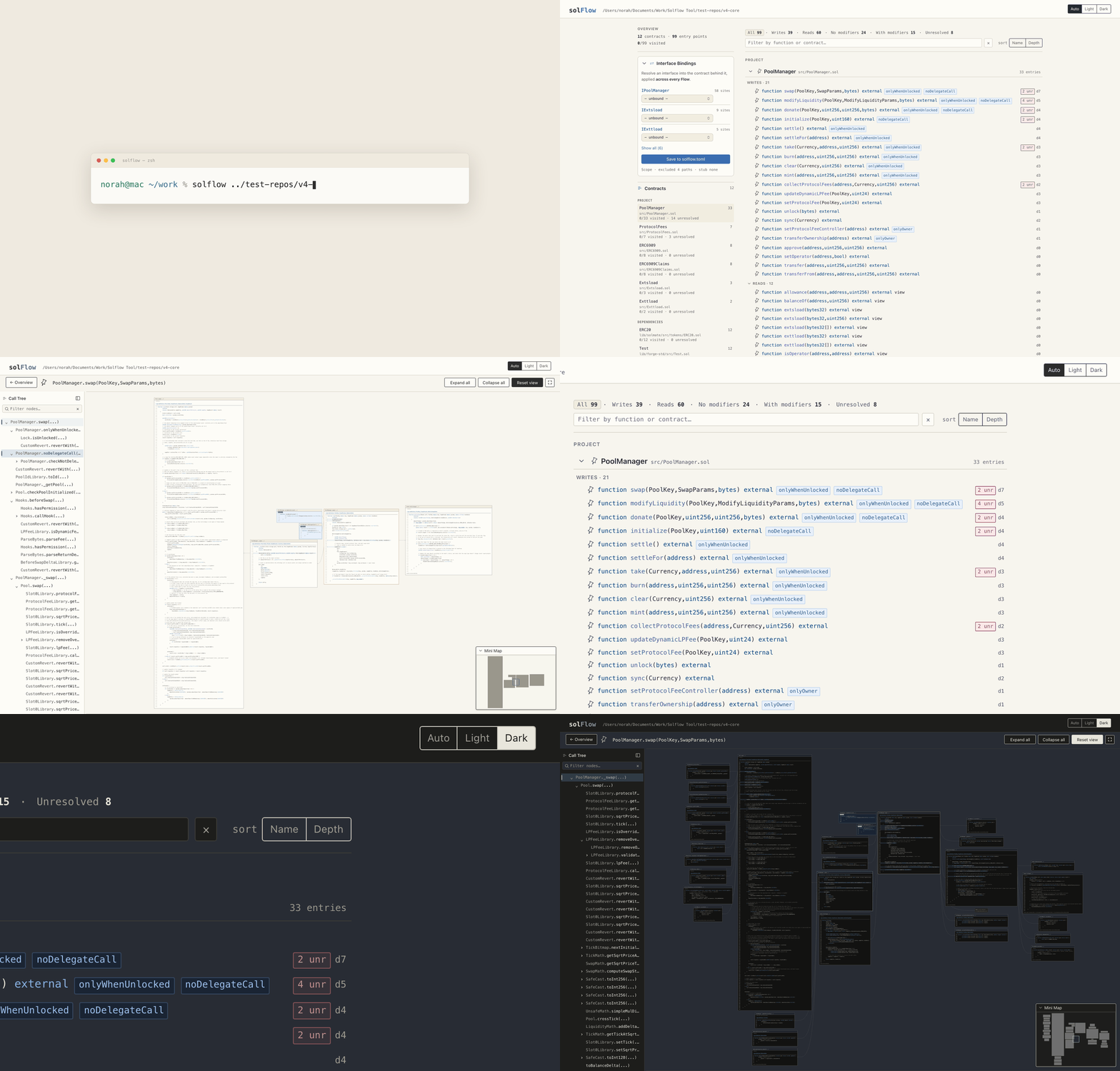
SolFlow on Morpho Blue: launch from the terminal, browse the entry-point index, expand the liquidate flow into its full call tree, then flip to dark mode. Pausable stills are under Screenshots.
[!NOTE] SolFlow is not a vulnerability scanner. It emits no findings and makes no security claims. It shows you the code's shape so you can find the problems faster.
Why
The first job in any audit is reconstructing what actually happens when someone calls an entry point. The answer is scattered across base contracts, libraries, and modifiers in a dozen files. SolFlow lays it out as a graph you can read.
Features
- One Flow per entry point. The index lists every externally callable function, grouped by contract and split into mutating vs. read-only, with modifier badges, call-tree depth, and unresolved-target counts per entry: the whole audit surface on one page. A filter box narrows the list as you type, by signature or contract name, so protocols with hundreds of entry points stay navigable.
- Real source, not boxes. Every node renders the target function's actual code, syntax-highlighted and line-numbered. Click a call site and the callee expands beside it, the edge anchored to the exact line that makes the call.
- Types expanded inline. When a function's parameters or returns name a struct, enum, or user-defined value type, a type definitions panel above the source gives you the full definition without leaving the Flow, resolved from wherever it's declared (contract, interface, library, or file scope). Structs nest the types their fields reference, so you drill from a parameter into its members in one place, and a nested type is tinted where it appears so the field links visibly to its definition. Two distinct types that share a name are shown qualified (
Pool.State,Position.State) so you can tell them apart. The panels stay collapsed by default, persist what you opened, and respond to Expand all / Collapse all. - Progressive or bird's-eye. Flows open at the root and expand on demand, so you reveal only the paths you're tracing. Expand all and Collapse all controls in the Flow header flip the whole tree at once, or start with
--expand-allfor the full tree at page load. Your expanded call sites are remembered per Flow, so returning to one restores exactly what you had open. - Light or dark. A header toggle sets the palette to Auto (follows your OS), Light, or Dark, so long audit sessions stay easy on the eyes. The choice is server-rendered: no flash on load, and your preference never leaves the machine.
- Bookmarks & recently-viewed. Bookmark the entry points (and contracts) you keep returning to, and they collect in a Bookmarked section at the top of the index, reachable from any scroll position via a floating shortcut. Toggling a bookmark happens in place, so the page doesn't lose your spot. Entry points you've already opened are tinted on the index so you can see your progress at a glance. It's all a first-party localhost cookie (no accounts, nothing leaves the machine), and the toggles still work with JavaScript disabled.
- It never silently lies. When a call target can't be resolved statically (an interface with no bound implementation,
addr.call(...), computed-target Yul), the node is explicitly marked unresolved, with the reason. No guessing, no silent omissions. The auditor's trust in a Flow's completeness within its declared scope is the load-bearing property. - Bind interfaces to implementations. When a call exits through an interface (
IOracle(addr).price()), pin the concrete contract that runs and SolFlow resolves into its body, at every call site across every Flow. Bind from the dropdown on any interface node, or from the Bindings panel on the index, then Save the set tosolflow.tomlso it persists across runs. A bound edge is an asserted assumption, not a static proof, so it stays badged as such. - Scope you control. Inline a dependency, stub a dense in-tree math library, or exclude test and mock contracts, via
solflow.tomlor CLI flags (see Configuration). - Local and private. Analysis runs entirely on your machine and the server binds only to
127.0.0.1. Audit code under NDA is never uploaded anywhere.
Prerequisites
- Python 3.11+
- A
solcmatching your target, via solc-select. Slither needs it to compile the project.
Installation
pipx install solflow
pipx install solc-select
solc-select install <version> && solc-select use <version>
For the latest development version: pipx install git+https://github.com/norah1499/solidity-flow-navigator.
To uninstall, pipx uninstall solflow removes the tool and all its bundled dependencies; SolFlow writes nothing outside its own install directory, apart from the solflow.toml in your working directory that the Bindings panel's Save writes when you click it. solc-select and its downloaded compilers are a separate install, removable with pipx uninstall solc-select.
Updating
Check your installed version with solflow --version, and upgrade to the latest release with:
pipx upgrade solflow
SolFlow does not check for or notify you about new versions. It makes no network calls of any kind, the same local-and-private property that keeps audited code on your machine, so there is nothing to phone home for an update check. To hear about new releases, watch the GitHub releases or the PyPI project page, or simply run pipx upgrade solflow now and then.
Usage
solflow path/to/your/solidity/project
Point it at the repository root, where Slither can resolve dependencies. SolFlow compiles the project, binds 127.0.0.1:8080 (or the next free port), and prints the URL. Open it in your browser to navigate the Flows.
Compilation goes through crytic-compile, so any build system it detects should work (Foundry, Hardhat, Truffle, Brownie, plain solc). Foundry projects are what SolFlow is tested against.
Configuration
SolFlow runs with sensible defaults. By default it excludes common test and mock directories (**/*.t.sol, **/test/**, **/tests/**, **/mocks/**) and *Mock* contracts. Refine scope through a config file, CLI flags, or both. CLI flags override file values; file values override defaults.
CLI flags
Run solflow --help for the full reference, grouped into Scope, Resolution, Rendering, and Server.
| Flag | What it does |
|---|---|
--exclude-path GLOB |
Drop contracts whose file path matches the glob (repeatable) |
--exclude-contract PATTERN |
Drop contracts whose name matches the pattern (repeatable) |
--inline-library NAME |
Recurse into a lib/<NAME>/ dependency instead of stubbing it (repeatable) |
--stub-path GLOB |
Stop at a terminal node for matching in-tree call targets, e.g. dense math libraries (repeatable) |
--expand-all |
Open every Flow fully expanded, for a bird's-eye view |
--port N |
Bind a specific port (the default auto-selects from 8080 upward) |
--config PATH |
Use a config file other than solflow.toml in the working directory |
--version |
Print the installed SolFlow version and exit |
Config file
SolFlow looks for solflow.toml in the directory you invoke it from. All keys are optional; a missing key uses its default, and setting a key to [] clears the default.
[scope]
exclude_paths = ["**/*.t.sol", "**/test/**", "**/tests/**", "**/mocks/**"]
exclude_contracts = ["*Mock*"]
inline_libraries = []
stub_paths = []
How it works
SolFlow is a thin pipeline over Slither's analysis model:
- Compile the repository via crytic-compile, then extract raw facts from Slither: contracts, functions, modifiers, inheritance order, call edges, and source locations.
- Build a Flow per entry point, applying your scope rules: modifiers folded into the call tree, virtual dispatch resolved through the C3 chain, cross-contract calls resolved against bindings, and every unresolvable branch explicitly marked.
- Serve the Flows as progressive HTML+SVG graphs from a local Flask server, with source highlighted server-side by Pygments.
When the first run fails
SolFlow is built on Slither and is contingent on it: anything Slither cannot compile and analyze, SolFlow cannot visualize. When that happens, SolFlow prints the underlying error verbatim and exits without producing anything.
[!IMPORTANT] There is no partial output and no auto-remediation, by design. SolFlow never installs dependencies or modifies the target repository to make a build pass; a half-compiled picture would silently mislead an audit. The rule of thumb: if the project does not build on its own in that directory, SolFlow will not build it either.
The two most common first-run failures are environment issues, not tool bugs:
- solc version mismatch. The active
solcdoes not match the project's pragma. Fix:solc-select install <version> && solc-select use <version>. - Missing dependencies. The target was cloned fresh and its libraries were never fetched. Fix: run the project's own setup (
forge install,npm install, or equivalent) and confirm its build succeeds before pointing SolFlow at it.
If the project builds cleanly and Slither itself still fails on it (this happens on some large protocols), that is an upstream Slither limitation rather than a SolFlow defect; an issue is still welcome so it can be tracked.
Screenshots
Stills from the demo above (Morpho Blue)
The index lists every external entry point of the analyzed repository:

Opening an entry point renders its full call flow; every callee panel shows the real source:


Development
Issues and pull requests are welcome. Before opening a PR, make sure these pass:
pytest
black --check .
ruff check
Project details
Verified details
These details have been verified by PyPIProject links
GitHub Statistics
Maintainers
Release history Release notifications | RSS feed


Download files
Download the file for your platform. If you're not sure which to choose, learn more about installing packages.
Source Distribution
Built Distribution
Filter files by name, interpreter, ABI, and platform.
If you're not sure about the file name format, learn more about wheel file names.
Copy a direct link to the current filters
File details
Details for the file solflow-0.22.0.tar.gz.
File metadata
- Download URL: solflow-0.22.0.tar.gz
- Upload date:
- Size: 280.6 kB
- Tags: Source
- Uploaded using Trusted Publishing? Yes
- Uploaded via: twine/6.1.0 CPython/3.13.12
File hashes
| Algorithm | Hash digest | |
|---|---|---|
| SHA256 |
d0606f472038f7d5a2c72d0603ebc0e2e2f7c4ae57008c437cedcdc4cfd2470d
|
|
| MD5 |
d980e423233b0706ed92d5b831d8406f
|
|
| BLAKE2b-256 |
3a6e90a2af46da99ee4929427b0c3cd9aba89c6f0888b2f49be8ecaec0b95373
|
Provenance
The following attestation bundles were made for solflow-0.22.0.tar.gz:
Publisher:
release.yml on norah1499/solidity-flow-navigator
-
Statement:
-
Statement type:
https://in-toto.io/Statement/v1 -
Predicate type:
https://docs.pypi.org/attestations/publish/v1 -
Subject name:
solflow-0.22.0.tar.gz -
Subject digest:
d0606f472038f7d5a2c72d0603ebc0e2e2f7c4ae57008c437cedcdc4cfd2470d - Sigstore transparency entry: 1849960624
- Sigstore integration time:
-
Permalink:
norah1499/solidity-flow-navigator@8592007374c42cf8160b912801d01bbfdf5dc768 -
Branch / Tag:
refs/tags/v0.22.0 - Owner: https://github.com/norah1499
-
Access:
public
-
Token Issuer:
https://token.actions.githubusercontent.com -
Runner Environment:
github-hosted -
Publication workflow:
release.yml@8592007374c42cf8160b912801d01bbfdf5dc768 -
Trigger Event:
release
-
Statement type:
File details
Details for the file solflow-0.22.0-py3-none-any.whl.
File metadata
- Download URL: solflow-0.22.0-py3-none-any.whl
- Upload date:
- Size: 287.7 kB
- Tags: Python 3
- Uploaded using Trusted Publishing? Yes
- Uploaded via: twine/6.1.0 CPython/3.13.12
File hashes
| Algorithm | Hash digest | |
|---|---|---|
| SHA256 |
2f41543d91483b21965b62d91479cc9a294d908dd34186b70a7a7495cb4cc4d2
|
|
| MD5 |
b432c46013051ca94462c43b2314de6e
|
|
| BLAKE2b-256 |
d83d597b894b331016c61e4cc3e84793ac1c3e71861cc56277c2a489b5111e02
|
Provenance
The following attestation bundles were made for solflow-0.22.0-py3-none-any.whl:
Publisher:
release.yml on norah1499/solidity-flow-navigator
-
Statement:
-
Statement type:
https://in-toto.io/Statement/v1 -
Predicate type:
https://docs.pypi.org/attestations/publish/v1 -
Subject name:
solflow-0.22.0-py3-none-any.whl -
Subject digest:
2f41543d91483b21965b62d91479cc9a294d908dd34186b70a7a7495cb4cc4d2 - Sigstore transparency entry: 1849960695
- Sigstore integration time:
-
Permalink:
norah1499/solidity-flow-navigator@8592007374c42cf8160b912801d01bbfdf5dc768 -
Branch / Tag:
refs/tags/v0.22.0 - Owner: https://github.com/norah1499
-
Access:
public
-
Token Issuer:
https://token.actions.githubusercontent.com -
Runner Environment:
github-hosted -
Publication workflow:
release.yml@8592007374c42cf8160b912801d01bbfdf5dc768 -
Trigger Event:
release
-
Statement type:






