
System Oberving Tool

Project description

Command-line system obervation tool.
sot is a Command-line System Obervation Tool in the spirit of top. It displays various interesting system stats and graphs them. Works on all operating systems.





Installation

Using pipx
Install and run with pipx. Setup pipx before proceeding.
python3 -m pipx install sot
python3 -m pipx ensurepath
sudo pipx ensurepath --global
or in single line:
python3 -m pipx install sot && python3 -m pipx ensurepath && sudo pipx ensurepath --global
Using DEB Package (Experimental - Debian/Ubuntu)
### Using DEB Package (Experimental - Debian/Ubuntu)⚠️ Experimental: DEB packages are experimental. Use uv or pipx for recommended installation.
Download the latest DEB package from the releases page and install:
# Download latest .deb file from releases
wget https://github.com/anistark/sot/releases/latest/download/sot-*.deb

# Install the package
sudo dpkg -i sot-*.deb

# Install any missing dependencies (if needed)
sudo apt-get install -f
Using RPM Package (Experimental - RHEL/CentOS/Fedora)
⚠️ Experimental: RPM packages are experimental. Use uv or pipx for recommended installation.
Download the latest RPM package from the releases page and install:
# Download latest .rpm file from releases
wget https://github.com/anistark/sot/releases/latest/download/sot-*.rpm

# Install the package
sudo rpm -ivh sot-*.rpm
Verifying Package Signatures (Recommended)
For enhanced security, verify GPG signatures before installing packages:
# Import the public signing key (one time setup)
curl -fsSL https://github.com/anistark/sot/releases/latest/download/public-key.asc | gpg --import

# For DEB packages:
dpkg-sig --verify sot-*.deb
# Or verify using detached signature
gpg --verify sot-*.deb.asc sot-*.deb
# Verify checksums
gpg --verify SHA256SUMS.sig && sha256sum -c SHA256SUMS

# For RPM packages:
gpg --verify sot-*.rpm.asc sot-*.rpm
# Verify checksums
gpg --verify SHA256SUMS-RPM.sig && sha256sum -c SHA256SUMS-RPM
GPG Key Fingerprint: DCD1 9CA3 2C3F ACAA 1360 1C78 F4D7 EFDB 552E 84C9
Run with:
sot
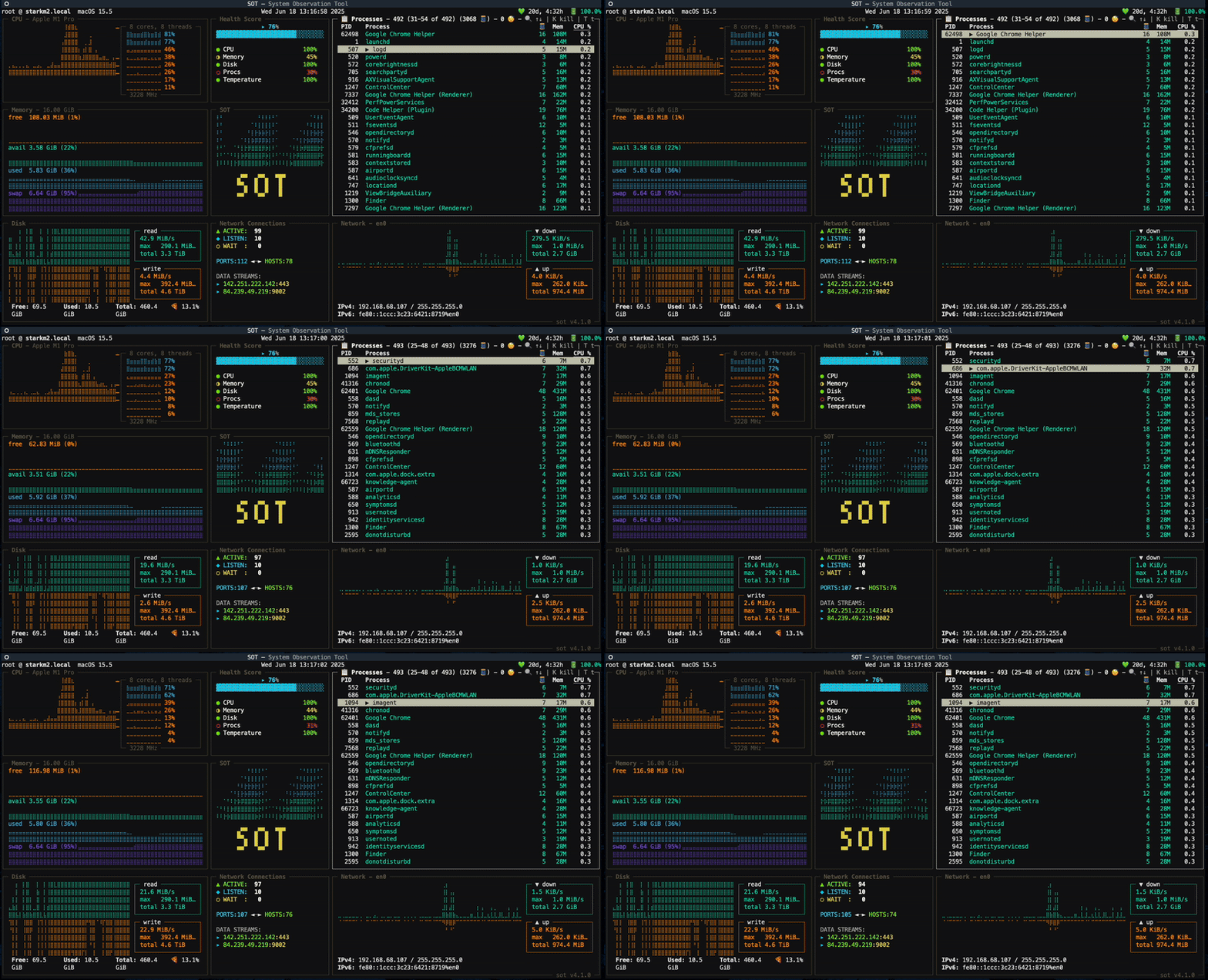
Features
System
- CPU Usage
- Per Core and Thread level
- Processes with ID, threads, memory and cpu usage
- Interactive Order By: Press
Oto enter order by mode, navigate columns with arrow keys, toggle sort direction with Enter (DESC ↓ → ASC ↑ → OFF → cycle)
- Interactive Order By: Press
Disk
- Disk Usage
- Per Read/Write
- Capacity
- Free
- Used
- Total
- Percent
Memory
- Memory Usage
- Capacity
- Free
- Available
- Used
- Swap
Network
- Local IP
- Upload/Download Speed
- Bandwidth
- Network Usage
For all options, see
sot -H
usage: sot [--help] [--version] [--log LOG] [--net NET]

Command-line System Obervation Tool ≈

options:
  --help, -H     Show this help message and exit.
  --version, -V  Display version information
  --log, -L LOG  Debug log file
  --net, -N NET  Network interface to display (default: auto)
Main Theme:
| Color | Hex | RGB |
|---|---|---|
| sky_blue3 | #5fafd7 |
rgb(95,175,215) |
| aquamarine3 | #5fd7af |
rgb(95,215,175) |
| yellow | #808000 |
rgb(128,128,0) |
| bright_black | #808080 |
rgb(128,128,128) |
| slate_blue1 | #875fff |
rgb(135,95,255) |
| red3 | #d70000 |
rgb(215,0,0) |
| dark_orange | #d75f00 |
rgb(215,95,0) |
All supported colors.
🏴 ≈ 🏴
sot uses:
Tested Systems:


If you use a system that's not listed above, feel free to add to the list. If you're facing any issues, would be happy to take a look.
Other top alternatives in alphabetical order:
Release history Release notifications | RSS feed


Download files
Download the file for your platform. If you're not sure which to choose, learn more about installing packages.
Source Distribution
Built Distribution
Filter files by name, interpreter, ABI, and platform.
If you're not sure about the file name format, learn more about wheel file names.
Copy a direct link to the current filters
File details
Details for the file sot-4.4.2.tar.gz.
File metadata
- Download URL: sot-4.4.2.tar.gz
- Upload date:
- Size: 137.1 kB
- Tags: Source
- Uploaded using Trusted Publishing? No
- Uploaded via: twine/6.1.0 CPython/3.12.10
File hashes
| Algorithm | Hash digest | |
|---|---|---|
| SHA256 |
06cb4b259a207ff2f44260cbd6b98b5904bc359fcc03a5e8ef813baab3e571e7
|
|
| MD5 |
e5ba3a65053c14f0a5ced7011874248f
|
|
| BLAKE2b-256 |
952b90fe6bd6c7868d04b8ea3491cca98bbbf3572ec8f537dab81d938b3706f5
|
File details
Details for the file sot-4.4.2-py3-none-any.whl.
File metadata
- Download URL: sot-4.4.2-py3-none-any.whl
- Upload date:
- Size: 35.2 kB
- Tags: Python 3
- Uploaded using Trusted Publishing? No
- Uploaded via: twine/6.1.0 CPython/3.12.10
File hashes
| Algorithm | Hash digest | |
|---|---|---|
| SHA256 |
7dfb7334c16c9568036568ac75655b02fd0b2c605afe48ac0997b1f331ad83c6
|
|
| MD5 |
995d0ccf6c3fdf85dde90797aebc9f41
|
|
| BLAKE2b-256 |
69257c62e56b92593069e2bf91518d84588705be319e1b4b5eaaa73f466c5377
|






