
System Oberving Tool

Project description

Command-line system obervation tool.
sot is a Command-line System Obervation Tool in the spirit of top. It displays various interesting system stats and graphs them. Works on all operating systems.





Installation

Quick Install (Recommended)
One-line installer for macOS and Linux - Automatically detects your environment and installs all dependencies:
curl -fsSL https://raw.githubusercontent.com/anistark/sot/main/install.sh | bash
This script will:
- ✅ Detect your operating system
- ✅ Check for Python 3.10+ (installs if missing)
- ✅ Install pipx (if not present)
- ✅ Install sot and configure PATH
- ✅ Verify the installation
Note: This installation script does not work on Windows. Windows users should use one of the alternative installation methods below.
Alternative Installation Methods
Using brew
brew tap anistark/tools
brew install sot
Or single line:
brew install anistark/tools/sot
Update using:
brew update && brew upgrade sot
Using pipx
Install and run with pipx. Setup pipx before proceeding.
python3 -m pipx install sot
python3 -m pipx ensurepath
sudo pipx ensurepath --global
or in single line:
python3 -m pipx install sot && python3 -m pipx ensurepath && sudo pipx ensurepath --global
Using DEB Package (Experimental - Debian/Ubuntu)
### Using DEB Package (Experimental - Debian/Ubuntu)⚠️ Experimental: DEB packages are experimental. Use uv or pipx for recommended installation.
Download the latest DEB package from the releases page and install:
# Download latest .deb file from releases
wget https://github.com/anistark/sot/releases/latest/download/sot-*.deb

# Install the package
sudo dpkg -i sot-*.deb

# Install any missing dependencies (if needed)
sudo apt-get install -f
Using RPM Package (Experimental - RHEL/CentOS/Fedora)
⚠️ Experimental: RPM packages are experimental. Use uv or pipx for recommended installation.
Download the latest RPM package from the releases page and install:
# Download latest .rpm file from releases
wget https://github.com/anistark/sot/releases/latest/download/sot-*.rpm

# Install the package
sudo rpm -ivh sot-*.rpm
Verifying Package Signatures (Recommended)
For enhanced security, verify GPG signatures before installing packages:
# Import the public signing key (one time setup)
curl -fsSL https://github.com/anistark/sot/releases/latest/download/public-key.asc | gpg --import

# For DEB packages:
dpkg-sig --verify sot-*.deb
# Or verify using detached signature
gpg --verify sot-*.deb.asc sot-*.deb
# Verify checksums
gpg --verify SHA256SUMS.sig && sha256sum -c SHA256SUMS

# For RPM packages:
gpg --verify sot-*.rpm.asc sot-*.rpm
# Verify checksums
gpg --verify SHA256SUMS-RPM.sig && sha256sum -c SHA256SUMS-RPM
GPG Key Fingerprint: DCD1 9CA3 2C3F ACAA 1360 1C78 F4D7 EFDB 552E 84C9
Install from source
For testing or installing the latest version from source directly on your system.
Using uv (Recommended):
# Clone the repository
git clone https://github.com/anistark/sot.git
cd sot

# Install from source (system-wide)
uv pip install --system .

# Run from anywhere
sot
Using pipx:
# Clone the repository
git clone https://github.com/anistark/sot.git
cd sot

# Install from source using pipx
pipx install .

# Run from anywhere
sot
Run with:
sot
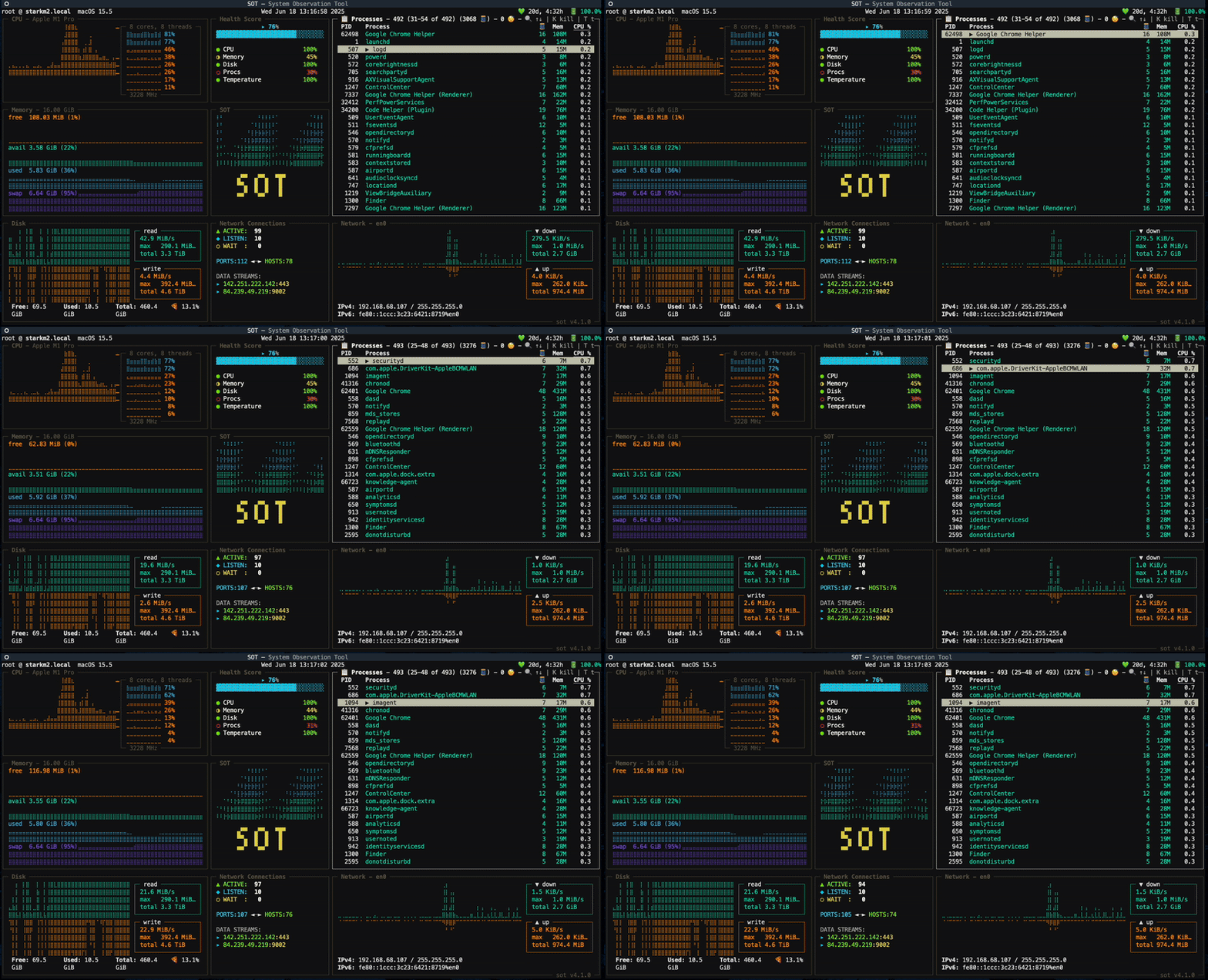
Features
System
- CPU Usage
- Per Core and Thread level
- Processes with ID, threads, memory and cpu usage
- Interactive Order By: Press
Oto enter order by mode, navigate columns with arrow keys, toggle sort direction with Enter (DESC ↓ → ASC ↑ → OFF → cycle)
- Interactive Order By: Press
Disk
- Interactive Disk TUI - View all physical disks with partitions
- Real-time disk usage monitoring with accurate APFS container calculations
- Visual usage bars and percentage indicators
- I/O statistics (read/write counts and bytes)
- Disk Usage
- Per Read/Write
- Capacity
- Free
- Used
- Total
- Percent
Memory
- Memory Usage
- Capacity
- Free
- Available
- Used
- Swap
Network
- Local IP
- Upload/Download Speed
- Bandwidth
- Network Usage
System Information
The sot info command displays comprehensive system information with a beautiful OS-specific ASCII logo.
Usage
sot info
Example Output
                  ,MMMM.            Host        -  john@macbook.local
                .MMMMMM             Model       -  MacBook Pro
                MMMMM,              SKU         -  MK1E3LL/A
      .;MMMMM:' MMMMMMMMMM;.        Identifier  -  MacBookPro18,1
    MMMMMMMMMMMMNWMMMMMMMMMMM:      Serial      -  C02YX2QZMD6R
  .MMMMMMMMMMMMMMMMMMMMMMMMWM.
  MMMMMMMMMMMMMMMMMMMMMMMMM.        OS          -  macOS 14.5.0 Sonoma
 ;MMMMMMMMMMMMMMMMMMMMMMMM:         Kernel      -  23.5.0
 :MMMMMMMMMMMMMMMMMMMMMMMM:         Firmware    -  10151.121.3
 .MMMMMMMMMMMMMMMMMMMMMMMMM.        DE          -  Aqua
  MMMMMMMMMMMMMMMMMMMMMMMMMMM.      WM          -  Quartz Compositor
   .MMMMMMMMMMMMMMMMMMMMMMMMMM.     Shell       -  zsh
     MMMMMMMMMMMMMMMMMMMMMMMM       Terminal    -  iTerm.app (3.5.2)
      ;MMMMMMMMMMMMMMMMMMMM.
        .MMMM,.    .MMMM,.          Chip        -  Apple M1 Pro (8P + 2E cores)
                                    GPU         -  Apple M1 Pro (16 cores)
                                    Memory      -  8 GiB / 32 GiB

                                    Displays    -  2560 x 1600 Retina (Color LCD)
                                                   3840 x 2160@60.00Hz (Dell U2720Q)

                                    Uptime      -  12d 4h 23m
                                    Battery     -  87% & Discharging
Features
The info command displays detailed system information organized into logical sections:
System Information
- Host (user@hostname)
- Model name (e.g., MacBook Pro)
- SKU/Model number
- Model identifier
- Serial number
Software
- Operating system with version name (e.g., macOS 15.6.1 Sequoia)
- Kernel version
- Firmware version
- Desktop Environment (DE)
- Window Manager (WM)
- Shell
- Terminal emulator
Hardware
- Chip details with performance/efficiency core breakdown (e.g., Apple M1 Pro with 6P + 2E cores)
- GPU model with core count
- Memory (used / total)
Displays
- All connected displays with resolutions, refresh rates, and display names
- Screen brightness (when available)
Status
- System uptime
- Battery status (percentage and charging state)
OS-Specific Logos
The command automatically detects your operating system and distribution, displaying the appropriate ASCII logo:
macOS: Apple logo
Linux Distributions:
- Ubuntu
- Debian
- Fedora
- Red Hat / RHEL
- Arch Linux
- Manjaro
- Pop!_OS
- CentOS
- Generic Linux/Tux (fallback)
Windows: Windows logo
Disk Benchmarking
The sot bench command allows you to measure disk performance with comprehensive benchmarks including sequential throughput, random IOPS, and latency distribution.
Interactive Mode (Default)
sot bench
This will display available disks and let you select one to benchmark interactively.
Benchmark Options
# Benchmark with default 10 second duration per test
sot bench

# Specify custom duration (in seconds)
sot bench --duration 5     # Quick 5-second benchmark
sot bench -d 30            # Longer 30-second benchmark for more stable results

# Specify custom output file
sot bench --output results.json

# Combine options
sot bench --duration 20 --output bench_results.json
Benchmark Tests
The benchmarking tool runs four comprehensive tests:
- Sequential Read - Measures sustained read throughput (MB/s)
- Sequential Write - Measures sustained write throughput (MB/s)
- Random Read IOPS - Measures random read operations per second
- Random Write IOPS - Measures random write operations per second
Each test runs for the specified duration (default: 10 seconds) and provides detailed metrics:
- Throughput/IOPS measurements
- Min/Avg/Max latencies
- p50, p95, p99 percentile latencies
- Total test duration
Duration Parameter
The --duration flag controls how long each test runs:
- Default: 10 seconds - Quick, reliable measurements for most use cases
- Shorter durations (5s) - Very quick benchmarks for rapid testing
- Longer durations (30s+) - More stable results, accounts for system variance better
For all options, see
sot -H
usage: sot [--help] [--version] [--log LOG] [--net NET] {info,bench} ...

Command-line System Obervation Tool ≈

commands: {info,bench}
    info             Display system information
    bench            Disk benchmarking

options:
  --help, -H         Show this help message and exit.
  --version, -V      Display version information with styling
  --log LOG, -L LOG  Debug log file path (enables debug logging)
  --net NET, -N NET  Network interface to display (default: auto-detect best interface)
For benchmark-specific options:
sot bench -h
usage: sot bench [-h] [--output OUTPUT] [--duration DURATION]

options:
  -h, --help            show this help message and exit
  --output OUTPUT, -o OUTPUT
                        Output file for benchmark results (JSON format)
  --duration DURATION, -d DURATION
                        Duration for each benchmark test in seconds (default: 10s)
Main Theme:
| Color | Hex | RGB |
|---|---|---|
| sky_blue3 | #5fafd7 |
rgb(95,175,215) |
| aquamarine3 | #5fd7af |
rgb(95,215,175) |
| yellow | #808000 |
rgb(128,128,0) |
| bright_black | #808080 |
rgb(128,128,128) |
| slate_blue1 | #875fff |
rgb(135,95,255) |
| red3 | #d70000 |
rgb(215,0,0) |
| dark_orange | #d75f00 |
rgb(215,95,0) |
All supported colors.
🏴 ≈ 🏴
sot uses:
Tested Systems:


If you use a system that's not listed above, feel free to add to the list. If you're facing any issues, would be happy to take a look.
Other top alternatives in alphabetical order:
Release history Release notifications | RSS feed


Download files
Download the file for your platform. If you're not sure which to choose, learn more about installing packages.
Source Distribution
Built Distribution
Filter files by name, interpreter, ABI, and platform.
If you're not sure about the file name format, learn more about wheel file names.
Copy a direct link to the current filters
File details
Details for the file sot-5.0.0.tar.gz.
File metadata
- Download URL: sot-5.0.0.tar.gz
- Upload date:
- Size: 162.8 kB
- Tags: Source
- Uploaded using Trusted Publishing? No
- Uploaded via: twine/6.1.0 CPython/3.12.10
File hashes
| Algorithm | Hash digest | |
|---|---|---|
| SHA256 |
a9dc126a6b4c7edb7d516f0ab06f7d4bba04c4848c6459b584c293c61124f680
|
|
| MD5 |
218e4f00f0831b3b8b87769c1799e1a2
|
|
| BLAKE2b-256 |
a2ab47857ca85332e2afe9fd54e439f51b2c6fe54e37c38ec951a689e369047d
|
File details
Details for the file sot-5.0.0-py3-none-any.whl.
File metadata
- Download URL: sot-5.0.0-py3-none-any.whl
- Upload date:
- Size: 59.9 kB
- Tags: Python 3
- Uploaded using Trusted Publishing? No
- Uploaded via: twine/6.1.0 CPython/3.12.10
File hashes
| Algorithm | Hash digest | |
|---|---|---|
| SHA256 |
f6dc0b4b32ea0a6e116b368575e56bdc5c7eed0c559237d64f96490208ff38f1
|
|
| MD5 |
d082a874089a34c5f8c331862d1289f6
|
|
| BLAKE2b-256 |
340f7ed58e9786a05a3cec137248f05d09815205e7a71eb52826588950dc4a01
|






