








spaCR
Spatial phenotype analysis of CRISPR screens.
spaCR is an end-to-end platform for image-based pooled CRISPR screens, high-content microscopy, and single-cell phenotype discovery. It connects raw microscopy images and sequencing reads to segmentation, measurements, annotation, predictive models, screen scores, quality control, and publication-ready results.
Every object stays traceable. Images, masks, measurements, annotations, model predictions, barcodes, and experimental identifiers are linked through a SQLite-backed project rather than scattered across unrelated files.
Why spaCR?
One connected workflow. Move from microscope output and FASTQ files to object-level phenotypes and gene-level screen results.
Biology-aware data model. Keep plate, well, field, object, crop, annotation, prediction, and barcode identities linked.
Desktop and headless operation. Use the PySide6 application interactively or run the same modules on a workstation, server, or cluster.
Live visual feedback. Preview masks, tracks, timelapse frames, training metrics, activation maps, and image embeddings where the corresponding module supports them.
Reproducible execution. Validate settings, record manifests, preserve run journals, rotate logs, resume supported jobs, and export reports with settings and package versions.
CPU and GPU execution. Run general analysis on CPU and use CUDA automatically for supported segmentation and deep-learning workloads.
Installation options


The lightweight desktop installers include a private Python runtime, so users do not need to install Python or conda first:
Install the Qt application into an existing Python environment with:
python -m pip install "spacr[qt]"
spacr
Detailed desktop, headless, development, and conda instructions appear in Installation details.
Features
Core
Module |
Feature |
Description |
|---|---|---|
Runs the connected image-to-object processing workflow. |
||
Provides the modern module-based desktop application. |
||
Runs validated modules from scripts, servers, and clusters. |
||
Records settings, manifests, journals, progress, and rotating logs. |
Data and I/O
Module |
Feature |
Description |
|---|---|---|
Reads microscopy images and maintains linked project data. |
||
Converts ND2, CZI, LIF, and OME-TIFF acquisitions. |
||
Imports external images, masks, tables, and databases. |
||
Links images, masks, crops, measurements, and identifiers. |
||
Filters, inspects, and exports project SQLite tables. |
||
Registers tile layouts and writes large stitched canvases. |
Segmentation and masks
Module |
Feature |
Description |
|---|---|---|
Generates cell, nucleus, pathogen, and organelle masks. |
||
Segments volumetric image stacks. |
||
Segments volumetric time series. |
||
Previews segmentation settings before a full run. |
||
Creates and edits mask-training datasets. |
||
Trains custom segmentation checkpoints. |
||
Compares masks, counts, and agreement between models. |
||
Finds, verifies, downloads, and benchmarks checkpoints. |
Tracking and timelapse
Module |
Feature |
Description |
|---|---|---|
Links objects with IoU, Trackpy, btrack, Trackastra, or ultrack. |
||
Shows tracks on demand before full processing. |
||
Summarizes displacement, velocity, persistence, and infection. |
Measurements
Module |
Feature |
Description |
|---|---|---|
Measures morphology, intensity, texture, and colocalization. |
||
Measures objects throughout volumetric image stacks. |
||
Measures volumetric objects over time. |
||
Writes database-linked single-object images and arrays. |
Annotation
Module |
Feature |
Description |
|---|---|---|
Reviews crops and saves labels directly to the database. |
AI and machine learning
Module |
Feature |
Description |
|---|---|---|
Trains and applies PyTorch CNN and transformer models. |
||
Streams loss, accuracy, and training images to TensorBoard. |
||
Trains interpretable classical and boosted models. |
||
Inspects points, draws clusters, and writes labels to SQLite. |
||
Explains predictions with Captum, SmoothGrad, and TorchCAM. |
||
Compares metrics and settings across model runs. |
||
Searches supported embedding and model settings. |
||
Connects supported modules to local AI command-line tools. |
Sequencing and screen analysis
Module |
Feature |
Description |
|---|---|---|
Maps row, column, and gRNA barcodes from FASTQ reads. |
||
Estimates guide, gene, condition, and control effects. |
||
Explores pooled-screen designs over parameter grids. |
Visualization, QC, and reporting
Module |
Feature |
Description |
|---|---|---|
Displays measurement heatmaps and spatial plate effects. |
||
Quantifies agreement and exposes conflicting annotations. |
||
Builds HTML or PDF reports with QC and provenance. |
Biological assays
Module |
Feature |
Description |
|---|---|---|
Quantifies plaque number, area, intensity, and morphology. |
||
Compares marker recruitment between conditions. |
||
Distinguishes attached and invaded parasites. |
||
Summarizes parasites per vacuole and replication rates. |
Automation and specialist tools
Module |
Feature |
Description |
|---|---|---|
Chains several plates through a shared workflow. |
||
Queues modules and reports dependency-aware failures. |
||
Trains an existing image dataset without rebuilding crops. |
||
Compares available Cellpose models on the same images. |
Tutorials
Tutorials are coming soon.
Workflow
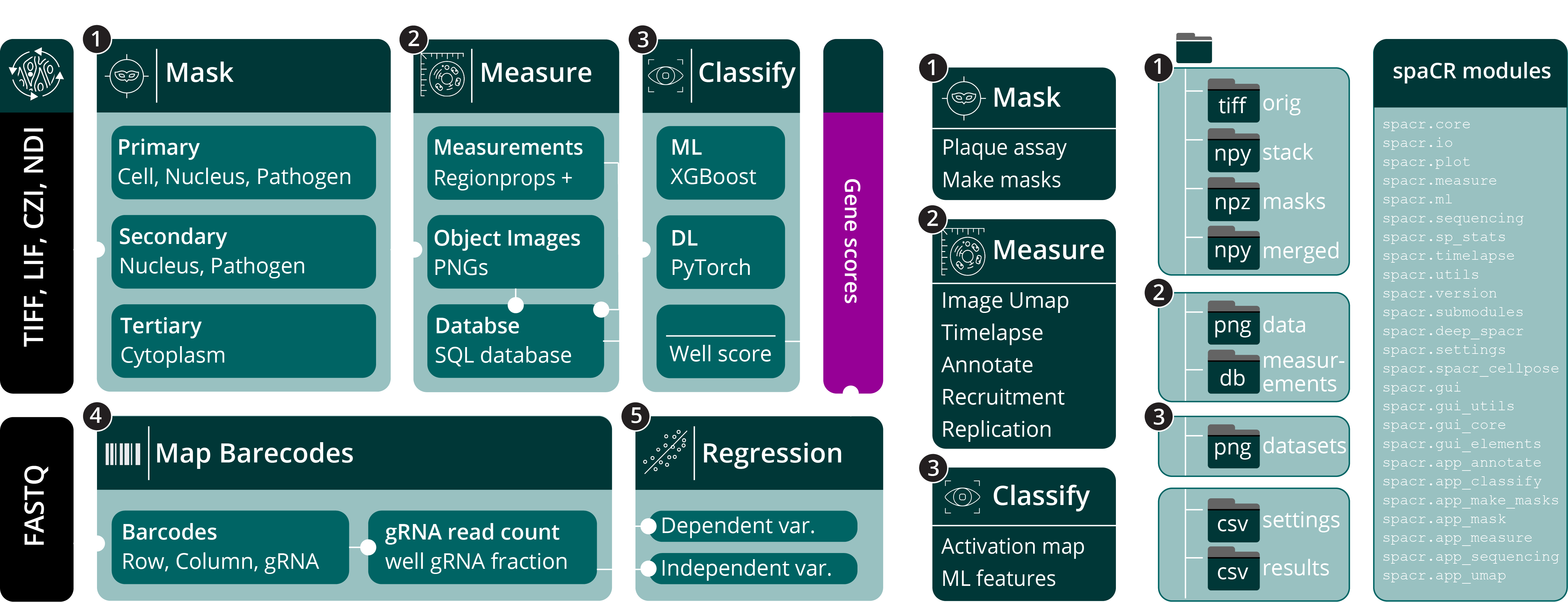
Microscopy images (TIFF, OME-TIFF, LIF, CZI, and ND2) and sequencing reads (FASTQ) enter complementary image-analysis and barcode-mapping pipelines. Object tables, crops, annotations, predictions, guide identities, QC results, and well-level summaries can then be analyzed together.
Quick start
The recommended installation uses an isolated conda environment with Python 3.12 and the Qt desktop extra:
conda create -n spacr python=3.12 -y
conda activate spacr
python -m pip install --upgrade pip
python -m pip install "spacr[qt]"
spacr
spaCR supports Python 3.9 through 3.14 (except Python 3.14.1, which is excluded by torchvision). Python 3.12 is recommended for the broadest combination of optional scientific packages. Linux is recommended for CUDA workflows; macOS and Windows are also supported.
Installation details
Lightweight installers — no conda or existing Python required
No conda installation and no existing Python installation are required. The installer downloads a private Python 3.12 runtime, Qt, PyTorch, spaCR, and the scientific dependencies during installation. PyTorch automatically selects a compatible GPU backend when one is detected and otherwise installs its CPU build. The installer download therefore stays small while the installed application is complete and isolated from system Python.
On Linux, make the downloaded installer executable before opening it:
chmod +x SpaCR-*-Linux-x86_64-Online.run
./SpaCR-*-Linux-x86_64-Online.run
The installer validates spaCR, Qt, PyTorch, and dependency consistency before replacing an older installation, so an interrupted update leaves the previous working environment in place.
Desktop application from PyPI
python -m pip install "spacr[qt]"
spacr
Headless or server installation
python -m pip install spacr
spacr-run --list
Latest development branch
git clone https://github.com/EinarOlafsson/spacr.git
cd spacr
git switch nightly
python -m pip install -e ".[qt]"
Conda environments
The native conda-forge recipe is ready in conda-forge/recipe. Conda-forge requires a one-time reviewed onboarding pull request before the package name becomes available. After that review, every PyPI release is detected, tested, and published by the conda-forge update bot:
conda install -c conda-forge spacrThe short one-time maintainer procedure is documented in conda-forge/README.md.
Optional capabilities
Install only the extras needed by your workflow:
python -m pip install "spacr[trackastra]"    # transformer tracking
python -m pip install "spacr[ultrack]"       # global-optimization tracking
python -m pip install "spacr[attribution]"   # TorchCAM methods
python -m pip install "spacr[boosting]"      # LightGBM and CatBoost
python -m pip install "spacr[zernike]"       # Zernike measurements
python -m pip install "spacr[btrack]"        # btrack timelapse tracking
python -m pip install "spacr[czi,nd2,lif]"   # vendor file readers
Optional dependency availability varies by Python version. In particular, ultrack currently limits spacr[all] on Python 3.13, and TorchCAM’s NumPy constraint limits the attribution extra there. The core package and Qt application remain supported. On Python 3.14, btrack is supported through its optional extra. The high-performance pylibCZIrw CZI converter remains optional and outside the tested profile. Other timelapse backends and czifile-based CZI reading remain available.
The legacy Tk interface remains available as spacr-legacy but is no longer under active development.
Command-line entry points
spacr                                      # Qt application
spacr-run --list                           # list headless modules
spacr-run --describe MODULE                # inspect a module contract
spacr-run MODULE --settings settings.csv   # execute a module
spacr-run validate --module MODULE \
    --settings settings.csv                # validate before running
spacr-repro --help                         # reproducibility tools
Set SPACR_LOG_LEVEL=DEBUG when troubleshooting. Rotating logs are stored under ~/.spacr/logs/spacr.log.
Project data model
A typical project contains:
normalized channel stacks and object masks;
merged image/mask arrays;
measurements/measurements.db with object-linked tables;
per-object PNG crops and dataset splits;
annotations and model predictions;
barcode mappings and screen-level summaries;
settings snapshots, manifests, QC scorecards, and run reports.
This layout lets desktop modules, headless jobs, and external analysis code work on the same source of truth.
Data
Citing spaCR
If spaCR contributes to your research, cite:
Olafsson EB, et al. A pooled image-based CRISPR screen identifies EAF1 as a T. gondii modulator of ESCRT subversion.
Contributing and support
Bug reports and focused feature requests are welcome through GitHub Issues. When reporting a failure, include the spaCR version, operating system, Python version, module settings, and the relevant log excerpt.
spaCR is released under the MIT License.
1 maintainer

Download files
Download the file for your platform. If you're not sure which to choose, learn more about installing packages.
Source Distribution
Built Distribution
Filter files by name, interpreter, ABI, and platform.
If you're not sure about the file name format, learn more about wheel file names.
Copy a direct link to the current filters
File details
Details for the file spacr-1.4.9.9.tar.gz.
File metadata
- Download URL: spacr-1.4.9.9.tar.gz
- Upload date:
- Size: 25.2 MB
- Tags: Source
- Uploaded using Trusted Publishing? Yes
- Uploaded via:
twine/7.0.0 CPython/3.13.14
File hashes
| Algorithm | Hash digest | |
|---|---|---|
| SHA256 |
b120c25c45a17c041981359db6d9b200c1caeae34aebd35111879eaa5b6f3dc6
|
|
| MD5 |
98911251f03b15847f65ded3908de769
|
|
| BLAKE2b-256 |
8312d95d6f027bdf409e6a3659dc218f9eadc56f70936670602bf57356e92eef
|
Provenance
The following attestation bundles were made for spacr-1.4.9.9.tar.gz:
Publisher:
release.yml on EinarOlafsson/spacr
-
Statement:
-
Statement type:
https://in-toto.io/Statement/v1 -
Predicate type:
https://docs.pypi.org/attestations/publish/v1 -
Subject name:
spacr-1.4.9.9.tar.gz -
Subject digest:
b120c25c45a17c041981359db6d9b200c1caeae34aebd35111879eaa5b6f3dc6 - Sigstore transparency entry: 2290364984
- Sigstore integration time:
-
Permalink:
EinarOlafsson/spacr@6ebad25bc779977c6771584b36fcf2efb9f94805 -
Branch / Tag:
refs/heads/main - Owner: https://github.com/EinarOlafsson
-
Access:
public
-
Token Issuer:
https://token.actions.githubusercontent.com -
Runner Environment:
github-hosted -
Publication workflow:
release.yml@6ebad25bc779977c6771584b36fcf2efb9f94805 -
Trigger Event:
workflow_dispatch
-
Statement type:
File details
Details for the file spacr-1.4.9.9-py3-none-any.whl.
File metadata
- Download URL: spacr-1.4.9.9-py3-none-any.whl
- Upload date:
- Size: 13.0 MB
- Tags: Python 3
- Uploaded using Trusted Publishing? Yes
- Uploaded via:
twine/7.0.0 CPython/3.13.14
File hashes
| Algorithm | Hash digest | |
|---|---|---|
| SHA256 |
4e6feed577760816e7b5ef975a1c669607e2fa1c4ae8341349868b1d5587be46
|
|
| MD5 |
3d845b81e940c7a38ce3022fe9a43134
|
|
| BLAKE2b-256 |
fe01e4a4d9c6115d928fefd7feaa2069739c04f4c5bbb979a6e7d85ef56ce06a
|
Provenance
The following attestation bundles were made for spacr-1.4.9.9-py3-none-any.whl:
Publisher:
release.yml on EinarOlafsson/spacr
-
Statement:
-
Statement type:
https://in-toto.io/Statement/v1 -
Predicate type:
https://docs.pypi.org/attestations/publish/v1 -
Subject name:
spacr-1.4.9.9-py3-none-any.whl -
Subject digest:
4e6feed577760816e7b5ef975a1c669607e2fa1c4ae8341349868b1d5587be46 - Sigstore transparency entry: 2290365144
- Sigstore integration time:
-
Permalink:
EinarOlafsson/spacr@6ebad25bc779977c6771584b36fcf2efb9f94805 -
Branch / Tag:
refs/heads/main - Owner: https://github.com/EinarOlafsson
-
Access:
public
-
Token Issuer:
https://token.actions.githubusercontent.com -
Runner Environment:
github-hosted -
Publication workflow:
release.yml@6ebad25bc779977c6771584b36fcf2efb9f94805 -
Trigger Event:
workflow_dispatch
-
Statement type:














