










spaCR
Spatial phenotype analysis of CRISPR screens.
spaCR segments and measures single cells in high-content microscopy images, links each cell to the gRNA it received, and reports which genes changed the phenotype. Plate images and FASTQ reads go in; per-object measurements, trained classifiers, per-guide and per-gene effect sizes, and a ranked hit list come out.
If you run image-based pooled CRISPR screens, that is the whole path. If you have high-content microscopy and no screen, the segmentation, measurement, annotation and classification half runs on its own.
Images, masks, crops, measurements, annotations, predictions, barcodes and well identifiers live in one SQLite project, so a number in a result can be traced back to the object it came from.
Run spaCR as a desktop application or headlessly on a workstation, server or cluster. Both drive the same modules, and CUDA is used automatically where a module supports it.
Workflow at a glance
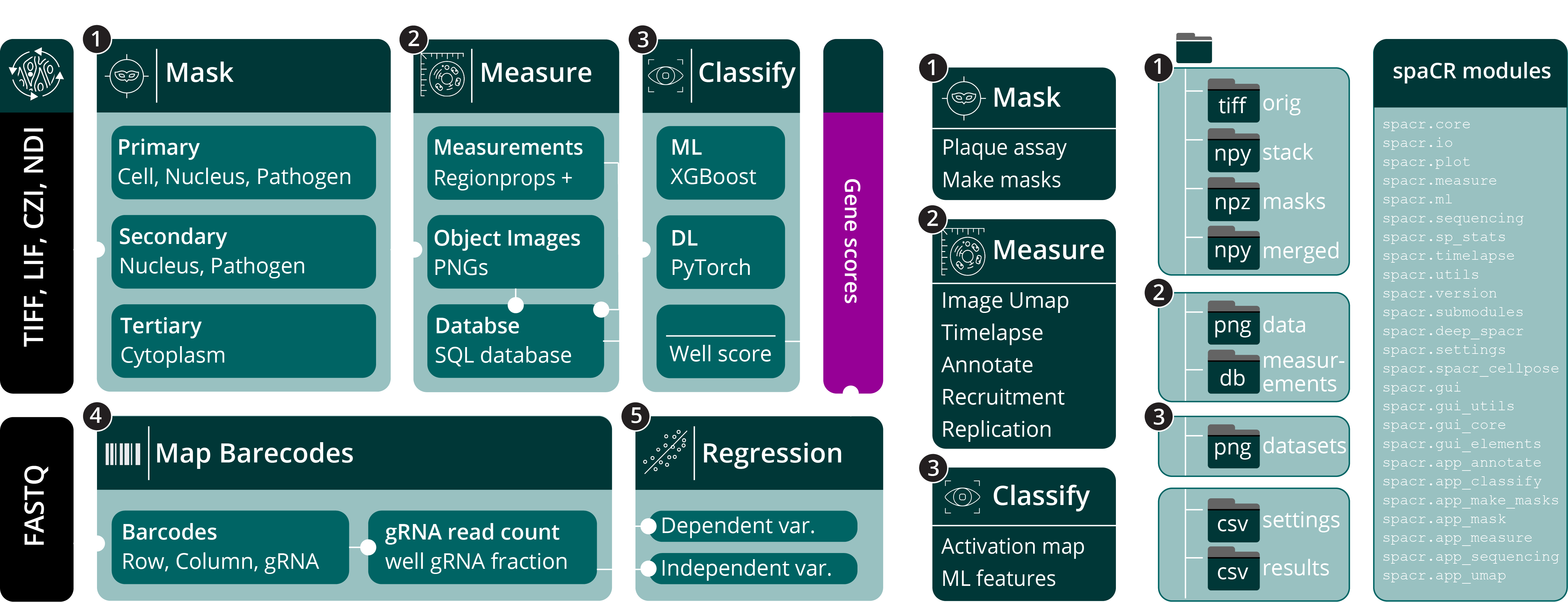
Microscopy images (TIFF, OME-TIFF, LIF, CZI, ND2) and sequencing reads (FASTQ) enter complementary image-analysis and barcode-mapping pipelines. Object tables, crops, annotations, predictions, guide identities, QC results and well-level summaries are then analyzed together.
Quick start
conda create -n spacr python=3.12 -y
conda activate spacr
python -m pip install --upgrade pip
python -m pip install "spacr[qt]"
spacr
spaCR supports Python 3.9 through 3.14 (except Python 3.14.1, which torchvision excludes). Python 3.12 has the widest choice of optional scientific packages. Linux is recommended for CUDA workflows; macOS and Windows are also supported.
Installation details


(beta) Lightweight desktop installers:
Lightweight installers — no conda or existing Python required
The installer downloads a private Python 3.12 runtime, Qt, PyTorch, spaCR and the scientific dependencies during installation, so neither conda nor an existing Python is needed. The portable CPU build is the default, which keeps the installation from pulling several gigabytes of CUDA libraries unannounced. Windows offers NVIDIA acceleration as an optional installer component, Linux accepts --torch-backend auto, and the standard macOS PyTorch wheel keeps Apple MPS acceleration.
On Linux, make the downloaded installer executable before opening it:
chmod +x SpaCR-*-Linux-x86_64-Online.run
./SpaCR-*-Linux-x86_64-Online.run
On macOS, open the downloaded .pkg. If Gatekeeper blocks the current beta installer because it is not notarized, open System Settings → Privacy & Security, choose Open Anyway for spaCR, then run the package again.
The installer validates spaCR, Qt, PyTorch and dependency consistency before replacing an older installation, so an interrupted update leaves the previous working environment in place. A diagnostic log is kept as install.log inside the private spaCR installation directory.
Desktop application from PyPI
python -m pip install "spacr[qt]"
spacr
Headless or server installation
python -m pip install spacr
spacr-run --list
Latest development branch
git clone https://github.com/EinarOlafsson/spacr.git
cd spacr
git switch nightly
python -m pip install -e ".[qt]"
Conda environments
conda create -n spacr python=3.12 pip -y
conda activate spacr
python -m pip install "spacr[qt]"
Optional capabilities
Install only the extras your workflow needs:
python -m pip install "spacr[trackastra]"    # transformer tracking
python -m pip install "spacr[ultrack]"       # global-optimization tracking
python -m pip install "spacr[btrack]"        # btrack timelapse tracking
python -m pip install "spacr[attribution]"   # TorchCAM methods
python -m pip install "spacr[boosting]"      # LightGBM and CatBoost
python -m pip install "spacr[zernike]"       # Zernike measurements
python -m pip install "spacr[napari]"        # napari mask correction
python -m pip install "spacr[czi,nd2,lif]"   # vendor file readers
Which extras resolve depends on the Python version. On Python 3.13, ultrack limits spacr[all] and TorchCAM’s NumPy constraint limits the attribution extra; the core package and the Qt application are unaffected. On Python 3.14, btrack is available through its extra. The pylibCZIrw CZI converter is optional and untested; czifile-based CZI reading remains available.
The legacy Tk interface is still installed as spacr-legacy but is no longer developed.
Command-line entry points
spacr                                      # Qt application
spacr-doctor                               # diagnose the installation
spacr-run --list                           # list headless modules
spacr-run --describe MODULE                # inspect a module contract
spacr-run MODULE --settings settings.csv   # execute a module
spacr-run validate --module MODULE \
    --settings settings.csv                # validate before running
spacr-repro RUN_DIR                        # replay a recorded run
Set SPACR_LOG_LEVEL=DEBUG when troubleshooting. Rotating logs are written to ~/.spacr/logs/spacr.log.
Features
The six modules most screens use
Mask segments cells, nuclei, pathogens and organelles with Cellpose, in 2D images and in volumetric or time-series data. The model list is read from the installed Cellpose rather than hard-coded, and an object diameter is estimated from the images before the run starts. Masks can be corrected by hand in the layer viewer, or sent to napari and back.
Measure writes per-object morphology, intensity, texture and colocalization features to the project database, together with the crops. New in 1.5.0.0: illumination correction estimates the flat-field from the plate itself and divides it out before any intensity feature is taken, which removes the well-position bias that plate heatmaps show as edge effects. A segmentation QC banner states in plain language what the masks look like before Measure runs; it informs, it does not block. A drawn polygon restricts measurement to a region of interest.
Annotate shows crops on a keyboard-driven grid and writes labels straight to SQLite. It now closes the active-learning loop: retrain a model on what you have labelled without leaving the screen, re-rank the queue by uncertainty, watch the learning curve, and get a stopping verdict when further labels stop changing the model. Coverage is reported per class, per well and per plate, and every round is recorded.
Classify trains PyTorch CNNs and transformers on annotated crops, and classical or boosted models on measurement tables. Per-class accuracy is now kept every epoch instead of being discarded, and each checkpoint gets a model card recording its dataset, class balance, split rule and held-out metrics. In the evaluation screen, a confusion-matrix cell is a query: click it to open those crops, with confidently wrong predictions listed apart from uncertain ones.
Map Barcodes decodes row, column and gRNA barcodes from FASTQ reads, assigns guide identities to wells, and joins them to imaged cells. Barcode QC reports reads per well, collision rate and unmapped fraction, sweeping around the number of gRNAs per well you say you expect rather than a fixed threshold.
Regression estimates guide, gene, condition and control effects using 17 model families, including mixed models, logistic and probit, quantile, beta, GLMs with quasi-binomial variance, lasso, ridge, elastic net, hinge and horseshoe. The result is a ranked, annotated hit list rather than a coefficient dump.
New in 1.5.0.0
Before a screen exists, the Power / Design module answers how many cells and how many wells it needs, priced with sequencing error and with the dropout that comes from wells that were imaged too thinly. An experiment designer lays out the plate, its controls and its replicates and exports the layout for the pipeline. Afterwards, a QC dashboard collects the segmentation, plate, annotator-agreement and leakage checks into one verdict, and ComBat is available beside center and zscore for batch correction.
Results are explored rather than exported and re-imported. A Graph Builder plots a table by dragging columns onto x, y, colour, size and facet. Gates drawn on a histogram or a scatter become filters. A feature explorer ranks features by how well they separate the classes. Small multiples, dose-response fits, control charts and robust outlier detection use the same axis engine. Selecting objects in one view selects them in all of them, and opening a selection brings up the crops those objects came from. A layer viewer stacks images, labels, points and shapes, with orthogonal views, a synchronised comparison grid, and a lineage tree from cell to nucleus to pathogen.
Runs are now identifiable. Each carries one run id, one seed and an on_error policy; Mask, Measure, Classify and the AnnData export register what they wrote in an artifact registry, so an output file leads back to the settings that produced it. A module opens on what the previous step actually wrote, the pipeline graph marks which outputs are stale, run comparison diffs the settings, object counts and hit lists of two runs, and every GUI run emits the equivalent Python script. Measurements export to .h5ad for scanpy; OME-Zarr and OMERO are available through the Python API. The methods-and-results exporter drafts those two manuscript sections from a structured digest of the run: the model writes the prose, but every number comes from the digest, and a draft containing a number the digest does not contain is rejected. When something is wrong with the installation, spacr-doctor reports which spaCR is actually running, whether the GPU is usable, whether Cellpose matches the API spaCR calls, and whether the project database and settings are sound, with a copyable fix on every line that is not a pass.
Internationalized desktop interface
spaCR → Preferences → Language retranslates the running application into English, Swedish, German, Spanish, Mandarin Chinese, Portuguese, Hindi, Korean, Icelandic or French without a restart. The choice persists, and screens opened later inherit it.
Navigation, Preferences, AI and LIVE controls, module descriptions and spaCR-authored console notices follow the selected language. Worker output, logs, tracebacks, paths, database values, annotations, AI responses, measurements and saved results are never translated, so scientific output remains canonical English. Setting tooltips not yet reviewed in a language stay in English rather than becoming a mixed-language explanation. The localization guide documents the behavior, the environment override, and the contextual help that is translated with it.
Animated setting guidance
94 short animations explain what 143 visual settings do to an image. Hover a setting and click Animation in its tooltip to play the square beside the text; click it again to fold it away. Animations are off until asked for, and can be disabled in Preferences. The gallery shows all of them, and the Setting animation registry records which setting each one belongs to.
Module reference
Module |
Feature |
State |
Description |
|---|---|---|---|
Desktop experience |
|||
Stable |
Retranslates open and lazily created screens across ten bundled languages. |
||
Stable |
Localizes module summaries and setting-help chrome while preserving exact API URLs. |
||
Stable |
Localizes AI and LIVE controls without changing user or model content. |
||
Stable |
Plays 94 packaged animations for 143 visual settings from the setting tooltip. |
||
Alpha |
Shares one object selection across the table, plate, embedding, scatter and graph views. |
||
Alpha |
Diagnoses the install — GPU, Cellpose API, database, settings — with a fix per failing check. |
||
Image analysis |
|||
Stable |
Segments cells, nuclei, pathogens and organelles in 2D images. |
||
Beta |
Segments volumetric images and 4D time series. |
||
Alpha |
Estimates the flat-field from the plate and divides it out before intensity is measured. |
||
Stable |
Measures morphology, intensity, texture and colocalization, and writes the crops. |
||
Alpha |
States what the segmentation looks like before Measure runs, without blocking it. |
||
Beta |
Tracks objects with IoU, Trackpy, btrack, Trackastra or ultrack, and quantifies motility. |
||
Alpha |
Stacks image, label, point and shape layers, with orthogonal views and a comparison grid. |
||
Alpha |
Hands a mask to napari for correction and takes it back, recording every edit. |
||
AI and phenotyping |
|||
Stable |
Reviews crops on a keyboard-driven grid and saves annotations to SQLite. |
||
Alpha |
Retrains inside Annotate, re-ranks by uncertainty, and says when labelling can stop. |
||
Stable |
Trains and applies PyTorch CNN and transformer models. |
||
Alpha |
Records dataset, class balance, split rule and held-out metrics beside each checkpoint. |
||
Alpha |
Opens the crops behind a confusion cell, confident errors listed apart from uncertain ones. |
||
Stable |
Trains interpretable classical and boosted models on measurement tables. |
||
Beta |
Explains predictions with Captum, SmoothGrad and TorchCAM. |
||
Beta |
Explores image embeddings interactively and propagates cluster labels. |
||
Sequencing and screen analysis |
|||
Stable |
Maps row, column and gRNA barcodes from FASTQ reads and assigns guides to imaged cells. |
||
Alpha |
Reports reads per well, collision rate and unmapped fraction against the expected gRNAs per well. |
||
Stable |
Estimates guide, gene, condition and control effects with 17 model families. |
||
Alpha |
Answers how many cells and wells a screen needs, with sequencing error and well dropout priced in. |
||
Alpha |
Builds a plot by dragging columns onto x, y, colour, size and facet. |
||
Alpha |
Records the run id, seed and settings behind mask, measure, classify and export outputs. |
Data
Reference datasets
Contributing and support
Bug reports and focused feature requests are welcome through GitHub Issues. When reporting a failure, include the spaCR version, operating system, Python version, module settings and the relevant log excerpt. spacr-doctor collects most of that for you.
Licensing
The current development branch is source-available under the PolyForm Noncommercial License 1.0.0. Commercial use requires a separate license from the copyright holder. Released versions through spaCR 1.4.9.9 remain available under the MIT License that accompanied those releases.
Tutorials
The interactive spaCR tutorial library contains narrated, captioned walkthroughs of installation and of each application workflow, in eight languages.
Citing spaCR
If spaCR contributes to your research, cite:
Olafsson EB, et al. A pooled image-based CRISPR screen identifies EAF1 as a T. gondii modulator of ESCRT subversion.
1 maintainer

Download files
Download the file for your platform. If you're not sure which to choose, learn more about installing packages.
Source Distribution
Built Distribution
Filter files by name, interpreter, ABI, and platform.
If you're not sure about the file name format, learn more about wheel file names.
Copy a direct link to the current filters
File details
Details for the file spacr-1.5.0.4.tar.gz.
File metadata
- Download URL: spacr-1.5.0.4.tar.gz
- Upload date:
- Size: 32.8 MB
- Tags: Source
- Uploaded using Trusted Publishing? Yes
- Uploaded via:
twine/7.0.0 CPython/3.13.14
File hashes
| Algorithm | Hash digest | |
|---|---|---|
| SHA256 |
5efe7a89baa0db0e35e758be04aa4d56ffb161eb9ba42c44423cabf480590981
|
|
| MD5 |
9172a933d523804914161b7bb7e01fb1
|
|
| BLAKE2b-256 |
e24bb5792c9dea903df6a18bdf67f0beb5d7e97cb39bdd83aa83cda2b0dbadd1
|
Provenance
The following attestation bundles were made for spacr-1.5.0.4.tar.gz:
Publisher:
release.yml on EinarOlafsson/spacr
-
Statement:
-
Statement type:
https://in-toto.io/Statement/v1 -
Predicate type:
https://docs.pypi.org/attestations/publish/v1 -
Subject name:
spacr-1.5.0.4.tar.gz -
Subject digest:
5efe7a89baa0db0e35e758be04aa4d56ffb161eb9ba42c44423cabf480590981 - Sigstore transparency entry: 2410522637
- Sigstore integration time:
-
Permalink:
EinarOlafsson/spacr@8e29bc1fdba30c248f44443f790c88d7b336c627 -
Branch / Tag:
refs/heads/main - Owner: https://github.com/EinarOlafsson
-
Access:
public
-
Token Issuer:
https://token.actions.githubusercontent.com -
Runner Environment:
github-hosted -
Publication workflow:
release.yml@8e29bc1fdba30c248f44443f790c88d7b336c627 -
Trigger Event:
workflow_dispatch
-
Statement type:
File details
Details for the file spacr-1.5.0.4-py3-none-any.whl.
File metadata
- Download URL: spacr-1.5.0.4-py3-none-any.whl
- Upload date:
- Size: 30.4 MB
- Tags: Python 3
- Uploaded using Trusted Publishing? Yes
- Uploaded via:
twine/7.0.0 CPython/3.13.14
File hashes
| Algorithm | Hash digest | |
|---|---|---|
| SHA256 |
ab2dd075f2e882ebaec600ebf8b7ffdce98f83d1645e8c946ba8aa3609ed8122
|
|
| MD5 |
6366720973fdfbea2b58631f1af7bc5d
|
|
| BLAKE2b-256 |
342cfe3810020a043f1ce439208d7e1ef9793a86716019399d6410c56f5c271c
|
Provenance
The following attestation bundles were made for spacr-1.5.0.4-py3-none-any.whl:
Publisher:
release.yml on EinarOlafsson/spacr
-
Statement:
-
Statement type:
https://in-toto.io/Statement/v1 -
Predicate type:
https://docs.pypi.org/attestations/publish/v1 -
Subject name:
spacr-1.5.0.4-py3-none-any.whl -
Subject digest:
ab2dd075f2e882ebaec600ebf8b7ffdce98f83d1645e8c946ba8aa3609ed8122 - Sigstore transparency entry: 2410522707
- Sigstore integration time:
-
Permalink:
EinarOlafsson/spacr@8e29bc1fdba30c248f44443f790c88d7b336c627 -
Branch / Tag:
refs/heads/main - Owner: https://github.com/EinarOlafsson
-
Access:
public
-
Token Issuer:
https://token.actions.githubusercontent.com -
Runner Environment:
github-hosted -
Publication workflow:
release.yml@8e29bc1fdba30c248f44443f790c88d7b336c627 -
Trigger Event:
workflow_dispatch
-
Statement type:














