
spotify_monitor





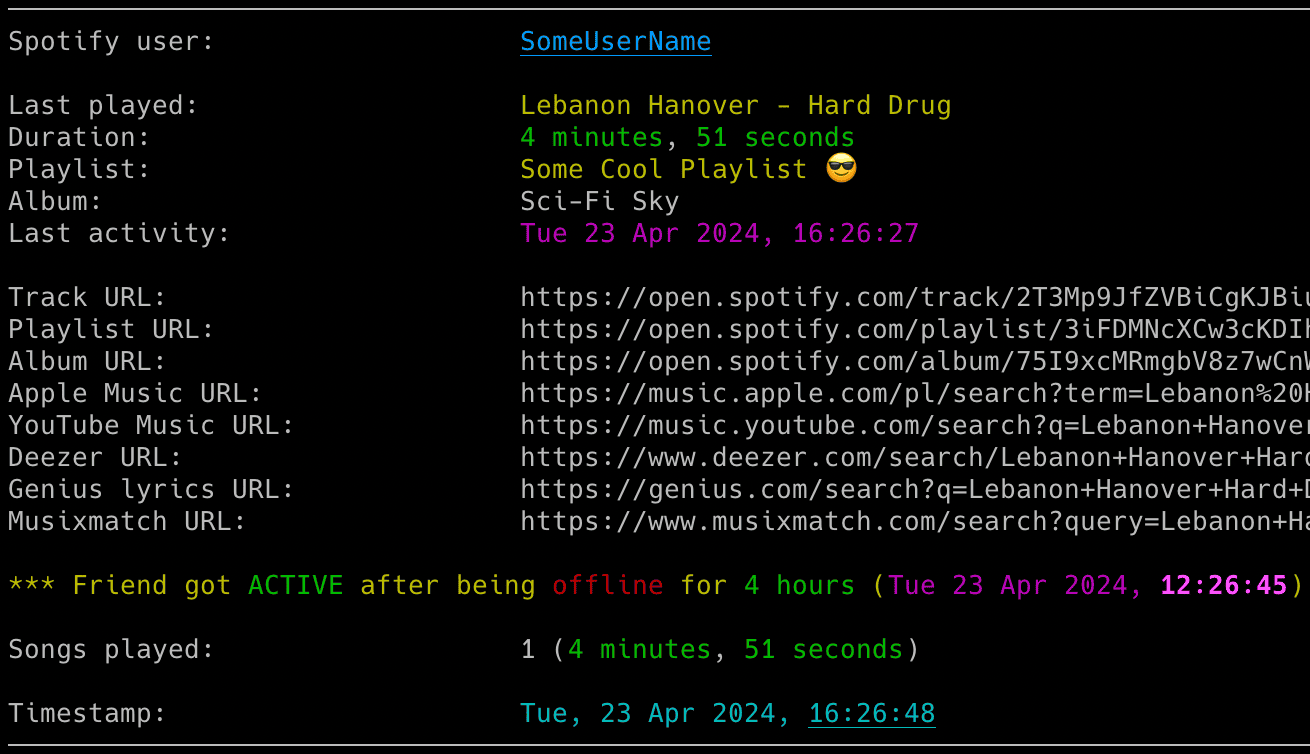
Powerful real-time tracker for Spotify friend music activity: monitor listening habits, auto-sync playback to your local client, detect skipped tracks and receive instant notifications for every beat your friends play.
🚀 Quick Install & Run
Python from PyPI
pip install spotify_monitor
spotify_monitor --setup
Docker Compose
On Linux, set the container user to your host user before the first setup command. This lets Spotify Monitor create its configuration and private .env file in the current directory. Docker Desktop users on macOS or Windows can skip the two export commands.
curl -fsSLO https://raw.githubusercontent.com/misiektoja/spotify_monitor/refs/heads/main/docker-compose.yml
export SPOTIFY_MONITOR_UID="$(id -u)"
export SPOTIFY_MONITOR_GID="$(id -g)"
docker compose run --rm spotify_monitor --setup
docker compose up
Docker run
On macOS or Windows with Docker Desktop:
docker pull misiektoja/spotify-monitor:latest
docker run --rm -it --init -v "${PWD}:/data:z" misiektoja/spotify-monitor:latest --setup
docker run --rm -it --init -v "${PWD}:/data:z" misiektoja/spotify-monitor:latest --config-file /data/spotify_monitor.conf
The Docker Desktop commands use macOS shell or Windows PowerShell syntax. In Windows Command Prompt replace ${PWD} with %cd%.
On Linux, pass your host user and group so the container can write to the current directory:
docker pull misiektoja/spotify-monitor:latest
docker run --rm -it --init --user "$(id -u):$(id -g)" -v "$PWD:/data:z" misiektoja/spotify-monitor:latest --setup
docker run --rm -it --init --user "$(id -u):$(id -g)" -v "$PWD:/data:z" misiektoja/spotify-monitor:latest --config-file /data/spotify_monitor.conf
For the manual single-file method, optional extras and upgrade commands for every method, see Installation.
Features
🔍 Real-time Tracking
- Friend Activity: Monitor songs listened by Spotify users in real-time.
- Presence Detection: Detect when friends get online or offline.
- Session Stats: Display duration, track counts and songs on loop.
🎮 Playback Control
- Auto-Sync: Automatically play friends' songs in your local Spotify client.
- Smart Pause: Pause or switch tracks when the monitored user goes offline.
- Crossfade Support: Detect and annotate crossfaded songs during transitions.
📊 Rich Insights
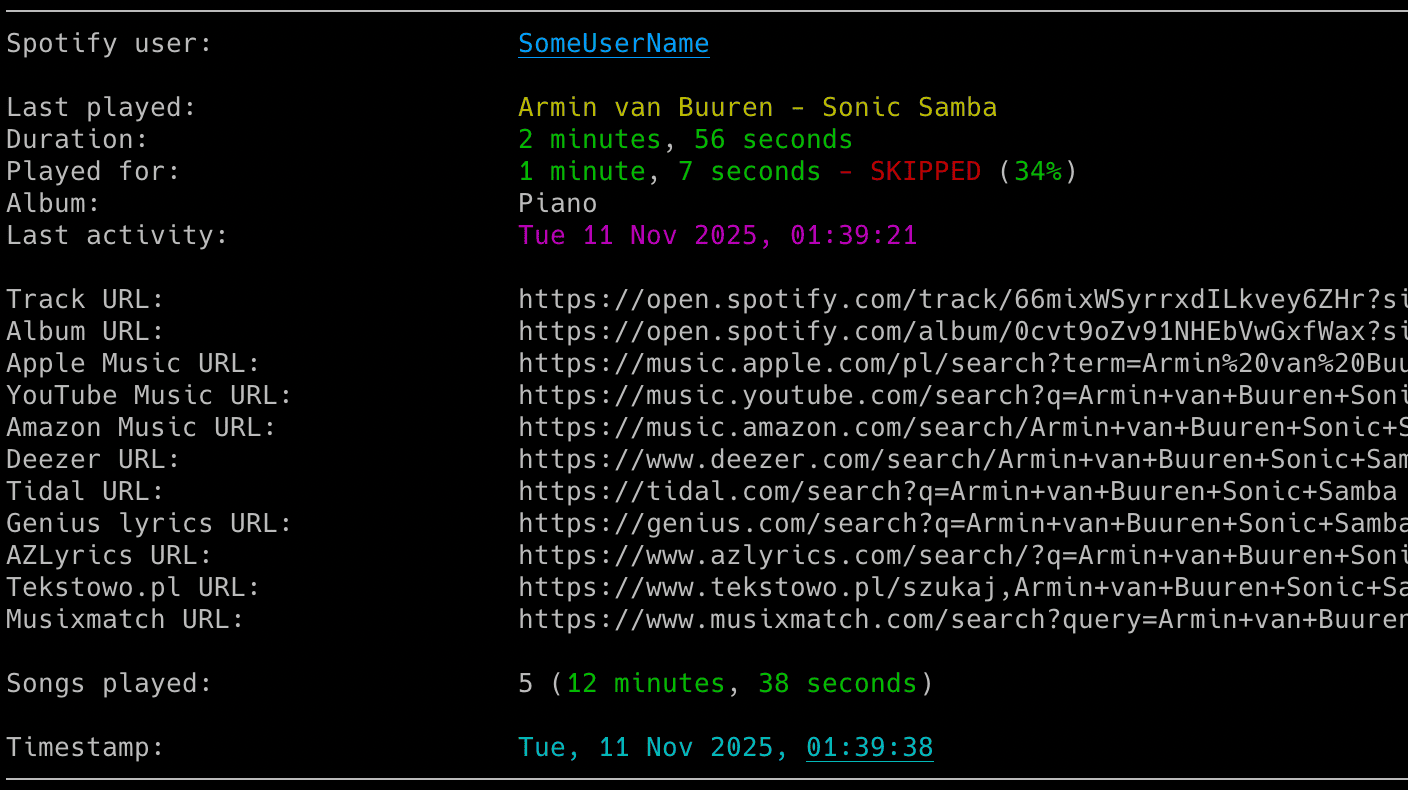
- Track Context: View playlist, artist and album info with clickable URLs.
- Skip Detection: Identify exactly when and how long a song was played.
- Global Search: Instant links to Spotify, YouTube Music, Apple Music, Tidal, lyrics and more.
🔔 Smart Notifications
- Multi-Channel: Instant alerts via Email and Webhooks (Discord, ntfy etc.).
- Detailed Alerts: Choose activity, tracked-song, every-song, loop and error alerts.
- Session Summaries: Receive detailed reports when a friend finishes a session.
- Error Reporting: Be notified if the monitoring process hits a snag.
⚙️ Power Features
- Auth Flexibility: Cookie or Desktop Client access with automatic web-player metadata fallback and optional legacy OAuth app support.
- CSV Logging: Save every listened song with full timestamps to a CSV file.
- Flexible Config: Support for files, dotenv and environment variables.
- Signal Control: Manage the running script via system signals (macOS/Linux).
- Docker Ready: Run through Docker Hub, Docker Compose or a local image with persistent configuration, secrets and output.
For pause and resume tracking, progress indicators and offline mode, see lastfm_monitor.
For Spotify profile and playlist change tracking, see spotify_profile_monitor.
For Spotify Web Player token and TOTP utilities, see Debugging Tools.
Documentation
Full documentation is available at misiektoja.github.io/spotify_monitor:
- Installation - PyPI, manual script, Docker installation and upgrades
- Quick Start - setup wizard, authentication and first run
- Configuration - Spotify login, targets, SMTP, webhooks and secrets
- Usage - command formats, monitoring, container operation, notifications, playback and output
- Troubleshooting - the
--doctorself-check and logging levels - Debugging Tools - TOTP token testing and secret extraction
Quick Start
New here? Run the setup wizard
The fastest way to get started is --setup. It asks who to monitor, how to connect to Spotify and which alerts you want then saves a ready-to-run configuration. Private values stay in .env.
On Linux, set SPOTIFY_MONITOR_UID="$(id -u)" and SPOTIFY_MONITOR_GID="$(id -g)" before using Docker Compose.
Use the command that matches how you run the tool:
# PyPI install
spotify_monitor --setup

# Manual Python script on macOS or Linux
python3 spotify_monitor.py --setup

# Manual Python script on Windows
python spotify_monitor.py --setup

# Docker Compose (skip curl if you cloned the repository)
curl -fsSLO https://raw.githubusercontent.com/misiektoja/spotify_monitor/refs/heads/main/docker-compose.yml
docker compose run --rm spotify_monitor --setup

# Docker image on macOS or Windows
docker run --rm -it --init -v "${PWD}:/data:z" misiektoja/spotify-monitor:latest --setup

# Docker image on Linux
docker run --rm -it --init --user "$(id -u):$(id -g)" -v "$PWD:/data:z" misiektoja/spotify-monitor:latest --setup
Running the tool with no arguments also offers the wizard when no target has been saved. It detects whether you use PyPI, the downloaded script, Docker or Docker Compose then shows matching commands.
Before monitoring
Spotify only shows a person's listening activity when both of these conditions are met:
- The Spotify account used by Spotify Monitor follows the person you want to monitor.
- That person has enabled listening activity sharing in Spotify.
The setup wizard (spotify_monitor --setup) checks whether the configured Spotify account follows the target. It offers to follow only when needed and changes the account only after explicit confirmation. If you want to do it manually, open the person's profile in the Spotify desktop or mobile app then use Share > Copy link to profile. You can paste the complete profile link into the setup wizard. You do not need to extract the user ID yourself. See Following the Monitored User.
For local installs, Firefox import is the recommended login path. Docker users should use the wizard's hidden manual sp_dc entry. See the full Quick Start guide for details.
Not sure which command you need?
| I want to... | Run this |
|---|---|
| Set up Spotify Monitor for the first time | Use the setup command for your installation above |
| Start monitoring with existing authentication | spotify_monitor TARGET, where TARGET is a raw ID, spotify:user: URI or profile URL |
Start a target saved as TARGET_USER_URI_ID |
spotify_monitor --config-file spotify_monitor.conf or docker compose up |
| Check authentication, connectivity and one target | spotify_monitor --doctor TARGET |
| List Spotify friends visible to the configured account | spotify_monitor --list-friends |
| Import a Spotify login from Firefox | Open Spotify Web Player in Firefox, sign in then run spotify_monitor --import-browser-cookie --browser firefox |
Safely set or replace SP_DC_COOKIE |
Run spotify_monitor --set-sp-dc and enter sp_dc at the hidden prompt |
| Configure and test webhook alerts | Use the setup wizard or follow Webhook Settings |
Manual commands
The examples below use a PyPI install. For a manual script install, replace spotify_monitor with python3 spotify_monitor.py on macOS or Linux and python spotify_monitor.py on Windows. Docker users can copy the complete command prefixes from the Usage guide.
Sign in to Spotify Web Player with Firefox then import that login:
spotify_monitor --import-browser-cookie --browser firefox
If browser import is unavailable, enter sp_dc through a hidden prompt:
spotify_monitor --set-sp-dc
Start monitoring with a raw user ID, Spotify user URI or profile URL. A target saved by the wizard does not need to be repeated:
spotify_monitor <spotify_user_uri_id>
spotify_monitor "https://open.spotify.com/user/spotify_user_uri_id"
spotify_monitor --config-file spotify_monitor.conf
Run the self-check or view every command:
spotify_monitor --doctor <spotify_user_uri_id>
spotify_monitor --list-friends
spotify_monitor --help
For browser profiles, manual cookie extraction, Docker authentication, email and webhook setup, see Configuration. For notification choices, playback controls and output files, see Usage.
Change Log
See RELEASE_NOTES.md for details.
Maintainers
- misiektoja (@misiektoja)
- tomballgithub (@tomballgithub)
License
Licensed under GPLv3. See LICENSE.
1 maintainer

Download files
Download the file for your platform. If you're not sure which to choose, learn more about installing packages.
Source Distribution
Built Distribution
Filter files by name, interpreter, ABI, and platform.
If you're not sure about the file name format, learn more about wheel file names.
Copy a direct link to the current filters
File details
Details for the file spotify_monitor-3.0.tar.gz.
File metadata
- Download URL: spotify_monitor-3.0.tar.gz
- Upload date:
- Size: 185.2 kB
- Tags: Source
- Uploaded using Trusted Publishing? Yes
- Uploaded via:
twine/6.1.0 CPython/3.13.14
File hashes
| Algorithm | Hash digest | |
|---|---|---|
| SHA256 |
d74885fff4697e49985277378c9745c09638bd4ff4a0b6cad67e45ad485b15b3
|
|
| MD5 |
3f1cb22b6827bc043bcbc1ebbc4697ec
|
|
| BLAKE2b-256 |
47b8913d82d8652902184f4db5cae4f7904ff6c9f1e2df3c30d4fd50fb535008
|
Provenance
The following attestation bundles were made for spotify_monitor-3.0.tar.gz:
Publisher:
publish.yml on misiektoja/spotify_monitor
-
Statement:
-
Statement type:
https://in-toto.io/Statement/v1 -
Predicate type:
https://docs.pypi.org/attestations/publish/v1 -
Subject name:
spotify_monitor-3.0.tar.gz -
Subject digest:
d74885fff4697e49985277378c9745c09638bd4ff4a0b6cad67e45ad485b15b3 - Sigstore transparency entry: 2215726639
- Sigstore integration time:
-
Permalink:
misiektoja/spotify_monitor@dbd6b64d9a520816656ed5b62902c6d3ca9151f1 -
Branch / Tag:
refs/tags/v3.0 - Owner: https://github.com/misiektoja
-
Access:
public
-
Token Issuer:
https://token.actions.githubusercontent.com -
Runner Environment:
github-hosted -
Publication workflow:
publish.yml@dbd6b64d9a520816656ed5b62902c6d3ca9151f1 -
Trigger Event:
release
-
Statement type:
File details
Details for the file spotify_monitor-3.0-py3-none-any.whl.
File metadata
- Download URL: spotify_monitor-3.0-py3-none-any.whl
- Upload date:
- Size: 121.2 kB
- Tags: Python 3
- Uploaded using Trusted Publishing? Yes
- Uploaded via:
twine/6.1.0 CPython/3.13.14
File hashes
| Algorithm | Hash digest | |
|---|---|---|
| SHA256 |
de4748effc10d57699c37eda44bdce8fc6b13b0ec314bb2997840623dc61cf12
|
|
| MD5 |
0bea831cdcf0e585bda9d5197e547987
|
|
| BLAKE2b-256 |
d362593e2252ea34ad44defe2e77f4799c310daa777b65794c4fba65cf78bc4b
|
Provenance
The following attestation bundles were made for spotify_monitor-3.0-py3-none-any.whl:
Publisher:
publish.yml on misiektoja/spotify_monitor
-
Statement:
-
Statement type:
https://in-toto.io/Statement/v1 -
Predicate type:
https://docs.pypi.org/attestations/publish/v1 -
Subject name:
spotify_monitor-3.0-py3-none-any.whl -
Subject digest:
de4748effc10d57699c37eda44bdce8fc6b13b0ec314bb2997840623dc61cf12 - Sigstore transparency entry: 2215726663
- Sigstore integration time:
-
Permalink:
misiektoja/spotify_monitor@dbd6b64d9a520816656ed5b62902c6d3ca9151f1 -
Branch / Tag:
refs/tags/v3.0 - Owner: https://github.com/misiektoja
-
Access:
public
-
Token Issuer:
https://token.actions.githubusercontent.com -
Runner Environment:
github-hosted -
Publication workflow:
publish.yml@dbd6b64d9a520816656ed5b62902c6d3ca9151f1 -
Trigger Event:
release
-
Statement type:







