
SpritePro
A high-level 2D game framework for Python (on top of pygame). Desktop, web and mobile from one codebase.




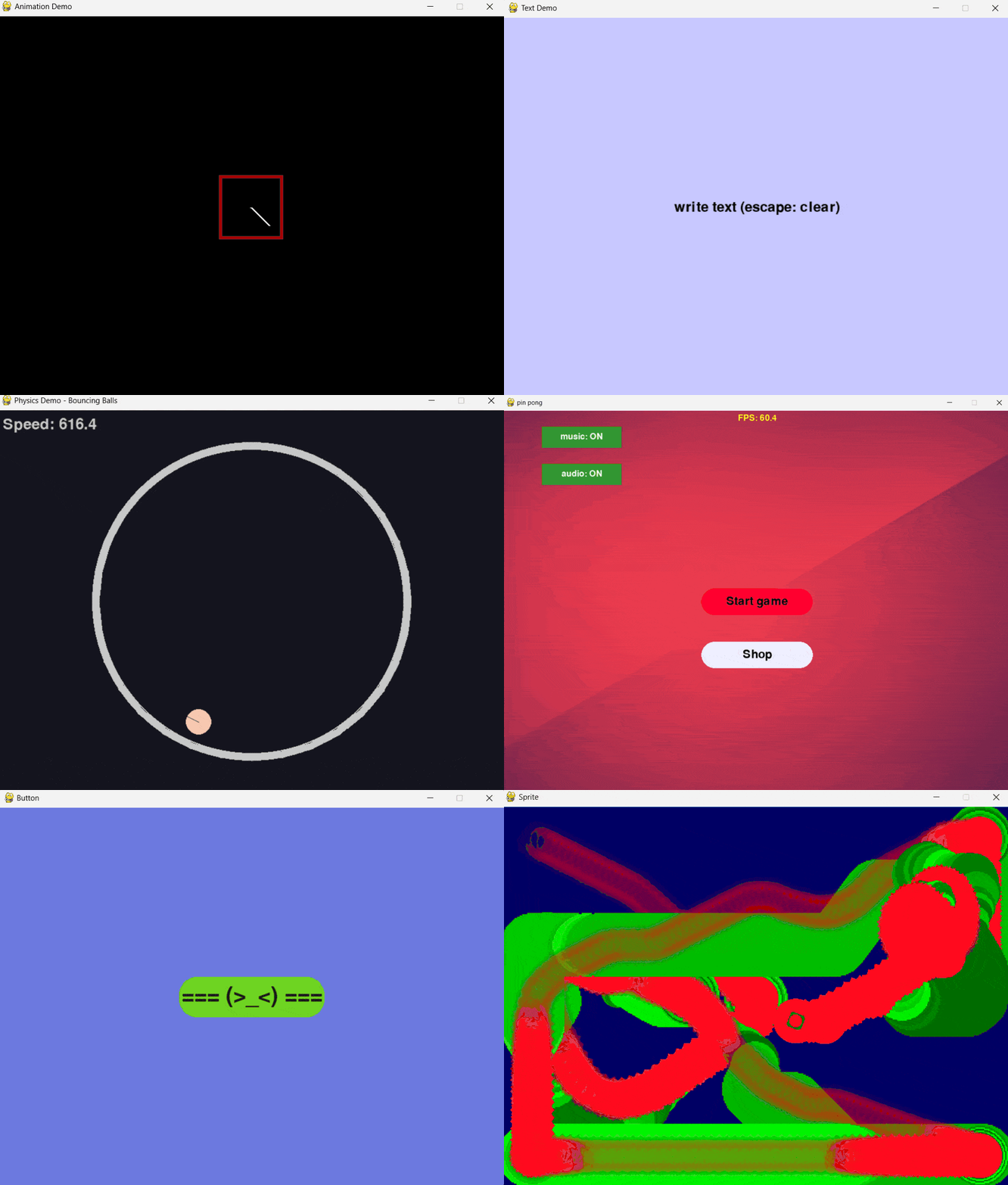
Installation
pip install spritepro
For mobile: pip install "spritepro[kivy]"
Project template: python -m spritePro.cli --create (minimal: --create --simple)
Updating
pip install --upgrade spritepro
Why SpritePro
| What you usually do | In SpritePro |
|---|---|
| Hand-written game loop | s.run(scene=...) — scene + auto-render |
| Your own camera | Camera API, follow, zoom, shake |
| UI from scratch | Button, ToggleButton, TextSprite, Slider, TextInput, Layout |
| Physics kept separate | pymunk integration, body types, collisions |
| Visual editor | Sprite Editor → JSON → spawn_scene(...) |
| Parsing saves by hand | PlayerPrefs → JSON |
| Multiplayer from scratch | TCP, lobby, ChatScene, sync |
| Mobile as a separate thing | platform="kivy" — same logic |
| Scrollable UI | ScrollView + ClipMask — clipping that already works |
SpritePro = pygame + physics, Layout, ScrollView, ClipMask, scene editor, multiplayer, UI.
Quick start
import spritePro as s

class MainScene(s.Scene):
    def __init__(self):
        super().__init__()
        self.player = s.Sprite("", (50, 50), s.WH_C, speed=5, scene=self)

    def update(self, dt):
        self.player.handle_keyboard_input()

s.run(scene=MainScene, size=(800, 600), title="My Game")
That's it: window, scene, game loop, controls.
What's inside
- Sprite — the base class, with movement, effects and a parent-child hierarchy
- UI: Button, ToggleButton, Slider, TextInput, TextSprite, Layout (flex/grid/circle/line)
- ClipMask — a clipping mask for viewports, inventories, chats
- ScrollView — scrollable content with a wheel and drag-and-drop
- Physics: pymunk, DYNAMIC/STATIC/KINEMATIC bodies, collisions
- Animations: Tween, Fluent API (
DoMove,DoScale,SetEase...) - Particles: ParticleEmitter, presets, pools
- Multiplayer: TCP, lobby, ChatScene, sync
- Audio: sound and music
- Save/Load: PlayerPrefs as JSON
- Sprite Editor: build scenes visually → JSON
Sprite Editor
A visual scene editor with a hierarchy, an inspector and gizmos.
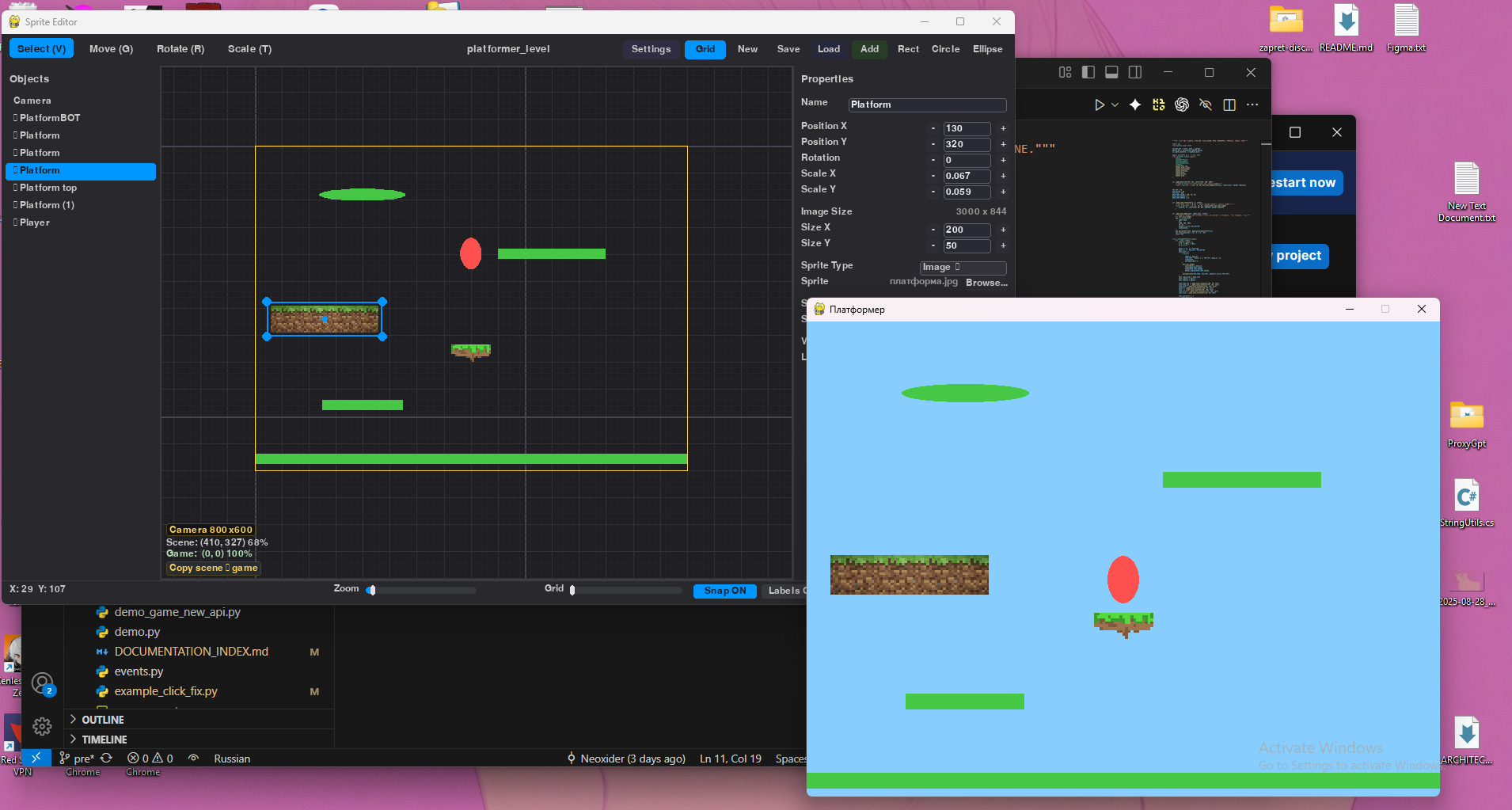
python -m spritePro.cli --editor
Build a scene → save it as JSON → load it in the game:
rt = spawn_scene("level.json", scene=self)
player = rt.exact("player").Sprite(speed=5)
Multiplayer chat
A ready-made chat scene with a clipping mask and scrolling:
from spritePro.readyScenes import ChatScene, ChatStyle
import spritePro as s

s.run(scene=ChatScene, multiplayer=True, multiplayer_use_lobby=True, title="Chat")
Comparison
| Feature | pygame | arcade | SpritePro |
|---|---|---|---|
| Auto-render | ❌ | ✅ | ✅ |
| Ready-made camera | ❌ | ✅ | ✅ |
| Physics (pymunk) | ❌ | ✅ | ✅ |
| Layout (flex/grid) | ❌ | ❌ | ✅ |
| Scene editor (JSON) | ❌ | ❌ | ✅ |
| Clipping mask / ScrollView | ❌ | ❌ | ✅ |
| Multiplayer (TCP) | ❌ | ❌ | ✅ |
| PlayerPrefs | ❌ | ❌ | ✅ |
What to build
- Platformers, arcades, RPGs
- Puzzles, tower defense
- Multiplayer games
- Mobile games (
platform="kivy")
Demo games
python -m spritePro.demoGames.physics_demo       # physics
python -m spritePro.demoGames.fluent_tween_demo   # tweens
python -m spritePro.demoGames.layout_demo         # layouts
python -m spritePro.demoGames.local_multiplayer_demo --quick
Slizario (andrulok)
A multiplayer clone of Slither.io and the reference networked game on SpritePro: host-authoritative food and bots, actions confirmed by the host, joining mid-game. Architecture walkthrough in ARCHITECTURE.md.

# single player
python spritePro/demoGames/slisario_andrulok/main.py --single

# local: host + client, two windows
python spritePro/demoGames/slisario_andrulok/main.py --quick
More: spritePro/demoGames/slisario_andrulok/README.md
Mobile and Web
s.run(scene=MainScene, platform="kivy") # Android/iOS
python -m spritePro.cli --android . --android-orientation portrait
Web: docs/builds/building_web.md
Documentation
| What | Where |
|---|---|
| Full index | DOCUMENTATION_INDEX.md |
Table of contents for docs/ |
docs/README.md |
| API Reference | docs/API_REFERENCE.md |
| For beginners | docs/GETTING_STARTED.md |
| Physics | docs/core/physics_guide.md |
| UI/Layout | docs/ui/layout_ui.md |
| ClipMask | docs/ui/clip_mask.md |
| Multiplayer | docs/systems/networking_guide.md |
| Sprite Editor | docs/editor/sprite_editor.md |
| Mobile | docs/builds/mobile_kivy.md |
Contributing
- CONTRIBUTING.md — how to contribute
- ROADMAP.md — roadmap
- CHANGELOG.md — changelog
1 maintainer

Metadata
1 maintainer
Release files for spritepro 3.13.1
For a detailed explanation of source distributions (sdists) and built distributions (wheels), please see the package formats documentation.
Source distribution (sdist)
| File | Size | Uploaded | Provenance | |
|---|---|---|---|---|
| spritepro-3.13.1.tar.gz | 373.9 kB | With provenance | Details |
Built distribution (wheel)
| File | Interpreter | ABI | Platform | Reset |
|---|---|---|---|---|
| spritepro-3.13.1-py3-none-any.whl | Python 3 | none | any | Details |
Total release size: 816.3 kB
Release files / spritepro-3.13.1.tar.gz
| Download URL | spritepro-3.13.1.tar.gz |
|---|---|
| Size | 373.9 kB |
| Tags | Source |
|
SHA-256 checksum How to use checksums |
b13eb0a026a598c71e1b8c1c308da93e89fca5cb10e083d5428b8d877aa1f918
|
|
BLAKE2b-256 checksum How to use checksums |
ca90727a868a30a5456d7d3bed8bad6c4efb8266e5fa3ec45cc00fff15ac1b46
|
| Upload date | |
|
Uploaded using Trusted Publishing? What is trusted publishing? |
Yes |
| Uploaded via |
twine/7.0.0 CPython/3.13.16
|
Provenance
Provenance describes where a file came from. On PyPI, provenance is shared via attestations, which provide a verifiable record of the build or publishing details. View details, limitations and caveats.


PyPI Publish Attestation
PyPI verified that this artifact, at this checksum, originated from the publisher listed below.
Signed by GitHub Actions, verified by PyPI on Oct 24, 2026.
Transparency logRelease files / spritepro-3.13.1-py3-none-any.whl
| Download URL | spritepro-3.13.1-py3-none-any.whl |
|---|---|
| Size | 442.4 kB |
| Tags | Python 3 |
|
SHA-256 checksum How to use checksums |
c889738d5fde3e9c13a9f7e60dd5327b5436debf9ec93d398f58d5f7e473e64d
|
|
BLAKE2b-256 checksum How to use checksums |
6749e55859665d6be5c322375f32bed4efc645cd998d669aa3615d06522f63ae
|
| Upload date | |
|
Uploaded using Trusted Publishing? What is trusted publishing? |
Yes |
| Uploaded via |
twine/7.0.0 CPython/3.13.16
|
Provenance
Provenance describes where a file came from. On PyPI, provenance is shared via attestations, which provide a verifiable record of the build or publishing details. View details, limitations and caveats.
PyPI Publish Attestation
PyPI verified that this artifact, at this checksum, originated from the publisher listed below.
Signed by GitHub Actions, verified by PyPI on Oct 24, 2026.
Transparency logSecurity for spritepro 3.13.1
Provenance
Provenance describes where a file came from. On PyPI, provenance is shared via attestations, which provide a verifiable record of the build or publishing details. View details, limitations and caveats.
Full provenance
All 2 files in this release have been uploaded with provenance metadata.
Attestation for spritepro-3.13.1.tar.gz
PyPI Publish Attestation
PyPI verified that this artifact, at this checksum, originated from the publisher listed below.
Signed by GitHub Actions, verified by PyPI on Oct 24, 2026.
Transparency logA note on package security
PyPI is a repository for distributing packages, not a service for auditing them. While third-party security researchers and our staff do their best to detect and remove malicious packages, PyPI cannot guarantee the quality, security or suitability of any given package.
To learn more about protecting yourself from malicious actors, visit our package security documentation.














