
Modifies OpenAI's Whisper to produce more reliable timestamps.

Project description
Stabilizing Timestamps for Whisper
This script modifies OpenAI's Whisper to produce more reliable timestamps.
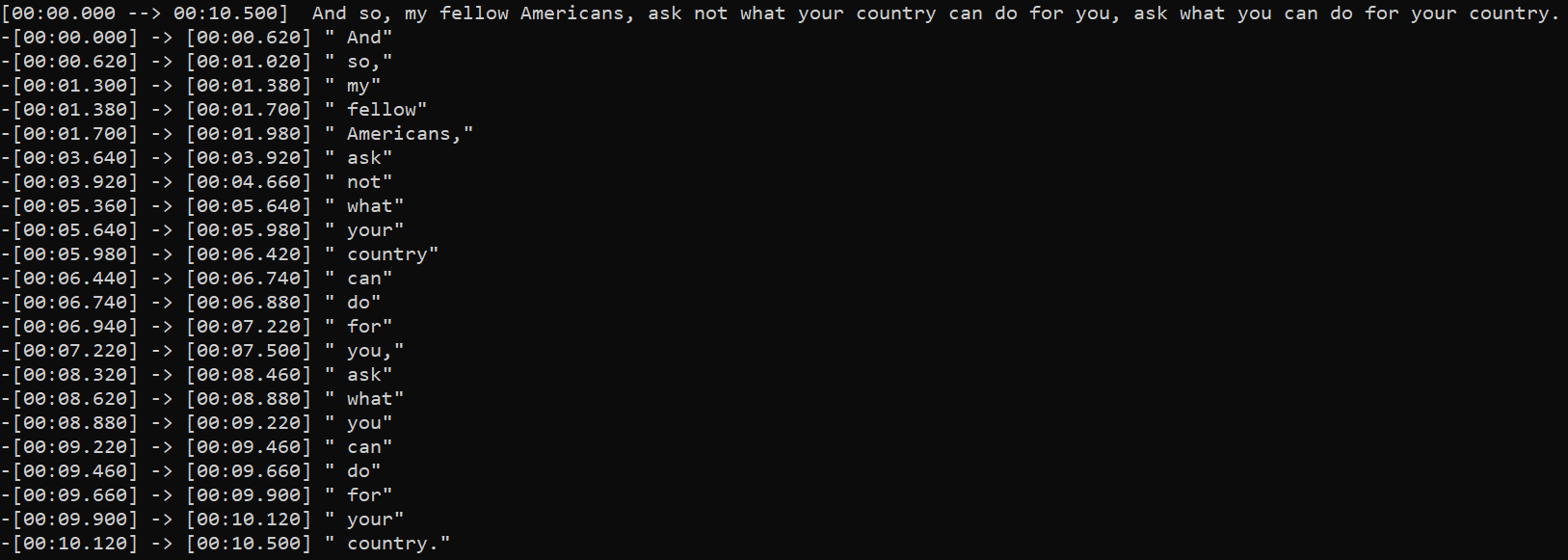
What's new in 2.0.0 ?
- updated to use Whisper's more reliable word-level timestamps method.
- the more reliable word timestamps allows regrouping segments word by word.
- can now suppress silence with Silero VAD (requires PyTorch 1.2.0+)
- non-VAD silence suppression is also more robust
Features
- more control over the timestamps than default Whisper
- supports direct preprocessing with Demucs to isolate voice
- support dynamic quantization to decrease memory usage for inference on CPU
- lower memory usage than default Whisper when transcribing very long input audio tracks
Setup
pip install -U stable-ts
To install the lastest commit:
pip install -U git+https://github.com/jianfch/stable-ts.git
Command-line usage
Transcribe audio then save result as JSON file which contains the original inference results.
This allows results to be reprocessed different without having to redo inference.
Change audio.json to audio.srt to process it directly into SRT.
stable-ts audio.mp3 -o audio.json
Processing JSON file of the results into SRT.
stable-ts audio.json -o audio.srt
Transcribe multiple audio files then process the results directly into SRT files.
stable-ts audio1.mp3 audio2.mp3 audio3.mp3 -o audio1.srt audio2.srt audio3.srt
Python usage
import stable_whisper

model = stable_whisper.load_model('base')
# modified model should run just like the regular model but accepts additional parameters
result = model.transcribe('audio.mp3')
# srt/vtt
result.to_srt_vtt('audio.srt')
# ass
result.to_ass('audio.ass')
# json
result.save_as_json('audio.json')
Regrouping Words
Stable-ts has a preset for regrouping word into different segments. This preset is enabled by regroup=True.
But there are other built-in regrouping methods that allow you to customize the regrouping logic.
This preset is just a predefined a combination of those methods.
result0 = model.transcribe('audio.mp3', regroup=True) # regroup is True by default
# regroup=True is same as below
result1 = model.transcribe('audio.mp3', regroup=False)
result1.split_by_punctuation(['.', '。', '?', '?'], True).split_by_gap(.5).merge_by_gap(.15).unlock_all_segments()
# result0 == result1
Visualizing Suppression
- Requirement: Pillow or opencv-python
Non-VAD Suppression

import stable_whisper
# regions on the waveform colored red is where it will be likely be suppressed and marked to as silent
# [q_levels=20] and [k_size=5] are defaults for non-VAD.
stable_whisper.visualize_suppression('audio.mp3', 'image.png', q_levels=20, k_size = 5)
VAD Suppression

# [vad_threshold=0.35] is defaults for VAD.
stable_whisper.visualize_suppression('audio.mp3', 'image.png', vad=True, vad_threshold=0.35)
Encode Comparison
import stable_whisper

stable_whisper.encode_video_comparison(
    'audio.mp3',
    ['audio_sub1.srt', 'audio_sub2.srt'],
    output_videopath='audio.mp4',
    labels=['Example 1', 'Example 2']
)
License
This project is licensed under the MIT License - see the LICENSE file for details
Acknowledgments
Includes slight modification of the original work: Whisper
Release history Release notifications | RSS feed


Download files
Download the file for your platform. If you're not sure which to choose, learn more about installing packages.
Source Distribution
File details
Details for the file stable-ts-2.0.3.tar.gz.
File metadata
- Download URL: stable-ts-2.0.3.tar.gz
- Upload date:
- Size: 30.6 kB
- Tags: Source
- Uploaded using Trusted Publishing? No
- Uploaded via: twine/4.0.2 CPython/3.8.15
File hashes
| Algorithm | Hash digest | |
|---|---|---|
| SHA256 |
27be5baa823f4dcfada8c6556c18b9ac46fba34ef3409a90dba7d98d8f947ed4
|
|
| MD5 |
36bb27287a0e0b665eb5b0d84e0ef77f
|
|
| BLAKE2b-256 |
f908829a77e7cb0ad99b30f9507513f283a8c769c22a9d5d2f94ace4d770eae9
|






