
Stabilizing Timestamps for Whisper
This script modifies OpenAI's Whisper to produce more reliable timestamps.
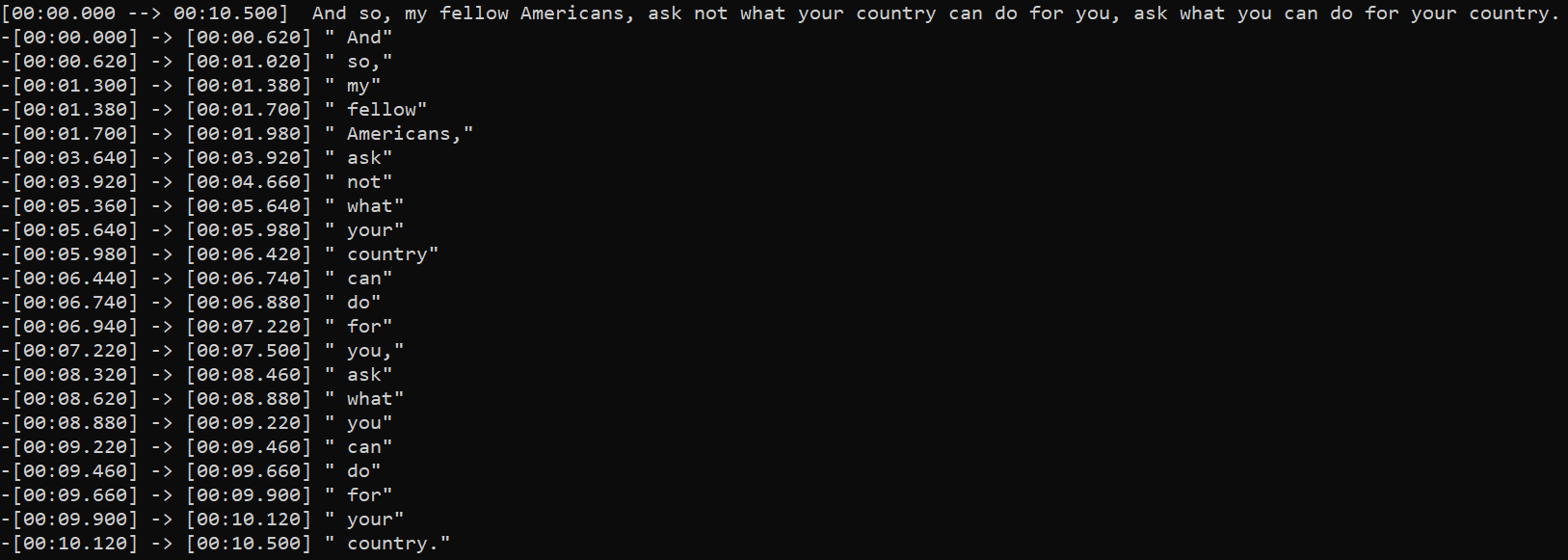
What's new in 2.0.0 ?
- updated to use Whisper's more reliable word-level timestamps method.
- the more reliable word timestamps allows regrouping all words into segments with more natural boundaries.
- can now suppress silence with Silero VAD (requires PyTorch 1.2.0+)
- non-VAD silence suppression is also more robust
- see Quick 1.X → 2.X Guide
Features
- more control over the timestamps than default Whisper
- supports direct preprocessing with Demucs to isolate voice
- support dynamic quantization to decrease memory usage for inference on CPU
- lower memory usage than default Whisper when transcribing very long input audio tracks
Setup
pip install -U stable-ts
To install the lastest commit:
pip install -U git+https://github.com/jianfch/stable-ts.git
Command-line usage
Transcribe audio then save result as JSON file which contains the original inference results.
This allows results to be reprocessed different without having to redo inference.
Change audio.json to audio.srt to process it directly into SRT.
stable-ts audio.mp3 -o audio.json
Processing JSON file of the results into SRT.
stable-ts audio.json -o audio.srt
Transcribe multiple audio files then process the results directly into SRT files.
stable-ts audio1.mp3 audio2.mp3 audio3.mp3 -o audio1.srt audio2.srt audio3.srt
Python usage
import stable_whisper

model = stable_whisper.load_model('base')
# modified model should run just like the regular model but accepts additional parameters
result = model.transcribe('audio.mp3')
# srt/vtt
result.to_srt_vtt('audio.srt')
# ass
result.to_ass('audio.ass')
# json
result.save_as_json('audio.json')
Quick 1.X → 2.X Guide
results_to_sentence_srt(result, 'audio.srt')→result.to_srt_vtt('audio.srt', word_level=False)results_to_word_srt(result, 'audio.srt')→result.to_srt_vtt('output.srt', segment_level=False)results_to_sentence_word_ass(result, 'audio.srt')→result.to_ass('output.ass')- there's no need to stabilize segment after inference because they're already stabilized during inference
transcribe()returns aWhisperResultobject which can be converted todictwith.to_dict(). e.gresult.to_dict()
Regrouping Words
Stable-ts has a preset for regrouping words into different into segments with more natural boundaries.
This preset is enabled by regroup=True. But there are other built-in regrouping methods that allow you to customize the regrouping logic.
This preset is just a predefined a combination of those methods.
result0 = model.transcribe('audio.mp3', regroup=True) # regroup is True by default
# regroup=True is same as below
result1 = model.transcribe('audio.mp3', regroup=False)
(
    result1
    .split_by_punctuation([('.', ' '), '。', '?', '?', ',', ','])
    .split_by_gap(.5)
    .merge_by_gap(.15, max_words=3)
    .split_by_punctuation([('.', ' '), '。', '?', '?'])
)
# result0 == result1
Visualizing Suppression
- Requirement: Pillow or opencv-python
Non-VAD Suppression

import stable_whisper
# regions on the waveform colored red is where it will be likely be suppressed and marked to as silent
# [q_levels=20] and [k_size=5] are defaults for non-VAD.
stable_whisper.visualize_suppression('audio.mp3', 'image.png', q_levels=20, k_size = 5)
VAD Suppression

# [vad_threshold=0.35] is defaults for VAD.
stable_whisper.visualize_suppression('audio.mp3', 'image.png', vad=True, vad_threshold=0.35)
Encode Comparison
import stable_whisper

stable_whisper.encode_video_comparison(
    'audio.mp3',
    ['audio_sub1.srt', 'audio_sub2.srt'],
    output_videopath='audio.mp4',
    labels=['Example 1', 'Example 2']
)
License
This project is licensed under the MIT License - see the LICENSE file for details
Acknowledgments
Includes slight modification of the original work: Whisper
1 maintainer

Metadata
1 maintainer
Release files for stable-ts 2.1.1
For a detailed explanation of source distributions (sdists) and built distributions (wheels), please see the package formats documentation.
Source distribution (sdist)
| File | Size | Uploaded | Provenance | Actions |
|---|---|---|---|---|
| stable-ts-2.1.1.tar.gz | 31.6 kB | Without provenance | Details for stable-ts-2.1.1.tar.gz |
Release files / stable-ts-2.1.1.tar.gz
| Download URL | stable-ts-2.1.1.tar.gz |
|---|---|
| Size | 31.6 kB |
| Tags | Source |
|
SHA-256 checksum How to use checksums |
fd4399a28da92276f5d552f54e0104cb0edeee2c5c2233f305bf28f8c19bf895
|
|
BLAKE2b-256 checksum How to use checksums |
30dd36a32394bb404e9d77932b8a513fcab1d7b011fd182ed91af96f2f772b6a
|
| Upload date | |
|
Uploaded using Trusted Publishing? What is trusted publishing? |
No |
| Uploaded via |
twine/4.0.2 CPython/3.8.15
|
Security for stable-ts 2.1.1
Provenance
Provenance describes where a file came from. On PyPI, provenance is shared via attestations, which provide a verifiable record of the build or publishing details. View details, limitations and caveats.
No provenance found
None of the files in this release were uploaded with provenance metadata.
A note on package security
PyPI is a repository for distributing packages, not a service for auditing them. While third-party security researchers and our staff do their best to detect and remove malicious packages, PyPI cannot guarantee the quality, security or suitability of any given package.
To learn more about protecting yourself from malicious actors, visit our package security documentation.














