
Drop-in monitoring for GenAI applications

Project description
stakeout-agent



Drop-in observability for LangGraph and CrewAI. One callback. Every run, node, and tool call — captured automatically into MongoDB or PostgreSQL. No changes to your agent code.
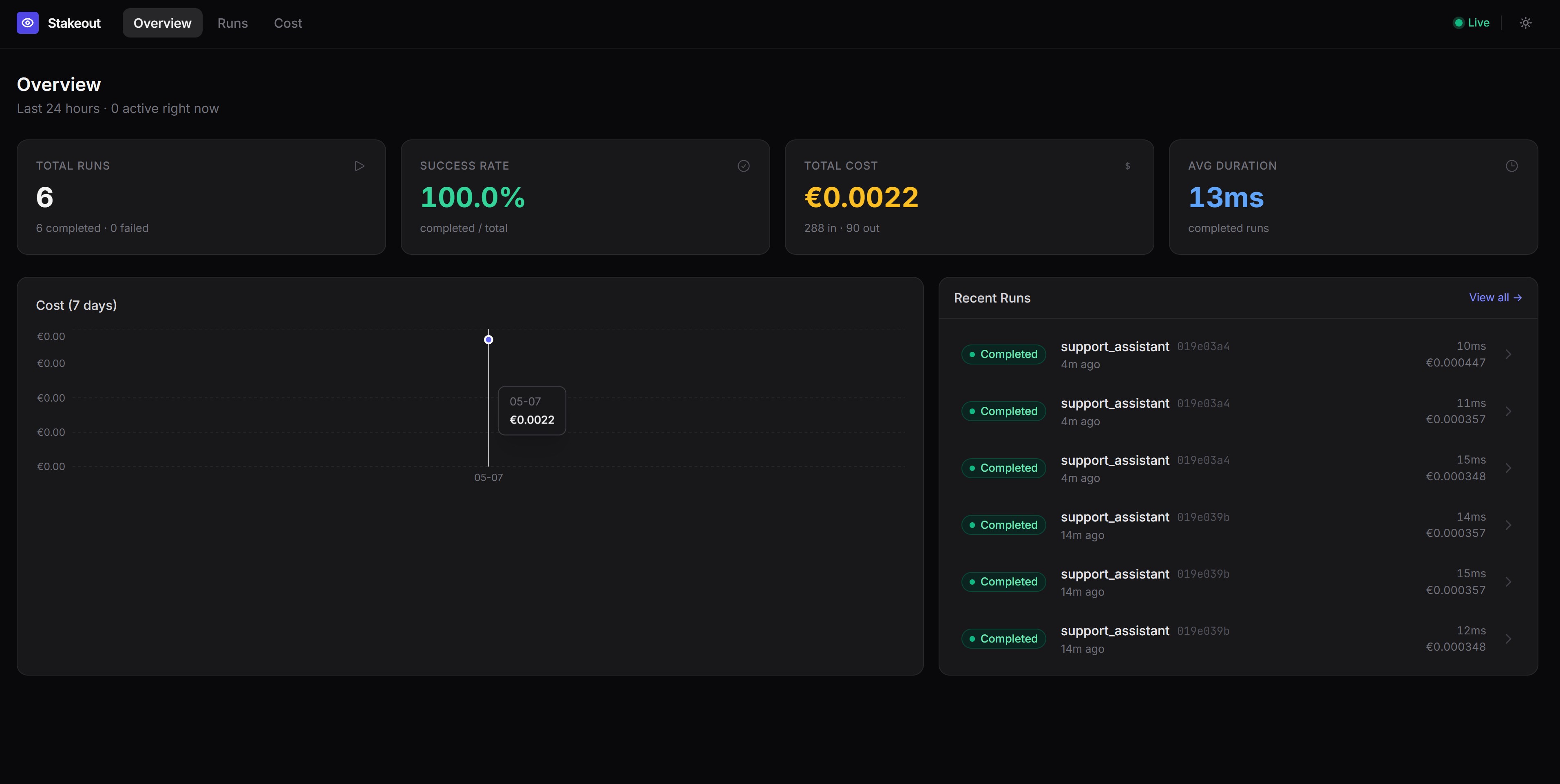
Install and go
pip install stakeout-agent
from stakeout_agent import LangGraphMonitorCallback

monitor = LangGraphMonitorCallback(graph_id="my_graph", thread_id="thread_123")
result = graph.invoke(inputs, config={"callbacks": [monitor]})
That's it. Every node execution, tool call, latency, and error is now in your database.
How it works
graph LR
    A[Your LangGraph / CrewAI app] -->|callback| B[stakeout-agent]
    B --> C[(MongoDB)]
    B --> D[(PostgreSQL)]
    C --> E[Dashboard / your queries]
    D --> E
stakeout-agent hooks into your framework's event system. It records a run document for each invocation and an event document for every node start/end, tool call, tool result, and error — with latency tracked at every step.
Why stakeout-agent?
| stakeout-agent | |
|---|---|
| Lines of integration code | 3 |
| Crashes your app on DB failure | Never — errors are logged, not raised |
| Node-level latency (P95) | Yes — tracked per node and per tool |
| Frameworks | LangGraph + CrewAI |
| Backends | MongoDB + PostgreSQL |
| Dashboard included | Yes — Streamlit, zero config |
Installation
# MongoDB backend (default)
pip install stakeout-agent

# PostgreSQL backend
pip install 'stakeout-agent[postgres]'

# CrewAI support
pip install 'stakeout-agent[crewai]'
Requires Python 3.10+.
Quick start
LangGraph — Sync
from stakeout_agent import LangGraphMonitorCallback

monitor = LangGraphMonitorCallback(graph_id="my_graph", thread_id="thread_123")
result = graph.invoke(inputs, config={"callbacks": [monitor]})
LangGraph — Async
from stakeout_agent import AsyncLangGraphMonitorCallback

monitor = AsyncLangGraphMonitorCallback(graph_id="my_graph", thread_id="thread_123")
result = await graph.ainvoke(inputs, config={"callbacks": [monitor]})
CrewAI — Sync
from stakeout_agent import CrewAIMonitorCallback

monitor = CrewAIMonitorCallback(crew_id="my_crew", thread_id="thread_123")
crew.kickoff(inputs={...})
CrewAIMonitorCallback registers itself with CrewAI's event bus automatically — no extra wiring needed.
CrewAI — Async
from stakeout_agent import AsyncCrewAIMonitorCallback

monitor = AsyncCrewAIMonitorCallback(crew_id="my_crew", thread_id="thread_123")
await crew.akickoff(inputs={...})
Dashboard
Visualise runs, node timelines, and tool call details with the included Streamlit dashboard:
docker compose up -d mongo
cd stakeout-agent
uv run python examples/seed_demo_data.py   # optional: load demo data
uv run --with streamlit streamlit run examples/dashboard.py
Open http://localhost:8501. The dashboard shows:
- Run History — recent runs, status, duration, and a runs-over-time chart
- Node Performance — average and P95 latency per node and tool, error counts
- Run Inspector — full event timeline for any individual run
- Thread Deep Dive — multi-turn conversation view across all runs in a thread
Try the examples
LangGraph
A self-contained example that requires no LLM API key — nodes are pure Python functions.
docker compose up -d mongo
cd stakeout-agent
uv run python examples/dummy_app.py
CrewAI
Requires a running MongoDB instance and an OpenAI API key (or configure a different provider via the llm parameter on each Agent).
Sync:
docker compose up -d mongo
cd stakeout-agent
OPENAI_API_KEY=sk-... uv run --with crewai python examples/dummy_crewai_app.py
Async:
docker compose up -d mongo
cd stakeout-agent
OPENAI_API_KEY=sk-... uv run --with crewai python examples/dummy_crewai_async_app.py
Each example runs a two-agent crew (Researcher + Writer) with a MultiplyTool, then prints the runs and events documents written to MongoDB.
Configuration
| Environment variable | Default | Description |
|---|---|---|
STAKEOUT_BACKEND |
mongodb |
Backend to use: mongodb or postgres |
MONGO_URI |
mongodb://localhost:27017 |
MongoDB connection string |
MONGO_DB |
stakeout |
MongoDB database name |
POSTGRES_URI |
postgresql://localhost/stakeout |
PostgreSQL connection string (also reads DATABASE_URL) |
PostgreSQL
export STAKEOUT_BACKEND=postgres
export POSTGRES_URI=postgresql://user:password@localhost/stakeout
Tables are created automatically on first connection — no migration needed.
docker compose up -d postgres
# connection string: postgresql://stakeout:stakeout@localhost/stakeout
You can also inject a backend instance directly:
from stakeout_agent import LangGraphMonitorCallback, PostgresMonitorDB

monitor = LangGraphMonitorCallback(
    graph_id="my_graph",
    thread_id="thread_123",
    db=PostgresMonitorDB(),
)
What gets recorded
runs
One document per graph/crew invocation.
{
  "_id": "<run_id>",
  "graph_id": "my_graph",
  "thread_id": "thread_123",
  "status": "completed",
  "started_at": "2026-04-25T10:00:00Z",
  "ended_at": "2026-04-25T10:00:05Z",
  "error": null,
  "metadata": {}
}
status is one of running, completed, or failed.
events
One document per node/task start/end, tool call, or error.
{
  "run_id": "<run_id>",
  "graph_id": "my_graph",
  "event_type": "node_end",
  "node_name": "agent",
  "timestamp": "2026-04-25T10:00:03Z",
  "latency_ms": 1240.5,
  "payload": {"outputs": "..."},
  "error": null
}
event_type |
When | latency_ms |
|---|---|---|
node_start |
A graph node or crew task begins | absent |
node_end |
A graph node or crew task completes | present |
tool_call |
A tool is invoked | absent |
tool_result |
A tool returns a result | present |
error |
A node, task, or tool raises an exception | present |
Error handling
All database writes catch exceptions and log them — a monitoring failure will never crash your application. Enable DEBUG logging to see them:
import logging
logging.getLogger("stakeout_agent").setLevel(logging.DEBUG)
Querying the database directly
MongoDB
from stakeout_agent import MongoMonitorDB

db = MongoMonitorDB()
runs = list(db.runs.find({"graph_id": "my_graph"}).sort("started_at", -1))
events = list(db.events.find({"run_id": "<run_id>"}).sort("timestamp", 1))
PostgreSQL
import psycopg2

conn = psycopg2.connect("postgresql://user:password@localhost/stakeout")
with conn.cursor() as cur:
    cur.execute("SELECT * FROM runs WHERE graph_id = %s ORDER BY started_at DESC", ("my_graph",))
    runs = cur.fetchall()
Extending stakeout-agent
New framework: create a file under callback_handler/ that inherits _MonitorBase and implements the target framework's callback protocol.
New database: create a class that inherits AbstractMonitorDB and implement create_run, complete_run, fail_run, and insert_event.
stakeout_agent/
├── backends/
│   ├── base.py        # AbstractMonitorDB — shared interface
│   ├── mongodb.py     # MongoMonitorDB
│   ├── postgres.py    # PostgresMonitorDB
│   └── __init__.py    # get_backend() factory
├── callback_handler/
│   ├── base.py        # _MonitorBase — framework-agnostic core logic
│   ├── langgraph.py   # LangGraphMonitorCallback, AsyncLangGraphMonitorCallback
│   ├── crewai.py      # CrewAIMonitorCallback, AsyncCrewAIMonitorCallback
│   └── __init__.py
License
MIT
Release history Release notifications | RSS feed


Download files
Download the file for your platform. If you're not sure which to choose, learn more about installing packages.
Source Distribution
Built Distribution
Filter files by name, interpreter, ABI, and platform.
If you're not sure about the file name format, learn more about wheel file names.
Copy a direct link to the current filters
File details
Details for the file stakeout_agent-0.0.7.tar.gz.
File metadata
- Download URL: stakeout_agent-0.0.7.tar.gz
- Upload date:
- Size: 18.1 kB
- Tags: Source
- Uploaded using Trusted Publishing? Yes
- Uploaded via: twine/6.1.0 CPython/3.13.12
File hashes
| Algorithm | Hash digest | |
|---|---|---|
| SHA256 |
8b5150cf2ae718912fac7cf86727c71c8644e868ac40a911f231f319a78aba05
|
|
| MD5 |
85376f8fcdb9218d779e190b25790d41
|
|
| BLAKE2b-256 |
dd69862d0e11b242cad67f8b23349b96bdddba3cf6a10c27694f42da343c6ef0
|
Provenance
The following attestation bundles were made for stakeout_agent-0.0.7.tar.gz:
Publisher:
python-publish.yml on KyriakosFrang/stakeout-agent
-
Statement:
-
Statement type:
https://in-toto.io/Statement/v1 -
Predicate type:
https://docs.pypi.org/attestations/publish/v1 -
Subject name:
stakeout_agent-0.0.7.tar.gz -
Subject digest:
8b5150cf2ae718912fac7cf86727c71c8644e868ac40a911f231f319a78aba05 - Sigstore transparency entry: 1421948326
- Sigstore integration time:
-
Permalink:
KyriakosFrang/stakeout-agent@2cb8f4d2ea94146124e0c2a46b2d02d55e45c0fe -
Branch / Tag:
refs/tags/v0.0.7 - Owner: https://github.com/KyriakosFrang
-
Access:
public
-
Token Issuer:
https://token.actions.githubusercontent.com -
Runner Environment:
github-hosted -
Publication workflow:
python-publish.yml@2cb8f4d2ea94146124e0c2a46b2d02d55e45c0fe -
Trigger Event:
release
-
Statement type:
File details
Details for the file stakeout_agent-0.0.7-py3-none-any.whl.
File metadata
- Download URL: stakeout_agent-0.0.7-py3-none-any.whl
- Upload date:
- Size: 13.4 kB
- Tags: Python 3
- Uploaded using Trusted Publishing? Yes
- Uploaded via: twine/6.1.0 CPython/3.13.12
File hashes
| Algorithm | Hash digest | |
|---|---|---|
| SHA256 |
d879c94e17b771bb4961acef5224461bbbac97450a49b6dc31b33ecc354dfebe
|
|
| MD5 |
bd6ab8aee2746e7b04dcc89ab261140b
|
|
| BLAKE2b-256 |
f42aea36bca53b8a83e4ceb7e23e14b4ee900a6b8e052ec3492ffd741be8c17f
|
Provenance
The following attestation bundles were made for stakeout_agent-0.0.7-py3-none-any.whl:
Publisher:
python-publish.yml on KyriakosFrang/stakeout-agent
-
Statement:
-
Statement type:
https://in-toto.io/Statement/v1 -
Predicate type:
https://docs.pypi.org/attestations/publish/v1 -
Subject name:
stakeout_agent-0.0.7-py3-none-any.whl -
Subject digest:
d879c94e17b771bb4961acef5224461bbbac97450a49b6dc31b33ecc354dfebe - Sigstore transparency entry: 1421948394
- Sigstore integration time:
-
Permalink:
KyriakosFrang/stakeout-agent@2cb8f4d2ea94146124e0c2a46b2d02d55e45c0fe -
Branch / Tag:
refs/tags/v0.0.7 - Owner: https://github.com/KyriakosFrang
-
Access:
public
-
Token Issuer:
https://token.actions.githubusercontent.com -
Runner Environment:
github-hosted -
Publication workflow:
python-publish.yml@2cb8f4d2ea94146124e0c2a46b2d02d55e45c0fe -
Trigger Event:
release
-
Statement type:






