
Drop-in observability for LangGraph and CrewAI — captures every run, node, tool call, token count, prompt, and response into MongoDB or PostgreSQL
Verified details
These details have been verified by PyPIProject links
GitHub Statistics
Maintainers

Project description
stakeout-agent
Drop-in observability for LangGraph and CrewAI.
One callback. Every run, node, tool call, token count, prompt, and response — captured automatically into MongoDB or PostgreSQL. No changes to your agent code.






Install and go
pip install stakeout-agent
from stakeout_agent import LangGraphMonitorCallback

monitor = LangGraphMonitorCallback(graph_id="my_graph", thread_id="thread_123")
result = graph.invoke(inputs, config={"callbacks": [monitor]})
That's it. Every node execution, tool call, latency, token count, prompt, response, and error is now in your database.
How it works
graph LR
    A[Your LangGraph / CrewAI app] -->|callback| B[stakeout-agent]
    B --> C[(MongoDB)]
    B --> D[(PostgreSQL)]
    C --> E[Dashboard / your queries]
    D --> E
stakeout-agent hooks into your framework's event system. It records a run document for each invocation and an event document for every node start/end, tool call, tool result, and error — with latency, token usage, and the actual prompts and responses captured at every step.
Why stakeout-agent?
| stakeout-agent | |
|---|---|
| Lines of integration code | 3 |
| Crashes your app on DB failure | Never — errors are logged, not raised |
| Node-level latency (P95) | Yes — tracked per node and per tool |
| Token usage | Yes — per node and rolled up to the run |
| Cost estimation | Yes — opt-in, configurable per model |
| Prompt & response capture | Yes — per node, opt-out, truncation supported |
| Frameworks | LangGraph + CrewAI |
| Backends | MongoDB + PostgreSQL |
| Dashboard included | Yes — Streamlit, zero config |
Installation
# MongoDB backend (default)
pip install stakeout-agent

# PostgreSQL backend
pip install 'stakeout-agent[postgres]'

# CrewAI support
pip install 'stakeout-agent[crewai]'
Requires Python 3.10+.
Quick start
LangGraph — Sync
from stakeout_agent import LangGraphMonitorCallback

monitor = LangGraphMonitorCallback(graph_id="my_graph", thread_id="thread_123")
result = graph.invoke(inputs, config={"callbacks": [monitor]})
LangGraph — Async
from stakeout_agent import AsyncLangGraphMonitorCallback

monitor = AsyncLangGraphMonitorCallback(graph_id="my_graph", thread_id="thread_123")
result = await graph.ainvoke(inputs, config={"callbacks": [monitor]})
CrewAI — Sync
from stakeout_agent import CrewAIMonitorCallback

monitor = CrewAIMonitorCallback(crew_id="my_crew", thread_id="thread_123")
crew.kickoff(inputs={...})
CrewAIMonitorCallback registers itself with CrewAI's event bus automatically — no extra wiring needed.
CrewAI — Async
from stakeout_agent import AsyncCrewAIMonitorCallback

monitor = AsyncCrewAIMonitorCallback(crew_id="my_crew", thread_id="thread_123")
await crew.akickoff(inputs={...})
One instance per invocation
Each callback instance stores per-run state (run ID, node timings, token accumulators) as instance variables. Do not share a single instance across concurrent invocations — a second call will overwrite the first run's state, causing events to be written under the wrong run ID and latencies to be miscalculated.
# Wrong — shared instance, concurrent calls corrupt each other
monitor = AsyncLangGraphMonitorCallback(graph_id="g", thread_id="t")
await asyncio.gather(
    graph.ainvoke(inputs_a, config={"callbacks": [monitor]}),
    graph.ainvoke(inputs_b, config={"callbacks": [monitor]}),
)

# Correct — separate instance per invocation
await asyncio.gather(
    graph.ainvoke(inputs_a, config={"callbacks": [AsyncLangGraphMonitorCallback(graph_id="g", thread_id="t")]}),
    graph.ainvoke(inputs_b, config={"callbacks": [AsyncLangGraphMonitorCallback(graph_id="g", thread_id="t")]}),
)
Token usage and cost tracking
Token counts are captured automatically from every LLM call — no changes to your agent code required. Per-node input/output tokens are recorded on each node_end event, and totals are rolled up onto the run document at completion.
Token capture only (always on)
from stakeout_agent import LangGraphMonitorCallback

monitor = LangGraphMonitorCallback(graph_id="my_graph", thread_id="thread_123")
result = graph.invoke(inputs, config={"callbacks": [monitor]})
Token fields (input_tokens, output_tokens, model) appear on node_end events and total_input_tokens / total_output_tokens on the run document whenever the LLM response contains usage metadata.
Cost estimation (opt-in)
from stakeout_agent import LangGraphMonitorCallback
from stakeout_agent.pricing import ModelPricing, PricingMap

monitor = LangGraphMonitorCallback(
    graph_id="my_graph",
    thread_id="thread_123",
    pricing=PricingMap({
        "gpt-4o":      ModelPricing(input_cost_per_1k=0.005,   output_cost_per_1k=0.015),
        "gpt-4o-mini": ModelPricing(input_cost_per_1k=0.00015, output_cost_per_1k=0.0006),
    })
)
result = graph.invoke(inputs, config={"callbacks": [monitor]})
When pricing is provided, estimated_cost_usd is computed per LLM call and rolled up onto the run. Multi-model workflows are fully supported — each node resolves cost against the model it actually used. Models not present in the map are silently skipped; token counts are still recorded.
Custom token extractor
The default extractor covers OpenAI (token_usage / model_name) and Anthropic (usage / model) response shapes. For providers with a different metadata structure, pass a token_extractor:
def my_extractor(metadata: dict) -> tuple[int | None, int | None, str | None]:
    usage = metadata.get("llm_output", {}).get("token_usage", {})
    return usage.get("input"), usage.get("output"), metadata.get("model_id")

monitor = LangGraphMonitorCallback(
    graph_id="my_graph",
    thread_id="thread_123",
    token_extractor=my_extractor,
)
The extractor receives response.llm_output and must return (input_tokens, output_tokens, model_name). Any field can be None.
Prompt and response capture
The exact messages sent to the LLM and the response text are captured automatically on each node_end event. This is on by default and requires no configuration.
from stakeout_agent import LangGraphMonitorCallback

monitor = LangGraphMonitorCallback(graph_id="my_graph", thread_id="thread_123")
result = graph.invoke(inputs, config={"callbacks": [monitor]})
Each node_end event will include:
{
  "event_type": "node_end",
  "node_name": "agent",
  "llm_input": [
    { "role": "system", "content": "You are a helpful assistant." },
    { "role": "user",   "content": "Summarize the following document..." }
  ],
  "llm_output": "Here is a concise summary..."
}
llm_input and llm_output are absent when no LLM call occurred within the node (e.g. pure routing nodes).
Opt out for sensitive workloads
monitor = LangGraphMonitorCallback(
    graph_id="my_graph",
    thread_id="thread_123",
    capture_payloads=False,
)
Recommended for regulated or privacy-sensitive environments (financial services, healthcare) where prompt content may include PII or confidential data.
Limit stored content size
monitor = LangGraphMonitorCallback(
    graph_id="my_graph",
    thread_id="thread_123",
    max_payload_chars=2000,
)
Each message's content and the response text are truncated to max_payload_chars characters before storage. Useful for long-context or multi-turn workflows to prevent unbounded document sizes.
Both options apply identically to AsyncLangGraphMonitorCallback, CrewAIMonitorCallback, and AsyncCrewAIMonitorCallback.
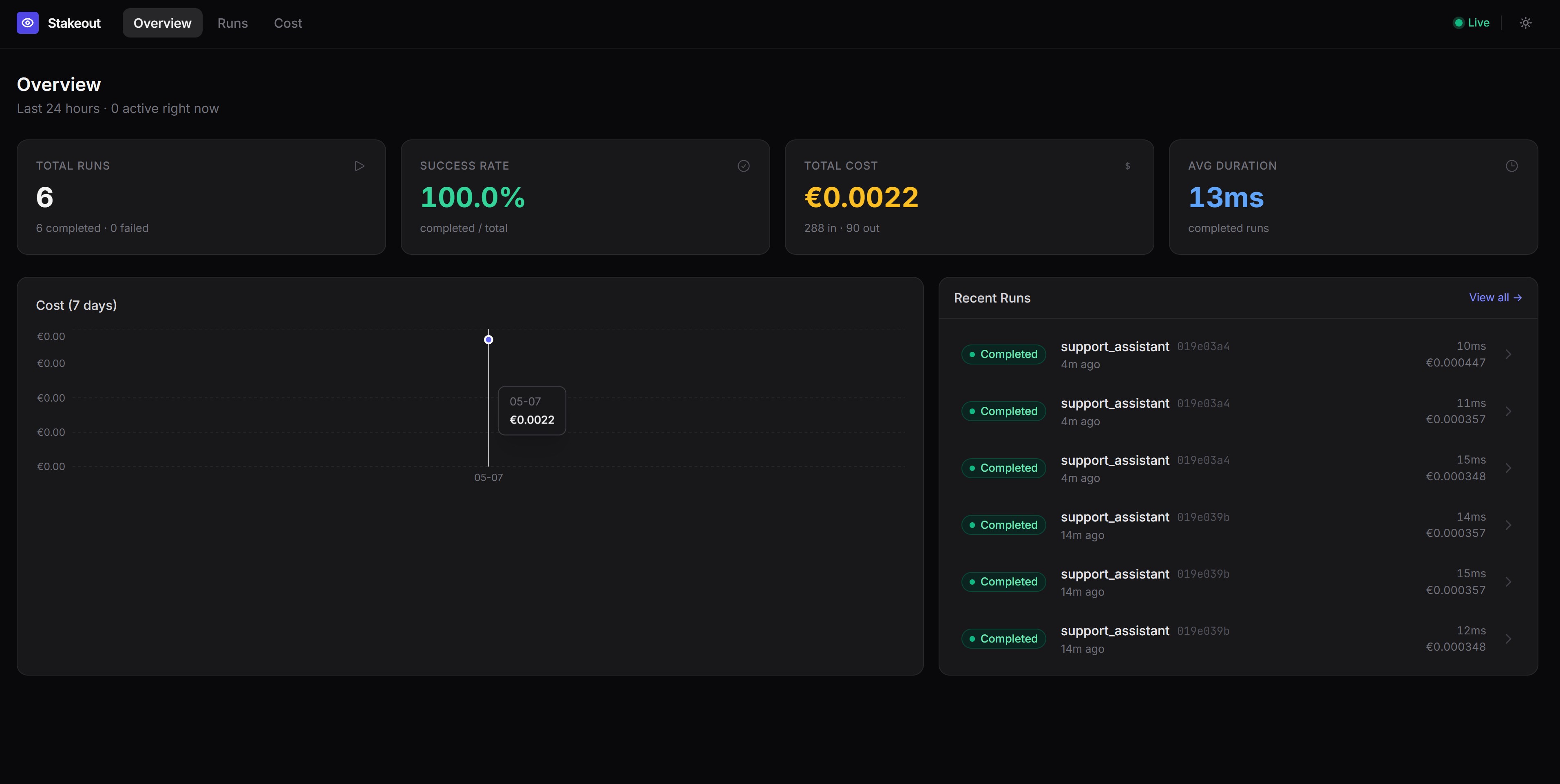
Dashboard
Visualise runs, node timelines, and tool call details with the included Streamlit dashboard:
docker compose up -d mongo
cd stakeout-agent
uv run python examples/seed_demo_data.py   # optional: load demo data
uv run --with streamlit streamlit run examples/dashboard.py
Open http://localhost:8501. The dashboard shows:
- Run History — recent runs, status, duration, and a runs-over-time chart
- Node Performance — average and P95 latency per node and tool, error counts
- Run Inspector — full event timeline for any individual run
- Thread Deep Dive — multi-turn conversation view across all runs in a thread
Try the examples
LangGraph
A self-contained example that requires no LLM API key — nodes are pure Python functions.
docker compose up -d mongo
cd stakeout-agent
uv run python examples/dummy_app.py
CrewAI
Requires a running MongoDB instance and an OpenAI API key (or configure a different provider via the llm parameter on each Agent).
Sync:
docker compose up -d mongo
cd stakeout-agent
OPENAI_API_KEY=sk-... uv run --with crewai python examples/dummy_crewai_app.py
Async:
docker compose up -d mongo
cd stakeout-agent
OPENAI_API_KEY=sk-... uv run --with crewai python examples/dummy_crewai_async_app.py
Each example runs a two-agent crew (Researcher + Writer) with a MultiplyTool, then prints the runs and events documents written to MongoDB.
Configuration
| Environment variable | Default | Description |
|---|---|---|
STAKEOUT_BACKEND |
mongodb |
Backend to use: mongodb or postgres |
MONGO_URI |
mongodb://localhost:27017 |
MongoDB connection string |
MONGO_DB |
stakeout |
MongoDB database name |
POSTGRES_URI |
postgresql://localhost/stakeout |
PostgreSQL connection string (also reads DATABASE_URL) |
PostgreSQL
export STAKEOUT_BACKEND=postgres
export POSTGRES_URI=postgresql://user:password@localhost/stakeout
Tables are created automatically on first connection — no migration needed. New columns (llm_input, llm_output, token and cost fields) are added to existing tables via ALTER TABLE … ADD COLUMN IF NOT EXISTS.
docker compose up -d postgres
# connection string: postgresql://stakeout:stakeout@localhost/stakeout
You can also inject a backend instance directly:
from stakeout_agent import LangGraphMonitorCallback, PostgresMonitorDB

monitor = LangGraphMonitorCallback(
    graph_id="my_graph",
    thread_id="thread_123",
    db=PostgresMonitorDB(),
)
What gets recorded
runs
One document per graph/crew invocation.
{
  "_id": "<run_id>",
  "graph_id": "my_graph",
  "thread_id": "thread_123",
  "status": "completed",
  "started_at": "2026-04-25T10:00:00Z",
  "ended_at": "2026-04-25T10:00:05Z",
  "error": null,
  "total_input_tokens": 1850,
  "total_output_tokens": 420,
  "estimated_cost_usd": 0.01553
}
status is one of running, completed, or failed. Token and cost fields are omitted when no LLM usage data is available; estimated_cost_usd is omitted when no pricing map is configured.
events
One document per node/task start/end, tool call, or error.
{
  "run_id": "<run_id>",
  "graph_id": "my_graph",
  "event_type": "node_end",
  "node_name": "agent",
  "timestamp": "2026-04-25T10:00:03Z",
  "latency_ms": 1240.5,
  "input_tokens": 320,
  "output_tokens": 85,
  "model": "gpt-4o",
  "llm_input": [
    {"role": "system", "content": "You are a helpful assistant."},
    {"role": "user", "content": "Summarize the following document..."}
  ],
  "llm_output": "Here is a concise summary...",
  "payload": {"outputs": "..."},
  "error": null
}
event_type |
When | latency_ms |
token fields | llm_input / llm_output |
|---|---|---|---|---|
node_start |
A graph node or crew task begins | absent | absent | absent |
node_end |
A graph node or crew task completes | present | present when LLM was called | present when LLM was called and capture_payloads=True |
tool_call |
A tool is invoked | absent | absent | absent |
tool_result |
A tool returns a result | present | absent | absent |
error |
A node, task, or tool raises an exception | present | absent | absent |
Error handling
All database writes catch exceptions and log them — a monitoring failure will never crash your application. Enable DEBUG logging to see them:
import logging
logging.getLogger("stakeout_agent").setLevel(logging.DEBUG)
Querying the database directly
MongoDB
from stakeout_agent import MongoMonitorDB

db = MongoMonitorDB()
runs = list(db.runs.find({"graph_id": "my_graph"}).sort("started_at", -1))
events = list(db.events.find({"run_id": "<run_id>"}).sort("timestamp", 1))
PostgreSQL
import psycopg2

conn = psycopg2.connect("postgresql://user:password@localhost/stakeout")
with conn.cursor() as cur:
    cur.execute("SELECT * FROM runs WHERE graph_id = %s ORDER BY started_at DESC", ("my_graph",))
    runs = cur.fetchall()
Extending stakeout-agent
New framework: create a file under callback_handler/ that inherits _MonitorBase and implements the target framework's callback protocol.
New database: create a class that inherits AbstractMonitorDB and implement create_run, complete_run, fail_run, and insert_event.
stakeout_agent/
├── backends/
│   ├── base.py        # AbstractMonitorDB — shared interface
│   ├── mongodb.py     # MongoMonitorDB
│   ├── postgres.py    # PostgresMonitorDB
│   └── __init__.py    # get_backend() factory
├── callback_handler/
│   ├── base.py        # _MonitorBase — framework-agnostic core logic
│   ├── langgraph.py   # LangGraphMonitorCallback, AsyncLangGraphMonitorCallback
│   ├── crewai.py      # CrewAIMonitorCallback, AsyncCrewAIMonitorCallback
│   └── __init__.py
├── pricing.py         # ModelPricing, PricingMap
Roadmap
- Sync LangGraph callback support
- Async LangGraph callback support
- Sync CrewAI callback support
- Async CrewAI callback support
- MongoDB persistence
- PostgreSQL persistence
- Run and event collections
- Token usage tracking (per node and per run)
- Cost estimation with configurable pricing map
- Prompt and response capture per node (
capture_payloads,max_payload_chars) - Streamlit dashboard (Run History, Node Performance, Run Inspector, Thread Deep Dive)
- Additional agentic frameworks (PydanticAI, SemanticKernel, AutoGen etc.)
- Additional storage backends (SQLite, Redis, ...)
License
MIT
Project details
Verified details
These details have been verified by PyPIProject links
GitHub Statistics
Maintainers
Release history Release notifications | RSS feed


Download files
Download the file for your platform. If you're not sure which to choose, learn more about installing packages.
Source Distribution
Built Distribution
Filter files by name, interpreter, ABI, and platform.
If you're not sure about the file name format, learn more about wheel file names.
Copy a direct link to the current filters
File details
Details for the file stakeout_agent-0.0.8.tar.gz.
File metadata
- Download URL: stakeout_agent-0.0.8.tar.gz
- Upload date:
- Size: 27.6 kB
- Tags: Source
- Uploaded using Trusted Publishing? Yes
- Uploaded via: twine/6.1.0 CPython/3.13.12
File hashes
| Algorithm | Hash digest | |
|---|---|---|
| SHA256 |
d760c946710f74fa0d89101633b5ac7f5530e80bf122cb92700aac16e9e65145
|
|
| MD5 |
868be110324bff98063e7fefaa80db8f
|
|
| BLAKE2b-256 |
cfa0cb64e26f72888ca0468c71d0173e0f5054c10b7e32d9e9326014e82a7d73
|
Provenance
The following attestation bundles were made for stakeout_agent-0.0.8.tar.gz:
Publisher:
python-publish.yml on KyriakosFrang/stakeout-agent
-
Statement:
-
Statement type:
https://in-toto.io/Statement/v1 -
Predicate type:
https://docs.pypi.org/attestations/publish/v1 -
Subject name:
stakeout_agent-0.0.8.tar.gz -
Subject digest:
d760c946710f74fa0d89101633b5ac7f5530e80bf122cb92700aac16e9e65145 - Sigstore transparency entry: 1452086121
- Sigstore integration time:
-
Permalink:
KyriakosFrang/stakeout-agent@8e7183057dc8fa263fb9ed339993a65f8a7ebddc -
Branch / Tag:
refs/tags/v0.0.8 - Owner: https://github.com/KyriakosFrang
-
Access:
public
-
Token Issuer:
https://token.actions.githubusercontent.com -
Runner Environment:
github-hosted -
Publication workflow:
python-publish.yml@8e7183057dc8fa263fb9ed339993a65f8a7ebddc -
Trigger Event:
release
-
Statement type:
File details
Details for the file stakeout_agent-0.0.8-py3-none-any.whl.
File metadata
- Download URL: stakeout_agent-0.0.8-py3-none-any.whl
- Upload date:
- Size: 20.4 kB
- Tags: Python 3
- Uploaded using Trusted Publishing? Yes
- Uploaded via: twine/6.1.0 CPython/3.13.12
File hashes
| Algorithm | Hash digest | |
|---|---|---|
| SHA256 |
f947c62c8366d7ccf01d9f7d7df357834d304c98949c08ed05fc57db5115af29
|
|
| MD5 |
bc7f722eddb8d11bdf0301ad01171342
|
|
| BLAKE2b-256 |
839148c59ffa9224012c7006fcdd7b6271104f96bbe17bb7339ea0efaa256f54
|
Provenance
The following attestation bundles were made for stakeout_agent-0.0.8-py3-none-any.whl:
Publisher:
python-publish.yml on KyriakosFrang/stakeout-agent
-
Statement:
-
Statement type:
https://in-toto.io/Statement/v1 -
Predicate type:
https://docs.pypi.org/attestations/publish/v1 -
Subject name:
stakeout_agent-0.0.8-py3-none-any.whl -
Subject digest:
f947c62c8366d7ccf01d9f7d7df357834d304c98949c08ed05fc57db5115af29 - Sigstore transparency entry: 1452086233
- Sigstore integration time:
-
Permalink:
KyriakosFrang/stakeout-agent@8e7183057dc8fa263fb9ed339993a65f8a7ebddc -
Branch / Tag:
refs/tags/v0.0.8 - Owner: https://github.com/KyriakosFrang
-
Access:
public
-
Token Issuer:
https://token.actions.githubusercontent.com -
Runner Environment:
github-hosted -
Publication workflow:
python-publish.yml@8e7183057dc8fa263fb9ed339993a65f8a7ebddc -
Trigger Event:
release
-
Statement type:






