
Starplast
← Back · Next → · Open slide viewer · PDF · PowerPoint

















Starplast is a desktop app for exploring gene evidence in Toxoplasma gondii and Plasmodium falciparum. It brings expression, fitness screens, localization, protein features, interactions, and literature annotations into one place.
Use it to look up a gene, investigate hits from a screen, compare groups of genes, and choose candidates for follow-up experiments. The bundled maps contain 8,140 T. gondii genes and 5,720 P. falciparum genes, viewed separately.
User guide · Python API · Dataset catalogue · Changes
Install
Python 3.10 or newer is required. The desktop app needs a display and OpenGL.
pip install starplast
starplast
From a checkout:
git clone https://github.com/EinarOlafsson/starplast.git
cd starplast
pip install -e .
starplast
The default installation runs analyses on the CPU. For an NVIDIA GPU on Linux x86_64 with a CUDA 12 compatible driver:
pip install "starplast[gpu]"
GPU dependencies are large and optional. starplast-install-gpu can also inspect
your driver and offer an installation command. macOS and Windows use CPU analysis;
the 3D display still uses OpenGL.
The built gene tables and graphs ship with the package. Browsing them works offline. Protein structures are downloaded when requested and cached locally. Rebuilding the bundled data requires the original source datasets.
Explore a screen
- Choose the organism under File → Species.
- Search for a gene ID. For T. gondii, File → Import data adds your screen results.
- Colour and filter the map using the measurements you want to compare.
- Click a gene to read its evidence and inspect each type of relationship separately.
- Select a group with a lasso or brush, then export the gene list for follow-up.
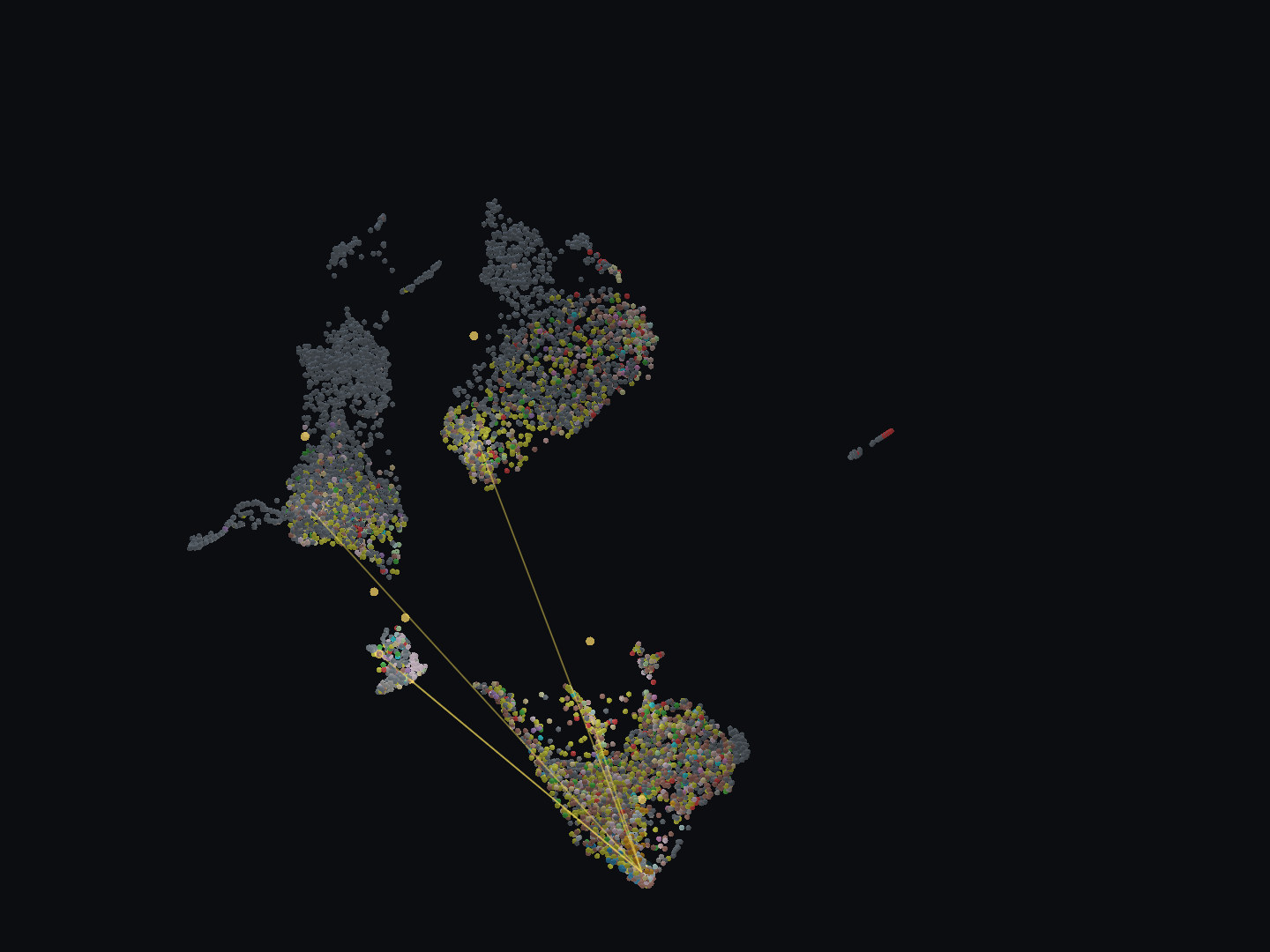
The T. gondii map with CDPK1 (TGME49_301440) selected. The selected gene and
its five neighbours emit light; lines show attention-corrected literature
co-mention links. Colours show compartments. This animation uses the pre-0.43
layout; newly opened maps use the recorded, balanced feature recipe.
View a still image.
Each point is a gene. Its position comes from an embedding of selected features; nearby points have similar inputs, but proximity alone does not demonstrate a shared function or physical interaction. Colours, relationship edges, and the evidence panel provide the context needed to interpret the map. Missing evidence is shown separately from measured values.
The analysis panel lets you change feature sets, build embeddings, cluster genes, and evaluate recovery of labels held out from the input. Search scores help prioritize candidates; they are not experimental validation. See the user guide for controls and analysis settings.
Explore, predict and compare
The Tools menu offers three starting points:
- Explore a gene searches identifiers, symbols and descriptions, then shows the source evidence.
- Predict a trait compares held-out predictions before making calls for unlabelled genes. Related genes stay in the same evaluation group; reports retain missing values, calibration status and exact input settings.
- Compare a screen joins a gene-level CSV/TSV to the existing evidence and keeps unresolved identifiers visible.
The package includes frozen protein sequence representations for 8,064 Toxoplasma proteins and AF3 summary features for 1,210 exactly mapped genes. Sequence features are optional inputs to prediction; local structure files can also be indexed for the structure viewer.
In the 0.43 benchmark, boosted trees with sequence and structure features reached 56.2% localization accuracy across held-out orthogroups. UMAP neighbours performed less well, and several rare classes remained poorly recovered. These are model hypotheses, not experimentally established annotations.
Guided workflows · Local AF3 structures · Protein sequence features
Working with spaCR
spaCR handles microscopy and image-based screen analysis. Its Starplast launcher installs and opens this app in a separate Python environment. Starplast provides a place to explore the biological evidence around those screen results. Export a gene-level table from spaCR and import it into Starplast; launching the app does not transfer results automatically.
Data and reproducibility
Full table of included data and source links →
The catalogue lists all 130 registered datasets and computed layers, with their measurements, coverage, publication references, and links to source data or inputs. Coverage differs by organism and assay; absence from a literature search does not establish that a gene has never been studied.
python -m starplast.paths       # show data locations and missing cache files
python -m starplast.build_graph # rebuild from available source datasets
| Variable | Purpose |
|---|---|
STARPLAST_CACHE |
Override the directory containing built gene tables and graphs |
STARPLAST_DATA |
Locate raw datasets used for rebuilding |
STARPLAST_STATE |
Override the directory for saved runs, annotations, and downloads |
Methods are described in MATERIALS_AND_METHODS.md. HANDOFF.md contains the development history and earlier design decisions. The repository review describes the current architecture and its limitations.
Development
pip install -e ".[dev,docs]"
QT_QPA_PLATFORM=offscreen pytest tests/test_app_smoke.py tests/test_docstrings.py -q
python scripts/build_docs.py
Open docs/site/index.html for the guide and generated API reference.
Some tests need source datasets, CUDA, or a working OpenGL context; see
development and releases for the release checks.
Develop on nightly and merge checked changes into main. To release, update all
package and runtime versions together with python scripts/release.py bump 0.43.0 and update
the changelog before merging. A version increase on main triggers checks,
builds, PyPI publishing, and a GitHub release. Ordinary merges do not publish.
The initial PyPI account setup is described in the release guide.
The source code is distributed under the MIT license. Source datasets and third-party artwork retain their own licenses and attribution.
1 maintainer

Metadata
1 maintainer
Release files for starplast 0.43.0
For a detailed explanation of source distributions (sdists) and built distributions (wheels), please see the package formats documentation.
Source distribution (sdist)
| File | Size | Uploaded | |
|---|---|---|---|
| starplast-0.43.0.tar.gz | 47.5 MB | Details |
Built distribution (wheel)
| File | Interpreter | ABI | Platform | Reset |
|---|---|---|---|---|
| starplast-0.43.0-py3-none-any.whl | Python 3 | none | any | Details |
Total release size: 94.6 MB
Release files / starplast-0.43.0.tar.gz
| Download URL | starplast-0.43.0.tar.gz |
|---|---|
| Size | 47.5 MB |
| Tags | Source |
|
SHA-256 checksum How to use checksums |
18492ea714db61ad1bbc7b5ca2a62824596044ed4228f8edcb1c760ebb1169e5
|
|
BLAKE2b-256 checksum How to use checksums |
613b3daa18b9d6184d12bd8a5f38345cea6e014ce82e2d069a287b05da338baf
|
| Upload date | |
|
Uploaded using Trusted Publishing? What is trusted publishing? |
Yes |
| Uploaded via |
twine/7.0.0 CPython/3.13.14
|
Provenance
Provenance describes where a file came from. On PyPI, provenance is shared via attestations, which provide a verifiable record of the build or publishing details. View details, limitations and caveats.


PyPI Publish Attestation
PyPI verified that this artifact, at this checksum, originated from the publisher listed below.
Signed by GitHub Actions, verified by PyPI on Sep 23, 2026.
Transparency logRelease files / starplast-0.43.0-py3-none-any.whl
| Download URL | starplast-0.43.0-py3-none-any.whl |
|---|---|
| Size | 47.1 MB |
| Tags | Python 3 |
|
SHA-256 checksum How to use checksums |
a50584af70be393bb61fe66fe591a51ecf116a57fe8b074188d0636892d24227
|
|
BLAKE2b-256 checksum How to use checksums |
1f2c4af0277a2f5fcdb1499429037c91bbc5358aff8617d49ba8a008d2c0179e
|
| Upload date | |
|
Uploaded using Trusted Publishing? What is trusted publishing? |
Yes |
| Uploaded via |
twine/7.0.0 CPython/3.13.14
|
Provenance
Provenance describes where a file came from. On PyPI, provenance is shared via attestations, which provide a verifiable record of the build or publishing details. View details, limitations and caveats.
PyPI Publish Attestation
PyPI verified that this artifact, at this checksum, originated from the publisher listed below.
Signed by GitHub Actions, verified by PyPI on Sep 23, 2026.
Transparency log













