
A comprehensive GPU memory profiler for JAX, PyTorch and TensorFlow with CLI, visualization, and analytics
Verified details
These details have been verified by PyPIProject links
GitHub Statistics
Maintainers


Project description
Stormlog




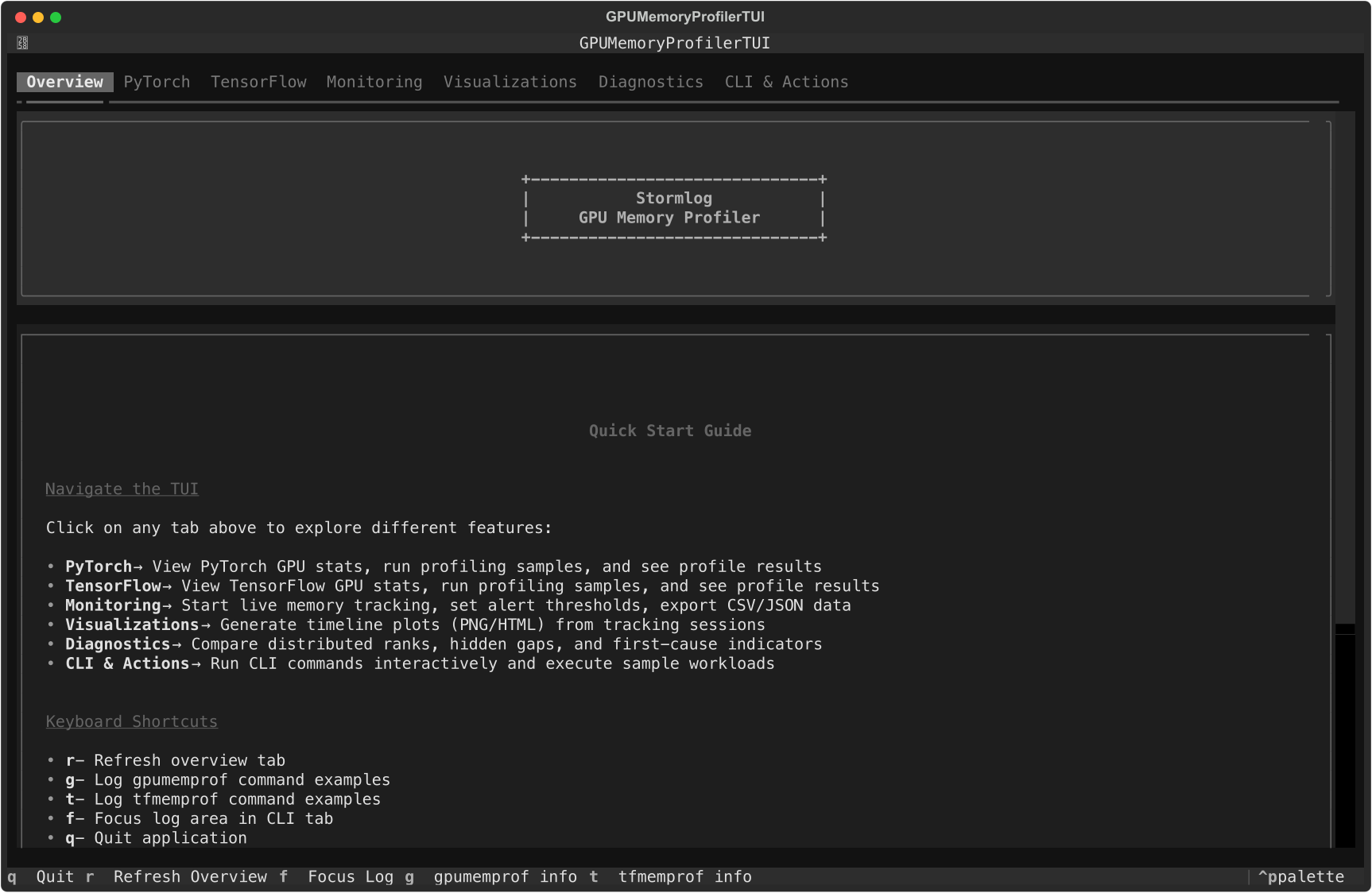
Current Overview tab from the shipped Textual interface.
Stormlog is a memory-profiling and inference-profiling toolkit for day-to-day PyTorch, TensorFlow, JAX, and OpenAI-compatible serving work. It combines Python APIs, CLI commands, and a Textual TUI so you can move from "what is using memory?" or "what is my endpoint doing under load?" to saved artifacts and shareable diagnostics without switching tools.
Long-running track and diagnose flows are session-aware, so one capture can
be reconstructed deterministically across sink segments, diagnose bundles, and
OOM flight-recorder artifacts.
For task-oriented operational guidance, use the Production Cookbook. The highest-signal entry points are the Always-on Tracking recipe, Incident Playbooks, and CI and Release Qualification.
Why use this tool
- Catch memory growth before it becomes an OOM.
- Compare allocated vs reserved usage during training and inference.
- Export telemetry and diagnose bundles for CI or release triage.
- Load the same artifacts into a terminal UI for faster debugging.
- Keep workflows available on CPU-only and MPS systems, not just CUDA boxes.
Installation
From PyPI
pip install stormlog
pip install "stormlog[viz]"
pip install "stormlog[tui,torch]"
pip install "stormlog[torch]"
pip install "stormlog[tf]"
pip install "stormlog[jax]"
pip install "stormlog[infer-tokenizers]"
pip install "stormlog[all]"
stormlog[all] installs every runtime extra: visualization, TUI, PyTorch,
TensorFlow, JAX, W&B, and inference tokenizer dependencies.
Package and import names
stormlog is the distribution name on PyPI and the primary Python import root.
TensorFlow-specific APIs live under stormlog.tensorflow; JAX-specific APIs
live under stormlog.jax.
| Task | Use |
|---|---|
| Install the package | pip install stormlog |
| Launch the TUI | stormlog or stormlog tui |
| Profile OpenAI-compatible inference | stormlog infer profile |
| Import PyTorch APIs | from stormlog import GPUMemoryProfiler, MemoryTracker |
| Import TensorFlow APIs | from stormlog.tensorflow import TFMemoryProfiler |
| Import JAX APIs | from stormlog.jax import JAXMemoryProfiler |
| Query local artifacts | stormlog query |
| Run framework memory CLI automation | gpumemprof, tfmemprof, or jaxmemprof |
From source
git clone https://github.com/Silas-Asamoah/stormlog.git
cd stormlog
pip install -e .
pip install -e ".[viz,tui,torch]"
If you want both framework extras in a development checkout:
pip install -e ".[dev,test,all]"
The examples/ package and Markdown test guides are source-checkout only. A
plain pip install stormlog does not include them.
Quick start
CLI-first workflow
This is the fastest path to verify an environment and produce an artifact you can inspect later:
gpumemprof info
gpumemprof track --duration 2 --interval 0.5 --output /tmp/gpumemprof_track.json --format json
gpumemprof analyze /tmp/gpumemprof_track.json --format txt --output /tmp/gpumemprof_analysis.txt
gpumemprof diagnose --duration 0 --output /tmp/gpumemprof_diag

tfmemprof info
tfmemprof diagnose --duration 0 --output /tmp/tf_diag

jaxmemprof info
jaxmemprof diagnose --duration 0 --output /tmp/jax_diag
If you reuse a sink directory across multiple runs, Stormlog separates those
captures by session_id and defaults analysis to the newest clean session.
OpenAI-compatible inference workflow
Use stormlog infer when you want client-observed latency, throughput,
failure, token, and optional system telemetry from a Chat Completions endpoint:
stormlog infer profile \
  --base-url http://localhost:8000/v1 \
  --model Qwen/Qwen2.5-7B-Instruct \
  --concurrency 1,4,8 \
  --input-tokens 512,2048 \
  --output-tokens 128,512 \
  --requests 20 \
  --output /tmp/stormlog_infer.jsonl

stormlog infer analyze /tmp/stormlog_infer.jsonl
PyTorch API workflow
GPUMemoryProfiler currently targets PyTorch runtimes exposed through
torch.cuda, which covers NVIDIA CUDA and ROCm-backed builds. On Apple MPS or
CPU-only systems, use MemoryTracker, the CLI, or CPUMemoryProfiler instead.
import torch
from stormlog import GPUMemoryProfiler

profiler = GPUMemoryProfiler()
device = profiler.device
model = torch.nn.Linear(1024, 128).to(device)

def train_step() -> torch.Tensor:
    x = torch.randn(64, 1024, device=device)
    y = model(x)
    return y.sum()

profile = profiler.profile_function(train_step)
summary = profiler.get_summary()

print(profile.function_name)
print(f"Peak memory: {summary['peak_memory_usage'] / (1024**3):.2f} GB")
TensorFlow API workflow
TFMemoryProfiler works on GPU or CPU-backed TensorFlow runtimes.
from stormlog.tensorflow import TFMemoryProfiler

profiler = TFMemoryProfiler(enable_tensor_tracking=True)

with profiler.profile_context("training"):
    model.fit(x_train, y_train, epochs=1, batch_size=32)

results = profiler.get_results()
print(f"Peak memory: {results.peak_memory_mb:.2f} MB")
print(f"Snapshots captured: {len(results.snapshots)}")
Daily workflows
ML engineer
- instrument a training step with
GPUMemoryProfilerorTFMemoryProfiler - switch to
trackwhen you need telemetry over time - export plots or analyze saved telemetry later
Researcher debugging regressions
- capture
trackoutput or adiagnosebundle - open the same artifacts in the TUI diagnostics and visualizations tabs
- compare growth, gaps, and per-rank behavior before changing model code
- switch between discovered sessions instead of merging multiple captures from the same sink
CI or release owner
These example-module commands require a source checkout plus pip install -e ..
- run
python -m examples.cli.quickstart - run
python -m examples.cli.capability_matrix --mode smoke --target both --oom-mode simulated - archive the emitted artifacts for later triage in the TUI
Terminal UI
Install the optional TUI dependencies and launch:
pip install "stormlog[tui,torch]"
stormlog
The current TUI startup path imports PyTorch immediately, so stormlog[tui] alone is not enough yet.
The current TUI tabs are:
OverviewPyTorchTensorFlowMonitoringVisualizationsDiagnosticsCLI & Actions
Overview tab with current system summary and navigation guidance.
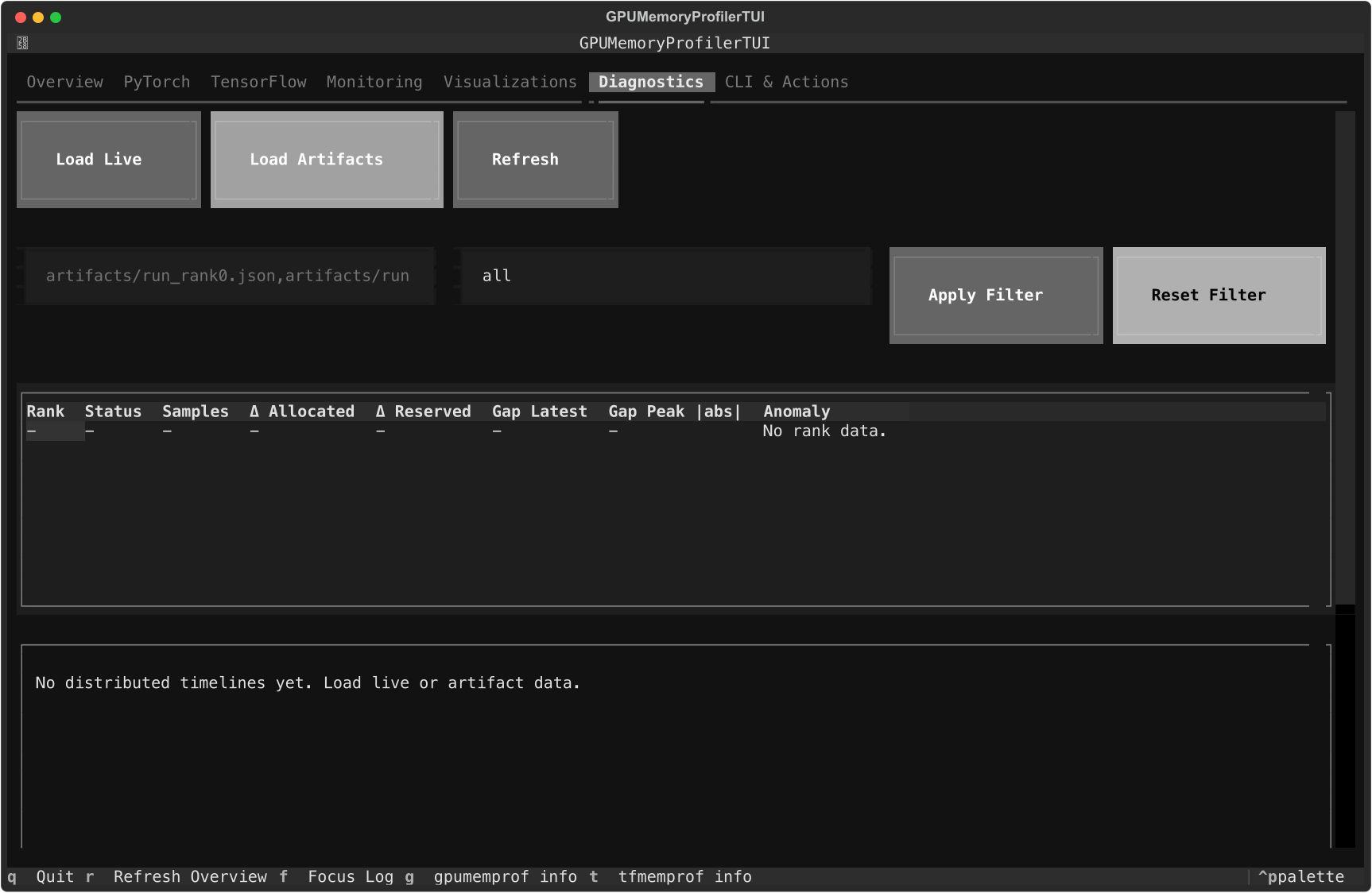
Diagnostics tab with the current artifact loader, rank table, and timeline panes.
Use the Monitoring tab to start live tracking, export CSV or JSON events to ./exports, and tune warning or critical thresholds. In Visualizations, refresh the live timeline and save PNG or HTML exports under ./visualizations. In Diagnostics, load live telemetry or artifact paths and rebuild rank-level diagnostics without leaving the terminal.
For screen-by-screen details, see the TUI Guide.
Examples and walkthroughs
- Documentation home
- Installation guide
- Usage guide
- CLI guide
- Production cookbook
- Always-on tracking
- Incident playbooks
- CI and release qualification
- Examples guide
- Testing guide
- PyTorch guide
- TensorFlow guide
- Long-form article
Launch QA scenarios
These commands require a source checkout:
python -m examples.cli.quickstart
python -m examples.cli.capability_matrix --mode smoke --target both --oom-mode simulated
python -m examples.scenarios.cpu_telemetry_scenario
python -m examples.scenarios.oom_flight_recorder_scenario --mode simulated
CPU-only and laptop workflows
If CUDA is not available, Stormlog still supports:
gpumemprof infogpumemprof monitorgpumemprof trackCPUMemoryProfilerCPUMemoryTracker- the TUI overview, monitoring, diagnostics, and CLI tabs
See the CPU Compatibility Guide for the CPU-only path.
Contributing
See the Contributing Guide and Code of Conduct.
License
Project details
Verified details
These details have been verified by PyPIProject links
GitHub Statistics
Maintainers
Release history Release notifications | RSS feed


Download files
Download the file for your platform. If you're not sure which to choose, learn more about installing packages.
Source Distribution
Built Distribution
Filter files by name, interpreter, ABI, and platform.
If you're not sure about the file name format, learn more about wheel file names.
Copy a direct link to the current filters
File details
Details for the file stormlog-0.3.7.tar.gz.
File metadata
- Download URL: stormlog-0.3.7.tar.gz
- Upload date:
- Size: 6.5 MB
- Tags: Source
- Uploaded using Trusted Publishing? Yes
- Uploaded via: twine/6.1.0 CPython/3.13.13
File hashes
| Algorithm | Hash digest | |
|---|---|---|
| SHA256 |
df4235741c863e8140b993e13cb419451f65e9a27cb5c4946444f45525153de4
|
|
| MD5 |
239ac780079f5e45c1a31767a9600058
|
|
| BLAKE2b-256 |
da0ebd055a8e1f8f7363230df5207c5a4c2ec1e8bb96707852f3821cf3034a98
|
Provenance
The following attestation bundles were made for stormlog-0.3.7.tar.gz:
Publisher:
release.yml on Silas-Asamoah/stormlog
-
Statement:
-
Statement type:
https://in-toto.io/Statement/v1 -
Predicate type:
https://docs.pypi.org/attestations/publish/v1 -
Subject name:
stormlog-0.3.7.tar.gz -
Subject digest:
df4235741c863e8140b993e13cb419451f65e9a27cb5c4946444f45525153de4 - Sigstore transparency entry: 1917206338
- Sigstore integration time:
-
Permalink:
Silas-Asamoah/stormlog@7e84d361b0ab358fe2fb56812941d736cc3d322c -
Branch / Tag:
refs/heads/main - Owner: https://github.com/Silas-Asamoah
-
Access:
public
-
Token Issuer:
https://token.actions.githubusercontent.com -
Runner Environment:
github-hosted -
Publication workflow:
release.yml@7e84d361b0ab358fe2fb56812941d736cc3d322c -
Trigger Event:
workflow_dispatch
-
Statement type:
File details
Details for the file stormlog-0.3.7-py3-none-any.whl.
File metadata
- Download URL: stormlog-0.3.7-py3-none-any.whl
- Upload date:
- Size: 330.5 kB
- Tags: Python 3
- Uploaded using Trusted Publishing? Yes
- Uploaded via: twine/6.1.0 CPython/3.13.13
File hashes
| Algorithm | Hash digest | |
|---|---|---|
| SHA256 |
69157b27f8a8caca45550d00e1ea3a514d5c4ed042cc598c46e587b778f6e17a
|
|
| MD5 |
c185ecb5f1f26794f0eff86077546389
|
|
| BLAKE2b-256 |
3f3380458cf039346d6aee0af4d3c8d026f1cbd5e6c46d9533dc5d0613cb83d3
|
Provenance
The following attestation bundles were made for stormlog-0.3.7-py3-none-any.whl:
Publisher:
release.yml on Silas-Asamoah/stormlog
-
Statement:
-
Statement type:
https://in-toto.io/Statement/v1 -
Predicate type:
https://docs.pypi.org/attestations/publish/v1 -
Subject name:
stormlog-0.3.7-py3-none-any.whl -
Subject digest:
69157b27f8a8caca45550d00e1ea3a514d5c4ed042cc598c46e587b778f6e17a - Sigstore transparency entry: 1917206427
- Sigstore integration time:
-
Permalink:
Silas-Asamoah/stormlog@7e84d361b0ab358fe2fb56812941d736cc3d322c -
Branch / Tag:
refs/heads/main - Owner: https://github.com/Silas-Asamoah
-
Access:
public
-
Token Issuer:
https://token.actions.githubusercontent.com -
Runner Environment:
github-hosted -
Publication workflow:
release.yml@7e84d361b0ab358fe2fb56812941d736cc3d322c -
Trigger Event:
workflow_dispatch
-
Statement type:






