


Terminal streaming markdown that rocks
The problem: Every terminal markdown renderer wants to capture your screen. You want one that just outputs formatted text without trying to hijack things into a full screen experience.
The solution: Streamdown, part of the DAY50 suite of open-source tools for AI workflows, is designed for the wide variety of markdown from various LLM models.
Beautify markdown from any terminal application, any source, in any context, in realtime.
As both a fast standards-compliant library and a powerful CLI, it supports standard piping and files as arguments like any normal pager but can also run as a wrapper so you retain full keyboard interactivity. Arrow keys, control, alt, all still work.
$ uv tool install streamdown
Using it as a library:
sd = Streamdown()
sd.render(content)
sd.tidyup()
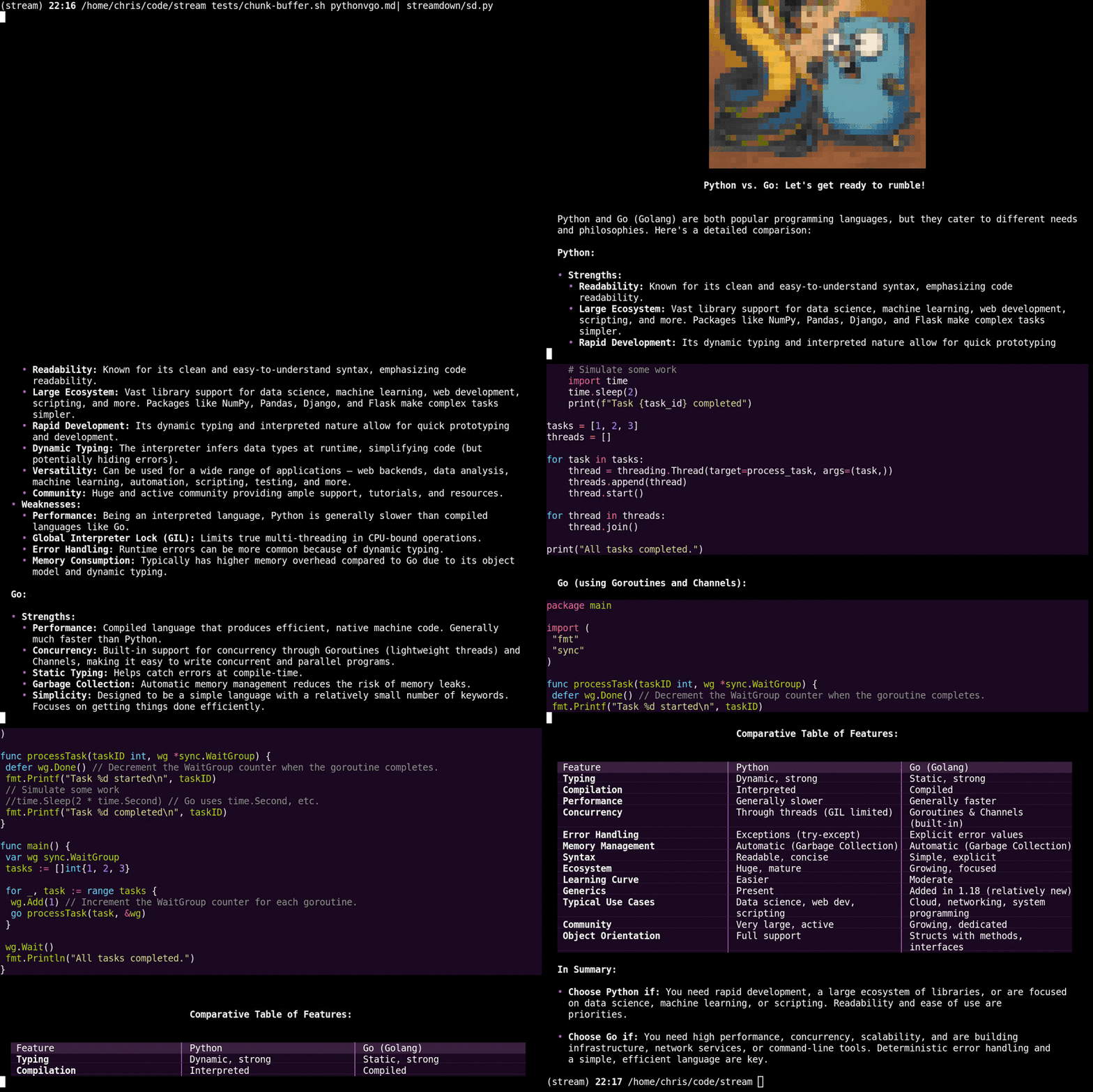
Fast and Realtime.
Watch Streamdown run over a FIFO pipe through tee in tmux on an M4 using BitNet. This is run straight. No clever unbuffering tricks. You can see the unstructured content on the right and the realtime Streamdown render on the left.
Provides clean copyable code for long code lines
Other renderers inject line breaks when copying code that wraps around. Streamdown's better and now you are too!
Set PrettyBroken and PrettyPad to False in your toml (see below) to make Streamdown ensure code is always cleanly mouse copyable
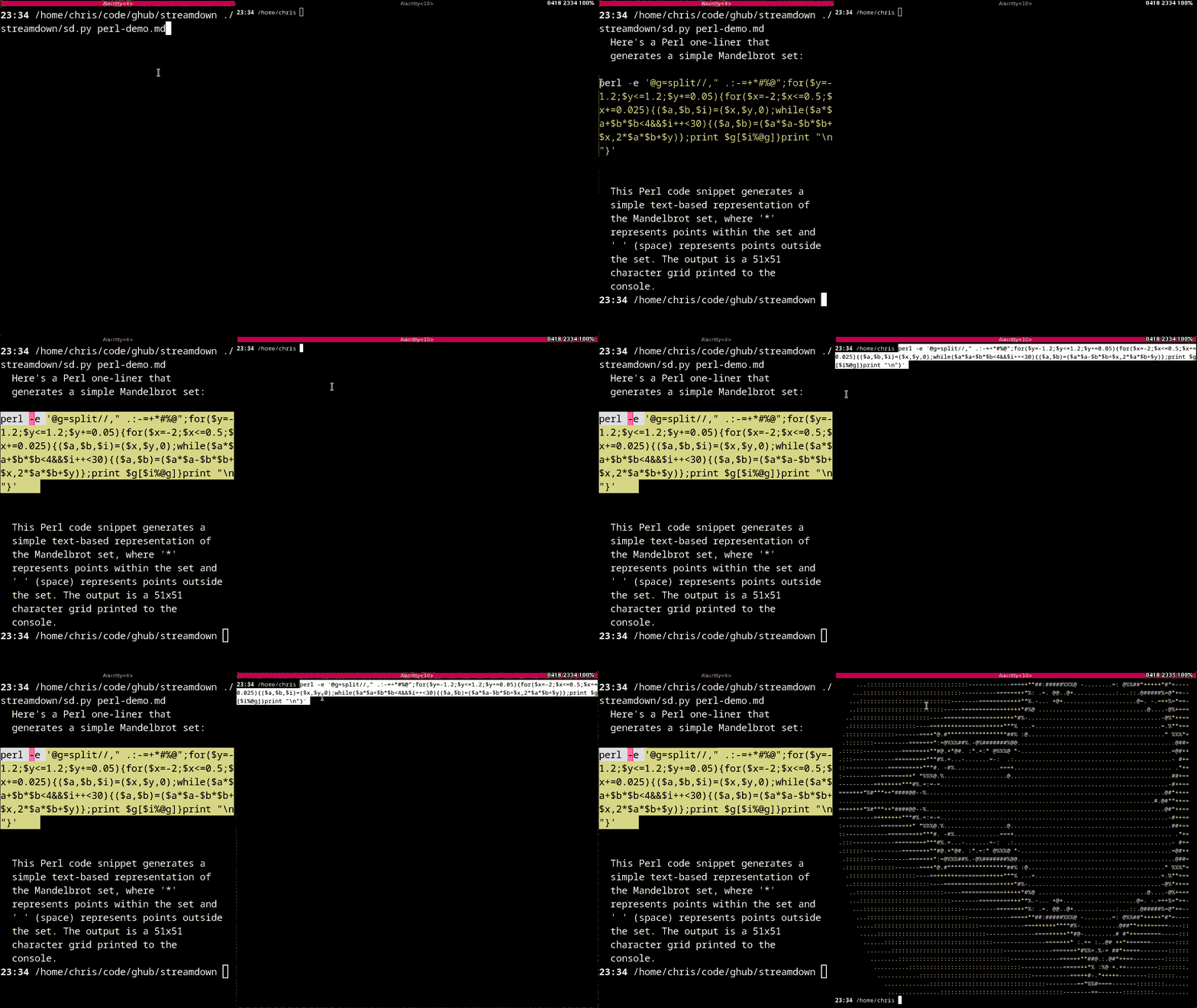
Supports images
Here's kitty and alacritty.
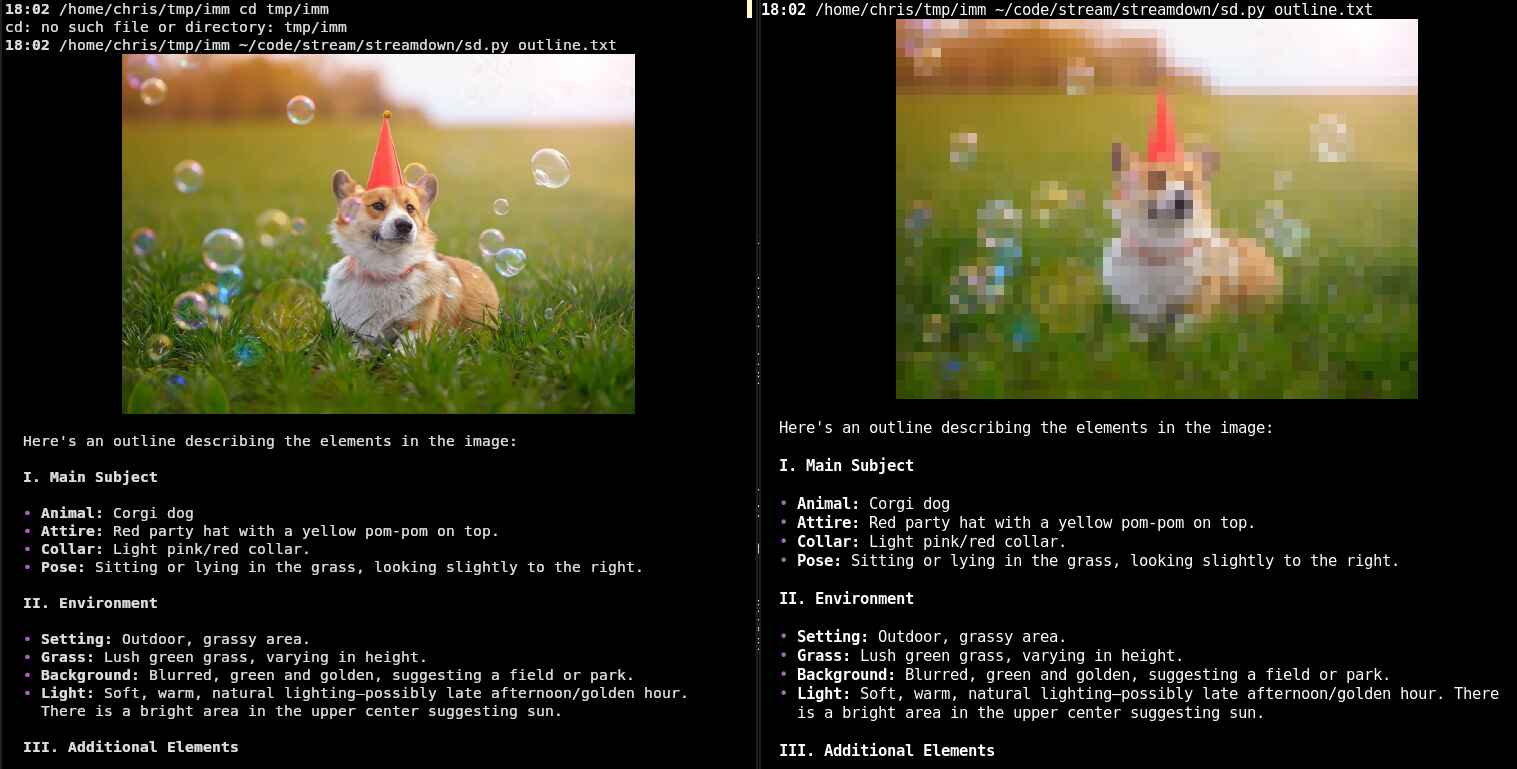
Hyperlinks (OSC 8) and Clipboard (OSC 52)
The optional Clipboard feature puts the final codeblock into your clipboard. See below for details.
As well as everything else...
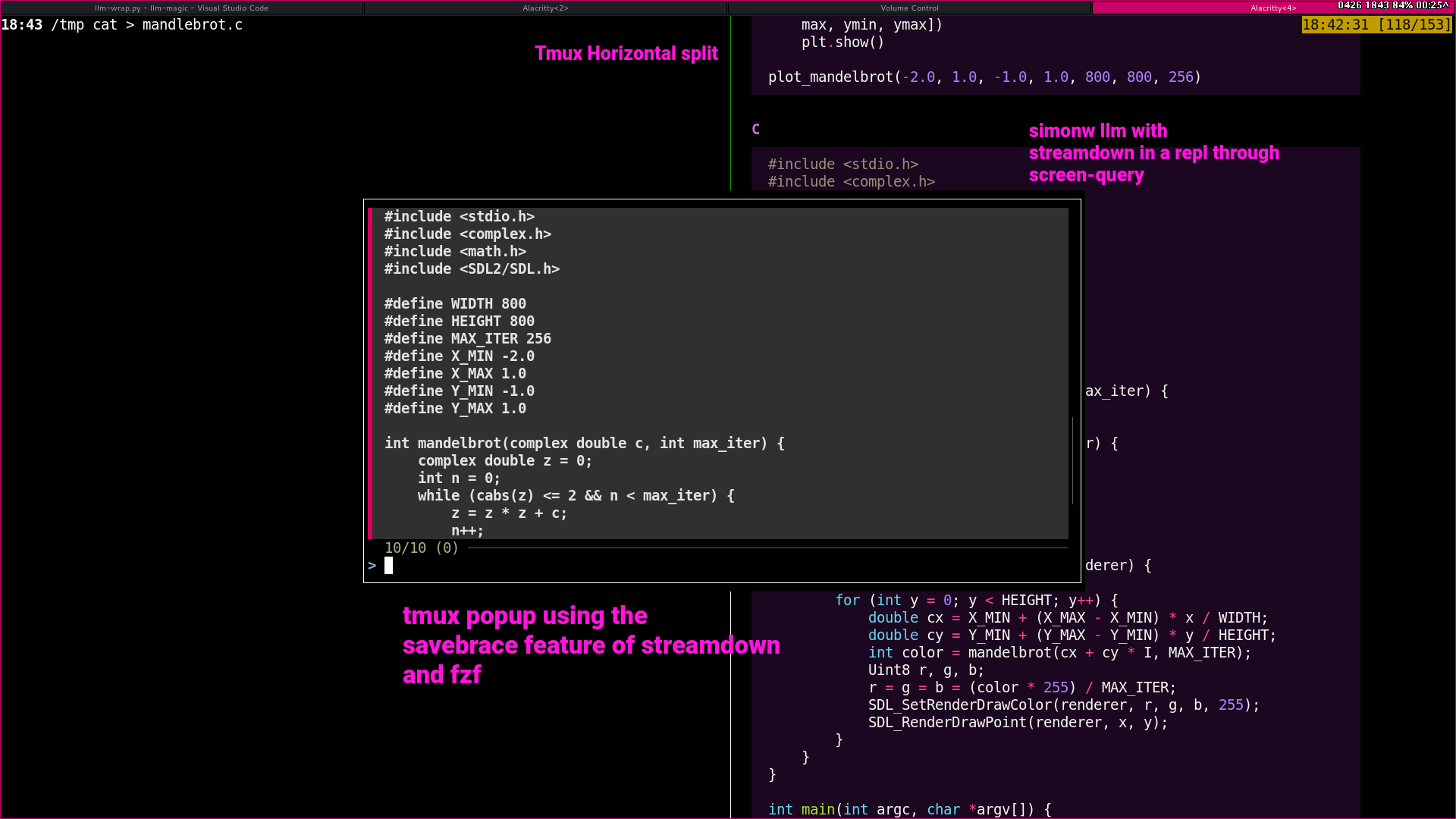
Here's the Savebrace feature with sidechat and sc-picker. You can have an ongoing conversation in tmux with your terminal session. Then use popups and fzf to insert command or coding blocks all with a keystroke.
This allows you to interactively debug in a way that the agent doesn't just wander off doing silly things.
It takes about 2 minutes to set up and about 0.2s to use. Fast, fluid and free.
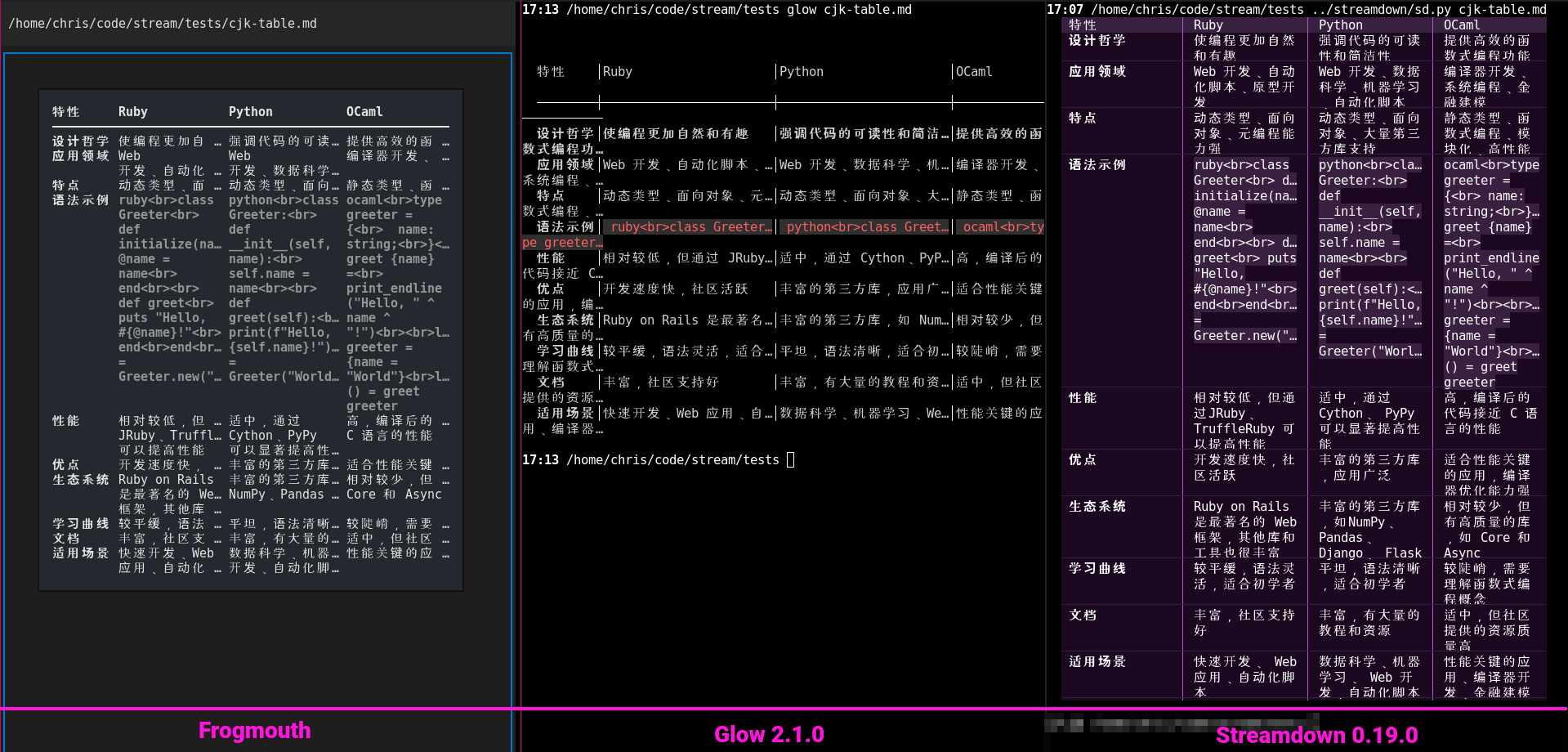
...even CJK
Compare how streamdown wraps and spaces this tabular Chinese description of programming languages to other leading markdown renderers.
Only one generates the text without truncation. 很美!
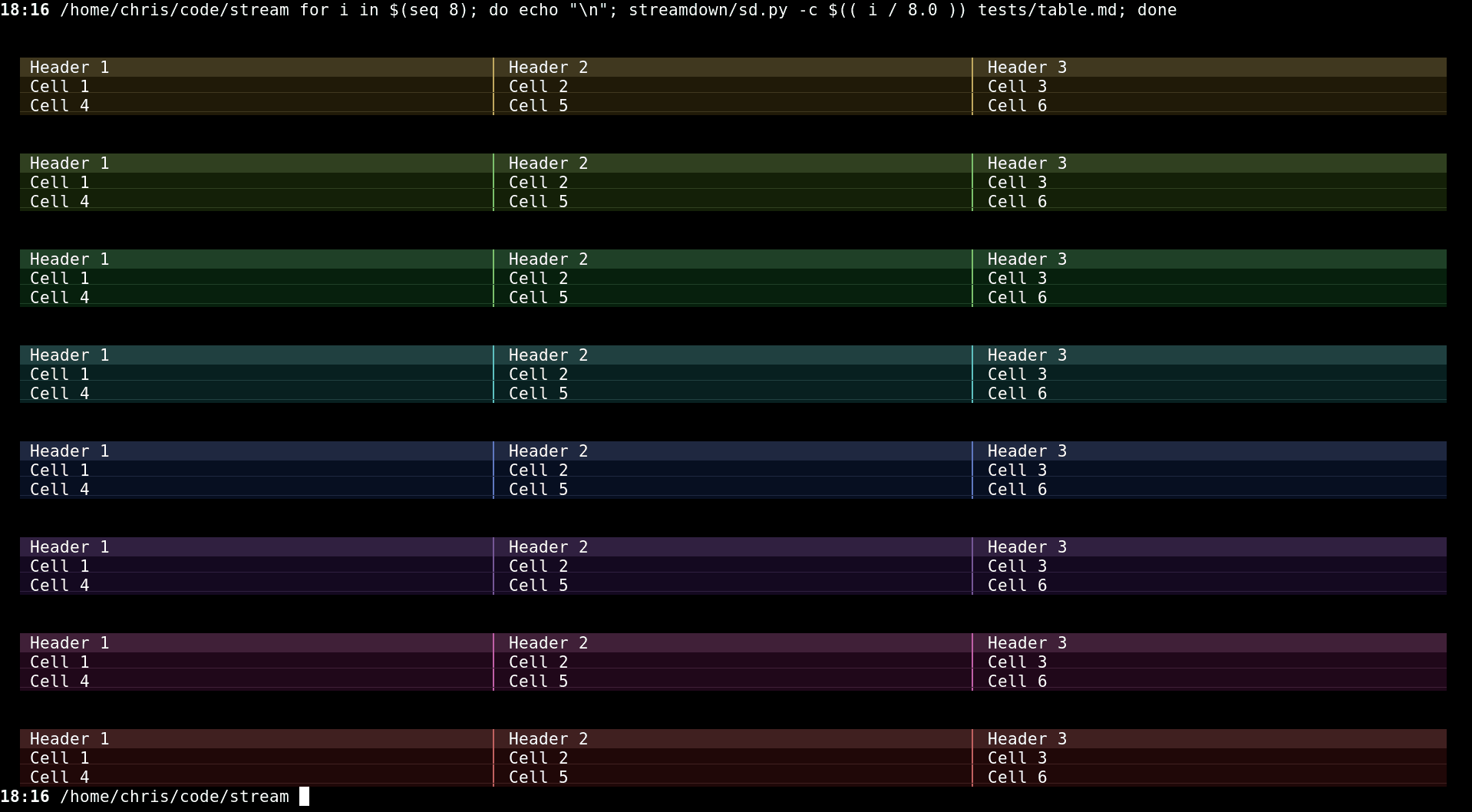
Colors are highly (and quickly) configurable for people who care a lot, or just a little.
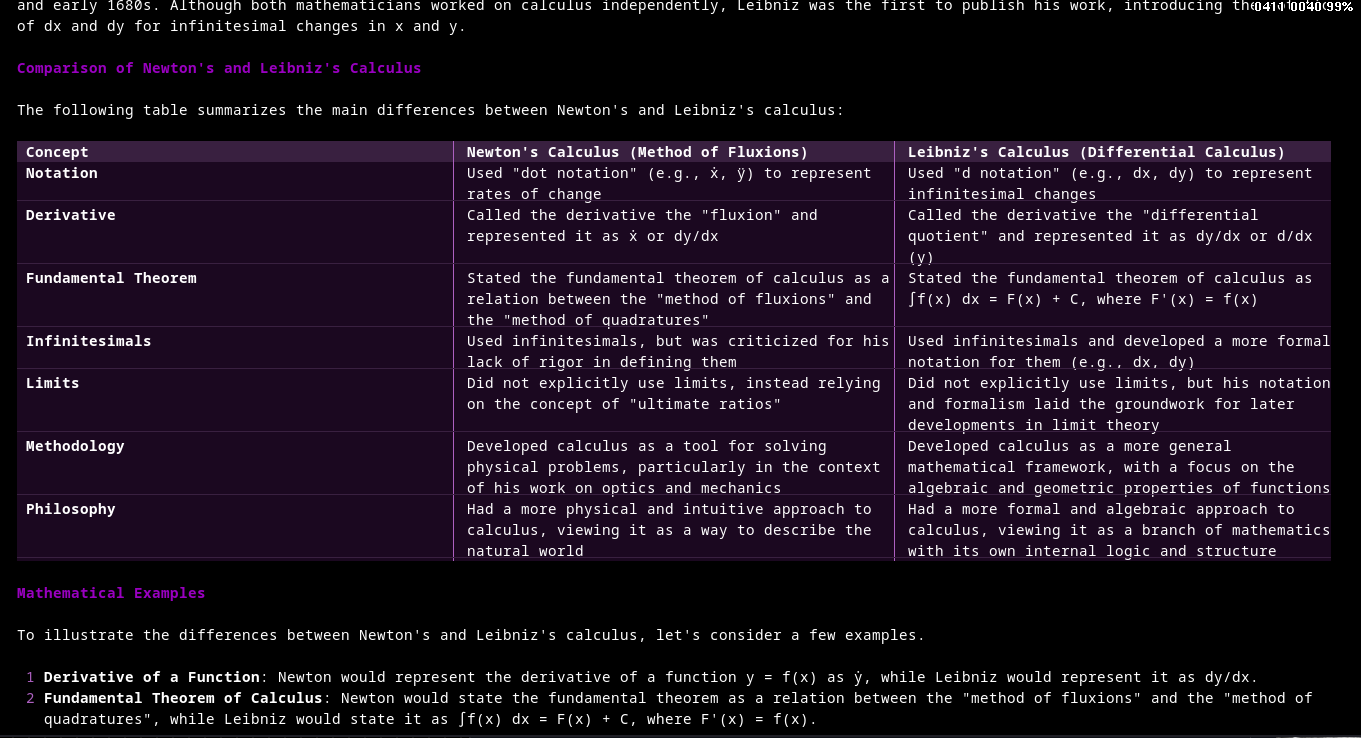
Has a Plugin system to extend the parser and renderers.
For instance, here is the latex plugin doing math inside a table:
It is designed for AI and can be used to do parser based sophisticated pipelines and routing, cracking open various monolithic AI solutions to permit them to integrate. Think of it as output level routing at the semantic level.
You can also just use it like a normal person.
Configuration
The location it's stored is platform specific and can be seen with the -h flag. If this file does not exist upon first run, it will be created with default values.
Here are the sections:
[style]
Defines the base Hue (H), Saturation (S), and Value (V) from which all other palette colors are derived. This can also be specified at runtime via command line arguments. See below!
The default values are at the beginning of the source.
HSV: [ 0.0 - 1.0, 0.0 - 1.0, 0.0 - 1.0 ]Dark: Multipliers for background elements, code blocks.Grey: Multipliers for blockquote and thinkblock.Mid: Multipliers for inline code backgrounds, table headers.Symbol: Multipliers for list bullets, horizontal rules, links.Head: Multipliers for level 3 headers.Bright: Multipliers for level 2 headers.Margin(integer, default:2): The left and right indent for the output.Width(integer, default:0): Along with theMargin,Widthspecifies the base width of the content, which when set to 0, means use the terminal width. See #6 for more detailsPrettyPad(boolean, default:true): Uses a unicode vertical pad trick to add a half height background to code blocks. This makes copy/paste have artifacts. See #2. I like it on. But that's just mePrettyBroken(boolean, default:true): This will break the copy/paste assurance above. The output is much prettier, but it's also broken. So it's pretty broken. Works nicely with PrettyPad.ListIndent(integer, default:2): This is the recursive indent for the list styles.Syntax(string, defaultnative): This is the syntax highlighting theme which come via pygments.
Example:
[style]
PrettyPad = true
PrettyBroken = true
HSV = [0.7, 0.5, 0.5]
Dark = { H = 1.0, S = 1.2, V = 0.25 } # Make dark elements less saturated and darker
Symbol = { H = 1.0, S = 1.8, V = 1.8 } # Make symbols more vibrant
[features]
Controls optional features:
Timeout(float, default:0.1): controls the select timeout for streaming. This usually doesn't have to be modified.Network(boolean, default:true): controls whether network calls are made (such as for the rendering of remote images). See #29Images(boolean, default:true): controls whether images are rendered or not.CodeSpaces(boolean, default:true): Enables detection of code blocks indented with 4 spaces. Set tofalseto disable this detection method (triple-backtick blocks still work).Clipboard(boolean, default:true): Enables copying the last code block encountered to the system clipboard using OSC 52 escape sequences upon exit. Set tofalseto disable.Logging(boolean, default:false): Enables logging to tmpdir (/tmp/sd) of the raw markdown for debugging and bug reporting. The logging uses an emoji as a record separator so the actual streaming delays can be simulated and replayed. If you use thefilenamebased invocation, that is to say,sd <filename>, this type of logging is always off.Savebrace(boolean, default:true): Saves the code blocks of a conversation to the append file$TMP/sd/$UID/savebraceso you canfzfor whatever you want through it. See how it's used in DAY50's sidechat.
Example:
[features]
CodeSpaces = false
Clipboard = false
Command Line
The most exciting feature here is --exec with it you can do full readline support like this:
$ sd --exec "llm chat"
And now you have all your readline stuff. It's pretty great. (Also see the DAY50 shellwrap project.)
This relies on "guessing" what a prompt will look like. But don't worry, you can change that with the --prompt option if yours is a bit unique. It's a PCRE regex, so you can be a bit flexible.
It's also worth noting that things like the -c aren't "broken" with regard to file input. You can do something like this:
$ sd -c <(echo "[style]\nMargin=10")
To override the margin.
usage: sd [-h] [-l LOGLEVEL] [-b BASE] [-c CONFIG] [-w WIDTH] [-e EXEC]
          [-p PROMPT] [-s SCRAPE] [-v] [--strip]
          [filenameList ...]

Streamdown is a streaming markdown renderer for modern terminals.
https://github.com/day50-dev/Streamdown

paths:
  config                /home/chris/.config/streamdown/config.toml
  logs                  /tmp/sd/1000

positional arguments:
  filenameList          Input file to process (also takes stdin)

options:
  -h, --help            show this help message and exit
  -l, --loglevel LOGLEVEL
                        Set the logging level
  -b, --base BASE       Set the hsv base: h,s,v
  -c, --config CONFIG   Use a custom config override
  -w, --width WIDTH     Set the width WIDTH
  -e, --exec EXEC       Wrap a program EXEC for more 'proper' i/o handling
  -p, --prompt PROMPT   A PCRE regex prompt to detect (default: ^.*>\s+$)
  -s, --scrape SCRAPE   Scrape code snippets to a directory SCRAPE
  -v, --version         Show version information
  --strip               Just strip the markdown and output plaintext
Note: Some features are not supported on some OSs. Please file a ticket if you need a feature on your platform that isn't working.
Demo
Do this
$ ./streamdown/sd.py tests/*md
Install from source
After the git clone least one of these should work, hopefully. it's using the modern uv pip tool but is also backwards compatible to the pip3 install -r requirements.txt flow.
$ pipx install -e .
$ pip install -e .
$ uv pip install -e .
Explore the rest of DA`/50. Feel free to follow us, there's some exciting stuff coming.
1 maintainer

Metadata
1 maintainer
Release files for streamdown 0.36.7
For a detailed explanation of source distributions (sdists) and built distributions (wheels), please see the package formats documentation.
Source distribution (sdist)
| File | Size | Uploaded | |
|---|---|---|---|
| streamdown-0.36.7.tar.gz | 4.3 MB | Details |
Built distribution (wheel)
| File | Interpreter | ABI | Platform | Reset |
|---|---|---|---|---|
| streamdown-0.36.7-py3-none-any.whl | Python 3 | none | any | Details |
Total release size: 4.3 MB
Release files / streamdown-0.36.7.tar.gz
| Download URL | streamdown-0.36.7.tar.gz |
|---|---|
| Size | 4.3 MB |
| Tags | Source |
|
SHA-256 checksum How to use checksums |
f92f09c908a5c5a5a94b294e2a55549374f42217203cfcb0ce386a1bd5531640
|
|
BLAKE2b-256 checksum How to use checksums |
d4e1206abbf839c7746d667ee5d1b5a8c30824bcb12117ec953dd85c1cd4d872
|
| Upload date | |
|
Uploaded using Trusted Publishing? What is trusted publishing? |
No |
| Uploaded via |
twine/6.1.0 CPython/3.13.14
|
Release files / streamdown-0.36.7-py3-none-any.whl
| Download URL | streamdown-0.36.7-py3-none-any.whl |
|---|---|
| Size | 34.3 kB |
| Tags | Python 3 |
|
SHA-256 checksum How to use checksums |
13ee78fb3ee808ef2381953f03383a93638ba83f0b64b9b3a02d2a22df0f8cf2
|
|
BLAKE2b-256 checksum How to use checksums |
a21efc9be1f7de6292e25a23946b0d39941c1c90594c32ca2c3f87eb9ec7a593
|
| Upload date | |
|
Uploaded using Trusted Publishing? What is trusted publishing? |
No |
| Uploaded via |
twine/6.1.0 CPython/3.13.14
|














