
streamlit-sigmajs



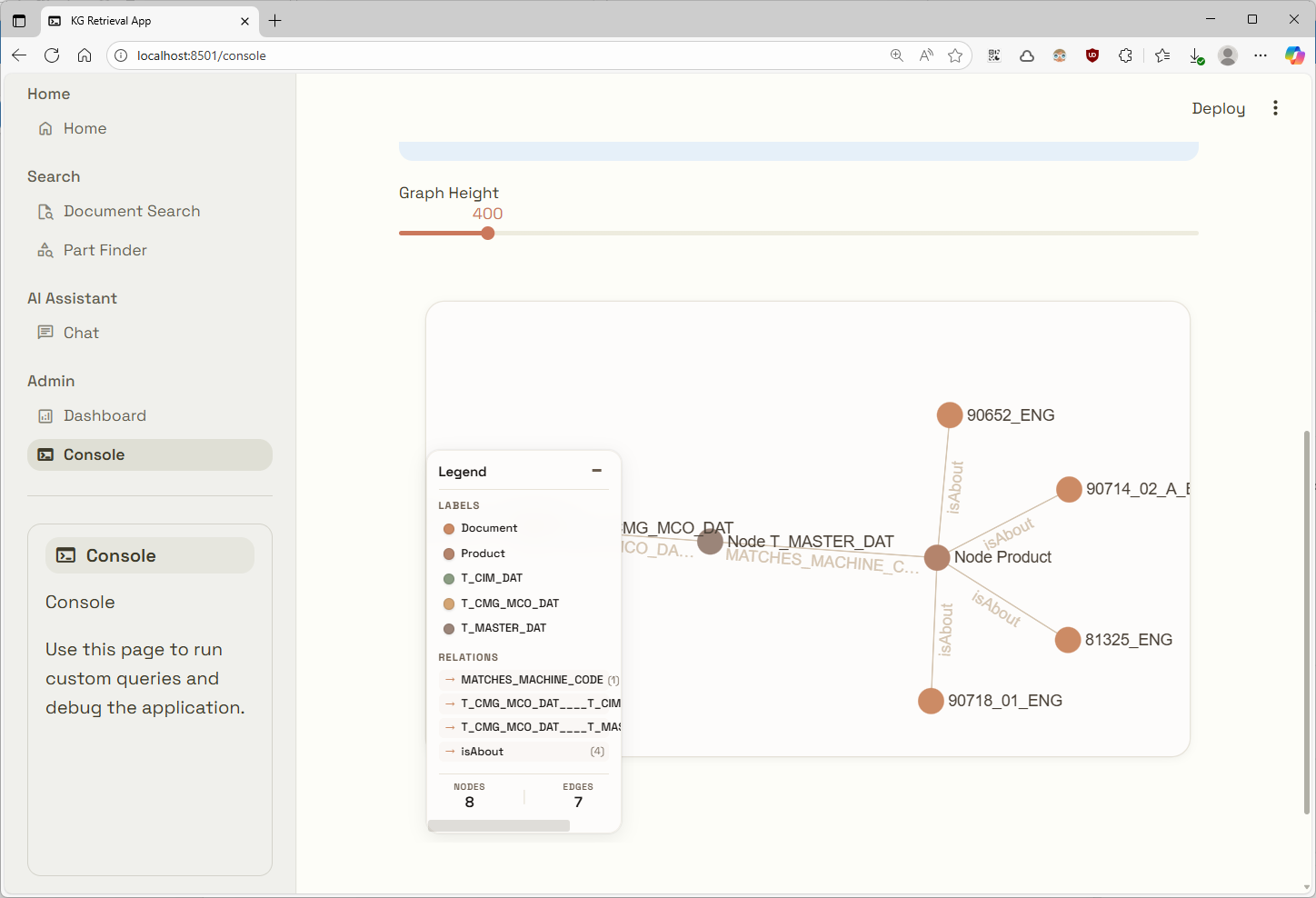
Interactive property-graph visualization for Streamlit, powered by Sigma.js. Pass a property-graph dictionary, NetworkX graph, Neo4j graph result, or pair of pandas DataFrames directly from Python.
Features
- Direct NetworkX, Neo4j, DataFrame, and property-graph inputs
- Streamlit-native and warm humanistic themes
- Node and edge selection with compact property inspectors
- Configurable labels, legend, colors, fonts, and interaction behavior
- ForceAtlas2, force, circular, circlepack, grid, concentric, hierarchical, random, and pre-positioned layouts
- Optional post-drag relaxation: the dropped node stays in place while nearby nodes settle
- Multiple independent graphs on the same Streamlit page
Requirements
- Python 3.10 or newer
- Streamlit 1.51 or newer
No JavaScript or frontend setup is required when installing the package from PyPI.
Installation
With uv:
uv add streamlit-sigmajs
With pip:
python -m pip install streamlit-sigmajs
NetworkX, pandas, and the Neo4j driver are optional. Install only the library used by your application.
Quick start
Create app.py:
import streamlit as st
from st_sigma import sigma_graph

st.title("Knowledge graph")

graph = {
    "nodes": [
        {
            "id": "ada",
            "labels": ["Person"],
            "properties": {"name": "Ada Lovelace", "born": 1815},
        },
        {
            "id": "notes",
            "labels": ["Work"],
            "properties": {"name": "Notes on the Analytical Engine"},
        },
    ],
    "edges": [
        {
            "id": "authored",
            "source": "ada",
            "target": "notes",
            "type": "AUTHORED",
            "properties": {"year": 1843},
            "directed": True,
        }
    ],
}

sigma_graph(graph, height=600, key="knowledge-graph")
Run it with uv:
uv run streamlit run app.py
Or with pip:
streamlit run app.py
The default streamlit theme follows the host app's colors. Click a node or
edge to inspect its properties, drag nodes to reposition them, and use the
mouse wheel or trackpad to zoom.
Supported graph inputs
NetworkX
Pass any NetworkX Graph, DiGraph, MultiGraph, or MultiDiGraph. Node
attributes become properties. The label or labels attribute sets the node
type, while an edge's type attribute sets its relationship type.
import networkx as nx
from st_sigma import sigma_graph

graph = nx.karate_club_graph()
sigma_graph(graph, layout="forceatlas2", key="karate")
Install NetworkX with uv add networkx or python -m pip install networkx.
pandas DataFrames
Pass the node DataFrame first and the edge DataFrame through edges=. Nodes
require an id column; edges require source and target. The conventional
optional columns are label or labels for nodes and id, type, and
directed for edges. All remaining columns become properties.
import pandas as pd
from st_sigma import sigma_graph

nodes = pd.DataFrame([
    {"id": "ada", "label": "Person", "name": "Ada Lovelace"},
    {"id": "notes", "label": "Work", "name": "Analytical Engine Notes"},
])
edges = pd.DataFrame([
    {"id": "r1", "source": "ada", "target": "notes", "type": "AUTHORED"},
])

sigma_graph(nodes, edges=edges, theme="humanistic", key="dataframes")
Install pandas with uv add pandas or python -m pip install pandas.
Neo4j
neo4j.Result.graph output can be passed directly; no conversion helper is
needed.
import neo4j
from neo4j import GraphDatabase
from st_sigma import sigma_graph

with GraphDatabase.driver(NEO4J_URI, auth=NEO4J_AUTH) as driver:
    graph = driver.execute_query(
        "MATCH (a)-[r]->(b) RETURN a, r, b LIMIT 100",
        result_transformer_=neo4j.Result.graph,
    )

sigma_graph(graph, height=650, key="neo4j")
Install the driver with uv add neo4j or python -m pip install neo4j.
Property-graph dictionaries
The canonical schema is:
graph = {
    "nodes": [
        {
            "id": "node-id",
            "labels": ["NodeType"],
            "properties": {"name": "Visible label", "any_key": "any value"},
        }
    ],
    "edges": [
        {
            "id": "edge-id",
            "source": "source-node-id",
            "target": "target-node-id",
            "type": "RELATIONSHIP_TYPE",
            "properties": {},
            "directed": True,
        }
    ],
}
Legacy dictionaries using identity, relationships, start, and end are
also normalized automatically.
Themes and layouts
Use a preset for common cases:
sigma_graph(graph, theme="humanistic", layout="circular")
Themes:
streamlit— neutral styling that follows Streamlit theme variableshumanistic— warm surfaces and a muted, low-saturation palette
Layouts:
forceatlas2forcecircularcirclepackgridconcentrichierarchicalrandomnone— preserve suppliedxandynode properties
Display and interaction configuration
Most applications only need sigma_graph(...). Use GraphConfig when more
control is required:
from st_sigma import DisplayConfig, GraphConfig, LayoutConfig, sigma_graph

config = GraphConfig(
    display=DisplayConfig(
        node_labels="hover",       # "auto" | "hover" | "hidden"
        edge_labels="hover",       # "always" | "hover" | "hidden"
        node_label_size=11,
        edge_label_size=8,
        properties_panel="compact",  # "compact" | "cards" | "hidden"
        show_legend=True,
        legend_collapsed=True,
        selection_dimming=0.68,
    ),
    layout=LayoutConfig(
        name="forceatlas2",
        iterations=120,
        dynamic_after_drag=True,
        drag_solver="force",       # "force" | "forceatlas2"
        drag_relaxation_ms=1000,
    ),
)

sigma_graph(graph, config=config, key="configured-graph")
Hierarchical layouts accept hierarchy_direction="TB", "BT", "LR", or
"RL".
To use a locally installed font, set label_font_family. For Google Fonts or a
self-hosted @font-face stylesheet, also provide its CSS URL:
display = DisplayConfig(
    label_font_family="'IBM Plex Sans', sans-serif",
    label_font_url=(
        "https://fonts.googleapis.com/css2?"
        "family=IBM+Plex+Sans:wght@400;500;600&display=swap"
    ),
)
Run the example gallery
The repository includes a gallery with property-graph, NetworkX, DataFrame, and Neo4j-like inputs, both themes, and an interactive configuration playground.
Clone the repository, then run it with uv:
git clone https://github.com/gitkeniwo/streamlit-sigmajs.git
cd streamlit-sigmajs
uv sync --extra examples
uv run streamlit run examples/app.py
Or create an editable environment with pip:
git clone https://github.com/gitkeniwo/streamlit-sigmajs.git
cd streamlit-sigmajs
python -m venv .venv
source .venv/bin/activate  # Windows: .venv\Scripts\activate
python -m pip install -e ".[examples]"
streamlit run examples/app.py
Downloaded datasets are stored in the ignored examples/data/ directory.
See the
example gallery notes
for dataset sources and optional data preparation commands.
Compatibility
The v0.1 st_sigmagraph(graphData=...) entry point remains available for
existing applications. New code should use sigma_graph(...).
License
1 maintainer

Download files
Download the file for your platform. If you're not sure which to choose, learn more about installing packages.
Source Distribution
Built Distribution
Filter files by name, interpreter, ABI, and platform.
If you're not sure about the file name format, learn more about wheel file names.
Copy a direct link to the current filters
File details
Details for the file streamlit_sigmajs-0.2.0.tar.gz.
File metadata
- Download URL: streamlit_sigmajs-0.2.0.tar.gz
- Upload date:
- Size: 160.5 kB
- Tags: Source
- Uploaded using Trusted Publishing? Yes
- Uploaded via: twine/7.0.0 CPython/3.13.14
File hashes
| Algorithm | Hash digest | |
|---|---|---|
| SHA256 |
47d6aecdee5a121eea143261c08e46a6f23844790ebdfc5f22f7e2e97c2c44d9
|
|
| MD5 |
b08d29021272b695fe6c7495994328b5
|
|
| BLAKE2b-256 |
2e311fabc250fc457cd917b04c948aa33081ad4ff9ad2097387e6d9c27afaac5
|
Provenance
The following attestation bundles were made for streamlit_sigmajs-0.2.0.tar.gz:
Publisher:
publish.yml on gitkeniwo/streamlit-sigmajs
-
Statement:
-
Statement type:
https://in-toto.io/Statement/v1 -
Predicate type:
https://docs.pypi.org/attestations/publish/v1 -
Subject name:
streamlit_sigmajs-0.2.0.tar.gz -
Subject digest:
47d6aecdee5a121eea143261c08e46a6f23844790ebdfc5f22f7e2e97c2c44d9 - Sigstore transparency entry: 2442521951
- Sigstore integration time:
-
Permalink:
gitkeniwo/streamlit-sigmajs@c3428d95e262be8cca1d9ff41105e0a6006d39c6 -
Branch / Tag:
refs/tags/v0.2.0 - Owner: https://github.com/gitkeniwo
-
Access:
public
-
Token Issuer:
https://token.actions.githubusercontent.com -
Runner Environment:
github-hosted -
Publication workflow:
publish.yml@c3428d95e262be8cca1d9ff41105e0a6006d39c6 -
Trigger Event:
push
-
Statement type:
File details
Details for the file streamlit_sigmajs-0.2.0-py3-none-any.whl.
File metadata
- Download URL: streamlit_sigmajs-0.2.0-py3-none-any.whl
- Upload date:
- Size: 157.8 kB
- Tags: Python 3
- Uploaded using Trusted Publishing? Yes
- Uploaded via: twine/7.0.0 CPython/3.13.14
File hashes
| Algorithm | Hash digest | |
|---|---|---|
| SHA256 |
63f530659938e86ba5dcd9841d3591e76bb75a7dfa7ad999c95dd21e64bec7e5
|
|
| MD5 |
a26c28dae5ae1307af50a203d33a31f9
|
|
| BLAKE2b-256 |
6c58baa04c61af886d3e38851e36587f4ad2a36ce1b2d819ea436a93cda5183b
|
Provenance
The following attestation bundles were made for streamlit_sigmajs-0.2.0-py3-none-any.whl:
Publisher:
publish.yml on gitkeniwo/streamlit-sigmajs
-
Statement:
-
Statement type:
https://in-toto.io/Statement/v1 -
Predicate type:
https://docs.pypi.org/attestations/publish/v1 -
Subject name:
streamlit_sigmajs-0.2.0-py3-none-any.whl -
Subject digest:
63f530659938e86ba5dcd9841d3591e76bb75a7dfa7ad999c95dd21e64bec7e5 - Sigstore transparency entry: 2442522106
- Sigstore integration time:
-
Permalink:
gitkeniwo/streamlit-sigmajs@c3428d95e262be8cca1d9ff41105e0a6006d39c6 -
Branch / Tag:
refs/tags/v0.2.0 - Owner: https://github.com/gitkeniwo
-
Access:
public
-
Token Issuer:
https://token.actions.githubusercontent.com -
Runner Environment:
github-hosted -
Publication workflow:
publish.yml@c3428d95e262be8cca1d9ff41105e0a6006d39c6 -
Trigger Event:
push
-
Statement type:







