
sttop
sttop transcribes your mic and system audio locally, right in your terminal. It labels who's speaking and writes a Markdown transcript as you talk.
Start recording now
uvx sttop
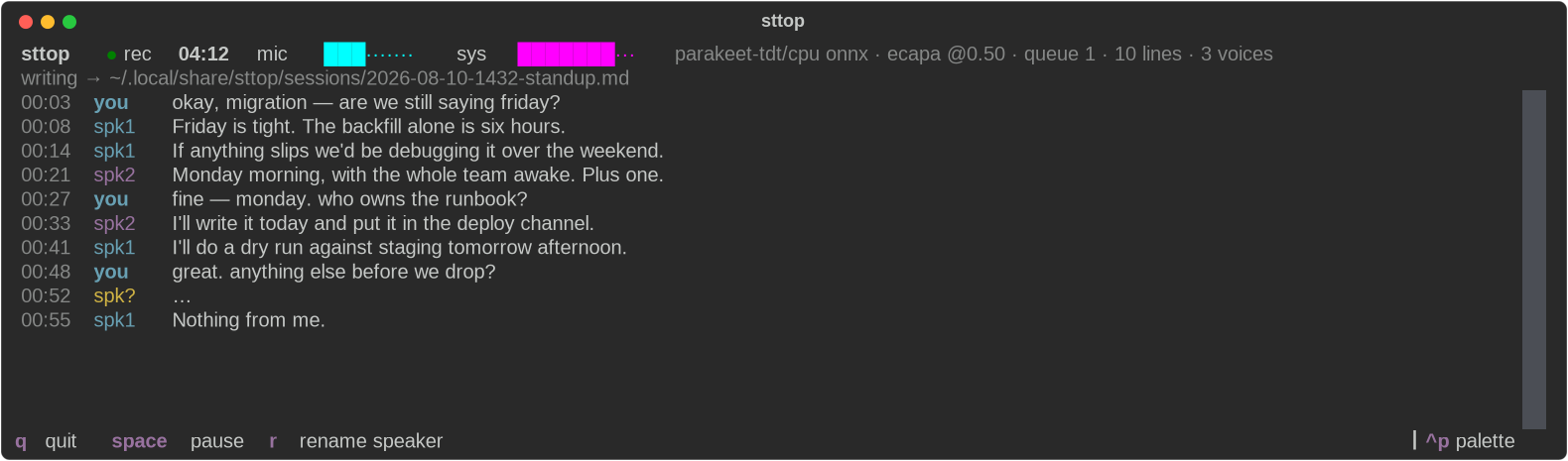
It runs on Linux and macOS and downloads models on the first run. An animated progress bar shows the current loading stage. Recording starts as soon as audio devices are ready; speech is buffered in memory while models load, then the transcript catches up automatically. The TUI shows buffering, catch-up, and live transcription states. Quitting stops capture and finishes buffered speech before exiting. Later starts reuse cached models and load transcription and speaker identification concurrently. You don't need API keys. On macOS 13+, give your terminal permission in System Settings → Privacy & Security → Screen & System Audio Recording, then restart the terminal to capture system audio.
Installation options
To install permanently:
uv tool install sttop
Usage
uvx sttop -t "standup"               # name the session
uvx sttop ls                         # list transcripts in a folder tree
uvx sttop read                       # open the latest transcript
uvx sttop read standup               # find a session by name
uvx sttop follow                     # stream the live transcript, e.g. to an agent
uvx sttop devices --test             # check audio sources
uvx sttop doctor                     # troubleshoot setup
uvx sttop --help                     # all commands and options
| Key | Action |
|---|---|
q |
Name the session and quit |
ctrl+c |
Quit without naming |
space |
Pause / resume |
r |
Rename a speaker throughout the transcript |
y |
Copy the transcript so far |
sttop saves each line to ~/.local/share/sttop/sessions/ as it's transcribed.
It labels your mic as "you" and assigns speaker labels to the system audio.
Customize
Run uvx sttop config to create ~/.config/sttop/config.toml. The comments
explain the settings for audio sources, models, speaker labels, themes, and storage.
sttop uses Parakeet for transcription: MLX on Apple Silicon Macs, ONNX on CPU
on Linux and Intel Macs. Apple Silicon installations include MLX automatically.
Choose explicitly with sttop --backend mlx or sttop --backend onnx, or set
backend = "mlx" / "onnx" under [stt] in your config. The default is "auto";
it falls back to ONNX if MLX dependencies are missing. Explicit MLX requests and
model-loading failures report an error instead.
Both engines download weights from Hugging Face on first use and reuse the
local cache. ONNX uses istupakov/parakeet-tdt-0.6b-v3-onnx; MLX uses
mlx-community/parakeet-tdt-0.6b-v3.
Switching engines requires a separate model download. The existing default
model name and the v2 ONNX alias map to their MLX equivalents automatically;
other custom ONNX models continue to use ONNX in auto mode.
The built-in v2/v3 downloads are pinned to specific Hugging Face commits and
limited to the required ONNX or Safetensors weights and configuration files.
These are community conversions of NVIDIA weights, not NVIDIA-owned download
repositories. The ONNX conversion is published by the onnx-asr maintainer;
the MLX conversion is published by mlx-community. No Python code from model
repositories is loaded. Custom --model overrides select your own source and
are not covered by these built-in revision pins. Python dependencies are
resolved with artifact hashes in uv.lock for uv sync --locked installs.
Speaker labels come from NVIDIA's Nemotron 3 Diarization, an end-to-end model
that tracks up to 8 remote speakers. It runs on CPU through a pinned community
ONNX export, joosthel/Nemotron-3-Diarization-ONNX. On the 16 AMI test meetings,
it mislabels 11% of speech time, down from 25% with the previous ECAPA clustering.
It finds 4 speakers per 4-person meeting on average. The older backend is still
available: install sttop[ecapa] and set backend = "ecapa" under [diarize].
Encrypted backup
uvx sttop sync
The first run sets up a private Git remote and a vault passphrase. sttop keeps Markdown files on your machine and syncs encrypted copies after each recording. Use the same remote and passphrase on another machine to share your transcripts.
Keep a copy of the passphrase. You can't recover the remote backups without it.
Set storage.encrypt = "always" to encrypt local transcripts too.
Updates
sttop checks PyPI in the background and shows an update command when a newer
stable release is available. Checks are cached for six hours; offline checks
never delay recording. Use uvx sttop@latest to run the latest release, or
uv tool upgrade sttop for a permanent installation.
Development
git clone https://github.com/v4rgas/sttop
cd sttop
uv sync --extra dev
uv run sttop
uv run pytest
License
MIT
1 maintainer

Metadata
1 maintainer
Release files for sttop 0.12.0
For a detailed explanation of source distributions (sdists) and built distributions (wheels), please see the package formats documentation.
Source distribution (sdist)
| File | Size | Uploaded | Provenance | Actions |
|---|---|---|---|---|
| sttop-0.12.0.tar.gz | 224.7 kB | With provenance | Details for sttop-0.12.0.tar.gz |
Built distribution (wheel)
| File | Interpreter | ABI | Platform | Actions Reset |
|---|---|---|---|---|
| sttop-0.12.0-py3-none-any.whl | Python 3 | none | any | Details for sttop-0.12.0-py3-none-any.whl |
Total release size: 307.8 kB
Release files / sttop-0.12.0.tar.gz
| Download URL | sttop-0.12.0.tar.gz |
|---|---|
| Size | 224.7 kB |
| Tags | Source |
|
SHA-256 checksum How to use checksums |
97c417f266cdaa458f73ea78f66e24ba8561148bb570c330fb2d449a2632a13e
|
|
BLAKE2b-256 checksum How to use checksums |
c303042dd6379f3b1c1d8a1f26b6366f47b3e19e3260066384d6c89340b87a4c
|
| Upload date | |
|
Uploaded using Trusted Publishing? What is trusted publishing? |
Yes |
| Uploaded via |
twine/7.0.0 CPython/3.13.16
|
Provenance
Provenance describes where a file came from. On PyPI, provenance is shared via attestations, which provide a verifiable record of the build or publishing details. View details, limitations and caveats.


PyPI Publish Attestation
PyPI verified that this artifact, at this checksum, originated from the publisher listed below.
Signed by GitHub Actions, verified by PyPI on Nov 15, 2026.
Transparency logRelease files / sttop-0.12.0-py3-none-any.whl
| Download URL | sttop-0.12.0-py3-none-any.whl |
|---|---|
| Size | 83.1 kB |
| Tags | Python 3 |
|
SHA-256 checksum How to use checksums |
5aaeed8b34fca2f643c8b271091195c89e45cc11b452005fab2d1cd6facbf3a7
|
|
BLAKE2b-256 checksum How to use checksums |
2cb471e3e4b3a1ded3de232a537a5bf9b91964d3d2a2f042bf163b8525fc0495
|
| Upload date | |
|
Uploaded using Trusted Publishing? What is trusted publishing? |
Yes |
| Uploaded via |
twine/7.0.0 CPython/3.13.16
|
Provenance
Provenance describes where a file came from. On PyPI, provenance is shared via attestations, which provide a verifiable record of the build or publishing details. View details, limitations and caveats.
PyPI Publish Attestation
PyPI verified that this artifact, at this checksum, originated from the publisher listed below.
Signed by GitHub Actions, verified by PyPI on Nov 15, 2026.
Transparency logSecurity for sttop 0.12.0
Provenance
Provenance describes where a file came from. On PyPI, provenance is shared via attestations, which provide a verifiable record of the build or publishing details. View details, limitations and caveats.
Full provenance
Both files in this release have been uploaded with provenance metadata.
Attestation for sttop-0.12.0.tar.gz
PyPI Publish Attestation
PyPI verified that this artifact, at this checksum, originated from the publisher listed below.
Signed by GitHub Actions, verified by PyPI on Nov 15, 2026.
Transparency logA note on package security
PyPI is a repository for distributing packages, not a service for auditing them. While third-party security researchers and our staff do their best to detect and remove malicious packages, PyPI cannot guarantee the quality, security or suitability of any given package.
To learn more about protecting yourself from malicious actors, visit our package security documentation.














