
superbased-observer
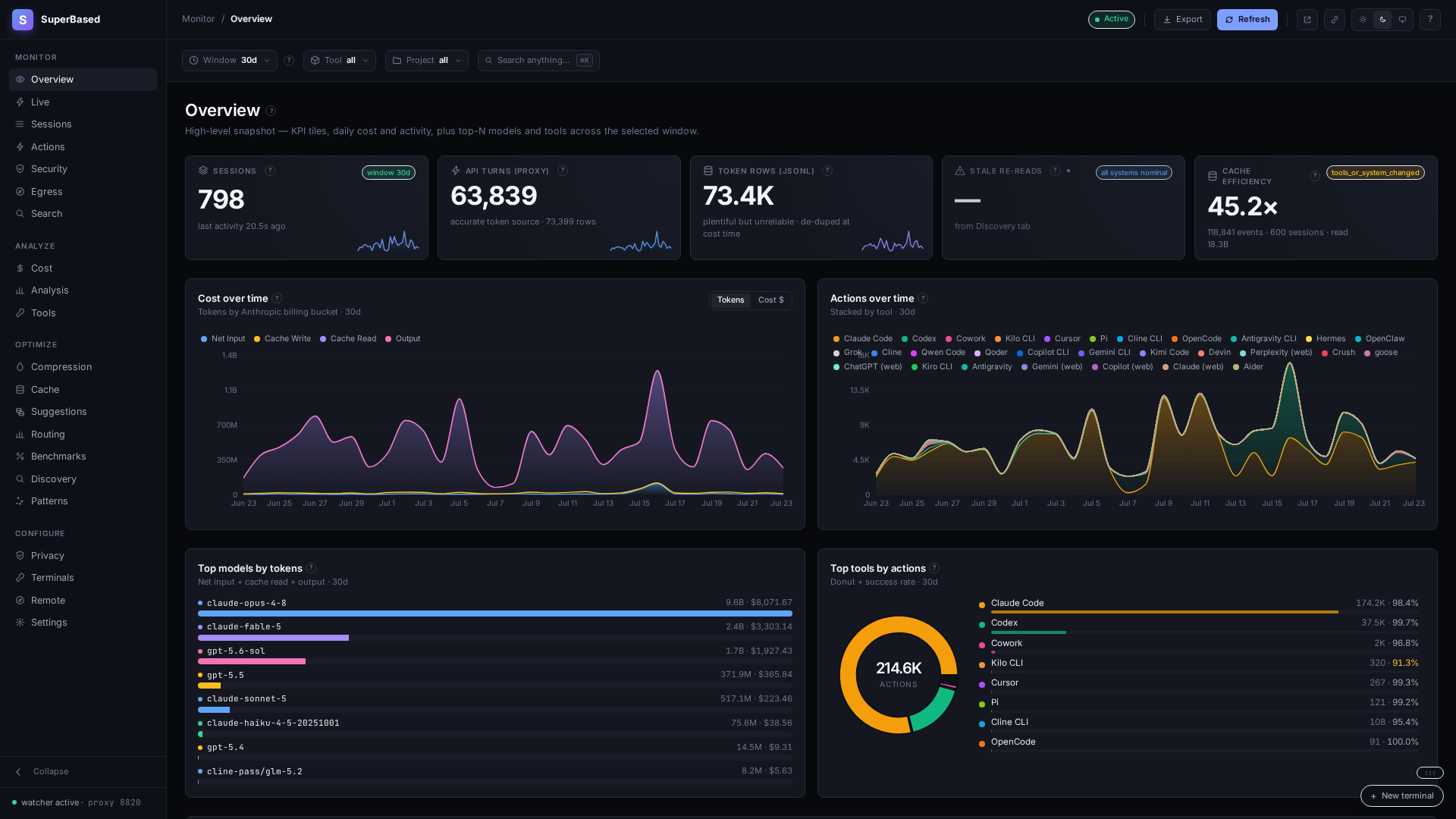
Local-first observability for AI coding agents. See what Claude Code, Codex, Cursor and every other coding agent you run really cost, from the tokens your provider actually billed. On your own machine, with no account.




Try it without installing
uvx --from superbased-observer observer usage
Reads the session logs your coding agents already keep on disk, prints a 30-day cost table by tool
and model, and deletes its temporary database on exit. No config, no network. (The package is
superbased-observer; the command is observer.)
Install
uv tool install superbased-observer    # or: pipx install superbased-observer
observer --version
Each wheel bundles its platform's prebuilt binary (manylinux2014 x86_64 and aarch64, macOS Intel and Apple Silicon, win_amd64): no compile step, no download at install time, no Go toolchain. The same binary ships on npm and the VS Code Marketplace with the same version numbers; install from one channel only.
Why SuperBased
One local binary that tracks Claude Code token usage, Codex cost and Cursor spend side by side, and helps you control them.
- Provider-exact cost, not estimates. An optional local proxy records the tokens your provider returned: net input, 5-minute vs 1-hour cache writes, reasoning tokens and long-context repricing.
- Every coding agent in one place. 40 adapters normalize Claude Code, Codex, Cursor, GitHub Copilot, Gemini CLI, Cline, Aider, Kiro, Devin, OpenCode, Junie and more into one local database.
- Local-first, no account. No telemetry and no sign-in. Everything lives in one SQLite file
under
~/.observer/. - Know the next bill before it lands. Prompt-cache tracking with expiry warnings, a cost band for your next message, and a 5-hour and weekly limit gauge for proxied sessions.
- Guardrails on your own agents. Built-in and custom rules for destructive commands, secrets
egress, MCP pinning and budgets. Observe mode by default;
observer guard simulatefirst. - Your agents as terminals. Launch agent CLIs from the dashboard, join a running session from a paired device over your Tailscale tailnet, and hand a session from one tool to another.
Get started
observer start    # proxy + watcher + dashboard; opens http://localhost:8081
observer scan     # backfill history from the session logs already on disk
observer doctor   # check the install
For provider-exact tokens, route your agent through the proxy: in the dashboard open Compression,
click your tool's status pill and choose Route through the observer proxy (it previews the
config change and writes only when you confirm), or run observer claude / observer codex for a
one-off proxied session. observer init additionally registers the opt-in MCP server.
What you get
- A local dashboard for sessions, cost, cache, security and live activity, filterable by tool and project.
- Cost per session, model, project and tool, with cache read/write splits down to each API turn.
- An opt-in MCP server so your agents can query their own history across tools.
- Waste detection: stale re-reads, repeated commands and files several agents fight over.
- Dashboard terminals with multi-seat join and native resume.
- A CLI for everything:
observer usage,cost,predict,tail,statusline.
Privacy
No telemetry and no account. SuperBased stores paths, commands and short excerpts, scrubs secrets
before writing, and binds the proxy and dashboard to 127.0.0.1 by default. The proxy forwards your
own requests, unchanged, to the provider you already use. See
PRIVACY.md.
Learn more
- Documentation and quickstart
- Supported agents and per-tool setup
- How SuperBased compares
- Source, issues and changelog
Troubleshooting
externally-managed-environmentfrom pip: your distro protects the system Python (PEP 668). Useuv tool installorpipx install, which give the tool its own environment.observer: command not found: make sure the installer'sbindirectory (usually~/.local/bin) is onPATH;pip show -f superbased-observerlists the exact path.- Port 8820 or 8081 already in use: another
observer startis running; stop it first.
License
Apache 2.0. This package is a small Python launcher that runs the prebuilt binary bundled in the wheel.
1 maintainer

Metadata
1 maintainer
Release files for superbased-observer 1.36.0
For a detailed explanation of source distributions (sdists) and built distributions (wheels), please see the package formats documentation.
Built distributions (wheels)
| File | Reset | |||
|---|---|---|---|---|
| superbased_observer-1.36.0-py3-none-win_amd64.whl | Python 3 | none | Windows x86-64 | Details |
| superbased_observer-1.36.0-py3-none-manylinux2014_x86_64.whl | Python 3 | none | Linux glibc 2.17+ x86-64 | Details |
| superbased_observer-1.36.0-py3-none-manylinux2014_aarch64.whl | Python 3 | none | Linux glibc 2.17+ ARM64 | Details |
| superbased_observer-1.36.0-py3-none-macosx_11_0_arm64.whl | Python 3 | none | macOS 11.0+ ARM64 | Details |
| superbased_observer-1.36.0-py3-none-macosx_10_15_x86_64.whl | Python 3 | none | macOS 10.15+ x86-64 | Details |
Total release size: 169.5 MB
Release files / superbased_observer-1.36.0-py3-none-win_amd64.whl
| Download URL | superbased_observer-1.36.0-py3-none-win_amd64.whl |
|---|---|
| Size | 33.4 MB |
| Tags | Python 3 Windows x86-64 |
|
SHA-256 checksum How to use checksums |
65cd348c236d3d910bcf47f2d34c4c736535c7194e8c8bedd219b3fb9b8d7edc
|
|
BLAKE2b-256 checksum How to use checksums |
5a44c1c25e324db77f3b9d9d23f8d403cf8a12989693a0f6b87008187046dce1
|
| Upload date | |
|
Uploaded using Trusted Publishing? What is trusted publishing? |
No |
| Uploaded via |
twine/7.0.0 CPython/3.13.14
|
Release files / superbased_observer-1.36.0-py3-none-manylinux2014_x86_64.whl
| Download URL | superbased_observer-1.36.0-py3-none-manylinux2014_x86_64.whl |
|---|---|
| Size | 36.4 MB |
| Tags | Linux glibc 2.17+ x86-64 Python 3 |
|
SHA-256 checksum How to use checksums |
80a69ed73714eaabe22cafd1065e8e972f765ec39962307725db348fb3d1ceb9
|
|
BLAKE2b-256 checksum How to use checksums |
9287a98afca7bc1d05707a698d6b361f1a9037f3c7c5db86da812b0ac0c9594d
|
| Upload date | |
|
Uploaded using Trusted Publishing? What is trusted publishing? |
No |
| Uploaded via |
twine/7.0.0 CPython/3.13.14
|
Release files / superbased_observer-1.36.0-py3-none-manylinux2014_aarch64.whl
| Download URL | superbased_observer-1.36.0-py3-none-manylinux2014_aarch64.whl |
|---|---|
| Size | 34.0 MB |
| Tags | Linux glibc 2.17+ ARM64 Python 3 |
|
SHA-256 checksum How to use checksums |
2818778146821ba251cd1ea4af26b00385dfc3533b66fa7c4d6633d1c526341a
|
|
BLAKE2b-256 checksum How to use checksums |
c99fea794c334b48f2412256a71bd68c273ecbac39de5f1175e9db54b53506b5
|
| Upload date | |
|
Uploaded using Trusted Publishing? What is trusted publishing? |
No |
| Uploaded via |
twine/7.0.0 CPython/3.13.14
|
Release files / superbased_observer-1.36.0-py3-none-macosx_11_0_arm64.whl
| Download URL | superbased_observer-1.36.0-py3-none-macosx_11_0_arm64.whl |
|---|---|
| Size | 32.0 MB |
| Tags | Python 3 macOS 11.0+ ARM64 |
|
SHA-256 checksum How to use checksums |
3572657daf9c20afe82c28a7b351effd89fbfacf7e09d14d1f4390321e1e6c48
|
|
BLAKE2b-256 checksum How to use checksums |
cdf21c60f7f32c92c3d3ce2093c70532c35f2f095646738487407eee9f4f8003
|
| Upload date | |
|
Uploaded using Trusted Publishing? What is trusted publishing? |
No |
| Uploaded via |
twine/7.0.0 CPython/3.13.14
|
Release files / superbased_observer-1.36.0-py3-none-macosx_10_15_x86_64.whl
| Download URL | superbased_observer-1.36.0-py3-none-macosx_10_15_x86_64.whl |
|---|---|
| Size | 33.6 MB |
| Tags | Python 3 macOS 10.15+ x86-64 |
|
SHA-256 checksum How to use checksums |
a06bb2bd7a90c7f475bfc830e040ae430cf093ae89ff170e24a4731c22fa4c42
|
|
BLAKE2b-256 checksum How to use checksums |
a085d20d9ffb7bb3b4700d058f98929a4a5409193f40f74a531b4c718ce1d71f
|
| Upload date | |
|
Uploaded using Trusted Publishing? What is trusted publishing? |
No |
| Uploaded via |
twine/7.0.0 CPython/3.13.14
|














