
Swiss Weather MCP Server





A Model Context Protocol (MCP) server that provides AI applications with weather information for any place in Switzerland.
- Forecasts for today and the next 8 days from the MeteoSwiss local forecasts, updated every hour
- Measurements from about 160 SwissMetNet weather stations, updated every 10 minutes
- Any place on the Swiss national map, such as towns, districts, lakes and peaks, from swissNAMES3D
- A bundled MCP client for testing
Data sources. This project is not an official MeteoSwiss product.
- Weather forecasts and measurements: MeteoSwiss Open Data. Source: MeteoSwiss
- Place names: swissNAMES3D. Source: Federal Office of Topography swisstopo
Table of Contents
- Project Structure
- Installation
- Usage
- Available Tools
- Good to Know
- Example Usage with LMStudio
- Resources
- License
Project Structure
swiss-weather-mcp/
├── src/swiss_weather_mcp/
│   ├── server.py           # MCP server and its tools
│   ├── places/             # swisstopo place lookup
│   ├── forecast/           # MeteoSwiss local forecasts
│   ├── measurements/       # MeteoSwiss SwissMetNet measurements
│   └── client.py           # MCP client
├── tests/swiss_weather_mcp/  # Tests
└── .github/workflows/      # CI and release pipelines
Installation
# As a command line tool
uv tool install swiss-weather-mcp

# With the optional MCP client, which pulls in the OpenAI SDK
uv tool install 'swiss-weather-mcp[client]'

# As a library dependency
uv add swiss-weather-mcp  # or: pip install swiss-weather-mcp
From source:
git clone https://github.com/cuolm/swiss-weather-mcp.git
cd swiss-weather-mcp
uv sync --extra client  # or, in a virtual environment: pip install -e ".[client]"
No configuration is needed, the server reads everything it requires from MeteoSwiss and swisstopo.
Usage
Running the Server
# stdio (default)
swiss-weather-mcp-server

# streamable-http
swiss-weather-mcp-server --transport=streamable-http --host=localhost --port=8050
From a source checkout, put uv run in front. --help lists all flags.
Note: The cache lives in your OS cache directory, such as
~/Library/Caches/swiss-weather-mcpon macOS or~/.cache/swiss-weather-mcpon Linux. SetSWISS_WEATHER_MCP_CACHE_DIRto move it. The first start downloads the swissNAMES3D archive (about 33 MB).MeteoSwiss publishes a new forecast run every hour, each hourly parameter as one file of about 30 to 34 MB for all forecast points. By default the server downloads such a file for every new forecast point and keeps only that point's rows. With
--cache-all-forecast-pointsit keeps the whole files, so further places in the same run need no new download. This helps when many places are asked within the hour, at the cost of disk space.
Running the Server with Docker
Images are built and published automatically by GitHub Actions to the project's GitHub Container Registry, tagged :latest (newest release) and by version.
- Run the published image, mapping port 8050:
docker run -p 8050:8050 ghcr.io/cuolm/swiss-weather-mcp:latest
- Access the server at:
http://localhost:8050/mcp/
Note: The cache lives inside the container and is lost when it stops. Mount a volume to keep it across restarts, for example
-v swiss-weather-cache:/root/.cache/swiss-weather-mcp.
Manual Build
docker build -t swiss-weather-mcp .
docker run -p 8050:8050 swiss-weather-mcp
Running the MCP Client using Stdio Transport
The bundled MCP client tests the server over stdio. It needs the client extra (see Installation) and starts the MCP server itself, but not the LLM, which has to be running first, for example in llama-server.
- Install llama.cpp, which provides
llama-server, as its installation guide describes. With Homebrew on macOS or Linux:brew install llama.cpp
- Start
llama-serverwith a model in its own terminal. It downloads the model on first use:llama-server --jinja --no-mmproj -hf unsloth/Qwen3.5-4B-GGUF --port 8080
--jinjauses the model's chat template, which tool calling needs (the default in current llama.cpp), and--no-mmprojskips the vision projector. - Run the client against it in a second terminal:
swiss-weather-mcp-client --model=unsloth/Qwen3.5-4B-GGUF --base-url=http://localhost:8080/v1

# From a source checkout, using uv
uv run --extra client swiss-weather-mcp-client --model=unsloth/Qwen3.5-4B-GGUF --base-url=http://localhost:8080/v1
--base-urlis the server's OpenAI compatible API, and--modelthe name it lists under/v1/models.
Available Tools
The forecast tools take a location (the name of a place, such as "Zurich") and a Swiss local time,
or a date for forecast_daily. Every tool that takes a location also takes an optional near, only
needed when several places share the name (see Locations). Each answer holds the forecast,
the place and the MeteoSwiss forecast point used, with their altitudes and distance, the time it applies
to, and the model run.
| Tool | Purpose | Example Call |
|---|---|---|
current_date_and_time() |
Today's weekday and the Swiss time now | current_date_and_time() |
forecast_daily(location, start_date, days) |
One row per day, 1 to 9 days: lowest and highest temperature, median rainfall with its 10th and 90th percentile, daytime weather in words with an emoji | forecast_daily("Zurich", "2026-09-26", 2) |
forecast_hourly(location, start, end) |
Hour by hour over any period within the forecast, or one hour without end: temperature (°C) with its 10th and 90th percentile, rain chance (%) and the weather in words with an emoji |
forecast_hourly("Zurich", "2026-09-23T15:00") |
forecast_rain(location, start, end) |
Rain in 3-hour blocks over any period within the forecast: chance (%), median (mm) and how much the wettest hour may bring (mm) | forecast_rain("Zurich", "2026-09-23T12:00", "2026-09-24T00:00") |
forecast_sunshine(location, start, end) |
Sunshine (h) summed over a period | forecast_sunshine("Zurich", "2026-09-23T06:00", "2026-09-23T18:00") |
forecast_wind(location, when) |
Mean speed and strongest gust (km/h) in the hour up to that time, how strong that gust may get (its 90th percentile), and the direction as degrees and compass point | forecast_wind("Titlis", "2026-09-23T14:00") |
forecast_cloud_cover(location, when) |
Estimated total cloud cover (%) plus the low, medium and high layers | forecast_cloud_cover("Zurich", "2026-09-23T14:00") |
forecast_freezing_level(location, when) |
Height of the 0 °C line (m above sea level) | forecast_freezing_level("Zermatt", "2026-09-23T14:00") |
current_conditions(location) |
Measured now at a MeteoSwiss station near the place: temperature, humidity, dew point, rain and sunshine in the last 10 minutes, wind, gust, direction and sea-level pressure, plus the temperature and pressure change over the last 3 hours and the rain, sunshine and strongest gust of the last hour | current_conditions("Zurich") |
current_extremes(extreme) |
Where in Switzerland it is warmest, coldest, windiest, wettest or sunniest now, from the measurements of all weather stations: the first 5 stations by temperature or gust, or how many stations are sunny or rainy in Switzerland and in each canton |
current_extremes("sunniest") |
Good to Know
Times
- Send times as Swiss clock time in ISO 8601, such as
"2026-09-23T14:00"; the server applies summer or winter time. - Answers give times with their UTC offset, such as
2026-09-23T13:00+02:00. - An hourly value stamped
14:00covers 13:00 to 14:00. Cloud cover and the freezing level are values at that moment. - The forecast covers today and the next 8 days. For "tomorrow" or "tonight", ask
current_date_and_time()first.
Locations
- A location is a place name from swissNAMES3D: a town, village, city district, peak, pass, lake,
glacier, valley or railway station, such as
Zürich,Oerlikon,TitlisorZürichsee. - Case and accents are ignored, and English names such as
Genevawork too. - A name of several places, such as
Blausee, needsnear: a village next to the one the user means, such asnear="Riederalp". Without it, the tool lists every place, each with a village to pass asnear:'Blausee' is the name of 6 places. [...] The biggest first: near="Blausee-Mitholz": district and lake, fewer than 20 people, 887 m near="Ramiswil": settlement, fewer than 20 people, 683 m ... - An unknown name gets suggestions, such as
Davos DorfandDavos PlatzforDavos.
Forecast Points
- The forecast comes from a MeteoSwiss forecast point near the place, and every answer names it.
- Weather changes faster with height than with distance: in the standard atmosphere, air cools by 0.65 °C per 100 m.
- So among the points within 5 km, the server takes the one with the smallest distance plus 20 times the height gap: 100 m of height gap counts like 2 km of distance. Without a point within 5 km, it takes the nearest one.
- The factor 20 was tested on the real data: up to 20, the height gaps of lakes and peaks shrink a lot, and every town of 1,000 people or more still gets a point within 3 km.
Measurements
current_conditionsuses one of the about 160 SwissMetNet stations that measure the temperature, chosen like the forecast point: the smallest distance plus 20 times the height gap. Stations are far fewer than forecast points, so the station can still be far from the place and higher or lower.- Every answer starts with a sentence that says so, such as "The measurements for Braunwald (1290 m) are those of the MeteoSwiss station Elm (958 m), 13.5 km away and 332 m lower."
current_extremeslists the first 5 stations by temperature or gust, and for the sunniest and the wettest counts the sunny or rainy stations in Switzerland and in each canton.
Forecast Values Are Medians
- Temperature and rain are the median of the many possible outcomes MeteoSwiss calculates, not the most likely value.
- Medians do not add up: when showers are possible but unlikely in any single hour, every hour shows 0 mm while the day still has several millimetres.
- Use
forecast_dailyfor the rain of a day, andforecast_rainfor the chance and how much a wet hour may bring.
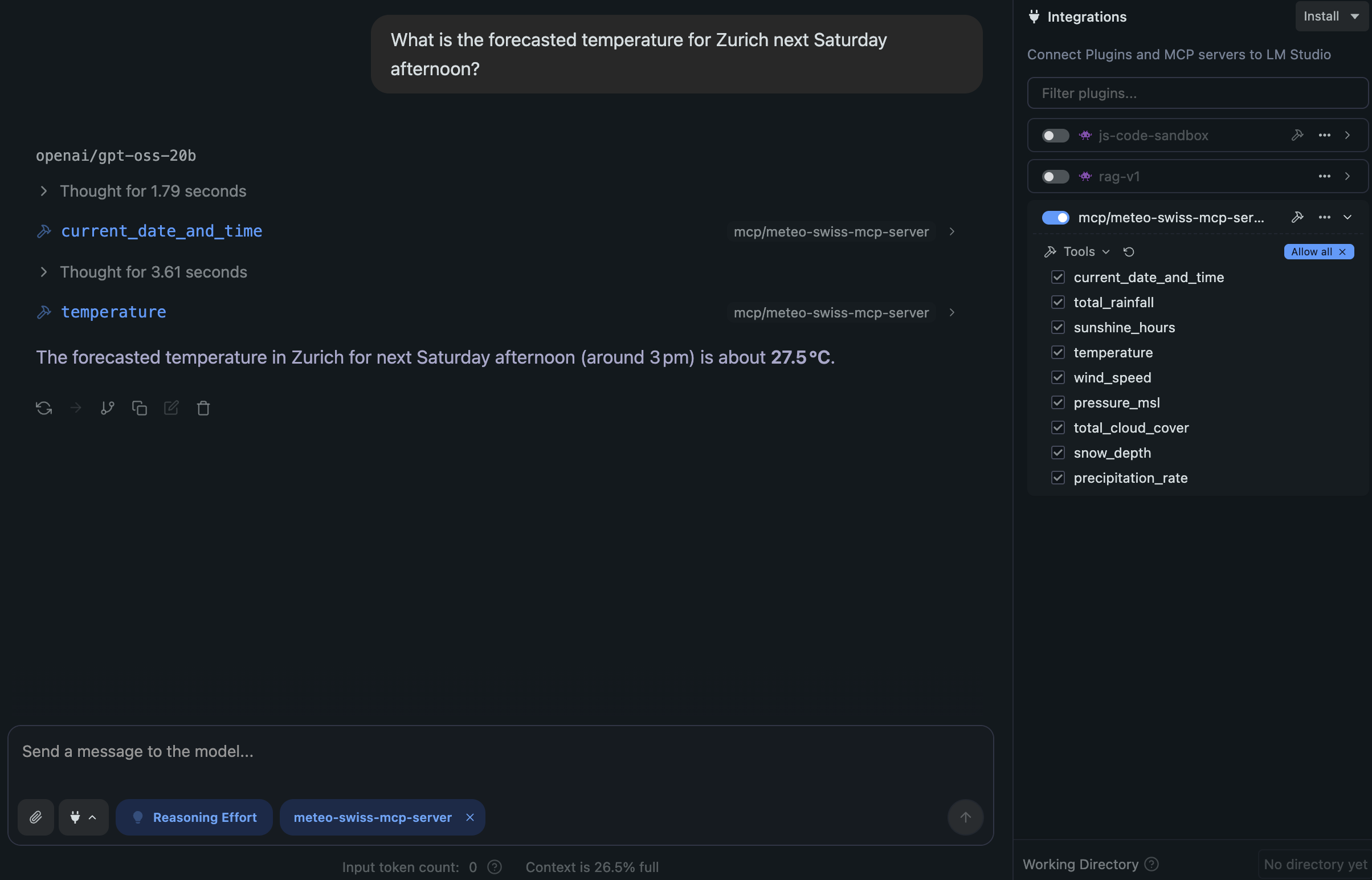
Example Usage with LMStudio
Using the streamable-http transport layer
Configure the mcp.json file in LMStudio:
{
  "mcpServers": {
    "swiss_weather_mcp_server": {
      "url": "http://localhost:8050/mcp/"
    }
  }
}
Run the MCP server with the streamable-http transport layer:
swiss-weather-mcp-server --transport=streamable-http --host=localhost --port=8050
Using the stdio transport layer
Configure the mcp.json file in LMStudio. Replace <path-to> so the command is the full path that
which swiss-weather-mcp-server prints:
{
  "mcpServers": {
    "swiss_weather_mcp_server": {
      "command": "<path-to>/swiss-weather-mcp-server"
    }
  }
}
Resources
- Meteo Swiss Open Data
- Local Forecast Notebook Examples
- Automatic Weather Stations (SwissMetNet)
- swissNAMES3D (swisstopo)
- Model Context Protocol
- MCP Server Quickstart
License
Licensed under the Apache License 2.0.
1 maintainer

Metadata
1 maintainer
Release files for swiss-weather-mcp 0.3.0
For a detailed explanation of source distributions (sdists) and built distributions (wheels), please see the package formats documentation.
Source distribution (sdist)
| File | Size | Uploaded | Provenance | Actions |
|---|---|---|---|---|
| swiss_weather_mcp-0.3.0.tar.gz | 548.3 kB | With provenance | Details for swiss_weather_mcp-0.3.0.tar.gz |
Built distribution (wheel)
| File | Interpreter | ABI | Platform | Actions Reset |
|---|---|---|---|---|
| swiss_weather_mcp-0.3.0-py3-none-any.whl | Python 3 | none | any | Details for swiss_weather_mcp-0.3.0-py3-none-any.whl |
Total release size: 608.3 kB
Release files / swiss_weather_mcp-0.3.0.tar.gz
| Download URL | swiss_weather_mcp-0.3.0.tar.gz |
|---|---|
| Size | 548.3 kB |
| Tags | Source |
|
SHA-256 checksum How to use checksums |
a79f942d7ae9a0c0591fec849938a52b435b3dae0d46093010ccaf2acf5fa447
|
|
BLAKE2b-256 checksum How to use checksums |
6a9c558ee6b6b8a474a3bc2403dcb7f5ad40b271f73f3a826c66533f2171d18b
|
| Upload date | |
|
Uploaded using Trusted Publishing? What is trusted publishing? |
Yes |
| Uploaded via |
twine/7.0.0 CPython/3.13.14
|
Provenance
Provenance describes where a file came from. On PyPI, provenance is shared via attestations, which provide a verifiable record of the build or publishing details. View details, limitations and caveats.


PyPI Publish Attestation
PyPI verified that this artifact, at this checksum, originated from the publisher listed below.
Signed by GitHub Actions, verified by PyPI on Oct 18, 2026.
Transparency logRelease files / swiss_weather_mcp-0.3.0-py3-none-any.whl
| Download URL | swiss_weather_mcp-0.3.0-py3-none-any.whl |
|---|---|
| Size | 59.9 kB |
| Tags | Python 3 |
|
SHA-256 checksum How to use checksums |
0f5cf5c31fc5c581b98b03675af7ec69ab6a6d7d98736609183797503c8e5e2f
|
|
BLAKE2b-256 checksum How to use checksums |
d99addcdd424cce8d5718f95152e68935dc1fe68d67bfbce7d8fe7f49fb746ae
|
| Upload date | |
|
Uploaded using Trusted Publishing? What is trusted publishing? |
Yes |
| Uploaded via |
twine/7.0.0 CPython/3.13.14
|
Provenance
Provenance describes where a file came from. On PyPI, provenance is shared via attestations, which provide a verifiable record of the build or publishing details. View details, limitations and caveats.
PyPI Publish Attestation
PyPI verified that this artifact, at this checksum, originated from the publisher listed below.
Signed by GitHub Actions, verified by PyPI on Oct 18, 2026.
Transparency logSecurity for swiss-weather-mcp 0.3.0
Provenance
Provenance describes where a file came from. On PyPI, provenance is shared via attestations, which provide a verifiable record of the build or publishing details. View details, limitations and caveats.
Full provenance
All 2 files in this release have been uploaded with provenance metadata.
Attestation for swiss_weather_mcp-0.3.0.tar.gz
PyPI Publish Attestation
PyPI verified that this artifact, at this checksum, originated from the publisher listed below.
Signed by GitHub Actions, verified by PyPI on Oct 18, 2026.
Transparency logA note on package security
PyPI is a repository for distributing packages, not a service for auditing them. While third-party security researchers and our staff do their best to detect and remove malicious packages, PyPI cannot guarantee the quality, security or suitability of any given package.
To learn more about protecting yourself from malicious actors, visit our package security documentation.














