

Observation-consistent super-resolution of Sentinel-2 imagery to a 2 m grid






Documentation | Quick start | Examples | API
synapse-sr turns a Sentinel-2 L2A scene into a 2.0 m red, green, blue and near-infrared product. The network adds only the structure the 10 m measurement cannot see. Everything the satellite did observe is pinned by a physical model of the instrument and cannot be changed. Every result reports how much of each pixel came from the observation and how much from the learned prior.
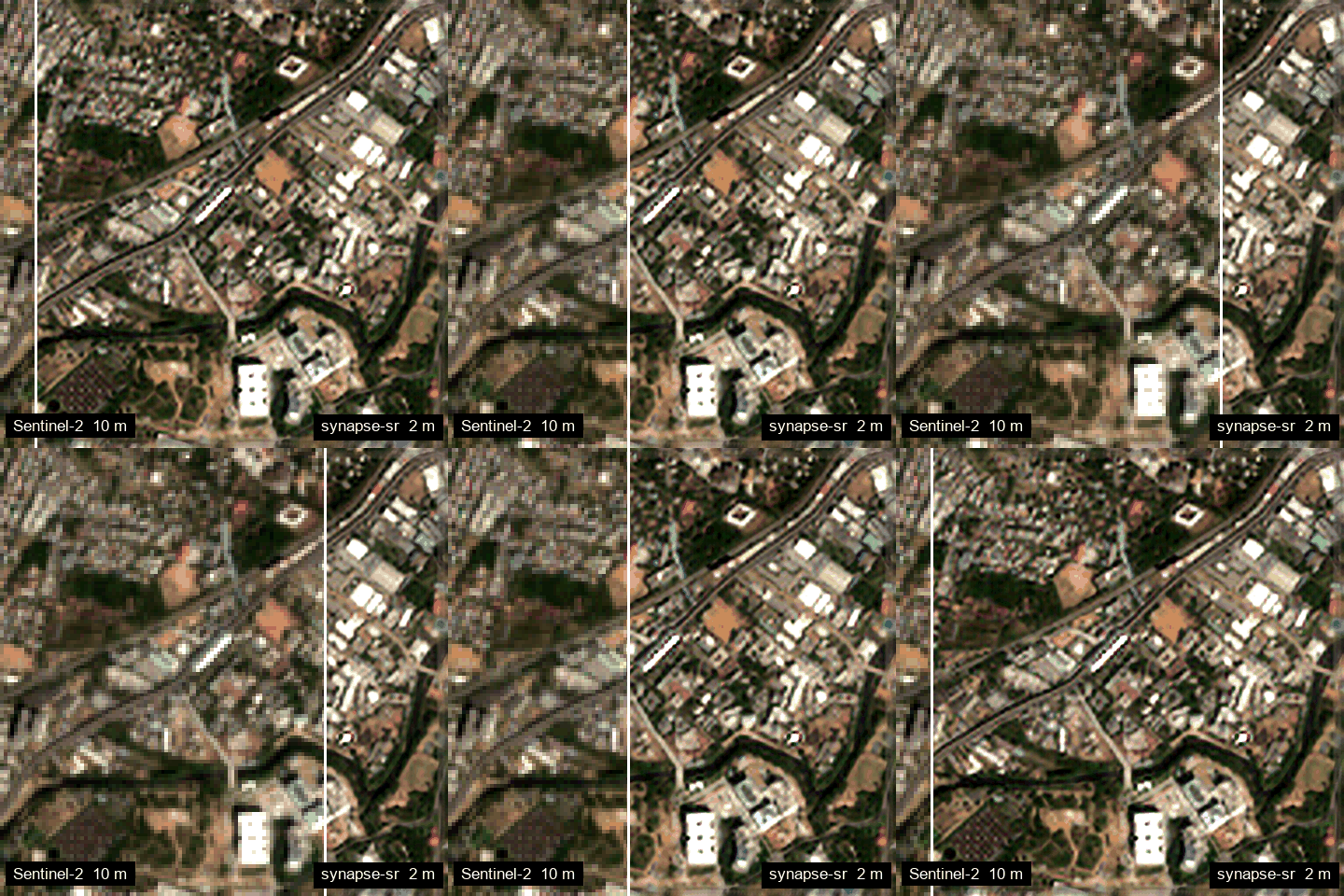
RV University, Bengaluru. Sentinel-2 L2A 10 m (left) and synapse-sr 2 m (right), 6 February 2025.
Table of contents
- Overview
- Installation
- Quick start
- From download to 2 m
- Numpy, torch and xarray inputs
- Large scenes
- Support, confidence and consistency
- Command line
- Offline use
- Examples
- How it works
- Limitations
- Citation
- Acknowledgements
Overview
| Observation-consistent | x_hat = x_base + P_N(delta): the learned correction lives in the null space of the Sentinel-2 forward operator, so re-observing the output reproduces the input |
| Accountable | per-pixel error scale, HIGH / MEDIUM / LOW support classes, validity mask, and a measured round-trip consistency on every result |
| Direct x5 | one network from 10 m to a 2 m grid; the centre sub-pixel sits on the source-pixel centre, and the grid origin is preserved |
| Geospatial I/O | GeoTIFF in, GeoTIFF out; CRS and bounds preserved; any scene size via seamless tiling; NoData and SCL cloud masking |
| Easy | one Python call or one shell command; numpy, torch or xarray inputs; automatic band mapping and radiometric offset; fully offline once the weights are local |
Installation
pip install synapse-sr
| Extra | Adds |
|---|---|
pip install "synapse-sr[stac]" |
fetch_sentinel2 scene download |
pip install "synapse-sr[xarray]" |
xarray input and Result.to_xarray() |
pip install "synapse-sr[cuda]" |
fused mamba-ssm CUDA kernel (optional; must match your PyTorch/CUDA build) |
Without the fused kernel, a PyTorch implementation is used. It matches the fused kernel to a relative error
of 1.7e-7 and is slower. Run synapse-sr --env to see what is active. Full details:
Installation.
Quick start
import synapse_sr

result = synapse_sr.super_resolve("sentinel2_l2a.tif")
result.save("sentinel2_2m.tif")
With an explicit model object:
from synapse_sr import Pro

model = Pro.from_pretrained(device="cuda")        # weights="model.safetensors" for a local file
result = model.super_resolve("sentinel2_l2a.tif")

result.image          # (4, 5H, 5W) reflectance, B04 B03 B02 B08, 2.0 m grid
result.support        # (5H, 5W) 2 HIGH, 1 MEDIUM, 0 LOW / invalid
result.consistency    # {"B04": 0.95, ...} round trip against the input, in noise units
From download to 2 m
from synapse_sr import Pro, fetch_sentinel2       # pip install "synapse-sr[stac]"

scene = fetch_sentinel2(lat=12.9237, lon=77.4987, start="2025-01-01", end="2025-03-15", size_m=2000)
result = Pro.from_pretrained().super_resolve(scene)   # radiometric offset and cloud mask applied automatically

import matplotlib.pyplot as plt
plt.imshow(result.rgb()); plt.axis("off")
Numpy, torch and xarray inputs
model.super_resolve(array)                                   # (C, H, W) DN or reflectance, 10/12/13-band order
model.super_resolve(array, band_names=["B04", "B03", ...])   # any order, by name
model.super_resolve(tensor)                                  # torch.Tensor (C, H, W) or (1, C, H, W)
model.super_resolve(cube.isel(time=0))                       # xarray with a "band" coordinate (cubo, stackstac)
The model uses B04, B03 and B02 (10 m), B08 (10 m), and B05, B06, B07, B8A, B11 and B12 (20 m, as spectral context). See Inputs and preprocessing.
Large scenes
Scenes of any size and shape are tiled with a real-context halo and assembled on the output grid. The output
is always exactly 5H x 5W, with no dropped regions. Tiled and single-window results agree to 0.4 % relative
RMS.
result = model.super_resolve("large_scene.tif", tile=64, halo=16)
Support, confidence and consistency
result.x_base         # determined by the Sentinel-2 observation
result.prior          # added by the learned prior, invisible to the sensor; x_base + prior == image
result.support        # 2 HIGH (observation-determined), 1 MEDIUM, 0 LOW (prior-dominated) or invalid
result.confidence     # learned per-pixel error scale (not calibrated)
result.valid          # False on NoData, cloud, cloud shadow, cirrus, saturation
See Support, confidence and consistency.
Command line
synapse-sr scene.tif scene_2m.tif
synapse-sr scene.tif scene_2m.tif --device cpu --weights synapse-pro-v1.safetensors --scl scene_SCL.tif
synapse-sr --env
The output GeoTIFF has nine bands: B04 B03 B02 B08, ERRSCALE_* for each of the four, and SUPPORT.
Use --no-confidence to write the four reflectance bands only.
Offline use
model = Pro.from_pretrained(weights="/opt/models/synapse-pro-v1.safetensors")
No network access is needed apart from an optional one-time weight download, which is verified by SHA-256. See Offline and on-premises use.
Examples
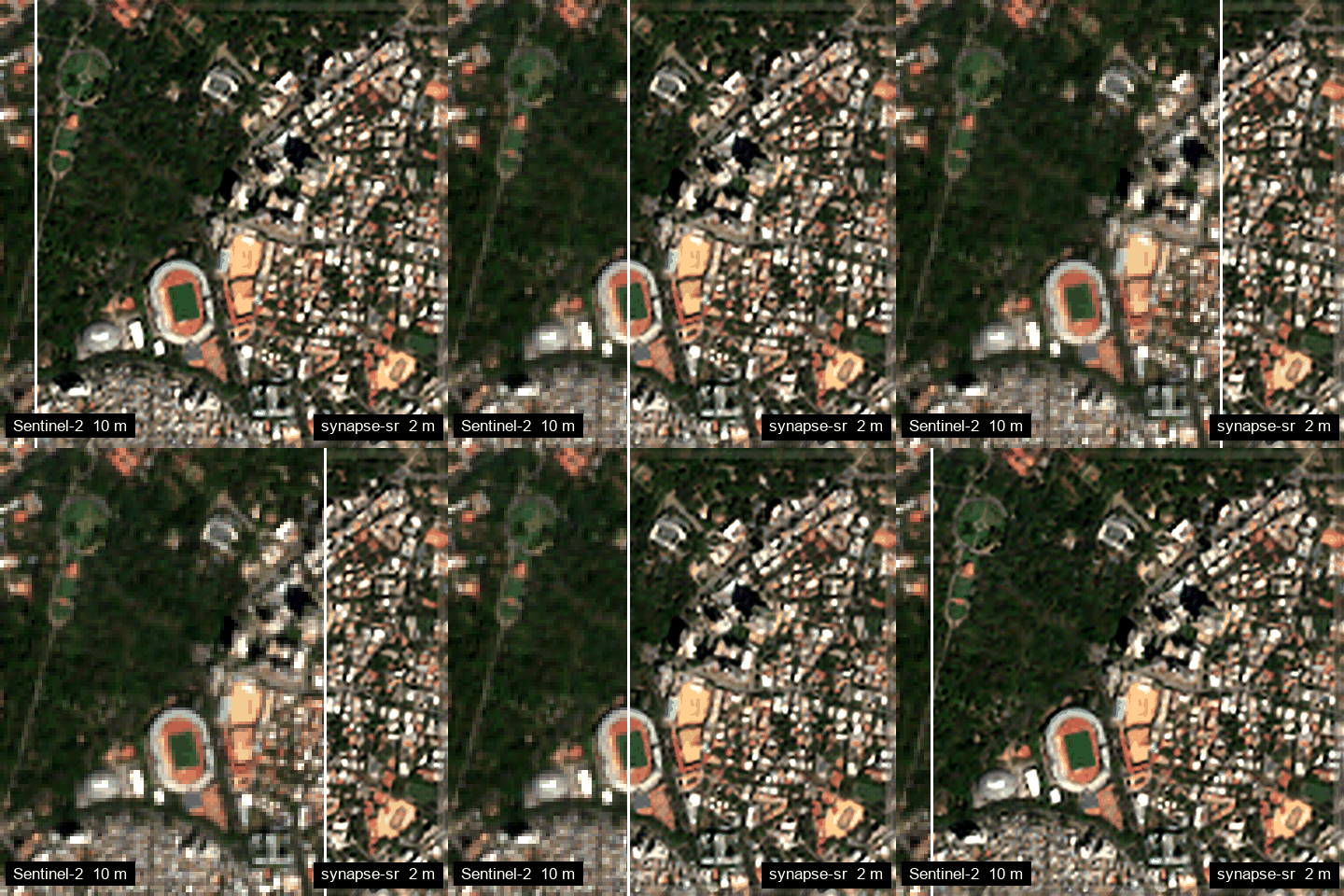
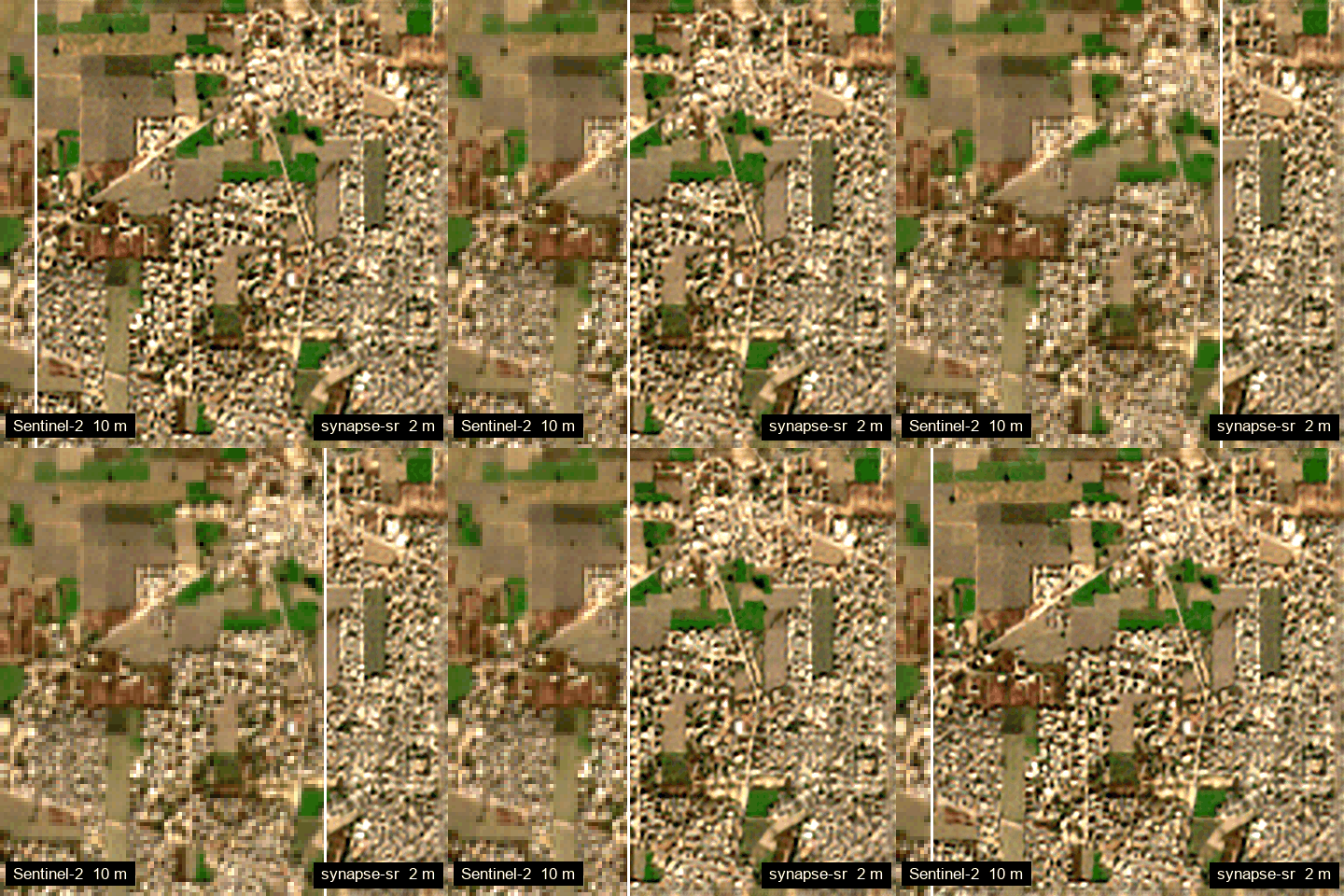
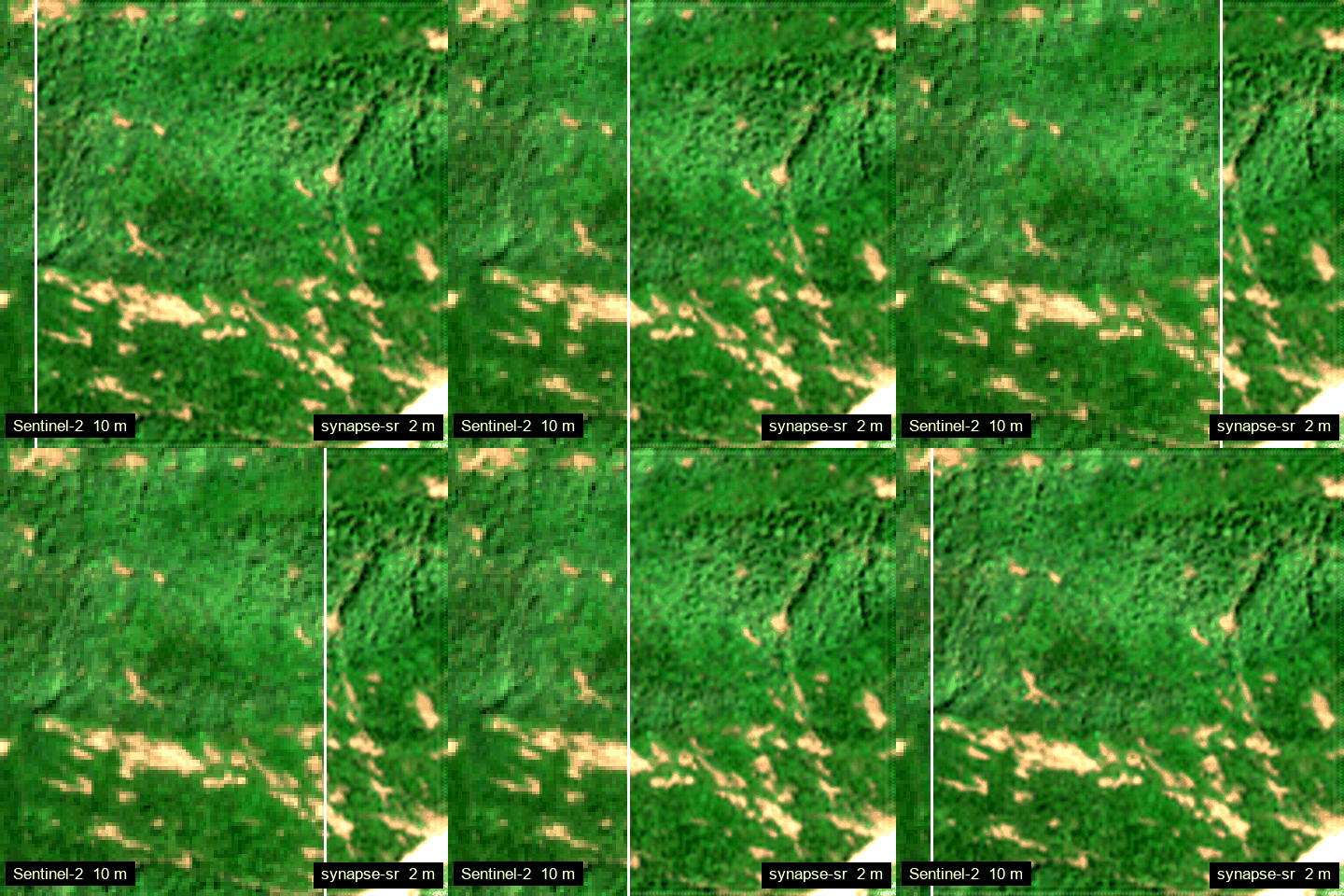
Produced with the package itself (tools/make_gifs.py). Left: Sentinel-2 L2A at 10 m. Right: synapse-sr at
2 m. Each area is 1.28 km x 1.28 km.
| RV University, Bengaluru | Bengaluru city centre |
|---|---|
|
 |
| Ludhiana, Punjab: fields | Wayanad, Kerala: landslide-affected hills |
 |
 |
More in the Examples section of the documentation.
How it works
x_hat = x_base + P_N(delta)
x_base: a Tikhonov-regularised inversion of the Sentinel-2 forward modelA. Its per-band weight is set so the residual matches sensor noise.delta: predicted bySynapseProX5, a 14.4 M-parameter network. It has:- a state-space (Mamba) backbone;
- a gated 20 m spectral-context stem;
- a frequency mixer;
- a direct x5 PixelShuffle head.
P_N = I - A^T (A A^T)^+ A: removes everything the sensor could have observed.A x_hat = A x_base, whatever the network predicts.
Details: How it works.
Limitations
- Grid spacing is not effective resolution. In the controlled bar-pair test, the v0.1 preview checkpoint does not yet certify pairs at 8 m or finer; the official SEN2SR model certifies 6 m. No effective-resolution figure is claimed for this release.
- Only red, green, blue and near-infrared are super-resolved. The six 20 m bands are used as context only.
- Consistency assumes the nominal sensor model and correct geolocation. It degrades with PSF or registration error.
- The confidence map is not calibrated. The support thresholds are heuristic.
- The training reference imagery comes from the United States. Other regions are not separately validated.
Full list: Limitations.
Citation
@software{synapse_sr,
  title  = {synapse-sr: observation-consistent super-resolution of Sentinel-2 imagery},
  author = {Naidu, Sharadh},
  year   = {2026},
  url    = {https://github.com/SharadhNaidu/synapse-sr}
}
Acknowledgements
- The optional fused kernel comes from mamba-ssm (Apache-2.0).
- Sentinel-2 data: Copernicus programme, European Space Agency.
See THIRD_PARTY_NOTICES.
1 maintainer

Release files for synapse-sr 0.1.0
For a detailed explanation of source distributions (sdists) and built distributions (wheels), please see the package formats documentation.
Source distribution (sdist)
| File | Size | Uploaded | |
|---|---|---|---|
| synapse_sr-0.1.0.tar.gz | 47.4 kB | Details |
Built distribution (wheel)
| File | Interpreter | ABI | Platform | Reset |
|---|---|---|---|---|
| synapse_sr-0.1.0-py3-none-any.whl | Python 3 | none | any | Details |
Total release size: 92.4 kB
Release files / synapse_sr-0.1.0.tar.gz
| Download URL | synapse_sr-0.1.0.tar.gz |
|---|---|
| Size | 47.4 kB |
| Tags | Source |
|
SHA-256 checksum How to use checksums |
2d1d1d948eef74be493d39688edd36ccaf8d60aa433fb5275cbbcf71b2cb3ece
|
|
BLAKE2b-256 checksum How to use checksums |
1cc4e33accd4889c1677ebca6783f5c9be8564d74dcfcb648d05b9a0818ed3c0
|
| Upload date | |
|
Uploaded using Trusted Publishing? What is trusted publishing? |
Yes |
| Uploaded via |
twine/7.0.0 CPython/3.13.14
|
Provenance
Provenance describes where a file came from. On PyPI, provenance is shared via attestations, which provide a verifiable record of the build or publishing details. View details, limitations and caveats.


PyPI Publish Attestation
PyPI verified that this artifact, at this checksum, originated from the publisher listed below.
Signed by GitHub Actions, verified by PyPI on Sep 23, 2026.
Transparency logRelease files / synapse_sr-0.1.0-py3-none-any.whl
| Download URL | synapse_sr-0.1.0-py3-none-any.whl |
|---|---|
| Size | 45.0 kB |
| Tags | Python 3 |
|
SHA-256 checksum How to use checksums |
06f184cf7aed15c2b5dec51065a001110c469c14915a799c05a7ed17875bda31
|
|
BLAKE2b-256 checksum How to use checksums |
e91878ce83e7da00afaee2a9f3218d0c9ccf51867835d1036a1ceb1e16444cc3
|
| Upload date | |
|
Uploaded using Trusted Publishing? What is trusted publishing? |
Yes |
| Uploaded via |
twine/7.0.0 CPython/3.13.14
|
Provenance
Provenance describes where a file came from. On PyPI, provenance is shared via attestations, which provide a verifiable record of the build or publishing details. View details, limitations and caveats.
PyPI Publish Attestation
PyPI verified that this artifact, at this checksum, originated from the publisher listed below.
Signed by GitHub Actions, verified by PyPI on Sep 23, 2026.
Transparency log













