

Sentinel-2 at 2 m, with every pixel accounted for






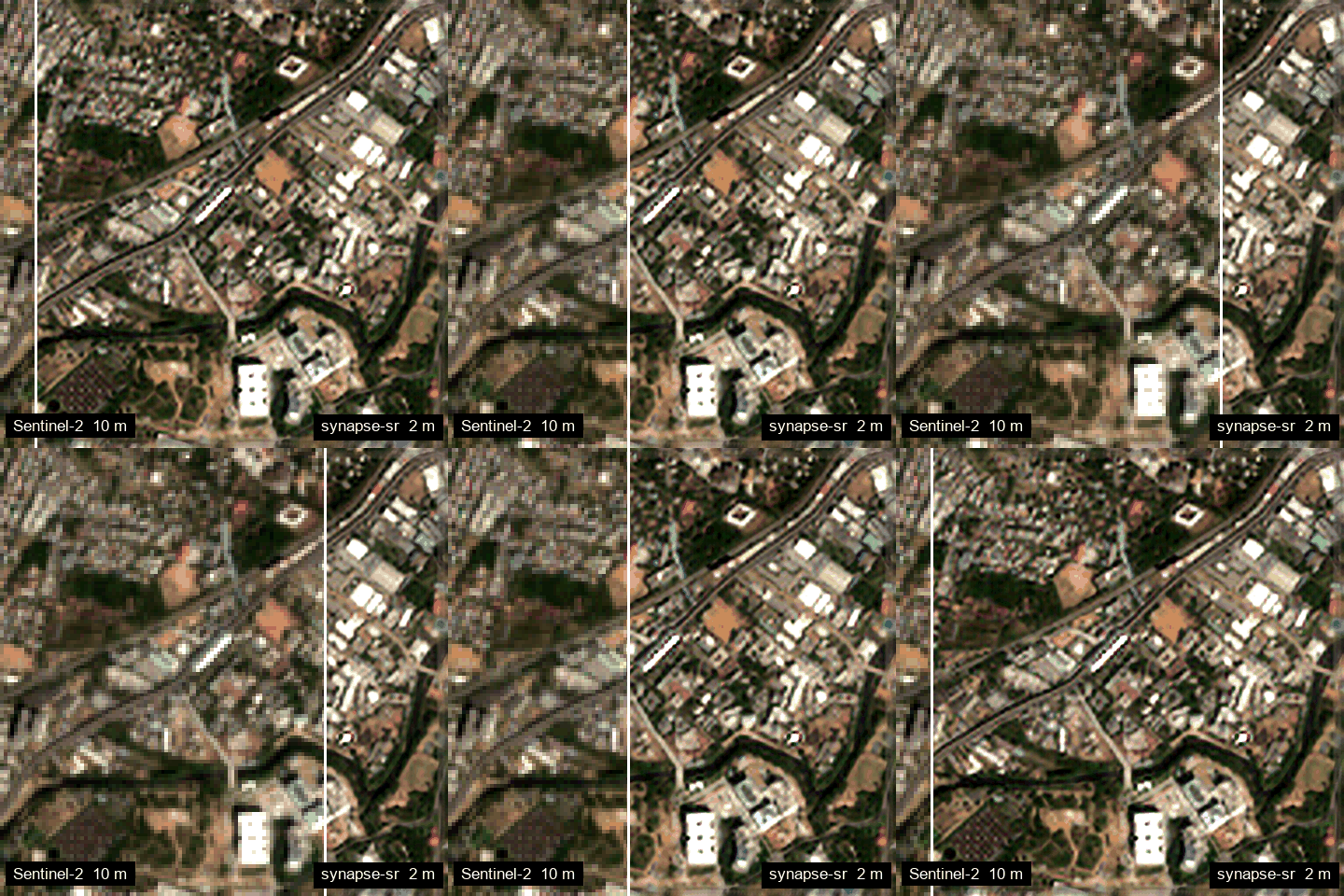
synapse-sr turns a Sentinel-2 L2A scene into a 2.0 m red / green / blue / near-infrared GeoTIFF. A physical model of the instrument pins everything the satellite measured. The network only adds what 10 m pixels cannot show, and every output says which pixels came from the measurement and which came from the learned prior.
pip install synapse-sr
import synapse_sr
result = synapse_sr.super_resolve("scene.tif")

import synapse_sr

r = synapse_sr.super_resolve("sentinel2_l2a.tif")   # progress bar, then a 5x larger result
r.save("sentinel2_2m.tif")                           # georeferenced, same CRS and bounds
r.summary()                                          # size, consistency, support, time
synapse-sr sentinel2_l2a.tif sentinel2_2m.tif        # the same from the shell
synapse-sr --fetch 12.92,77.50 --dates 2025-01-01:2025-03-15 out.tif --preview preview.png   # download + run
synapse-sr scenes/ scenes_2m/ --cog                  # a whole folder, as Cloud-Optimised GeoTIFFs
Every common task on one page: cheat sheet. AI assistants
and agents can read the whole documentation from llms.txt.
Benchmarks
Official opensr-test protocol (Aybar et al.): Sentinel-2 L2A input, harmonised
high-resolution references, opensr_test.Metrics() defaults, mean over its five datasets (NAIP, SPOT, Spain urban,
Spain crops, VENµS; 178 scenes). Every model at its native scale, compared on the reference grid.
| Model | Improvement ↑ | Omission ↓ | Hallucination ↓ | Detail corr. ↑ | RMSE ↓ | Spectral error ↓ | Reflectance error ↓ |
|---|---|---|---|---|---|---|---|
| SYNAPSE Flash | 0.148 | 0.756 | 0.096 | 0.298 | 0.0237 | 0.427 | 0.0019 |
| SYNAPSE Pro | 0.152 | 0.750 | 0.098 | 0.297 | 0.0237 | 0.428 | 0.0019 |
| SEN2SR | 0.150 | 0.759 | 0.091 | 0.284 | 0.0235 | 0.665 | 0.0025 |
| SEN2SR-Lite | 0.152 | 0.749 | 0.099 | 0.290 | 0.0234 | 0.463 | 0.0019 |
| LDSR-S2 | 0.197 | 0.599 | 0.204 | 0.206 | 0.0240 | 1.015 | 0.0036 |
| Satlas ESRGAN | 0.129 | 0.181 | 0.690 | 0.089 | 0.0443 | 7.787 | 0.0242 |
| Bicubic | 0.102 | 0.830 | 0.068 | 0.279 | 0.0234 | 0.601 | 0.0028 |
Best in bold. SYNAPSE runs with the package defaults (synapse_sr.super_resolve). Flash processes a 1.28 km scene
in about 1 s on a laptop CPU; Pro in about 5 s on a GPU.
What it is for
| One line | ||
|---|---|---|
| Crop monitoring | r.indices()["ndvi"], synapse_sr.boundaries(r, "field") |
NDVI, SAVI, EVI, red-edge NDRE, field edges at 2 m |
| Urban analysis | synapse_sr.boundaries(r, "urban"), r.indices()["ndbi"] |
buildings, roads, built-up index |
| Water and floods | synapse_sr.change(before, after, "ndwi") |
flooded area in km², shoreline strength |
| Disaster assessment | synapse_sr.change(before, after, "nbr") |
burn scars, landslides, debris; changes flagged only where both dates are trustworthy |
Worked examples for each: Applications.
Flash or Pro
| Flash (default) | Pro | |
|---|---|---|
| Network | ~0.6 M-parameter re-parameterised CNN, distilled from Pro | 14.4 M-parameter state-space (Mamba) model |
| Speed (1.28 km scene) | ~1 s on a laptop CPU; 10 km x 10 km in ~14 s | ~5 s on a GPU (Colab / Kaggle T4, workstations) |
| Runs on | any CPU, laptops, integrated graphics, Apple silicon, ARM, any GPU | GPU recommended; CPU works, slower |
| Choose it | synapse_sr.super_resolve(src) |
synapse_sr.super_resolve(src, model="pro") |
| Load | Flash.from_pretrained() |
Pro.from_pretrained() |
| Physics, support map, calibrated uncertainty | yes | yes |
Both run the same observation-consistent pipeline and score within a whisker of each other on the benchmark above.
Use Flash for speed and anywhere-deployment, Pro for the most detail on a GPU. synapse-sr --models lists
every published checkpoint.
Why trust the output
import synapse_sr
r = synapse_sr.super_resolve("scene.tif")

r.x_base        # what the 10 m observation determines
r.prior         # what the network added (x_base + prior == image), invisible to the sensor
r.support       # per pixel: 2 observation-determined, 1 medium, 0 prior-dominated or invalid
r.uncertainty() # calibrated expected error per pixel and band
r.consistency   # how closely re-observing the output reproduces the input, in sensor-noise units
x_hat = x_base + P_N(delta): P_N removes every component the sensor could have seen from the network's
output, so the network cannot contradict the measurement. See How it works.
Runs everywhere
| Platform | What you get |
|---|---|
| Colab / Kaggle GPU | Pro with a Triton scan kernel, compiled on first use (no extra installs) |
Linux GPU + mamba-ssm |
fused CUDA kernel (pip install "synapse-sr[cuda]") |
| Windows / macOS / CPU-only / ARM | exact PyTorch path; Flash recommended |
| Offline / air-gapped | Pro.from_pretrained(weights="model.safetensors") |
synapse-sr --env shows what is active on your machine.
Documentation
Quick start · Colab and Kaggle · Applications · Examples · API
Citation and acknowledgements
@software{synapse_sr,
  title  = {synapse-sr: observation-consistent super-resolution of Sentinel-2 imagery},
  author = {Naidu, Sharadh},
  year   = {2026},
  url    = {https://github.com/SharadhNaidu/synapse-sr}
}
- Third-party components and their licences are listed in
THIRD_PARTY_NOTICES. - The optional fused kernel comes from mamba-ssm (Apache-2.0).
- Sentinel-2 data: Copernicus programme, European Space Agency.
1 maintainer

Release files for synapse-sr 0.4.0
For a detailed explanation of source distributions (sdists) and built distributions (wheels), please see the package formats documentation.
Source distribution (sdist)
| File | Size | Uploaded | |
|---|---|---|---|
| synapse_sr-0.4.0.tar.gz | 72.5 kB | Details |
Built distribution (wheel)
| File | Interpreter | ABI | Platform | Reset |
|---|---|---|---|---|
| synapse_sr-0.4.0-py3-none-any.whl | Python 3 | none | any | Details |
Total release size: 142.4 kB
Release files / synapse_sr-0.4.0.tar.gz
| Download URL | synapse_sr-0.4.0.tar.gz |
|---|---|
| Size | 72.5 kB |
| Tags | Source |
|
SHA-256 checksum How to use checksums |
4aa3a168d20779fb0347442ac83f0e1cef28c06e21c0184aa0e92084ca659c76
|
|
BLAKE2b-256 checksum How to use checksums |
4c8e6ba5ae79b40bc4bed65f7c17f3067ad6855b7e5f74cfb7f1ebe38fd1c54e
|
| Upload date | |
|
Uploaded using Trusted Publishing? What is trusted publishing? |
Yes |
| Uploaded via |
twine/7.0.0 CPython/3.13.14
|
Provenance
Provenance describes where a file came from. On PyPI, provenance is shared via attestations, which provide a verifiable record of the build or publishing details. View details, limitations and caveats.


PyPI Publish Attestation
PyPI verified that this artifact, at this checksum, originated from the publisher listed below.
Signed by GitHub Actions, verified by PyPI on Sep 28, 2026.
Transparency logRelease files / synapse_sr-0.4.0-py3-none-any.whl
| Download URL | synapse_sr-0.4.0-py3-none-any.whl |
|---|---|
| Size | 69.9 kB |
| Tags | Python 3 |
|
SHA-256 checksum How to use checksums |
3680a0b5daca1f828040db0679298c5c468d20f8850877c1b657e501fce04d59
|
|
BLAKE2b-256 checksum How to use checksums |
4dfa44f4356edf69756daa3dba2ed3a373ef8c58082206cb79b6ff8340665844
|
| Upload date | |
|
Uploaded using Trusted Publishing? What is trusted publishing? |
Yes |
| Uploaded via |
twine/7.0.0 CPython/3.13.14
|
Provenance
Provenance describes where a file came from. On PyPI, provenance is shared via attestations, which provide a verifiable record of the build or publishing details. View details, limitations and caveats.
PyPI Publish Attestation
PyPI verified that this artifact, at this checksum, originated from the publisher listed below.
Signed by GitHub Actions, verified by PyPI on Sep 28, 2026.
Transparency log













