

Syndrilla
A PyTorch-based numerical simulator for decoders in quantum error correction.
Table of contents
- Syndrilla
Features
- High modularity: easily customizing your own decoding algorithms and error models
- High compatibility: cross-platform simulation on CPUs, GPUs, and even AI accelerators
- High performance: showing 10-20X speedup on GPUs over CPUs
- Community focus: support for standard BPOSD, BP4, MWPM, and Union-Find decoders
- Flexible data format: support for FP16/BF16/FP32/FP64 simulation
- Hardware awareness: support for quantization simulation
- Fine-grained measurement: support for a broad range of metrics, with degeneracy errors highlighted
- Multi-purpose: allowing researching new codes, new decoders, new error models, and beyond
- Circuit-level simulation: support Stim for circuit-level modeling, enabling fair and reproducible benchmarking across different decoders and noise models
Installation
All provided installation methods allow running syndrilla in the command line and import syndrilla as a python module.
Make sure you have Anaconda installed before the steps below.
Option 1: pip installation
git clonethis repo andcdto the repo dir.conda env create -f environment.yaml- The
name: syndrillainenvironment.yamlcan be updated to a preferred one.
- The
conda activate syndrillapip install syndrilla- Validate installation via
syndrilla -hin the command line orimport syndrillain python code- If you want to validate the simulation results against BPOSD, you need to change python to version 3.10. Then install BPOSD and run
python tests/validate_bposd.py
- If you want to validate the simulation results against BPOSD, you need to change python to version 3.10. Then install BPOSD and run
Option 2: source installation
This is the developer mode, where you can edit the source code with live changes reflected for simulation.
git clonethis repo andcdto the repo dir.conda env create -f environment.yaml- The
name: syndrillainenvironment.yamlcan be updated to a preferred one.
- The
conda activate syndrillapython3 -m pip install -e . --no-deps- Validate installation via
syndrilla -hin the command line orimport syndrillain python code
Basic usage
1. Run with command line arguments
Syndrilla simulation can be done via command-line arguments. Below is an example command that runs a simulation using the BPOSD decoder:
syndrilla -r=tests/test_outputs
          -d=examples/alist/bposd_hx.decoding.yaml
          -e=examples/alist/bsc.error.yaml
          -c=examples/alist/lx.check.yaml
          -s=examples/alist/perfect.syndrome.yaml
          -m=examples/alist/surface_10.matrix.yaml
          -bs=10000
          -te=1000
Following is a table for detailed explaination on each command line arguments:
| Argument | Description | Example |
|---|---|---|
-r |
Path to store outputs | -r=tests/test_outputs |
-d |
Path to decoding YAML file | -d=examples/alist/bposd_hx.decoding.yaml |
-e |
Path to error model YAML file | -e=examples/alist/bsc.error.yaml |
-c |
Path to check matrix YAML file | -c=examples/alist/lx.check.yaml |
-s |
Path to syndrome extraction YAML file | -s=examples/alist/perfect.syndrome.yaml |
-m |
Path to matrix YAML file | -m=examples/alist/surface_10.matrix.yaml |
-i |
Path to interface YAML file, replacing -m/-e/-s/-c |
-i=examples/stim/stim_generated.interface.yaml |
-ckpt |
Path to checkpoint YAML file to resume; with -t, the training run's *_result.yaml, given alongside its -tckpt |
-ckpt=tests/test_outputs/result_phy_err_0.1.yaml |
-bs |
Number of samples in each batch | -bs=10000 |
-te |
Total number of errors to stop decoding, default 1000; ignored with -t |
-te=1000 |
-tb |
Target number of batches to stop decoding, instead of an error target; batches that decode deferred samples again do not count; wins over -te with a warning if both are given, ignored with -t |
-tb=500 |
-l |
Level of logger | -l=SUCCESS |
-t |
Train the decoder instead of decoding | -t |
-tr |
Path to training YAML file | -tr=examples/alist/train_saq_hx.training.yaml |
-tckpt |
Path to a run's *_last.pt, to resume training; given alongside the same run's -ckpt |
-tckpt=tests/test_outputs/saq_hx_n41_last.pt |
--save-interval |
Batches between result saves, at least 100, default 100 |
--save-interval=100 |
--seed |
Seed for decoding, so the same seed and flags draw the same shots; recorded as seed in the result YAML; default unseeded; with -ckpt the run seeds with a mixed seed derived from the base seed and the checkpoint's batch count, so it draws new shots on CPU and CUDA, using the checkpoint's seed when --seed is not given; ignored with -t |
--seed=0 |
To decode on several GPUs at once, syndrilla-parallel has three subcommands, and a call without one prints them: run (one launch, below), sweep-gen and sweep (see Sweep configurations). syndrilla-parallel run runs one or more syndrilla processes (workers) per GPU and passes every flag it does not define, except -ckpt and the training flags, to each worker unchanged. Workers form one flat list: worker i writes to <-r>/w<i>/ and runs on one device, taken from --gpus repeated --workers-per-gpu times each in GPU order (with --gpus 0 1 --workers-per-gpu 2, w0 and w1 run on GPU 0, w2 and w3 on GPU 1). launch.yaml records each worker's name and physical device, and merged_result.yaml repeats them per worker. The decoding YAML should set device_type: cuda with device_idx: 0; with device_type: cpu, the launch runs as one worker w0 on cpu with no CUDA_VISIBLE_DEVICES set, the probe included, and --gpus and --workers-per-gpu are ignored with a note. A run directory from the old gpu<g>_w<j> or cpu_w0 layout is refused; use a new -r:
syndrilla-parallel run --gpus 0 1 -r=tests/test_outputs/multi -te=1000 -d=... -i=... -e=... -s=... -bs=10000
| Argument | Subcommands | Description |
|---|---|---|
-r |
all | run: parent run directory; sweep-gen and sweep: sweep directory; required |
--gpus |
run, sweep |
GPU indices as torch numbers them (positions in CUDA_VISIBLE_DEVICES when it is set); default every visible GPU |
--workers-per-gpu |
run, sweep |
Workers per GPU, default 1 |
-te |
run, sweep |
Pooled number of logical errors to stop at, split over workers when given alone; default 1000 unless -tb is given |
-tb |
run, sweep |
Pooled number of batches to stop at, split over workers when given alone; with -te, the run stops at whichever is reached first |
--save-interval |
run, sweep |
Batches between a worker's result saves, at least 100, passed to every worker when given; default the worker's own, 100 |
--poll-interval |
run, sweep |
Seconds between reads of the worker result YAMLs; default 60 |
--seed |
run, sweep |
Base seed; in run, worker i gets --seed=<seed+i>; in sweep, see below; default unseeded |
--no-probe |
run, sweep |
Skip the probe decode run |
--dry-run |
run, sweep |
Print the commands, then exit without launching; run prints the probe line (unless --no-probe) and one line per worker with its environment and command; sweep prints, for each point to launch, its label and one line per worker with its physical device and command (no probe, no environment), and one line per point already done |
-c |
sweep-gen |
Sweeping configs YAML, required |
--force |
sweep-gen |
Rewrite the config YAMLs of point folders that already hold a result YAML; the results are kept |
--workers-per-point |
sweep |
Workers per point, sharing GPUs when capacity allows; default 1 |
--fail-fast |
sweep |
Stop the sweep at the first failed point |
With only one of -te and -tb, each worker decodes its share of that target: the shares differ by at most one and add up to the target, and the target must be at least the number of workers. A lone -tb ends exactly at it; a lone -te ends at or above it, each worker stopping at its own share.
With both, the targets are pooled. Every worker gets the full -tb, so a worker's own stop acts only as a safety net. The launcher reads every worker's result YAML each --poll-interval seconds (a worker saves it every --save-interval batches), and once the pooled logical errors reach -te or the pooled batches reach -tb, whichever comes first, it sends SIGTERM to all workers; each then finishes its current batch and saves. The pooled totals end at or above the target: since the counts are read from the saved YAMLs, each worker can run past it by about --save-interval batches, plus the batches it decodes during one poll interval, plus the batch in flight and the drain of its deferred queue at SIGTERM. A worker that reaches its own target first exits and the others continue.
Workers run in their own session, so a Ctrl-C in the terminal reaches only the launcher, which sends SIGTERM to every worker, waits for each to save, and exits with status 1 without merging. While it waits, the launcher prints one line per poll in which a YAML changed, with the pooled shots, logical errors, logical error rate and its 95% Wilson interval, pooled shots per second, and the projected seconds to the target.
Before any worker dir is created, the launcher decodes one batch (-tb=1) at the given -bs with the same flags on the first worker's GPU, in a scratch dir under -r that is removed afterwards. A bad YAML, a decoder that is not on cuda, or an out-of-memory error of one worker at that -bs then fails in seconds with the last lines of that run's log, and the torch extension cache is built once before the workers start. The probe does not catch memory pressure from several workers sharing a GPU (--workers-per-gpu above 1). A failed probe removes -r again if the launcher created it, so -r is left as it was; if -r existed before, the scratch dir is kept and the launcher prints the path of its probe.log. --no-probe skips the probe.
A rerun of the same command resumes: each worker dir that already holds a result YAML passes it to its worker as -ckpt, so a stopped launch continues. A resume needs the same -te/-tb, --gpus and --workers-per-gpu; otherwise the launcher exits before starting any worker. A -r that holds a result YAML but no launch.yaml and no worker dir, as a single syndrilla run leaves it, is refused with the syndrilla -ckpt command that resumes it. The targets of a launch are kept in <-r>/launch.yaml, written before the workers start. A failed or interrupted launch leaves no merged or pooled YAML behind (the worker YAMLs stay, and a rerun resumes and rewrites them). When all workers finish, <-r>/merged_result.yaml holds the pooled shots, logical errors, logical error rate with its 95% Wilson interval, throughput, the resumed workers, the stop rule that fired (pooled -te, pooled -tb, or worker targets when every worker reached its own target) with the pooled values the launcher read at that moment, the workers that saved no result YAML (left out of the pool), and one row per worker, and <-r>/result_phy_err_<rate>.yaml holds the pooled result in the single-run result YAML layout (a comment at its top lists what is pooled).
Training a learned decoder (-t)
Besides the fixed decoding algorithms above, Syndrilla supports AI decoder models, which learn their parameters from data (currently saq).
Adding -t trains the decoder given by -d instead of decoding with it, under the training YAML passed with -tr, and writes the trained weights into -r:
syndrilla -t
          -r=tests/test_outputs
          -d=examples/alist/train_saq_hx.decoding.yaml
          -m=examples/alist/surface_5.matrix.yaml
          -e=examples/alist/bsc_train.error.yaml
          -s=examples/alist/perfect.syndrome.yaml
          -tr=examples/alist/train_saq_hx.training.yaml
          -bs=256
The weights kept are the epoch the decoder scores best, the lowest validation logical error for saq, named in the result YAML under selection metric.
A learned decoder therefore ships as two YAMLs of one architecture: train_saq_hx.decoding.yaml names no weights and is the one -t fits, and saq_hx.decoding.yaml adds the config.checkpoint key naming trained weights, so the normal command above evaluates them.
Each mode is held to its own file: a run without -t is refused if a learned decoder names no weights, since it would decode at chance and still report a logical error rate, and -t ignores the key rather than warm-starting from it (that is what -tckpt does, optimizer and schedule included).
See Trainer module for the training loop, its configuration, its outputs, and how an interrupted run is resumed.
2. Input format and configurations
|
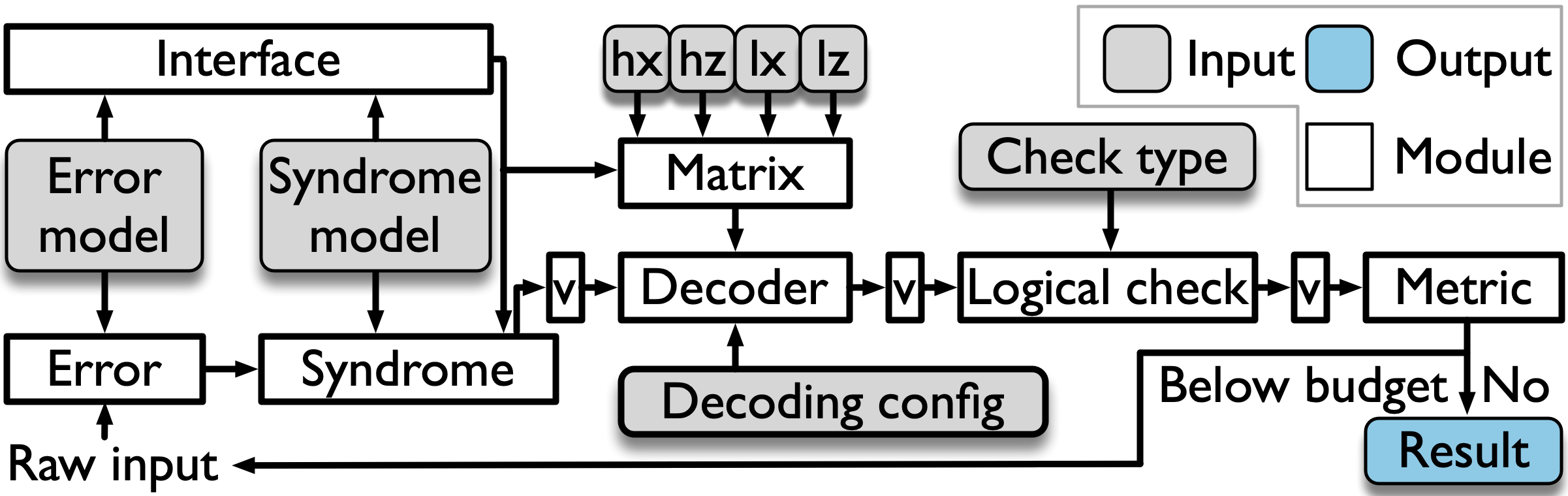
Syndrilla virtualizes the full decoder pipeline of data encoding, syndrome measurement, and error decoding into modules: error, syndrome, matrix, decoder, logical check, interface, trainer, and metric, as shown in the figure above.
All configurations are defined through YAML files.
Each module requires its own dedicated YAML configuration file, with the exception of the metric module. The trainer module supports the decoder rather than sitting in the decode pipeline: it is built only for a -t run, is selected with -tr, and carries the objective, the optimizer, and the epoch schedule.
2.1. Error module
The error YAML file defines all configuration parameters associated with the error model.
It currently supports a 1-channel Binary Symmetric Channel (BSC) error model, 2-channel error models for both depolarizing noise and BSC, a training-only swept-rate BSC, and a stim circuit-level model.
An example error configuration file using the Binary Symmetric Channel (BSC) model is provided in bsc.error.yaml:
error:
  model: bsc
  number_channel: 1
  device:
    device_type: cpu
    device_idx: 0
  rate: 0.1
The following table details the configuration parameters used in the error YAML file.
| Key | Description | Example |
|---|---|---|
error.model |
Type of quantum error model applied to data qubits | bsc, depol or stim_circuit |
error.number_channel |
The number of error channel applied to quantum circuit | 1 or 2 |
error.device.device_type |
Type of the device where the error injection will happen | cpu or cuda |
error.device.device_idx |
Index of the device where the error injection will happen. This option only works when device_type = cuda. |
0 |
error.rate |
Physical error rate applied to each data qubit. A training run may sweep it as a [lower, upper, points] range, one level drawn per shot |
0.05 or [0.01, 0.20, 9] |
The following table details all types of error model Syndrilla supports. (Using different error model may need different configuration format, which will be shown on Error module.)
| Error Model | Number of channels | Example |
|---|---|---|
| Binary Symmetric Channel (BSC) | Both 1 and 2 | bsc |
| Depolarizing Channel | 2 | depol |
| Stim circuit-level model | 1 | stim_circuit |
2.2. Syndrome module
The syndrome YAML file defines all configuration parameters associated with the syndrome measurement.
An example configuration file that assumes ideal (error-free) syndrome measurements is provided in perfect.syndrome.yaml:
syndrome:
  measure: perfect
The following table details the configuration parameters used in the syndrome module YAML file.
| Key | Description | Example |
|---|---|---|
syndrome.measure |
Model for syndrome measurement | perfect, phenomenological, or stim |
The following table details all types of syndrome measurement Syndrilla supports. (Using different syndrome measurement model may need different configuration format, which will be shown on Syndrome module.)
| Syndrome model | Description | Example |
|---|---|---|
| Perfect | Ideal (error-free) syndrome measurement: returns H * e mod 2 |
perfect |
| Phenomenological | Replicates the true syndrome over rounds and flips each bit with probability measurement_error_rate, which a training run may sweep as a range |
phenomenological |
| Stim | Circuit-level syndrome sampler driven by a stim circuit (used with the stim interface) | stim |
2.3. Matrix module
The matrix YAML file defines all configuration parameters associated with the matrix processing. Syndrilla accepts matrix from:
- .alist format introduced by David MacKay, Matthew Davey, and John Lafferty, which contains a sparse matrix.
- .npz format from NumPy, which contains a sparse matrix.
- .txt format containing a dense 2D matrix. Each row represents a check node of the H matrix, in which each 1 entry denotes a connecting variable node to that check node.
A decoder consumes a bundle of matrices (Hx, Hz, and optionally Lx and Lz). These are combined into a single matrix YAML file, where each entry can be referenced as a file path or inlined as a config dict. An example combined matrix configuration is provided in surface_10.matrix.yaml, which is the file passed via -m in the command above:
matrix:
  parity_matrix_hx:
    file_type: alist
    path: examples/alist/surface/surface_10_hx.alist
  parity_matrix_hz:
    file_type: alist
    path: examples/alist/surface/surface_10_hz.alist
  logical_check_matrix: True
  logical_check_lx:
    file_type: alist
    path: examples/alist/surface/surface_10_lx.alist
  logical_check_lz:
    file_type: alist
    path: examples/alist/surface/surface_10_lz.alist
The following table details the configuration parameters used in the combined matrix YAML file.
| Key | Description | Example |
|---|---|---|
matrix.parity_matrix_hx |
Matrix entry (path or inline dict) for the X-type parity-check matrix | examples/alist/surface/surface_10_hx.alist |
matrix.parity_matrix_hz |
Matrix entry (path or inline dict) for the Z-type parity-check matrix | examples/alist/surface/surface_10_hz.alist |
matrix.logical_check_matrix |
Flag for whether logical-check matrices are provided; if False, they are computed from Hx/Hz via compute_lz |
True or False |
matrix.logical_check_lx |
Matrix entry for the X-type logical-check matrix (used when logical_check_matrix = True) |
examples/alist/surface/surface_10_lx.alist |
matrix.logical_check_lz |
Matrix entry for the Z-type logical-check matrix (used when logical_check_matrix = True) |
examples/alist/surface/surface_10_lz.alist |
The following table details all matrix formats Syndrilla supports. (Using different matrix formats may need different configuration format, which will be shown on Matrix module.)
| Matrix format | Description | Example |
|---|---|---|
| alist | Sparse format from MacKay/Davey/Lafferty; lists nonzero neighbor indices per check node | alist |
| npz | NumPy/SciPy compressed archive containing a sparse parity-check matrix | npz |
| txt | Plain-text dense 2D matrix; each row is a check node with 1s marking connected variable nodes |
txt |
| stim | Built directly from a stim circuit's detector error model; selects either the check (H) or observable (L) matrix |
stim |
2.4. Decoder module
The decoding YAML file defines all configuration parameters associated with the decoder.
An example decoder configuration file is provided in bposd_hx.decoding.yaml:
decoding:
  algorithm: [bp_norm_min_sum, osd_0]
  check_type: hx
  dtype: float64
  device:
    device_type: cuda
    device_idx: 0
  config:
    max_iter: 181
The following table details the configuration parameters used in the decoder module YAML file.
| Key | Description | Example |
|---|---|---|
decoding.algorithm |
List of decoding algorithms used | [bp_norm_min_sum, osd_0] |
decoding.check_type |
Type of parity-check matrix used | hx or hz |
decoding.device.device_type |
Type of the device where the decoding will happen | cpu or cuda |
decoding.device.device_idx |
Index of the device where the decoding will happen. This option only works when device_type = cuda. |
0 |
decoding.dtype |
Data type for decoding computations | float32, float64 |
decoding.force_pytorch |
(optional) Run the plain PyTorch module even on a CUDA device | false |
decoding.rebatch_opt |
(optional) Iteration cap, boolean, default true; false means no iteration cap; see Decoder module |
false |
decoding.rebatch_opt_params |
(optional) Block overriding the cap's class defaults kl_eps, kl_window, kl_min, candidates; see Decoder module |
{kl_eps: 0.001} |
decoding.config |
Algorithm-specific settings (e.g. max_iter, or a learned decoder's checkpoint). A mapping configures the first algorithm; a list gives one entry per entry of decoding.algorithm |
max_iter: 181 |
decoding.config.compile |
(optional, bp_norm_min_sum only) Run the PyTorch module's iteration body through torch.compile; set false to run eager. Applies only to the PyTorch module on a CUDA device (force_pytorch: true, or the CUDA port unavailable); ignored on CPU |
true |
The keys above the last one are framework-wide and apply to the whole block; anything only one algorithm understands (max_iter, quantization widths, relay_bp's leg schedule) goes under decoding.config. Written as a plain mapping, as above, it configures the first algorithm, so max_iter reaches bp_norm_min_sum and osd_0, which takes no settings of its own, runs on its defaults. Written as a list it is matched to decoding.algorithm by position, which is how a chain configures a stage other than its first. A key written at the top level that belongs under decoding.config, or the reverse, is rejected with a message naming the block it belongs in. See Decoder module for the full rule.
An AI decoder trained with -t takes no run settings from this block: its optimizer and epoch budget configure the run rather than the model, so they live in the training YAML passed with -tr, under training.optimizer and training.budget; see Trainer module. The decoder block keeps the model itself, and a decode run loads decoding.config.checkpoint from it, whose key list is in Decoder module.
When decoding.device.device_type is set to cuda, every decoder automatically uses its CUDA-kernel implementation if a CUDA-capable GPU is present and the kernel is available; otherwise it falls back to the PyTorch implementation. This covers every registered decoder except saq: the BP family plus osd_0, mwpm, and union_find. For osd_0, mwpm, and union_find the CUDA output is bit-for-bit identical to the CPU implementation. Non-NVIDIA accelerators (e.g. AMD ROCm, IBM), where the CUDA kernels do not compile, automatically use the PyTorch implementation. See Decoder module for details.
The following table details the different types of decoding algorithms Syndrilla supports. (Using different decoder may need different configuration format, which will be shown on Decoder module.)
| Decoding Algorithm | #Channel | Example | Reference |
|---|---|---|---|
| Min-Sum Belief Propagation (Min-Sum BP) | 1 | bp_norm_min_sum | Factor Graphs and the Sum-Product Algorithm |
| Branch-Assisted Sign-Flipping Belief Propagation (BSFBP) | 1 | bp_branch_assisted | Branch-Assisted Sign-Flipping Belief Propagation Decoding for Topological Quantum Codes Based on Hypergraph Product Structure |
| Ordered Statistics Decoding (OSD) | 1 | osd_0 | Soft-Decision Decoding of Linear Block Codes Based on Ordered Statistics |
| Quaternary Belief Propagation (BP4) | 2 | bp4 | Quaternary Neural Belief Propagation Decoding of Quantum LDPC Codes with Overcomplete Check Matrices |
| Relay Belief Propagation (Relay BP) | 1 | relay_bp | Relay BP: normalized min-sum over multiple legs with disordered per-variable memory (relay-bp crate, trmue/relay) |
| Belief Propagation with Syndrome Flipping (BP-SF) | 1 | bp_sf | Fully Parallelized BP Decoding for Quantum LDPC Codes Can Outperform BP-OSD (Dies-Irae/BP-SF) |
| Quantized Min-Sum BP | 1 | bp_norm_min_sum_quant | Normalized min-sum BP with fixed-point quantized messages |
| Lottery BP | 1 | bp_lottery | Sobol/system-driven sign-flip perturbations on the BP messages |
| Quantized Lottery BP | 1 | bp_lottery_quant | Lottery BP with fixed-point quantized messages |
| Lottery BP with a sign-flip policy | 1 | bp_lottery_policy | Lottery BP with a selectable sign-flip policy |
| SAQ (learned decoder) | 1 | saq | SAQ: Stabilizer-Aware Quantum Error Correction Decoder (arXiv:2512.08914); trained with -t |
| Minimum-Weight Perfect Matching (MWPM) | 1 | mwpm | PyMatching v2 sparse-blossom (Higgott & Gidney); graphlike codes only |
| Union-Find (Delfosse-Nickerson) | 1 | union_find | Almost-linear-time decoding for topological codes (arXiv:1709.06218); graphlike codes only (surface and toric) |
2.5. Logical check module
The check YAML file defines all configuration parameters associated with the computation of logical check error rates.
An example configuration file for computing the logical check error rate using the lx matrix is provided in lx.check.yaml.
check:
  check_type: lx
The following table provides a detailed explanation of the configuration parameters used in the check module YAML file.
| Key | Description | Example |
|---|---|---|
check.check_type |
Method used on logical check computation | lx or lz |
2.6. Interface module
This module can be used with a quantum circuit simulator such as Stim to generate circuits that include various types of errors.
An example configuration file using Stim is provided in stim_generated.interface.yaml. (Using interface will cause other modules having different format, which will be shown on Interface module.)
interface:
  backend: stim
  code: surface_code:rotated_memory_x
  distance: 3
The following table provides a detailed explanation of the configuration parameters used in the interface module YAML file.
| Key | Description | Example |
|---|---|---|
interface.backend |
The quantum circuit simulator is used | stim |
interface.code |
Stim code family to generate, required unless interface.circuit is given |
surface_code:rotated_memory_x |
interface.distance |
Code distance of the generated circuit, required unless interface.circuit is given |
3 |
interface.circuit |
(optional) Inline stim circuit string, or a mapping of generation parameters, used instead of code/distance |
<stim circuit string> |
interface.number_channel |
(optional) Fallback channel count when error.number_channel is absent |
1 |
The device and dtype of an interface run come from the decoder YAML, not from this file. See Interface module for the full key list.
2.7. Trainer module
The trainer is a support module for the decoder: its YAML file defines everything that configures a -t run rather than the model it fits, namely the objective, the optimizer, and the epoch schedule.
It is read only when training, and is the one module a decode run never builds.
An example configuration file is provided in train_saq_hx.training.yaml:
training:
  algorithm: saq
  loss:
    lambda_lc: 1.0
    lambda_lp: 0.2
    lambda_ent: 1.0
  optimizer:
    lr: 5.0e-4
    weight_decay: 5.0e-8
    min_lr: 1.0e-6
  budget:
    epochs: 100
    test_batches: 200
    validation_batches: 20
    error_random_seed: 42
The following table provides a detailed explanation of the configuration parameters used in the trainer module YAML file.
| Key | Description | Example |
|---|---|---|
training.algorithm |
Training algorithm, naming a module under syndrilla/trainer/; it brings the objective and the optimizer |
saq |
training.loss.* |
That algorithm's objective settings; saq weights its three terms |
lambda_lp: 0.2 |
training.optimizer.* |
Settings the Trainer builds the run's optimizer from; it fits Adam with lr, weight_decay and min_lr |
lr: 5.0e-4 |
training.budget.epochs |
Number of epochs to run | 100 |
training.budget.test_batches |
Training batches per epoch | 200 |
training.budget.validation_batches |
Validation batches per epoch, drawn clear of the training set | 20 |
training.budget.error_random_seed |
Seeds the error stream, so every epoch trains on the same batches | 42 |
Each block has one reader: loss and optimizer the algorithm's own trainer module, budget the metric module. See Trainer module for the training loop and its outputs.
2.8. Metric module
This module does not take any YAML file as inputs, it will report default metrics as output, which will be described in the output.
3. Output format and metrics
The result YAML file will be saved to the path specified by the -r option.
In the example above, the result YAML file can be found in the tests/test_outputs folder.
This file includes both the metric results for each decoder and a summary of the full decoding.
Additionally, the result YAML file is updated every --save-interval batches (default 100), and a run sent SIGTERM stops after the current batch and saves its result YAML, allowing Syndrilla to resume the simulation from the last checkpoint if the error budget was not reached in the previous run.
Example output of a run like the one above, abridged:
decoder_0:
  algorithm: bp_norm_min_sum
  decoder invoke rate: 1.00000000000000000e+00
  average iteration: 7.69916235294117968e+01
  iteration distribution: [1, 1, 1, 1, 1, 2, 2, 2, 2, 2, 2, 2, 2, 2, 2, 2, 2, 2, 2,
    2, 2, 2, 2, 3, 3, 3, 3, 3, 3, 3, 4, 4, 4, 4, 4, 4, 4, 5, 5, 6, 6, 8, 14, 131,
    131, 131, 131, 131, 131, 131, 131, 131, 131, 131, 131, 131, 131, 131, 131, 131,
    131, 131, 131, 131, 131, 131, 131, 131, 131, 131, 131, 131, 131, 131, 131, 131,
    131, 131, 131, 131, 131, 131, 131, 131, 131, 131, 131, 131, 131, 131, 131, 131,
    131, 131, 131, 131, 131, 131, 131, 131, 131]
  total time (s): '1.10485250949859619e+01'
  average time per batch (s): '6.49913240881527104e-02'
  average time per sample (s): '6.49913240881526920e-05'
  average time per iteration (s): '8.44576808757733200e-07'
  hx:
    data qubit accuracy: 9.75190120246994030e-01
    data qubit correction accuracy: 6.41507008117403132e-01
    data frame error rate: 6.73282352941176554e-01
    syndrome frame error rate: 5.77482352941176336e-01
    logical error rate: 5.78029411764705681e-01
    converge failure rate: 5.47058823529412205e-04
    converge success rate: 4.21970588235294097e-01
decoder_1:
  algorithm: osd_0
  decoder invoke rate: 5.77482352941176336e-01
  average iteration: 1.77477071406242374e+02
  iteration distribution: [1, 170, 172, 172, 173, 173, 174, 174, 174, 175, 175, 175,
    175, 175, 175, 176, 176, 176, 176, 176, 176, 176, 176, 176, 177, 177, 177, 177,
    177, 177, 177, 177, 177, 177, 177, 178, 178, 178, 178, 178, 178, 178, 178, 178,
    178, 178, 178, 178, 178, 178, 178, 178, 178, 178, 178, 178, 178, 178, 179, 179,
    179, 179, 179, 179, 179, 179, 179, 179, 179, 179, 179, 179, 179, 179, 179, 179,
    179, 179, 179, 179, 179, 179, 179, 179, 179, 179, 179, 179, 179, 179, 179, 179,
    179, 179, 179, 179, 179, 179, 179, 179, 179]
  total time (s): '6.03572950363159180e+01'
  average time per batch (s): '3.55042911978328934e-01'
  average time per sample (s): '3.55042911978328650e-04'
  average time per iteration (s): '2.00049854387823897e-06'
  hx:
    data qubit accuracy: 9.81503314917126946e-01
    data qubit correction accuracy: 6.86872349409486938e-01
    data frame error rate: 5.27194117647059146e-01
    syndrome frame error rate: 0.00000000000000000e+00
    logical error rate: 5.92352941176471030e-03
    converge failure rate: 5.92352941176471030e-03
    converge success rate: 9.94076470588235228e-01
decoder_full:
  batch size: 1000
  batch count: 170
  target error: 1000
  target error reached: 1007
  data type: torch.float64
  physical error rate: 5.00000000000000028e-02
  total time (s): '7.14058201313018799e+01'
  H matrix: /home/ya212494/code/syndrilla/examples/alist/surface/surface_10_hx.alist
  hx:
    logical error rate: 5.92352941176471030e-03
The block above is abridged: a real result file also carries sample count and iteration count for every decoder, and its numbers reflect whichever batch size and error rate the run actually used.
3.1. Per-decoder metrics
Since Syndrilla supports a sequence of decoding algorithms, there are two types of output metrics: (1) per-decoder metrics for each individual decoder, and (2) final metrics after all decoders.
The following table provides a detailed explanation of the metrics in the output YAML file for per-decoder metrics:
| Metric | Description |
|---|---|
algorithm |
Name of the decoding algorithm used (e.g., bp_norm_min_sum, osd_0) |
data qubit accuracy |
Ratio of correctly matched data qubits over all data qubits |
data qubit correction accuracy |
Ratio of correctly identified data qubit errors |
data frame error rate |
Ratio of samples with any data qubit mismatched |
syndrome frame error rate |
Ratio of samples with any syndrome mismatched |
logical error rate |
Ratio of samples that have a logical error |
converge failure rate |
Ratio of samples that successfully converge with a logical error |
converge success rate |
Ratio of samples that successfully converge without a logical error |
decoder invoke rate |
Ratio of samples for which the decoder is invoked |
average iteration |
Average number of iterations per sample |
sample count |
Total number of samples this decoder metered. Per-sample rates are accumulated weighted by this count (not by batch count), so they stay correct when batches differ in size, e.g. under the adaptive iteration speedup (rebatch_opt), where a batch may meter only its converged samples. For equal-size batches it equals batch count × batch size. |
iteration distribution |
Once the error budget is reached, the per-percentile iteration counts (101 values, 0–100% at 1% intervals); before then, the raw per-iteration histogram |
iteration count |
Raw per-iteration histogram (samples stopping at each iteration index), always saved un-percentiled regardless of completion |
total time (s) |
Total time taken by the decoder in seconds |
average time per batch (s) |
Average time taken per batch in seconds |
average time per sample (s) |
Average time taken per sample in seconds |
average time per iteration (s) |
Average time per iteration per sample in seconds |
3.2. Final metrics
The following table provides a detailed explanation of the metrics in the output YAML file for final metrics:
| Metric | Description |
|---|---|
H matrix |
Path to the parity-check matrix used |
batch size |
Number of samples in each batch |
batch count |
Total number of batches |
target error |
Total number of errors to stop decoding |
target batch |
Batch budget the run was given with -tb, null under an error target |
target error reached |
Actual number of logical errors observed |
seed |
Seed given with --seed or kept from the -ckpt checkpoint, null when unseeded |
data type |
Floating point data used |
physical error rate |
Physical error rate |
logical error rate |
Logical error rate of the final decoder in the chain across all samples |
total time (s) |
Total simulation time across all batches in seconds |
Note that the time metric here only considers the decoding time.
To change the configuration of the simulator, user need to update the YAML files.
For example, if you want to use a different physical error rate, you need to find the input error YAML (e.g., examples/alist/bsc.error.yaml) and update the rate field.
4. Resume from checkpoint
If previous run is terminated by accident, the simulation can resume by setting -ckpt to the checkpoint YAML file, the results of a previous run (e.g., tests/test_outputs/result_phy_err_0.1.yaml). The checkpoint's physical error rate has to match the one in the error YAML, or the run is rejected.
syndrilla -r=tests/test_outputs
          -d=examples/alist/bposd_hx.decoding.yaml
          -m=examples/alist/surface_10.matrix.yaml
          -e=examples/alist/bsc.error.yaml
          -c=examples/alist/lx.check.yaml
          -s=examples/alist/perfect.syndrome.yaml
          -bs=10000
          -te=1000
          -ckpt=tests/test_outputs/result_phy_err_0.1.yaml
A training run resumes on the pair of checkpoints it wrote, -ckpt set to the run's *_result.yaml and -tckpt to its *_last.pt, with every other flag left as it was; either flag without the other is refused, as is a resume under a different selection metric. See Trainer module.
5. Sweep configurations
syndrilla-parallel sweep-gen writes one point folder per configuration, and syndrilla-parallel sweep runs every point folder as one syndrilla-parallel run launch.
Run both from the repository root: the templates and the matrix paths in the generated YAMLs are relative to it (examples/alist/).
syndrilla-parallel sweep-gen -c zoo/script/sweeping_configs.yaml -r zoo/bposd_quant_sweeping
syndrilla-parallel sweep -r zoo/bposd_quant_sweeping -te=1000 -bs=10000 -l=SUCCESS
The configurations to sweep are specified in a sweeping configs YAML file. It allows specifying decoder (decoder algorithm), code (code type), probability (physical error rate), check_type (check type), distance (code distance), and dtype (data type). Below is an example:
decoder: [bposd_quant]
code: [surface]
probability: [0.001, 0.002, 0.005, 0.01, 0.02, 0.05, 0.1, 0.2, 0.5]
check_type: [hx]
distance: [3, 5, 7, 9, 11, 13]
dtype: ['float32']
This file lives at zoo/script/sweeping_configs.yaml; it ships with the wider alternatives commented out above each line.
Note that currently supported data format includes ['bfloat16', 'float16', 'float32', 'float64'].
sweep-gen writes one folder per combination directly under -r, named <code>_<check_type>_<probability>_<distance>_<dtype>, holding <decoder>_<check_type>.decoding.yaml, bsc.error.yaml, lx.check.yaml (hx) or lz.check.yaml (hz), perfect.syndrome.yaml and matrix.yaml. The max_iter of the decoding YAML is set from the distance. If a point folder already holds a result YAML, sweep-gen writes nothing and exits, unless --force is given, which rewrites the config YAMLs and keeps the results.
python zoo/script/generate_sweeping_configs.py does the same from zoo/script/sweeping_configs.yaml, writing the points of each decoder to zoo/<decoder>_sweeping/, or all points to zoo/<-r>/ with -r. A point folder holds one decoding YAML, so both refuse a sweep dir given more than one decoder.
sweep takes every folder under -r that holds a *.decoding.yaml as a point, in sorted name order, and takes -d, -e, -c, -s and -m from the point folder's *.decoding.yaml, *.error.yaml, *.check.yaml, *.syndrome.yaml and matrix.yaml, each of which must match exactly one file; giving any of them, or -i, on the command line is refused. Every other run flag applies to each point, and unknown flags are passed to every worker. Each point folder is launched exactly like run with -r set to that folder: probe, launch.yaml, worker dirs, pooled stop, merged_result.yaml and the pooled result_phy_err_<rate>.yaml, resume and refusals all work per folder. Every point is planned before the first one starts, so a refusal in any folder stops the sweep before it runs anything.
Points form a queue over GPU slots, --workers-per-gpu slots per GPU. A point starts when --workers-per-point (w) slots are free and takes them spread over the emptiest GPUs first, doubling up on a GPU only when nothing emptier is free (ties go to the lower GPU index); its workers are w0 to w<w-1> under the point folder, each on the physical device launch.yaml records. A w above the total slot count (GPUs times --workers-per-gpu) is refused. A started point folder resumes only on its recorded devices: the sweep waits for those slots, and refuses when a recorded device is not in --gpus or needs more slots than --workers-per-gpu gives. A point whose decoding YAML says cpu runs one worker on a single cpu slot, so cpu points run one at a time. A point folder that already holds merged_result.yaml counts as done and is not checked; an unfinished folder from the old gpu<g>_w<j> layout is refused. With --seed b, worker j of point i (in sorted order) gets --seed=<b + i*w + j>. Seeds come from each folder's position in sorted order, so they stay the same across resumes only while the set of point folders is unchanged.
When a point fails (its probe, a worker, or its merge), the sweep goes on with the other points, lists the failed points at the end, and exits with status 1. With --fail-fast, it instead sends SIGTERM to the running points, which save their result YAMLs, starts no further point, and exits with status 1. A Ctrl-C, or any error in the launcher, stops every started worker the same way. In every case sweep writes <-r>/sweep_results.csv with one row per point: folder, code, check_type, p, d, dtype, shots, fails, LER, Wilson low, Wilson high (95% Wilson interval), wall s (this launch) and status (done, failed, stopped or not run); a stopped row holds the counts of the worker YAMLs saved so far. A rerun of the same command skips each point folder that holds merged_result.yaml (its row is rebuilt from that file, which is kept) and resumes the other point folders.
Simulation results
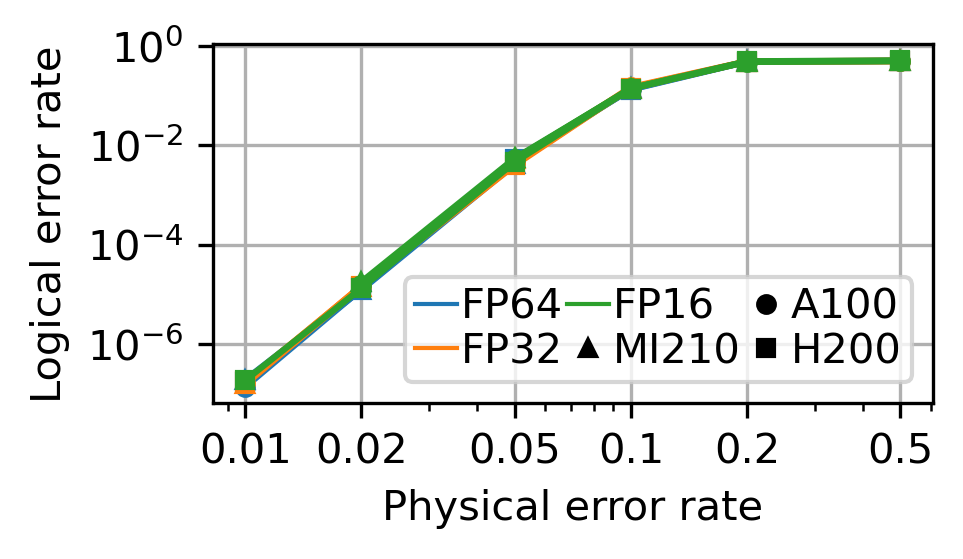
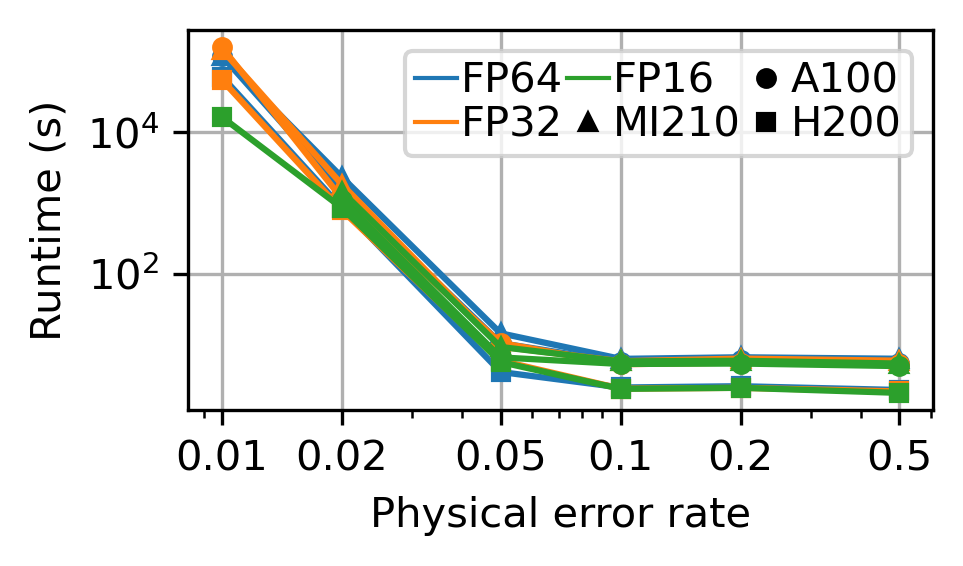
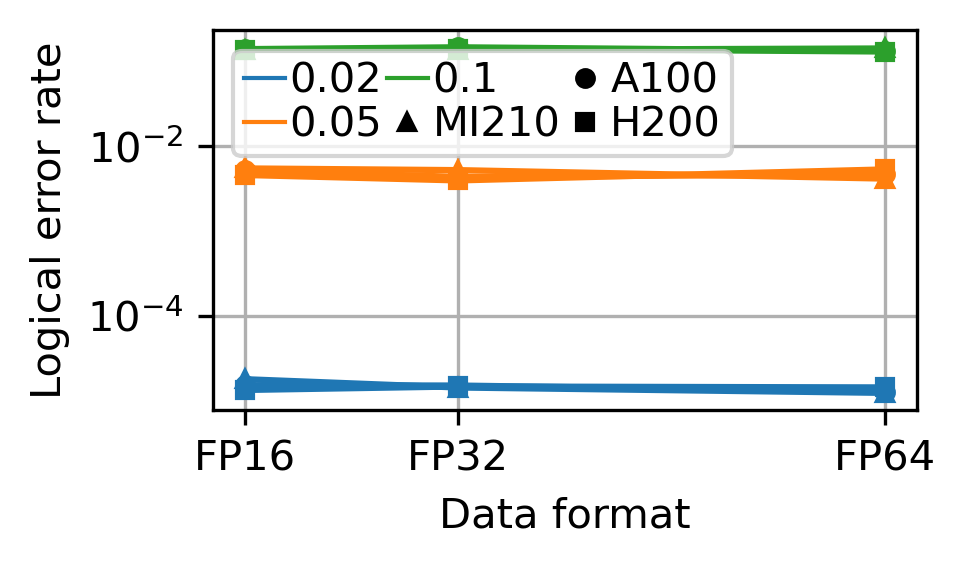
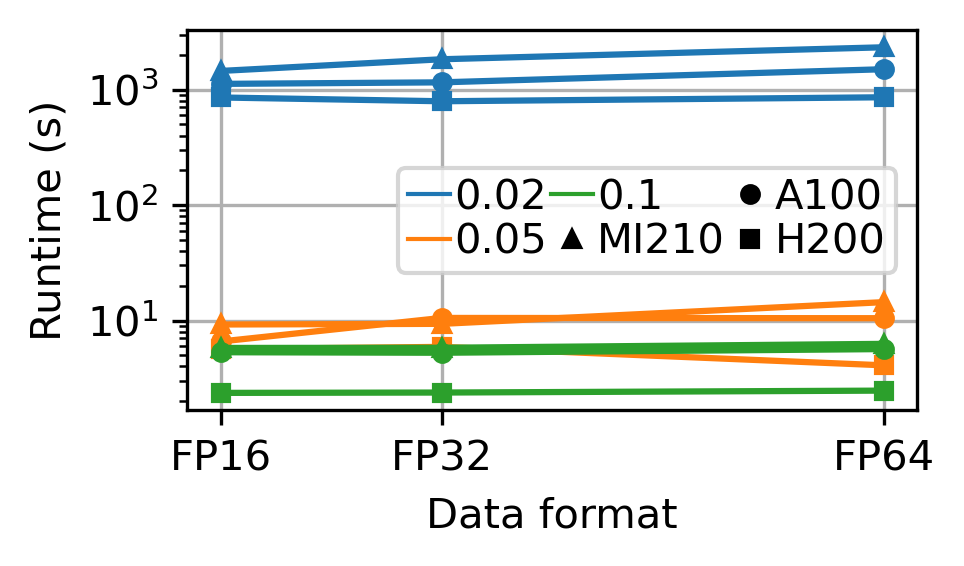
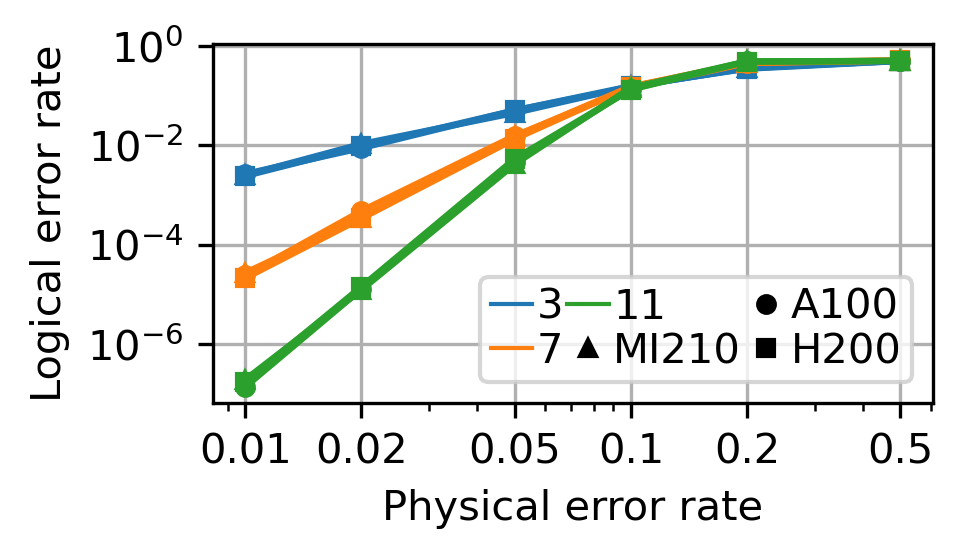
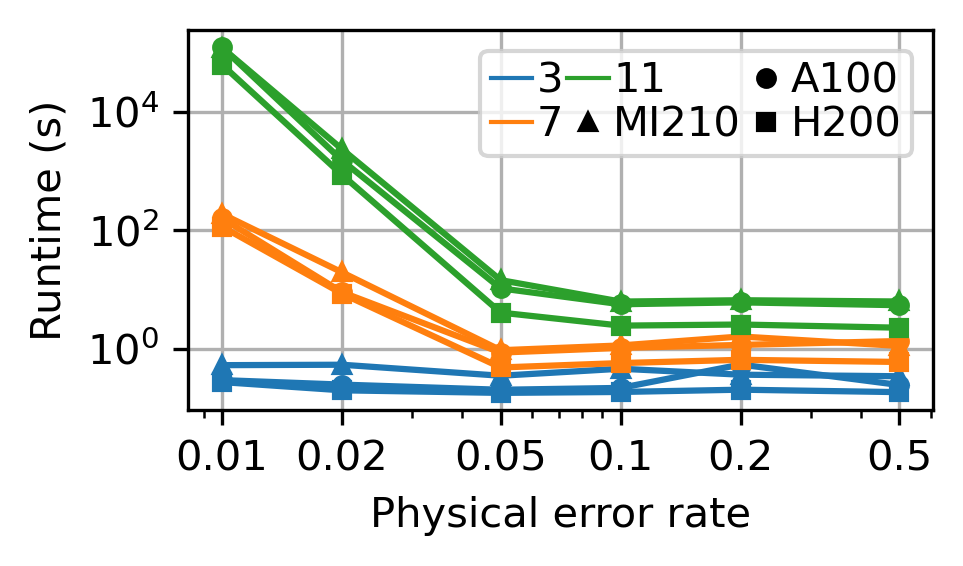
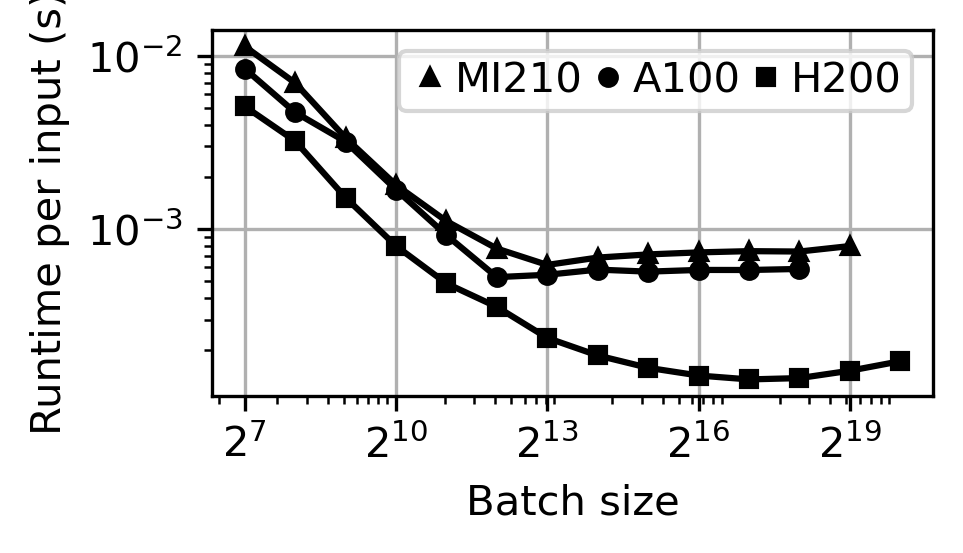
We show some of the simulation results as below. These results show the impact of data format, code distance, physical error rate, and hardware on logical error rate and runtime.
GPUs: AMD Insticnt MI210, NVIDIA A100, NVIDIA H200
CPU: Intel i9-13900K
Comparison across GPUs
 Accuracy |
 Time |
Comparison across data formats
 Accuracy |
 Time |
Comparison across distances
 Accuracy |
 Time |
Comparison across batch sizes and against CPU
 Time |
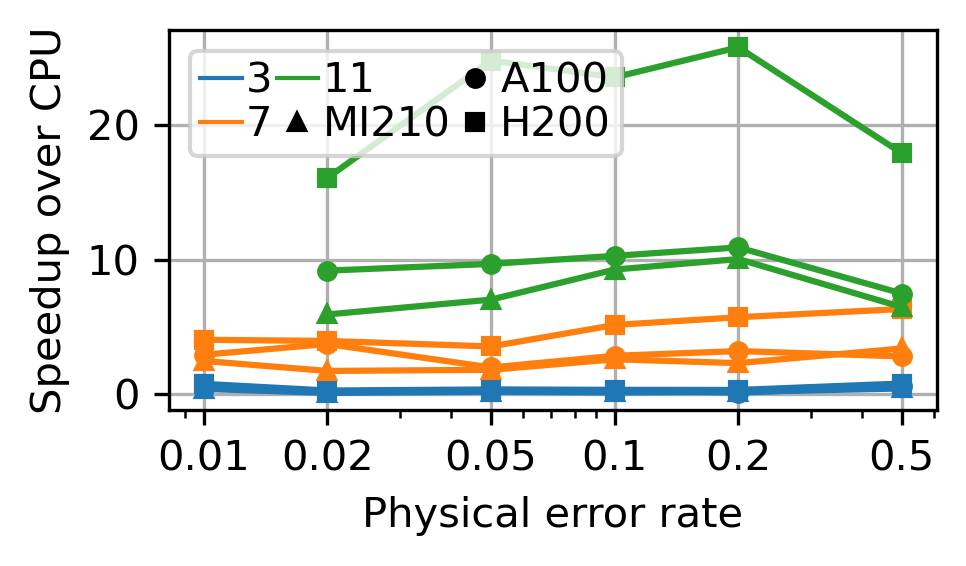 Speedup over CPU |
Citation
If you use Syndrilla in your research, please cite the following papers:
@article{2026_arxiv_lottery_bp,
	title={{Lottery BP: Unlocking Quantum Error Decoding at Scale}},
	author={Yanzhang Zhu and Chen-Yu Peng and Yun Hao Chen and Yeong-Luh Ueng and Di Wu},
	year={2026},
	eprint={2605.00038},
	archivePrefix={arXiv},
	url={https://arxiv.org/abs/2605.00038}
}
@article{2025_qce_syndrilla,
	title={{Syndrilla: Simulating Decoders for Quantum Error Correction using PyTorch}},
	author={Yanzhang Zhu and Chen-Yu Peng and Yun Hao Chen and Siyuan Niu and Yeong-Luh Ueng and Di Wu},
	booktitle={International Conference on Quantum Computing and Engineering},
	year={2025}
}
Contribution
We warmly welcome contributions to Syndrilla, just open a pull request!
License
Syndrilla is released under the MIT License. See LICENSE for the full text.


Release files for syndrilla 2.3.2
For a detailed explanation of source distributions (sdists) and built distributions (wheels), please see the package formats documentation.
Source distribution (sdist)
| File | Size | Uploaded | |
|---|---|---|---|
| syndrilla-2.3.2.tar.gz | 9.3 MB | Details |
Built distribution (wheel)
| File | Interpreter | ABI | Platform | Reset |
|---|---|---|---|---|
| syndrilla-2.3.2-py3-none-any.whl | Python 3 | none | any | Details |
Total release size: 9.6 MB
Release files / syndrilla-2.3.2.tar.gz
| Download URL | syndrilla-2.3.2.tar.gz |
|---|---|
| Size | 9.3 MB |
| Tags | Source |
|
SHA-256 checksum How to use checksums |
5ad2e4d8d377487b1db7702745cd43374e8d1ff36c7d01c88df91f180a1ebeb0
|
|
BLAKE2b-256 checksum How to use checksums |
fcd234886810310e88c65c8e0a4d06c843ac7f71619590bb27560435615ca7ab
|
| Upload date | |
|
Uploaded using Trusted Publishing? What is trusted publishing? |
Yes |
| Uploaded via |
twine/7.0.0 CPython/3.13.14
|
Provenance
Provenance describes where a file came from. On PyPI, provenance is shared via attestations, which provide a verifiable record of the build or publishing details. View details, limitations and caveats.


PyPI Publish Attestation
PyPI verified that this artifact, at this checksum, originated from the publisher listed below.
Signed by GitHub Actions, verified by PyPI on Oct 5, 2026.
Transparency logRelease files / syndrilla-2.3.2-py3-none-any.whl
| Download URL | syndrilla-2.3.2-py3-none-any.whl |
|---|---|
| Size | 264.8 kB |
| Tags | Python 3 |
|
SHA-256 checksum How to use checksums |
0fe9287bd6a4c7e3fd1f52869a998dd242a485416f7a3b9737a3c56e2cc2d4f6
|
|
BLAKE2b-256 checksum How to use checksums |
c4ead33aa750369cc77740a28a603201d82d629ca398d80e7e24f0e0a7764bb2
|
| Upload date | |
|
Uploaded using Trusted Publishing? What is trusted publishing? |
Yes |
| Uploaded via |
twine/7.0.0 CPython/3.13.14
|
Provenance
Provenance describes where a file came from. On PyPI, provenance is shared via attestations, which provide a verifiable record of the build or publishing details. View details, limitations and caveats.
PyPI Publish Attestation
PyPI verified that this artifact, at this checksum, originated from the publisher listed below.
Signed by GitHub Actions, verified by PyPI on Oct 5, 2026.
Transparency log













