
SynKit




Graph-native reaction informatics and executable electron-flow models
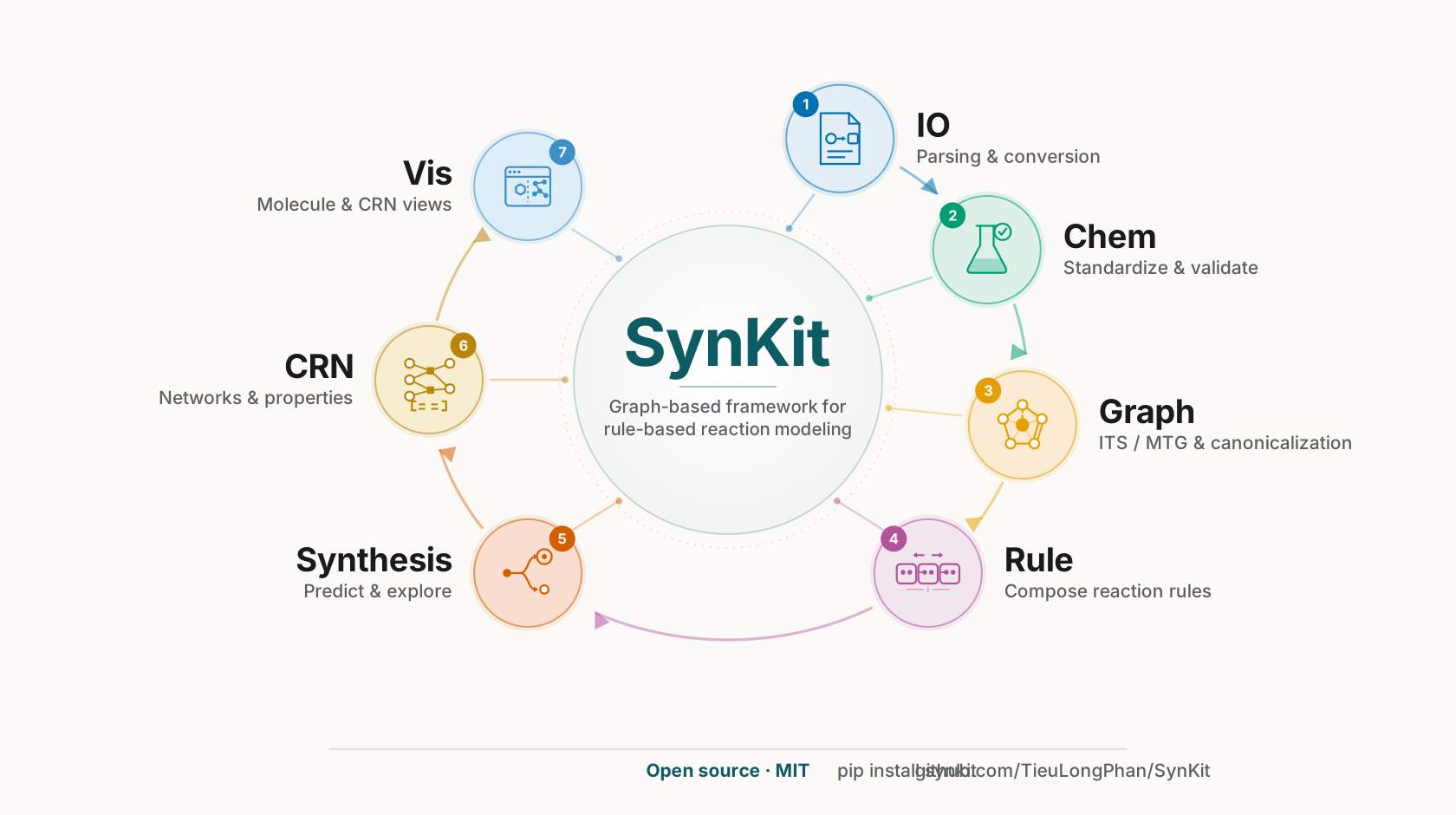
SynKit is a Python toolkit for atom mapping, chemical graph transformations, reaction rules, stereochemistry, and chemical reaction networks. It also represents Lewis-labelled graphs and verifies user-supplied electron-flow mechanisms. It does not predict the kinetically or thermodynamically preferred mechanism.
Installation
Requires Python 3.11 or later.
python -m pip install synkit
See Getting Started for examples, optional dependencies, and Docker installation.
Documentation
Publications
- Lewis-labeled graphs: curly arrows and fishhooks as executable electron transfers, submitted (2026).
- SynKit: A Graph-Based Python Framework for Rule-Based Reaction Modeling and Analysis, Journal of Chemical Information and Modeling (2025).
Contributing
Contributions and bug reports are welcome. Create a branch from the current mainline, make a focused change, and run the repository checks before opening a pull request:
git switch -c feature/short-description
bash scripts/lint.sh
bash scripts/pytest.sh
Questions can be sent to tieu@bioinf.uni-leipzig.de.
Contributors
License
SynKit is distributed under the MIT License. See LICENSE.
Acknowledgments
This project received funding from the European Union’s Horizon Europe Doctoral Network programme under Marie Skłodowska-Curie grant agreement No. 101072930 (TACsy).
1 maintainer

Metadata
1 maintainer
Release files for synkit 1.6.3
For a detailed explanation of source distributions (sdists) and built distributions (wheels), please see the package formats documentation.
Source distribution (sdist)
| File | Size | Uploaded | Provenance | Actions |
|---|---|---|---|---|
| synkit-1.6.3.tar.gz | 1.2 MB | With provenance | Details for synkit-1.6.3.tar.gz |
Built distribution (wheel)
| File | Interpreter | ABI | Platform | Actions Reset |
|---|---|---|---|---|
| synkit-1.6.3-py3-none-any.whl | Python 3 | none | any | Details for synkit-1.6.3-py3-none-any.whl |
Total release size: 2.7 MB
Release files / synkit-1.6.3.tar.gz
| Download URL | synkit-1.6.3.tar.gz |
|---|---|
| Size | 1.2 MB |
| Tags | Source |
|
SHA-256 checksum How to use checksums |
d1359c41a66adee4451427f72dfe83bf3e5430d1622e6a071fbd9b54db371245
|
|
BLAKE2b-256 checksum How to use checksums |
d97c08866cad3b6503d8414e50da34921edde326c0ff0c2f3c5e3bd21632765f
|
| Upload date | |
|
Uploaded using Trusted Publishing? What is trusted publishing? |
Yes |
| Uploaded via |
twine/7.0.0 CPython/3.13.14
|
Provenance
Provenance describes where a file came from. On PyPI, provenance is shared via attestations, which provide a verifiable record of the build or publishing details. View details, limitations and caveats.


PyPI Publish Attestation
PyPI verified that this artifact, at this checksum, originated from the publisher listed below.
Signed by GitHub Actions, verified by PyPI on Oct 12, 2026.
Transparency logRelease files / synkit-1.6.3-py3-none-any.whl
| Download URL | synkit-1.6.3-py3-none-any.whl |
|---|---|
| Size | 1.5 MB |
| Tags | Python 3 |
|
SHA-256 checksum How to use checksums |
f3012376c3ac7b6d7c2ae906cd98345bfead5ddd1c0ddf4b398e24dc9d75731a
|
|
BLAKE2b-256 checksum How to use checksums |
724a8178614e469c8fd3e9d46d7cef9a5b4bd3839f7125602db5071803ddab3a
|
| Upload date | |
|
Uploaded using Trusted Publishing? What is trusted publishing? |
Yes |
| Uploaded via |
twine/7.0.0 CPython/3.13.14
|
Provenance
Provenance describes where a file came from. On PyPI, provenance is shared via attestations, which provide a verifiable record of the build or publishing details. View details, limitations and caveats.
PyPI Publish Attestation
PyPI verified that this artifact, at this checksum, originated from the publisher listed below.
Signed by GitHub Actions, verified by PyPI on Oct 12, 2026.
Transparency logSecurity for synkit 1.6.3
Provenance
Provenance describes where a file came from. On PyPI, provenance is shared via attestations, which provide a verifiable record of the build or publishing details. View details, limitations and caveats.
Full provenance
All 2 files in this release have been uploaded with provenance metadata.
Attestation for synkit-1.6.3.tar.gz
PyPI Publish Attestation
PyPI verified that this artifact, at this checksum, originated from the publisher listed below.
Signed by GitHub Actions, verified by PyPI on Oct 12, 2026.
Transparency logA note on package security
PyPI is a repository for distributing packages, not a service for auditing them. While third-party security researchers and our staff do their best to detect and remove malicious packages, PyPI cannot guarantee the quality, security or suitability of any given package.
To learn more about protecting yourself from malicious actors, visit our package security documentation.














