
Utility for reaction modeling using graph grammar
Verified details
These details have been verified by PyPIProject links
GitHub Statistics
Maintainers

Project description
SynKit











Graph-native reaction informatics and supplied-mechanism verification
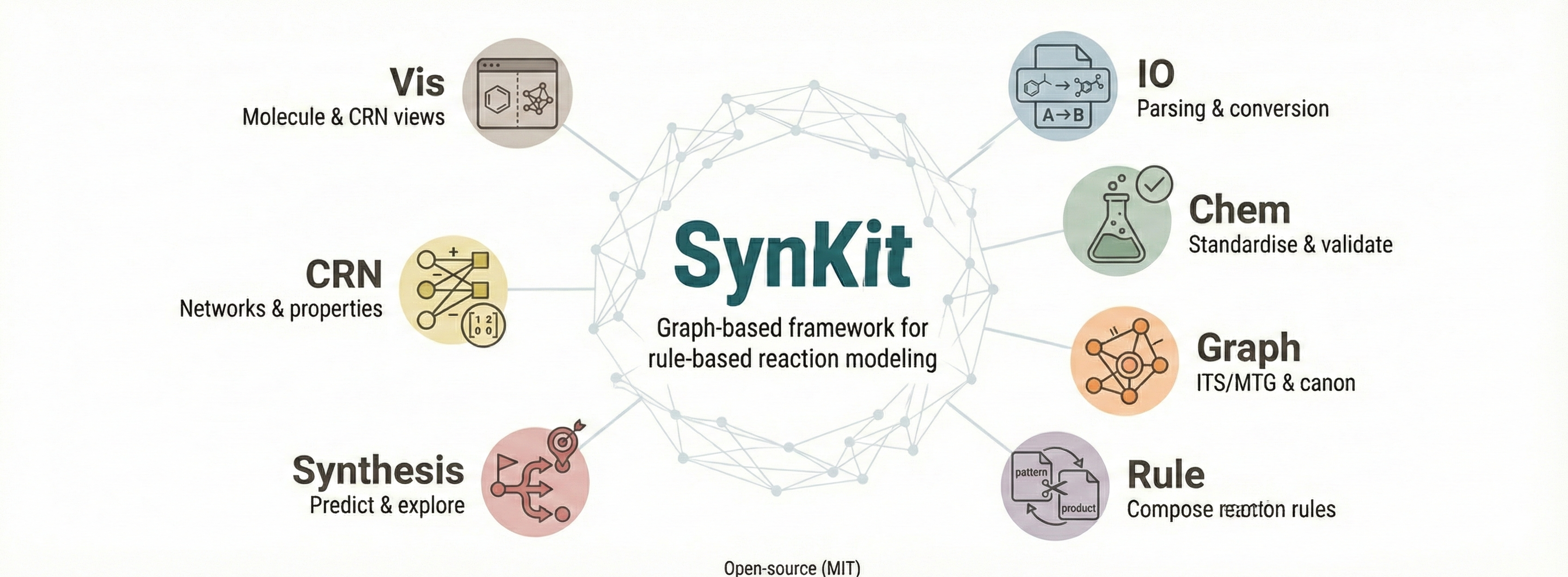
SynKit represents mapped reactions, Lewis-labelled graphs (LLGs), transformation rules, and explicitly supplied electron-flow mechanisms. The prerelease API adds atomic curved-arrow/fishhook groups, radical state, deterministic replay certificates, and mechanism trajectory graphs. It validates annotations; it does not predict the chemically preferred mechanism.
Mechanism verification quick start
from synkit.Mechanism import MechanismRecord

mechanism = MechanismRecord.from_ef_smirks(text)
certificate = mechanism.verify(electron="strict")
trajectory = mechanism.to_mtg()
mechanism.draw(certificate=certificate, path="mechanism.svg")
mechanism.to_json("mechanism.json")
Canonical internal electron loci are lp, σ, π, and ∙; adapters accept
documented ASCII and legacy spellings. Curved arrows carry two electrons and
fishhooks carry one electron. Coupled radical events commit atomically.
The prerelease package version is 1.6.0b1; its mechanism schema remains
2.0.0-draft1 while that schema is still under prerelease review.
For more details on each utility within the repository, please refer to the documentation provided in the respective folders.
Table of Contents
Installation
-
Python Installation: Ensure that Python 3.11 or later is installed on your system. You can download it from python.org.
-
Creating a Virtual Environment (Optional but Recommended): It's recommended to use a virtual environment to avoid conflicts with other projects or system-wide packages. Use the following commands to create and activate a virtual environment:
python -m venv synkit-env
source synkit-env/bin/activate
Or Conda
conda create --name synkit-env python=3.11
conda activate synkit-env
- Install from PyPi: The easiest way to use SynTemp is by installing the PyPI package synkit.
pip install synkit
Optional if you want to install full version
pip install synkit[all]
-
Install via Docker
Pull the image:docker pull tieulongphan/synkit:latest # or a specific version: docker pull tieulongphan/synkit:1.0.0
Run a container (sanity check):
docker run --rm tieulongphan/synkit:latest
Contribute
We're welcoming new contributors to build this project better. Please not hesitate to inquire me via email.
Before you start, ensure your local development environment is set up correctly. Pull the latest version of the main branch to start with the most recent stable code.
git checkout main
git pull
Working on New Features
-
Create a New Branch:
For every new feature or bug fix, create a new branch from themainbranch. Name your branch meaningfully, related to the feature or fix you are working on.git checkout -b feature/your-feature-name
-
Develop and Commit Changes:
Make your changes locally, commit them to your branch. Keep your commits small and focused; each should represent a logical unit of work.git commit -m "Describe the change"
-
Run Quality Checks:
Before finalizing your feature, run the following commands to ensure your code meets our formatting standards and passes all tests:./lint.sh # Check code format pytest Test # Run tests
Fix any issues or errors highlighted by these checks.
Integrating Changes
-
Rebase onto Staging:
Once your feature is complete and tests pass, rebase your changes onto thestagingbranch to prepare for integration.git fetch origin git rebase origin/staging
Carefully resolve any conflicts that arise during the rebase.
-
Push to Your Feature Branch: After successfully rebasing, push your branch to the remote repository.
git push origin feature/your-feature-name
-
Create a Pull Request: Open a pull request from your feature branch to the
stagingbranch. Ensure the pull request description clearly describes the changes and any additional context necessary for review.
Contributing
Publication
SynKit: A Graph-Based Python Framework for Rule-Based Reaction Modeling and Analysis
License
This project is licensed under MIT License - see the License file for details.
Acknowledgments
This project has received funding from the European Unions Horizon Europe Doctoral Network programme under the Marie-Skłodowska-Curie grant agreement No 101072930 (TACsy -- Training Alliance for Computational)
Project details
Verified details
These details have been verified by PyPIProject links
GitHub Statistics
Maintainers
Release history Release notifications | RSS feed


Download files
Download the file for your platform. If you're not sure which to choose, learn more about installing packages.
Source Distribution
Built Distribution
Filter files by name, interpreter, ABI, and platform.
If you're not sure about the file name format, learn more about wheel file names.
Copy a direct link to the current filters
File details
Details for the file synkit-1.6.0b1.tar.gz.
File metadata
- Download URL: synkit-1.6.0b1.tar.gz
- Upload date:
- Size: 921.0 kB
- Tags: Source
- Uploaded using Trusted Publishing? Yes
- Uploaded via: twine/6.1.0 CPython/3.13.14
File hashes
| Algorithm | Hash digest | |
|---|---|---|
| SHA256 |
c3efb0e77b515bb9ad45a01b63d4fc33055ef48f8b80e65057f0a5e0af79e75c
|
|
| MD5 |
d88cd0b06b463a3cc59ae3975cadeb68
|
|
| BLAKE2b-256 |
a49f1239d2f94617caaf252eaf11f464bd3dacb0fb1a5eb9b42ed4cdab14bea2
|
Provenance
The following attestation bundles were made for synkit-1.6.0b1.tar.gz:
Publisher:
publish-package.yml on TieuLongPhan/SynKit
-
Statement:
-
Statement type:
https://in-toto.io/Statement/v1 -
Predicate type:
https://docs.pypi.org/attestations/publish/v1 -
Subject name:
synkit-1.6.0b1.tar.gz -
Subject digest:
c3efb0e77b515bb9ad45a01b63d4fc33055ef48f8b80e65057f0a5e0af79e75c - Sigstore transparency entry: 2205398390
- Sigstore integration time:
-
Permalink:
TieuLongPhan/SynKit@1577fa89e017ba57a5bc2a2800af1abe8e652304 -
Branch / Tag:
refs/heads/stereo - Owner: https://github.com/TieuLongPhan
-
Access:
public
-
Token Issuer:
https://token.actions.githubusercontent.com -
Runner Environment:
github-hosted -
Publication workflow:
publish-package.yml@1577fa89e017ba57a5bc2a2800af1abe8e652304 -
Trigger Event:
push
-
Statement type:
File details
Details for the file synkit-1.6.0b1-py3-none-any.whl.
File metadata
- Download URL: synkit-1.6.0b1-py3-none-any.whl
- Upload date:
- Size: 1.1 MB
- Tags: Python 3
- Uploaded using Trusted Publishing? Yes
- Uploaded via: twine/6.1.0 CPython/3.13.14
File hashes
| Algorithm | Hash digest | |
|---|---|---|
| SHA256 |
af845bb6ac47db3ce1925e46819c2733553b47c4245c2570ee8632c2c8f98f2b
|
|
| MD5 |
3bc05c5de9f7b5ccb48d3bcb2b1c3504
|
|
| BLAKE2b-256 |
bcc759b02872f6127b19f385a19f3c73bd61308d90827989bd4f67d4b3c00285
|
Provenance
The following attestation bundles were made for synkit-1.6.0b1-py3-none-any.whl:
Publisher:
publish-package.yml on TieuLongPhan/SynKit
-
Statement:
-
Statement type:
https://in-toto.io/Statement/v1 -
Predicate type:
https://docs.pypi.org/attestations/publish/v1 -
Subject name:
synkit-1.6.0b1-py3-none-any.whl -
Subject digest:
af845bb6ac47db3ce1925e46819c2733553b47c4245c2570ee8632c2c8f98f2b - Sigstore transparency entry: 2205398401
- Sigstore integration time:
-
Permalink:
TieuLongPhan/SynKit@1577fa89e017ba57a5bc2a2800af1abe8e652304 -
Branch / Tag:
refs/heads/stereo - Owner: https://github.com/TieuLongPhan
-
Access:
public
-
Token Issuer:
https://token.actions.githubusercontent.com -
Runner Environment:
github-hosted -
Publication workflow:
publish-package.yml@1577fa89e017ba57a5bc2a2800af1abe8e652304 -
Trigger Event:
push
-
Statement type:






