
TachyPy





TachyPy is a psychophysics engine for Python focused on precise visual timing with OpenGL rendering, a GLFW-first display/input backend, and experiment-friendly stimulus helpers.
Why "TachyPy"?
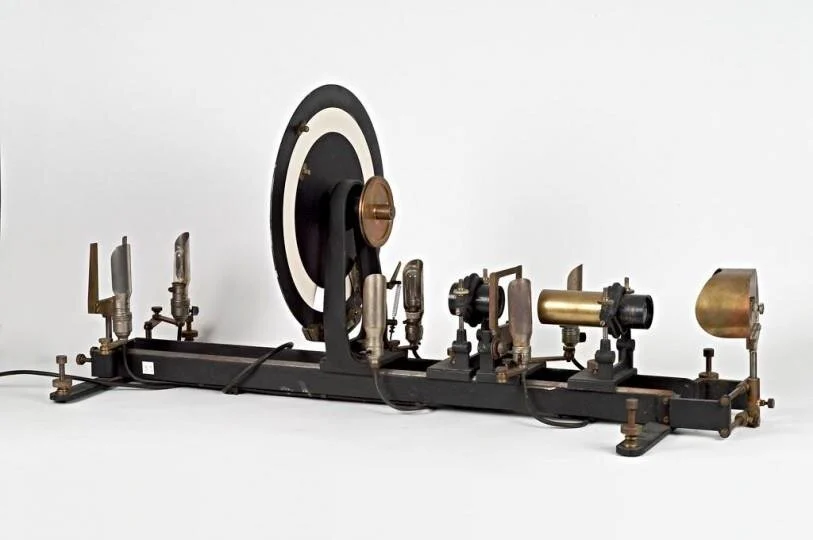
The name TachyPy comes from the tachistoscope: a classic laboratory instrument used to present visual stimuli for precisely controlled, brief durations. TachyPy aims to bring that timing discipline into Python experiments while keeping stimulus code readable and inspectable.
Timing Validation
TachyPy's GLFW backend was tested with a photodiode setup using a centrally presented white square on a uniform gray background. The white square was shown for one frame on a 60 Hz monitor. The photodiode was placed at the screen center, over the white square, and the recording captured both serial trigger events and the photodiode signal.
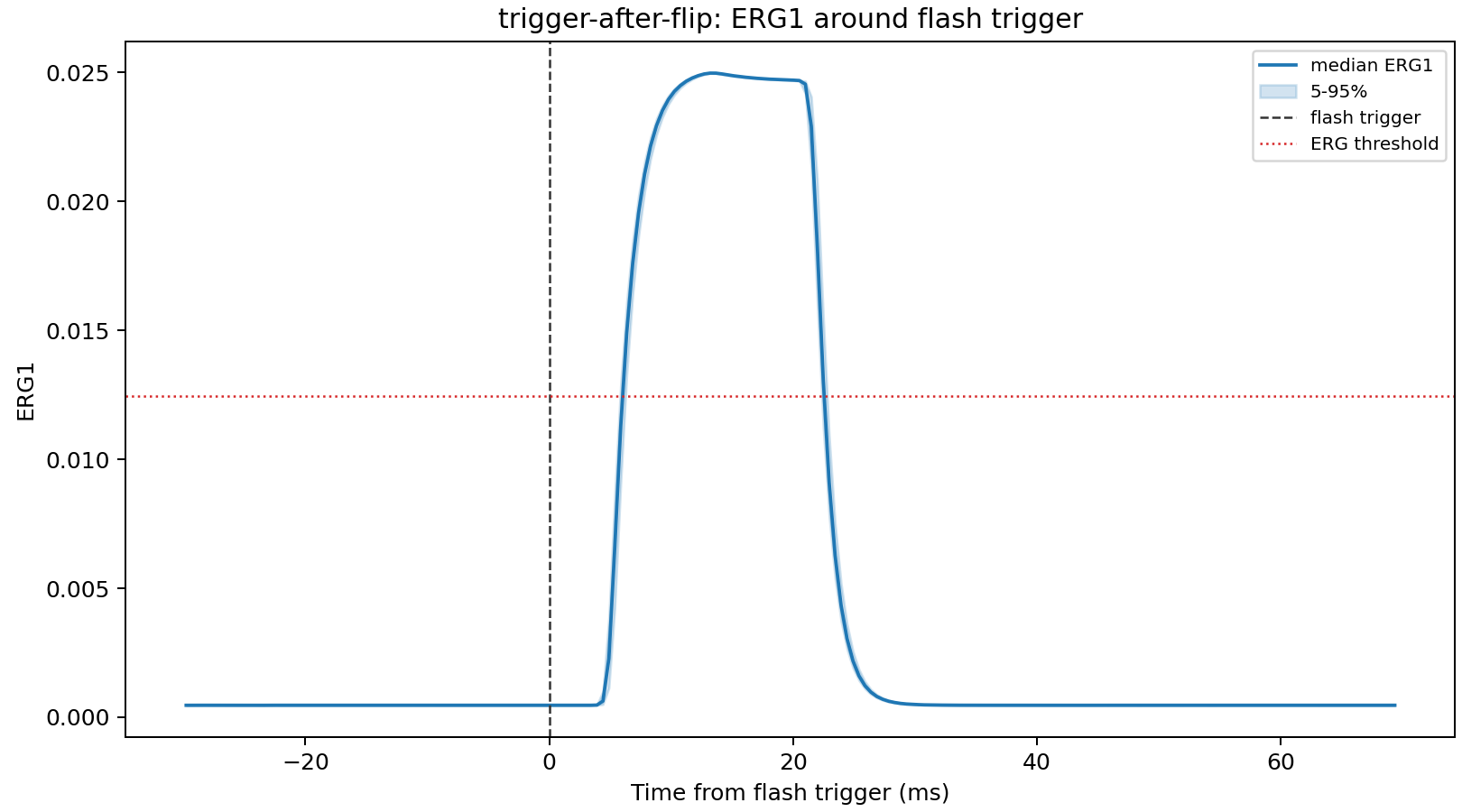
In the after-flip trigger condition shown here, the dashed line marks the serial flash trigger. The blue trace is the median photodiode waveform, with the shaded region showing the 5th to 95th percentile range across flashes.
Summary for this run:
- Median rise after flash trigger:
6.35 ms - SD of rise after flash trigger:
0.20 ms - Median photodiode pulse width:
16.60 ms - SD of photodiode pulse width:
0.18 ms
These measurements are hardware/display dependent, but they provide a concrete validation pattern for TachyPy timing tests: combine serial trigger logging, photodiode measurements, and TachyPy flip timestamps rather than relying on software timestamps alone.
Highlights
- OpenGL stimulus rendering (
Texture,Shapes, fixation, etc.). - GLFW-first window/input handling via
Screenfor tighter display control. - Backend-aware input handling through
ResponseHandler. Textfor text rendering: system fonts via FreeType + HarfBuzz, drawn as OpenGL quads.- Psychophysics helpers (
make_gabor, gratings, normalization, dithering). - Audio playback utility (
Audio) backed bytachyaudio. - Optional Wooting analog-keyboard integration (
tachypy[wooting]): on-screen pressure feedback, analog scrollbar interaction, andWOOTING_ACQUISITIONstraight fromtachypy. - Test suite for core logic and regressions.
Installation
Install base package:
pip install tachypy
The base install includes GLFW, PyOpenGL, FreeType, HarfBuzz, pyserial, and
TachyAudio. Pygame is no longer supported. TachyAudio is currently beta;
TachyPy requires tachyaudio>=0.2.0b2. If pip refuses pre-releases, pass
--pre explicitly.
Editable install for development:
git clone https://github.com/Charestlab/tachypy.git
cd tachypy
pip install --pre -e .
Optional extras:
pip install -e ".[test]"        # pytest
pip install -e ".[wooting]"     # Wooting analog-keyboard integration
Wooting analog-keyboard integration
pip install "tachypy[wooting]" adds support for Wooting analog keyboards
(pressure acquisition, logging, visual feedback, and analog scrollbar
interaction):
from tachypy import Screen, WOOTING_ACQUISITION

acq = WOOTING_ACQUISITION(threshold=0.8)
acq.initialize_keyboard()
acq.wait_light_press_visual(target_keys=["c", "z"], screen=Screen(fullscreen=False))
See the Wooting docs page for details.
Audio dependency
TachyPy audio now uses tachyaudio>=0.2.0b2. TachyPy no longer depends on
sounddevice or requires users to install PortAudio separately. Hardware/audio
device validation should still be done on the lab machine that will run the
experiment.
Quick Start
from tachypy import Screen, ResponseHandler

screen = Screen(
    screen_number=0,
    fullscreen=False,
    width=1280,
    height=720,
)
responses = ResponseHandler(screen=screen)

running = True
while running:
    screen.fill((128, 128, 128))
    screen.flip()

    responses.get_events()
    if responses.should_quit() or responses.was_key_pressed("esc"):
        running = False
    if responses.was_key_pressed("space"):
        print("Space pressed")

screen.close()
To run the full demo:
python example_tachypy.py
To run the fullscreen GLFW clock/stop-timer demo:
tachypy-clock-demo
From a source checkout:
python clock_timer_demo.py
Use Esc to quit, click START/STOP/RESET, or use Space and R.
For development, use tachypy-clock-demo --windowed or python clock_timer_demo.py --windowed.
Choose a font for demo text rendering with GLFW Text:
TACHYPY_FONT="Avenir Next, Helvetica, Arial" python example_tachypy.py
Backend Notes
Screen(backend="glfw"): GLFW-managed window/events, with top-left logical coordinate handling aligned to TachyPy conventions.Screen(...)defaults to GLFW, so most code does not need a backend argument.Screen(...)also presents 60 neutral warmup frames by default before experiment timing begins; setwarmup_frames=0to disable or choose another count for a specific display.- Initialize
ResponseHandler(screen=screen)for input. It callsscreen.poll_events()and owns keyboard/mouse state;Screendoes not track participant responses directly. DraggableManagerreads mouse transitions throughResponseHandler(screen=screen).
Text Rendering Notes
Textis the only renderer. It uses FreeType + HarfBuzz and draws OpenGL quads.font_nameaccepts a family, comma-separated fallback list (for example,"Avenir Next, Helvetica, Arial"), or direct font path. Missing fonts use a built-in default with a warning; construction raises only if none resolve.
API Naming
The psychophysics module exposes modern English APIs (for example
make_gabor, make_sine_grating, normalize_to_unit_interval).
Legacy French names remain as compatibility wrappers and emit
DeprecationWarning.
Testing
Run tests:
pip install -e ".[test]"
pytest
Current suite covers audio timing helpers, response/key state handling, backend behavior, psychophysics invariants, text layout/renderer basics, and other regression-prone utility paths.
CI uses mocked TachyAudio streams for deterministic unit tests. Keep hardware audio-device validation as a dedicated local or lab-machine test.
Documentation
Expanded docs live in /docs and include:
- getting started
- backend behavior and input routing
- text rendering options
- audio backend guidance
- Wooting analog-keyboard integration
- examples and contribution workflow
Hosted docs (Read the Docs): https://tachypy.readthedocs.io/
If Read the Docs is not auto-updating after pushes, reconnect GitHub in RTD and re-sync project webhooks from the RTD project settings.
Main Modules
screen.py: display/context lifecycle and backend abstraction.responses.py: keyboard/mouse event handling and key-state queries.text.py: text rendering (Text).textures.py,shapes.py,draggable.py,scrollbar.py: visual primitives.psychophysics.py: stimulus generation and normalization utilities.audio.py: sound playback and timing helpers.
Contributing
- Fork and clone the repository.
- Create a branch for your change.
- Add tests for behavioral changes.
- Run
pytest. - Open a pull request.
License
MIT. See LICENSE.
1 maintainer

Download files
Download the file for your platform. If you're not sure which to choose, learn more about installing packages.
Source Distribution
Built Distribution
Filter files by name, interpreter, ABI, and platform.
If you're not sure about the file name format, learn more about wheel file names.
Copy a direct link to the current filters
File details
Details for the file tachypy-0.2.0.tar.gz.
File metadata
- Download URL: tachypy-0.2.0.tar.gz
- Upload date:
- Size: 107.9 kB
- Tags: Source
- Uploaded using Trusted Publishing? No
- Uploaded via:
twine/6.2.0 CPython/3.14.5
File hashes
| Algorithm | Hash digest | |
|---|---|---|
| SHA256 |
d492bd54f91abff6282026f1f9b8ed4a26de4d74d4de4dee2b9504b21642b9b9
|
|
| MD5 |
d13faa81714cf97d195a5d7a5bdca0f2
|
|
| BLAKE2b-256 |
2b62ffb50f27de839aee21a00c52adba8714f149f42941e3fd03f70c60b2a658
|
File details
Details for the file tachypy-0.2.0-py3-none-any.whl.
File metadata
- Download URL: tachypy-0.2.0-py3-none-any.whl
- Upload date:
- Size: 86.6 kB
- Tags: Python 3
- Uploaded using Trusted Publishing? No
- Uploaded via:
twine/6.2.0 CPython/3.14.5
File hashes
| Algorithm | Hash digest | |
|---|---|---|
| SHA256 |
f8b8744c11dd7d33d2b781facf0a0c25fd36833d92ec5c8f249b16a580dbf63d
|
|
| MD5 |
9dc82002b1f7b16566d5ae60dbdd771e
|
|
| BLAKE2b-256 |
aa8d9ab20b6007cf320b517f10a960cc034e9fe584740defed3622978433ff8f
|














