
🤝 tandem
One coding session. Multiple AI agents. Shared context.
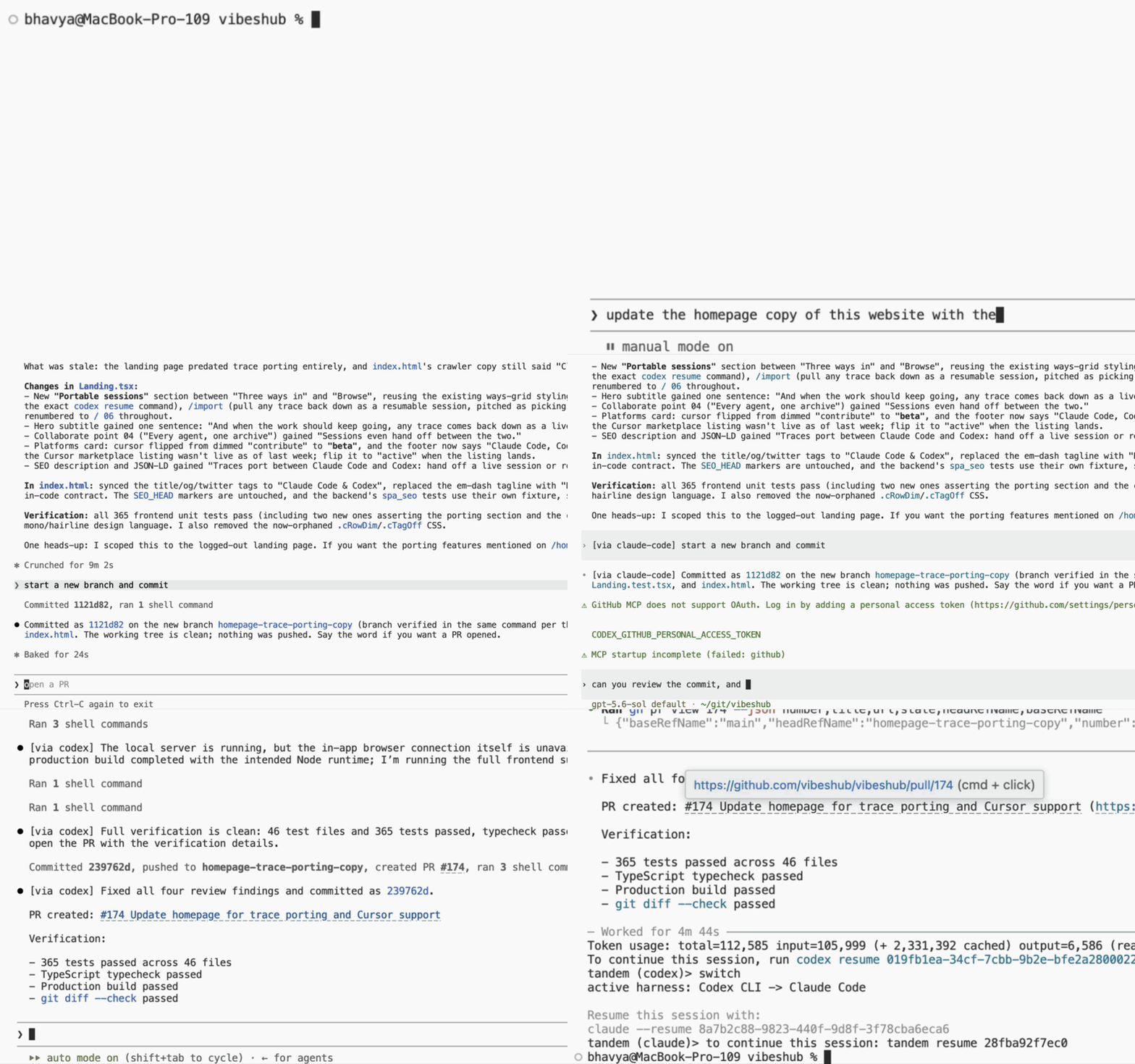
Use Claude Code, OpenAI Codex CLI, and opencode in one continuous coding session. Work in their native interfaces, press Ctrl-] to move to the next CLI, and continue without copying prompts or rebuilding context by hand.


Quick start
You need Python 3.11+ and at least two supported CLIs installed and signed in: Claude Code, Codex CLI, or opencode.
uv tool install tandem-cli   # or: pip install tandem-cli
cd your-project
tandem
Work normally in the CLI that opens. Press Ctrl-] to continue the same session in the next CLI. If you press it while the model is working, tandem waits until the response finishes; press it again to cancel the switch.
Exit normally when you're done. Come back later with:
tandem resume      # resume the latest session in this directory
tandem sessions    # find recent sessions across directories
By default, tandem opens the first usable CLI in your configured order. Use
tandem --active codex or tandem --active opencode to choose another.
What's new in 0.5
Rate-limit windows on the tab bar. Every slot now shows its account's rate limits — percent used per window, labeled by window length — so you can see which subscription has room before you press Ctrl-]. The active slot also carries the model's live context and the session's input↑ / output↓ token totals:
claude ● 144k ctx · 7.6M↑ 312k↓ · 5h 4% 7d 41% │ codex ○ 7d 12% │ opencode ○ ^] flips
The figures come from the same account endpoints that claude's /usage
and codex's /status call, using the credentials those CLIs already keep
on disk, refreshed every minute and after each response. They are cosmetic
by design: a failed fetch blanks the figure and never touches sync, and
API-key logins and opencode show none. These polls are tandem's only
network calls — set rate_limits = false under [frame] in
~/.tandem/config.toml to turn them off. See
Configuration
for the status bar's other settings.
Why tandem?
- Keep going when a model hits its limit. The tab bar shows each account's rate-limit windows; move to another CLI and continue with the same files and conversation history.
- Bring different models to the same problem. Ask another CLI for a second opinion without copying a wall of context between terminals.
- Keep the native tools you already use. Claude Code, Codex, and opencode retain their own interfaces, commands, keybindings, and MCP servers.
- Work through a single-provider outage. If another configured CLI is available, switch and continue until the affected provider recovers.
Want GPT subagents inside Claude Code too? See the GPT subagents guide. For more use cases, see Why tandem?.
How it works
┌──────────────────────────────────────────────┐
│ Work normally in a native coding CLI         │
└──────────────────────┬───────────────────────┘
                       ▼
┌──────────────────────────────────────────────┐
│ tandem keeps the other sessions in sync      │
│ locally — without calling another model      │
└──────────────────────┬───────────────────────┘
                       ▼
┌──────────────────────────────────────────────┐
│ Press Ctrl-] and continue in the next CLI    │
└──────────────────────────────────────────────┘
Only the active model runs. tandem translates its growing conversation into
the other CLIs' native session formats using local file access, so they are
ready when you switch. Your session stays in the CLIs' own storage plus a
small local database in ~/.tandem; tandem adds no cloud sync or telemetry
(its only network calls are the optional rate-limit polls for the tab bar).
See How tandem works for transcript translation, switching, crash safety, compatibility, and data locations.
Everyday commands
| Command | What it does |
|---|---|
tandem |
Start a new session |
Ctrl-] |
Continue in the next CLI |
tandem resume [id] |
Resume the latest or a specific session in this directory |
tandem sessions [-n N] |
List recent sessions across directories |
tandem run --on codex "…" |
Send one contextual prompt to another CLI (claude, codex, or opencode) |
Learn more
- Why tandem? — use cases, subscriptions, native tools, token visibility, and privacy
- GPT subagents — plugin setup, worker models, routing, and sandboxing
- Configuration — participants, startup arguments, the switch key, and the status bar
- How tandem works — synchronization, switching, compatibility, and local data
- Developing tandem — development setup and the harness adapter interface
- Observed session formats — Claude Code, Codex, and opencode storage formats
License
1 maintainer

Download files
Download the file for your platform. If you're not sure which to choose, learn more about installing packages.
Source Distribution
Built Distribution
Filter files by name, interpreter, ABI, and platform.
If you're not sure about the file name format, learn more about wheel file names.
Copy a direct link to the current filters
File details
Details for the file tandem_cli-0.5.0.tar.gz.
File metadata
- Download URL: tandem_cli-0.5.0.tar.gz
- Upload date:
- Size: 513.7 kB
- Tags: Source
- Uploaded using Trusted Publishing? No
- Uploaded via: uv/0.11.14 {"installer":{"name":"uv","version":"0.11.14","subcommand":["publish"]},"python":null,"implementation":{"name":null,"version":null},"distro":{"name":"macOS","version":null,"id":null,"libc":null},"system":{"name":null,"release":null},"cpu":null,"openssl_version":null,"setuptools_version":null,"rustc_version":null,"ci":null}
File hashes
| Algorithm | Hash digest | |
|---|---|---|
| SHA256 |
51d64fa5dfe02701907e57108c29833f4355ae334885ca229e232b8c866cd21e
|
|
| MD5 |
c6f8ff0a6a829536ac5c2ef5c4f26097
|
|
| BLAKE2b-256 |
9d10b6f872c6b6143879a57b510e5ba703e369637cfae4ad3092cf33b4842b9d
|
File details
Details for the file tandem_cli-0.5.0-py3-none-any.whl.
File metadata
- Download URL: tandem_cli-0.5.0-py3-none-any.whl
- Upload date:
- Size: 128.8 kB
- Tags: Python 3
- Uploaded using Trusted Publishing? No
- Uploaded via: uv/0.11.14 {"installer":{"name":"uv","version":"0.11.14","subcommand":["publish"]},"python":null,"implementation":{"name":null,"version":null},"distro":{"name":"macOS","version":null,"id":null,"libc":null},"system":{"name":null,"release":null},"cpu":null,"openssl_version":null,"setuptools_version":null,"rustc_version":null,"ci":null}
File hashes
| Algorithm | Hash digest | |
|---|---|---|
| SHA256 |
82edcb81755537577ce96c7a5c5419f6f6d2bd661a2c6bf375b3391a9c59cc9d
|
|
| MD5 |
3fe030c24b7608724b28b5c60859957c
|
|
| BLAKE2b-256 |
7a53edaa9b30ab17b968745a7321628e9cbe95fdf86072b19eb89f0cf2878f2e
|







