
########    ###     ######  ##    ##  ######  ##     ## ########  ######  ##    ##
   ##      ## ##   ##    ## ##   ##  ##    ## ##     ## ##       ##    ## ##   ##
   ##     ##   ##  ##       ##  ##   ##       ##     ## ##       ##       ##  ##
   ##    ##     ##  ######  #####    ##       ######### ######   ##       #####
   ##    #########       ## ##  ##   ##       ##     ## ##       ##       ##  ##
   ##    ##     ## ##    ## ##   ##  ##    ## ##     ## ##       ##    ## ##   ##
   ##    ##     ##  ######  ##    ##  ######  ##     ## ########  ######  ##    ##
A non-AI automatic scheduler for taskwarrior (i.e. alternative to skedpal / timehero / flowsavvy / reclaim / trevor / motion)
This is a taskwarrior extension that automatically schedules your tasks based on your working hours, estimated time, and calendar events, finding an optimal time to work on each task and match all your deadlines.
[!IMPORTANT] This repo is actively maintained again
Features
- Use arbitrarily complex time maps for working hours
- Block scheduling time using iCal calendars (meetings, vacations, holidays, etc.)
- Parallel scheduling algorithm for multiple tasks, considering urgency and dependencies
- Dry-run mode: preview scheduling without modifying your Taskwarrior database
- Custom urgency weighting for scheduling (via CLI or config)
- Auto-fix scheduling to match due dates
- Force update of iCal calendars, bypassing cache
- Simple, customizable reports for planned and unplanned tasks
- Emoji and attribute customization in reports
- Use Google API to access calendars
Install
pipx install taskchecktaskcheck --install
How does it work
This extension parses your pending and waiting tasks sorted decreasingly by urgency and tries to schedule them in the future. It considers their estimated time to schedule all tasks starting from the most urgent one.
UDAs
Taskcheck leverages two UDAs, estimated and time_map. The estimated attribute is
the expected time to complete the task in hours. The time_map is a comma-separated list of strings
that indicates the hours per day in which you will work on a task (e.g. work, weekend, etc.).
The exact correspondence between the time_map and the hours of the day is defined in the configuration
file of taskcheck. For instance:
[time_maps]
# get an error)
[time_maps.work]
monday = [[9, 12.30], [14, 17]]
tuesday = [[9, 12.30], [14, 17]]
# ...
They say it's an "AI"
Taskcheck will also parse online iCal calendars (Google, Apple, etc.) and will match them with your time maps.
It will then modify the Taskwarrior tasks by adding the completion_date attribute with the expected
date of completion and the scheduled attribute with the date in which the task is expected to
start.
It will also print a red line for every task whose completion_date is after its due_date.
In general, it is recommended to run taskcheck rather frequently and at least once at the beginning of your working day.
Reports
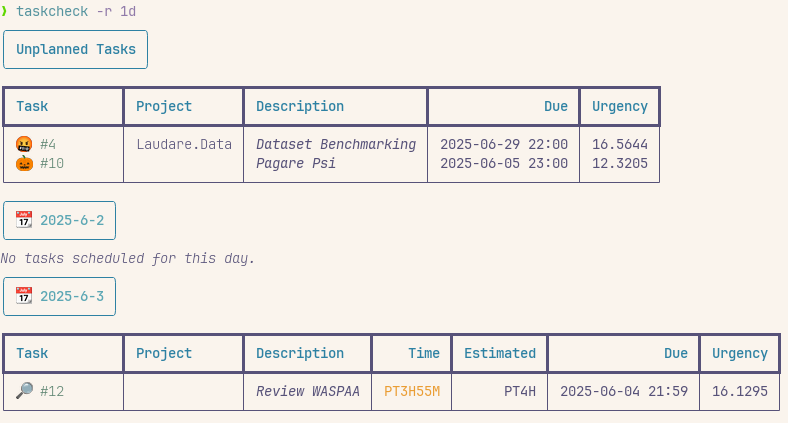
You can also print simple reports that exploit the scheduling UDA filled by Taskcheck to grasp
how much time you have to work on which task in which day. For
instance:
taskcheck -r todaywill show the tasks planned for todaytaskcheck -r 1wwill show the tasks planned for the next week
Configuration
taskcheck --install allows you to create required and recommended configurations for
Taskwarrior. It will also generate a default configuration file for taskcheck.
Below is an example of a taskcheck configuration file, with all relevant options:
[time_maps]
# Define your working hours for each named time map (in 24h format, e.g. 9.5 = 9:30)
[time_maps.work]
monday = [[9, 12.30], [14, 17]]
tuesday = [[9, 12.30], [14, 17]]
wednesday = [[9, 12.30], [14, 17]]
thursday = [[9, 12.30], [14, 17]]
friday = [[9, 12.30], [14, 17]]

[time_maps.weekend]
saturday = [[9, 12.30]]
sunday = [[9, 12.30]]

[scheduler]
days_ahead = 1000         # How far to go with the schedule (lower values = faster computation)
weight_urgency = 1.0      # Default weight for urgency in scheduling (overridable via CLI)
# if weight_urgency is set to 0, only due urgency is considered
# by default, this factor is automatically reduced if some task cannot be scheduled in time,
# leading to tasks with due dates being prioritized (see --no-auto-adjust-urgency)

[calendars]
# iCal calendars can be used to block your time and make the scheduling more precise
[calendars.1]
url = "https://your/url/to/calendar.ics"
expiration = 0.08         # In hours (0.08 hours ≈ 5 minutes)
timezone = "Europe/Rome"  # If set, force timezone for this calendar (see TZ database)

[calendars.holidays]
url = "https://www.officeholidays.com/ics-clean/italy/milan"
event_all_day_is_blocking = true
expiration = 720          # In hours (720 hours = 30 days)

[report]
include_unplanned = true
additional_attributes = ["estimated", "due", "urgency"]           # Extra attributes to show in the report
additional_attributes_unplanned = ["due", "urgency"]               # Extra attributes for unplanned tasks
unplanned_max_due = "30d"       # Only show unplanned tasks due within this Taskwarrior-relative horizon; tasks without a due date are always shown
emoji_keywords = {"meet"=":busts_in_silhouette:", "review"=":mag_right:"} # Map keywords to emoji
Configuration Options
- [scheduler]
days_ahead: How many days ahead to schedule tasks.weight_urgency: Default weight for urgency in scheduling (0.0 to 1.0). Can be overridden with--urgency-weight.
- [calendars]
url: iCal URL to block time.expiration: Cache expiration in hours.timezone: (Optional) Force a timezone for this calendar.event_all_day_is_blocking: (Optional, bool) Treat all-day events as blocking.
- [report]
include_unplanned: Show unplanned tasks in a separate section.additional_attributes: Extra columns to show in the report.additional_attributes_unplanned: Extra columns for unplanned tasks.unplanned_max_due: Optional Taskwarrior-relative horizon (for example30d) for dated unplanned tasks. Tasks without a due date are always shown; omitting this setting applies no limit.emoji_keywords: Map keywords in task descriptions to emoji.
Algorithm
The algorithm simulates what happens if you work on a task for a certain time on a given day.
For each day X starting from today, it sorts the tasks by decreasing urgency.
It start from the most urgent tasks that can be allocated on day X depending on the task's
time_map and on your calendars. It allocates a few number of hours to the task,
then recomputes the urgencies exactly as Taskwarrior would do
if it was running on day X. Having recomputed the urgencies, it restarts.
If after 2 hours a long task has decreased its urgency, it will be noticed and the newer most urgent task will get scheduled in its place.
For today, taskcheck will skip the hours in the past -- i.e. if you're running at 12 pm, it will
skip all the available slots until 12 pm.
The maximum time that is allocated at each attempt is by default 2 hours
(or less if the task is shorter), but you can change it by tuning the Taskwarrior UDA min_block.
After the scheduling is done, if any task has a completion_date after its due_date, the
weight_urgency factor is reduced by 0.1 and the scheduling is repeated, until all tasks
are scheduled before their due dates or the weight_urgency factor reaches 0.
Tips and Tricks
- You can exclude a task from being scheduled by removing the
time_maporestimatedattributes. - You can see tasks that you can execute now with the
task readyreport.
CLI Options
usage: __main__.py [-h] [-v] [-i] [-r REPORT] [-s] [-f] [--taskrc TASKRC] [--urgency-weight URGENCY_WEIGHT] [--dry-run] [--no-auto-adjust-urgency]

options:
  -h, --help            show this help message and exit
  -v, --verbose         Increase output verbosity.
  -i, --install         Install the UDAs, required settings, and default config file.
  -r REPORT, --report REPORT
                        Generate a report of the tasks based on the scheduling; can be any Taskwarrior datetime specification (e.g. today, tomorrow, eom, som, 1st, 2nd, etc.). It is considered as `by`, meaning that the report will be
                        generated for all the days until the specified date and including it.
  -s, --schedule        Perform the scheduling algorithm, giving a schedule and a scheduling UDA and alerting for not completable tasks
  -f, --force-update    Force update of all ical calendars by ignoring cache expiration
  --taskrc TASKRC       Set custom TASKRC directory for debugging purposes
  --urgency-weight URGENCY_WEIGHT
                        Weight for urgency in scheduling (0.0 to 1.0), overrides config value. When 1.0, the whole Taskwarrior urgency is used for scheduling. When 0.0, the Taskwarrior urgency is reduced to only due urgency.
  --dry-run             Perform scheduling without modifying the Taskwarrior database, useful for testing
  --no-auto-adjust-urgency
                        Disable automatic reduction of urgency weight … (default: enabled)
Examples
taskcheck --schedule
Run the scheduler and update your Taskwarrior tasks.taskcheck --schedule --dry-run
Preview the schedule without modifying your database.taskcheck --schedule --urgency-weight 0.5
Use a custom urgency weighting for this run.taskcheck --schedule --no-auto-adjust-urgency
Avoid the automatically reduction of urgency weight if tasks can't be scheduled before their due dates.taskcheck --report today
Show the schedule for today.taskcheck --report 1w
Show the schedule for the next week.taskcheck --force-update
Force refresh of all iCal calendars, ignoring cache.
1 maintainer

Metadata
1 maintainer
Release files for taskcheck 1.1.0
For a detailed explanation of source distributions (sdists) and built distributions (wheels), please see the package formats documentation.
Source distribution (sdist)
| File | Size | Uploaded | |
|---|---|---|---|
| taskcheck-1.1.0.tar.gz | 45.0 kB | Details |
Built distribution (wheel)
| File | Interpreter | ABI | Platform | Reset |
|---|---|---|---|---|
| taskcheck-1.1.0-py3-none-any.whl | Python 3 | none | any | Details |
Total release size: 66.9 kB
Release files / taskcheck-1.1.0.tar.gz
| Download URL | taskcheck-1.1.0.tar.gz |
|---|---|
| Size | 45.0 kB |
| Tags | Source |
|
SHA-256 checksum How to use checksums |
cb9bc0ee03bc9b1ed01d351075279f7f34d4d4c649a1c8e67e1d4e05cf3fd6fc
|
|
BLAKE2b-256 checksum How to use checksums |
11ab2c1e3295bf2f33e83551c7b97b5f363b8b0a4c9ad6c5aedbd866f3c2f3d1
|
| Upload date | |
|
Uploaded using Trusted Publishing? What is trusted publishing? |
No |
| Uploaded via |
uv/0.11.32 {"installer":{"name":"uv","version":"0.11.32","subcommand":["publish"]},"python":null,"implementation":{"name":null,"version":null},"distro":{"name":"Debian GNU/Linux","version":"13","id":"trixie","libc":null},"system":{"name":null,"release":null},"cpu":null,"openssl_version":null,"setuptools_version":null,"rustc_version":null,"ci":null}
|
Release files / taskcheck-1.1.0-py3-none-any.whl
| Download URL | taskcheck-1.1.0-py3-none-any.whl |
|---|---|
| Size | 21.8 kB |
| Tags | Python 3 |
|
SHA-256 checksum How to use checksums |
29bec50450ac2ba4abb9cf0789da2e5781ca4c438eb6db340d4f4fbeee3428bc
|
|
BLAKE2b-256 checksum How to use checksums |
5d757aae7be803de17040e272b83b76088880436027f1419776afc060612cf03
|
| Upload date | |
|
Uploaded using Trusted Publishing? What is trusted publishing? |
No |
| Uploaded via |
uv/0.11.32 {"installer":{"name":"uv","version":"0.11.32","subcommand":["publish"]},"python":null,"implementation":{"name":null,"version":null},"distro":{"name":"Debian GNU/Linux","version":"13","id":"trixie","libc":null},"system":{"name":null,"release":null},"cpu":null,"openssl_version":null,"setuptools_version":null,"rustc_version":null,"ci":null}
|














