
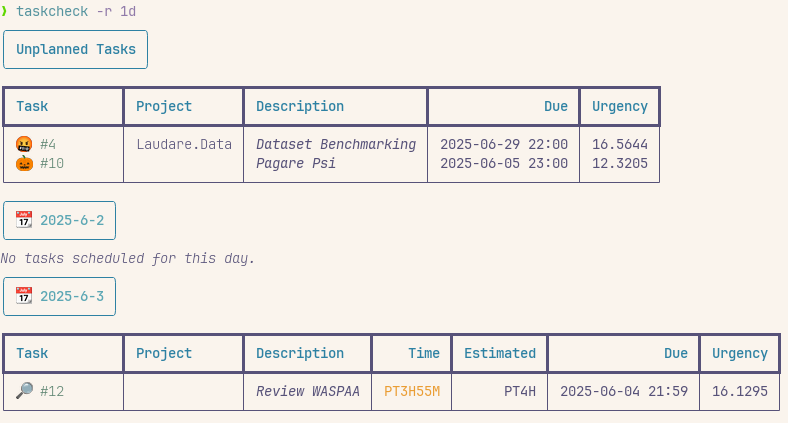
A Taskwarrior scheduler for people who want a realistic plan, not a manual to-do list. It turns tasks, working hours, and calendar blocks into an actionable schedule — then keeps due dates visible.
Use it if you want to:
- stop guessing what to do next
- fit tasks into real availability
- be sure your long-time plan won't go overdue
- keep Taskwarrior as the source of truth
[!IMPORTANT] This repo is actively maintained again
Features
- ✨ Auto-schedule tasks from working hours + calendar blocks
- 🧭 Support complex working-hour maps
- ⏱️ Consider urgency, due dates, and dependencies
- 🧪 Dry-run mode to preview changes
- 🧠 Auto-adjust urgency when deadlines cannot be met
- 🔄 Force-refresh iCal calendars
- 📊 Custom reports for planned and unplanned tasks
- 🎨 Report styling with emoji and extra attributes
- 🗓️ Block time with iCal or Google Calendar, including all-day events
Quick start
pipx install taskchecktaskcheck --install← setup only- add
estimated+time_mapUDAs - edit
~/.config/task/taskcheck.toml(see Reference) taskcheck --schedule
How it works
Taskcheck reads your pending and waiting tasks, estimates when each one can be worked on, and writes back a schedule. It respects:
- your working hours
- task duration estimates
- calendar events and vacations from iCal / Google Calendar
- task urgency and due dates
It updates Taskwarrior with:
scheduled→ when work should startcompletion_date→ when work is expected to finish- a warning when a task will miss its due date
Required UDAs
estimated: expected duration in hourstime_map: which working-hour profile applies to the task, for exampleworkorweekend
Example:
[time_maps.work]
monday = [[9, 12.30], [14, 17]]
tuesday = [[9, 12.30], [14, 17]]
Reports
taskcheck -r today→ tasks planned for todaytaskcheck -r 1w→ tasks planned for the next week
Reference
📚 Full reference: REFERENCE.md
In short:
taskcheck --installis interactive- it installs required Taskwarrior settings if you confirm the first prompt
- it installs optional urgency/report tuning if you confirm the second prompt
- it can also create the default config file if you confirm the third prompt
- it does not schedule tasks or fetch calendars
- scheduling happens with
taskcheck --schedule - all flags/config keys/settings are documented in
REFERENCE.md
Algorithm
The algorithm simulates a workday one chunk at a time.
For each day starting from today, it sorts tasks by urgency and picks the most urgent task that fits the available time. It assigns a small block of work, then recomputes urgency exactly as Taskwarrior would on that day. If urgency changes, the next task choice can change too.
For today, taskcheck skips past hours.
The default work chunk is 2 hours (or less if the task is shorter); you can tune it with the Taskwarrior UDA min_block.
If a task would finish after its due_date, taskcheck retries. It keeps that task's current non-due urgency weight, then lowers the weight by 0.1 only for tasks that have not missed a deadline. Due urgency is never reduced. Retries stop when deadlines are respected or unflagged tasks reach a weight of 0.
Tips and Tricks
- You can exclude a task from being scheduled by removing the
time_maporestimatedattributes. - You can see tasks that you can execute now with the
task readyreport.
See the reference section above for flags, config keys, and installed Taskwarrior settings.
1 maintainer

Metadata
1 maintainer
Release files for taskcheck 1.3.1
For a detailed explanation of source distributions (sdists) and built distributions (wheels), please see the package formats documentation.
Source distribution (sdist)
| File | Size | Uploaded | |
|---|---|---|---|
| taskcheck-1.3.1.tar.gz | 45.4 kB | Details |
Built distribution (wheel)
| File | Interpreter | ABI | Platform | Reset |
|---|---|---|---|---|
| taskcheck-1.3.1-py3-none-any.whl | Python 3 | none | any | Details |
Total release size: 67.7 kB
Release files / taskcheck-1.3.1.tar.gz
| Download URL | taskcheck-1.3.1.tar.gz |
|---|---|
| Size | 45.4 kB |
| Tags | Source |
|
SHA-256 checksum How to use checksums |
0587e59e28c32fd98dce59cbbd5e6d3ae6f778ee4a285b8a8aab872e1ab67744
|
|
BLAKE2b-256 checksum How to use checksums |
990c459895d1227302f4758ca51f194435ed8ce6d4b265ae69b38ee2592f35ce
|
| Upload date | |
|
Uploaded using Trusted Publishing? What is trusted publishing? |
No |
| Uploaded via |
uv/0.11.32 {"installer":{"name":"uv","version":"0.11.32","subcommand":["publish"]},"python":null,"implementation":{"name":null,"version":null},"distro":{"name":"Debian GNU/Linux","version":"13","id":"trixie","libc":null},"system":{"name":null,"release":null},"cpu":null,"openssl_version":null,"setuptools_version":null,"rustc_version":null,"ci":null}
|
Release files / taskcheck-1.3.1-py3-none-any.whl
| Download URL | taskcheck-1.3.1-py3-none-any.whl |
|---|---|
| Size | 22.3 kB |
| Tags | Python 3 |
|
SHA-256 checksum How to use checksums |
63a25bba550765cd4b7241f0638bd90ba071fcd5af7baca3243977ffafbb4412
|
|
BLAKE2b-256 checksum How to use checksums |
d3581da185174b18e7f50cc4e8734d7c2b4704fa76e07a0d6c4cacfa31ea2c83
|
| Upload date | |
|
Uploaded using Trusted Publishing? What is trusted publishing? |
No |
| Uploaded via |
uv/0.11.32 {"installer":{"name":"uv","version":"0.11.32","subcommand":["publish"]},"python":null,"implementation":{"name":null,"version":null},"distro":{"name":"Debian GNU/Linux","version":"13","id":"trixie","libc":null},"system":{"name":null,"release":null},"cpu":null,"openssl_version":null,"setuptools_version":null,"rustc_version":null,"ci":null}
|














