
Taskuary


Your inbox, staffed by AI agents
Taskuary turns incoming messages into organized work. It sorts what matters, hands tasks to your agents, and brings decisions back to you. Nothing sends or ships without your approval.

Taskuary is early—currently v0.3.3.11—so breaking changes are still possible before 1.0.

The real app with invented data. Nothing connects, sends, or runs.
What Taskuary can do
Connect every system. Keep control.
Bring your mail, chats, issue trackers, alerts, reports, and AI agents into one control center that runs on your machine. Every input lands on a single Timeline with its context, status, and available actions intact. Taskuary gives your tools one place to work together while you decide what can run, what can send, and what needs your attention.
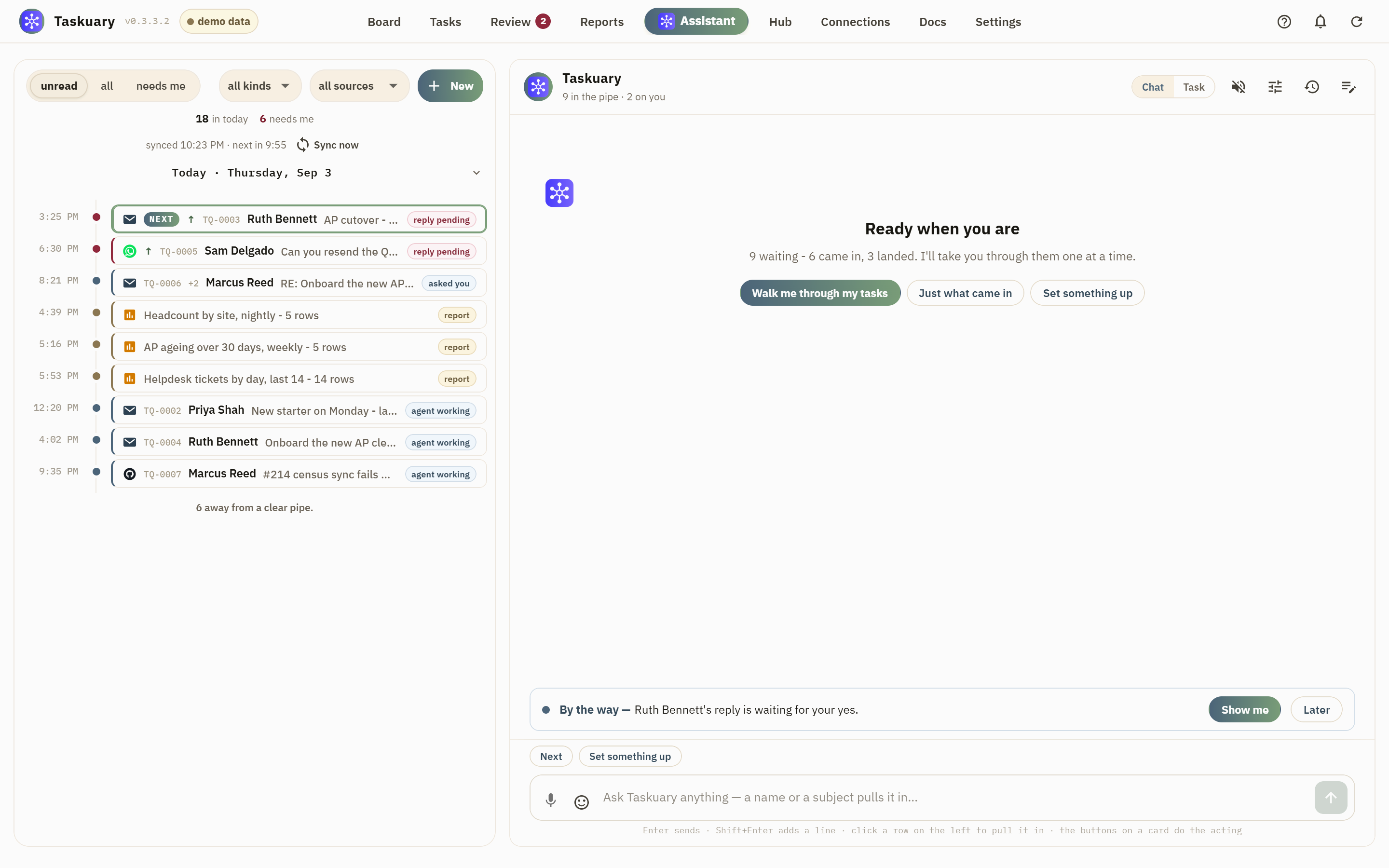
Turn incoming work into tasks automatically
AI triage reads every incoming item, understands what it means, and turns actionable requests into ready-to-run tasks. Routine updates are filed, questions get draft replies, and urgent decisions move to the front. Every choice comes with a reason, and you can change it at any time.
Watch the work. Approve the outcome.
Taskuary keeps the system moving and brings you in when your judgment matters. The Assistant speaks up when a reply is waiting, a task has gone quiet, a report has failed, or a meeting is about to start. Each update arrives once, with the evidence and next actions attached, so you can review the work, make the call, and approve what happens next.
Agents in your own repos
Send coding work to Claude Code, Codex, Gemini, Cursor, Copilot, or another CLI.
Live workspaces
Watch the terminal, answer questions, review changes, and use the built-in browser without losing the session.
Describe a check. Let it run itself.
Say what you want watched in plain words and Taskuary builds it: read a folder of CSVs every morning, total the AP bills due in the next 30 days, count helpdesk tickets by day. Reports read and summarize, on a schedule or on demand, and can come back with an AI summary. Workflows write data and keep state. Quiet checks stay quiet, so the only one you hear about is the one that failed.
You stay in control
Replies and proposed actions wait in Review. You decide what sends, runs, closes, or gets dismissed.
How work flows
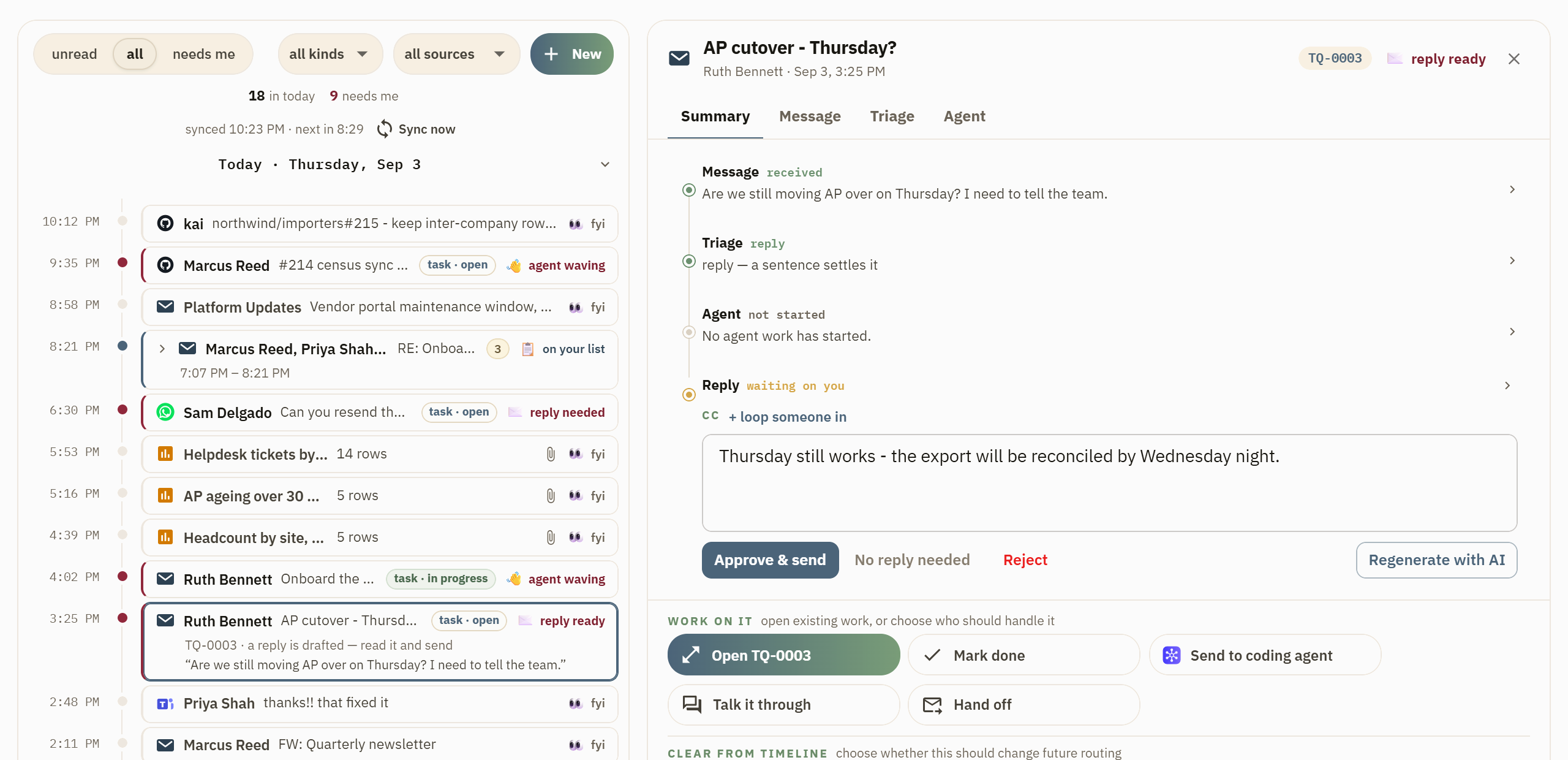
1. Work arrives and gets sorted
Taskuary reads connected inboxes, separates tasks from noise, and shows the result on one Timeline.
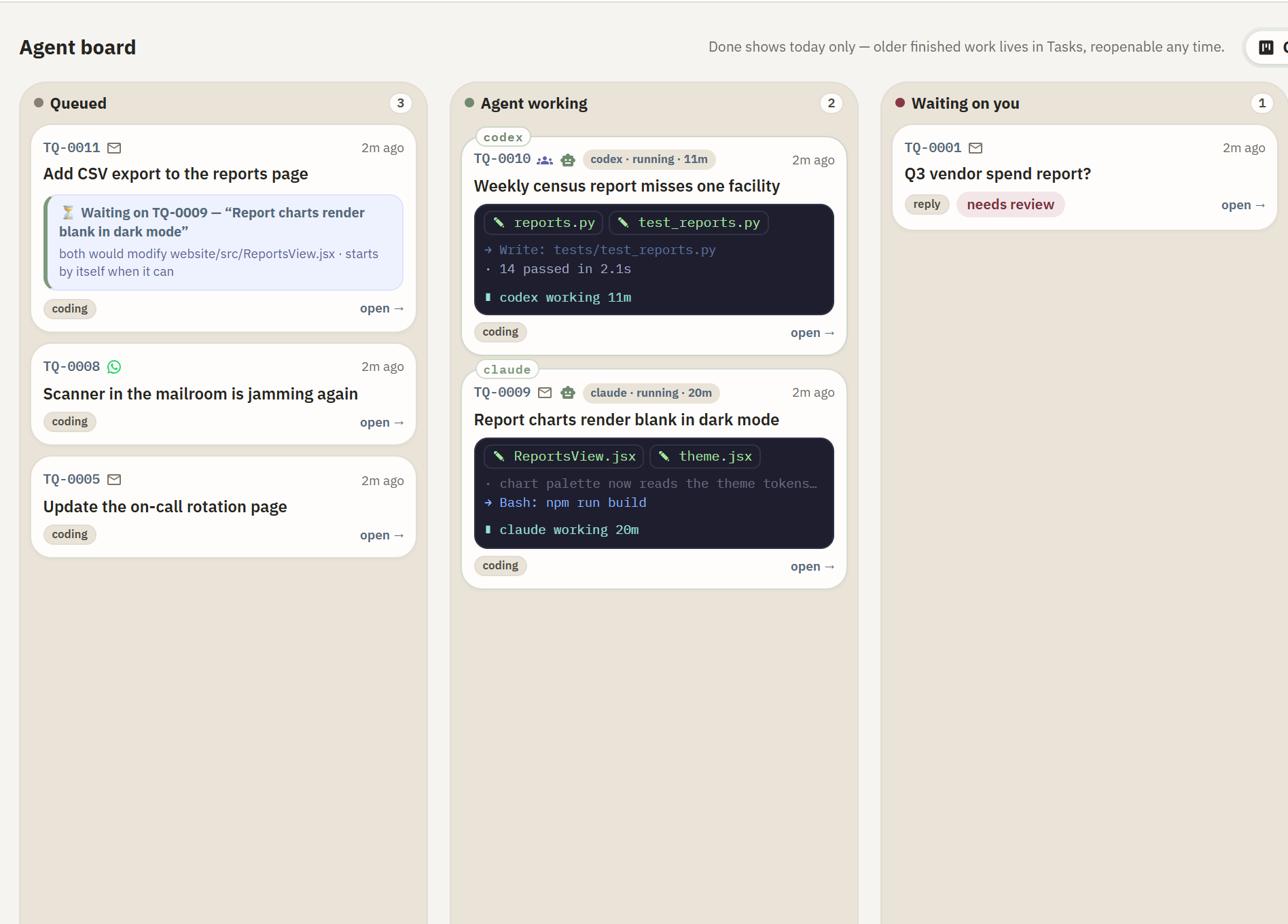
2. An agent works on it
Tasks move from Queued to Agent working. The Board shows live progress and anything waiting on you.
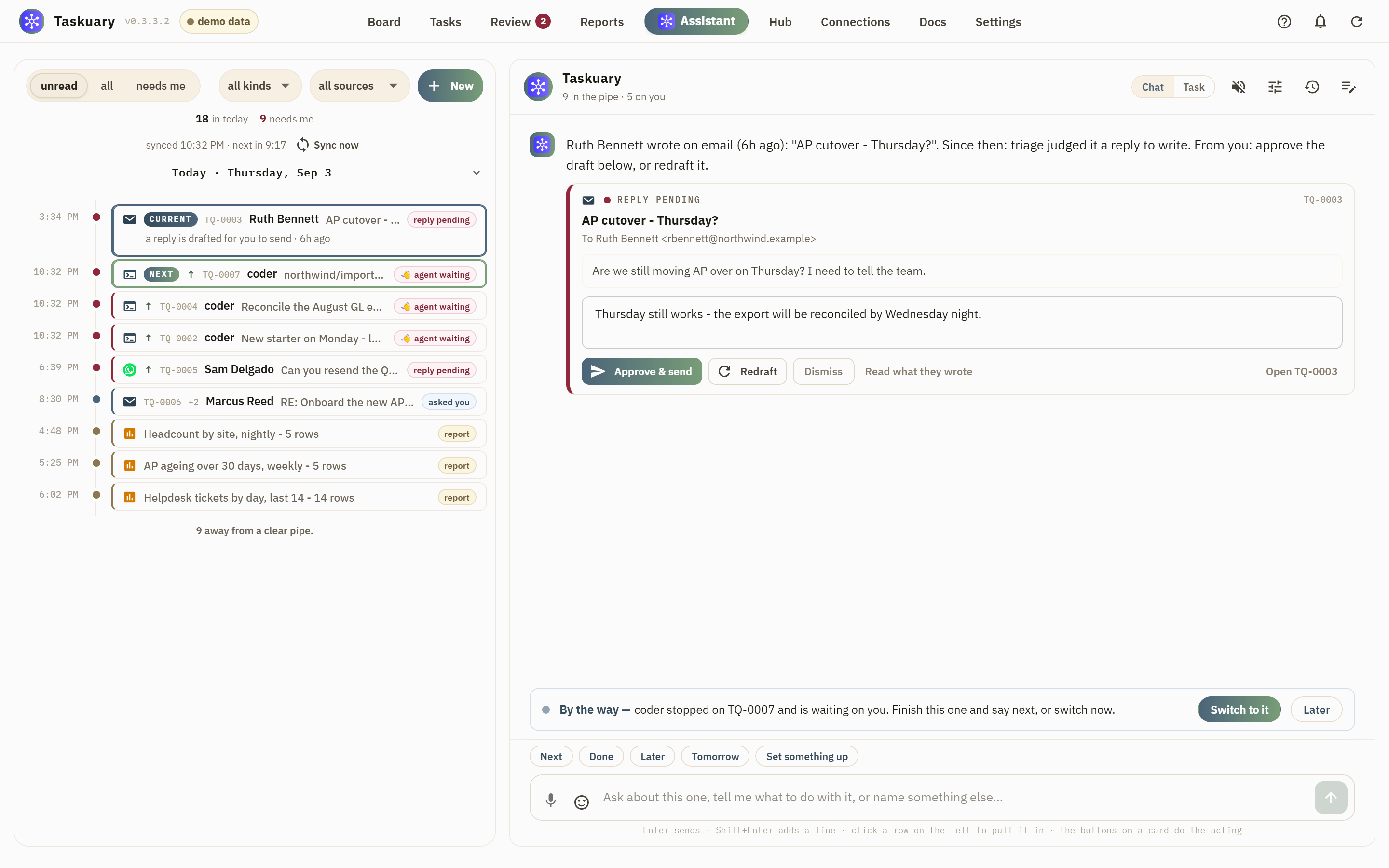
3. The result comes back to you
Finished work, draft replies, questions, and loose ends return for review. You decide what to send, change, snooze, or dismiss.
Install
Windows app
Download the latest single-file Taskuary.exe and open it. No Python or installer is required.
Python
Python 3.10 or newer works on Windows, macOS, and Linux:
pip install taskuary
taskuary
Taskuary opens at http://127.0.0.1:7787. For a native desktop
window instead, install pip install "taskuary[desktop]" and run taskuary-desktop.
Docker
git clone https://github.com/ldbumble/taskuary
cd taskuary
docker compose up
Then open http://127.0.0.1:7787. Docker runs the web app; coding CLIs and the optional WhatsApp bridge remain on the host.
On first run, connect an AI provider or local Ollama model, add at least one inbound channel, then choose the coding CLI that should receive tasks. The setup wizards test each connection before it goes live.
Try it without installing anything
taskuary --demo # or: docker compose --profile demo up
The demo is the real interface with fictional work and scripted replies. It cannot connect to outside systems, send messages, run tools, or start agents. Its changes reset when you reload.
Installs

Updated daily from PyPI with mirror traffic excluded. The raw series is docs/downloads.csv.
Documentation
- Getting started—installation, first-run setup, Docker, and data
- Product guide—the workflow, learning loop, agents, and operator documents
- Integrations—channels, AI providers, work systems, and report sources
- Reports and proactive checks—the report pipeline, AI-written source cards, and what Taskuary watches
- Status and roadmap—what works today and what is next
- Contributing—development setup and contribution guide
Taskuary is free and open source under the MIT License. Issues and pull requests are welcome; security reports belong in SECURITY.md.
1 maintainer

Release files for taskuary 0.3.3.11
For a detailed explanation of source distributions (sdists) and built distributions (wheels), please see the package formats documentation.
Source distribution (sdist)
| File | Size | Uploaded | |
|---|---|---|---|
| taskuary-0.3.3.11.tar.gz | 2.3 MB | Details |
Built distribution (wheel)
| File | Interpreter | ABI | Platform | Reset |
|---|---|---|---|---|
| taskuary-0.3.3.11-py3-none-any.whl | Python 3 | none | any | Details |
Total release size: 4.1 MB
Release files / taskuary-0.3.3.11.tar.gz
| Download URL | taskuary-0.3.3.11.tar.gz |
|---|---|
| Size | 2.3 MB |
| Tags | Source |
|
SHA-256 checksum How to use checksums |
27d678da8e236cd68ab25e9e2593536ade1923f51dfd3bf1af8d53168c3e77fc
|
|
BLAKE2b-256 checksum How to use checksums |
4edfa84385c3b6d3b7305ab05f793f65c7bcb9183617f1956610bf7f019a9c75
|
| Upload date | |
|
Uploaded using Trusted Publishing? What is trusted publishing? |
Yes |
| Uploaded via |
twine/7.0.0 CPython/3.13.14
|
Provenance
Provenance describes where a file came from. On PyPI, provenance is shared via attestations, which provide a verifiable record of the build or publishing details. View details, limitations and caveats.


PyPI Publish Attestation
PyPI verified that this artifact, at this checksum, originated from the publisher listed below.
Signed by GitHub Actions, verified by PyPI on Sep 8, 2026.
Transparency logRelease files / taskuary-0.3.3.11-py3-none-any.whl
| Download URL | taskuary-0.3.3.11-py3-none-any.whl |
|---|---|
| Size | 1.8 MB |
| Tags | Python 3 |
|
SHA-256 checksum How to use checksums |
e2ef35e25f3376e540935222ad685b356955d896ad3ae355827b143118f0593c
|
|
BLAKE2b-256 checksum How to use checksums |
46ad1297909fe67b4a540c1c38fe3f718684ef1b011cc85378b9aa68a5431ec0
|
| Upload date | |
|
Uploaded using Trusted Publishing? What is trusted publishing? |
Yes |
| Uploaded via |
twine/7.0.0 CPython/3.13.14
|
Provenance
Provenance describes where a file came from. On PyPI, provenance is shared via attestations, which provide a verifiable record of the build or publishing details. View details, limitations and caveats.
PyPI Publish Attestation
PyPI verified that this artifact, at this checksum, originated from the publisher listed below.
Signed by GitHub Actions, verified by PyPI on Sep 8, 2026.
Transparency log













