




Tentacle
Marking menus and tool panels for Maya and Blender. Hold a key over the viewport, press a mouse button and flick toward a command. Tentacle puts your everyday commands and 50 tool panels one gesture away, and they work the same way in both apps.
Highlights
- Fast by gesture. Hold
Zfor a heads-up display of the scene; add a mouse button and a radial menu opens at the cursor, ready for a flick toward a command. Commands become muscle memory instead of trips through menus. - One toolset, two DCCs. The menus and 48 of the 50 tool panels are shared by Maya and Blender, built on one API that both host libraries implement. A control one host can't support is hidden there, never left as a dead button.
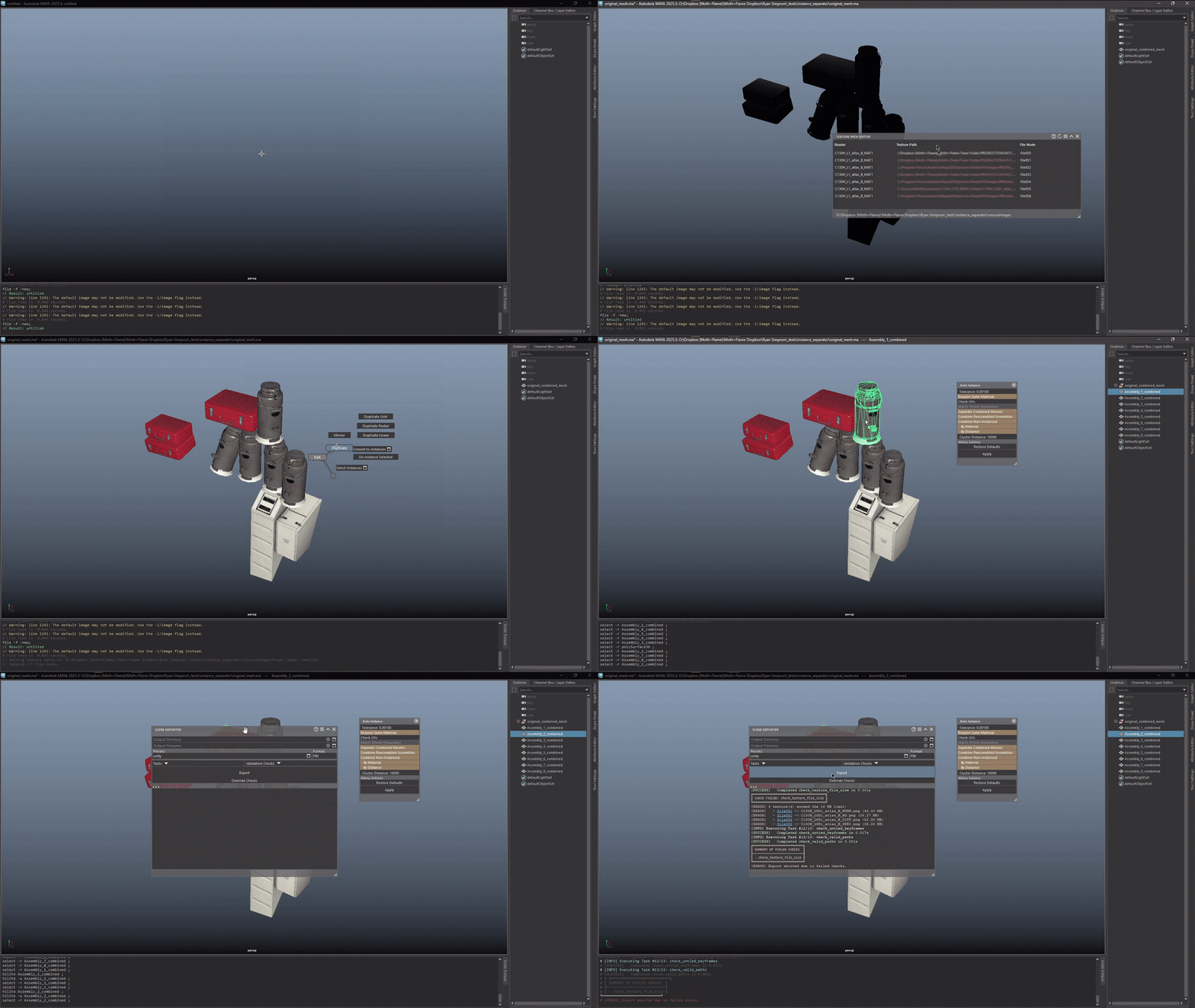
- Pipeline tools, not just shortcuts. Batch scene export with checks, shot sequencing, reversible baking, lightmap baking, rigs for hoses, wheels and jointed props, and bridges into Marmoset Toolbag, Substance 3D Painter, RizomUV, Unity and the other DCC.
- Feels native. In Maya a tool takes the selection, keeps its settings in an option box and undoes in one step; in Blender it is one step in Blender's own undo history too. Long jobs show progress and can be cancelled.
- Settings that survive updates. Panel values, presets and shortcuts carry forward from release to release, even when panels merge or are renamed.
- One-file install. The same file installs Tentacle in Maya or Blender, with no administrator rights and nothing written into the DCC's own install.
- Scriptable. Each panel is a thin layer over a public library API (mayatk, blendertk), so anything a panel does, a script can do. Your own slot library and chord table plug in from a startup script.
Install
Download tentacle_installer.py, one file for both DCCs, on Windows or Linux:
| DCC | Do this |
|---|---|
| Maya 2025+ | Drag the file into the viewport. |
| Blender 4.1+ | Edit ▸ Preferences ▸ Add-ons ▸ Install from Disk… (under the ⌄ menu; Install… on 4.1), pick the file, and tick Tentacle Marking Menu if it is not already on. |
The first start downloads Tentacle, the library for your DCC and, in Blender, PySide6 from PyPI. That takes about a minute: Maya shows a progress window, and Blender shows pip's progress in its system console. Then hover the viewport and hold Z. Everything lands in a per-user folder the DCC already reads from (<Maya prefs>/<version>/tentacle/, or Blender's scripts/addons/modules/), and the DCC's own install is never touched. The DCC's Python needs to reach PyPI, so a proxy or firewall may need to allow it.
Update or uninstall: drop the file in again (Maya) or open the add-on's preferences (Blender); while the menu is running, the change applies at the next start. In Blender, use the add-on's own Uninstall: Blender's Remove button deletes only the add-on file and leaves the packages behind.
Deploying to a team: "<mayapy>" tentacle_installer.py install|update|uninstall, or blender --background --python tentacle_installer.py -- install|update|uninstall. Both exit with code 1 when the step fails. In Blender, update and uninstall are recorded and finish at the next start, so one more blender --background run completes them.
With pip: pip install "tentacletk[maya]" or "tentacletk[blender]" into the DCC's own Python. The extra in brackets installs the library for that DCC; plain tentacletk has none, and the menu will not start without it. Add apps ("tentacletk[maya,apps]") to install the standalone apps below as well.
Using it
Hold the activation key (Z by default) with the cursor over the viewport, and press mouse buttons while you hold it to pick a menu:
| Chord | Opens |
|---|---|
Z |
HUD: warnings, the selection or the scene's status, and the last command |
Z + left button |
Cameras: the standard views, Align View, and dolly, roll, truck and orbit |
Z + middle button |
Editors: the DCC's editors, one click away |
Z + right button |
Main: the tool categories, from Polygons and Materials to Animation and Rendering |
Z + left + right |
Your DCC's own menus, reached by gesture |
Change the key under Settings ▸ Global Shortcuts (the Show Marking Menu row) or, in Blender, Preferences ▸ Keymap ▸ 3D View ▸ Tentacle Marking Menu. Every chord follows the new key, and the choice is remembered. Global Shortcuts also holds the keys that repeat the last command and reopen the last panel. Settings ▸ Menu Bindings chooses which menu each chord opens, and Scene ▸ Preferences holds the theme, working units, autosave and HUD warnings.
The tools
Forty-nine panels, each a window over an API a script can call too:
| Area | Panels |
|---|---|
| Modeling | Bevel · Bridge · Mirror · Cut On Axis · Snap · Duplicate Linear · Duplicate Radial · Duplicate Grid · Curve to Tube · Dynamic Pipe · Curtain · Image Tracer · Image to Plane · Exploded View |
| UVs and textures | Texture Combine · Shell Xform · RizomUV Bridge · Texture Path Editor |
| Materials | Game Shader · Shader Templates · Material Updater · Color ID · Emissive Groups · Substance Bridge · Marmoset Bridge |
| Rigging | Tube Rig · Wheel Rig · Telescope Rig · Articulated Rig |
| Animation and shots | Shots · Shot Sequencer · Shot Manifest · Smart Bake · Key Stash · Blendshape Animator · Audio Clips |
| Lighting and rendering | Lightmap Baker · HDR Manager · Light Rigs · Shadow Rig · Render Effects |
| Scene and workflow | Scene Exporter · Hierarchy Sync · Reference Manager · Workspaces · Channels · Naming · DCC Bridge · Calculator |
From build sheet to game engine
Three panels carry a procedure from the sheet it is written on to the engine that plays it.
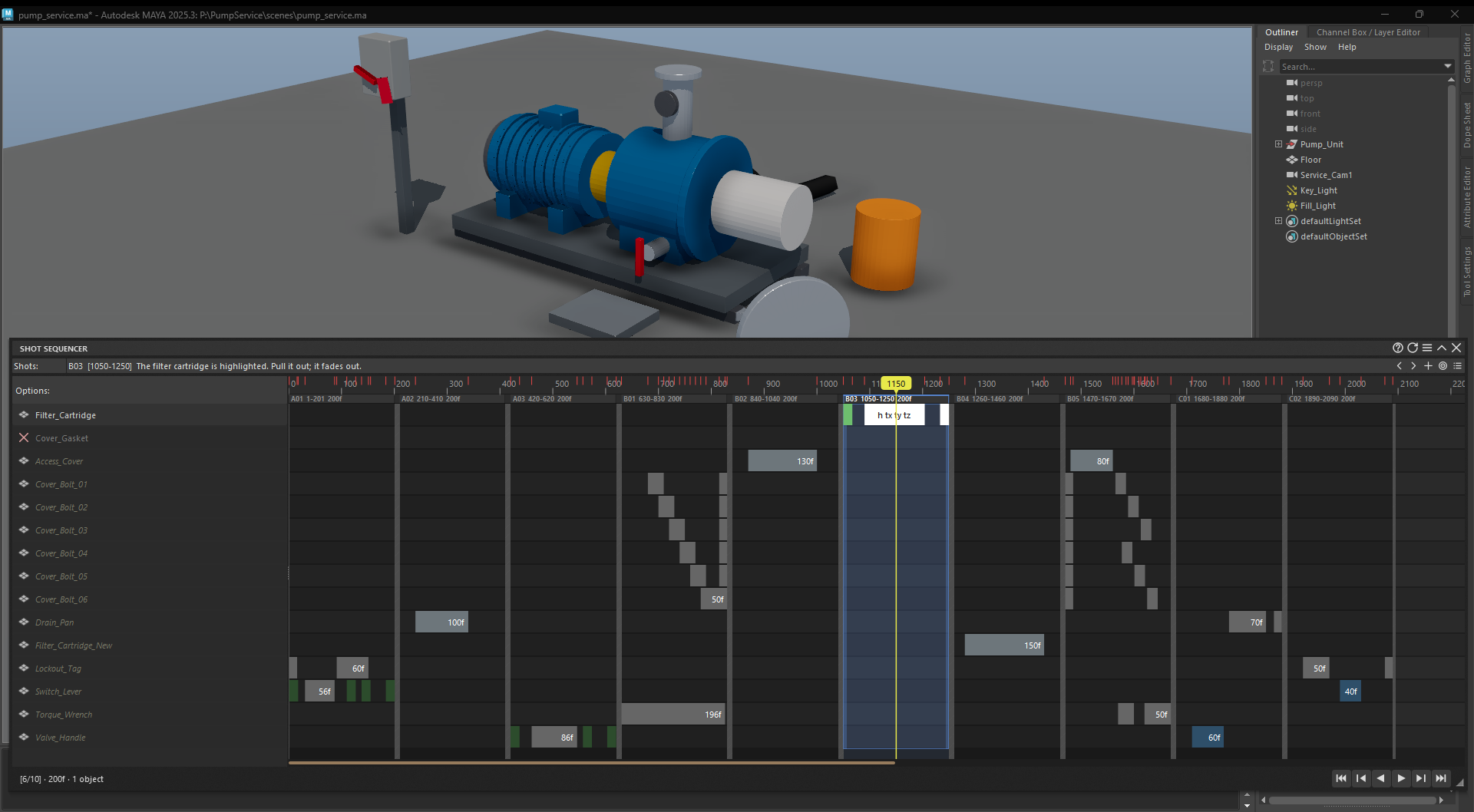
- Shot Manifest reads the build sheet, a CSV file or a Google Sheets link, and builds one shot per step: named after the step, holding its objects, with the fades and highlights its text asks for already keyed. When the sheet or the scene changes, Assess shows what drifted and Build brings the scene back in line, never keying over an animator's work.
- Shot Sequencer lays the shots out on one timeline. Drag a clip to retime its keys; drag a shot's edge and the shots after it move with their keys; switch to the Graph view to shape the curves.
- Scene Exporter runs the scene's checks and fixes, then writes FBX, GLB or USD. In an FBX, each shot rides out as its own named take, which Unity imports as an animation clip.
More standouts
- Smart Bake bakes whatever drives the animation down to keys, reversibly.
- Lightmap Baker bakes the scene's lighting into lightmaps a game engine reads.
- Texture Combine merges several materials into one texture atlas and one material, in place.
- Hierarchy Sync compares the scene's hierarchy with a reference file, then pulls in what is missing or fixes what drifted.
- The rigs handle hoses and cables (Tube Rig), wheels that roll as their control moves (Wheel Rig), extending segments (Telescope Rig) and parts on hinges, swivels and slides (Articulated Rig).
- The bridges send the selection to Marmoset Toolbag or a fresh copy of the other DCC, run Substance 3D Painter scripts on it, or unwrap it in RizomUV and bring the UVs back.
Standalone apps
With extapps installed, the menus also open nine of its standalone apps by name: the Map Packer, Map Converter and Map Compositor for textures; the Metashape, RealityScan and Brush Splat workflows for photogrammetry and Gaussian splats; the Mesh Converter; Unity Scripts; and the WebXR Preview. Opened from Maya or Blender, Unity Scripts and the WebXR Preview send the current scene, exported by the DCC, to Unity or to a browser or headset. If extapps is missing, the first app you open installs it, within the version range tentacletk[apps] declares. Outside a DCC, the extapps command opens any of them.
How it works
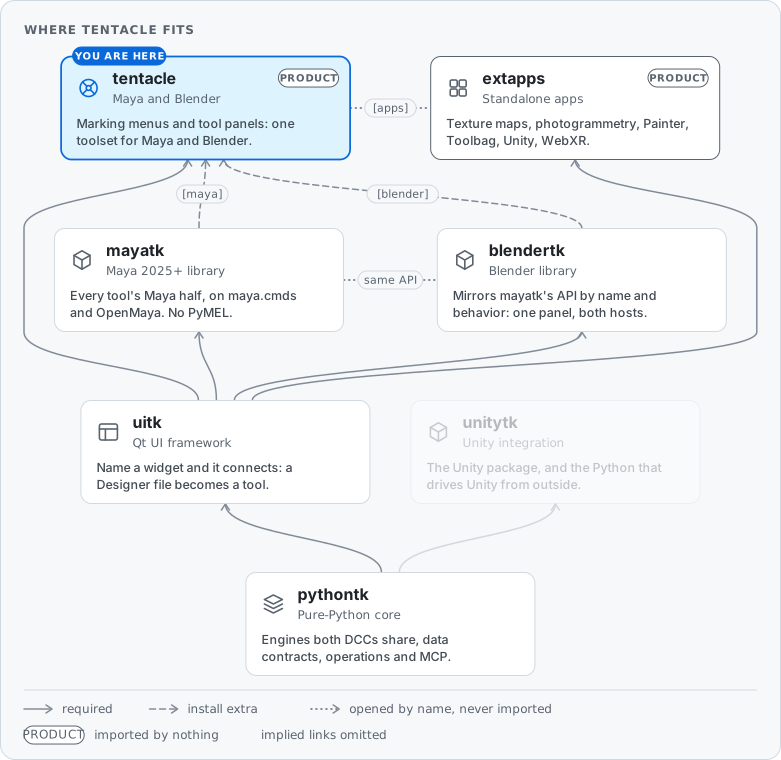
Tentacle is the product end of the ecosystem. It holds the launcher and the panels. Every tool's logic lives in the libraries beneath it: mayatk and blendertk, which share one API, over pythontk's host-free engines. The menu itself is a uitk widget.
Tcl.launch finds the running DCC and builds one uitk marking menu for it. Whatever the host does differently, such as its main window, its keyboard handling and how it defers startup, comes from an adapter in that host's library: one launcher, with no per-host fork.
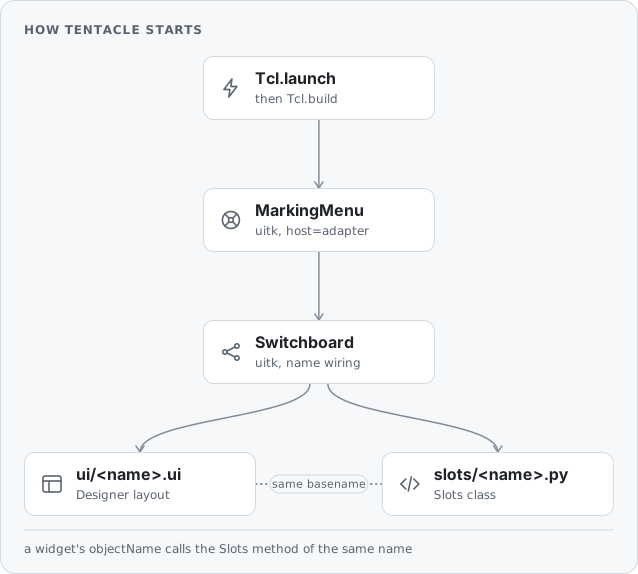
Every panel follows uitk's naming convention: a .ui file pairs with the Python module of the same name, and each widget calls the method named after it.
ui/polygons.ui                        ──pairs with──►  slots/polygons.py
  └─ widget "tb000" (Merge Vertices)  ──calls──►       def tb000(self, widget): ...
                                      ──set up by──►   def tb000_init(self, widget): ...  (optional)
No findChild, no connect: name the widget, write the method.
Customize
Start Tentacle from your own startup script with two lines; Tcl.launch detects the DCC and defers startup the way that DCC needs:
from tentacle import Tcl
Tcl.launch(key_show="Z")   # bare ("Z", "Space") or Qt-named ("Key_F11")
Put it in Maya's userSetup.py (in the user scripts folder for your Maya version) or Blender's startup.py (in its user scripts/startup folder). key_show names the default key; without it, the TENTACLE_KEY environment variable does, else Z. A key the user picks in Settings outranks all of them.
Other options pass through to the menu. slot_source adds a slot library of your own (a relative path is read from the tentacle package folder), and bindings replaces the default chord table. A bindings table also sets the activation key, ahead of one the user picked, though the user's own chord-to-menu changes on that key still apply:
Tcl.launch(
    slot_source="/studio/tentacle/slots",   # adds your own slot library
    log_level="DEBUG",
    bindings={                               # in place of the default chord table
        "Key_F11":             "main#startmenu",
        "Key_F11|RightButton": "cameras#startmenu",
    },
)
Chord syntax, gesture mechanics and the rest of the menu's options: uitk's marking-menu guide.
Development
git clone https://github.com/m3trik/tentacle
pip install -e ./tentacle
cd tentacle && python -m pytest test/
CI runs the structural suites (test_package.py, test_slot_integrity.py, test_ui_integrity.py) and the module suites (workflow); the full run, python test/run_tests.py --in-maya, launches a fresh Maya of its own. Search every public class and method with python -m pythontk ops run api.search "query=<words>". Contributor conventions: AGENTS.md; history: CHANGELOG.md.
License
GPL-3.0-or-later; see COPYING, plus an additional permission to combine it with mayatk and Autodesk Maya (COPYING.EXCEPTION). Copyright (C) 2021-2026 m3trik@live.com.
1 maintainer

Metadata
1 maintainer
Release files for tentacletk 0.19.0
For a detailed explanation of source distributions (sdists) and built distributions (wheels), please see the package formats documentation.
Built distribution (wheel)
| File | Interpreter | ABI | Platform | Actions Reset |
|---|---|---|---|---|
| tentacletk-0.19.0-py3-none-any.whl | Python 3 | none | any | Details for tentacletk-0.19.0-py3-none-any.whl |
Release files / tentacletk-0.19.0-py3-none-any.whl
| Download URL | tentacletk-0.19.0-py3-none-any.whl |
|---|---|
| Size | 1.2 MB |
| Tags | Python 3 |
|
SHA-256 checksum How to use checksums |
1fa57a41149a78afc30a2e6167da09c7cac780cbb712ab46d92aa1419c63ada0
|
|
BLAKE2b-256 checksum How to use checksums |
b5af37ca8ee98282b600ea529f6f30e58d656bcbc42c2e450d0260c907c10727
|
| Upload date | |
|
Uploaded using Trusted Publishing? What is trusted publishing? |
No |
| Uploaded via |
twine/7.0.0 CPython/3.11.18
|
Security for tentacletk 0.19.0
Provenance
Provenance describes where a file came from. On PyPI, provenance is shared via attestations, which provide a verifiable record of the build or publishing details. View details, limitations and caveats.
No provenance found
None of the files in this release were uploaded with provenance metadata.
A note on package security
PyPI is a repository for distributing packages, not a service for auditing them. While third-party security researchers and our staff do their best to detect and remove malicious packages, PyPI cannot guarantee the quality, security or suitability of any given package.
To learn more about protecting yourself from malicious actors, visit our package security documentation.














