
Tenuo for Claude Code




Keep your AI coding agent inside the lines. Claude Code can read files, run shell, fetch URLs, and call MCP tools. Tenuo puts a signed policy in front of all of it so the agent only does what you allowed, on one laptop or across a Cloud-connected fleet.
Why: Claude's permission prompts are easy to bypass (--dangerously-skip-permissions, local settings edits). Hook-only guardrails trust the process. Tenuo adds limits you can prove were enforced: sandbox-scoped reads, shell allowlists, MCP argument checks, URL policy, and an audit trail per call.
What you get: one policy file (tenuo.yaml), a local authorizer that says allow/deny on every call, and optional Tenuo Cloud for verifiable receipts, human approval gates on high-risk calls, and fleet-wide revocation.
Try it
Requires Python 3.10+ and Docker or a native authorizer.
pip install tenuo-claude-code
mkdir my-project && cd my-project
tenuo-claude bootstrap
When verify passes, open Claude Code in this directory.
Native authorizer (no Docker):
tenuo-claude install-authorizer
tenuo-claude bootstrap
If Docker is not installed, bootstrap uses the native authorizer automatically. If Docker is installed and you want native anyway:
export TENUO_AUTHORIZER_BACKEND=native
tenuo-claude bootstrap
Where to go next
| If you want to… | Start here |
|---|---|
| Day-to-day commands, ports, CLI reference | Use the tool |
| Edit or replace the example policy | Policy |
| Clone the repo or run the sample project | Build from source |
| Connect to Tenuo Cloud | Cloud mode |
| Review security posture | Security |
| Plan org-wide rollout | Talk to us |
| Something failed during setup | Troubleshooting (Q&A) |
| Implementation depth | docs/DETAILS.md |
How it works
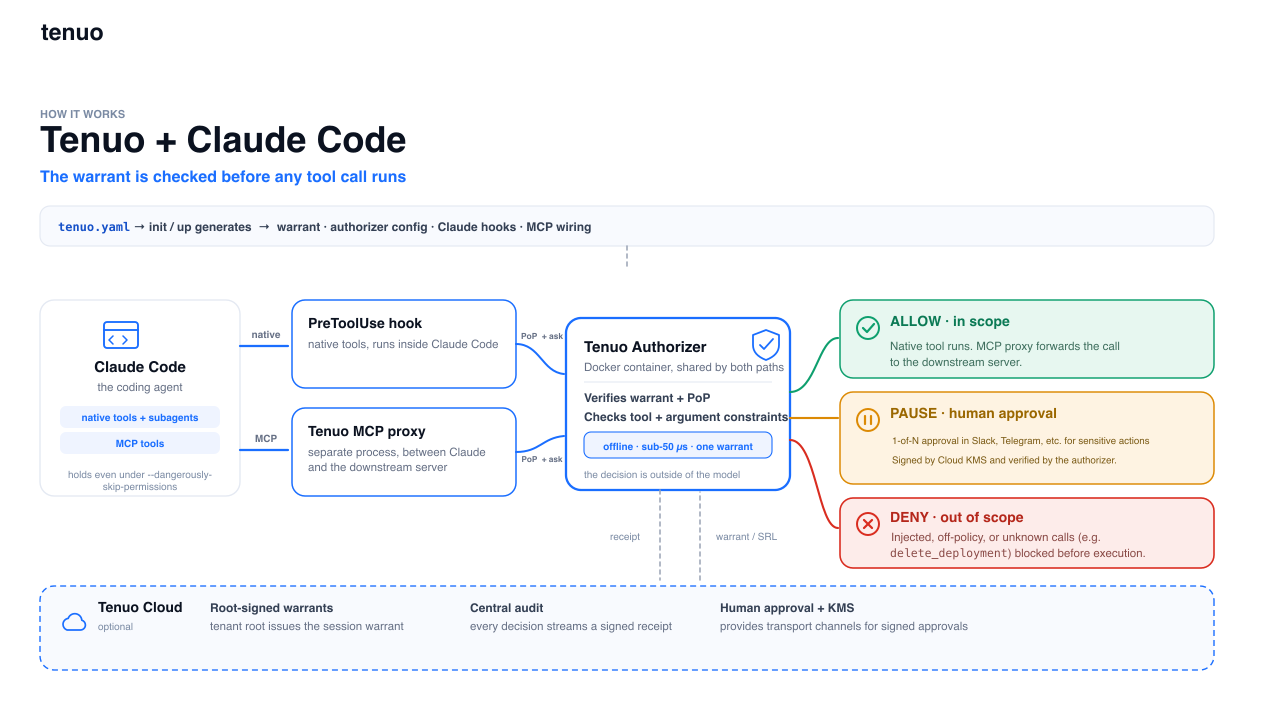
tenuo.yaml  →  init/up  →  warrant + authorizer + hooks + MCP proxy
                                    |
                                    |
                                    v
              native tools (PreToolUse hook)  |  MCP tools (proxy)
                                    |
                                    |
                                    v
                         authorizer → allow / deny → log / receipt
Native tools (Read, Bash, WebFetch, and the rest) go through a PreToolUse hook. MCP tools go through a proxy in place of the downstream server. At init, Tenuo mints a session warrant; each call must prove it holds that warrant before the authorizer allows the action.
More: docs/DETAILS.md
Prerequisites
- Python ≥ 3.10
- Authorizer runtime (use one):
- Docker (default when the daemon is running): Docker Desktop or your engine, then
tenuo-claude up. Uses the pinnedtenuo/authorizerimage. - Native (no Docker): run
tenuo-claude install-authorizer, thentenuo-claude up --native. On first run, add--install. Override the binary withTENUO_AUTHORIZER_BIN. SetTENUO_AUTHORIZER_SKIP_VERSION=1only for local dev builds. - To force native while Docker is installed, set
TENUO_AUTHORIZER_BACKEND=nativebeforebootstraporup.
- Docker (default when the daemon is running): Docker Desktop or your engine, then
- Claude Code — Tenuo wires PreToolUse hooks and MCP proxy at
init.
Local mode: no Tenuo Cloud account. Suitable for single-project evaluation.
Cloud mode: requires a cloud.tenuo.ai tenant for tenant-root warrants, central audit, fleet revocation, and org-wide rollout (Cloud mode).
Use the tool (PyPI)
After Try it, you have an example tenuo.yaml, a running authorizer, and passing verify.
Day to day
| When | Command |
|---|---|
| Start work (Cloud) | tenuo-claude check && tenuo-claude up |
| Start work (local only) | tenuo-claude up or tenuo-claude up --native |
check reports cloud bindings failure |
tenuo-admin setup, then check && up again |
You edited tenuo.yaml |
tenuo-claude refresh (local); Cloud capability changes also need tenuo-admin setup |
| Diagnose setup | tenuo-claude check |
| See decisions | tenuo-claude audit |
| Stop authorizer | tenuo-claude down |
See Troubleshooting (Q&A) for common errors.
If you always use the native authorizer without Docker, set TENUO_AUTHORIZER_BACKEND=native in your shell so plain up selects the host binary.
Port conflicts
The authorizer listens on 127.0.0.1:9090 by default. If that port is taken, set TENUO_AUTHORIZER_PORT before bootstrap:
export TENUO_AUTHORIZER_PORT=9091
tenuo-claude bootstrap
PORT is deprecated. Use TENUO_AUTHORIZER_PORT.
The chosen URL is saved in .state/state.json. Hooks and verify read that file, so they stay aligned even if the env var is unset later.
Generated files (do not commit): .state/ (keys, warrant), .claude/settings.json (hooks).
Custom policy
Bring your own tenuo.yaml (see Policy), or edit the example bootstrap wrote, then:
tenuo-claude init
tenuo-claude up
tenuo-claude verify
Use --native when Docker is not available. On the first native run, add --install. Alternatively, run tenuo-claude onboard --local for an interactive setup.
Reference demo
Sample policy, MCP stub, and scripted tour in demo/. The shipped demo/tenuo.yaml is richer than the bootstrap example; Cloud and approval overlays may already be present.
From repo root: uv venv && uv sync && source .venv/bin/activate, then:
First time, local only (no .state/cloud.env):
cd demo
tenuo-claude bootstrap
tenuo-claude demo
First time, Cloud (recommended for the reference demo with receipts):
cd demo
tenuo-claude bootstrap --cloud
# or: tenuo-claude onboard --cloud
tenuo-claude demo
Paste Quick Connect (Authorizer Only) into .state/cloud.env and tenant-admin
key into ~/.tenuo/admin.env when prompted. See Cloud mode.
Already Cloud-configured (.state/cloud.env or tenuo.cloud.yaml present):
Do not run plain bootstrap — it switches to local mode and moves Cloud files
aside. Use:
cd demo
tenuo-claude check && tenuo-claude up
tenuo-claude verify
tenuo-claude demo
If check fails on cloud bindings → tenuo-admin setup, then retry.
For human approval: Cloud mode § Human approval, then tenuo-claude demo --advanced --live-approval.
If plain bootstrap was run on a Cloud-configured project, restore .state/cloud.env
and policy overlays from backup, then tenuo-admin setup. See
Troubleshooting.
From a git checkout, see Build from source.
All commands
| Command | Does |
|---|---|
init |
Mint warrant, wire hooks and .mcp.json |
bootstrap |
Example policy (if missing) + check + init + up + verify |
up / down |
Start / stop authorizer. up flags: --native, --docker, --install (native, first run) |
install-authorizer |
Install tenuo-authorizer to ~/.tenuo/bin (no manual cargo) |
refresh |
Re-apply tenuo.yaml (restarts authorizer if up) |
check |
Preflight: deps, credentials, wiring drift, Cloud binding probe |
verify [--deep] |
Policy self-test against the authorizer (no agent session required) |
status |
Warrant, posture, Cloud summary |
onboard |
Interactive local or Cloud setup wizard |
bench [--json] |
Per-tool-call overhead |
audit [--tail N] |
Receipt trail |
revoke |
Revoke session warrant |
See also: Policy · Cloud mode · Troubleshooting · docs/DETAILS.md
Build from source
For local development, the reference demo from git, or ./bin/tenuo-claude instead of a PyPI install.
git clone https://github.com/tenuo-ai/claude-governance.git
cd claude-governance

uv venv && uv sync && chmod +x bin/tenuo-claude
source .venv/bin/activate   # Windows: .venv\Scripts\activate
Without Docker, install the authorizer binary once: uv run tenuo-claude install-authorizer
Run commands via the repo launcher or editable install:
./bin/tenuo-claude --help
# or: uv run tenuo-claude --help
# or: pip install -e . && tenuo-claude --help
Reference demo (from a git checkout):
cd demo
tenuo-claude check && tenuo-claude up   # Cloud; see Reference demo if check fails
tenuo-claude demo
First local-only run (no .state/cloud.env): use tenuo-claude bootstrap instead.
First Cloud run: tenuo-claude bootstrap --cloud or onboard --cloud.
Use tenuo-claude up --native when Docker is not available.
Open Claude Code in demo/. See demo/README.md and Reference demo above.
Re-run tenuo-claude init or refresh after switching Python venvs. Hooks pin sys.executable in .claude/settings.json.
Contributors: CONTRIBUTING.md.
Policy (tenuo.yaml)
One file drives the warrant, authorizer routes, hooks, and MCP proxy. bootstrap writes a minimal example and sets name: from your folder name. Edit before production.
name: acme-backend          # bootstrap uses your project directory name
sandbox: ./workspace
mode: enforce
enforce:
  Read:  "subpath:{sandbox}"
  Bash:  "shlex:ls,pwd,echo,date"
  WebFetch:
    domains: ["api.github.com", "*.githubusercontent.com"]
default: deny
subagents:
  analyst:
    tools: [Read, Grep, Glob]
mcp:
  downstream: ./your_mcp_server.py
  enforce:
    read_file: "subpath:{sandbox}"
enforce: allowed and argument-checked.audit: harness tools from bundled list (extend withaudit_extra:).default: deny: everything else blocked with a receipt.mode: audit: receipt allow/deny without blocking (rollout).subagents:: DETAILS.md.
Policy templates: ready-made patterns in examples/policies/. Download one, save as tenuo.yaml in your project directory, adapt sandbox paths and tool lists, then run tenuo-claude init. To contribute a template, see that folder's README.
Cloud overlays: templates/tenuo.yaml.cloud.example, templates/tenuo.yaml.advanced.example. Download from this repo or use tenuo-claude init --cloud / --advanced.
Cloud mode
Requires a cloud.tenuo.ai tenant.
Use Cloud when you need organization-scale governance, not just a single laptop:
- Tenant-root warrants: session credentials chain to your tenant, not a local issuer key
- Central audit: signed allow/deny/spawn/approval receipts in one stream
- Fleet revocation: revoke a warrant id; authorizers pull the SRL within ~30s
- Split keys: admins run
tenuo-admin setuponce; developers use runtime keys only - Optional approver gates: high-risk governed tool calls can pause for Cloud identity sign-off before proceeding (setup)
- Managed rollout: wire hooks via Claude Code managed settings; keep team
tenuo.yamlin git - Org-wide baseline: with managed settings, the signed warrant is enforced on
every tool call at the hook and MCP proxy. Engineers cannot disable it with local
Claude permission edits or
--dangerously-skip-permissions
Cloud quickstart
Two keys, two files. Runtime never sees the admin key:
| Key | Where to get it | File | Used by |
|---|---|---|---|
| Quick Connect (runtime) | cloud.tenuo.ai → Agents → Quick Connect → Authorizer Only → copy tenuo_ct_… |
.state/cloud.env |
tenuo-claude up, hooks |
| Tenant-admin (setup once) | Settings → API Keys → Create (tenant admin role) | ~/.tenuo/admin.env |
tenuo-admin setup once |
Do not put the tenant-admin key in .state/cloud.env or your shell when running tenuo-claude up. Runtime refuses to start if an admin key is reachable.
Fresh project (creates tenuo.yaml if none exists):
pip install tenuo-claude-code
mkdir my-project && cd my-project
tenuo-claude bootstrap --cloud
The wizard prompts for a Quick Connect token (tenuo_ct_…), then runs init, tenuo-admin setup, up, and verify. For an explicit Cloud URL and API key without Quick Connect, use the manual setup block below.
Non-interactive:
tenuo-claude bootstrap --cloud --yes \
  --connect-token "tenuo_ct_…" \
  --admin-key "tc_…"
Omit --admin-key if tenuo-admin setup already ran. Pass credentials with flags rather than export TENUO_ADMIN_KEY. Unset the admin key before tenuo-claude up; an admin key in the runtime environment causes startup to fail.
One-shot env vars for CI:
TENUO_CONNECT_TOKEN="tenuo_ct_…" TENUO_ADMIN_KEY="tc_…" \
  tenuo-claude bootstrap --cloud --yes
Existing local project
Keeps your current tenuo.yaml. Adds Cloud credentials and profile, re-mints the session warrant, and registers or updates the Cloud trigger.
cd my-project
tenuo-claude onboard --cloud
If you do not pass an admin key to the wizard, run tenuo-admin setup before up, or place the admin key in ~/.tenuo/admin.env and run setup yourself.
Manual setup (equivalent to the wizard). Credential templates are in templates/:
cd my-project
mkdir -p .state ~/.tenuo
# templates/cloud.env.example → .state/cloud.env
# templates/admin.env.example → ~/.tenuo/admin.env

tenuo-claude init --cloud
tenuo-admin setup
tenuo-claude check && tenuo-claude up
tenuo-claude verify
Every session (after onboarding):
tenuo-claude check && tenuo-claude up
If check reports cloud bindings failure, run tenuo-admin setup and retry.
Verify onboarding
After onboarding, run:
tenuo-claude status
tenuo-claude check
tenuo-admin show
You should see: authorizer up, cloud profile merged, a trigger id in tenuo-admin show, cloud bindings — trigger fire dry-run OK, and CHECK OK with no admin key in runtime env.
Re-run tenuo-admin setup when Cloud capabilities change — setup syncs the local
gateway, reconciles agent/trigger/holder bindings, and reloads the authorizer when
it is already running. Re-run tenuo-claude refresh for local-only policy edits (no
Cloud trigger change).
Stuck? Troubleshooting (Q&A).
Human approval (Cloud)
Approval is a third outcome on any governed tool call: not just egress.
When the warrant includes an approval gate for a capability, the authorizer can return approval-required instead of allow/deny. The hook creates a Cloud approval request, waits for an approver on their notification channel, then re-authorizes with signed approvals in X-Tenuo-Approvals.
Included policy examples:
- Native hook: off-allowlist
WebFetch(URLs that pass SSRF checks but are not on your domain allowlist). - MCP proxy:
delete_deploymentwithtarget=productiongated;target=stagingexempt.
Both use the same session approval policy and the same hook/proxy approval workflow for any tool argument the warrant gates.
- Configure a notification channel and identity binding in Cloud (channels, identity bindings).
- Add approval gates in policy. Use
cloud.approver_identity_idfor team and shared configs. Usecloud.approver_identity(display name) for demos only. See templates/tenuo.yaml.advanced.example. - Wire Cloud and re-run setup:
tenuo-claude init --advanced --approver-id "idn_..."
tenuo-admin setup          # syncs gateway; reloads authorizer if already up
tenuo-claude up            # if authorizer was down
tenuo-claude verify
For demos, display-name lookup is supported:
tenuo-claude onboard --cloud --advanced --approver "Alice Example"
If multiple Cloud identities share a display name, use --approver-id or
cloud.approver_identity_id in policy.
Reference demo:
cd demo
tenuo-claude demo --advanced --live-approval
For the WebFetch example: allowlisted domains pass directly. SSRF cases remain hard-denied. For the MCP example: exempt targets pass directly; other argument values pause for sign-off. Both paths use the same Cloud approval request flow.
Details: docs/DETAILS.md § Human approval.
Security
Tenuo works alongside Claude Code permissions — it does not replace managed settings. tenuo-claude init wires a PreToolUse hook and MCP proxy; the authorizer enforces the session warrant on every tool call and logs a receipt. Policy is one file (tenuo.yaml).
vs. Claude Code permissions
| Claude Code permissions | Tenuo warrant | |
|---|---|---|
| Policy | Allow/ask/deny in settings | Signed credential; Cloud chains to tenant root |
| Expiry | Until edited | Session TTL (~1h); up refreshes |
| Revocation | Edit rules; sessions may keep prior allowances | Revoke warrant id → ~30s SRL sync (Cloud) |
| Evidence | Optional hook logs | Local JSONL log; signed audit stream in Cloud |
| Delegation | Project/user tool policy | Per-role child warrant; session is the ceiling |
| Org-wide deployment | Per-user settings; users can edit local hooks | Managed settings + shared policy; hook/proxy enforcement is not user-editable |
--dangerously-skip-permissions |
Bypasses Claude permission prompts | Hook and MCP proxy still enforce the warrant |
--dangerously-skip-permissions skips Claude's permission UI, not the warrant.
Org admins can block it in managed settings (disableBypassPermissionsMode).
Organization-wide policy
For teams that need a global configuration engineers cannot bypass:
- Store
tenuo.yamlin version control and deploy the same policy to every project. - Push hook and MCP wiring through Claude Code managed settings (org admin), not
per-developer
settings.local.json. - Use Cloud for tenant-root warrants, central audit, and revocation across machines.
Talk to us about managed-settings rollout and Cloud deployment.
Receipts
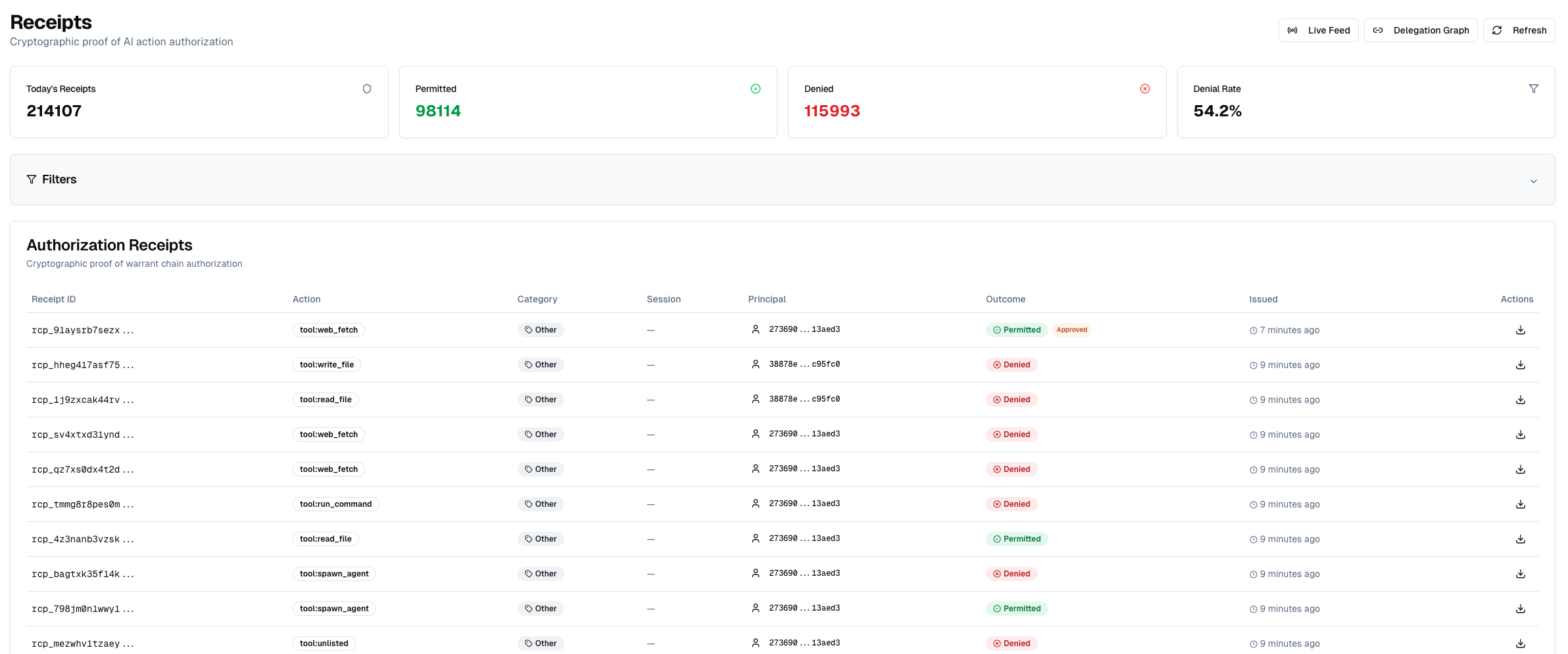
Every governed tool call carries a proof-of-possession signature; the authorizer verifies it before returning allow/deny.
What you can read back depends on mode:
Local (always): the hook appends a JSON line to .state/receipts.jsonl. Inspect
with tenuo-claude audit:
{"phase": "pre", "decision": "deny", "claude_tool": "Read", "governed": true,
 "args": {"file_path": "/etc/passwd"}, "reason": "Constraint not satisfied", "ts": "…"}
In mode: audit, denials show as WOULD-DENY in audit output (shadow: true in the file).
Cloud (when connected): the authorizer emits signed audit events (Ed25519 over a CBOR payload) to your tenant.
These are the non-repudiable receipts for compliance and fleet audit, not the local JSONL file.
More: docs/DETAILS.md § Receipts.
Cloud audit
With Tenuo Cloud, session warrants chain to your tenant root.
Allow, deny, spawn, and approved exceptions appear in one signed audit log. Revoke a warrant id from status or the dashboard without touching the laptop.
Admin and runtime keys stay split: tenuo-admin setup (once) vs tenuo-claude up (daily).
Runtime refuses to start if an admin key is in the environment.
Rollout
- Start on one project with Try it or the demo/ sample.
- Set
mode: auditto compute allow/deny in receipts without blocking. ReviewWOULD-DENYrows, tune policy, then setmode: enforce. - Organization-wide rollout: managed-settings hooks, Cloud warrants, shared
tenuo.yamlin version control, and the Cloud capabilities above. See Tenuo Cloud docs.
Scope and boundaries
Tenuo governs model-invoked tool calls: Read, Bash, WebFetch, MCP tools, subagent spawns, and the rest of the PreToolUse hook path. Each call is checked against the signed session warrant before it runs.
Agent Bash is in scope. When the model uses the Bash tool, PreToolUse fires and the authorizer applies your policy.
TUI ! shell is outside this scope. In Claude Code, typing ! in the input
box runs a command the operator typed. The model cannot invoke that path.
Prompt injection and tool overreach stay on the governed PreToolUse path; they do
not reach !.
Details: docs/DETAILS.md § Agent tools vs operator shell.
Fail-closed
Missing or broken tenuo.yaml denies every governed tool call until restored.
Keys and credentials in .state/ must be owner-only (0600 in a 0700 directory).
The authorizer reads gateway config from .state/authorizer/ (Docker mount or native process). Holder keys and cloud.env stay on the host. Session-key signing runs in the hook.
Report vulnerabilities: SECURITY.md.
Implementation depth: docs/DETAILS.md.
Performance
Run tenuo-claude bench after up.
On a typical laptop, Tenuo authorization is about 1-3 ms per call. Command hooks add about 100-200 ms (mostly process startup). Use bench --json on your machines.
This repo
GitHub: tenuo-ai/claude-governance
PyPI: tenuo-claude-code
| Path | Contents |
|---|---|
src/tenuo_claude_code/ |
Package source |
templates/ |
Starter tenuo.yaml and credential examples |
examples/policies/ |
Ready-made policy templates |
demo/ |
Reference project and scripted tour |
docs/ |
Architecture diagram, implementation notes |
1 maintainer

Download files
Download the file for your platform. If you're not sure which to choose, learn more about installing packages.
Source Distribution
Built Distribution
Filter files by name, interpreter, ABI, and platform.
If you're not sure about the file name format, learn more about wheel file names.
Copy a direct link to the current filters
File details
Details for the file tenuo_claude_code-0.2.2.tar.gz.
File metadata
- Download URL: tenuo_claude_code-0.2.2.tar.gz
- Upload date:
- Size: 545.0 kB
- Tags: Source
- Uploaded using Trusted Publishing? Yes
- Uploaded via: uv/0.11.21 {"installer":{"name":"uv","version":"0.11.21","subcommand":["publish"]},"python":null,"implementation":{"name":null,"version":null},"distro":{"name":"Ubuntu","version":"24.04","id":"noble","libc":null},"system":{"name":null,"release":null},"cpu":null,"openssl_version":null,"setuptools_version":null,"rustc_version":null,"ci":true}
File hashes
| Algorithm | Hash digest | |
|---|---|---|
| SHA256 |
d63839f1cd254f93526fbd93ffbc3b84096ade9896075b1734766a63a5e93545
|
|
| MD5 |
f52fae047bc7c7ad613b92af51dac229
|
|
| BLAKE2b-256 |
e8eba2d5d0746f4929c30411e1d087ce65ba01146099cbfc2daaf6e0d71c0d6c
|
File details
Details for the file tenuo_claude_code-0.2.2-py3-none-any.whl.
File metadata
- Download URL: tenuo_claude_code-0.2.2-py3-none-any.whl
- Upload date:
- Size: 70.3 kB
- Tags: Python 3
- Uploaded using Trusted Publishing? Yes
- Uploaded via: uv/0.11.21 {"installer":{"name":"uv","version":"0.11.21","subcommand":["publish"]},"python":null,"implementation":{"name":null,"version":null},"distro":{"name":"Ubuntu","version":"24.04","id":"noble","libc":null},"system":{"name":null,"release":null},"cpu":null,"openssl_version":null,"setuptools_version":null,"rustc_version":null,"ci":true}
File hashes
| Algorithm | Hash digest | |
|---|---|---|
| SHA256 |
e435f540bb2abf79afd1638076102ce1f0b33ae8f4243c97b1d43c0845aca72d
|
|
| MD5 |
d1942817bf64d52a70b639aa2323c2ad
|
|
| BLAKE2b-256 |
0d9e94eee694c6969c2a8d02ad5d493da453f7c8d9b31005b81ea76b2cea11ea
|







