
Tenuo for Claude Code




Claude Code can read files, run shell commands, fetch URLs, and call MCP tools.
Tenuo lets you write a tenuo.yaml policy for which of those calls are allowed,
then checks every model-invoked tool call before it runs.
That policy is compiled into a signed, expiring credential called a warrant. A local authorizer checks each tool call against it and logs the decision. The same policy is applied no matter why the model tried the call: prompt injection, hallucination, poisoned tool output, or an unsafe request.
Start with the local quickstart below. Optional Cloud control-plane setup is in Cloud mode.
Quickstart
Requires Python 3.10+. Uses Docker if it's running; otherwise a native authorizer binary, installed automatically. On Windows, run these commands from WSL.
pip install tenuo-claude-code
mkdir my-project && cd my-project
tenuo-claude bootstrap
bootstrap writes a starter tenuo.yaml, starts the authorizer, and runs a self-test (verify). It runs non-interactively, ideal for a fresh folder. For a guided wizard with prompts, run tenuo-claude onboard instead; it's the same flow with a preflight check. The starter policy is deliberately strict:
name: my-project
sandbox: ./workspace
mode: enforce
enforce:
  Read: "subpath:{sandbox}"          # Read only files under ./workspace
  Bash: "shlex:ls,pwd,echo,date"     # Bash only these commands
default: deny                        # every other tool call is denied
Now open Claude Code in my-project/:
claude
The agent is governed: Read ./workspace/notes.txt is allowed; Read /etc/passwd, Bash(curl …), or any tool not listed is denied and logged. After Claude runs a few tools, run tenuo-claude audit to see the decisions. Edit tenuo.yaml to fit your project (see Policy), then tenuo-claude refresh.
For an example with MCP and subagents, see the reference demo.
| Next | Go to |
|---|---|
| Write the policy | Policy |
| Day-to-day commands | Commands |
| Org root, receipts, approvals, revocation | Cloud mode |
| Security model and limits | Security |
| Something broke | Troubleshooting · deep dive docs/DETAILS.md |
Policy
tenuo.yaml is the whole configuration: it drives the warrant, the authorizer, the hooks, and the MCP proxy. You list tools under enforce: and give each a constraint on its key argument.
name: acme-backend
sandbox: ./workspace        # a directory; {sandbox} expands to its absolute path
mode: enforce               # block out-of-scope calls. 'audit' = log only, don't block

enforce:
  Read:  "subpath:{sandbox}"
  Write: "subpath:{sandbox}"
  Bash:  "shlex:ls,pwd,echo,cat,grep"
  WebFetch:
    domains: ["api.github.com", "*.githubusercontent.com"]
    cidrs:   ["10.0.0.0/8"]   # optional: also allow hosts in these IP ranges

default: deny               # anything not listed above is denied

subagents:                  # optional: each role runs under a narrower warrant
  analyst:
    tools: [Read, Grep, Glob]

mcp:                        # optional: govern a downstream MCP server's tools
  downstream: ./your_mcp_server.py
  enforce:
    read_file: "subpath:{sandbox}"          # bare string constrains the `path` arg
    run_query:                              # constrain a differently-named arg
      arg: sql
      constraint: "regex:^SELECT "
    http_call:                              # constrain several args at once
      args:
        url:    "urlpattern:https://api.example.com/*"
        method: "oneof:GET,HEAD"
Constraints
| Constraint | Applies to | What it checks |
|---|---|---|
subpath:DIR |
path tools (Read, Write, Edit, Glob, Grep) | the path argument must resolve to a location inside DIR. Symlinks are resolved first, so a link planted in the directory can't point outside it. |
shlex:a,b,c |
Bash, Monitor | the command's executable must be one of a,b,c, and the command must be a single simple command: pipes, &&/; chaining, subshells, and shell expansion are rejected. (This allowlists the verb, not file paths: cat /etc/passwd passes if cat is allowed. Use Read/Write to scope files; drop Bash for a hard lock.) |
domains / cidrs / schemes / ports |
WebFetch | the URL's host must match an allowed domain (* matches one label) or CIDR range, and pass SSRF hygiene: https-only by default (override with schemes), optional ports allowlist, with loopback, cloud-metadata IPs, encoded-IP tricks, and spoofed hosts (api.github.com.evil.com) blocked. |
oneof:a,b · notoneof:a,b · exact:v · pattern:glob · regex:re · range:min,max · urlpattern:url · cidr:n/m |
any tool argument | the value must be in the set / not in the set / equal / glob-match / regex-match / fall in the numeric range (either bound may be blank) / match the URL glob / fall inside the IP range (for any IP-based tool, not just WebFetch). |
The keys above are the tenuo.yaml DSL's convenient subset. The underlying tenuo engine supports more (set operations, numeric ranges, negation, boolean composition, and CEL expressions) for programmatic policies — see tenuo.
{sandbox} is a convenience variable for the directory in sandbox:; you can point subpath: at any path. Tools you don't list aren't governed individually; they're caught by default.
Command-execution tools. Bash, PowerShell, and Monitor all execute commands and are each governed independently (their own constraint on the command argument). Monitor runs the same shell commands as Bash in the background; PowerShell is a different dialect, so prefer oneof/pattern/regex over shlex (which parses POSIX syntax) for it. If your team enables PowerShell or Monitor in Claude Code, list them under enforce: too. Left unlisted they fall to default: deny blocks them, but audit logs them unconstrained, so on default: audit give every enabled shell an explicit constraint.
MCP tool arguments. Under mcp.enforce:, a bare constraint string targets the path argument. To constrain a differently-named argument use arg: NAME + constraint:, and to constrain several at once use args: {NAME: constraint, …}. This works for any downstream MCP tool and any constraint kind, locally and on Cloud. Tools you don't list are still allowed/denied by default and can be human-approval gated (approval:); they just aren't argument-constrained.
mode: enforceblocks denied calls.mode: auditcomputes and logs the same decisions but blocks nothing; use it to dry-run a policy, then switch toenforce.default: denydenies any tool not listed (recommended).default: auditlogs-and-allows unknown tools instead.subagents:declares roles; spawning is gated to those roles, and each runs under the session warrant attenuated to itstools(it can only ever do less than the session). Details.
Ready-made policies: examples/policies/. After any edit, run tenuo-claude refresh.
Commands
Day to day, you mostly need up (start), audit (review), and refresh (after editing policy).
| Command | What it does |
|---|---|
onboard |
Interactive first-run wizard (--local / --cloud); same flow as bootstrap but prompts and runs a preflight check. Scaffolds an example policy if you don't have one. |
bootstrap |
First-run quickstart (used above): non-interactive scaffold starter policy (if none) → init → up → verify. --cloud for Cloud. |
init |
Compile an existing tenuo.yaml: mint the warrant, wire the PreToolUse hook and MCP proxy. Pass --scaffold to write an example if none exists (it no longer does so automatically). |
up / down |
Start / stop the authorizer (auto-selects Docker or native; --native to force). |
refresh |
Recompile after editing tenuo.yaml (restarts the authorizer if running). In Cloud mode, warns if capability rules drifted from the last tenuo-admin setup. |
verify [--deep] |
Self-test the live policy against the authorizer (no Claude session needed). --deep adds an SSRF / encoded-IP matrix, extra Bash deny cases, and a live PreToolUse exit-code harness: a reproducible artifact for security review. |
audit [--tail N] |
Show the decision log (.state/receipts.jsonl). |
check |
Preflight: dependencies, wiring, audit-sink health, leaked admin keys, and (Cloud) control-plane bindings. |
status |
Warrant, mode, audit-sink health, and Cloud summary. |
install-authorizer |
Install the native authorizer to ~/.tenuo/bin (no Docker, no Cargo). |
bench [--json] |
Measure per-call overhead on your machine (PoP sign, authorizer round-trip, full hook path). |
revoke |
Revoke the current session warrant. |
The warrant is short-lived (~1h TTL); up refreshes it. The authorizer listens on 127.0.0.1:9090; change it with TENUO_AUTHORIZER_PORT before bootstrap. Generated files (don't commit): .state/ (keys, warrant, credentials), .claude/settings.json (hooks), .mcp.json (MCP wiring).
Working from a git clone instead of PyPI? See Build from source.
How enforcement works
init compiles tenuo.yaml into a signed warrant and wires two interception points; both check the same warrant against the same local authorizer:
- Native tools (Read, Bash, WebFetch, …) → a Claude Code PreToolUse hook intercepts the call, signs a proof-of-possession with the session key, and asks the authorizer.
- MCP tools → Claude is pointed at a proxy that stands in for the downstream MCP server; the proxy authorizes, then forwards only if allowed.
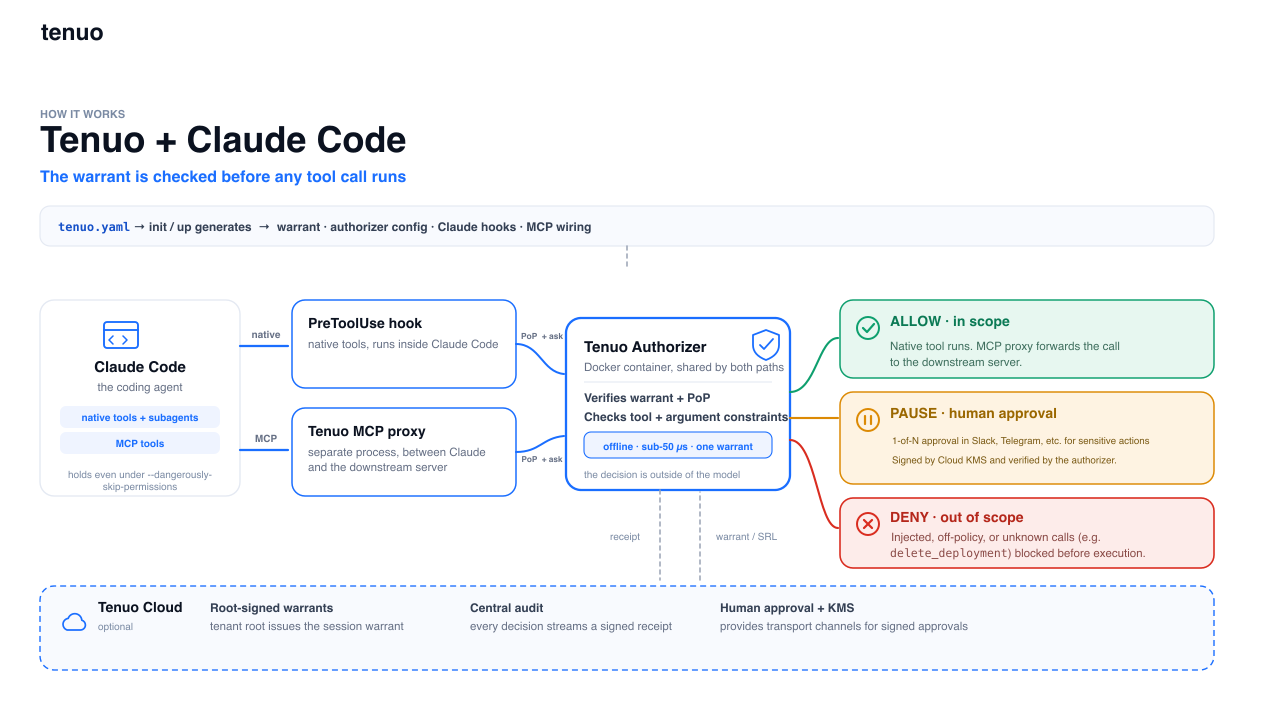
The authorizer (a small local service, ~1–3 ms/call) verifies the warrant's signature, proof-of-possession, and expiry, then checks the call's arguments against the warrant's constraints → allow, deny, or (Cloud) approval-required. Full detail in docs/DETAILS.md.
Cloud mode
Local mode is enough to evaluate Tenuo on one project. Connect cloud.tenuo.ai for organization-scale governance:
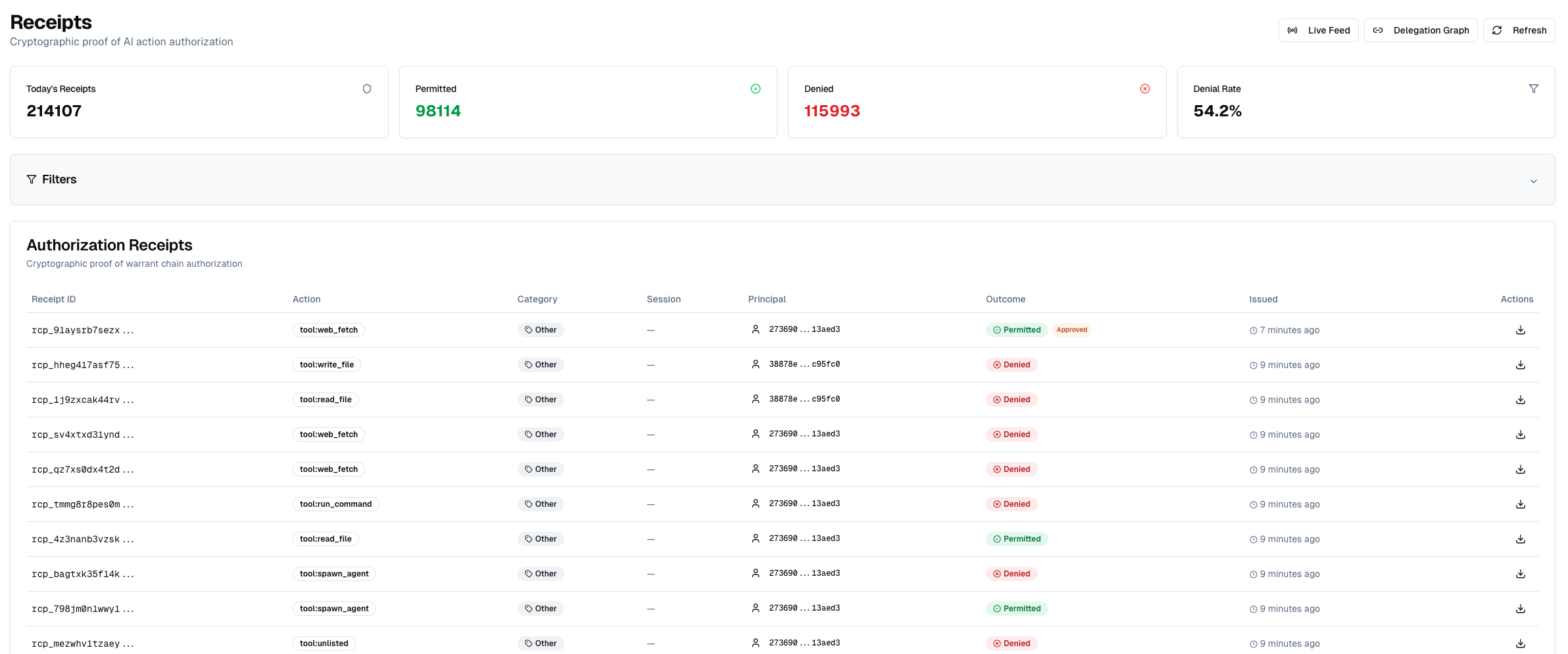
- Tenant-root warrants: sessions chain to your org root, not a key on the laptop.
- Signed receipts: one verifiable allow/deny/approval audit stream (Ed25519 over CBOR).
- Fleet revocation: revoke a warrant id; authorizers pick it up within ~30s.
- Human approval gates: specific calls pause for a person instead of allow/deny (below).
- Managed rollout: push hook/MCP wiring through Claude Code managed settings instead of per-project local settings.
Setup
Two keys, kept apart; the runtime never sees the admin key:
| Key | From | Goes in | Used by |
|---|---|---|---|
Runtime (tenuo_ct_…) |
cloud.tenuo.ai → Agents → Quick Connect → Authorizer Only | .state/cloud.env |
tenuo-claude up, hooks |
Tenant-admin (tc_…) |
Settings → API Keys → Create (admin role) | ~/.tenuo/admin.env |
tenuo-admin setup (once) |
mkdir my-project && cd my-project
tenuo-claude bootstrap --cloud      # wizard prompts for the runtime token, then sets up + verifies
Every session after that:
tenuo-claude check && tenuo-claude up
If check reports a cloud bindings failure, run tenuo-admin setup and retry.
tenuo-claude uprefuses to start if a tenant-admin key is in the environment; keep it only in~/.tenuo/admin.env. And once a project is on Cloud, don't re-run plainbootstrap: it reverts the project to local mode and moves your Cloud files aside. Usecheck && up.
CI / non-interactive and manual step-by-step setup: docs/DETAILS.md § Tenuo Cloud. After changing enforce/mcp/subagents/approvals on Cloud, re-run tenuo-admin setup; for mode-only changes, refresh suffices.
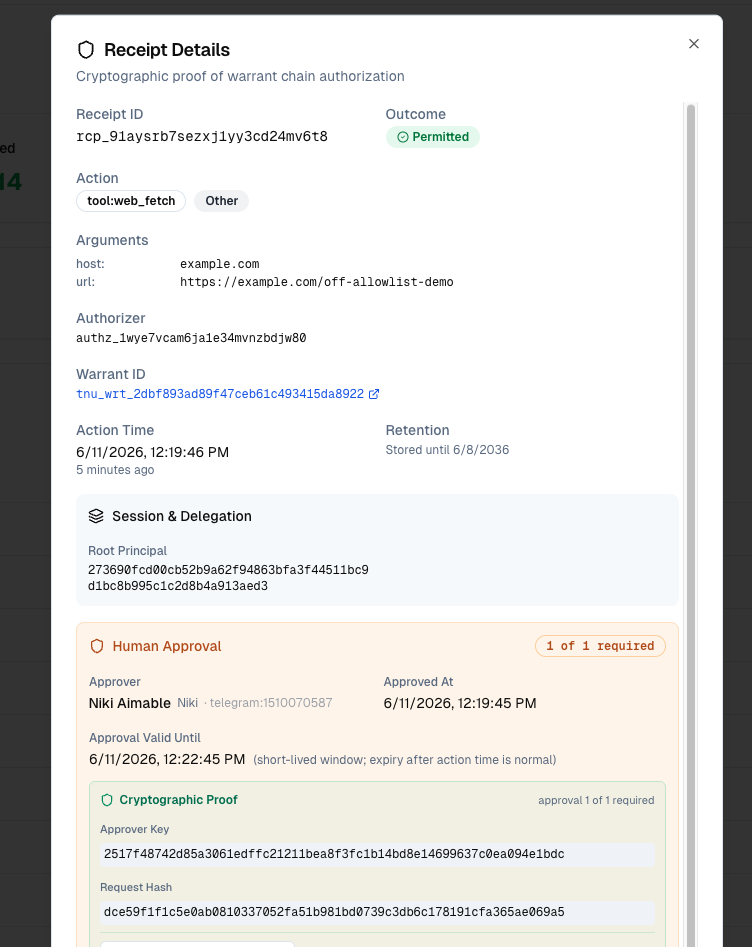
Human approval (Cloud)
A gated capability returns a third outcome, approval-required, instead of allow/deny. The hook opens a Cloud approval request, waits for an approver on their notification channel, then re-authorizes with their signed approval. The repo ships two worked examples (off-allowlist WebFetch, and delete_deployment with target=production). Setup and policy shape: docs/DETAILS.md § Human approval.
Security
Tenuo runs alongside Claude Code permissions; it doesn't replace managed settings. The difference is where and how policy is enforced:
| Claude Code permissions | Tenuo warrant | |
|---|---|---|
| Form | Allow/ask/deny rules in settings | Signed, expiring capability token; Cloud chains to your org root |
| Enforcement point | Claude's permission UI | PreToolUse hook + MCP proxy, checked by the authorizer |
--dangerously-skip-permissions |
Skips the prompts | Does not disable installed Tenuo hook/proxy checks |
| Expiry | Until edited | ~1h session TTL; up refreshes |
| Revocation | Edit rules (live sessions may keep allowances) | Revoke warrant id → ~30s fleet sync (Cloud) |
| Evidence | Optional hook logs | Local JSONL; signed receipt stream in Cloud |
| Org deployment | Per-user settings, locally editable | Managed-settings hooks + shared policy |
Admins can also block the bypass flag entirely in managed settings (disableBypassPermissionsMode).
What's in scope. Tenuo governs model-invoked tool calls (Read, Bash, WebFetch, MCP tools, subagent spawns) on the PreToolUse path, including the agent's own Bash. The TUI ! shell (a command the operator types) is not a tool call and is out of scope; the model can't invoke it. (details)
Fail-closed. A missing or broken tenuo.yaml denies every governed call until it's restored. Keys under .state/ must be owner-only (0600).
Receipts. Every governed call carries a proof-of-possession signature the authorizer verifies. Locally, the hook appends a JSON line to .state/receipts.jsonl (read with tenuo-claude audit; in mode: audit, denials show as WOULD-DENY):
{"phase":"pre","decision":"deny","claude_tool":"Read","governed":true,
 "args":{"file_path":"/etc/passwd"},"reason":"Constraint not satisfied"}
Connected to Cloud, the authorizer also emits signed receipts to your tenant, the verifiable record for compliance and fleet audit.
Rolling out to a team. Keep tenuo.yaml in version control, push the hook/MCP wiring through Claude Code managed settings (not per-developer settings.local.json), and use Cloud for org-root warrants, central audit, and revocation. Start in mode: audit, review the WOULD-DENY rows, then switch to enforce. Talk to us about managed-settings rollout. Report issues: SECURITY.md.
Build from source
For development, running the demo from a checkout, or using ./bin/tenuo-claude:
git clone https://github.com/tenuo-ai/claude-governance.git
cd claude-governance
uv venv && uv sync && source .venv/bin/activate     # Windows: .venv\Scripts\activate
chmod +x bin/tenuo-claude
uv run tenuo-claude install-authorizer              # only if you don't use Docker
Run via ./bin/tenuo-claude --help, uv run tenuo-claude --help, or pip install -e .. Re-run tenuo-claude init (or refresh) after moving the repo or reinstalling. The hooks pin the launcher path at wiring time. Contributors: CONTRIBUTING.md.
Performance
Authorization is ~1–3 ms per call; the command hook adds ~100–200 ms (mostly process startup). Measure on your machine with tenuo-claude bench after up.
This repo
GitHub: tenuo-ai/claude-governance · PyPI: tenuo-claude-code
| Path | Contents |
|---|---|
src/tenuo_claude_code/ |
Package source |
templates/ |
Starter tenuo.yaml and credential examples |
examples/policies/ |
Ready-made policy templates |
demo/ |
Reference project and scripted tour |
docs/ |
Implementation details · Troubleshooting |
1 maintainer

Download files
Download the file for your platform. If you're not sure which to choose, learn more about installing packages.
Source Distribution
Built Distribution
Filter files by name, interpreter, ABI, and platform.
If you're not sure about the file name format, learn more about wheel file names.
Copy a direct link to the current filters
File details
Details for the file tenuo_claude_code-0.3.0.tar.gz.
File metadata
- Download URL: tenuo_claude_code-0.3.0.tar.gz
- Upload date:
- Size: 558.7 kB
- Tags: Source
- Uploaded using Trusted Publishing? Yes
- Uploaded via: uv/0.11.21 {"installer":{"name":"uv","version":"0.11.21","subcommand":["publish"]},"python":null,"implementation":{"name":null,"version":null},"distro":{"name":"Ubuntu","version":"24.04","id":"noble","libc":null},"system":{"name":null,"release":null},"cpu":null,"openssl_version":null,"setuptools_version":null,"rustc_version":null,"ci":true}
File hashes
| Algorithm | Hash digest | |
|---|---|---|
| SHA256 |
7a1a520f7f66b51795d9c39f3b0603d673d4bc97903b762f350d5592c7b3e88e
|
|
| MD5 |
f23a70b7859ba0e534b531be0d1f0296
|
|
| BLAKE2b-256 |
91e8a03f88e2b464c3dce17e75493930ccc0fd4d5b31c4276527c821a93d1684
|
File details
Details for the file tenuo_claude_code-0.3.0-py3-none-any.whl.
File metadata
- Download URL: tenuo_claude_code-0.3.0-py3-none-any.whl
- Upload date:
- Size: 77.1 kB
- Tags: Python 3
- Uploaded using Trusted Publishing? Yes
- Uploaded via: uv/0.11.21 {"installer":{"name":"uv","version":"0.11.21","subcommand":["publish"]},"python":null,"implementation":{"name":null,"version":null},"distro":{"name":"Ubuntu","version":"24.04","id":"noble","libc":null},"system":{"name":null,"release":null},"cpu":null,"openssl_version":null,"setuptools_version":null,"rustc_version":null,"ci":true}
File hashes
| Algorithm | Hash digest | |
|---|---|---|
| SHA256 |
d8fbda4f03072e7f185d1da0d05ac78d500350627b37f45dd79ef12962636107
|
|
| MD5 |
e70456b470c68296e17e0c327d234535
|
|
| BLAKE2b-256 |
35a04141fbb323a49e34a118ab8bc379a5a02f813a7891f61ecb022bf357a38d
|







