
terrahour

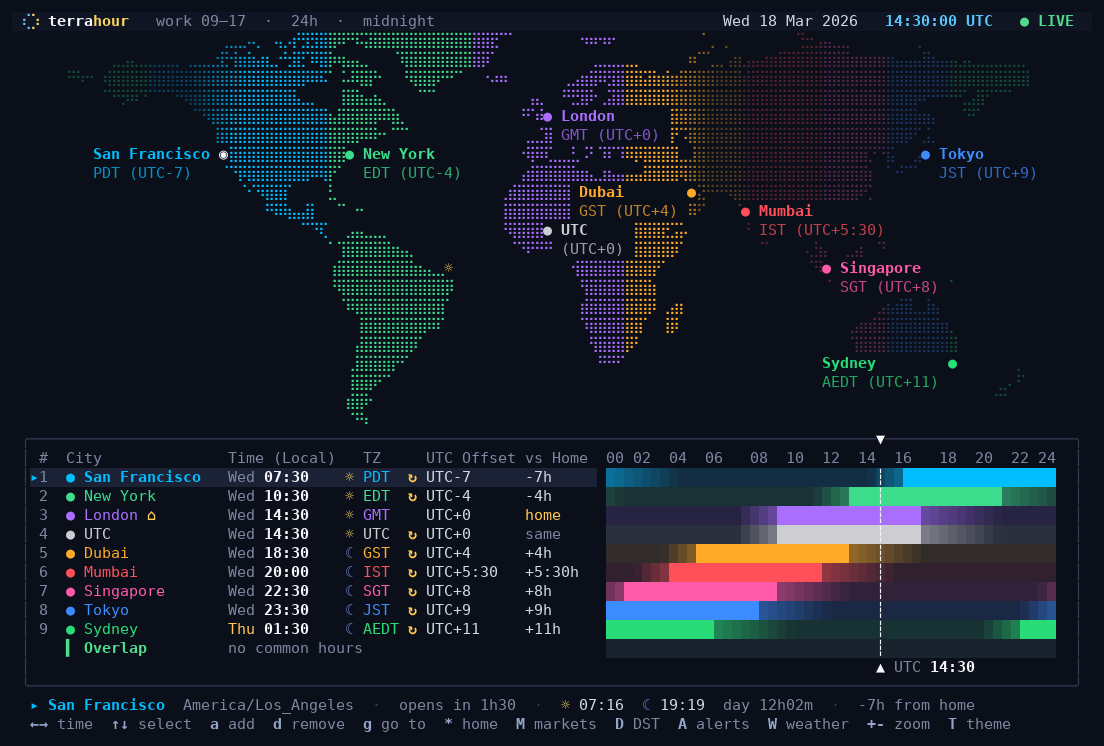
A world clock for the terminal. A map shows where it is day and where it is night, and a 24-hour timeline shows when the people in your cities are at work.
| Main view: the day and night map above a timeline per city |
|---|
 |
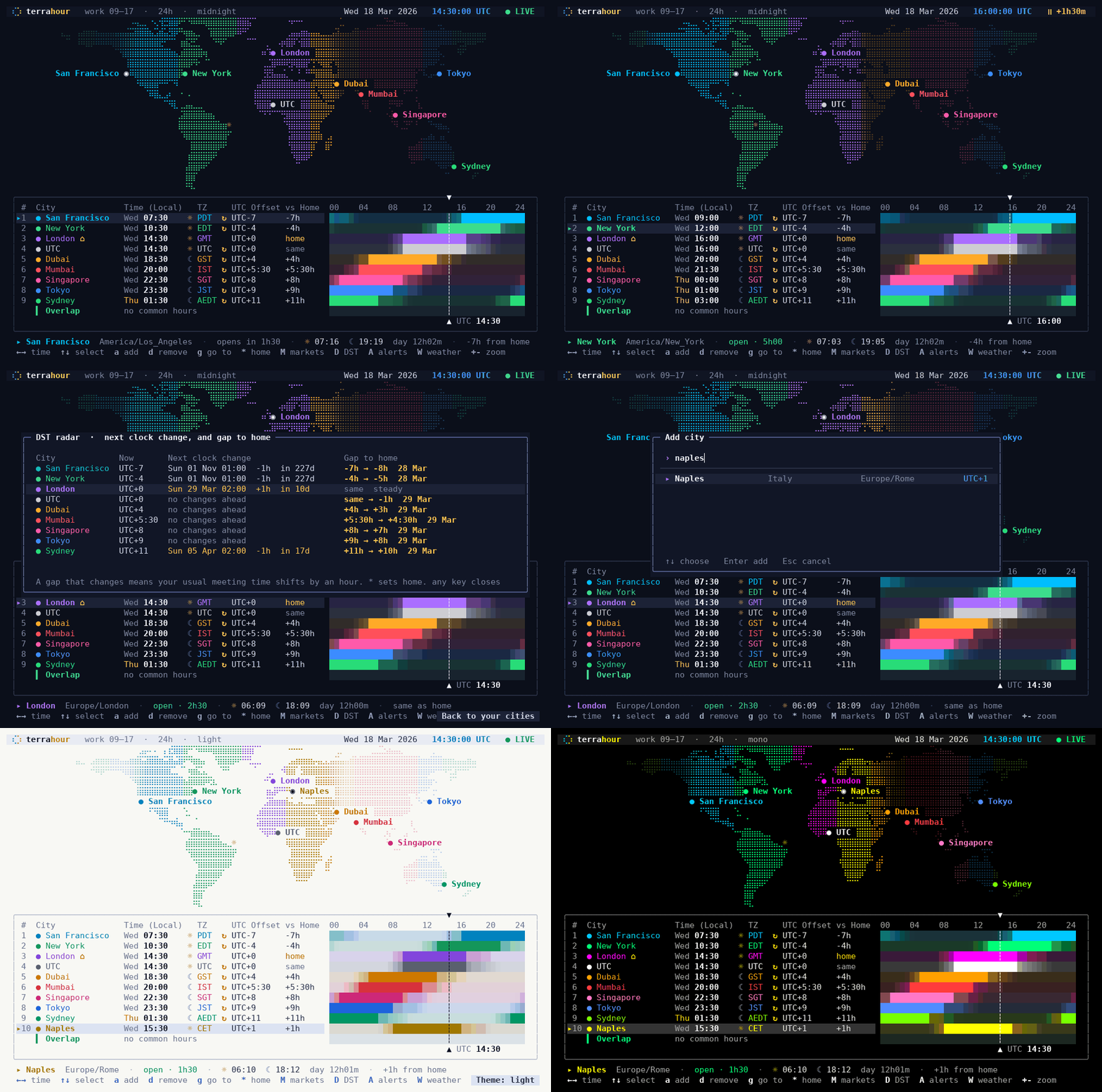
| A quick tour: scrubbing time, exchanges, DST radar, ambient view |
|---|
 |
What it does
- A map with day and night. Braille dots, shaded by sunlight and coloured by time zone,
with a marker for every city you track. Zoom with
+-or the mouse wheel, drag to pan.Nadds a shade over the night side. - A timeline per city. A 24-hour bar with the working hours lit up, and an overlap row that shows when everybody is at their desk.
- Scrub through time. Arrow keys move in 15-minute steps,
gjumps to any time ("15:30", "3pm", "+2h", "2026-10-05 09:00"),rgoes back to live. - DST radar.
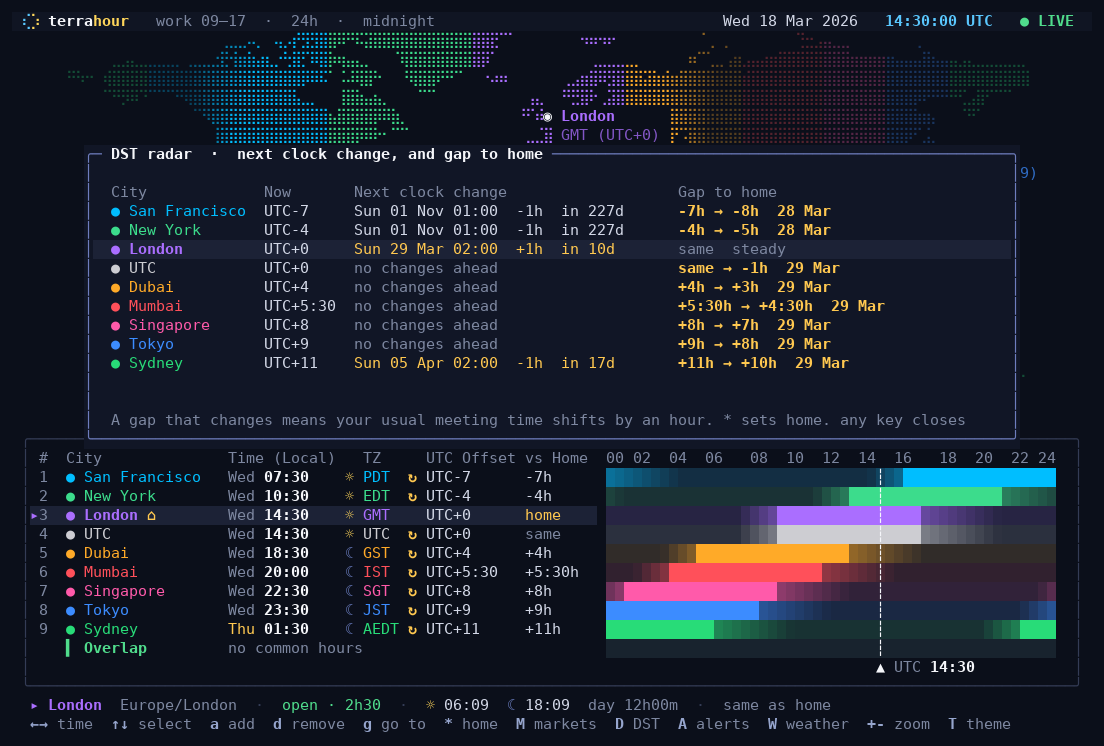
Dlists the next clock change for every city and, more usefully, whether the gap between you and them is about to shift by an hour. - Stock exchanges.
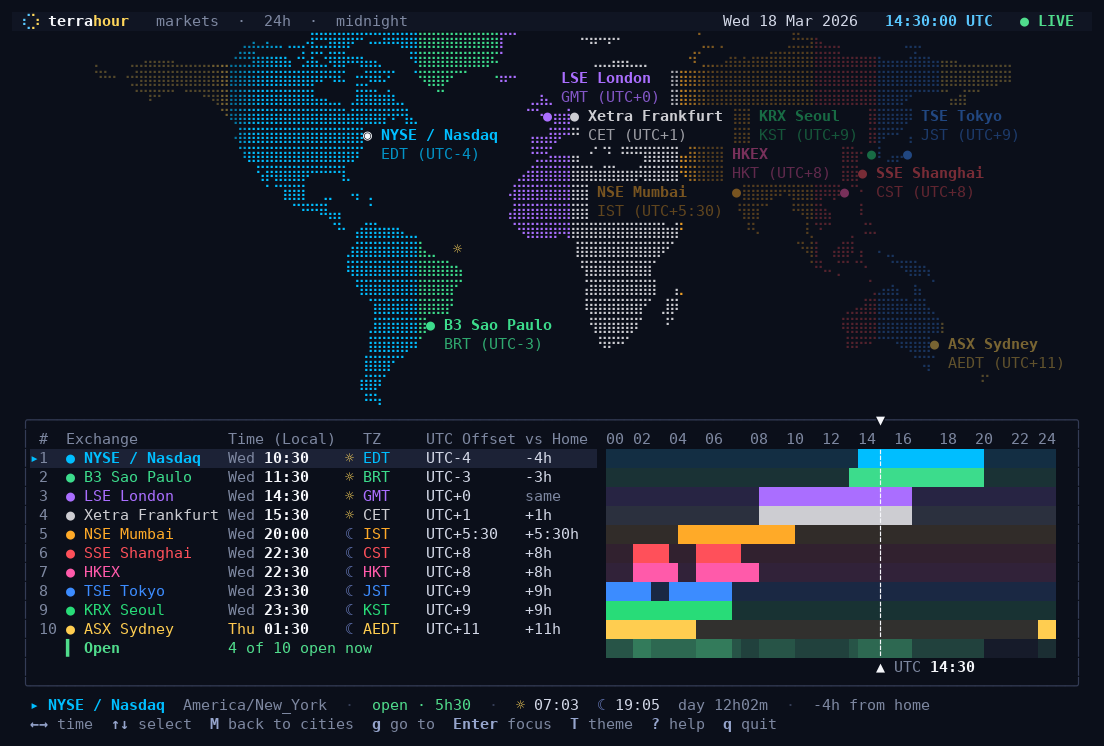
Mswaps the city list for the ten biggest exchanges with their real trading sessions, lunch breaks included. - Alerts.
Asets a daily reminder in another city's time, a ping when an office or exchange opens or closes, or a plain timer. They ring the bell and send a desktop notification while the app is open. - Weather, if you want it.
Wshows the current temperature next to each city (Open-Meteo, needs network, off by default). - Ambient view.
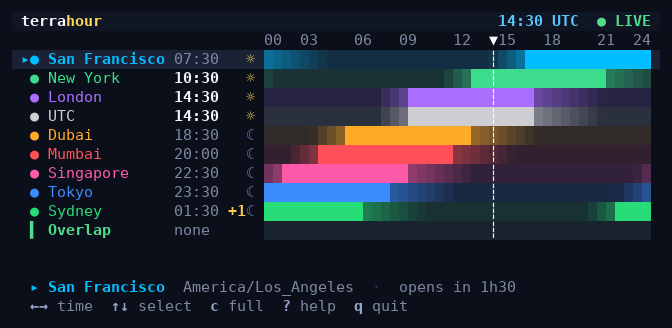
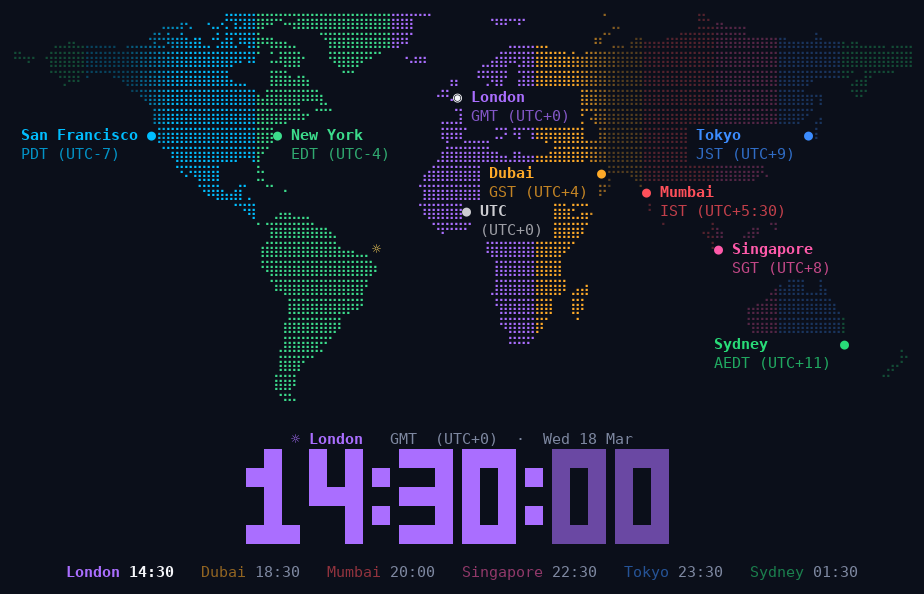
Vturns the whole terminal into a big clock over the map that cycles through your cities. Nice on a spare monitor. Pressgthere and type a time, say 09:00: the map then keeps the place where it is 09:00 right now in the centre, so it slowly turns through the day. - Fits anywhere. Narrow windows get a compact layout that works in a tmux split, and
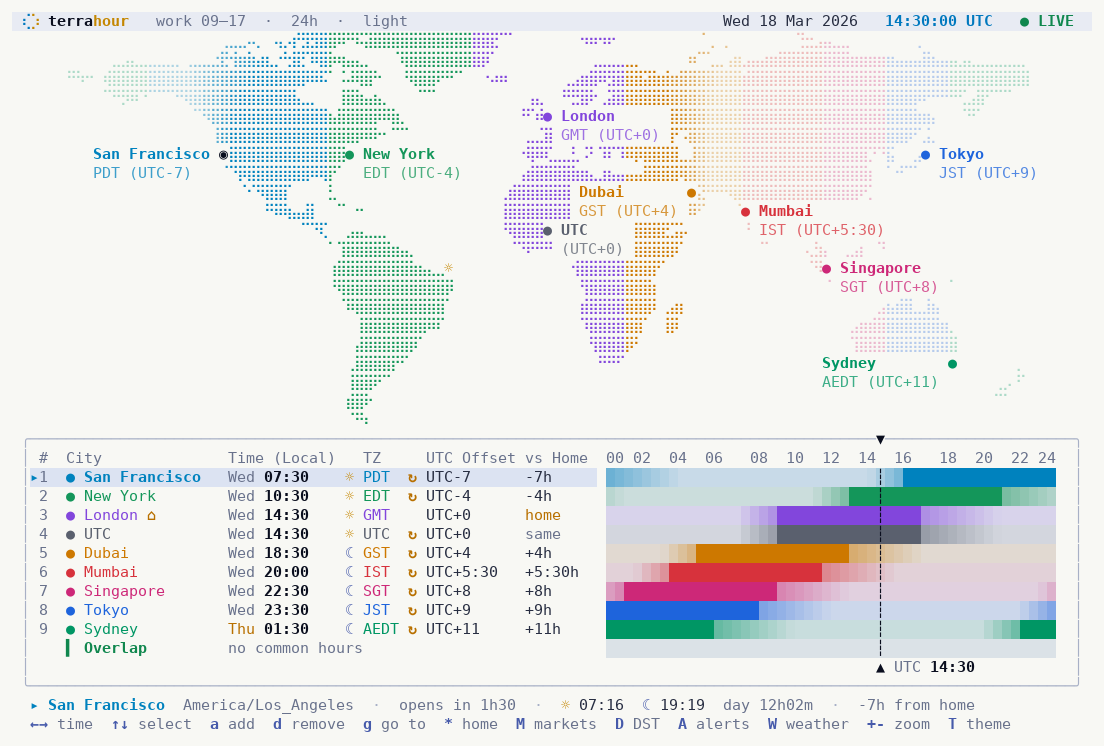
--lineprints a one-liner for a status bar. - Fourteen themes, a 12 or 24 hour clock, mouse support, and about 12,000 cities built in with online lookup for the rest.
| Exchanges | Compact layout for a tmux split |
|---|---|
 |
 |
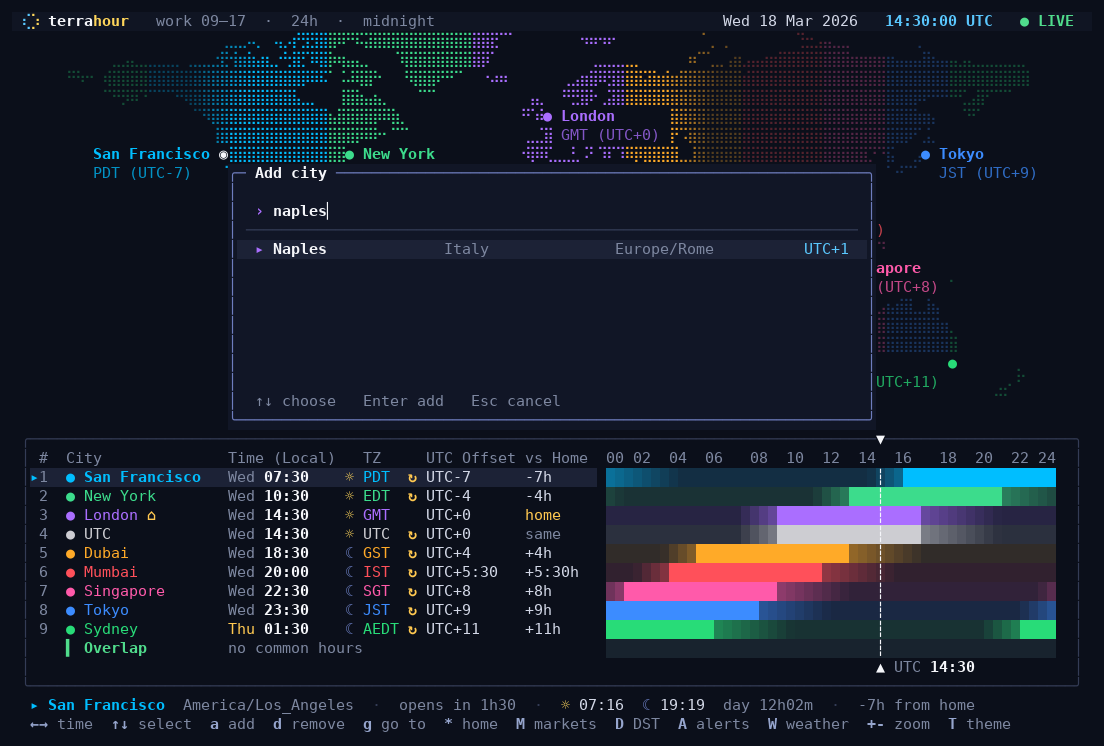
| DST radar | Adding a city |
|---|---|
 |
 |
| Ambient view | Light theme |
|---|---|
 |
 |
Install
It runs on Linux and macOS, in any terminal with truecolor and a UTF-8 locale (that is almost all of them). On Windows use WSL.
With pipx (recommended; it installs the terrahour command for your user):
pipx install terrahour
terrahour
No pipx yet? sudo apt install pipx on Debian and Ubuntu, brew install pipx on macOS.
If the shell cannot find terrahour afterwards, run pipx ensurepath once and open a new
terminal. Later, pipx upgrade terrahour gets you the newest version.
Without Python. Every release has a single-file executable for Linux (x86_64, ARM64) and macOS (Apple Silicon, Intel). Download the one for your machine, then:
chmod +x terrahour-linux-x86_64
./terrahour-linux-x86_64
On a Mac the first start is blocked because the file is not signed by Apple. Run
xattr -d com.apple.quarantine terrahour-macos-arm64 once, or right-click the file and
choose Open.
Other ways. pipx run terrahour or uvx terrahour runs it without installing.
pip install terrahour works inside a virtual environment (recent Debian and Ubuntu refuse
it outside one). And a clone runs in place with python3 -m terrahour; there is nothing to
build.
Usage
Run terrahour. The first time it starts with a default set of cities: press a to add
your own, d to remove one, * to mark the selected city as home, ? for every key and
q to quit.
terrahour                                  # your saved cities
terrahour Europe/Berlin "Home=America/Chicago" Naples   # a one-off set of zones or city names, not saved
terrahour --markets                        # start in the exchange view
terrahour --at 2026-10-05T09:00Z           # start frozen at a given time
terrahour --theme nord --12h
terrahour --night-shade 0.5                # shade the night side of the map (0 to 1)
terrahour --ambient                        # straight into the screensaver view
terrahour --ambient --follow 09:00         # ...with the map following where it is 9 in the morning
terrahour --reset                          # forget saved cities and settings
The keys you will use most:
| Key | Action |
|---|---|
← → |
scrub 15 minutes (Shift: 1 hour, PgUp/PgDn: 1 day) |
g |
go to a time, r back to live |
↑ ↓ j k |
select a city; capital K J move it up or down the list |
a d |
add or remove a city |
* |
mark the selected city as home (offsets are then relative to it) |
Enter |
focus the selected city, dims the others |
M D A W |
exchanges, DST radar, alerts, weather |
+ - [ ] 0 |
zoom the map, zoom the timeline, reset |
T t c V N |
theme, 12/24h, compact layout, ambient view, night shade |
q |
quit |
Everything you change in the app is saved to ~/.config/terrahour/config.json. Zones
given on the command line are for that session only.
Window size
| Your window | What you see |
|---|---|
| At least 76 columns wide and 21 rows tall | Everything: the map on top and the city table under it |
| Wide enough, but only 16 to 20 rows tall | The city table on its own, because the map would not fit |
| Narrower than 76 columns, or shorter than 16 rows | The compact layout: one line per city with a small timeline, no map |
On a small map only the selected city is named, so the dots stay readable. c forces the
compact layout, or goes back.
Status bars and scripts
$ terrahour --line
SF 07:30 · NY 10:30 · LON 14:30 · UTC 14:30 · DUB 18:30 · MUM 20:00 · SIN 22:30 · TOK 23:30 · SYD 01:30+1

$ terrahour --watch            # the same line, updating in place (good in a small tmux pane)
$ terrahour --tmux             # with tmux colour codes, for your status-right
$ terrahour --json --at 2026-03-18T14:30Z | jq '.cities[] | select(.open)'
The JSON has each city's local time, UTC offset, whether it is inside working hours, minutes
until that changes, and the next clock change. --once --size 120x40 prints a single frame
of the full screen, which is how the screenshots above were made.
Network
Two features talk to the internet, and both are optional: the online lookup of city names
that are not in the built-in list, and the weather. Set TERRAHOUR_OFFLINE=1 to switch
both off. Nothing else leaves your machine.
Credits
- City list derived from GeoNames (CC BY 4.0).
- Land mask rasterised from Natural Earth (public domain).
- Geocoding and weather from Open-Meteo (CC BY 4.0).
- Time zone rules come from your operating system's tz database through Python's
zoneinfo. - Several hardening fixes by yourpwnguy.
Want to change the code? See DEVELOPMENT.md.
License
MIT. See LICENSE.
1 maintainer

Metadata
1 maintainer
Release files for terrahour 1.0.6
For a detailed explanation of source distributions (sdists) and built distributions (wheels), please see the package formats documentation.
Source distribution (sdist)
| File | Size | Uploaded | |
|---|---|---|---|
| terrahour-1.0.6.tar.gz | 418.2 kB | Details |
Built distribution (wheel)
| File | Interpreter | ABI | Platform | Reset |
|---|---|---|---|---|
| terrahour-1.0.6-py3-none-any.whl | Python 3 | none | any | Details |
Total release size: 822.5 kB
Release files / terrahour-1.0.6.tar.gz
| Download URL | terrahour-1.0.6.tar.gz |
|---|---|
| Size | 418.2 kB |
| Tags | Source |
|
SHA-256 checksum How to use checksums |
192ded71a8c0e11e8f2a303b88434ff8f18ff1bef29859ecab37001e00ad44a6
|
|
BLAKE2b-256 checksum How to use checksums |
49832fa0e54d424f9d4329952e40c2962675ae5a2d3715df4e4b5bd89eb37200
|
| Upload date | |
|
Uploaded using Trusted Publishing? What is trusted publishing? |
Yes |
| Uploaded via |
twine/7.0.0 CPython/3.13.14
|
Provenance
Provenance describes where a file came from. On PyPI, provenance is shared via attestations, which provide a verifiable record of the build or publishing details. View details, limitations and caveats.


PyPI Publish Attestation
PyPI verified that this artifact, at this checksum, originated from the publisher listed below.
Signed by GitHub Actions, verified by PyPI on Oct 12, 2026.
Transparency logRelease files / terrahour-1.0.6-py3-none-any.whl
| Download URL | terrahour-1.0.6-py3-none-any.whl |
|---|---|
| Size | 404.3 kB |
| Tags | Python 3 |
|
SHA-256 checksum How to use checksums |
85ec8fe3fc144823f03a00226c4d5ae9e214673d6a0e27c888054edea1f1877d
|
|
BLAKE2b-256 checksum How to use checksums |
0ba10a40024afb1380a7d72ac9f2dd908fc43e494e0d68ffb81bdebede255478
|
| Upload date | |
|
Uploaded using Trusted Publishing? What is trusted publishing? |
Yes |
| Uploaded via |
twine/7.0.0 CPython/3.13.14
|
Provenance
Provenance describes where a file came from. On PyPI, provenance is shared via attestations, which provide a verifiable record of the build or publishing details. View details, limitations and caveats.
PyPI Publish Attestation
PyPI verified that this artifact, at this checksum, originated from the publisher listed below.
Signed by GitHub Actions, verified by PyPI on Oct 12, 2026.
Transparency log













