

tex-mcp-web




Write a LaTeX paper in the session that did the work, and review it from its rendered PDF, on a desktop, tablet, or phone, while Claude Code or Codex edits the source.

The agent that ran your analysis, wrote your code or worked through your data already holds
what the paper has to say. Have it write the paper in a folder you name, and say
do tex init: from where it is working, the agent shows the settings it proposes, the port
and whether the page opens only from your link among them, and sets the review page up for
that folder once you agree. Nothing is carried over to another tool by hand. Comment on as
many places as you like, then press Call agent once: the agent takes them all in one
turn and answers each from the work it did.
Review from the PDF
Select words in the PDF, or draw a box over part of a figure, and write what should change. Press Call agent, the bell above the comments, when they are ready. The agent edits the source, compiles, and answers in the thread, at times with a wording to apply, which you apply or reject. The keys at the bottom right are the ones pressed.
⭐ If this helps your writing, please give it a star. It helps others find the project.
Quick start
-
Paste this into Claude Code or Codex, and start the agent again once it is done:
Install tex-mcp-web by following https://raw.githubusercontent.com/MiiKiyoshi/tex-mcp-web/main/INSTALL.mdThe agent checks for Python 3.10 or newer and
latexmk, shows where it will install and which agents it will register with, and installs once you agree. -
Start the agent in the paper's folder, or stay where the work is with the paper in a folder of its own, and say
do tex init. It finds the main.texfile and a free port, shows you the settings, and writes.tex-mcp-web.yamlonce you agree. -
Open
http://localhost:<port>. On a machine other people log in to, say yes to the page token atdo tex init, and open the linktex-mcp-web linkprints once in each browser. The agent acts when you press Call agent. With the plugin the install adds, a Claude Code session started in the paper's folder waits for that press by itself. In Codex, or in an older Claude Code that does not support plugin monitors, saydo tex listenfirst, and again after the agent restarts.
Point at what words cannot
For a figure, a table or a page's layout, take the box tool beside pan and pointer in the PDF's toolbar, draw a box over it, and say what is wrong. The agent works from the box as from any comment.
Answer your co-authors' Overleaf comments, with the agent
Press Connect Overleaf in the top bar and paste the project's link. Its comment threads come into a tab of their own, Comments with a leaf, beside the comments you write here. In a thread you talk with the agent, which drafts the reply for Overleaf under it, and you send that reply once it reads right. Each tab opens on to do, what is not done yet: a comment the agent has yet to answer, a suggestion to apply, a reply to send, a suggested edit to accept. The number on the tab counts them, and once it is gone, nothing is left.
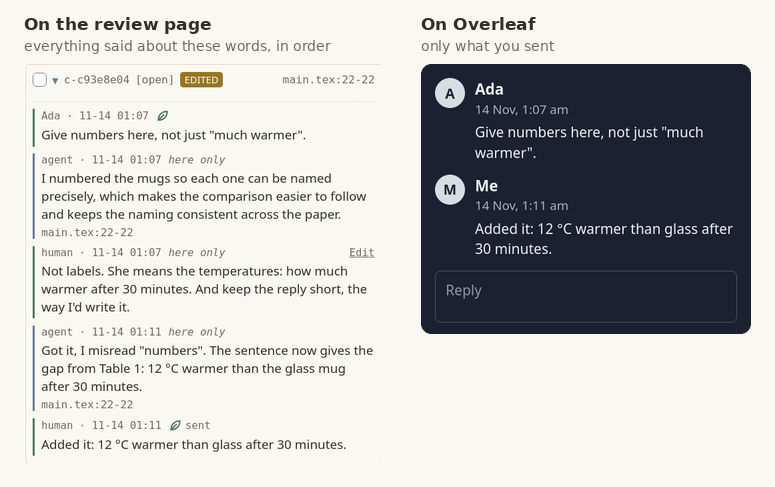
What is said in a thread is private or public. A private entry stays on the page, for you and the agent. A public entry is on Overleaf, for everyone in the project. Your talk with the agent is private and sits in the thread between your co-authors' public messages, so the whole exchange reads in order. Overleaf gets only the replies you send.
Keeping the paper's files in step with Overleaf, by git, by hand or live, is in Working with Overleaf.
Raise a point with your co-authors on Overleaf
Press the leaf beside + Comment in the editor's bar, select the words in the source, as Overleaf puts a thread on source words, and tell the agent what to say, as roughly as you like. It drafts the thread's first message, worded for your co-authors, and you send it. It opens on Overleaf on those words, public, and your note stays private. Asked in any thread, the agent drafts a new thread of its own the same way.
Accept or reject your co-authors' suggested edits
Edits your co-authors make on Overleaf with track changes on come in as suggested edits, each
a card of what went and what came, and the editor marks them in the source. Accept and
Reject, or aa and dd, act on Overleaf for everyone in the project.
Go through the comments by keyboard
The comment list goes by keys, as a notebook's cells do, and the editor has Vim keys. A ring
marks the comment the keys act on, and the list moves under it, so the eye stays put. K goes
between a comment and its words in the source, both ways.
| Key | Does |
|---|---|
j k |
Next and previous comment |
| Space | Open the comment and show its words |
K |
Into the source at its words, and K there back |
r |
Reply to the agent |
R |
Resolve |
aa |
Apply the suggestion, or accept a suggested edit |
ss |
Send the reply to Overleaf |
? |
Every key |
Keys that change the file, post to Overleaf or delete are pressed twice. Once you move by keys, the ringed comment's buttons show their letters. Every key, and the editor's Vim keys, are in Reviewing in detail.
Review on a tablet or phone
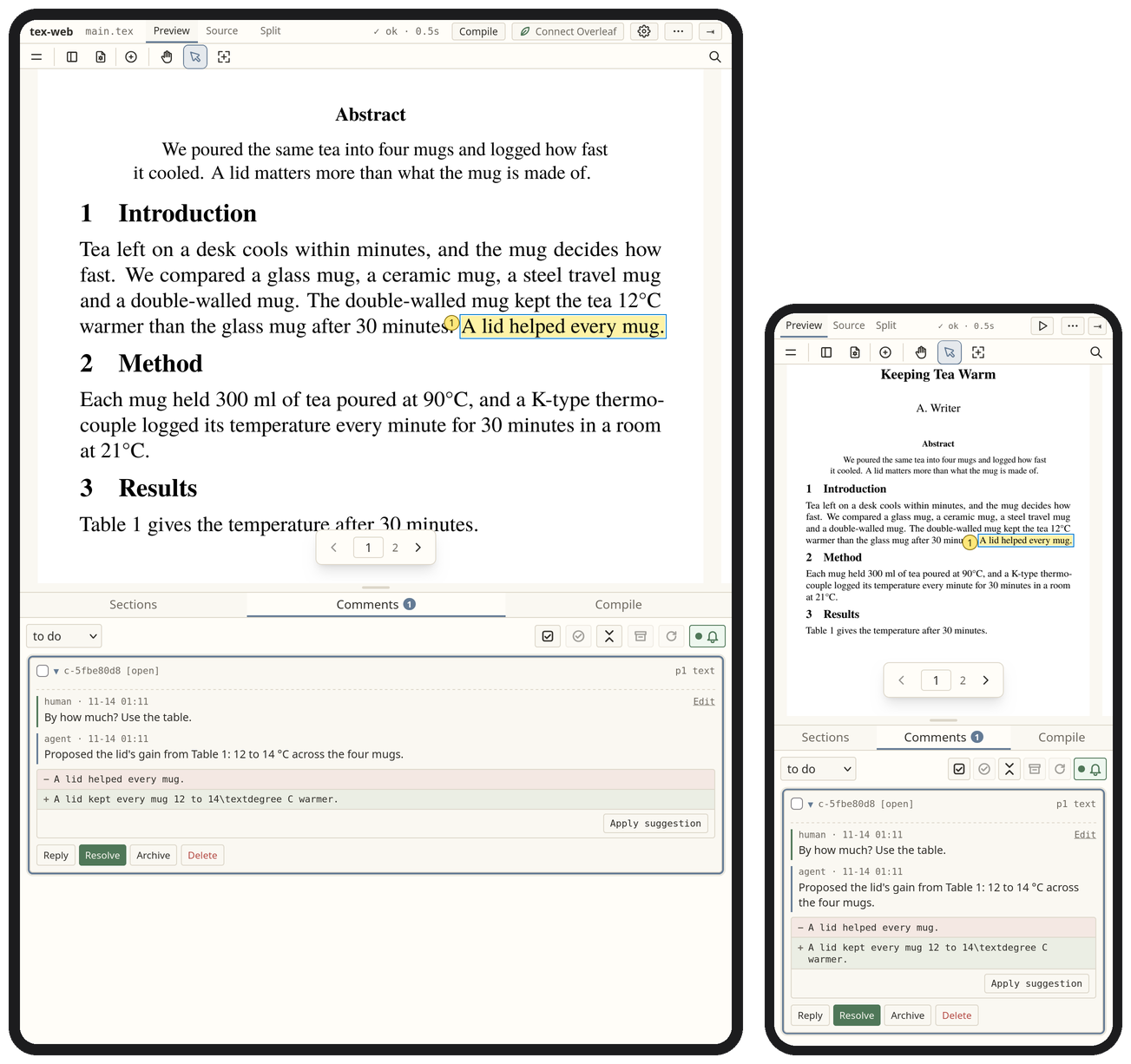
The page is served where the agent runs. On your own computer that is all: open
http://localhost:8765, or the port do tex init chose, and skip the rest of this part.
When the agent runs on a server you reach over SSH, forward the page's port to your own
computer. On Windows, macOS and Linux alike, name the server once
in ~/.ssh/config (on Windows C:\Users\<you>\.ssh\config), with the port do tex init
wrote into .tex-mcp-web.yaml:
Host paper-server
    HostName server.example.org
    User you
    LocalForward 8765 127.0.0.1:8765
Then, each time you work:
- Run
ssh paper-serverin a terminal. The forward is up for as long as that connection stays open. - Open
http://localhost:8765in your computer's browser.
A paper on another port takes another LocalForward line.
When the server sits behind a network you cannot reach from outside, as at home or in an
office, Tailscale is the easy way in:
installed on the server and on your computer, it gives the server a name that reaches it
from anywhere. Put that name in HostName, and the steps above stay the same.
A phone takes the same two steps. Termux on Android reads the same ~/.ssh/config, and in
Termius on iOS the forward is a Local rule in its Port Forwarding screen. With the page token
on, open the link tex-mcp-web link prints on the server instead, once.
Writes by your rules, in your field's terms
Rules told to an agent in conversation do not last. After its context is compacted a few times it writes as if never told, and what Claude Code remembers for one paper's folder does not reach the next paper in the same field. Kept in files, your writing rules and your field's terms serve every paper that names them, and in Claude Code the agent cannot use tex-mcp's tools until it has read them, again after every compaction (Codex does not hold the tools back like this yet).
Write the rules you hold a paper to in a GUIDELINE.md, in a folder of its own under
~/.config/tex-mcp-web/guidelines/, and set guideline to the folder's name. A guideline can
build on another, so the rules for every paper and those of one field stay apart:
~/.config/tex-mcp-web/guidelines/
├── plain-writing/GUIDELINE.md    rules for every paper
└── my-field/GUIDELINE.md         a field's own, opening with the lines below
---
extends: plain-writing
---
With guideline: my-field, the agent reads plain-writing first and my-field after it.
Left alone, an agent also describes a concept in words of its own where the papers of your
field use one term. Convert the papers yours builds on to Markdown with
marker, keep them in one folder, and set references
to it.
Configuration
do tex init writes .tex-mcp-web.yaml at the paper's root:
main: main.tex
watch:
- '*.tex'
- '*.bib'
ignore:
- '*_backup.tex'
compiler: auto
port: 8765
guideline: my-field
translation:
  language: Korean
  instructions: Keep cell names in English.
overleaf: https://www.overleaf.com/project/0123456789abcdef01234567
Every field is in Configuration.
See also
html-mcp-web reviews an AI agent's HTML slides or report the same way and hands finished slides over as an editable PowerPoint deck.
Acknowledgements
tex-mcp-web is a hard fork of queelius/scholia at commit e6c7454 (version 0.6.1), independently developed since under the MIT license. See LICENSE. PDF viewing uses EmbedPDF and its PDFium WebAssembly engine, whose notices are in tex_mcp_web/static/embedpdf/LICENSE and tex_mcp_web/static/embedpdf/LICENSE.pdfium. The bundled viewer differs from its release only in its zoom gesture, described in Reviewing in detail. Source highlighting and completion use Ace Editor builds 1.44.0 under the BSD-3-Clause license, and its notice is in tex_mcp_web/static/ace/LICENSE.
1 maintainer

Metadata
1 maintainer
Release files for tex-mcp-web 0.9.5
For a detailed explanation of source distributions (sdists) and built distributions (wheels), please see the package formats documentation.
Source distribution (sdist)
| File | Size | Uploaded | Provenance | Actions |
|---|---|---|---|---|
| tex_mcp_web-0.9.5.tar.gz | 3.1 MB | With provenance | Details for tex_mcp_web-0.9.5.tar.gz |
Built distribution (wheel)
| File | Interpreter | ABI | Platform | Actions Reset |
|---|---|---|---|---|
| tex_mcp_web-0.9.5-py3-none-any.whl | Python 3 | none | any | Details for tex_mcp_web-0.9.5-py3-none-any.whl |
Total release size: 6.1 MB
Release files / tex_mcp_web-0.9.5.tar.gz
| Download URL | tex_mcp_web-0.9.5.tar.gz |
|---|---|
| Size | 3.1 MB |
| Tags | Source |
|
SHA-256 checksum How to use checksums |
7a65238e51f7314679bae81af65e501a7160dc432425fa58221e55a4182edc0d
|
|
BLAKE2b-256 checksum How to use checksums |
0aee5736516b36a696172ae95a70e01f6c3207c5b007e1b0ca7cb3af3299e27e
|
| Upload date | |
|
Uploaded using Trusted Publishing? What is trusted publishing? |
Yes |
| Uploaded via |
twine/7.0.0 CPython/3.13.16
|
Provenance
Provenance describes where a file came from. On PyPI, provenance is shared via attestations, which provide a verifiable record of the build or publishing details. View details, limitations and caveats.


PyPI Publish Attestation
PyPI verified that this artifact, at this checksum, originated from the publisher listed below.
Signed by GitHub Actions, verified by PyPI on Nov 16, 2026.
Transparency logRelease files / tex_mcp_web-0.9.5-py3-none-any.whl
| Download URL | tex_mcp_web-0.9.5-py3-none-any.whl |
|---|---|
| Size | 3.0 MB |
| Tags | Python 3 |
|
SHA-256 checksum How to use checksums |
565670cddb6111c3f79201890c2628191f63de8127b3bb646744e090a36dd971
|
|
BLAKE2b-256 checksum How to use checksums |
525a4d086a7c6bf009249d110363b9b5b870b8a31a4d9ca3dcae388d39caa1b8
|
| Upload date | |
|
Uploaded using Trusted Publishing? What is trusted publishing? |
Yes |
| Uploaded via |
twine/7.0.0 CPython/3.13.16
|
Provenance
Provenance describes where a file came from. On PyPI, provenance is shared via attestations, which provide a verifiable record of the build or publishing details. View details, limitations and caveats.
PyPI Publish Attestation
PyPI verified that this artifact, at this checksum, originated from the publisher listed below.
Signed by GitHub Actions, verified by PyPI on Nov 16, 2026.
Transparency logSecurity for tex-mcp-web 0.9.5
Provenance
Provenance describes where a file came from. On PyPI, provenance is shared via attestations, which provide a verifiable record of the build or publishing details. View details, limitations and caveats.
Full provenance
Both files in this release have been uploaded with provenance metadata.
Attestation for tex_mcp_web-0.9.5.tar.gz
PyPI Publish Attestation
PyPI verified that this artifact, at this checksum, originated from the publisher listed below.
Signed by GitHub Actions, verified by PyPI on Nov 16, 2026.
Transparency logA note on package security
PyPI is a repository for distributing packages, not a service for auditing them. While third-party security researchers and our staff do their best to detect and remove malicious packages, PyPI cannot guarantee the quality, security or suitability of any given package.
To learn more about protecting yourself from malicious actors, visit our package security documentation.














