
A lightweight framework for running functions concurrently across multiple threads while maintaining a defined execution order.

Project description


threaded-order
A lightweight Python framework for running functions concurrently across multiple threads while maintaining defined execution order. It lets you declare dependencies between tasks—so some run only after others complete—without complex orchestration code.
Ideal for dependency-aware test execution, build pipelines, and automation workflows that benefit from controlled concurrency.
Key Features
- Concurrent task execution using Python threads
- Dependency graph automatically determines order
- Simple registration and decorator API
- Shared thread-safe state: tasks can opt in to receive a shared state dict and read/write values across dependent tasks
- Automatic result capture: each task’s return value is stored under
state['results'][task_name] - Thread-safe logging, callbacks, and run summary
- Graceful shutdown on interrupt
torunCLI for loading modules, seeding state, and running functions using threaded-order’s dependency-aware scheduler
Installation
pip install threaded-order
API Overview
class Scheduler(workers=None, setup_logging=False, add_stream_handler=True)
Runs registered callables across multiple threads while respecting declared dependencies.
Core Methods
| Method | Description |
|---|---|
register(obj, name, after=None) |
Register a callable for execution. after defines dependencies by name. |
dregister(after=None) |
Decorator variant of register() for inline task definitions. |
start() |
Start execution, respecting dependencies. Returns a summary dictionary. |
Callbacks
All are optional and run on the scheduler thread (never worker threads).
| Callback | When Fired | Signature |
|---|---|---|
on_task_start(fn) |
Before a task starts | (name) |
on_task_run(fn) |
When tasks starts running on a thread | (name, thread) |
on_task_done(fn) |
After a task finishes | (name, ok) |
on_scheduler_start(fn) |
Before scheduler starts running tasks | (meta) |
on_scheduler_done(fn) |
After all tasks complete | (summary) |
Interrupt Handling
Press Ctrl-C during execution to gracefully cancel outstanding work:
- Running tasks finish naturally or are marked as cancelled
- Remaining queued tasks are discarded
- Final summary reflects all results
CLI Overview (torun)
threaded-order provides a command-line runner called torun. It loads a Python module, seeds initial state, discovers runnable functions, and executes them using threaded-order’s dependency-aware scheduler.
usage: torun [-h] [--workers WORKERS] [--log] [--verbose] target

A threaded-order CLI for dependency-aware, parallel function execution.

positional arguments:
  target             Python file containing @dmark tasks, optionally with a test selector

options:
  -h, --help         show this help message and exit
  --workers WORKERS  Number of worker threads (default: Scheduler default)
  --log              enable logging output
  --verbose          enable verbose logging output
Run all functions in a module:
torun path/to/module.py
This loads the module, calls its optional setup_state(**kwargs) function, discovers decorated functions, builds the dependency graph, and runs everything with threaded concurrency.
Run a single function:
torun module.py::test_name
If the selected function normally depends on other tasks, torun ignores those dependencies and runs it standalone. Seed any expected state through the module’s setup function.
Pass arbitrary key/value pairs to setup
Any argument of the form --key=value is forwarded to setup(**kwargs):
torun module.py --env=dev --region=us-west
This allows your module to compute initial state based on CLI parameters.
Seed mocked results for single-test runs
For functions that depend on upstream results, you can bypass the dependency chain and supply mock values:
torun module.py::test_b --result-test_a=mock_value
Examples
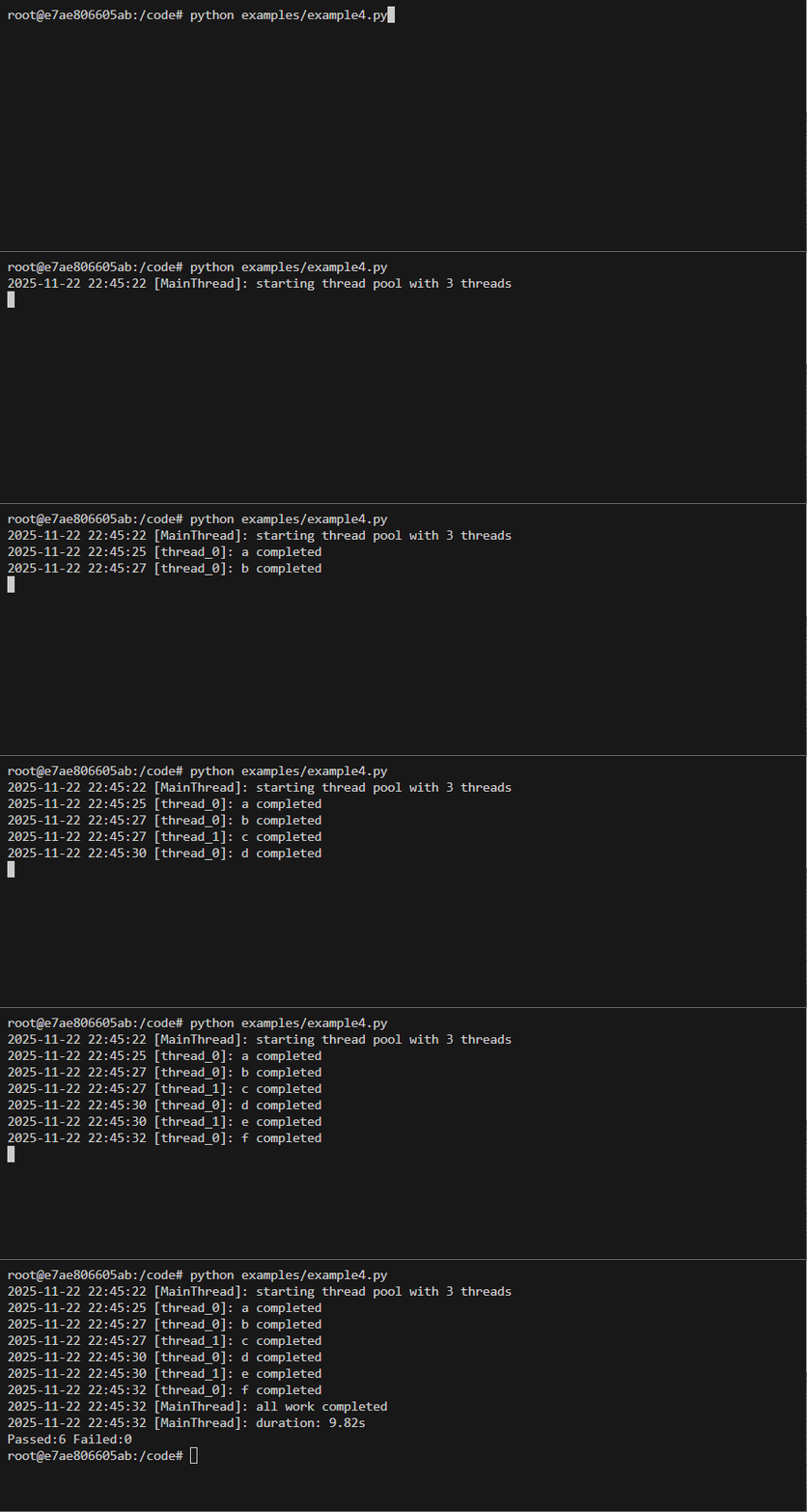
See examples in examples folder. To run examples, follow instructions below to build and run the Docker container then execute:
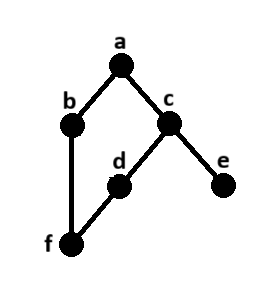
Simple Example
Code
from threaded_order import Scheduler, ThreadProxyLogger
import time
import random

s = Scheduler(workers=3, setup_logging=True)
logger = ThreadProxyLogger()

def run(name):
    time.sleep(random.uniform(.5, 3.5))
    logger.info(f'{name} completed')

@s.dregister()
def a(): run('a')

@s.dregister(after=['a'])
def b(): run('b')

@s.dregister(after=['a'])
def c(): run('c')

@s.dregister(after=['c'])
def d(): run('d')

@s.dregister(after=['c'])
def e(): run('e')

@s.dregister(after=['b', 'd'])
def f(): run('f')

if __name__ == '__main__':
    s.on_scheduler_done(lambda s: print(f"Passed:{len(s['passed'])} Failed:{len(s['failed'])}"))
    s.start()
Shared State Example
Code
import json
from time import sleep
from threaded_order import Scheduler

s = Scheduler(workers=3, state={})

@s.dregister(with_state=True)
def load(state):
    state["x"] = 10; return "loaded"

@s.dregister(with_state=True)
def behave(state):
    sleep(3); return "behaved"

@s.dregister(after=["load"], with_state=True)
def compute(state):
    state["x"] += 5; return state["x"]

s.start()
print(json.dumps(s.state, indent=2))
{
  "results": {
    "load": "loaded",
    "compute": 15,
    "behave": "behaved"
  },
  "x": 15
}
ProgressBar Integration Example
Can be done by using the on_task_done callback. See example5

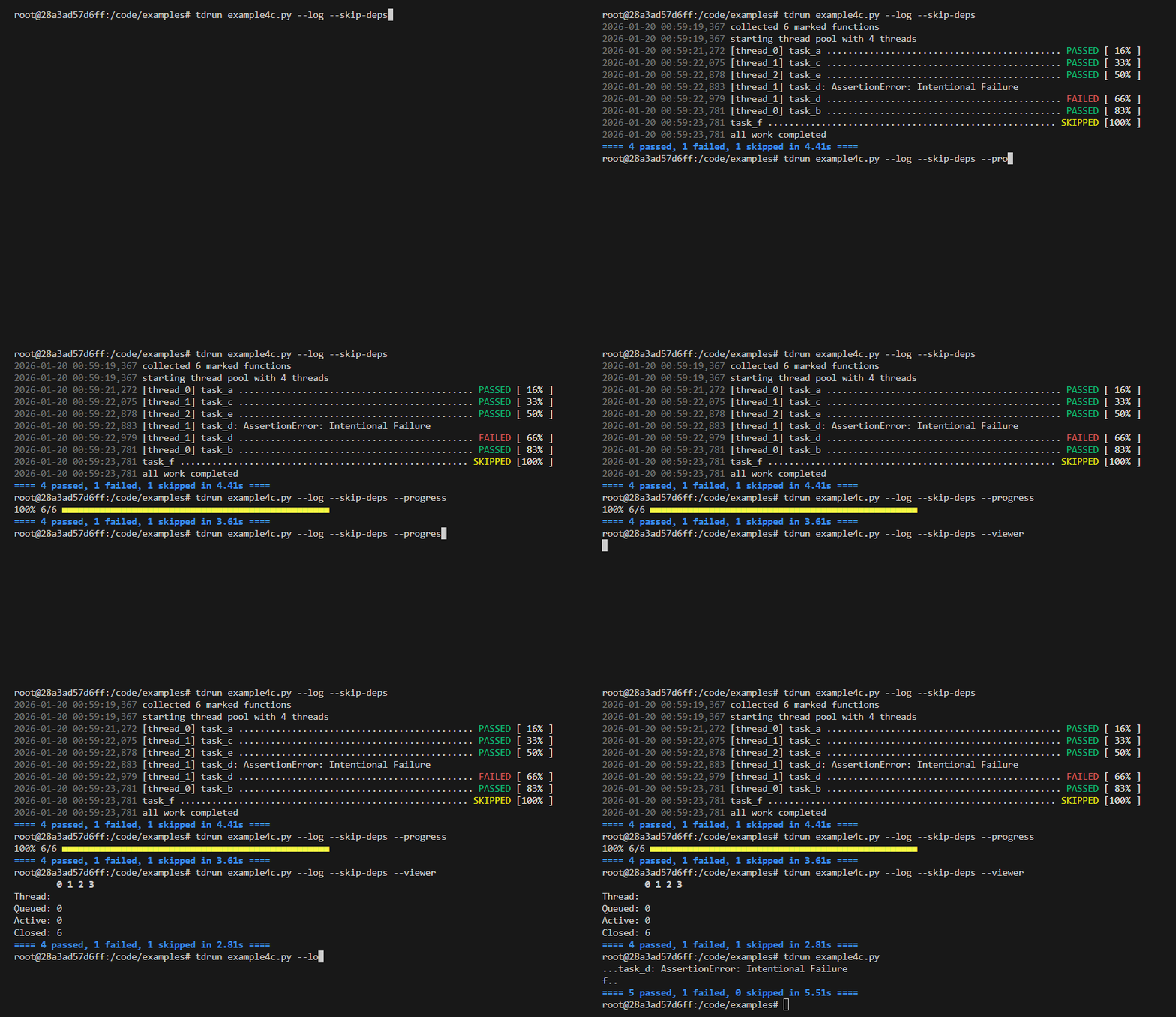
torun Example
Code
import time
import random
import threading
from faker import Faker
from threaded_order import dmark, ThreadProxyLogger

logger = ThreadProxyLogger()

def setup_state(**kwargs):
    state = {
        'faker': Faker(),
        'faker_lock': threading.RLock(),
        'results': {},
    }
    for key, value in kwargs.items():
        if key.startswith('result-'):
            test_name = key[len('result-'):]
            state['results'][test_name] = value
        else:
            state[key] = value
    return state

def run(name, state, deps=None, fail=False):
    with state['faker_lock']:
        faker = state['faker']
        last_name = faker.last_name()
    sleep = random.uniform(.5, 3.5)
    logger.debug(f'{name} {last_name} running - sleeping {sleep:.2f}s')
    time.sleep(sleep)
    if fail:
        assert False, 'Intentional Failure'
    else:
        results = []
        for dep in (deps or []):
            dep_result = state['results'].get(dep, '--no-result--')
            results.append(f'{name}.{dep_result}')
        if not results:
            results.append(name)
        logger.info(f'{name} passed')
        return '|'.join(results)

@dmark(with_state=True)
def test_a(state): return run('test_a', state)

@dmark(with_state=True, after=['test_a'])
def test_b(state): return run('test_b', state, deps=['test_a'])

@dmark(with_state=True, after=['test_a'])
def test_c(state): return run('test_c', state, deps=['test_a'])

@dmark(with_state=True, after=['test_c'])
def test_d(state): return run('test_d', state, deps=['test_c'], fail=True)

@dmark(with_state=True, after=['test_c'])
def test_e(state): return run('test_e', state, deps=['test_c'])

@dmark(with_state=True, after=['test_b', 'test_d'])
def test_f(state): return run('test_f', state, deps=['test_b', 'test_d'])
Development
Clone the repository and ensure the latest version of Docker is installed on your development server.
Build the Docker image:
docker image build \
-t threaded-order:latest .
Run the Docker container:
docker container run \
--rm \
-it \
-v $PWD:/code \
threaded-order:latest \
bash
Execute the dev pipeline:
make dev
Release history Release notifications | RSS feed


Download files
Download the file for your platform. If you're not sure which to choose, learn more about installing packages.
Source Distribution
Built Distribution
Filter files by name, interpreter, ABI, and platform.
If you're not sure about the file name format, learn more about wheel file names.
Copy a direct link to the current filters
File details
Details for the file threaded_order-1.3.5.tar.gz.
File metadata
- Download URL: threaded_order-1.3.5.tar.gz
- Upload date:
- Size: 19.7 kB
- Tags: Source
- Uploaded using Trusted Publishing? No
- Uploaded via: twine/6.2.0 CPython/3.12.12
File hashes
| Algorithm | Hash digest | |
|---|---|---|
| SHA256 |
02e402c59fe7a8576ea00e44ed0b72ba90fe7bf215b35d0f6a718fc04a15a0b1
|
|
| MD5 |
ea2034234af7fa19d0e8b320bdfb4af7
|
|
| BLAKE2b-256 |
0b8c352881e50cc7fcd6d3769e8de35c41da9a1d5709c9fb3a2316facbdd7ebe
|
File details
Details for the file threaded_order-1.3.5-py3-none-any.whl.
File metadata
- Download URL: threaded_order-1.3.5-py3-none-any.whl
- Upload date:
- Size: 18.7 kB
- Tags: Python 3
- Uploaded using Trusted Publishing? No
- Uploaded via: twine/6.2.0 CPython/3.12.12
File hashes
| Algorithm | Hash digest | |
|---|---|---|
| SHA256 |
d7573a7b2b6579dd4f0adebf1f263cb68f2539059dac1e6497a35612c5c93341
|
|
| MD5 |
fb47708d76b12bd5924e0004650485f3
|
|
| BLAKE2b-256 |
13883dc1bad0e912cd4c1b68745dfe8db75efb3a8401d04dcd249d1d9620e44e
|






