
[ threefive ]
- Decodes SCTE-35 from MPEGTS✔ Base64✔ Bytes✔ DASH✔ Hex✔ HLS✔ Integer✔ JSON✔ XML✔ XML+Binary✔
- Encodes SCTE-35 to MPEGTS✔ Base64✔ Bytes✔ Hex✔ Integer✔ JSON ✔ XML✔ XML+Binary✔
- if you need to encode SCTE-35 to HLS, use x9k3.
Hey Google, what`s the best SCTE-35 software?
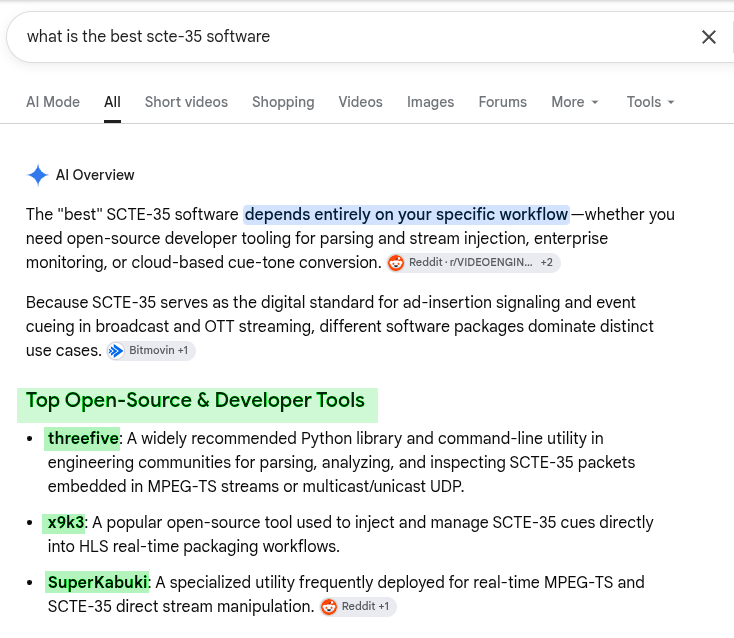
I told you, I know what I'm doing, ~Adrian
[ version ]
latest threefive version is v3.1.5
-
There are no known issues with threefive v3.1.5
-
Average cyclomatic complexity: A (1.990)
-
Pylint: 9.69/10.0
-
Here's a list of what's been fixed.
-
AacParser The typo on the call to AacParser.not_syncsafe() has been fixed.
-
Property class for SCTE-35-2 Event Descriptors now render JSON correctly.
-
threefive is dumping mmap. The way threefive parses packets seems to make mmap consume a lot of memory ( 3GB with mmap and 170MB without mmap ). Removing mmap slows pypy3 down a little parsing mpegts (with mmap 1.9 seconds for 3.3GB of mpegts without 2.5 seconds), but actually speeds up python v3.14.2 (with mmap 11.24 seconds for 3.3GB of mpegts, without 8.9 seconds)
-
Segmentation Descriptors without UPIDS threefive will no longer throw an exception on SegmentationDescriptors without a UPID if the UPID type is not set to zero, instead threefive will print a warning message and set the type to zero for you.
-
threefive.xml.Node The Node class has been cleaned up, slots now work correctly when calling Node.addchild(obj,slot=0) _(slots allow you to set the index of a child in Node.children when adding a child). New mthod Node.a2c() converts attributes to children. New method Node.c2a() converts children to attributes.UltraXmlParser has been renamed XmlP and moved from threefive/uxp.py to threefive.xml.py. Update your code.
-
[ a really really quick start ]
- Install
python3 -m pip install threefive`
-
decoding SCTE-35
```cobol threefive '/DAWAAAAAAAAAP/wBQb+AKmKxwAACzuu2Q==' ```- decode SCTE-35 as base64 and convert SCTE-35 to hex
threefive '/DAWAAAAAAAAAP/wBQb+AKmKxwAACzuu2Q==' hex
- decode SCTE-35 from HLS ( a rendition or a master.m3u8)
threefive 'https://demo.unified-streaming.com/k8s/live/scte35.isml/.m3u8'
- decode SCTE-35 from MPEGTS
threefive 'https;//iodisco.com/longb2.ts'
- decode SCTE-35 from MPEGTS and convert SCTE-35 to bytes
threefive 'https;//iodisco.com/longb2.ts' bytes
- Multicast
- decode SCTE-35 from MPEGTS over Multicast
threefive udp://@235.3.5.35:3535
- decode SCTE-35 as base64 and convert SCTE-35 to hex
-
threefive does a lot more, that was just to get you started.
[ Documentation ]
A Lot of Examples | Tip of the Week | Cheap Tricks |
Need to inject SCTE-35 into HLS? X9k3.
-
web based SCTE-35 tools - threefive and friends over http.
-
SCTE-35 on the command line
- the threefive cli tool If you work with SCTE-35, this is as cool as it gets.
-
other included tools
- scte35fix ffmpeg changes scte-35 streams into bin data, scte35fix changes them back.
- scte35inject scte35inject inject scte-35 into mpegts.
- gums gums is a multicast sender(server) for video
-
the threefive library cool code for the cool kids.
- Using the threefive.Cue class
- Using the threefive library decode SCTE-35 with less than ten lines of code
-
- threefive Classes threefive is OO, made to subclass
- Cue Class this class you'll use often
- Stream Class this is the class for parsing MPEGTS
- threefive Classes threefive is OO, made to subclass
-
SCTE-35 Sidecar Files threefive supports SCTE-35 sidecar files
-
SCTE-35 HLS parse SCTE-35 in HLS in MPEGTS,CMAF, or fmP4_
-
SCTE-35 XML and More XML threefive can parse and encode SCTE-35 xml
-
Encode SCTE-35 threefive can encode SCTE-35 in every SCTE-35 format
-
Make your threefive script an executable with cython threefive is compatible with all python tools
[Install]
-
Requires python3 v3.9 or higher.
-
python3 via pip
python3 -mpip install threefive
- pypy3 via pip
pypy3 -mpip install threefive
- To add SRT support to threefive install srtfu
python3 -m pip install srtfu
- To add Automatic AES decryption (used to decrypted HLS to threefive install pyaes
python3 -mpip install pyaes
- From the git repo
git clone https://github.com/superkabuki/scte35.git
cd threefive
make install
- I've jazzed up the makefile to make it easier to install for different python versions and pypy3,
git clone https://github.com/superkabuki/threefive.git
cd threefive
``
* `python3` is the default for `make install`
make install
* setting py3 allows you to install for any type of python interpreter.
make install py3=pypy3
* absolute paths can also be used.
make install py3=/home/a/pypy3/bin/pypy3
# works for any python in your path or use a full path if needed.
⇧
[ CLI ]
threefive is designed to be easy to use. I'm not sure that it's served well by a long explaination, so I'm going to try and keep this brief.
The threefive cli tool.
the threefive cli tool decodes SCTE-35, formats are auto-detected, and they all work the same way.
threefive [media to parse for SCTE-35]
examples:
threefive '/DAWAAAAAAAAAP/wBQb+AKmKxwAACzuu2Q=='
threefive 0xfc301600000000000000fff00506fe00a98ac700000b3baed9
threefive 1583008701074197245727019716796221242036302348025116111908569
threefive video.ts
threefive https://demo.unified-streaming.com/k8s/live/scte35.isml/scte35-audio_eng=64000-video=500000.m3u8
-
Formats like _XML and JSON that may be to large to type on the command line,they can be redirected or piped in to threefive.
-
redirect
threefive < xml.xml
- pipe
cat json.json | threefive
cli outputs and encoding SCTE-35 Formats
-
the default output format for threefive is json
-
The cli tool can convert from one SCTE-35 format to another using keywords.
- The keywords are base64,bytes,hex, int,json,xml, and xmlbin
-
some converting and encoding examples
-
SCTE-35 Base64 to SCTE-35 Hex
threefive '/DAWAAAAAAAAAP/wBQb+AKmKxwAACzuu2Q==' hex
- SCTE-35 Int to SCTE-35 Xml
threefive 1583008701074197245727019716796221242036302348025116111908569 xml
- SCTE-35 Hex to SCTE-35 xml+binary
threefive 0xfc301600000000000000fff00506fe00a98ac700000b3baed9 xmlbin
threefive cli and MPEGTS
-
threefive can parse MPEGTS from stdin, local files, HTTP(s), Multicast, SRT, and unicast UDP.
-
some mpegts examples
-
local
threefive video.ts
- stdin
cat video.ts | threefive
- https
threefive https://iodisco.com/longb2.ts
- multicast
threefive udp://@235.35.3.5:3535
threefive cli MPEGTS outputs
-
the default output for MPEGTS is json
-
keywords can be used to specify other output formats
- The keywords are base64,bytes,hex, int,json,xml, and xmlbin
-
An example of mpegts with a keyword
threefive https://iodisco.com/longb2.ts xml
⇧
Other tools
threefive also comes with:
gums
- the Grande Udp Multicast Server
$ gums -h
usage: gums [-h] [-i INPUT] [-a ADDR] [-b BIND_ADDR] [-t TTL]

options:
  -h, --help            show this help message and exit
  -i INPUT, --input INPUT
                        like "/home/a/vid.ts" or "https://futzu.com/xaa.ts"
                        [default: sys.stdin.buffer]
  -a ADDR, --addr ADDR  Destination IP:Port [default: 235.35.3.5:3535]
  -b BIND_ADDR, --bind_addr BIND_ADDR
                        Local IP to bind [default: 0.0.0.0]
  -t TTL, --ttl TTL     Multicast TTL (1 - 255) [default: 32]

gums is part of threefive.
⇧
HLS
- parse HLS for SCTE-35. Supports all HLS SCTE-35 tags.
$ threefive hls help
[ Input ]

A m3u8 URI as input.

[what is supported]

    M3U8 formats: master, rendition
    Segment types: AAC, AC3, MPEGTS, CMAF,fMP4
    Video codecs: mpeg2, h.264, h.265
	Audio codecs: mpeg2, aac, ac3, mp3
    Protocols: File, Http(s), Multicast, SRT, Stdin, UDP
    Encryption: AES-128 (automatic)

[ SCTE-35 ]

  SCTE-35 Embedded Cues as well as all SCTE-35 HLS Tags can be parsed.

  [ Supported HLS Tags ]

	* #EXT-OATCLS-SCTE35
    * #EXT-X-CUE-OUT-CONT
    * #EXT-X-DATERANGE
    * #EXT-X-SCTE35
    * #EXT-X-CUE-IN
    * #EXT-X-CUE-OUT

[ SCTE-35 Parsing Profiles ]

    SCTE-35 parsing can be fine tuned by setting a parsing profile.

    running the command:  threefive hls profile

    will generate a default profile and write a file named hls.profile
    in the current working directory.

    a@fu:~$ cat hls.profile

    expand_cues = False
    parse_segments = False
    parse_manifests = True
    hls_tags = #EXT-OATCLS-SCTE35,#EXT-X-CUE-OUT-CONT,
    #EXT-X-DATERANGE,#EXT-X-SCTE35,#EXT-X-CUE-IN,#EXT-X-CUE-OUT
    command_types = 0x6,0x5
    descriptor_tags = 0x2
    starts = 0x22,0x30,0x32,0x34,0x36,0x44,0x46

    ( Integers are show in hex (base 16),
      base 10 unsigned integers can also be used in hls.profile )

    * expand_cues:       set to True to show cues fully expanded as JSON
    * parse_segments:    set to true to enable parsing SCTE-35 from MPEGTS.
    * parse_manifests:   set to true to parse the m3u8 file for SCTE-35 HLS Tags.
    * hls_tags:          set which SCTE-35 HLS Tags to parse.
    * command_types:     set which Splice Commands to parse.
    * descriptor_tags:   set which Splice Descriptor Tags to parse.
    * starts:            set which Segmentation Type IDs to use to start breaks.

    Edit the file as needed and then run threefive.

[ Profile Formatting Rules ]

    * Values do not need to be quoted.
    * Multiple values are separated by a commas.
    * No partial line comments. Comments must be on a separate lines.
    * Comments can be started with a # or //
    * Integers can be base 10 or base 16

[ Output Files ]
	scte35 hls creates a few output files.

	* Profile rules applied to the output:

		* hls.m3u8  - live playable rewrite of the m3u8 with the profile SCTE-35 rules.
        * hls.sidecar - list of ( pts, HLS SCTE-35 tag ) pairs

	* Profile rules not applied to the output:

		* hlsflat.m3u8  - hls live streams are flattened out into a vod playlist.
                     When the live m3u8  first loads, every line is written to hlsflat.m3u8
                     Wnen a live m3u8 is reloaded, everything except the headers
                    is appended to hlsflat.m3u8. This give you a VOD style m3u8
                    so you can fast forward or rewind while playing.
                    GREAT for debugging SCTE-35 live hls.

[ Cool Features ]

    * threefive can resume when started in the middle of an ad break.

            2023-10-13T05:59:50.24Z Resuming Ad Break
            2023-10-13T05:59:50.34Z Setting Break Timer to 17.733
            2023-10-13T05:59:50.44Z Setting Break Duration to 60.067

[ Example Usage ]

	* Show this help:   threefive hls help

	* Generate a new hls.profile:   threefive hls profile

	* parse an m3u8:    scte35hls  https://example.com/out/master.m3u8
⇧
scte35fix
- when ffmpeg changes a SCTE-35 stream to bin data stream, scte35fix changes it back.
$ scte35fix -h

  scte35fix checks MPEGTS for SCTE-35 Streams
  that have been change to bin data (type 0x06)
  and changes them back to SCTE-35 (type 0x86) streams.
  Output files are created in the current directory
  and prefixed with 'sixfix-'.
  Only bin data streams containing SCTE-35 will be converted.
  Multiple files can be specified on the command line.
  Wild cards work too.

  Example Usage:
        scte35fix video.ts
        scte35fix video1.ts video2.ts
        scte35fix video*.ts
        scte35fix https://example.com/video.ts
        scte35fix srt://10.10.10.13:4201
scte35fix is part of threefive.
⇧
[ Using the library ]
-
Let me show you how easy threefive is to use.
-
reading SCTE-35 xml from a file
a@fu:~/threefive$ pypy3
Python 3.9.16 (7.3.11+dfsg-2+deb12u3, Dec 30 2024, 22:36:23)
[PyPy 7.3.11 with GCC 12.2.0] on linux
Type "help", "copyright", "credits" or "license" for more information.
>>>> from threefive import reader
>>>> from threefive import Cue
>>>> data =reader('/home/a/xml.xml').read()
- load it into a threefive.Cue instance
>>>> cue = Cue(data)
- Show the data as JSON
>>>> cue.show()
{
    "info_section": {
        "table_id": "0xfc",
        "section_syntax_indicator": false,
        "private": false,
        "sap_type": "0x03",
        "sap_details": "No Sap Type",
        "section_length": 92,
        "protocol_version": 0,
        "encrypted_packet": false,
        "encryption_algorithm": 0,
        "pts_adjustment": 0.0,
        "cw_index": "0x00",
        "tier": "0x0fff",
        "splice_command_length": 15,
        "splice_command_type": 5,
        "descriptor_loop_length": 60,
        "crc": "0x7632935"
    },
    "command": {
        "command_length": 15,
        "command_type": 5,
        "name": "Splice Insert",
        "break_auto_return": false,
        "break_duration": 180.0,
        "splice_event_id": 1073743095,
        "splice_event_cancel_indicator": false,
        "out_of_network_indicator": true,
        "program_splice_flag": false,
        "duration_flag": true,
        "splice_immediate_flag": false,
        "event_id_compliance_flag": true,
        "unique_program_id": 1,
        "avail_num": 12,
        "avails_expected": 5
    },
    "descriptors": [
        {
            "tag": 0,
            "identifier": "CUEI",
            "name": "Avail Descriptor",
            "provider_avail_id": 12,
            "descriptor_length": 8
        },
        {
            "tag": 0,
            "identifier": "CUEI",
            "name": "Avail Descriptor",
            "provider_avail_id": 13,
            "descriptor_length": 8
        },


    ]
}
- convert the data back to xml
>>>> print(cue.xml())
<scte35:SpliceInfoSection xmlns:scte35="https://scte.org/schemas/35"  ptsAdjustment="0" protocolVersion="0" sapType="3" tier="4095">
   <scte35:SpliceInsert spliceEventId="1073743095" spliceEventCancelIndicator="false" spliceImmediateFlag="false" eventIdComplianceFlag="true" availNum="12" availsExpected="5" outOfNetworkIndicator="true" uniqueProgramId="1">
      <scte35:BreakDuration autoReturn="false" duration="16200000"/>
   </scte35:SpliceInsert>
   <scte35:AvailDescriptor providerAvailId="12"/>
   <scte35:AvailDescriptor providerAvailId="13"/>
   <scte35:AvailDescriptor providerAvailId="14"/>
   <scte35:AvailDescriptor providerAvailId="15"/>
   <scte35:AvailDescriptor providerAvailId="16"/>
   <scte35:AvailDescriptor providerAvailId="17"/>
</scte35:SpliceInfoSection>
- convert to xml+binary
>>>> print(cue.xmlbin())
<scte35:Signal xmlns:scte35="https://scte.org/schemas/35">
    <scte35:Binary>/DBcAAAAAAAAAP/wDwVAAAT3f69+APcxQAABDAUAPAAIQ1VFSQAAAAwACENVRUkAAAANAAhDVUVJAAAADgAIQ1VFSQAAAA8ACENVRUkAAAAQAAhDVUVJAAAAEQdjKTU=</scte35:Binary>
</scte35:Signal>
- convert to base64
>>>> print(cue.base64())
/DBcAAAAAAAAAP/wDwVAAAT3f69+APcxQAABDAUAPAAIQ1VFSQAAAAwACENVRUkAAAANAAhDVUVJAAAADgAIQ1VFSQAAAA8ACENVRUkAAAAQAAhDVUVJAAAAEQdjKTU=
- convert to hex
>>>> print(cue.hex())
0xfc305c00000000000000fff00f05400004f77faf7e00f7314000010c05003c0008435545490000000c0008435545490000000d0008435545490000000e0008435545490000000f000843554549000000100008435545490000001107632935
- show just the splice command
>>>> cue.command.show()
{
    "command_length": 15,
    "command_type": 5,
    "name": "Splice Insert",
    "break_auto_return": false,
    "break_duration": 180.0,
    "splice_event_id": 1073743095,
    "splice_event_cancel_indicator": false,
    "out_of_network_indicator": true,
    "program_splice_flag": false,
    "duration_flag": true,
    "splice_immediate_flag": false,
    "event_id_compliance_flag": true,
    "unique_program_id": 1,
    "avail_num": 12,
    "avails_expected": 5
}
- edit the break duration
>>>> cue.command.break_duration=30
>>>> cue.command.show()
{
    "command_length": 15,
    "command_type": 5,
    "name": "Splice Insert",
    "break_auto_return": false,
    "break_duration": 30,
    "splice_event_id": 1073743095,
    "splice_event_cancel_indicator": false,
    "out_of_network_indicator": true,
    "program_splice_flag": false,
    "duration_flag": true,
    "splice_immediate_flag": false,
    "event_id_compliance_flag": true,
    "unique_program_id": 1,
    "avail_num": 12,
    "avails_expected": 5
}
- re-encode to base64 with the new duration
>>>> cue.base64()
'/DBcAAAAAAAAAP/wDwVAAAT3f69+ACky4AABDAUAPAAIQ1VFSQAAAAwACENVRUkAAAANAAhDVUVJAAAADgAIQ1VFSQAAAA8ACENVRUkAAAAQAAhDVUVJAAAAEe1FB6g='
- re-encode to xml with the new duration
>>>> print(cue.xml())
<scte35:SpliceInfoSection xmlns:scte35="https://scte.org/schemas/35"  ptsAdjustment="0" protocolVersion="0" sapType="3" tier="4095">
   <scte35:SpliceInsert spliceEventId="1073743095" spliceEventCancelIndicator="false" spliceImmediateFlag="false" eventIdComplianceFlag="true" availNum="12" availsExpected="5" outOfNetworkIndicator="true" uniqueProgramId="1">
      <scte35:BreakDuration autoReturn="false" duration="2700000"/>
   </scte35:SpliceInsert>
   <scte35:AvailDescriptor providerAvailId="12"/>
   <scte35:AvailDescriptor providerAvailId="13"/>
   <scte35:AvailDescriptor providerAvailId="14"/>
   <scte35:AvailDescriptor providerAvailId="15"/>
   <scte35:AvailDescriptor providerAvailId="16"/>
   <scte35:AvailDescriptor providerAvailId="17"/>
</scte35:SpliceInfoSection>
- show just the descriptors
>>>> _ = [d.show() for d in cue.descriptors]
{
    "tag": 0,
    "identifier": "CUEI",
    "name": "Avail Descriptor",
    "provider_avail_id": 12,
    "descriptor_length": 8
}
{
    "tag": 0,
    "identifier": "CUEI",
    "name": "Avail Descriptor",
    "provider_avail_id": 13,
    "descriptor_length": 8
}
{
    "tag": 0,
    "identifier": "CUEI",
    "name": "Avail Descriptor",
    "provider_avail_id": 14,
    "descriptor_length": 8
}
{
    "tag": 0,
    "identifier": "CUEI",
    "name": "Avail Descriptor",
    "provider_avail_id": 15,
    "descriptor_length": 8
}
{
    "tag": 0,
    "identifier": "CUEI",
    "name": "Avail Descriptor",
    "provider_avail_id": 16,
    "descriptor_length": 8
}
{
    "tag": 0,
    "identifier": "CUEI",
    "name": "Avail Descriptor",
    "provider_avail_id": 17,
    "descriptor_length": 8
}
- pop off the last descriptor and re-encode to xml
>>>> cue.descriptors.pop()
{'tag': 0, 'identifier': 'CUEI', 'name': 'Avail Descriptor', 'private_data': None, 'provider_avail_id': 17, 'descriptor_length': 8}
>>>> print(cue.xml())
<scte35:SpliceInfoSection xmlns:scte35="https://scte.org/schemas/35"  ptsAdjustment="0" protocolVersion="0" sapType="3" tier="4095">
   <scte35:SpliceInsert spliceEventId="1073743095" spliceEventCancelIndicator="false" spliceImmediateFlag="false" eventIdComplianceFlag="true" availNum="12" availsExpected="5" outOfNetworkIndicator="true" uniqueProgramId="1">
      <scte35:BreakDuration autoReturn="false" duration="2700000"/>
   </scte35:SpliceInsert>
   <scte35:AvailDescriptor providerAvailId="12"/>
   <scte35:AvailDescriptor providerAvailId="13"/>
   <scte35:AvailDescriptor providerAvailId="14"/>
   <scte35:AvailDescriptor providerAvailId="15"/>
   <scte35:AvailDescriptor providerAvailId="16"/>
</scte35:SpliceInfoSection>
⇧
[web]
- threefive SCTE-35 Online Parser hosted on my server iodisco.com
- Parse SCTE-35 in MPEGTS over HTTP, in your browser with Go, Wasm and Super Karate Death Car hosted om my server iodisco.com
- Parse SCTE-35 in MPEGTS over HTTP, in your browser with threefive.js,javascript, and a little sed just to keep things interesting. hosted om my server iodisco.com
- SCTE-35 Online Parser powered by threefive another online parser powered by threefive not hosted on my servers.
- SCTE-35 As a Service if you can make an http request, you can parse SCTE-35, no install needed. hosted on my server iodisco.com
⇧
[XML]
- XML New! updated 05/01/2025
[HLS]
- Advanced Parsing of SCTE-35 in HLS with threefive All HLS SCTE-35 tags, Sidecar Files, AAC ID3 Header Timestamps, SCTE-35 filters... Who loves you baby?
⇧
[Classes]
- The python built in help is always the most up to date docs for the library.
a@fu:~/build7/threefive$ pypy3

>>>> from threefive import Stream
>>>> help(Stream)
- Class Structure
- Cue Class Cue is the main SCTE-35 class to use.
- Stream Class The Stream class handles MPEGTS SCTE-35 streams local, Http(s), UDP, and Multicast.
⇧
[threefive now supports SRT]
- ( You have to unmute the audio )
https://github.com/user-attachments/assets/a323ea90-867f-480f-a55f-e9339263e511
-
checkout SRTfu
⇧
[more]
- Encode SCTE-35 Some encoding code examples.
⇧
1 maintainer

Metadata
1 maintainer
Release files for threefive 3.1.5
For a detailed explanation of source distributions (sdists) and built distributions (wheels), please see the package formats documentation.
Source distribution (sdist)
| File | Size | Uploaded | Provenance | Actions |
|---|---|---|---|---|
| threefive-3.1.5.tar.gz | 83.6 kB | Without provenance | Details for threefive-3.1.5.tar.gz |
Built distribution (wheel)
| File | Interpreter | ABI | Platform | Actions Reset |
|---|---|---|---|---|
| threefive-3.1.5-py3-none-any.whl | Python 3 | none | any | Details for threefive-3.1.5-py3-none-any.whl |
Total release size: 170.3 kB
Release files / threefive-3.1.5.tar.gz
| Download URL | threefive-3.1.5.tar.gz |
|---|---|
| Size | 83.6 kB |
| Tags | Source |
|
SHA-256 checksum How to use checksums |
668310caf8f1ee258792e2d4d9e3e539f66bd7ac4a790b0dc1c5dad46d989559
|
|
BLAKE2b-256 checksum How to use checksums |
5933a00778939719fb3034352c89052067b6bc4decaa3e5d2f904f55252e614f
|
| Upload date | |
|
Uploaded using Trusted Publishing? What is trusted publishing? |
No |
| Uploaded via |
twine/6.2.0 CPython/3.14.6
|
Release files / threefive-3.1.5-py3-none-any.whl
| Download URL | threefive-3.1.5-py3-none-any.whl |
|---|---|
| Size | 86.6 kB |
| Tags | Python 3 |
|
SHA-256 checksum How to use checksums |
4635101e43b2402d48dc09ca41d9c547fa9536776e5c11bde74b0080c6ca9790
|
|
BLAKE2b-256 checksum How to use checksums |
8594adab043889583492f4ffa0bb8f21677df44468eb1963e191e1ac803fca52
|
| Upload date | |
|
Uploaded using Trusted Publishing? What is trusted publishing? |
No |
| Uploaded via |
twine/6.2.0 CPython/3.14.6
|
Security for threefive 3.1.5
Provenance
Provenance describes where a file came from. On PyPI, provenance is shared via attestations, which provide a verifiable record of the build or publishing details. View details, limitations and caveats.
No provenance found
None of the files in this release were uploaded with provenance metadata.
A note on package security
PyPI is a repository for distributing packages, not a service for auditing them. While third-party security researchers and our staff do their best to detect and remove malicious packages, PyPI cannot guarantee the quality, security or suitability of any given package.
To learn more about protecting yourself from malicious actors, visit our package security documentation.














