
TokenCat


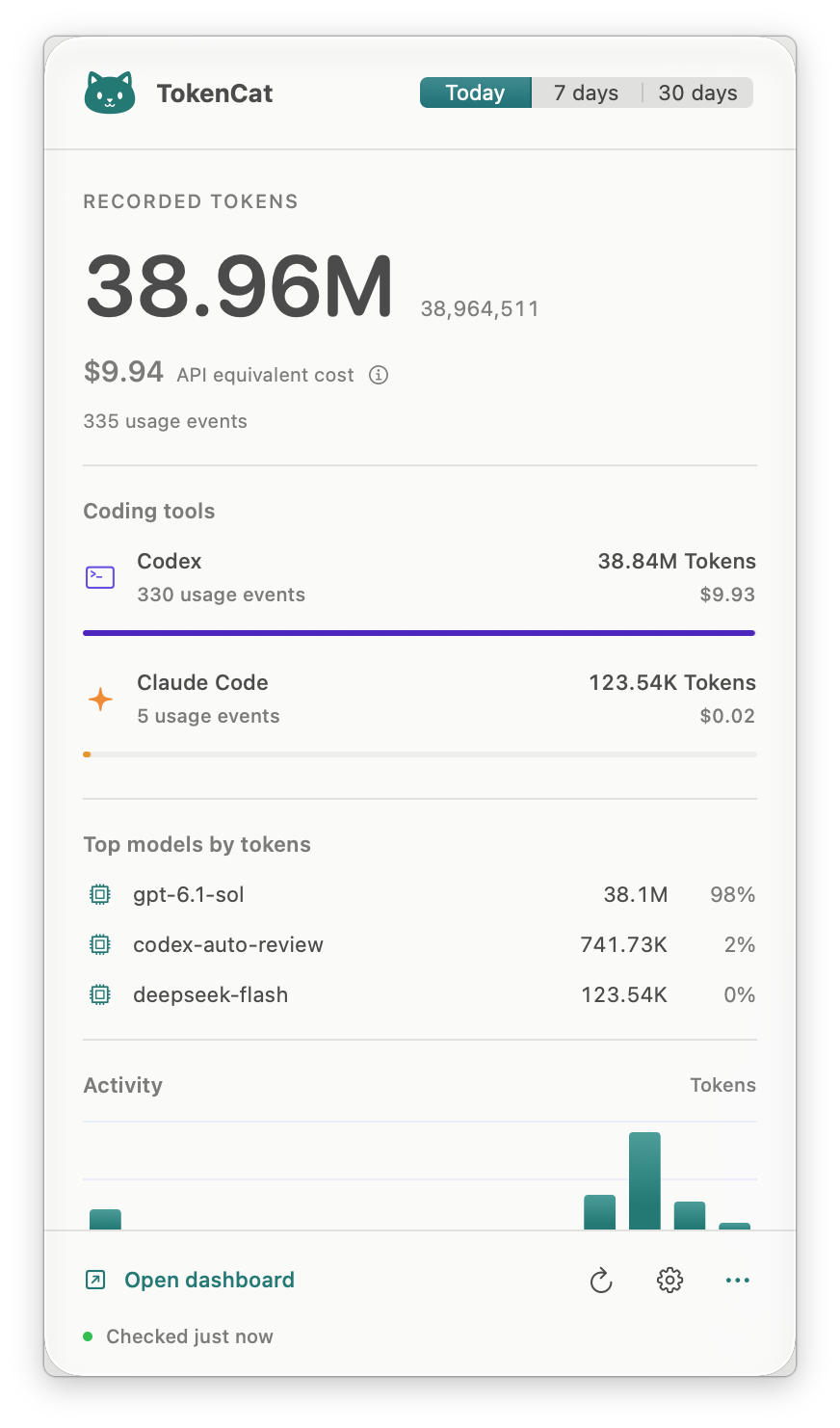
See token usage and estimated costs across your coding agents and subagents. TokenCat reads local usage records from Codex, Claude Code, OpenCode, and Antigravity. Use the macOS app to follow usage as records arrive and explore task families, or the CLI to review a period and export JSON.
- Follow a task and its subagents. In the app, expand recorded parent-child relationships and distinguish a task's own estimated cost from the cost of its whole family.
- Understand the numbers. Explore usage by tool, model, project, and task; inspect cache usage, pricing coverage, unknown prices, and uncertain estimates.
- Keep collection local and read-only. No provider credentials are needed for reporting. Session IDs are anonymized and project paths stay hidden by default.
Costs are API-equivalent estimates, not your bill or remaining subscription quota. App updates follow locally recorded usage; data can appear only after your coding tool writes it.
macOS app · Terminal CLI · Prices and privacy · Feedback and contributing
Choose an interface
Both interfaces support Codex, Claude Code, OpenCode, and Antigravity. The app requires macOS 14 or newer. The CLI supports macOS and Linux with Python 3.9 or newer; Windows is not supported.
| Interface | Use it for | Availability |
|---|---|---|
| macOS app | Background monitoring, task trees, and interactive breakdowns | Build from source |
| Terminal CLI | Period reviews, provider filters, calendar grouping, and JSON exports | PyPI release or source checkout; see the version note below |
Version note: this README describes the 0.9.0 source version. As of October 4, 2026, the latest PyPI release is 0.8.0; pipx install tokencat installs that release. Use the 0.8.0 documentation on PyPI for its commands, or install this checkout for the behavior below.
The 0.9.0 CLI provides local dashboards and JSON export. Remote aggregation, the older report/server commands, Gemini CLI, and GitHub Copilot are unavailable in this version.
The app and CLI keep separate settings and usage histories; they do not automatically synchronize. To compare results, use the same source roots, time window, time zone, and pricing catalog. Previously collected history can still differ.
macOS app
Install from source
You need Rust and Xcode's Swift toolchain with the macOS 26 SDK or newer. The app runs independently of Python and pipx.
Clone this repository, then build and launch:
git clone https://github.com/xiaoran007/TokenCat.git
cd TokenCat
bash macos/scripts/build-app.sh
open build/TokenCat.app
The app is created at build/TokenCat.app. Move it to /Applications before enabling Launch at Login in Settings. To update, rebuild, quit the running copy, and open the new app.
Use the app
Click the cat in the menu bar to see today's estimated cost and open the usage panel. Choose Today, 7 days, or 30 days, then open the dashboard for more detail.
In the dashboard you can:
- Search models, projects, and tasks; sort by cost, tokens, or recent activity.
- Switch the activity chart between recorded tokens and known API cost.
- Open a task to inspect its own usage and related subagents.
For a task with recorded subagents, expand its row in Tasks and open the parent. Direct task cost shows that task's own usage; Task and subagents includes its descendants. Open a child to inspect its contribution. Relationships and usage depend on what the source records expose.
Open Settings with the settings button or Command–comma. Choose language, appearance, time zone, refresh interval, and source folders. English and Simplified Chinese are included. By default, the app waits two seconds after each refresh before scanning again and refreshes when the Mac wakes. This is near-real-time monitoring of local records, not token-by-token streaming from the provider.
Standard source locations are detected automatically:
| Tool | Default locations |
|---|---|
| Codex | ~/.codex/sessions and ~/.codex/archived_sessions |
| Claude Code | ~/.claude/projects and ~/.config/claude/projects |
| OpenCode | ~/.local/share/opencode/opencode.db, honoring XDG_DATA_HOME |
| Antigravity | conversations under ~/.gemini/antigravity and ~/.gemini/antigravity-cli |
If your tools store data elsewhere, set their roots in Settings. Project paths stay hidden unless you enable them.
First run: use a supported coding tool under the same user account, then choose a TokenCat period containing that activity. You should see recorded tokens for that tool. Missing prices do not mean missing usage; check pricing coverage. If the panel is empty, check source roots in Settings and troubleshooting.
Terminal CLI
Install or upgrade
For the published 0.8.0 release, follow its documentation:
pipx install tokencat
# Update an existing installation:
pipx upgrade tokencat
For the 0.9.0 source version described below, you need Python 3.9+, pipx, Rust, and a C compiler:
git clone https://github.com/xiaoran007/TokenCat.git
cd TokenCat
pipx install .
If TokenCat is already installed with pipx, use pipx install --force . from this checkout instead.
If you previously installed the candidate alongside TokenCat, remove that extra with pipx uninject tokencat tokencat-native. Use tokencat for the current CLI. Its first run copies saved candidate usage into the CLI data directory and keeps the original candidate ledger. An existing CLI ledger takes precedence.
Use the dashboard
After installing the source version, run tokencat --since 7d. You should see recorded tokens, model totals, and pricing coverage for supported tools with local activity in that period. No provider login is needed for TokenCat. If the view is empty, check warnings, confirm you used a supported tool under this user account, and try --since 30d.
The CLI scans once per invocation. Use the app for automatic background refreshes.
tokencat                                      # Last seven days
tokencat dashboard                            # Also show recent sessions
tokencat --since 30d --weekly
tokencat --provider claude
tokencat --since 2026-10-01 --until 2026-10-03
tokencat --since 7d --json
TZ=America/New_York tokencat --since 7d
Use --daily, --weekly, or --monthly for calendar grouping, and --theme auto|light|dark for terminal colors. Repeat --provider to select several tools. Time windows use the system time zone; set TZ to choose another. --until includes the specified end time or the whole day for date-only values.
Standard source locations are detected automatically. Claude honors comma-separated roots in CLAUDE_CONFIG_DIR and XDG_CONFIG_HOME; OpenCode honors XDG_DATA_HOME. Run tokencat --help or tokencat dashboard --help for all options.
The CLI includes offline prices without automatic catalog downloads. Missing prices appear as unknown, and uncertain estimates appear as a range. Use --no-price to show usage without cost estimation. JSON exports anonymize session IDs and hide project paths; diagnostic warnings may include source file paths.

Prices and privacy
Costs are API-equivalent estimates, not your bill or subscription balance. Unknown model prices remain unpriced. Ambiguous recorded usage favors the higher defensible estimate; requests missing from local logs cannot be counted. Usage without a confirmed date may contribute to a window's totals while remaining outside the calendar timeline; warnings explain this difference. Estimates do not include every billing tier, tool fee, or regional adjustment.
Both interfaces include offline prices and show pricing coverage and sources. The app checks for price updates every 24 hours by default; Settings offers manual refresh, other intervals, an off switch, and a custom catalog. Different catalogs, source roots, and independently saved history can produce different totals between interfaces.
Usage collection reads local records. TokenCat does not proxy requests, change provider endpoints, or read OAuth/session credentials for reporting. Reports exclude prompt and response bodies. App price updates and CLI version checks access the network.
Troubleshooting
A tool is missing or shows no usage. Make sure it has recorded local activity under the same user account. Check source roots in app Settings and warnings in the CLI output. For nonstandard CLI locations, CLAUDE_CONFIG_DIR accepts comma-separated Claude roots and XDG_DATA_HOME sets the OpenCode data location.
Costs look different from an invoice. TokenCat estimates standard API usage, including when a tool is used through a subscription. Check pricing coverage and unknown models before comparing totals. Updating the catalog can change estimates for earlier dates.
A native extension cannot be loaded. Reinstall TokenCat using a wheel matching your operating system and architecture. For a source installation, make sure Rust and a C compiler are available, then reinstall. TokenCat requires its native extension to collect usage.
Where is TokenCat's data stored? The app keeps usage and downloaded prices in ~/Library/Application Support/TokenCat/. The CLI keeps usage in ~/.tokencat/usage.sqlite3. Candidate history remains in ~/.tokencat-candidate/ after migration. Removing source logs does not erase already saved usage.
Feedback and contributing
- Missing usage, unexpected totals, or installation trouble? Report a bug with your version, coding tool, time window, and time zone.
- Did TokenCat help with a real task? Share your experience, including what was useful and where you got stuck.
- Have a workflow in mind? Suggest an improvement with a concrete example.
- Want to contribute? Start with the contributor guide for setup, code locations, and checks. Compatibility fixes, synthetic usage samples, interface improvements, and documentation are welcome.
English and Simplified Chinese are welcome. Review exports and screenshots for private file paths before sharing. Do not attach full logs, databases, credentials, or conversation bodies.
If TokenCat is useful to you, a GitHub star helps others discover it and lets you bookmark the project.
1 maintainer

Metadata
1 maintainer
Release files for tokencat 0.9.0
For a detailed explanation of source distributions (sdists) and built distributions (wheels), please see the package formats documentation.
Source distribution (sdist)
| File | Size | Uploaded | |
|---|---|---|---|
| tokencat-0.9.0.tar.gz | 260.5 kB | Details |
Built distributions (wheels)
| File | Reset | |||
|---|---|---|---|---|
| tokencat-0.9.0-cp39-abi3-manylinux_2_17_x86_64.manylinux2014_x86_64.whl | CPython 3.9 | abi3 | Linux glibc 2.17+ x86-64 | Details |
| tokencat-0.9.0-cp39-abi3-manylinux_2_17_aarch64.manylinux2014_aarch64.whl | CPython 3.9 | abi3 | Linux glibc 2.17+ ARM64 | Details |
| tokencat-0.9.0-cp39-abi3-macosx_11_0_x86_64.whl | CPython 3.9 | abi3 | macOS 11.0+ x86-64 | Details |
| tokencat-0.9.0-cp39-abi3-macosx_11_0_arm64.whl | CPython 3.9 | abi3 | macOS 11.0+ ARM64 | Details |
Total release size: 9.1 MB
Release files / tokencat-0.9.0.tar.gz
| Download URL | tokencat-0.9.0.tar.gz |
|---|---|
| Size | 260.5 kB |
| Tags | Source |
|
SHA-256 checksum How to use checksums |
549c7357d5fab211c9a32ba56dc1287c651e637cbebf9fe88614a401e942aee5
|
|
BLAKE2b-256 checksum How to use checksums |
b6e93a3f27776ed49d87634850686d1ca0a2d89f532aba41bbfbd212c8d6a0ad
|
| Upload date | |
|
Uploaded using Trusted Publishing? What is trusted publishing? |
Yes |
| Uploaded via |
twine/7.0.0 CPython/3.13.14
|
Provenance
Provenance describes where a file came from. On PyPI, provenance is shared via attestations, which provide a verifiable record of the build or publishing details. View details, limitations and caveats.


PyPI Publish Attestation
PyPI verified that this artifact, at this checksum, originated from the publisher listed below.
Signed by GitHub Actions, verified by PyPI on Oct 9, 2026.
Transparency logRelease files / tokencat-0.9.0-cp39-abi3-manylinux_2_17_x86_64.manylinux2014_x86_64.whl
| Download URL | tokencat-0.9.0-cp39-abi3-manylinux_2_17_x86_64.manylinux2014_x86_64.whl |
|---|---|
| Size | 2.3 MB |
| Tags | CPython 3.9 Linux glibc 2.17+ x86-64 abi3 |
|
SHA-256 checksum How to use checksums |
abb75e4919e214e28c00dd940c598b419c917155b78d6265ce92b8df47a1d75b
|
|
BLAKE2b-256 checksum How to use checksums |
a1109d4c2e7a5efaa1af727ab71066024d5367f01e949156a40e6f3afa2d123a
|
| Upload date | |
|
Uploaded using Trusted Publishing? What is trusted publishing? |
Yes |
| Uploaded via |
twine/7.0.0 CPython/3.13.14
|
Provenance
Provenance describes where a file came from. On PyPI, provenance is shared via attestations, which provide a verifiable record of the build or publishing details. View details, limitations and caveats.
PyPI Publish Attestation
PyPI verified that this artifact, at this checksum, originated from the publisher listed below.
Signed by GitHub Actions, verified by PyPI on Oct 9, 2026.
Transparency logRelease files / tokencat-0.9.0-cp39-abi3-manylinux_2_17_aarch64.manylinux2014_aarch64.whl
| Download URL | tokencat-0.9.0-cp39-abi3-manylinux_2_17_aarch64.manylinux2014_aarch64.whl |
|---|---|
| Size | 2.3 MB |
| Tags | CPython 3.9 Linux glibc 2.17+ ARM64 abi3 |
|
SHA-256 checksum How to use checksums |
15ebfccd14b84a1c2c7506a5af15f49b3e129c24bcc4e9a93af0670694af6e93
|
|
BLAKE2b-256 checksum How to use checksums |
1777e7437d663553cc8f5c699fb12b0b0d80fab1c74b52030bae560e0043804f
|
| Upload date | |
|
Uploaded using Trusted Publishing? What is trusted publishing? |
Yes |
| Uploaded via |
twine/7.0.0 CPython/3.13.14
|
Provenance
Provenance describes where a file came from. On PyPI, provenance is shared via attestations, which provide a verifiable record of the build or publishing details. View details, limitations and caveats.
PyPI Publish Attestation
PyPI verified that this artifact, at this checksum, originated from the publisher listed below.
Signed by GitHub Actions, verified by PyPI on Oct 9, 2026.
Transparency logRelease files / tokencat-0.9.0-cp39-abi3-macosx_11_0_x86_64.whl
| Download URL | tokencat-0.9.0-cp39-abi3-macosx_11_0_x86_64.whl |
|---|---|
| Size | 2.1 MB |
| Tags | CPython 3.9 abi3 macOS 11.0+ x86-64 |
|
SHA-256 checksum How to use checksums |
fd05d6fa57767787a250e41cd54c16a3c1fef64d98610e3c34c4e115de74a541
|
|
BLAKE2b-256 checksum How to use checksums |
94421260aad0b5a9b475584aa33abc54bc101aea58ab3a4f993b663740d82662
|
| Upload date | |
|
Uploaded using Trusted Publishing? What is trusted publishing? |
Yes |
| Uploaded via |
twine/7.0.0 CPython/3.13.14
|
Provenance
Provenance describes where a file came from. On PyPI, provenance is shared via attestations, which provide a verifiable record of the build or publishing details. View details, limitations and caveats.
PyPI Publish Attestation
PyPI verified that this artifact, at this checksum, originated from the publisher listed below.
Signed by GitHub Actions, verified by PyPI on Oct 9, 2026.
Transparency logRelease files / tokencat-0.9.0-cp39-abi3-macosx_11_0_arm64.whl
| Download URL | tokencat-0.9.0-cp39-abi3-macosx_11_0_arm64.whl |
|---|---|
| Size | 2.1 MB |
| Tags | CPython 3.9 abi3 macOS 11.0+ ARM64 |
|
SHA-256 checksum How to use checksums |
c4fc87d7ef56841d77253f5c8133dc5fe3fcd3bb2d63fd6c6a5fcd3c4659623d
|
|
BLAKE2b-256 checksum How to use checksums |
c938dd1c1b9f830e3462593a79b57759238fd82bc0ba980d523b20ffff80b699
|
| Upload date | |
|
Uploaded using Trusted Publishing? What is trusted publishing? |
Yes |
| Uploaded via |
twine/7.0.0 CPython/3.13.14
|
Provenance
Provenance describes where a file came from. On PyPI, provenance is shared via attestations, which provide a verifiable record of the build or publishing details. View details, limitations and caveats.
PyPI Publish Attestation
PyPI verified that this artifact, at this checksum, originated from the publisher listed below.
Signed by GitHub Actions, verified by PyPI on Oct 9, 2026.
Transparency log













