
ToolAtlas — Discover, Govern, and Optimize MCP Tools

Project description
ToolAtlas
The Knowledge Layer for MCP Tools



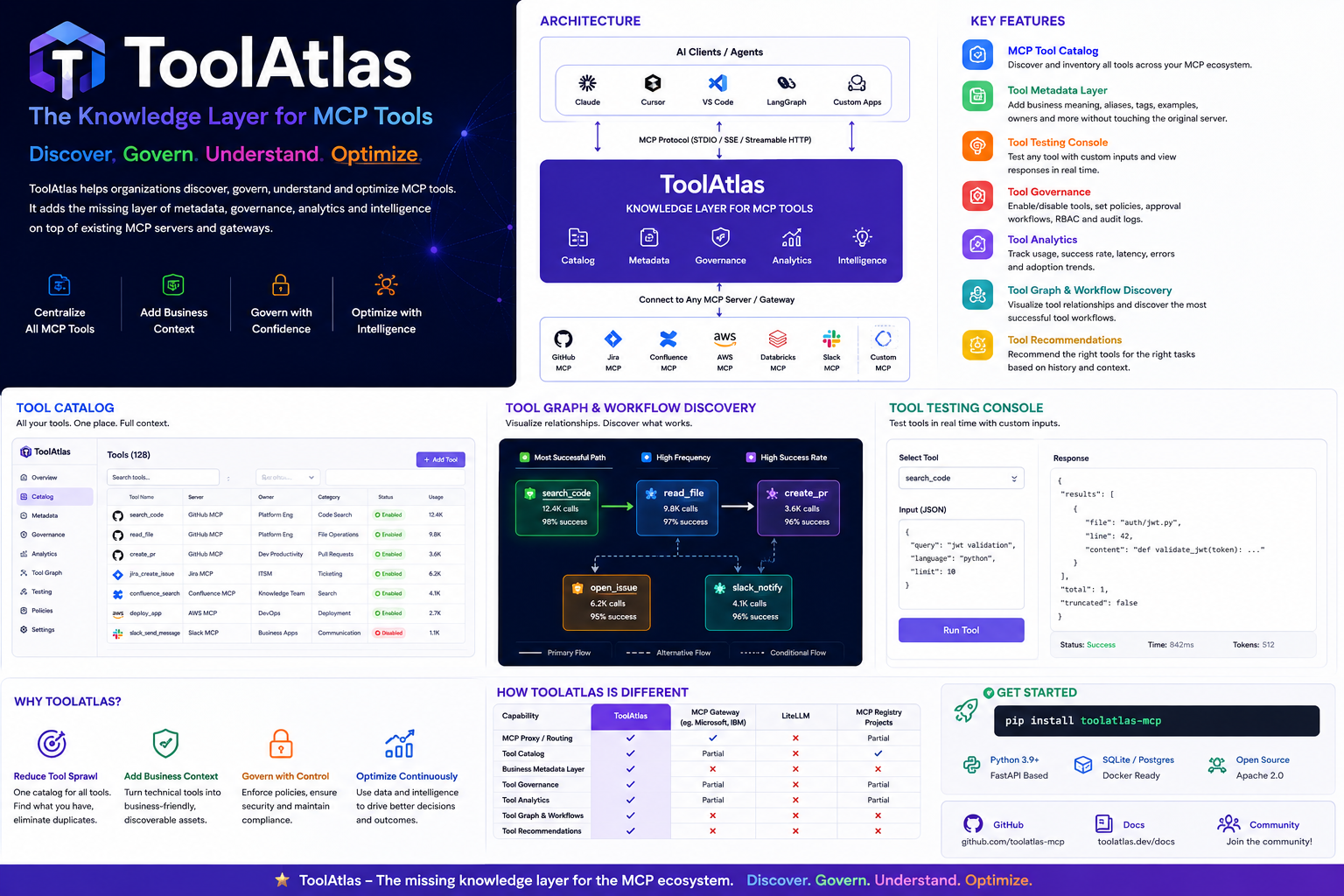
ToolAtlas helps organizations discover, govern, understand, and optimize MCP tools without modifying existing MCP servers.
pip install toolatlas-mcp
toolatlas start                  # defaults: port 8081, json storage
toolatlas start --port 9000 --storage sqlite --data-dir ./data
toolatlas start --storage postgres --database-url "postgresql+asyncpg://user:pass@localhost:5432/toolatlas"
Why ToolAtlas?
As MCP adoption grows, teams quickly accumulate hundreds of tools across GitHub, Jira, Confluence, AWS, Databricks, Slack, internal systems, and custom MCP servers. The challenge is no longer connecting tools — it's understanding them.
| Problem | How ToolAtlas Solves It |
|---|---|
| Tool Sprawl | Central catalog of every MCP tool — see what exists, what's used, what's duplicated, what's dangerous |
| Lack of Business Context | Add business descriptions, aliases, tags, domain categories, and glossary definitions — without modifying the original server |
| Governance | Per-proxy enable/disable, tool selection on server link, audit logging via call traces |
| Tool Intelligence | Usage analytics, success rates, latency tracking, top tools by usage |
ToolAtlas sits between AI clients and MCP servers — it's the control plane for your MCP ecosystem.
"LiteLLM manages models. ToolAtlas manages tools. "
Key Features
📋 MCP Tool Catalog
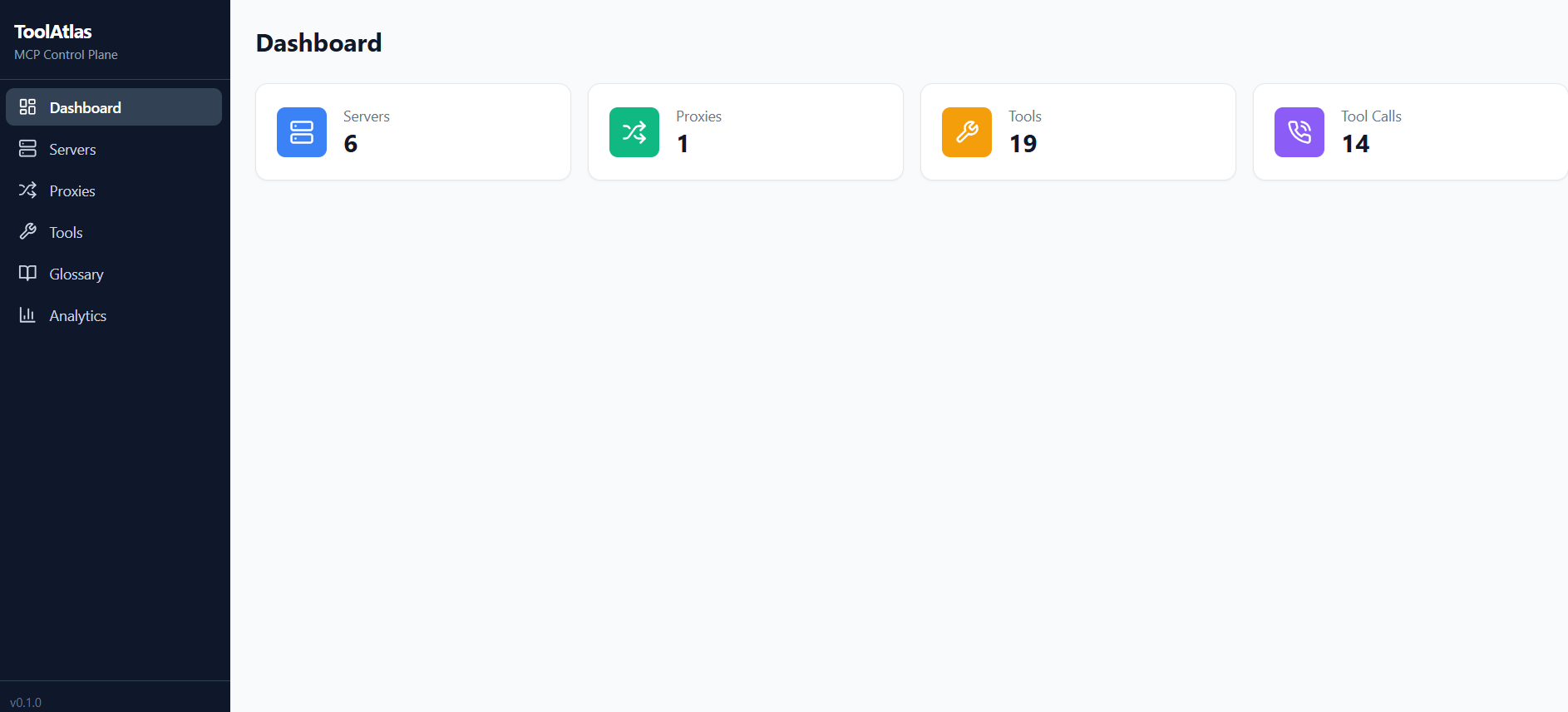
Central inventory of all MCP tools across all your servers — searchable, filterable, sortable from the web dashboard.
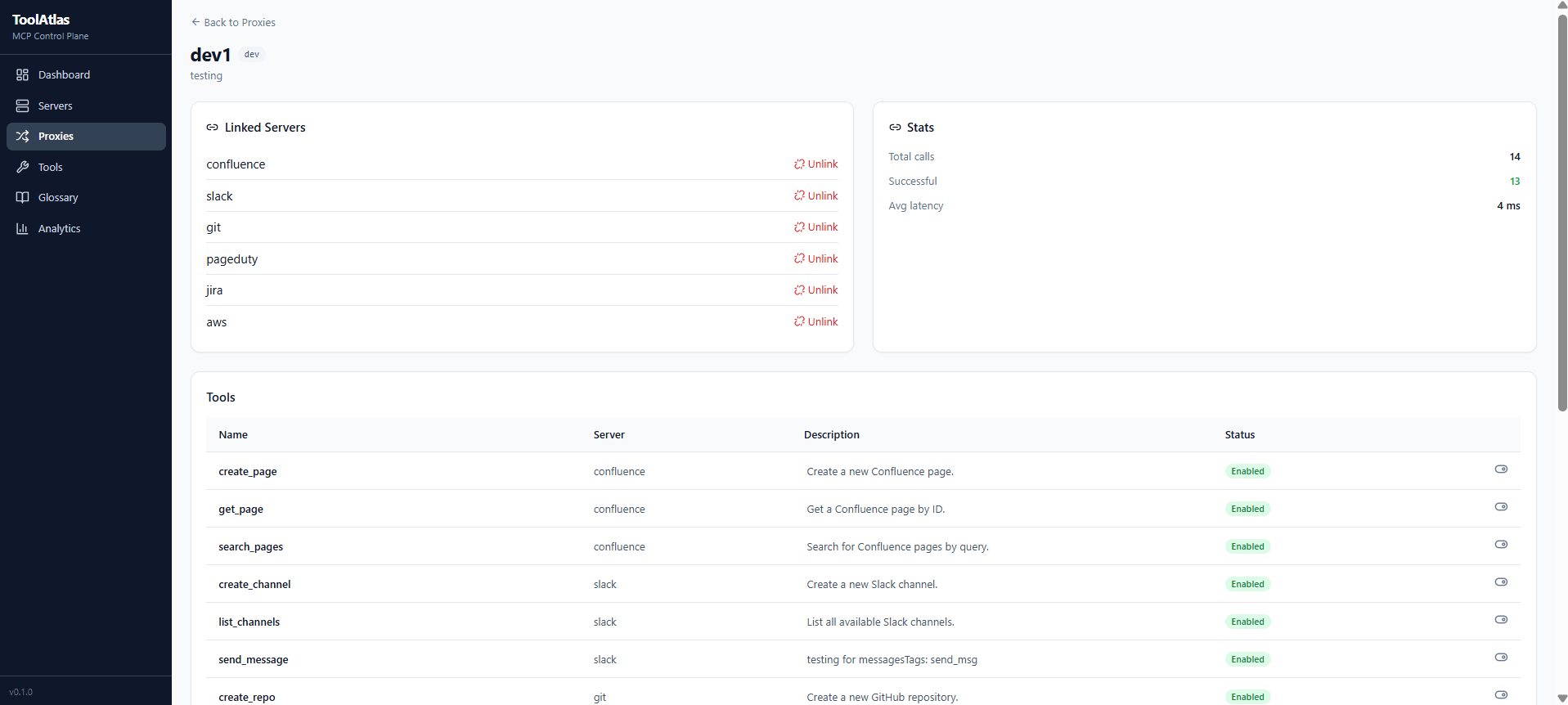
🗂️ Proxy Groups — Organize Tools by Team or Purpose
Create proxies (named groups) and assign MCP servers to each. Every proxy exposes a different toolset.
Proxy "dev"    → GitHub + GitLab     (for developers)
Proxy "pm"     → Jira + Confluence   (for project managers)
Proxy "devops" → AWS + PagerDuty     (for operations)
🛡️ Per-Tool Governance — Control What Each Proxy Exposes
Every tool can be independently configured per proxy:
| Control | What it does |
|---|---|
| Enable / Disable | Block dangerous tools (e.g. delete_repo) without touching the server |
| Custom Description | Rewrite the tool's description so AI agents understand it in context |
| Alias | Rename the tool per proxy |
| Tool Selection on Link | Pick exactly which tools to expose when linking a server — unselected tools auto-disable |
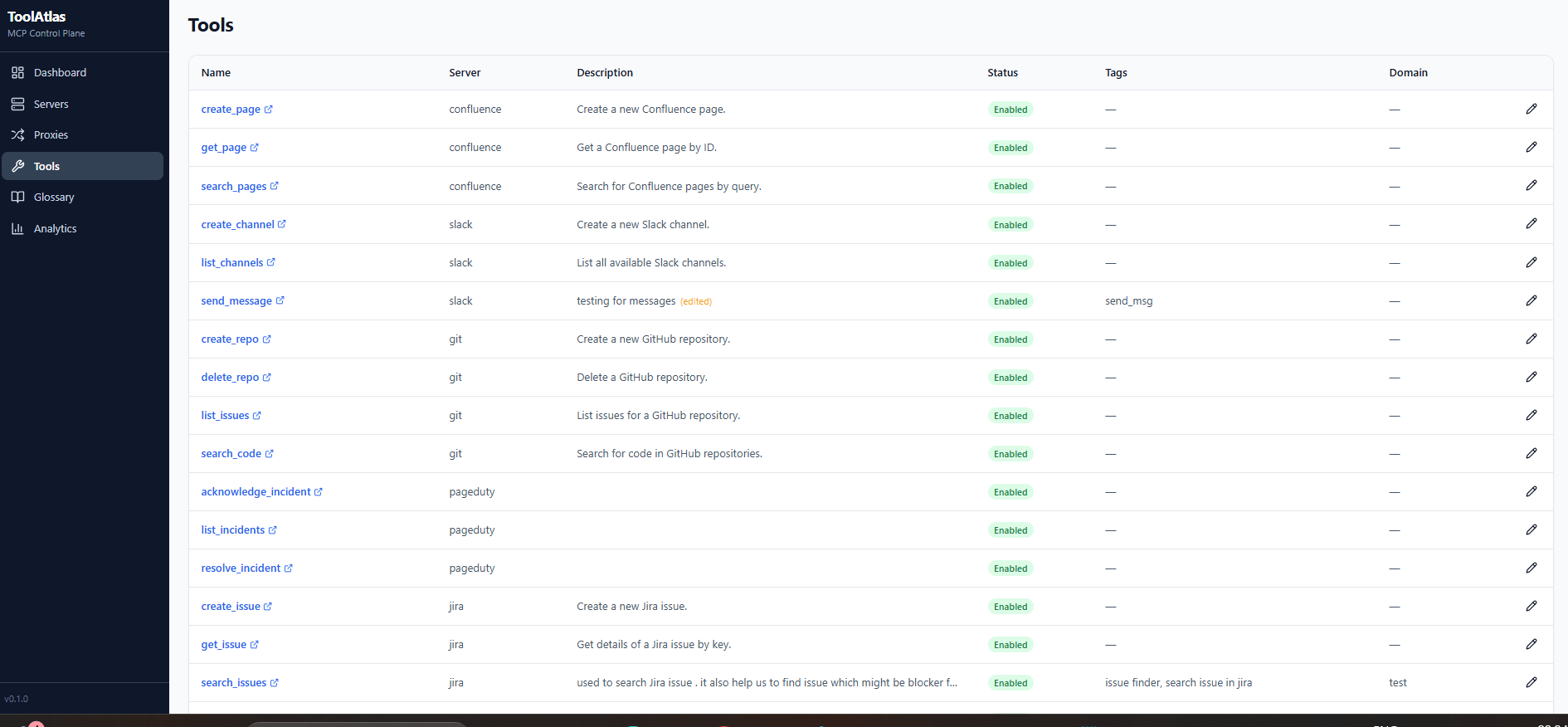
🏷️ Tool Enrichment — Make Tools Smarter
Every registry tool can be enriched with business context. The enriched description is what clients see when they call list_tools:
| Enrichment | Purpose | Example in client view |
|---|---|---|
| Custom Description | Override the original server description | Search for code in GitHub |
| Tags | Add searchable labels | Tags: git, code, search |
| Domain | Categorize by business area | Domain: development |
| Glossary Terms | Link one or more business concepts with definitions | Glossary: Search across all code repositories |
Client sees the full enriched description automatically:
{
  "name": "search_code",
  "description": "Search code in GitHub repositories\nTags: git, code\nDomain: development\nGlossary: Search code across all repositories",
  "inputSchema": { ... }
}
📊 Usage Analytics
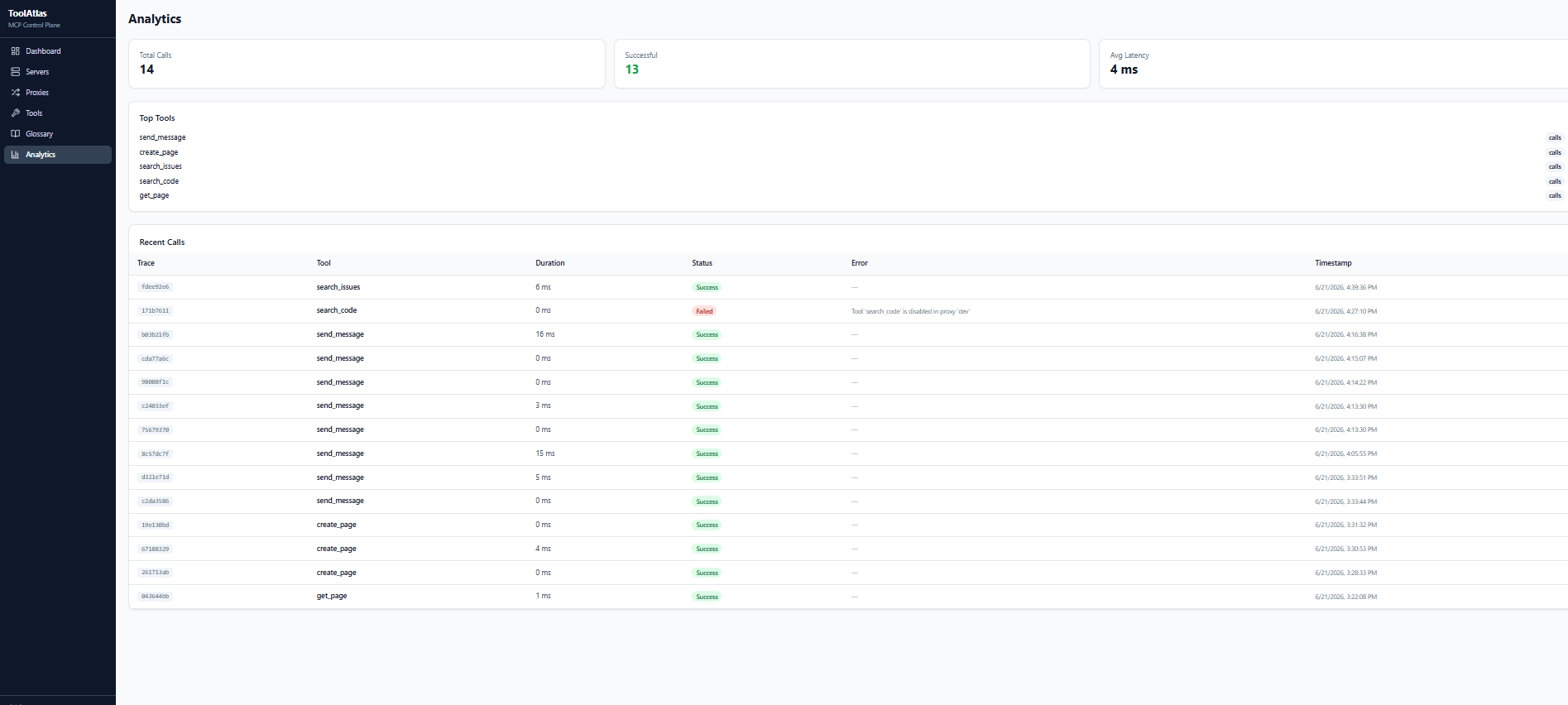
Every tool call is tracked — duration, success/failure, arguments. Dashboard shows top tools, latency trends, error rates, and per-call trace timelines.
🌐 Web Dashboard
Full SPA for managing everything visually — servers, proxies, tool settings, glossary, analytics.
🧪 Tool Testing Console
Test any tool directly from the UI — pass arguments via a dynamic form (auto-generated from the tool's input schema) and see the result in real time with duration tracking.
📂 Glossary with Domain Hierarchy
Organize glossary terms under domains (created first, then terms under them). Terms are grouped by domain in the UI. Assign multiple glossary terms to a single tool. Edit/delete domains and terms inline. Bulk import entire glossaries via JSON/CSV file upload with automatic domain creation.
🔍 Filters & Search
Every management page (Tools, Servers, Proxies, Glossary, Analytics) includes search bars and filter dropdowns for quick navigation.
🔮 Planned Features
| Feature | Status |
|---|---|
| Tool Graph — Visualize relationships between tools and discover real execution workflows | Planned |
| Tool Recommendations — Recommend the best tools for tasks based on usage patterns | Planned |
Architecture
┌─────────────────┐     ┌─────────────────────────────────────┐     ┌─────────────────┐
│  MCP Clients    │     │         ToolAtlas                    │     │  MCP Servers     │
│                 │     │                                     │     │                  │
│  Claude         │────▶│  Proxy "dev"     ── governance ──▶ │────▶│  GitHub MCP      │
│  Cursor         │────▶│  Proxy "pm"      ── governance ──▶ │────▶│  Jira MCP        │
│  Custom Agents  │────▶│  Proxy "devops"  ── governance ──▶ │────▶│  Slack MCP       │
│                 │     │                                     │     │  Confluence MCP  │
│                 │     │  ┌──────────────┐  ┌─────────────┐ │     │  AWS MCP         │
│                 │     │  │ Registry     │  │ Analytics   │ │     │  Custom MCP      │
│                 │     │  │ DB + API     │  │ Tracker     │ │     └─────────────────┘
│                 │     │  └──────────────┘  └─────────────┘ │
│                 │     │  ┌──────────────────────────────┐  │
│                 │     │  │  Web Dashboard (React SPA)   │  │
│                 │     │  └──────────────────────────────┘  │
│                 │     │  ┌──────────────────────────────┐  │
│                 │     │  │  CLI: toolatlas start/add    │  │
│                 │     │  └──────────────────────────────┘  │
│                 │     └─────────────────────────────────────┘
Clients speak MCP to ToolAtlas. ToolAtlas enforces governance, enriches tool descriptions, logs every call, and forwards to real MCP servers.
Installation
Prerequisites
- Python 3.10+ (download)
- pip (comes with Python)
Install from PyPI (recommended)
pip install toolatlas-mcp
PostgreSQL support (optional — requires asyncpg):
pip install "toolatlas-mcp[postgres]"
Verify it installed:
toolatlas --help
You should see the CLI help with start, server, proxy commands.
Install from source
git clone https://github.com/anomalyco/toolatlas-mcp
cd toolatlas-mcp

# Python package
pip install -e ".[dev]"

# Build the web UI
cd ui
npm install
npm run build
cd ..
Usage — Step by Step
1. Start the Server
toolatlas start
Output:
ToolAtlas starting on 127.0.0.1:8081
  Web UI: http://127.0.0.1:8081
  API:    http://127.0.0.1:8081/api/health
Open http://localhost:8081 in your browser to see the dashboard.
2. Add an MCP Server
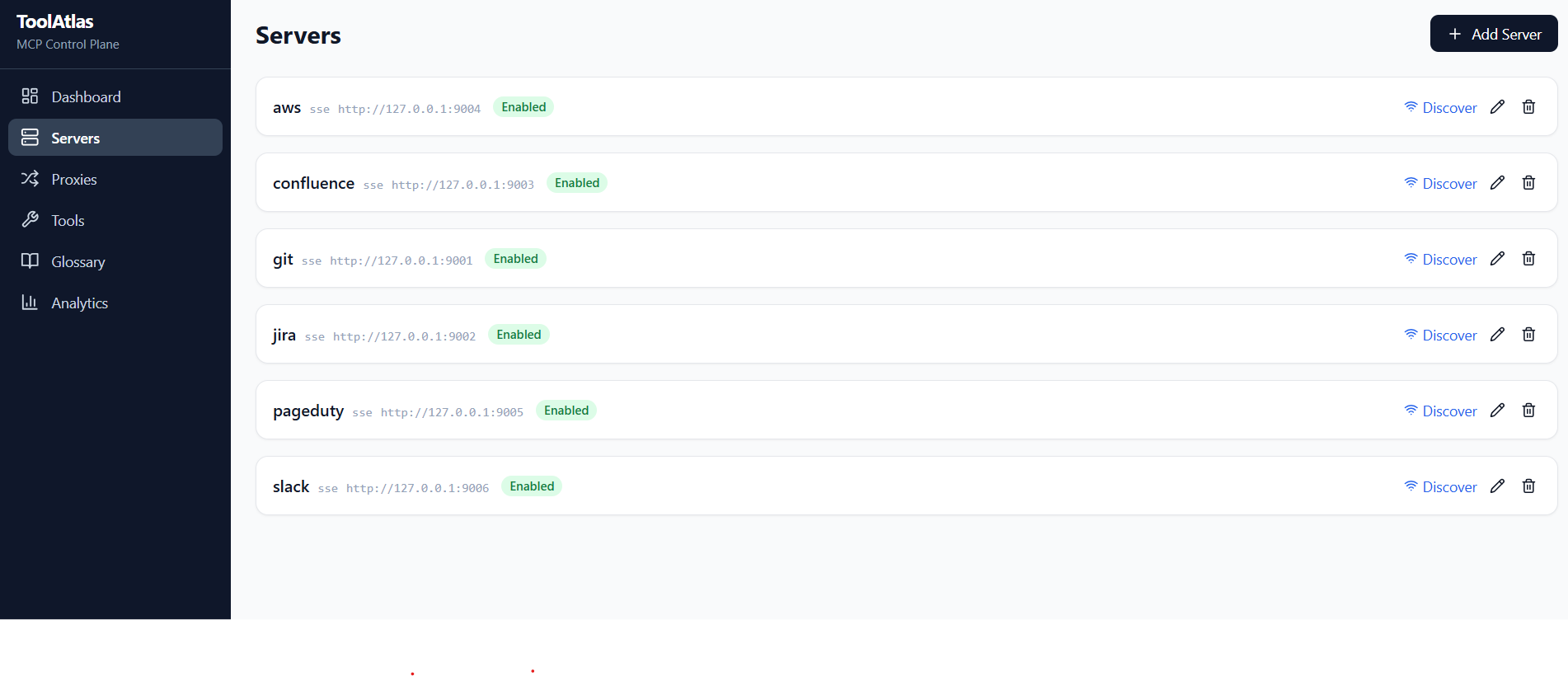
You can add servers via CLI or the web UI.
CLI — stdio server (e.g., npx-based):
toolatlas server add github \
  --transport stdio \
  --command "npx" \
  --args "-y" "@modelcontextprotocol/server-github"
CLI — SSE server (already running):
toolatlas server add my-api \
  --transport sse \
  --url "http://localhost:9001/sse"
Web UI: Go to Servers → Add Server, fill in the details.
3. Discover Tools
After adding a server, discover its tools:
# Via CLI (uses the API):
curl -X POST http://localhost:8080/api/servers/{server_id}/discover
Or click Discover & Save New on the Server detail page in the web UI.
4. Create a Proxy
Proxies organize tools into groups. Each proxy exposes a subset of your servers' tools.
# Create a proxy
toolatlas proxy add dev --description "Developer tools"

# Link servers to it
toolatlas proxy link dev github
toolatlas proxy link dev gitlab
List your proxies:
toolatlas proxy list
Tip: In the web UI, when linking a server you can select exactly which tools to expose — unselected tools are automatically disabled for that proxy. No need to manually toggle them afterwards.
5. Configure Tools Per Proxy
In the web UI, go to a Proxy detail page → Tools tab. For each tool:
- Toggle enabled/disabled — disable
delete_repofor the "dev" proxy - Set a custom description — e.g., "Search code in GitHub repos"
- Alias the tool — rename it for clarity
You can also select which tools to include at link time — click Link next to a server to open the tool picker modal.
6. Enrich Tool Metadata
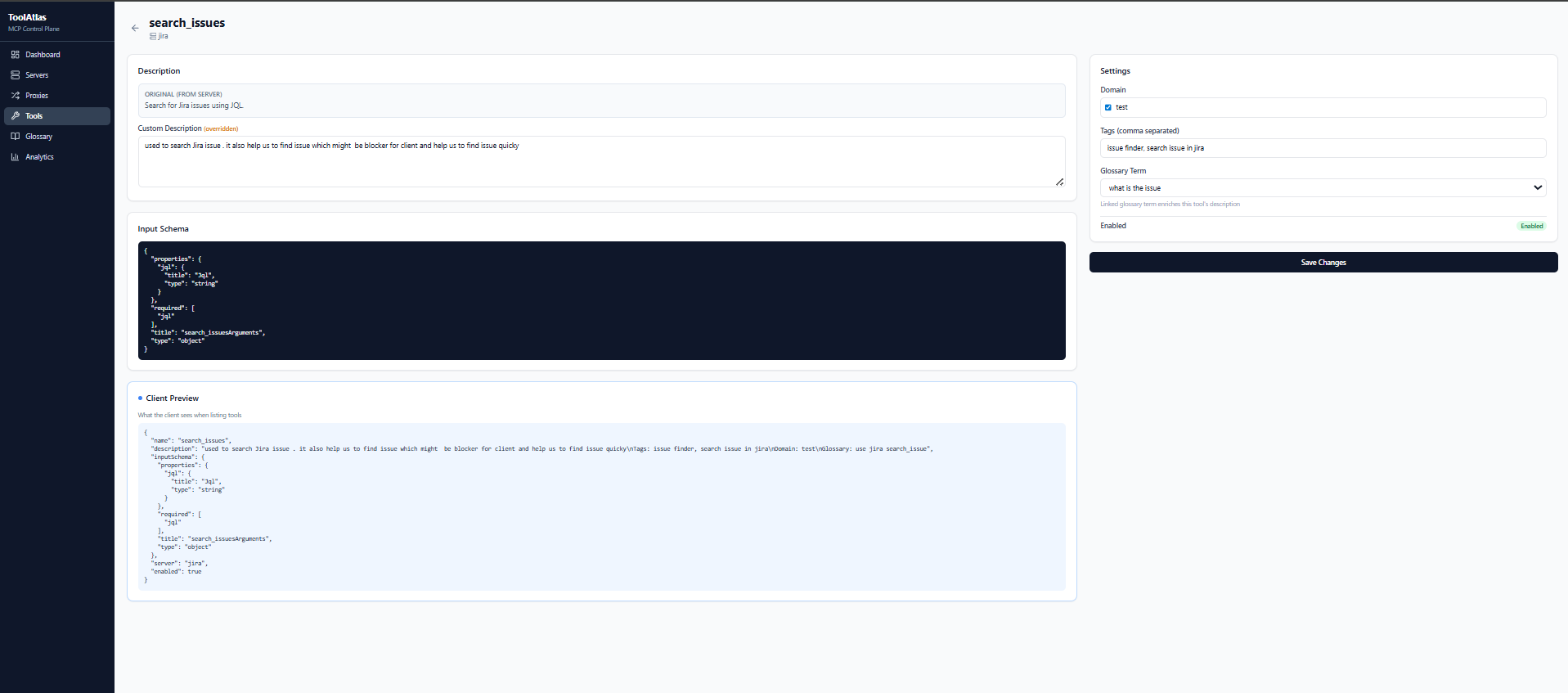
In the Tool detail page, you can add:
- Tags — comma-separated labels like
git, code, search - Domain — categorize the tool (e.g., "development", "security")
- Glossary Terms — link one or more business terms with definitions (multi-select, grouped by domain)
First create glossary domains and terms under the Glossary page, then assign them to tools from the tool detail page.
7. Connect Your AI Client
Configure your MCP client (Claude Desktop, Cursor, custom agent) to point to ToolAtlas. Replace dev with your proxy's slug name.
Claude Desktop (claude_desktop_config.json):
{
  "mcpServers": {
    "dev": {
      "type": "sse",
      "url": "http://localhost:8081/proxy/dev/sse"
    }
  }
}
Cursor / VS Code / any MCP client — same format; just register an SSE server with the URL above.
The proxy slug (dev, prod, etc.) is the name you gave when creating the proxy. Each proxy exposes a different toolset.
Advanced: Raw JSON-RPC (without SSE)
For scripting or testing without an MCP client library, use the message endpoint directly. Each call needs its own session_id (UUID).
import httpx, uuid

session_id = str(uuid.uuid4())
proxy_url = f"http://localhost:8081/proxy/dev/message/{session_id}"

# Initialize
httpx.post(proxy_url, json={
    "jsonrpc": "2.0", "id": 1, "method": "initialize",
    "params": {"protocolVersion": "2024-11-05", "capabilities": {}, "clientInfo": {"name": "test", "version": "1.0"}}
}).json()

# Notify initialized
httpx.post(proxy_url, json={
    "jsonrpc": "2.0", "method": "notifications/initialized"
}).json()

# List tools
httpx.post(proxy_url, json={
    "jsonrpc": "2.0", "id": 2, "method": "list_tools"
}).json()

# Call a tool
httpx.post(proxy_url, json={
    "jsonrpc": "2.0", "id": 3, "method": "call_tool",
    "params": {"name": "search_code", "arguments": {"query": "auth"}}
}).json()
8. View Analytics
Go to the Analytics page in the web UI to see:
- Total calls, success rate, average latency
- Top tools by usage
- Individual call traces with event timelines (proxy resolution → server call → response)
CLI Reference
| Command | Description |
|---|---|
toolatlas start |
Start the ToolAtlas server (defaults: port 8081, json storage) |
toolatlas start --port 9000 --host 0.0.0.0 |
Start on a different address |
toolatlas start --storage sqlite |
Use SQLite storage backend |
toolatlas start --storage postgres --database-url "postgresql+asyncpg://user:pass@host:5432/db" |
Use PostgreSQL storage backend |
toolatlas start --database-url "postgresql+asyncpg://..." |
Set database URL directly (any SQLAlchemy dialect) |
toolatlas start --data-dir ./my-data |
Custom data directory |
toolatlas start --reload |
Start with auto-reload (development) |
All flags: --port, --host, --storage (json/sqlite/postgres), --database-url, --data-dir, --reload. Environment variables are still supported with TOOLATLAS_ prefix and take precedence over defaults. You can also use a .env file in the working directory to set any TOOLATLAS_* variable.
Storage
ToolAtlas supports three storage backends:
| Backend | Type | Best for |
|---|---|---|
| JSON File (default) | json |
Development, single-user, portable setups, git-versioned data |
| SQLite | sqlite |
Production, multi-user, analytics-heavy workloads (good for up to ~10 concurrent connections) |
| PostgreSQL | postgres |
Production, high-concurrency, many concurrent connections (no write-lock contention) |
Storage Backend Comparison
| Feature | JSON | SQLite | PostgreSQL |
|---|---|---|---|
| Dependencies | built-in | built-in | pip install toolatlas-mcp[postgres] |
| Concurrent reads | asyncio-lock serialized | WAL mode (reads don't block reads) | Full MVCC |
| Concurrent writes | asyncio-lock serialized | One writer at a time (WAL mode) | Many concurrent writers |
| Persistence | Single file | Single file | External server |
| Setup | None | None | Requires running PostgreSQL instance |
Tip: SQLite with WAL mode + batch commits (v1.13+) handles moderate concurrency well. Switch to PostgreSQL when you have many concurrent proxy instances or tool discovery calls happening at the same time.
PostgreSQL Connection Pooling (v2.0.0+)
When using PostgreSQL, ToolAtlas automatically configures:
AsyncAdaptedQueuePoolwithpool_size=10andmax_overflow=20— no new TCP connection per querycommand_timeout=10— proper asyncpg parameter (not the aiosqlitetimeout)- Early
asyncpgdetection — a clearRuntimeErroris raised at import ifasyncpgis missing
The data.json file is saved to the same data directory as the SQLite database.
Configuration
Set via environment variables with TOOLATLAS_ prefix. A .env file in the working directory is also loaded automatically.
| Variable | Default | Description |
|---|---|---|
TOOLATLAS_HOST |
127.0.0.1 |
Bind address |
TOOLATLAS_PORT |
8081 |
HTTP port (auto-increments if in use) |
TOOLATLAS_DATABASE_URL |
sqlite+aiosqlite:///<data_dir>/toolatlas.db |
Database connection URL (any SQLAlchemy async dialect) |
TOOLATLAS_STORAGE_TYPE |
json |
Storage backend (json, sqlite, or postgres) |
TOOLATLAS_DATA_DIR |
~/.toolatlas (Unix) / %APPDATA%\ToolAtlas (Win) |
Data directory for databases and config |
TOOLATLAS_LOG_LEVEL |
INFO |
Log level (DEBUG, INFO, WARNING, ERROR) |
TOOLATLAS_BASE_PATH |
"" |
URL prefix when deployed behind a reverse proxy (e.g. /toolatlas) |
When starting interactively, you'll be prompted for the data directory and storage type if the environment variables aren't set. If you choose postgres, you'll be prompted for the connection details (host, port, database name, username, password). You can also provide a --database-url flag or TOOLATLAS_DATABASE_URL env var to skip prompts.
What's New in v2.0.0
| Area | Change | Impact |
|---|---|---|
| PostgreSQL | Dialect-aware connect_args, AsyncAdaptedQueuePool (pool=10, overflow=20), early asyncpg import check |
PostgreSQL now works reliably without crashes or per-query TCP overhead |
| Transaction safety | commit() wraps exceptions with rollback() — poisoned sessions are cleaned up |
Eliminates ResourceClosedError: This transaction is closed errors |
| Cache locking | list_tools cache miss uses double-checked locking under _engine_locks[slug] |
Prevents redundant list_tools flood when multiple domains' TTLs expire simultaneously |
| Batch commits | Proxy link-server tool disabling now uses auto_commit=False + single commit() |
130 toggles → 1 commit instead of 130 |
| Stale detection | Tool cache cleared immediately when any upstream client goes stale (not only when all are gone) | No stale tools returned after partial connection loss |
| Import hygiene | from sqlalchemy import JSON instead of sqlalchemy.dialects.sqlite.JSON |
Cleaner, semantically correct for all dialects |
The CLI automatically scans for a free port (8080→8280) if the default port is occupied.
Example:
export TOOLATLAS_HOST=0.0.0.0
export TOOLATLAS_PORT=9000
export TOOLATLAS_STORAGE_TYPE=json
export TOOLATLAS_DATA_DIR=./toolatlas-dev
toolatlas start
To use non-interactive mode (no prompts):
TOOLATLAS_DATA_DIR=/custom/path TOOLATLAS_STORAGE_TYPE=json toolatlas start
Using a .env file
Create a .env file in the directory where you run toolatlas start:
TOOLATLAS_STORAGE_TYPE=postgres
TOOLATLAS_DATABASE_URL=postgresql+asyncpg://user:pass@localhost:5432/toolatlas
TOOLATLAS_DATA_DIR=./toolatlas-dev
Then simply run toolatlas start — all values are picked up automatically.
Hosting ToolAtlas Inside an Existing Web Application
This guide explains how to embed ToolAtlas-MCP as a sub-app inside an existing Flask or FastAPI application under a URL prefix (e.g., /toolatlas/). No separate container or port is required.
Prerequisites
- An existing Python web application (Flask or FastAPI) running behind a reverse proxy (nginx, Apache, etc.)
- Python 3.10+
- pip access to install the
toolatlas-mcppackage
Installation
pip install toolatlas-mcp
This installs:
toolatlas-mcp— the core packageaiosqlite— SQLite async driver (needed even for JSON storage)rich,typer— CLI utilitiesfastapi,uvicorn— ASGI dependencies
For PostgreSQL, install with: pip install "toolatlas-mcp[postgres]"
Storage Configuration
ToolAtlas stores its data (servers, tools, proxies, etc.) in a JSON file by default. Set these environment variables to control storage:
export TOOLATLAS_STORAGE_TYPE=json            # "json" (default), "sqlite", or "postgres"
export TOOLATLAS_DATABASE_URL=...             # required for "postgres", e.g. "postgresql+asyncpg://user:pass@host:5432/toolatlas"
export TOOLATLAS_DATA_DIR=/data/toolatlas     # custom data path, default ~/.toolatlas
If not set, data lives at ~/.toolatlas/data.json.
Integration
Option A: FastAPI (mount as sub-app)
from fastapi import FastAPI
from toolatlas_mcp.api.app import create_app as create_toolatlas_app
from toolatlas_mcp.config import settings as toolatlas_settings
from toolatlas_mcp.db import init_db, close_db
from toolatlas_mcp.proxy.engine import close_all_engines

# Your existing FastAPI app
app = FastAPI()

# ... your existing routes ...

# Mount ToolAtlas under a prefix
toolatlas_settings.base_path = ""  # mount handles prefixing
toolatlas_app = create_toolatlas_app()
app.mount("/toolatlas", toolatlas_app)
Database lifecycle (add to your app's startup/shutdown):
from contextlib import asynccontextmanager
import os

@asynccontextmanager
async def lifespan(app: FastAPI):
    # Startup: ensure data dir exists
    data_dir = os.environ.get("TOOLATLAS_DATA_DIR", "/data/toolatlas")
    os.makedirs(data_dir, exist_ok=True)
    await init_db()
    yield
    # Shutdown
    close_all_engines()
    await close_db()

app = FastAPI(lifespan=lifespan)
Option B: Flask (WSGI sub-app)
Flask does not natively support ASGI sub-mounts. Use ASGI middleware or run ToolAtlas as a separate ASGI app behind the same reverse proxy on a different path.
Example using werkzeug middleware (limited):
from flask import Flask
from werkzeug.middleware.dispatcher import DispatcherMiddleware

app = Flask(__name__)

# ... your existing Flask app ...

# ToolAtlas needs ASGI — use a wrapper or run separately
Recommended for Flask: Run ToolAtlas as a separate uvicorn process behind the same nginx, routing /toolatlas/* to it. Or migrate your Flask app to FastAPI to get native sub-app mounting.
SPA Base URL Patching
The ToolAtlas SPA is a Vite/React build that hardcodes its API base URL and React Router basename as empty strings. When mounted under a prefix, these must be patched at runtime.
Add this startup code to patch the minified JS bundle:
import re
import glob

# Find the JS bundle
import toolatlas_mcp as _ta_pkg
_ta_root = re.sub(r"/?toolatlas_mcp/?$", "", _ta_pkg.__path__[0])
_js_paths = []
for _p in [_ta_root + "/toolatlas_mcp/ui/dist/assets", _ta_root + "/ui/dist/assets"]:
    _js_paths.extend(glob.glob(_p + "/*.js"))

# Patch paths for subpath deployment (e.g., /toolatlas)
prefix = "/toolatlas"
for _jsf in _js_paths:
    try:
        with open(_jsf) as _f:
            _c = _f.read()
        _new_c = (
            _c.replace('pv=""', f'pv="{prefix}"')      # Axios baseURL
              .replace('Tv=""', f'Tv="{prefix}"')       # React Router basename
        )
        if _new_c != _c:
            with open(_jsf, "w") as _f:
                _f.write(_new_c)
    except Exception:
        pass
Why this is needed: The SPA is built with VITE_API_BASE_URL="" and basename="". Without patching, API calls go to /api/... (404) and routes fail to match under the prefix.
Reverse Proxy (nginx)
Add a location block in your nginx config:
location /toolatlas/ {
    proxy_pass http://127.0.0.1:5100/;
    proxy_http_version 1.1;
    proxy_set_header Upgrade $http_upgrade;
    proxy_set_header Connection "upgrade";
    proxy_buffering off;
    proxy_cache off;
    proxy_set_header Host $host;
    proxy_set_header X-Real-IP $remote_addr;
    proxy_set_header X-Forwarded-For $proxy_add_x_forwarded_for;
    proxy_read_timeout 86400s;
}
Reload nginx:
nginx -s reload
Verifying the Deployment
# API health
curl http://localhost:5100/toolatlas/api/servers
curl http://localhost:5100/toolatlas/api/tools

# SPA
curl -o /dev/null -w '%{http_code}' http://localhost:5100/toolatlas/
# Expected: 200

# Open in browser
open http://localhost:5100/toolatlas/
Troubleshooting
| Symptom | Likely Cause | Fix |
|---|---|---|
| Blank page, no errors | React Router basename not patched | Run the JS patching code before mount |
| API calls returning 404 | Axios baseURL not patched | Check pv="" was replaced |
| API calls returning data but blank page | Router basename not patched | Check Tv="" was replaced |
| Data lost after restart | No persistent volume mounted | Set TOOLATLAS_DATA_DIR to a persisted path |
| SQLite file present even with JSON storage | ToolAtlas initializes both; safe to ignore or delete .db file after shutdown |
— |
Key Files
| File | Purpose |
|---|---|
~/.toolatlas/data.json |
Default JSON data file |
~/.toolatlas/toolatlas.db |
SQLite DB (created even in JSON mode, can be deleted) |
site-packages/toolatlas_mcp/ui/dist/assets/index-*.js |
SPA JS bundle that needs patching |
Notes
- ToolAtlas uses SQLAlchemy internally even for JSON storage. The
aiosqlitedependency is required regardless of storage backend. - The
data.jsonfile can grow large if many tool calls are recorded. Monitor its size if you enable call tracking. - ToolAtlas SPA is a single-page application. Ensure your reverse proxy serves
index.htmlfor all sub-paths under/toolatlas/if you need direct URL entry (FastAPI mount handles this automatically).
Client Examples
Python
import httpx, uuid

session_id = str(uuid.uuid4())
base = f"http://localhost:8081/proxy/dev/message/{session_id}"

# Initialize (required before any other call)
httpx.post(base, json={
    "jsonrpc": "2.0", "id": 1, "method": "initialize",
    "params": {"protocolVersion": "2024-11-05", "capabilities": {}, "clientInfo": {"name": "test", "version": "1.0"}}
}).json()

httpx.post(base, json={"jsonrpc": "2.0", "method": "notifications/initialized"}).json()

# List available tools
tools = httpx.post(base, json={
    "jsonrpc": "2.0", "id": 2, "method": "list_tools"
}).json()
print(tools)

# Call a tool
result = httpx.post(base, json={
    "jsonrpc": "2.0", "id": 3, "method": "call_tool",
    "params": {"name": "search_code", "arguments": {"query": "auth"}}
}).json()
print(result)
curl
SESSION_ID=$(uuidgen)

# Initialize
curl -s -X POST "http://localhost:8081/proxy/dev/message/$SESSION_ID" \
  -H "Content-Type: application/json" \
  -d '{"jsonrpc":"2.0","id":1,"method":"initialize","params":{"protocolVersion":"2024-11-05","capabilities":{},"clientInfo":{"name":"test","version":"1.0"}}}'

curl -s -X POST "http://localhost:8081/proxy/dev/message/$SESSION_ID" \
  -H "Content-Type: application/json" \
  -d '{"jsonrpc":"2.0","method":"notifications/initialized"}'

# List tools
curl -s -X POST "http://localhost:8081/proxy/dev/message/$SESSION_ID" \
  -H "Content-Type: application/json" \
  -d '{"jsonrpc":"2.0","id":2,"method":"list_tools"}'

# Call a tool
curl -s -X POST "http://localhost:8081/proxy/dev/message/$SESSION_ID" \
  -H "Content-Type: application/json" \
  -d '{"jsonrpc":"2.0","id":3,"method":"call_tool","params":{"name":"search_code","arguments":{"query":"auth"}}}'
Development
git clone https://github.com/anomalyco/toolatlas-mcp
cd toolatlas-mcp

# Python
pip install -e ".[dev]"

# UI
cd ui && npm install && npm run build && cd ..

# Tests
pytest

# Dev server (API only, UI served by Vite on port 5173)
toolatlas start --reload
# In another terminal:
cd ui && npm run dev
License
MIT © ToolAtlas contributors
Release history Release notifications | RSS feed


Download files
Download the file for your platform. If you're not sure which to choose, learn more about installing packages.
Source Distribution
Built Distribution
Filter files by name, interpreter, ABI, and platform.
If you're not sure about the file name format, learn more about wheel file names.
Copy a direct link to the current filters
File details
Details for the file toolatlas_mcp-2.0.1.tar.gz.
File metadata
- Download URL: toolatlas_mcp-2.0.1.tar.gz
- Upload date:
- Size: 2.1 MB
- Tags: Source
- Uploaded using Trusted Publishing? No
- Uploaded via: twine/6.2.0 CPython/3.11.3
File hashes
| Algorithm | Hash digest | |
|---|---|---|
| SHA256 |
850fd52bce1aa035ff41b2ebb1b7d7c0ff3471ae48d1205b968a6c226328c3a2
|
|
| MD5 |
beb2fdd7c3d136aa28c552b7d5da813e
|
|
| BLAKE2b-256 |
43b9887199c067464d41fe5357d6175a946a2bf44abfd7ed73691e93bd6fb4de
|
File details
Details for the file toolatlas_mcp-2.0.1-py3-none-any.whl.
File metadata
- Download URL: toolatlas_mcp-2.0.1-py3-none-any.whl
- Upload date:
- Size: 134.6 kB
- Tags: Python 3
- Uploaded using Trusted Publishing? No
- Uploaded via: twine/6.2.0 CPython/3.11.3
File hashes
| Algorithm | Hash digest | |
|---|---|---|
| SHA256 |
6e8ff15f76ce9895b6979935f5e720a239ca19e8f23baf3b9f35ec382b2a0ac2
|
|
| MD5 |
52cf52cc21bca250b10aaa3ede514b95
|
|
| BLAKE2b-256 |
0ee8b0b8207bd6dbd780fcf0b1b3f73578bfb7da9268bfd18c49d830b768af73
|






