

TorchNEP
Train NEP machine-learned interatomic potentials in PyTorch — the models run directly in GPUMD.







Documentation · Quick start · Examples · Citation
TorchNEP is a from-scratch implementation of NEP4, the neuroevolution potential architecture.
- GPUMD-compatible —
nep.txtfiles load directly into GPUMD for molecular dynamics - Two-stage training — a force-focused stage, then an energy-focused stage
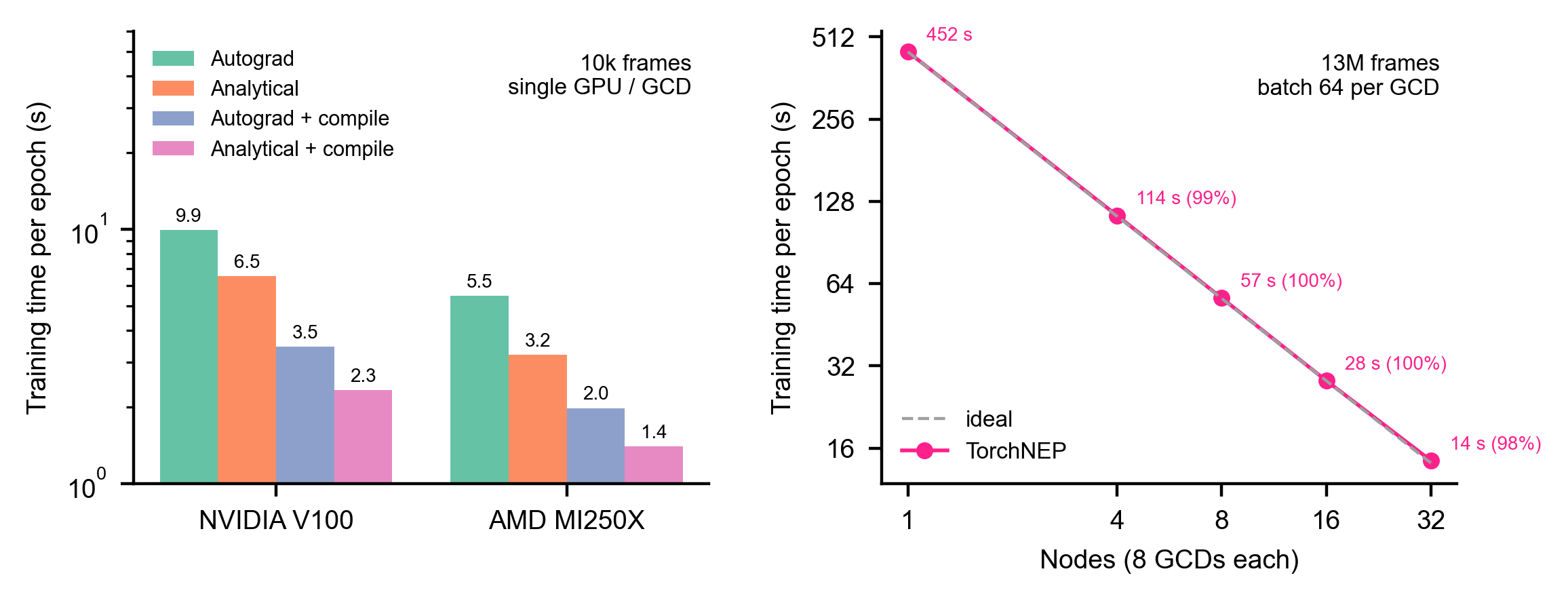
- Multi-GPU and multi-node — data-parallel training with near-linear scaling
- Fast on NVIDIA and AMD —
torch.compilewith automatic backend selection, tuned on CUDA and ROCm - Memory-friendly — the dataset stays in host memory; GPU memory scales with the batch, not the dataset
- Fine-tuning, ZBL, plots — start from any
nep.txt, add short-range repulsion, plot every run - Active learning — choose the MD frames worth computing with DFT, with one model (MaxVol extrapolation grade)
Installation
Install the PyTorch build for your hardware first, then:
pip install torchnep -U
Optional extras: torchnep[ase] (ASE calculator), torchnep[plot] (figures), torchnep[all].
Quick start
from torchnep import train_nep

train_nep("nep.in", "train.xyz", output_dir="output", valid_ratio=0.1)
The best model is written to output/nep_best.txt. The documentation covers nep.in, the training data format, multi-GPU training, restart and fine-tuning, prediction, the ASE calculator, plotting and active learning.
Tests
pip install -e ".[dev]"
TORCHNEP_TEST_DDP=1 pytest -n auto    # CPU; GPU-only tests are skipped
The coverage badge is this CPU run in CI. On 2 × NVIDIA GH200 the full suite (716 tests, including GPU training with torch.compile and multi-GPU training) covers 94 % of the code (October 2026). How to run it on your own GPU machine: Running the test suite.
Building the documentation
The site is built from docs/ with MkDocs Material. In a clone of the repository:
pip install "mkdocs>=1.6,<2" mkdocs-material "mkdocstrings[python]"
mkdocs serve    # preview at http://127.0.0.1:8000/torchnep/, reloaded on every edit
mkdocs build    # static site in site/
The API reference is read from the source files, so TorchNEP itself does not need to be installed. MkDocs stays below 2.0, which the Material theme does not support. Formulas ($...$, $$...$$) are rendered in the browser by MathJax, loaded from a CDN, so the preview needs an internet connection to show them; nothing else needs to be installed.
Citation
@misc{wu2026torchne,
      title={TorchNEP: Ultra-Efficient and Accurate Training of Neuroevolution Potentials},
      author={Yong-Chao Wu and Xiaoya Chang and Tero Mäkinen and Amin Esfandiarpour and Jian-Li Shao and Tapio Ala-Nissila and Zheyong Fan and Mikko Alava},
      year={2026},
      eprint={2606.19557},
      archivePrefix={arXiv},
      primaryClass={physics.comp-ph},
      url={https://arxiv.org/abs/2606.19557},
}
1 maintainer

Metadata
1 maintainer
Release files for torchnep 1.0.7
For a detailed explanation of source distributions (sdists) and built distributions (wheels), please see the package formats documentation.
Source distribution (sdist)
| File | Size | Uploaded | |
|---|---|---|---|
| torchnep-1.0.7.tar.gz | 201.2 kB | Details |
Built distribution (wheel)
| File | Interpreter | ABI | Platform | Reset |
|---|---|---|---|---|
| torchnep-1.0.7-py3-none-any.whl | Python 3 | none | any | Details |
Total release size: 412.2 kB
Release files / torchnep-1.0.7.tar.gz
| Download URL | torchnep-1.0.7.tar.gz |
|---|---|
| Size | 201.2 kB |
| Tags | Source |
|
SHA-256 checksum How to use checksums |
216e9d01fae82bca88d5c69e700b9bbae4d0d061a7668f24d5aa0ebe40c2081b
|
|
BLAKE2b-256 checksum How to use checksums |
7e3b7b2d53f2fe854fa4a178b5f379bd675e11bd8e046a8e4d03a1be8977fa9b
|
| Upload date | |
|
Uploaded using Trusted Publishing? What is trusted publishing? |
Yes |
| Uploaded via |
twine/7.0.0 CPython/3.13.14
|
Provenance
Provenance describes where a file came from. On PyPI, provenance is shared via attestations, which provide a verifiable record of the build or publishing details. View details, limitations and caveats.


PyPI Publish Attestation
PyPI verified that this artifact, at this checksum, originated from the publisher listed below.
Signed by GitHub Actions, verified by PyPI on Oct 2, 2026.
Transparency logRelease files / torchnep-1.0.7-py3-none-any.whl
| Download URL | torchnep-1.0.7-py3-none-any.whl |
|---|---|
| Size | 211.0 kB |
| Tags | Python 3 |
|
SHA-256 checksum How to use checksums |
46083119044986314fcb8cfcff97c7afc77774b2096f50254497e5a2c443db60
|
|
BLAKE2b-256 checksum How to use checksums |
dc231693b8d3259ab49904d4e78cedc307a482ecc22fe91ee73086e5d14cc422
|
| Upload date | |
|
Uploaded using Trusted Publishing? What is trusted publishing? |
Yes |
| Uploaded via |
twine/7.0.0 CPython/3.13.14
|
Provenance
Provenance describes where a file came from. On PyPI, provenance is shared via attestations, which provide a verifiable record of the build or publishing details. View details, limitations and caveats.
PyPI Publish Attestation
PyPI verified that this artifact, at this checksum, originated from the publisher listed below.
Signed by GitHub Actions, verified by PyPI on Oct 2, 2026.
Transparency log













