

Trapster Community
🌐 Website · 📚 Documentation · 💬 Discord
Trapster Community is a low-interaction honeypot designed to be deployed on internal networks or to capture credentials. It is built to monitor and detect suspicious activities, providing a deceptive layer to network security.
Visit the Trapster website to learn more about our commercial version, which includes advanced features like pre-configured hardened OS, automatic deployment, webhook, SIEM integration and much more...
Features
- Deceptive Security: Mimics network services to lure and detect potential intruders.
- Asynchronous Framework: Utilizes Python's
asynciofor efficient, non-blocking operations. - Configuration Management: Easily configurable through
trapster.conf. - Expandable Services: Add and configure as many services as needed with minimal effort.
- HTTP Honeypot Engine with AI capabilities: Clone any website using YAML configuration, and use AI to generate responses to some HTTP requests.
Supported Protocols
| Protocol | Notes |
|---|---|
| FTP (21) | Capture FTP login attempts |
| SSH (22) | Capture SSH login attempts |
| Telnet (23) | Capture TELNET login attempts |
| DNS (53) | Works as a proxy to a real DNS server, and log queries |
| HTTP/HTTPS (80/443) | Copy website, features custom YAML configuration templating engine |
| SNMP (161) | Log SNMP queries |
| LDAP (389) | Capture LDAP login attempts and queries |
| LDAPS (636) | Capture LDAP login attempts and queries over TLS |
| Rsync (873) | Capture RSYNC login attempts |
| MSSQL (1433) | Capture MSSQL login attempts |
| MySQL (3306) | Capture MySQL login attempts |
| RDP (3389) | Capture RDP login attempts |
| PostgreSQL (5432) | Capture POSTGRES login attempts |
| VNC (5900) | Capture VNC login attempts |
Documentation and installation guide
https://docs.trapster.cloud/community/
Quick start
Quick start with a demo configuration file:
git clone https://github.com/0xBallpoint/trapster-community
cd trapster-community
docker compose up --build
For a quick start with AI responses for HTTP (port 8081), just add a .env file, and run docker compose up again:
AI_MODEL=o4-mini
AI_BASE_URL=https://api.openai.com/v1/
AI_API_KEY=<YOUR_OPENAI_API_KEY>
Configuration wizard
You can start from the example trapster/data/trapster.conf, or run the helper script to create ./trapster.generated.conf interactively.
bash scripts/trapster-wizard.sh
From a checkout, with a venv:
python3 -m venv venv
source venv/bin/activate
pip install -r requirements.txt
bash scripts/trapster-wizard.sh
python main.py -c ./trapster.generated.conf
Or install the package in editable mode (pip install -e .) and run trapster -c ./trapster.generated.conf.
The example configuration listens on well-known ports; binding them usually requires elevated privileges. Run as root, or use sudo -E (keeps your environment, e.g. an activated venv) when starting Trapster with Python.
Logs
Trapster now separates:
- format: how events are structured (
defaultorecs) - output: where events are sent (
terminal,file,api,redis)
This lets you combine them freely, for example:
- default JSON -> terminal
- default JSON -> API
- ECS -> API
Event types
Each module can generate up to 4 event actions: connection, data, login, and query.
connection: a connection has been made to the moduledata: raw payload received (hex-encoded in thedatafield)login: authentication attemptquery: processed protocol request which is not an authentication attempt
Formats
default
The original Trapster event structure:
{
  "device": "trapster-1",
  "logtype": "ftp.login",
  "dst_ip": "10.0.0.10",
  "dst_port": 21,
  "src_ip": "10.0.0.50",
  "src_port": 49152,
  "timestamp": "2026-05-08 10:00:00.123456",
  "data": "68656c6c6f",
  "extra": {
    "username": "admin",
    "password": "admin"
  }
}
ecs
Elastic Common Schema format, with protocol details under trapster.<protocol>.*:
{
  "@timestamp": "2026-05-08T10:00:00.123456Z",
  "ecs": { "version": "8.11.0" },
  "event": {
    "category": ["authentication", "network"],
    "type": ["start", "info"],
    "action": "login",
    "outcome": "failure",
    "dataset": "trapster.ftp"
  },
  "network": {
    "transport": "tcp",
    "protocol": "ftp",
    "application": "ftp",
    "type": "ipv4"
  },
  "trapster": {
    "raw": "68656c6c6f",
    "login": {
      "username": "admin",
      "password": "admin"
    },
    "ftp": {}
  }
}
Configuration examples
1) Default JSON -> terminal
"logger": {
  "output": "terminal",
  "format": "default",
  "kwargs": {}
}
2) ECS -> API
"logger": {
  "output": "api",
  "format": "ecs",
  "kwargs": {
    "url": "https://example.local/ingest",
    "headers": {
      "Authorization": "Bearer <token>"
    }
  }
}
3) Default JSON -> file
"logger": {
  "output": "file",
  "format": "default",
  "kwargs": {
    "logfile": "/var/log/trapster-community.log",
    "mode": "a"
  }
}
Retrocompatibility
Existing logger configuration still works (name + kwargs):
"logger": {
  "name": "JsonLogger",
  "kwargs": {}
}
And also:
FileLoggerApiLoggerRedisLoggerEcsLogger
HTTP Engine
Configuration
The HTTP module can emulate any website. It works with YAML configuration files to match requests using regular expressions, and can generate responses using either a template or an AI model.
The configuration are stored in trapster/data/http, each folder represent a website.
demo_api (trapster/data/http/demo_api) is a reference skin: every entry in its config.yaml
and template exists specifically to demonstrate one capability of the HTTP engine, so it's the
place to look when writing your own. It shows, among others:
http_version: "2": advertise HTTP/2 over ALPN (only takes effect when the skin is served over HTTPS).- Custom reason phrases: override the HTTP/1.1 status line's reason (
reason:), either a fixed string or a per-request Jinja expression. - ETags & conditional GET:
etag()generates IIS-style or hashed ETags from a per-deployment seed; a matchingIf-None-Matchon a later request gets an automatic304. - Deploy-time
vars: values resolved once at startup from a random per-deployment seed, so they're identical across every request but unique per deployment. - Per-request templating:
.j2files re-render on every request (request.form,request.query_string,uuid(),quotefilter, etc.), while inlinecontent/headersare frozen at startup unless they referencerequest. - Static file serving, regex path/query matching,
default/errors/unknown_methodfallbacks.
Structure:
- config.yaml: contains the configuration for the website.
- files/: contains the static files for the website.
- templates/: contains the templates for the website, it supports jinja2 syntax.
Documentation : https://docs.trapster.cloud/community/modules/web/
Example: Fortigate
The default HTTPS server shows a fortigate login page:
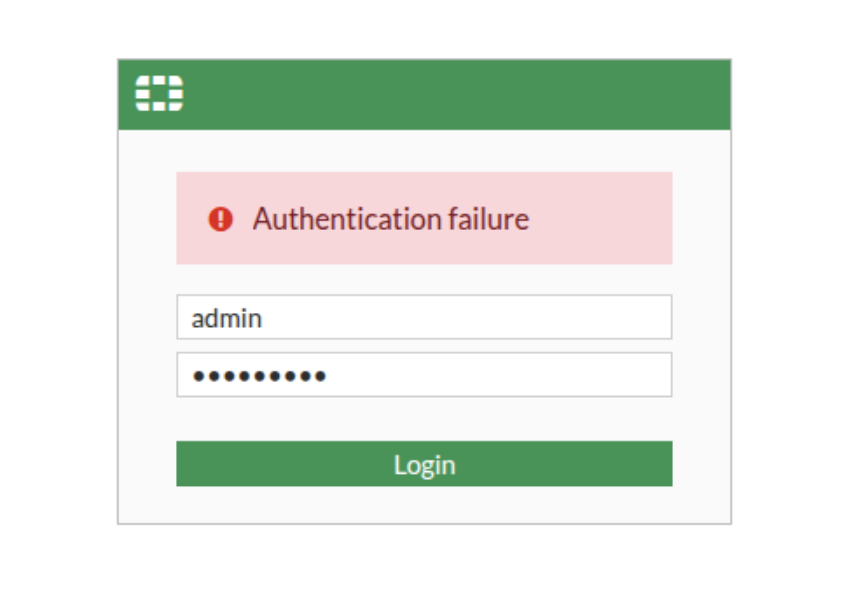
If someone tries to login, you will get a log like this one:
{
   "device":"trapster-1",
   "logtype":"https.login",
   "dst_ip":"127.0.0.1",
   "dst_port":8443,
   "src_ip":"127.0.0.1",
   "src_port":45182,
   "timestamp":"2025-02-28 18:53:18.498008",
   "data":"616a61783d3126757365726e616d653d61646d696e267365637265746b65793d61646d696e2672656469723d253246",
   "extra":{
      "method":"POST",
      "target":"/logincheck",
      "headers":{
         "host":"127.0.0.1:8443",
         "connection":"keep-alive",
         "content-length":"47",
         "cache-control":"no-store, no-cache, must-revalidate",
         "sec-ch-ua-platform":"\"Linux\"",
         "pragma":"no-cache",
         "sec-ch-ua":"\"Not(A:Brand\";v=\"99\", \"Google Chrome\";v=\"133\", \"Chromium\";v=\"133\"",
         "sec-ch-ua-mobile":"?0",
         "user-agent":"Mozilla/5.0 (Windows NT 10.0; Win64; x64) AppleWebKit/537.36 (KHTML, like Gecko) Chrome/132.0.0.0 Safari/537.3",
         "if-modified-since":"Sat, 1 Jan 2000 00:00:00 GMT",
         "content-type":"text/plain;charset=UTF-8",
         "accept":"*/*",
         "origin":"https://127.0.0.1:8443",
         "sec-fetch-site":"same-origin",
         "sec-fetch-mode":"cors",
         "sec-fetch-dest":"empty",
         "referer":"https://127.0.0.1:8443/login?redir=%2F",
         "accept-encoding":"gzip, deflate, br, zstd",
         "accept-language":"en-US,en;q=0.9"
      },
      "status_code":200,
      "username":"admin",
      "password":"admin"
   }
}
AI support
Disclaimer: AI-generated responses are not a substitute for intrusion detection. A motivated attacker can fingerprint them (latency, inconsistent state across requests, subtle phrasing) with a handful of probes, so this feature should not be relied on in a defensive or production deployment. It's intended for external CTI research, observing attacker tooling and behavior against a permissive AI-driven backend, not as a hardened detection control.
Show AI support details
To use AI, install the dependencies:
pip install trapster[ai]

# or locally
python3 -m pip install ".[ai]"
Then, you need to set your environnement variables. First, copy the example.env file
cp example.env .env
Now, you can set:
AI_MODEL=
AI_BASE_URL=
AI_API_KEY=
AI_MEMORY_ENABLE=false
# AI_MEMORY_PATH=
AI_MEMORY_ENABLE and AI_MEMORY_PATH are optionnal, it allows you to set persistant data between session using a database. Sessions are based on the IP of the user, and the username.
By default, if you set AI_MEMORY_ENABLE=true, then the database will be in trapster/data/ai_memory.db
You can also use OPENAI_API_KEY directly if you want to use the default o4-mini model:
export OPENAI_API_KEY=... && venv/bin/python3 main.py
AI for SSH
Trapster can generate fake shell responses when user connect to SSH.
To enable AI for SSH, allow the users to connect with username/password combination that you can define in the configuration file trapster.conf like :
...
 "ssh": [
      {
        "port": 2222,
        "version": "SSH-2.0-OpenSSH_8.1p1 Debian-1",
        "banner": null,
        "users": {
		      "guest":"guest",
            "admin":"admin",
            "ubuntu":"ubuntu",
            "pi":"raspberry",
            "debian":"password"
        }
      }
...
AI for HTTP
To generate responses, you can use the ai field in the configuration. It will generate a response for the corresponding URL. You can change the prompt for each URL. This enable to fast, pre-determined responses for the honeypot website, and only AI responses when the URL is unkown.
For example, this image show a request to capture SQLi attempts. Only the SQLi attempts are generated by AI.

A full example is available in trapster/data/demo_ai
Contributing
Contributions are welcome! Please follow these steps:
- Fork the repository.
- Create a new branch (git checkout -b feature-branch).
- Make your changes.
- Commit your changes (git commit -m 'Add new feature').
- Push to the branch (git push origin feature-branch).
- Create a pull request.
License
Trapster is licensed under the GNU Affero General Public License v3 or later (AGPLv3+). See the LICENSE file for more details.
1 maintainer

Download files
Download the file for your platform. If you're not sure which to choose, learn more about installing packages.
Source Distribution
Built Distribution
Filter files by name, interpreter, ABI, and platform.
If you're not sure about the file name format, learn more about wheel file names.
Copy a direct link to the current filters
File details
Details for the file trapster-1.2.2.tar.gz.
File metadata
- Download URL: trapster-1.2.2.tar.gz
- Upload date:
- Size: 80.9 kB
- Tags: Source
- Uploaded using Trusted Publishing? Yes
- Uploaded via: twine/7.0.0 CPython/3.13.14
File hashes
| Algorithm | Hash digest | |
|---|---|---|
| SHA256 |
49a415f4d30573bb3d1041402c9797a9bc380f98618862377d0dc90a60626b3d
|
|
| MD5 |
5a08f8c005ee9e57f8101db759fb4c5d
|
|
| BLAKE2b-256 |
62733a114c06fdac104a8d5f1554439a5980e4d1bd25d7b2deab1d72f3665945
|
Provenance
The following attestation bundles were made for trapster-1.2.2.tar.gz:
Publisher:
publish.yml on 0xBallpoint/trapster-community
-
Statement:
-
Statement type:
https://in-toto.io/Statement/v1 -
Predicate type:
https://docs.pypi.org/attestations/publish/v1 -
Subject name:
trapster-1.2.2.tar.gz -
Subject digest:
49a415f4d30573bb3d1041402c9797a9bc380f98618862377d0dc90a60626b3d - Sigstore transparency entry: 2340495004
- Sigstore integration time:
-
Permalink:
0xBallpoint/trapster-community@84ac80abbe149177befb0684f649b0a519a2491f -
Branch / Tag:
refs/tags/v1.2.2 - Owner: https://github.com/0xBallpoint
-
Access:
public
-
Token Issuer:
https://token.actions.githubusercontent.com -
Runner Environment:
github-hosted -
Publication workflow:
publish.yml@84ac80abbe149177befb0684f649b0a519a2491f -
Trigger Event:
release
-
Statement type:
File details
Details for the file trapster-1.2.2-py3-none-any.whl.
File metadata
- Download URL: trapster-1.2.2-py3-none-any.whl
- Upload date:
- Size: 87.9 kB
- Tags: Python 3
- Uploaded using Trusted Publishing? Yes
- Uploaded via: twine/7.0.0 CPython/3.13.14
File hashes
| Algorithm | Hash digest | |
|---|---|---|
| SHA256 |
4820354665ba4ac953d13e8f1f2e2a1817fd4df8bfdc9086851bc8ddef56fbf0
|
|
| MD5 |
565d8eac88ec997ae53498f6ddd18cd9
|
|
| BLAKE2b-256 |
ef92863daacbfd4d6c5dc25424f32805d81aac389cb25e1ab877765b02d86444
|
Provenance
The following attestation bundles were made for trapster-1.2.2-py3-none-any.whl:
Publisher:
publish.yml on 0xBallpoint/trapster-community
-
Statement:
-
Statement type:
https://in-toto.io/Statement/v1 -
Predicate type:
https://docs.pypi.org/attestations/publish/v1 -
Subject name:
trapster-1.2.2-py3-none-any.whl -
Subject digest:
4820354665ba4ac953d13e8f1f2e2a1817fd4df8bfdc9086851bc8ddef56fbf0 - Sigstore transparency entry: 2340495015
- Sigstore integration time:
-
Permalink:
0xBallpoint/trapster-community@84ac80abbe149177befb0684f649b0a519a2491f -
Branch / Tag:
refs/tags/v1.2.2 - Owner: https://github.com/0xBallpoint
-
Access:
public
-
Token Issuer:
https://token.actions.githubusercontent.com -
Runner Environment:
github-hosted -
Publication workflow:
publish.yml@84ac80abbe149177befb0684f649b0a519a2491f -
Trigger Event:
release
-
Statement type:







