
trend_classifier




Automated signal segmentation, trend classification and analysis.
Quick Start
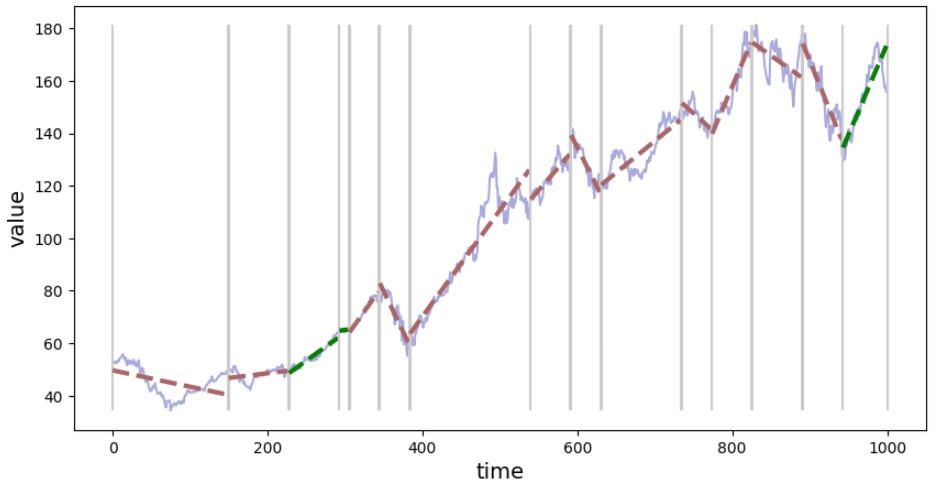
from trend_classifier import Segmenter

seg = Segmenter(x=x_data, y=y_data, n=20)
seg.calculate_segments()
seg.plot_segments()
Installation
pip install trend-classifier
With optional dependencies:
pip install trend-classifier[pelt]         # PELT algorithm (ruptures)
pip install trend-classifier[optimization] # Hyperparameter tuning (optuna)
pip install trend-classifier[all]          # All extras
Features
-
Multiple detection algorithms:
sliding_window- Original algorithm, interpretable, good for most casesbottom_up- Merge-based, control exact segment countpelt- Optimal segmentation via ruptures library
-
Rich segment information: slope, offset, volatility, trend consistency
-
DataFrame export:
seg.segments.to_dataframe() -
Visualization:
plot_segments(),plot_segment() -
Configurable: Fine-tune sensitivity with
alpha,beta, window size
Example with Stock Data
import yfinance as yf
from trend_classifier import Segmenter

# Download data
df = yf.download("AAPL", start="2020-01-01", end="2023-01-01", progress=False)

# Segment and visualize
seg = Segmenter(df=df, column="Close", n=20)
seg.calculate_segments()
seg.plot_segments()

# Export to DataFrame
seg.segments.to_dataframe()
Using Different Detectors
from trend_classifier import Segmenter

# PELT algorithm (requires: pip install trend-classifier[pelt])
seg = Segmenter(x=x, y=y, detector="pelt", detector_params={"penalty": 10})
seg.calculate_segments()

# Bottom-up with target segment count
seg = Segmenter(x=x, y=y, detector="bottom_up", detector_params={"max_segments": 10})
seg.calculate_segments()
Segment Properties
Each segment contains:
| Property | Description |
|---|---|
start, stop |
Index range |
slope |
Trend direction and steepness |
std |
Volatility (after detrending) |
reason_for_new_segment |
Why segment boundary was placed |
segment = seg.segments[0]
print(f"Slope: {segment.slope:.4f}, Volatility: {segment.std:.4f}")
Documentation
Full documentation with tutorials and API reference:
https://izikeros.github.io/trend_classifier/
License
1 maintainer

Metadata
1 maintainer
Release files for trend-classifier 0.3.3
For a detailed explanation of source distributions (sdists) and built distributions (wheels), please see the package formats documentation.
Source distribution (sdist)
| File | Size | Uploaded | |
|---|---|---|---|
| trend_classifier-0.3.3.tar.gz | 21.7 kB | Details |
Built distribution (wheel)
| File | Interpreter | ABI | Platform | Reset |
|---|---|---|---|---|
| trend_classifier-0.3.3-py3-none-any.whl | Python 3 | none | any | Details |
Total release size: 45.1 kB
Release files / trend_classifier-0.3.3.tar.gz
| Download URL | trend_classifier-0.3.3.tar.gz |
|---|---|
| Size | 21.7 kB |
| Tags | Source |
|
SHA-256 checksum How to use checksums |
9bba49bf79b1dca74d1079cc801986fe04b2fac40ef7d18622f6a9226652d314
|
|
BLAKE2b-256 checksum How to use checksums |
9cb815e287765ce9162a70c5ca79b1ea3e1d8bc3ac72acb457e59832a5e4f39a
|
| Upload date | |
|
Uploaded using Trusted Publishing? What is trusted publishing? |
No |
| Uploaded via |
twine/6.1.0 CPython/3.13.12
|
Release files / trend_classifier-0.3.3-py3-none-any.whl
| Download URL | trend_classifier-0.3.3-py3-none-any.whl |
|---|---|
| Size | 23.5 kB |
| Tags | Python 3 |
|
SHA-256 checksum How to use checksums |
97ca4d5c2039f0c4dbd6d04ac2c988fb817ddb1dfc9dcab5a5e9e143cea4868f
|
|
BLAKE2b-256 checksum How to use checksums |
cd5eddff2485dab7faeeb0b9187ef922bbc4a49a27f5a7cc63d1cba9ab0f878f
|
| Upload date | |
|
Uploaded using Trusted Publishing? What is trusted publishing? |
No |
| Uploaded via |
twine/6.1.0 CPython/3.13.12
|














