
Package for automated signal segmentation, trend classification and analysis.

Project description
trend_classifier




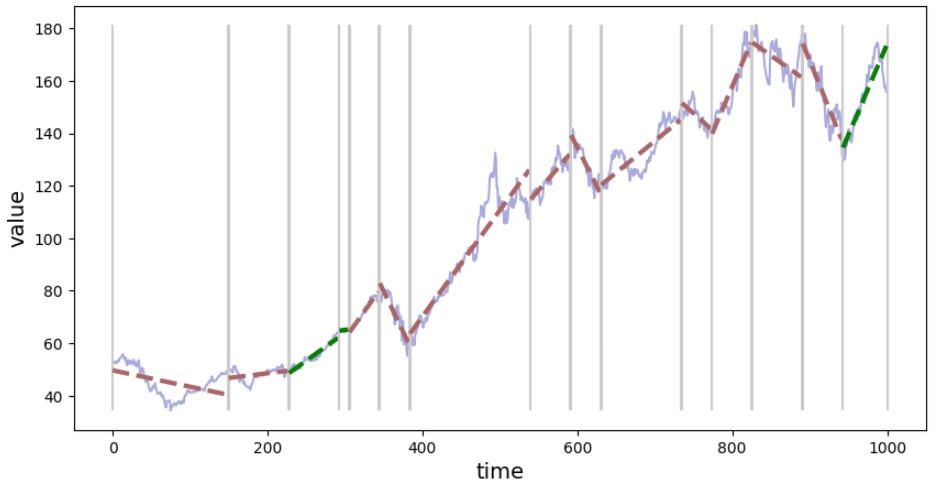
Automated signal segmentation, trend classification and analysis.
Quick Start
from trend_classifier import Segmenter

seg = Segmenter(x=x_data, y=y_data, n=20)
seg.calculate_segments()
seg.plot_segments()
Installation
pip install trend-classifier
With optional dependencies:
pip install trend-classifier[pelt]         # PELT algorithm (ruptures)
pip install trend-classifier[optimization] # Hyperparameter tuning (optuna)
pip install trend-classifier[all]          # All extras
Features
-
Multiple detection algorithms:
sliding_window- Original algorithm, interpretable, good for most casesbottom_up- Merge-based, control exact segment countpelt- Optimal segmentation via ruptures library
-
Rich segment information: slope, offset, volatility, trend consistency
-
DataFrame export:
seg.segments.to_dataframe() -
Visualization:
plot_segments(),plot_segment() -
Configurable: Fine-tune sensitivity with
alpha,beta, window size
Example with Stock Data
import yfinance as yf
from trend_classifier import Segmenter

# Download data
df = yf.download("AAPL", start="2020-01-01", end="2023-01-01", progress=False)

# Segment and visualize
seg = Segmenter(df=df, column="Close", n=20)
seg.calculate_segments()
seg.plot_segments()

# Export to DataFrame
seg.segments.to_dataframe()
Using Different Detectors
from trend_classifier import Segmenter

# PELT algorithm (requires: pip install trend-classifier[pelt])
seg = Segmenter(x=x, y=y, detector="pelt", detector_params={"penalty": 10})
seg.calculate_segments()

# Bottom-up with target segment count
seg = Segmenter(x=x, y=y, detector="bottom_up", detector_params={"max_segments": 10})
seg.calculate_segments()
Segment Properties
Each segment contains:
| Property | Description |
|---|---|
start, stop |
Index range |
slope |
Trend direction and steepness |
std |
Volatility (after detrending) |
reason_for_new_segment |
Why segment boundary was placed |
segment = seg.segments[0]
print(f"Slope: {segment.slope:.4f}, Volatility: {segment.std:.4f}")
Documentation
Full documentation with tutorials and API reference:
https://izikeros.github.io/trend_classifier/
License
Release history Release notifications | RSS feed


Download files
Download the file for your platform. If you're not sure which to choose, learn more about installing packages.
Source Distribution
Built Distribution
Filter files by name, interpreter, ABI, and platform.
If you're not sure about the file name format, learn more about wheel file names.
Copy a direct link to the current filters
File details
Details for the file trend_classifier-0.3.0.tar.gz.
File metadata
- Download URL: trend_classifier-0.3.0.tar.gz
- Upload date:
- Size: 21.7 kB
- Tags: Source
- Uploaded using Trusted Publishing? No
- Uploaded via: twine/6.1.0 CPython/3.13.7
File hashes
| Algorithm | Hash digest | |
|---|---|---|
| SHA256 |
4f7ac3d64531c27d6df265e50325e928de29ca327c31df1a4a0cfee5757614c0
|
|
| MD5 |
16d94b59604bfd84ff6259839eba6289
|
|
| BLAKE2b-256 |
f28ae6c96e0bb6fdcaef19f255a94a6489d93d11ddaf46c0586d175429e3e3ff
|
File details
Details for the file trend_classifier-0.3.0-py3-none-any.whl.
File metadata
- Download URL: trend_classifier-0.3.0-py3-none-any.whl
- Upload date:
- Size: 23.4 kB
- Tags: Python 3
- Uploaded using Trusted Publishing? No
- Uploaded via: twine/6.1.0 CPython/3.13.7
File hashes
| Algorithm | Hash digest | |
|---|---|---|
| SHA256 |
4f5474306de6c0f65885978c08e480c0c0093d1343be28b6696802c27e4a28fe
|
|
| MD5 |
7de08ca0c5a54e46781eb17cbe7a0ad9
|
|
| BLAKE2b-256 |
b0532353ca23b7c3e4e94e8cb562a8feb60c712dcae8bd0428a487cbda7f8112
|






