



🦕 Live demo — a company as five graphs: every action declares what must have happened before it, carries a date and an actor, and the page shows the declarations · pipeline demo — a data platform with an action log: every table wears its current state · workspace demo — 600 real third-party facts as 6 domain graphs, tiled and filterable; run SPARQL in the browser · PyPI
trikedb
The single-file knowledge graph for AI agents. One graph is one YAML file in your repo — SPARQL 1.1 queries and default-graph updates, reads and writes, agents write through an ontology guard, and every change arrives as a diff.
Compatibility and safety contract. This is one default graph: SPARQL reads plus default-graph INSERT/DELETE and CLEAR/DROP, with named-graph/dataset updates rejected. Legacy objects containing whitespace are literals; use rdf_terms={"o": {"kind": "iri"}} for an entity such as New York. SPARQL-inserted RDF types, language tags and blank nodes now survive save/reload. RDF/JSON-LD exports preserve the RDF projection, including metadata; pattern/NetworkX/SQL views use lexical names.
API-returned triples/properties are snapshots; use mutation APIs, not edits to returned objects. batch() rolls back its in-memory state on body or final-save failure; explicit saves/external effects inside it cannot be undone. reload() uses the stored ontology. The whitelist applies to API insertions when configured, with HTTP(S) predicate exceptions; manually edited files are not schema-checked on load.
Local writes replace complete files atomically but independent local processes are last-write-wins. One HTTP server shares and serializes REST/MCP state; external edits still require reload. S3/SQL conditional saves use the token returned by their own commit. Other fsspec backends lack that guarantee. Exported HTML requires network access to vis-network/Oxigraph CDNs. See the API contract.
Shared remote MCP on ECS + S3: Dockerfile and deployment guide. These optional files are GitHub-only; they are not included in PyPI packages.
triples:
  - {s: salesflow-crm, p: PROVIDES, o: crm-sync-job}
  - {s: crm-sync-job, p: INGESTS_TO, o: RAW_CRM_CONTACTS, schedule: hourly}
  - {s: LEGACY_DUMP, p: MIGRATED_TO, o: RAW_CRM_CONTACTS, deprecated: true}
That file is the database. No server, no daemon, no cloud deployment. It diffs cleanly in git, survives in a repo next to your code, and — the part trikedb is actually designed around — an LLM agent can Read it directly and ground its domain reasoning in explicit entity names.
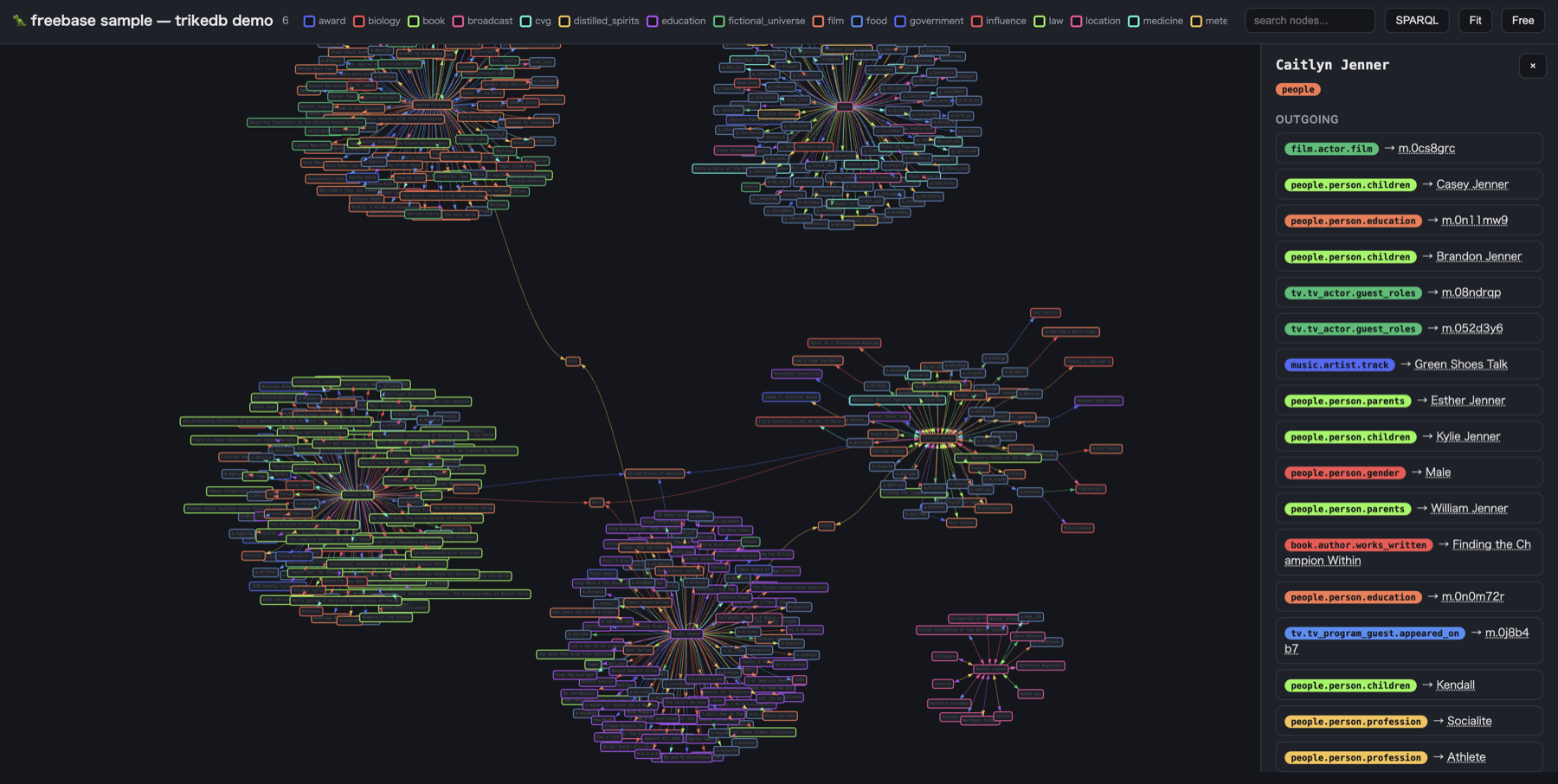
And it renders as an interactive workbench (workspace demo — 600 real Freebase facts):
Performance numbers below are historical measurements on their recorded hardware and version, not freshly measured guarantees for this release.
Why
RDF graph databases are powerful, correct — and heavy. SPARQL endpoints, OWL reasoners, enterprise semantic layers: great at scale, overkill when what you need is a curated map of a few hundred facts that your AI agents (and teammates) can trust.
trikedb keeps the interface of the big system — real SPARQL 1.1, executed by Oxigraph, not a homegrown subset — and shrinks the machinery down to an embedded library over a file you can read, diff, and commit:
| A full triple-store deployment | trikedb | |
|---|---|---|
| Storage | server / cloud service | one YAML file |
| Query | SPARQL 1.1 | SPARQL 1.1 (same language, Oxigraph's Rust engine) |
| Graph model | usually pick one: RDF or property graph (two systems) | both from one file — SPARQL/RDF (to_rdflib) and property graph (to_networkx, via [networkx]) |
| Writes | SPARQL Update | SPARQL Update — persisted back to the YAML |
| Schema | OWL + reasoners | a predicate whitelist, plus SHACL shapes via [shacl] |
| Inference | DL reasoning engines | OWL-RL materialization via [owl] — inferred facts land in the YAML, reviewable |
| Agent integration | a service to operate | the agent reads the file, trikedb mcp (stdio), or trikedb serve (remote MCP + UI + REST) |
| Setup time | an afternoon (or a sprint) | pip install trikedb |
If you need full OWL-DL reasoning at scale, named graphs, and multi-tenant governance, you want a full enterprise semantic platform. If you want a knowledge graph today, in a file, in git — that's trikedb. And because the storage maps cleanly onto RDF, graduating to a bigger system later is an export, not a rewrite: each team keeps its own YAML graph, and stitching them together (or migrating them wholesale) is just merging triples.
Curation-first, not extraction-first
Most "AI knowledge graph" tools use an LLM to extract triples from text. That's great for bootstrapping, but extracted graphs inherit hallucinations. trikedb takes the opposite stance: the graph is curated data (by humans, or by agents you supervise), the ontology constrains what can be said, and LLMs consume the graph rather than invent it. When an agent reads
- {s: crm-sync-job, p: INGESTS_TO, o: RAW_CRM_CONTACTS}
there is no step where a table name can be made up.
Install
From PyPI:
pip install trikedb             # library + CLI (PyYAML, rdflib, pyoxigraph)
pip install 'trikedb[all]'      # everything below in one shot

pip install 'trikedb[mcp]'      # + MCP server for AI agents (stdio)
pip install 'trikedb[serve]'    # + UI / REST / remote MCP over HTTP
pip install 'trikedb[oauth]'    # + OAuth 2.1 for the claude.ai / ChatGPT UIs
pip install 'trikedb[remote]' gcsfs   # + s3:// gs:// graphs
pip install 'trikedb[snowflake]' # + snowflake:// graphs (the warehouse is the store)
pip install 'trikedb[bigquery]' # + bigquery:// graphs (same, on BigQuery)
pip install 'trikedb[shacl]'    # + SHACL validation
pip install 'trikedb[owl]'      # + OWL-RL inference
pip install 'trikedb[semantic]' # + semantic search (numpy + model2vec, no torch)
pip install 'trikedb[networkx]' # + property-graph projection (to_networkx)
Quickstart (Python)
from trikedb import TrikeDB

# A typed knowledge graph that lives in one YAML file. The predicates you declare
# are the schema — that whitelist catches typos and junk on write.
db = TrikeDB("pipeline.yaml", ontology={
    "PROVIDES":   "SaaS vendor -> ingestion job",          # a description documents
    # a shape is enforced: write this edge between the wrong node types and it is
    # refused, not stored — including the common one, written backwards
    "INGESTS_TO": {"description": "ingestion job -> warehouse table",
                   "domain": "job", "range": "table"},
    "AFFECTED_BY": {"description": "warehouse table -> change event",
                    "domain": "table"},
    "MIGRATED_TO": "deprecated table -> its replacement",
})

# Add facts. Any keyword becomes an edge attribute — and `prov` is the one to
# standardize on: cite where each fact came from so the graph stays verifiable.
db.add("salesflow-crm", "PROVIDES", "crm-sync-job")
db.add("crm-sync-job", "INGESTS_TO", "RAW_CRM_CONTACTS",
       schedule="hourly", prov="https://runbook.example/crm#sync")
db.add("LEGACY_DUMP", "MIGRATED_TO", "RAW_CRM_CONTACTS", deprecated=True)

# The ontology is a guardrail: db.add("crm-sync-job", "OWNS", "x") would raise
# OntologyError — 'OWNS' isn't a declared predicate, so the typo never lands.

# Describe nodes: `type` colors the graph and is queryable; attach anything else.
db.set_node("RAW_CRM_CONTACTS", type="table", pii=True,
            url="https://catalog.example/raw_crm_contacts")

# db.add("RAW_CRM_CONTACTS", "INGESTS_TO", "crm-sync-job") would raise OntologyError
# too: INGESTS_TO is declared job -> table, and that is a table -> job.

# Something happened to a node? Don't write a note about it — run it. act()
# stamps the time, appends the record, and moves the node to the state that
# action left it in, and the three cannot come apart.
db.act("RAW_CRM_CONTACTS", "AFFECTED_BY", "email column dropped for privacy",
       by="data-platform", state="applied")     # at= defaults to now
db.state("RAW_CRM_CONTACTS")     # 'applied' — the node itself is different now
db.history("RAW_CRM_CONTACTS")   # everything that happened to it, newest first
# Run the same action again and you get a second record, not an overwritten one.

# An action can also declare *when* it may run and *who* may run it — the half a
# type check cannot reach. An order delivered before it ever shipped breaks no
# type; a price change approved by nobody is type-correct. Both are refused now.
db.declare_link("DELIVERED_TO", domain="order", range="region",
                requires="SHIPPED_FROM",   # this has to have happened first
                by="courier")              # and this is who may do it
# db.act("ORD-25101", "DELIVERED_TO", "Riverside", by="Kai") would raise
# OntologyError: ORD-25101 has no SHIPPED_FROM on either end. What the write
# path cannot see yet — a hand-edited file, an actor typed later — `trikedb
# audit` reads back off the finished graph, with the clock deciding what came
# first rather than the line a triple happens to sit on.

# A condition can span more than one step, joined on shared variables, with ?s
# and ?o already bound to the action's own two ends — because the thing a rule
# turns on is usually named by neither. "You may review what you bought": the
# review is customer -> product, and the purchase is an *order*, a third node.
db.declare_link("REVIEWED", domain="customer", range="product",
                requires=["?order PLACED_BY ?s",    # an order this customer placed
                          "?order CONTAINS ?o"])    # that held this very product
# Checked when the triple is written, not downgraded to a report afterwards.
# Inside a batch() a condition that does not hold yet is held and asked again at
# the end, because writing more triples can satisfy a condition and never break
# one — so the evidence may arrive after the write that needs it.

# Ask questions — join patterns with zero dependencies …
db.query(["?vendor PROVIDES ?job", "?job INGESTS_TO ?table"])
# [{'vendor': 'salesflow-crm', 'job': 'crm-sync-job', 'table': 'RAW_CRM_CONTACTS'}]

# … or SPARQL 1.1 queries and default-graph updates (FILTER, OPTIONAL, aggregates — run by Oxigraph, t: pre-bound)
db.sparql('SELECT ?t WHERE { ?t t:type "table" ; t:pii true }')   # every PII table
db.sparql('SELECT ?s ?o WHERE { ?st rdf:subject ?s ; rdf:object ?o ; t:schedule "hourly" }')  # edge attrs, too

# Let the graph classify itself — declare RDFS/OWL semantics and materialize what
# follows (pip install 'trikedb[owl]'). Inferred facts land in the YAML, reviewable.
db.declare("INGESTS_TO", "domain:job")    # subjects of INGESTS_TO are jobs
db.declare("INGESTS_TO", "range:table")   # objects are tables
db.infer(apply=True)   # -> crm-sync-job a job, RAW_CRM_CONTACTS a table (tagged inferred: true)

# Check it before you trust it — validate against SHACL shapes (pip install 'trikedb[shacl]')
ok, report = db.validate('''@prefix sh: <http://www.w3.org/ns/shacl#> . @prefix t: <urn:trikedb:> .
  t:IngestShape a sh:NodeShape ; sh:targetObjectsOf t:INGESTS_TO ;
    sh:property [ sh:path t:type ; sh:minCount 1 ] .''')   # does every landed table declare a type?

# Find facts by meaning, not spelling (pip install 'trikedb[semantic]')
db.search("what syncs the CRM?", k=5)

# Hybrid retrieval for agents — semantic recall + a hard structured filter, in one
# call: cast a wide net by meaning, then keep only what precisely matches.
db.find("where is the customer CRM data?", where={"type": "table", "pii": True})
# -> [{'node': 'RAW_CRM_CONTACTS', 'props': {'type': 'table', 'pii': True, ...}, 'facts': [...]}]

# Writes go through SPARQL too and autosave straight back to the YAML
db.sparql("INSERT DATA { t:figly t:PROVIDES t:figly-export-job }")

# Autosave rewrites the whole file per mutation — right for a handful of facts,
# quadratic for a bulk load. Wrap those in one save.
with db.batch():
    for s, p, o in rows:          # tens of thousands: minutes without this, seconds with
        db.add(s, p, o)

# Ship one single-file (CDN-dependent) HTML file your team can actually click through
db.to_html("pipeline.html")     # searchable graph + node details + in-browser SPARQL console
db.to_rdflib(); db.to_jsonld()  # RDF/SPARQL view — or graduate to any RDF tool
db.to_networkx()                # property-graph view: run networkx algorithms on the
                                # same file (shortest path, centrality) — 'trikedb[networkx]'
Quickstart (CLI)
trikedb add pipeline.yaml salesflow-crm PROVIDES crm-sync-job
# `prov` is just an edge attribute, but the one to standardize on: cite each fact's source.
trikedb add pipeline.yaml crm-sync-job INGESTS_TO RAW_CRM_CONTACTS -a schedule=hourly -a prov=https://runbook.example/crm#sync

trikedb query pipeline.yaml -w "?vendor PROVIDES ?job" -w "?job INGESTS_TO ?table"
# vendor         job           table
# -------------  ------------  ----------------
# salesflow-crm  crm-sync-job  RAW_CRM_CONTACTS

trikedb sparql pipeline.yaml \
  "SELECT ?v ?t WHERE { ?v t:PROVIDES ?j . ?j t:INGESTS_TO ?t }"

# updates persist straight back to the file
trikedb sparql pipeline.yaml \
  "INSERT DATA { t:figly t:PROVIDES t:figly-export-job }"

# semantic search: meaning, not spelling ([semantic] extra)
trikedb search pipeline.yaml "what syncs the CRM?" -k 5

# declare what a predicate connects, and have it enforced from then on
trikedb ontology pipeline.yaml --link INGESTS_TO=job>table

# execution conditions and permissions are declared in the YAML alongside the
# shape, and checked over the whole file
trikedb audit pipeline.yaml     # exits 1 on an action that ran out of order

# record something you did: the node moves to its new state, the log keeps the run
trike act pipeline.yaml RAW_CRM_CONTACTS AFFECTED_BY "email column dropped" \
  --state applied --by data-platform
trike history pipeline.yaml RAW_CRM_CONTACTS

trikedb stats pipeline.yaml
trike ui generate pipeline.yaml -o pipeline.html
trikedb jsonld pipeline.yaml
Importing from CSV and Markdown docs
The YAML file is the store, but triples can come from wherever your team already writes:
# CSV/TSV with an s,p,o header — extra columns become edge attributes
trikedb import pipeline.yaml new_vendors.csv

# Markdown: every table whose header has s/p/o columns is picked up;
# prose and other tables are ignored. Your design docs are data.
trikedb import pipeline.yaml design_doc.md
<!-- anywhere inside an ordinary design doc: -->
| s                 | p          | o                  | schedule  |
|-------------------|------------|--------------------|-----------|
| clickpath-pa      | PROVIDES   | clickpath-webhook  |           |
| clickpath-webhook | INGESTS_TO | RAW_PRODUCT_EVENTS | streaming |
Imports are deterministic — no LLM extraction, so nothing gets invented. The ontology is enforced on the way in, and "true"/"false" cells become booleans. See examples/acme_design_doc.md and examples/acme_new_vendors.csv.
Validation and inference (SHACL / OWL)
The predicate whitelist is the seatbelt; when you want real schema
validation, use SHACL (pip install 'trikedb[shacl]' — delegated to
pySHACL, not hand-rolled):
conforms, report = db.validate("""
@prefix sh: <http://www.w3.org/ns/shacl#> .
@prefix t:  <urn:trikedb:> .
t:BotShape a sh:NodeShape ;
  sh:targetSubjectsOf t:USES_ROLE ;
  sh:property [ sh:path t:type ; sh:hasValue "bot" ; sh:minCount 1 ] .
""")
trikedb validate graph.yaml shapes.ttl # exit code 1 on violations — CI-friendly
For inference, declare RDFS/OWL semantics on your predicates (and
classes) and materialize what follows (pip install 'trikedb[owl]',
OWL-RL via owlrl):
# OWL property characteristics
db.declare("INHERITS", "transitive")     # stored as a reviewable triple
db.add("admin", "INHERITS", "editor")
db.add("editor", "INHERITS", "viewer")
db.infer(apply=True)                     # adds (admin, INHERITS, viewer) — marked inferred: true

# RDFS class hierarchy + typing
db.declare("Cat", "subclass_of:Animal")        # rdfs:subClassOf
db.declare("authored", "domain:Person")        # rdfs:domain  → subjects get typed
db.declare("authored", "range:Book")           # rdfs:range   → objects get typed
db.declare("bornIn", "subproperty_of:locatedIn")  # rdfs:subPropertyOf
db.add("felix", "http://www.w3.org/1999/02/22-rdf-syntax-ns#type", "Cat")
db.infer()   # → (felix, rdf:type, Animal)  via subClassOf; domain/range typing; etc.
infer() surfaces classifications and hierarchy (rdf:type, subClassOf,
subPropertyOf) as well as OWL edges (transitive / symmetric / inverse),
while suppressing the reasoner's rdf/owl bookkeeping noise.
Inference is materialization, not magic: derived facts land in the
YAML tagged inferred: true, so the git diff shows exactly what the
reasoner concluded and a human can review it like any other change.
(For ad-hoc transitivity you often don't need OWL at all — SPARQL
property paths like t:INHERITS+ already walk chains at query time.)
Where the graph lives: your storage, your choice
The file doesn't have to be local, and it doesn't have to be a file.
Everything above storage only ever asks for one whole document, so the
destination swaps out and nothing else changes — SPARQL, the MCP tools,
SHACL and to_networkx behave identically wherever the bytes are.
Object storage (pip install 'trikedb[remote]' gcsfs):
db = TrikeDB("s3://team-bucket/kg/pipeline.yaml") # read and write
trikedb sparql s3://team-bucket/kg/pipeline.yaml "SELECT ?s WHERE { ?s ?p ?o } LIMIT 5"
trikedb mcp s3://team-bucket/kg/pipeline.yaml       # whole team's agents share one graph
Auth is delegated to the standard AWS credential chain (env vars,
~/.aws/credentials profiles, SSO, IAM roles) via fsspec/s3fs — trikedb
stores no credentials, and your bucket policy is the access control:
readers get s3:GetObject, writers get s3:PutObject, per-prefix
policies give each team its own graph. gs://, az:// and plain
https:// (read-only) work through the same mechanism with the
matching fsspec backend installed.
A warehouse table (pip install 'trikedb[snowflake]' or
'trikedb[bigquery]') — for teams whose governance says data lives in the
warehouse:
db = TrikeDB("snowflake://ANALYTICS.PUBLIC.TRIKE_GRAPHS/sales/crm")
# or
db = TrikeDB("bigquery://my-project.analytics.TRIKE_GRAPHS/sales/crm")
One graph is one row (name, doc, version, updated_at), and one
table holds many graphs — adopting trikedb costs a company one table, not
one per graph. There's no local copy and nothing to synchronise: the row
is the graph. Create the table first (trikedb won't run DDL in your
warehouse on its own):
trikedb sql-init snowflake://ANALYTICS.PUBLIC.TRIKE_GRAPHS/sales/crm --print   # review the DDL
trikedb sql-init snowflake://ANALYTICS.PUBLIC.TRIKE_GRAPHS/sales/crm           # or just run it
Connection settings come from the environment (SNOWFLAKE_ACCOUNT,
SNOWFLAKE_USER, SNOWFLAKE_PRIVATE_KEY_PATH or SNOWFLAKE_PASSWORD,
plus role/warehouse/database as needed), or name an entry in your
connections.toml with SNOWFLAKE_CONNECTION_NAME and let your existing
Snowflake tooling own it. Same as S3: trikedb stores no credentials, and
your grants are the access control.
And the warehouse can read it back. sql-init also creates four
views, so the same graph answers SPARQL from memory and SQL from the
warehouse — with no second copy to keep in step:
-- does the graph still match reality?
SELECT k.NODE_ID
FROM MYDB.PUBLIC.KG_NODE k
LEFT JOIN MYDB.INFORMATION_SCHEMA.TABLES t ON t.TABLE_NAME = k.NODE_ID
WHERE k.NODE_TYPE = 'table' AND t.TABLE_NAME IS NULL;   -- claimed, but gone
KG_NODE and KG_EDGE carry the node/edge column shape conventionally
used for property graphs on Snowflake, so a Cortex Analyst semantic model
or query written against that shape works here too; KG_PREDICATE exposes
the ontology, and KG_TRIPLE the same rows as plain s/p/o. Node
properties and edge attributes stay in VARIANT columns, so adding a
predicate never needs a DDL change. They're views, not tables — nothing
stored twice, nothing to drift, zero cost, and AT(TIMESTAMP => …) reads
the past through them. (That column shape is an intended byproduct, not a
dependency: nothing is imported from anyone, the SQL is generated from
trikedb's own model, and trikedb is not affiliated with or endorsed by
Snowflake.)
Reading without a write path. Pass read_only=True and every mutation
raises, reload() included:
db = TrikeDB("snowflake://DB.SCHEMA.T/sales/crm", read_only=True)
Use it when writes belong somewhere else — a reviewed file in git, say — and the warehouse is there for distribution and SQL access. An app that only reads shouldn't be holding a capability a bug could spend.
Bringing your own connection. Some hosts have a session and no way to make another — inside Streamlit in Snowflake there are no credentials to find and no outbound connection to open. Pass what you have:
from snowflake.snowpark.context import get_active_session

db = TrikeDB("snowflake://DB.SCHEMA.T/sales/crm",
             connection=get_active_session(), read_only=True)
A DB-API connection works too; dispatch is on what the object can do, not on an imported type, so neither driver has to be installed for the other path to work.
Concurrent writes are safe on both. A save is conditional on the stored
graph still being the one it was read from, so a write that would clobber
someone else is refused with ConcurrentWriteError rather than silently
winning — S3 does it with an ETag precondition, a warehouse with a
version column and an affected-row count. Ten concurrent writers land ten
triples in either. gs://, az:// and local files have no conditional
write, so they stay last-write-wins: point writers through a single MCP
process or keep writes in git-reviewed batches.
Adding a backend happens in one place. A warehouse is four SQL templates and a connect function.
Workspaces: many graphs, one view
Real teams have more than one graph — finance, data platform, HR. A workspace file unions them:
# workspace.yaml
graphs:
  finance:  finance.yaml
  platform: s3://team-bucket/kg/platform.yaml   # local and remote mix freely
  warehouse: ../infra/ontology/warehouse.yaml
Every command accepts it (trikedb sparql workspace.yaml ...,
trike ui generate workspace.yaml, trikedb serve workspace.yaml). In the
HTML view each project tiles into its own cluster with a per-graph
filter bar; every triple carries a graph: attribute naming its source.
The payoff is automatic joins: because RDF triples merge on shared
names, (tanaka, OWNS_BUDGET, project-atlas) in finance and
(project-atlas, USES, ACME_DWH) in platform become one SPARQL-walkable path —
no foreign keys, no schema negotiation. Unions are read-only views;
each member graph stays owned (and permissioned) by its team, and
writes go to the member file.
Members can be warehouse rows too, and they inherit the connection — which
is what makes a union usable somewhere that cannot open one of its own:
# workspace.yaml, itself stored as a row
graphs:
  ontology: snowflake://DB.SCHEMA.T/kg/ontology
  skills:   snowflake://DB.SCHEMA.T/kg/skills
db = TrikeDB("snowflake://DB.SCHEMA.T/kg/workspace",
             connection=get_active_session(), read_only=True)
Let TrikeDB build the union rather than reading the members and merging
them yourself. Three details decide what a union contains, and getting
one wrong is silent — the graph just comes out slightly poorer than the
files it was built from:
- Node properties merge per key, not per node. A node declared in two
members keeps the first value of each key, so a
descriptiononly the second member carries still survives. Taking the whole dict from the first member drops it with no error anywhere. - Ontologies merge per predicate, first member wins the description.
- A triple's
graphattribute is the workspace key, not the member's filename or path.
content_hash() is the cheap way to prove a union you built matches one
trikedb built: same hash, same graph.
Speed
The graph lives in memory, so what costs time is opening it and querying it. Both are tunable, and neither needs a change to how you write the graph.
Measured on 40,800 triples with benchmarks/backend_bench.py, medians of
three, Apple silicon:
Historical backend timings: the +1-fact column repeated the same fact, so only the first repetition added data. Treat it as reload/save latency. See benchmark audit.
| backend | open | 1-hop | 2-hop join | write 1 fact |
|---|---|---|---|---|
local .yaml |
992 ms | 0.04 ms | 55 ms | 1,957 ms |
local .json |
57 ms | 0.04 ms | 55 ms | 148 ms |
snowflake:// row |
507 ms | 0.04 ms | 56 ms | 2,889 ms |
Three things fall out of that. Queries do not care where the graph lives —
identical across all three, because they run in memory. The format matters
more than the medium: the same graph opens 17x faster as .json than as
.yaml, and a warehouse row beats a local YAML file despite crossing a
network, because its document is already JSON. Warehouse writes are the
expensive operation — read, rewrite, conditional update — so batch with
autosave=False rather than putting them in a loop.
And the engine, on the same graph once built:
| 1-hop | 2-hop join | count all | |
|---|---|---|---|
| rdflib | 0.90 ms | 342 ms | 432 ms |
| oxigraph (default) | 0.04 ms | 52 ms | 11 ms |
One knob, and one thing that is already on — neither changes what is stored:
Store JSON instead of YAML for a graph that is read far more often than
it is reviewed — name the file graph.json, or keep it in a warehouse row,
which is JSON already. Same API, same SPARQL, ~30x faster to open. The cost
is the thing YAML was picked for: nobody enjoys reading a diff of JSON.
Historical speed measurements. Read queries run on
Oxigraph, a Rust engine with real
indexes; pyoxigraph is a core dependency because it was faster at every
graph size measured, down to a few hundred triples. Both are SPARQL 1.1 and
the test suite asserts they answer identically — including the sharp edge,
typed literals, where ?x t:pii true has to match a boolean rather than the
string "true". TrikeDB(..., sparql_engine="rdflib") pins the old engine, which is worth
doing if you ever want to compare the two on a real query. If pyoxigraph is
ever absent — a vendored subset of the files, an interpreter it has no wheel
for yet — reads fall back to rdflib on their own rather than failing.
Updates (INSERT/DELETE), OWL inference and SHACL always use rdflib — those
paths change data or hand the graph to owlrl/pyshacl, and a second
implementation buys nothing there.
What is not tunable is the shape: the whole document is read on open and rewritten on save. That is the price of a graph you can review in a diff, and it is why the practical ceiling is a few MB rather than a few GB.
Keeping a growing graph healthy
Ontologies accumulate facts from many hands (and agents). Two commands keep that sustainable:
# CI / pre-commit: does the graph parse, and is the exported HTML current?
# Generated HTML embeds a content hash of the graph, so staleness is detectable.
trikedb check graph.yaml --html docs/index.html   # exit 1 if stale

# health findings: duplicate triples across workspace members, Tokyo-vs-tokyo
# name collisions, near-duplicate free-text facts, orphan node props,
# declared-but-unused predicates
trikedb audit workspace.yaml            # exit 1 on errors; --strict fails on warnings too
audit is deterministic by design — for semantic dedup beyond these
heuristics, hand the --json report to an LLM agent and let it propose
merges as a reviewable PR.
The review gate depends on where the graph lives. A file in git gives
you the strongest story: every change is a diff, check and audit run
in CI, history comes free. An s3:// or snowflake:// graph has no pull
request — writes land immediately — so review moves to the ontology guard
at the write boundary, audit on a schedule instead of per-change, and
the backend's own history (object versions, warehouse time travel, the
updated_at column). Some teams run both on purpose: the reviewed graph
in git, a shared graph agents write to, unioned with a workspace file so
curation and accumulation don't block each other.
Do you have to write YAML by hand?
No — YAML is the storage format, not the authoring interface. It's what the graph is written down as, chosen so a human can read a diff. Every write path produces the same document and passes the same ontology check:
db.add(s, p, o, **attrs) |
Python — scripts, notebooks, ETL |
trikedb add FILE S P O -a k=v |
one fact from a shell |
trikedb import FILE data.csv |
a spreadsheet or Markdown table already has the facts |
db.sparql("INSERT DATA {...}") |
you think in SPARQL |
MCP add_triple / set_node |
an agent is writing — the usual case |
db.infer(apply=True) |
materialize what already follows |
| editing the YAML | a text editor is a legitimate client too |
The guard applies to all of them equally, so "an agent wrote it" and "a human wrote it" can't diverge in vocabulary.
The HTML workbench is a rendering, and where the graph lives never
decides where the page goes: a local graph renders next to itself, a
remote one into the working directory, and -o takes a path or an object
URL (-o s3://site/kg.html publishes it). It's one single-file (CDN-dependent) file —
no build step, no server — so publishing is just putting it somewhere.
Serving a graph (UI + REST + remote MCP)
One process, three doors (pip install 'trikedb[serve]'):
trikedb serve workspace.yaml --port 8080 --token $SECRET
/— the workbench UI, always showing the current graph/sparql— minimal REST:POST {"query": "..."}→ JSON, for apps/mcp— MCP over Streamable HTTP, for agents anywhere:
claude mcp add kg https://kg.internal:8080/mcp --transport http \
  --header "Authorization: Bearer $SECRET"
Same eleven MCP tools as stdio — the server definition is shared, only
the transport differs. Pair it with an s3:// graph and the server is
stateless — run it anywhere.
OAuth 2.1, for the claude.ai and ChatGPT UIs
A static token is fine for a script, but the web UIs want a real login. Point trikedb at an IdP you already run and it becomes an OAuth 2.1 resource server — the thing both connector UIs know how to talk to:
pip install 'trikedb[serve,oauth]'
trikedb serve graph.yaml --public-url https://kg.example.com \
  --oauth-issuer https://idp.example.com/ --required-scope kg:read
Then add https://kg.example.com/mcp as a custom connector and log in
as yourself. trikedb verifies tokens; it never issues them. There is
no authorization server here, no user table, no password — just a JWKS
lookup against your issuer and a check that the token's signature,
expiry, and audience are right. Your IdP stays the only place identity
lives, and the graph stays a file.
Three things to get right:
--public-urlmust be the HTTPS URL clients actually reach. Tokens are bound to<public-url>/mcpas their audience (RFC 8707), so a token minted for another service can't open your graph. Override with--oauth-audienceif your IdP issues a fixed API identifier instead.- The IdP needs to register the connector. Dynamic Client Registration is the smooth path (Auth0, Okta, Keycloak, WorkOS all support it); if yours doesn't, claude.ai also accepts a Client ID Metadata Document or a client ID/secret you paste in.
- It has to be publicly reachable over HTTPS. Neither UI can connect
to
localhost— use a tunnel while you're developing.
Discovery is served for you at
/.well-known/oauth-protected-resource/mcp, and an unauthenticated
request gets the RFC 9728 challenge that starts the login flow.
And once trikedb knows who is calling, identity stops being only a gate.
An action written through /mcp is signed by the token: by is
filled in with the caller's own identity, and a by naming somebody
else is refused rather than recorded. Which is what turns a declaration
like APPROVED_BY: {by: approver} into something an agent cannot talk
its way around — a bot's token cannot write an approval, however nicely
it asks.
Tie an identity to a node with a subject property:
nodes:
  Rune Halvorsen: {type: approver, subject: "auth0|ryuto"}
  crm-sync-job:   {type: bot,      subject: "auth0|bot"}
A token whose sub is auth0|ryuto now stamps by: Rune Halvorsen,
which is the name by: approver is checked against. Pass
--actor-claim email to sign with something more legible than an opaque
sub. An identity you haven't mapped is stamped verbatim, so a graph
with no subject anywhere still gets signed events — it just signs them
with whatever your IdP calls people.
The map itself is not agent-writable: an authenticated request cannot
write a subject property at all, because an actor that can name itself
is not an actor. Curate it in the file, like the rest of the ontology. A
static --token names nobody, and neither does stdio or library use, so
by on those paths behaves exactly as it always has.
The file format
A trikedb file is ordinary YAML with three top-level keys (only triples is required):
ontology:            # optional — omit it for free-form predicates
  predicates:
    PROVIDES: "SaaS vendor -> ingestion job"      # a description documents
    # a shape is enforced: `domain` is the node type allowed as the subject,
    # `range` the type allowed as the object. A backwards edge is refused.
    INGESTS_TO: {description: "job -> warehouse table", domain: job, range: table}
    AFFECTED_BY: {description: "table -> change event", domain: table}

nodes:               # optional — free-form node properties
  salesflow-crm: {type: saas, url: "https://salesflow.example", plan: enterprise}
  RAW_CRM_CONTACTS: {type: table, schema: ACME_RAW, pii: true}

triples:
  # compact form for plain facts
  - {s: adastra-ads, p: PROVIDES, o: ads-spend-collector}

  # any extra keys become edge attributes — and a time attribute (at:, when:,
  # date: ...) makes the triple a change event on its subject
  - s: RAW_AD_SPEND_DAILY
    p: AFFECTED_BY
    o: adastra API v3 — spend now reported in micros (was cents)
    at: 2025-04-01        # when it happened
    by: adastra-ads       # who did it
    state: applied        # what state it left RAW_AD_SPEND_DAILY in
Three conventions worth stealing (see examples/acme_pipeline.yaml):
-
Change events hang off the node they changed. A triple carrying a time attribute (
at:,when:,date:, ...) is a change event on its subject, not a note floating on its own: the HTML view puts the newest event'sstate:on the node's label and lists the history — when, who, what — in the detail panel. That is the action layer: "what state is this table in, and what put it there?" is something you read off the node. Use--events AFFECTED_BYto pin the predicates by hand instead of auto-detecting them. -
When an event grows properties of its own, promote it to an object.
REPRICED: "list price 8400 -> 7560 yen"is a sentence: nothing can point at it, nothing can ask who approved it. The moment a change has a before, an after and an approver it is a thing, so give it an id and let it link like anything else — the same move Palantir makes when an Action Type earns its own Object Type, and what PROV-O calls anActivity:nodes: PC-0007: {type: price-change, price_before: 8400, price_after: 7560} triples: - {s: PC-0007, p: CHANGED, o: Copper Kettle 1.5L, at: 2025-07-16, state: applied} - {s: PC-0007, p: APPROVED_BY, o: Rune Halvorsen}
history()folds both directions, so the kettle still reads its own repricing even though it is now the object ofCHANGED.state()stays subject-only, soappliedlands on the change and not on the kettle or on Rune. That split is the whole reason promotion is safe here: you can model the event properly without the event's state leaking onto everything it touched.examples/trike_workspace.yamlis built this way — no dangling prose in 567 triples. -
An action is run, not described.
db.act(...)(trike act, or theactMCP tool) stamps the time, appends the event, and moves the node to the state that action left it in — one write, all three or none. Read it back withdb.state(node)anddb.history(node). Two runs of the same action leave two records: an event's identity includes when it happened, so appending to the log can never overwrite it. -
A declaration can be enforced instead of just documented.
INGESTS_TO: "job -> table"is a comment;INGESTS_TO: {domain: job, range: table}is a rule — the edge written backwards is refused on the way in, and the error names the direction that does work. Types written after the edges that use them are checked too, from the node's side, so which came first cannot decide whether the graph obeys its own ontology. What nothing could check yet — an endpoint with no type —trikedb auditreports. -
deprecated: trueon edges renders them dashed in the HTML view and lets agents filter dead paths. -
via:/schedule:attributes carry operational detail without polluting the node set. -
Node properties keep growing. That's the RDF promise: attach
type,url,schema, owners — whatever your team needs — without a schema migration.typedrives color grouping in the HTML view, and node properties are queryable in SPARQL (?x t:type "table"). Set them from code withdb.set_node("RAW_CRM_CONTACTS", pii=True).
Hybrid retrieval for agents
Semantic search is great at recall (finds what you mean) but not precision — the score is uncalibrated and it never says "no match." SPARQL is the opposite: exact, but only if you already know the names. find() combines them in one call — semantic recall, then a hard structured filter — which is the retrieval an agent actually wants:
# "cast a wide net by meaning, then keep only what precisely matches"
db.find("where is the customer CRM data?",
        where={"type": "table", "pii": True})   # dict of required node props …
db.find("customer data", where=lambda name, props: props.get("pii"))  # … or a predicate

# each result is a ready-to-use payload: the node, its properties, its facts
# [{"node": "RAW_CRM_CONTACTS", "props": {"type": "table", "pii": True, ...},
#   "facts": [["INGESTS_TO", ...], ...]}]
Embeddings are cached per sentence in your cache directory (TRIKEDB_CACHE_DIR, else ~/.cache/trikedb) — never beside the graph, so nothing binary lands in your diff. 27.5k sentences: 10.4s the first time, 0.11s after, 0.10s after a write, because adding a fact re-encodes that fact and not the corpus. A property holding a whole document comes back as a preview plus the passage that matched; get_node still has the full text.
Recall casts a wide net (search, cross-lingual, synonym-tolerant); the where filter drops the false positives with no fuzz and pulls exact structured facts. Use the recall stage for candidates and the filter for correctness — never gate on the raw similarity score. The same two-stage move is available to LLM agents as the find MCP tool below, or hand-rolled from search + sparql/match when you want full control.
An ontology layer for AI agents (MCP)
trikedb is embedded, not hosted. For agents, "embedded" means MCP over stdio — the graph runs inside the agent session, no server to operate. Register it with any MCP client:
{
  "mcpServers": {
    "kg": {
      "command": "uvx",
      "args": ["--from", "trikedb[mcp]", "trikedb", "mcp", "/absolute/path/to/graph.yaml"]
    }
  }
}
The agent gets sparql, match, search, find, get_node, ontology, stats to read, and add_triple, set_node, remove_triples, import_source to write. Every write autosaves to the YAML — so agent contributions arrive as reviewable git diffs.
This is also the answer to "just throw docs at it": the agent is the extractor, trikedb is the validated write path. Point your agent at a pile of documents and ask it to record the facts; it reads them (any format — it's an LLM), calls add_triple for each fact, and the ontology rejects any predicate it tries to invent. Extraction stays flexible, the graph stays clean, and a human reviews the diff.
Using it with LLM agents (no MCP)
The zero-setup loop:
-
Keep
graph.yamlin your repo, next to the code it describes. -
Tell your agent about it once (in your agent's project instructions / system prompt):
Before any task touching the data pipeline, read
pipeline.yaml. It is the source of truth for which jobs feed which tables. Predicates are limited to the ontology declared in the file. -
Agents propose edits as diffs to the YAML — reviewable in a PR like any other change. The ontology check (
trikedb.addraises on unknown predicates) keeps generated edits inside the vocabulary you chose. -
Humans browse the same graph with
trike ui.
One source of truth, two projections: YAML for machines, HTML for people.
What trikedb is not
- Not a SPARQL implementation of its own. The SPARQL surface is deliberately not hand-rolled — your YAML is projected into a real engine: reads run on Oxigraph, updates and OWL/SHACL on rdflib. Legacy mapping (explicit rdf_terms override it): subjects/predicates become URIs under
urn:trikedb:; objects with whitespace (change events, notes) become literals. Triples inserted via SPARQL start without edge attributes; surviving triples keep theirs. The lighterquery()/triples()API also exists for quick pattern matching. - Not an extraction pipeline. It won't turn your PDFs into a graph. Pair it with an extractor if you want that — then curate what comes out.
- Not for millions of triples. Everything is in memory and scans are linear. The sweet spot is the hundreds-to-thousands range, where a curated graph is even possible.
Examples
examples/trike_workspace.yaml— a fictional homeware and pantry retailer as five member graphs (catalog / commerce / fulfilment / org / incidents) unioned into one workspace: 567 triples in which all 36 predicates declare adomainand arange, nine declarerequires— what must already have happened — and eleven declareby:, who is allowed to sign them. 240 of those triples are dated actions, sostate('ORD-25101')is assembled from events in two different member graphs rather than read off a status column. This powers the live demo.examples/generate_trike_demo.py— the generator the workspace file and its five member graphs come out of. Deterministic: run it and the committed YAML comes back byte for byte, and a test checks that it still does — so the demo grows by editing the generator, not the data.examples/freebase_sample.yaml— real-world data: ~600 facts from the Freebase knowledge graph (CC BY, extracted from the WebQSP benchmark subgraphs) around Tupac Shakur, Agatha Christie, Nikola Tesla and more. Node types are inferred from predicate domains. Nothing in it is declared and nothing in it is dated — which is the point of keeping it: it is third-party data nobody here curated. The workspace demo draws these same facts; this file is them undivided, one graph rather than six.examples/freebase_workspace.yaml— the same facts split into 6 domain graphs (film / music / books / people / places / misc) and unioned back as a workspace: each member renders as its own island with a filter chip. This powers the workspace demo.examples/acme_pipeline.yaml— a fictional data platform showing the operational conventions: ontology, deprecations, change events. This powers the pipeline demo.examples/python_ecosystem.yaml— free-form predicates, no ontology.examples/trikedb_quickstart.ipynb— runnable notebook quickstart with an inline graph.
Live demo: https://ryutoyoda.github.io/trikedb/ (declarations enforced at write time — domain, range, requires, by) · Pipeline demo: https://ryutoyoda.github.io/trikedb/pipeline.html (the action layer — dated events, actors, states) · Workspace demo: https://ryutoyoda.github.io/trikedb/workspace.html
The exported HTML is a small workbench, not just a picture: click a node for a right-hand panel with all its properties (URLs become links), search nodes top-right, and open the SPARQL console to run real SPARQL 1.1 in the browser — powered by Oxigraph compiled to WASM, loaded from CDN on first use. A node with a history wears its current state on its label and lists its events — when, who, what — newest first in the detail panel; an event is drawn on the line between the two objects it happened between, labelled with its date and the state it left behind, and clicking any line opens the node it hangs off; the events button reads the whole log in time order, and event payloads that are not entities in their own right render as red diamonds; the initial layout adapts to graph shape (--layout flow|free|auto). Filter the view by toggling node-type checkboxes (with all / none shortcuts) — the legend slides horizontally when types get numerous — and, in a workspace, toggle member graphs the same way.
Benchmark
On WebQSP (knowledge-graph QA), the same
local model answers 42.7% alone vs 77.7% with a trikedb graph as context —
Hits@1 over 300 questions of the test split, a +35-point delta, paired McNemar
p = 9e-20. Retrieval put the answer in front of the model for 89.3% of them,
in 0.59 s per question. Scripts, the accuracy-versus-latency trade, and an
honest scoring-sensitivity analysis live in
benchmarks/.
These are historical 8B observations. The graph arm also used grounding instructions, so the delta does not isolate graph structure. The 89.3% statistic means a gold answer string appeared in context; it is not a strict accuracy ceiling. The 27B comparison has 150 questions, and scores use a local substring metric.
Documentation
- docs/REFERENCE.md — every feature and how to use it (CLI, Python API, MCP, serve, extras) · 日本語版
- docs/ARCHITECTURE.md — the layering and where new code goes
- docs/SCALING.md — measured limits at 1k/10k/100k triples, and when to move from whole-file reads to a served graph
- benchmarks/ — WebQSP methodology and findings
Development
Uses uv:
uv sync --extra dev
uv run pytest
License
MIT
Bundled data
The graphs under examples/ and the benchmark inputs under bench_out/ are
derived from third-party datasets and keep their original terms:
- Freebase — the
examples/freebase_*.yamlgraphs are a small extract of the Freebase dump, licensed CC BY 2.5. - WebQSP — the questions and evaluation set under
bench_out/come from The Value of Semantic Parse Labeling for KBQA (Yih et al., 2016). Used here for measurement only.
Neither is required to use trikedb; both are shipped so the demo pages and the benchmark numbers can be reproduced.
1 maintainer

Release files for trikedb 0.40.0
For a detailed explanation of source distributions (sdists) and built distributions (wheels), please see the package formats documentation.
Source distribution (sdist)
| File | Size | Uploaded | |
|---|---|---|---|
| trikedb-0.40.0.tar.gz | 499.6 kB | Details |
Built distribution (wheel)
| File | Interpreter | ABI | Platform | Reset |
|---|---|---|---|---|
| trikedb-0.40.0-py3-none-any.whl | Python 3 | none | any | Details |
Total release size: 628.5 kB
Release files / trikedb-0.40.0.tar.gz
| Download URL | trikedb-0.40.0.tar.gz |
|---|---|
| Size | 499.6 kB |
| Tags | Source |
|
SHA-256 checksum How to use checksums |
82ea7bb0190f4753287a404a285281d4fc699afeec0e8a0df5ff8fd0639a4633
|
|
BLAKE2b-256 checksum How to use checksums |
e2a60c4a7c0e7e2c41035155da1942d0a499d548bd6192e7618625e4eacb9d67
|
| Upload date | |
|
Uploaded using Trusted Publishing? What is trusted publishing? |
No |
| Uploaded via |
uv/0.8.5
|
Release files / trikedb-0.40.0-py3-none-any.whl
| Download URL | trikedb-0.40.0-py3-none-any.whl |
|---|---|
| Size | 128.9 kB |
| Tags | Python 3 |
|
SHA-256 checksum How to use checksums |
b13f3a2f6cc95b97beff4d4f5a56ed2ae8b56572c1f8cc55519d18819ccabad5
|
|
BLAKE2b-256 checksum How to use checksums |
08e5e1845df9708a8ec6809bc7c133a15fe63c29af6df9ef6779a220ff3075a6
|
| Upload date | |
|
Uploaded using Trusted Publishing? What is trusted publishing? |
No |
| Uploaded via |
uv/0.8.5
|














