
TubeAmp
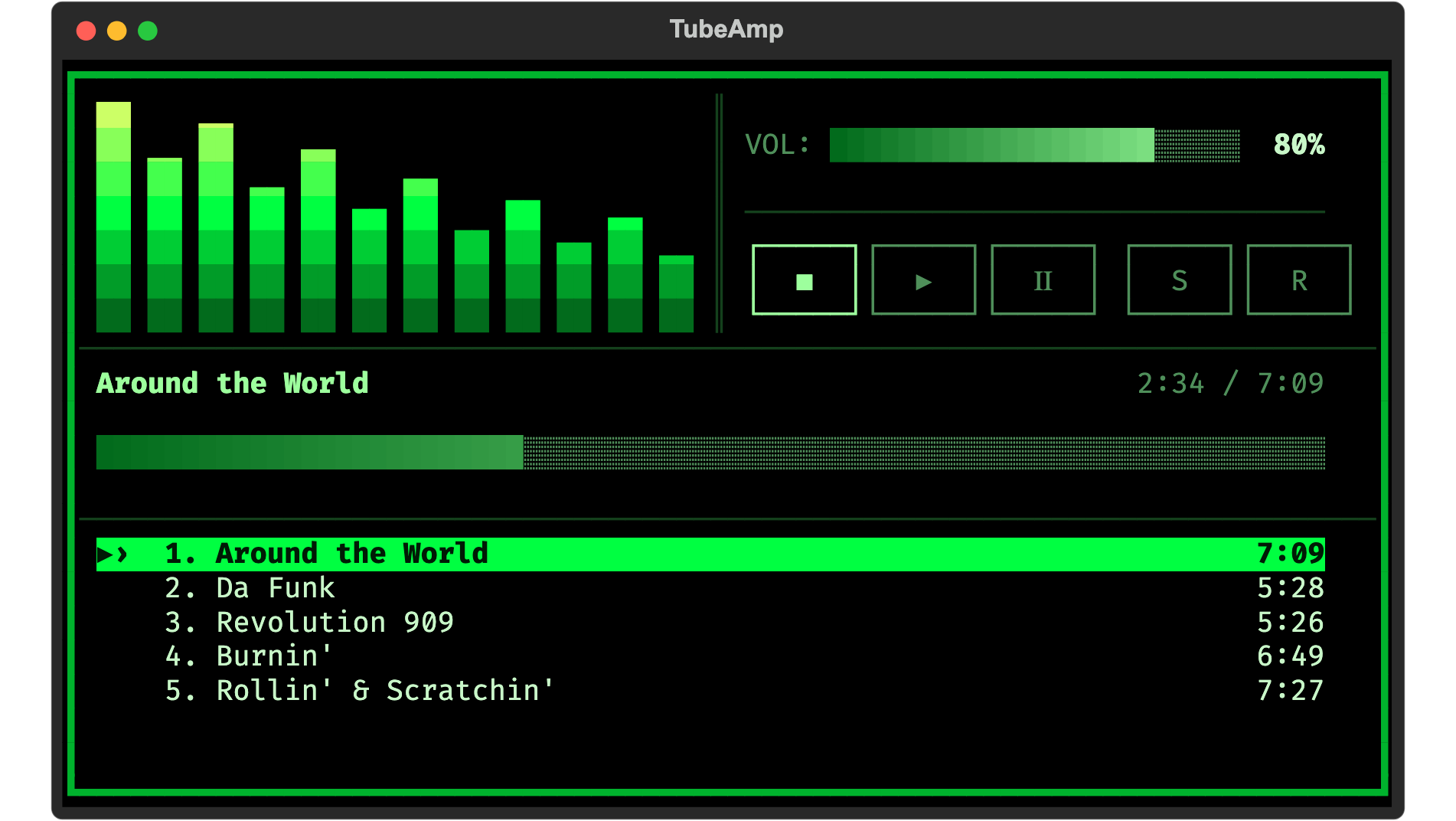
A retro-styled terminal music player that streams audio from YouTube. Think Winamp meets the terminal.
curl -fsSL https://raw.githubusercontent.com/tomekceszke/tubeamp/main/install.sh | bash
macOS and Linux. Then run tubeamp.
Features
- Streams audio straight from YouTube — search, or paste a playlist URL
- Spectrum visualizer driven by real FFT analysis, in sync with playback
- Playlists page in as you scroll; shuffle and three repeat modes
- Ten dark themes, from CRT phosphor to editor classics
- Entirely keyboard-driven, configured in TOML
Quick Start
Rather use your own package manager than run a script?
macOS
brew install tomekceszke/tap/tubeamp
Linux — Debian and Ubuntu; other distributions below
sudo apt install mpv libmpv2 ffmpeg
uv tool install tubeamp          # or: pipx install tubeamp
Other distributions
TubeAmp needs two system libraries — libmpv, which it loads through ctypes to play
audio, and ffmpeg, which decodes tracks for the spectrum analysis — plus Python 3.11
or newer. yt-dlp is a Python dependency and comes with the package, so it does not
need installing system-wide.
# Arch Linux — the mpv package ships libmpv
sudo pacman -S mpv ffmpeg

# Fedora
sudo dnf install mpv mpv-libs ffmpeg

# openSUSE
sudo zypper install mpv libmpv2 ffmpeg
Then uv tool install tubeamp, or pipx install tubeamp. Both keep TubeAmp in its own
environment rather than mixed into your system Python. Don't have either?
curl -LsSf https://astral.sh/uv/install.sh | sh   # uv
sudo apt install pipx                             # or pipx, from your package manager
If tubeamp comes back as "command not found", the install directory is not on your
PATH yet. Both tools install into ~/.local/bin; uv tool update-shell (or
pipx ensurepath) adds it, and the change takes effect in a new terminal.
Without the libmpv runtime package TubeAmp refuses to start and names the package to install for your system, rather than failing at first playback.
Windows
Not supported natively: python-mpv loads libmpv-2.dll through ctypes, and the official
mpv build for Windows does not ship that library. TubeAmp runs under WSL2 instead, where
the Linux instructions apply unchanged and WSLg handles audio — but setting WSL2 up is
its own detour, and it needs a reboot:
wsl --install # in PowerShell as administrator, then reboot
After the reboot, in the Ubuntu shell:
curl -fsSL https://raw.githubusercontent.com/tomekceszke/tubeamp/main/install.sh | bash
tubeamp
What the install script does, and reading it first
The one-liner at the top runs install.sh, which is short enough to read
in a minute and does four things: finds a Python 3.11+, installs libmpv and ffmpeg
through your own package manager, puts TubeAmp in its own virtualenv under
~/.local/share/tubeamp, and links it into ~/.local/bin.
It shows every command before running it and asks first — including the ones needing
sudo, and before it touches your shell's startup file. It never installs Homebrew for
you; on macOS without it, it stops and points you at brew.sh.
Reading it before running it is sensible:
curl -fsSL https://raw.githubusercontent.com/tomekceszke/tubeamp/main/install.sh -o install.sh
less install.sh && bash install.sh
bash install.sh --dry-run     # print the whole plan, change nothing
bash install.sh --yes         # no questions, for scripts and the impatient
bash install.sh --uninstall   # remove it again, leaving ~/.config/tubeamp alone
Re-running it upgrades an existing install.
Keeping it current, and where the releases come from
If playback stops working after a while, YouTube has most likely moved on from the pinned yt-dlp. Upgrading is the fix:
brew upgrade tubeamp          # Homebrew
uv tool upgrade tubeamp       # uv
bash install.sh               # the install script, re-run
Nothing here is a binary you have to trust on faith. Every release is built from a tagged commit by a GitHub Actions workflow and published to PyPI through Trusted Publishing, so no token is stored anywhere and each file carries an attestation linking it back to the commit and the workflow run that produced it. The Homebrew formula lives in tomekceszke/homebrew-tap and builds from that same published source.
From source
git clone https://github.com/tomekceszke/tubeamp.git
cd tubeamp
./install.sh
./run.sh
It is the same install.sh, and it notices the difference: run from a checkout it
installs the working tree in editable mode into .venv instead of fetching a release,
so your edits take effect without reinstalling. run.sh rebuilds that virtualenv if a
Python upgrade has left its interpreter symlinks dangling.
First Run
TubeAmp starts with an empty playlist and lists what to press:
/— search YouTube by artist or song, or paste a playlist or video URLh— every keybindingt— theme picker
To load a playlist automatically on startup, set youtube.default_playlist in
~/.config/tubeamp/config.toml.
Usage
tubeamp             # launch the player
tubeamp --version   # report the version without starting the TUI
tubeamp --help      # usage, config path, log path

./run.sh            # from a source checkout
Once running, press / to search YouTube or paste a playlist URL.
Keybindings
| Key | Action |
|---|---|
Space |
Play / Pause |
x |
Stop |
Up / Down |
Navigate playlist |
j / k |
Navigate playlist |
Enter |
Play selected track |
Left / Right |
Seek -/+ 10s |
- / + |
Volume down / up |
, / . |
Previous / next track |
s |
Toggle shuffle |
r |
Cycle repeat mode |
t |
Theme picker |
/ |
Search YouTube |
[ / ] |
Decrease / increase bars |
Page Up/Down |
Scroll playlist page |
Home / End |
Jump to first/last |
F12 |
Save screenshot (SVG) |
h |
Show help |
q, Esc |
Quit |
Configuration
Global config at ~/.config/tubeamp/config.toml (auto-created):
[audio]
volume = 80
quality = "bestaudio"

[visualizer]
backend = "analyzed"        # "analyzed" (FFT) or "simulated"
bars = 16
framerate = 30
sensitivity = 100           # percent gain on bar height

[youtube]
cookies_browser = ""        # "firefox", "chrome", etc.
default_playlist = ""       # auto-load on startup

[ui]
theme = "classic"
Working from a source checkout, a local.toml beside pyproject.toml overrides the
global file — handy for a personal default playlist you do not want committed (it is
in .gitignore). It is deliberately ignored anywhere else, so an installed tubeamp
never picks up a stray local.toml from whatever directory you happen to be in.
See local.toml.example.
Themes
Press t to open the picker; each row shows the palette and the player behind
the dialog repaints as you move the highlight, so a theme is judged on the real
UI. Esc puts the original back.
| Key | Theme | |
|---|---|---|
classic |
Classic | green phosphor terminal |
monochrome |
Monochrome | plain white on black |
amber |
Amber | amber CRT |
commander |
Commander | Midnight Commander blue |
cyberpunk |
Cyberpunk | acid yellow, cyan and red |
synthwave |
Synthwave | purple, hot pink and sunset yellow |
htop |
htop | green meters, cyan header, blue-green-red spectrum |
gruvbox |
Gruvbox Dark | |
ayu |
Ayu Dark | electric blue on near-black |
dracula |
Dracula |
Every colour on screen comes from the theme, so a palette also sets the
background, the frame and the spectrum gradient. A config naming a dropped
theme still works: retro resolves to amber, monokai to dracula, and
solarized-dark (like nord) to ayu.
Local overrides in local.toml (not committed, see local.toml.example).
Logging goes to ~/.config/tubeamp/tubeamp.log at INFO level; set
TUBEAMP_LOG_LEVEL=DEBUG for per-frame detail.
Architecture
See ARCHITECTURE.md for detailed design documentation.
Development
# Install with dev dependencies
pip install -e ".[dev]"

# Install the pre-commit hooks
pre-commit install

# Lint, type-check, test
ruff check src/ tests/
mypy src/ tests/
pytest
See CONTRIBUTING.md before opening a pull request.
Disclaimer
TubeAmp is an independent project, not affiliated with, endorsed by or sponsored by YouTube, Google, Winamp or Llama Group. Winamp is referenced only to describe the kind of interface this takes after.
Streams are resolved with yt-dlp. Playing YouTube content outside the official clients may conflict with YouTube's Terms of Service — check what applies where you are, and use it for content you are entitled to access.
License
MIT
1 maintainer

Metadata
1 maintainer
Release files for tubeamp 0.1.5
For a detailed explanation of source distributions (sdists) and built distributions (wheels), please see the package formats documentation.
Source distribution (sdist)
| File | Size | Uploaded | |
|---|---|---|---|
| tubeamp-0.1.5.tar.gz | 63.4 kB | Details |
Built distribution (wheel)
| File | Interpreter | ABI | Platform | Reset |
|---|---|---|---|---|
| tubeamp-0.1.5-py3-none-any.whl | Python 3 | none | any | Details |
Total release size: 117.9 kB
Release files / tubeamp-0.1.5.tar.gz
| Download URL | tubeamp-0.1.5.tar.gz |
|---|---|
| Size | 63.4 kB |
| Tags | Source |
|
SHA-256 checksum How to use checksums |
2314227a503391c88e85aab80cbccda7d8465bdaf4e37f183a958e0c465e298d
|
|
BLAKE2b-256 checksum How to use checksums |
5ed8168e14e1926f4eec50cbbb321d8b4cfbef2faa2339bfa74c3cde92b654c0
|
| Upload date | |
|
Uploaded using Trusted Publishing? What is trusted publishing? |
Yes |
| Uploaded via |
twine/7.0.0 CPython/3.13.14
|
Provenance
Provenance describes where a file came from. On PyPI, provenance is shared via attestations, which provide a verifiable record of the build or publishing details. View details, limitations and caveats.


PyPI Publish Attestation
PyPI verified that this artifact, at this checksum, originated from the publisher listed below.
Signed by GitHub Actions, verified by PyPI on Sep 10, 2026.
Transparency logRelease files / tubeamp-0.1.5-py3-none-any.whl
| Download URL | tubeamp-0.1.5-py3-none-any.whl |
|---|---|
| Size | 54.5 kB |
| Tags | Python 3 |
|
SHA-256 checksum How to use checksums |
a6103cbf0ed765e497d6aaa7747c1fa1fd4de60074a4c7788f035e4159e78183
|
|
BLAKE2b-256 checksum How to use checksums |
7abd1f0cac17a219cb64cb3898cfe194f732c6cf59c30ff9c3f56c1bea805370
|
| Upload date | |
|
Uploaded using Trusted Publishing? What is trusted publishing? |
Yes |
| Uploaded via |
twine/7.0.0 CPython/3.13.14
|
Provenance
Provenance describes where a file came from. On PyPI, provenance is shared via attestations, which provide a verifiable record of the build or publishing details. View details, limitations and caveats.
PyPI Publish Attestation
PyPI verified that this artifact, at this checksum, originated from the publisher listed below.
Signed by GitHub Actions, verified by PyPI on Sep 10, 2026.
Transparency log













