

TunnelScope
Evidence-based MTU and packet-size diagnostics for Linux networks.
v0.6.0 alpha: IPv4/IPv6 UDP probes, repeated measurement summaries, bounded
payload-size search, Linux ICMP feedback observations and a single-sender
diagnose workflow. Join sender and receiver evidence in JSON and offline HTML
reports. Automatic path-MTU discovery and root-cause diagnosis are not implemented.
For the Linux DF/fragmentation-permitted comparison and optional ICMP feedback, see the comparison guide and ICMP guide. The diagnose guide shows the combined workflow and how to join its receiver observations.
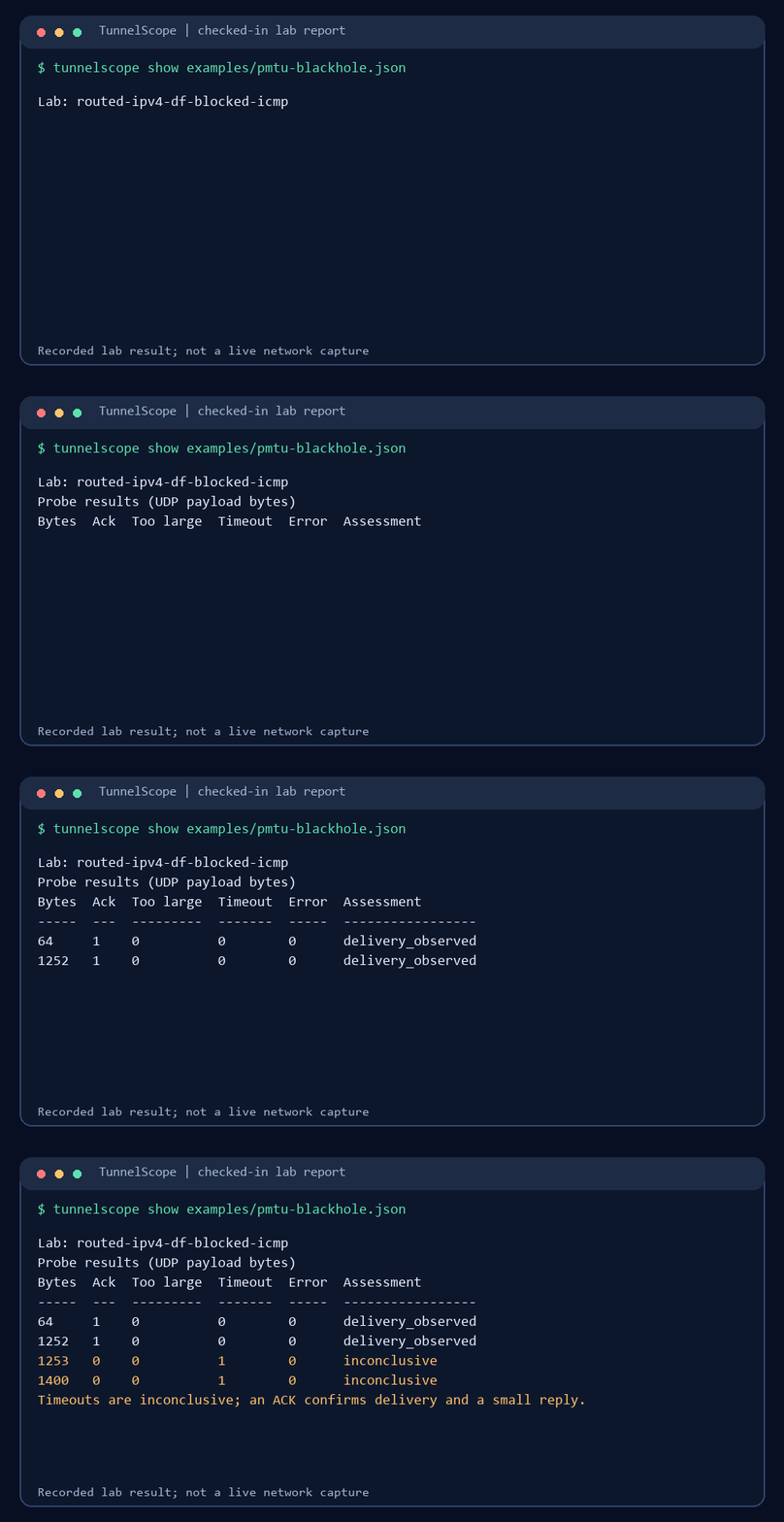
The animation runs tunnelscope show on a checked-in controlled lab report.
It is not a live network capture. A timeout on an unknown path remains inconclusive.
Why use TunnelScope?
Small pings can work while larger traffic fails. ping checks selected ICMP
sizes, tracepath depends on path feedback, and ip route get reports the
kernel's route and available MTU information; none alone confirms that a chosen
UDP payload reached the other endpoint. TunnelScope sends bounded payloads to
a cooperating receiver and saves both endpoints' observations for comparison.
Packet captures and these existing tools remain useful for root-cause work.
Quick start
Requires Python 3.10 or newer. In an empty working directory on Linux (or WSL2), install the published package in a virtual environment:
python3 -m venv .venv
source .venv/bin/activate
python -m pip install tunnelscope
tunnelscope --help
Open a second terminal and activate the same environment there with
source .venv/bin/activate. Run these commands in order on one machine; no
root access or network setup is needed for this loopback example.
Terminal 1 (receiver):
tunnelscope receive --max-packets 2 --output receiver.json
Wait for Listening on 127.0.0.1:9471, then run Terminal 2 (sender):
tunnelscope probe 127.0.0.1 --sizes 64,1200 --count 1 --output probe.json
The receiver exits after the two probes and saves receiver.json. Back in
either terminal, inspect the sender report and create a local HTML view:
tunnelscope show probe.json
tunnelscope html probe.json --output probe.html
Open probe.html in a browser. The receiver sends small acknowledgements, so
this example checks delivery in one direction only. A timeout is inconclusive;
it does not prove an MTU problem. For two machines, see the
two-endpoint workflow.
Bounded size search
On a controlled Linux path, search tests the endpoints and then narrows an
observed interval using repeated no-fragment probes:
tunnelscope search 192.0.2.2 --min 1200 --max 1400 --count 2 --output search.json
tunnelscope show search.json
Start a receiver at that lab address first. A timeout stops the search as inconclusive; even adjacent successful and explicit-error sizes are not an independently measured path MTU. See the size-search guide.
On Linux, v0.6 can also repeat the same sizes with DF enabled and source fragmentation permitted. Use a controlled receiver and read the comparison guide before interpreting differences.
What the results mean
acknowledged: the receiver got the UDP payload and a small reply returned.packet_too_large: Linux reportedEMSGSIZEin no-fragment mode; optional ICMP evidence can distinguish a local error from received path feedback.timeout: no matching reply arrived; the cause is unknown without more evidence.
Probe sizes are UDP payload bytes, including the 24-byte TunnelScope header. Success does not prove same-sized reverse delivery. The tool reports observed sizes, not an exact end-to-end path MTU.
Documentation
- Usage and report reference: source install, size sweeps, JSON fields, no-fragment behavior and lab commands.
- Bounded size-search guide: adaptive probes and how to interpret the observed interval.
- Repeated measurements and fragmentation comparison: comparison command and its limits.
- ICMP feedback observation: optional Linux error-queue evidence and its limits.
- Two-endpoint workflow and receiver correlation: compare both directions.
- Two-minute Linux demo and validation records: controlled failure scenarios.
- HTML report view, deployment guidance and security boundaries.
- v0.6 scope and next steps, v0.5 scope and completed milestones.
Contributing
Good first issues: Python 3.10 CI, receiver correlation quick start, and Windows PowerShell loopback guide. The roadmap connects all six open issues to the next release and field validation. Read CONTRIBUTING.md before opening a PR; share only synthetic or sanitized reports.
Run the unprivileged checks with python -m unittest discover -s tests -v.
Linux network-namespace checks require root and explicit opt-in; see the
usage reference.
1 maintainer

Metadata
1 maintainer
Release files for tunnelscope 0.6.0
For a detailed explanation of source distributions (sdists) and built distributions (wheels), please see the package formats documentation.
Source distribution (sdist)
| File | Size | Uploaded | Provenance | Actions |
|---|---|---|---|---|
| tunnelscope-0.6.0.tar.gz | 644.4 kB | With provenance | Details for tunnelscope-0.6.0.tar.gz |
Built distribution (wheel)
| File | Interpreter | ABI | Platform | Actions Reset |
|---|---|---|---|---|
| tunnelscope-0.6.0-py3-none-any.whl | Python 3 | none | any | Details for tunnelscope-0.6.0-py3-none-any.whl |
Total release size: 848.4 kB
Release files / tunnelscope-0.6.0.tar.gz
| Download URL | tunnelscope-0.6.0.tar.gz |
|---|---|
| Size | 644.4 kB |
| Tags | Source |
|
SHA-256 checksum How to use checksums |
07585dc6c95861e0936e4d1fc441bde9839069843d0a8b80e69430fa322c2f36
|
|
BLAKE2b-256 checksum How to use checksums |
bd9d1c58e9898d133913060f90651c5ade0818a6648ae25bfc6bc4c82f4b33fe
|
| Upload date | |
|
Uploaded using Trusted Publishing? What is trusted publishing? |
Yes |
| Uploaded via |
twine/7.0.0 CPython/3.13.16
|
Provenance
Provenance describes where a file came from. On PyPI, provenance is shared via attestations, which provide a verifiable record of the build or publishing details. View details, limitations and caveats.


PyPI Publish Attestation
PyPI verified that this artifact, at this checksum, originated from the publisher listed below.
Signed by GitHub Actions, verified by PyPI on Nov 3, 2026.
Transparency logRelease files / tunnelscope-0.6.0-py3-none-any.whl
| Download URL | tunnelscope-0.6.0-py3-none-any.whl |
|---|---|
| Size | 204.0 kB |
| Tags | Python 3 |
|
SHA-256 checksum How to use checksums |
88c961d4dd0c56bc988d293d67ff91d0ee0c13f1880ba7e00bcf5a33245a90b8
|
|
BLAKE2b-256 checksum How to use checksums |
c1218fd4150d2ee2129dc2861a9d6765a2872a55443ed3fdccb0ef56d56c6bf4
|
| Upload date | |
|
Uploaded using Trusted Publishing? What is trusted publishing? |
Yes |
| Uploaded via |
twine/7.0.0 CPython/3.13.16
|
Provenance
Provenance describes where a file came from. On PyPI, provenance is shared via attestations, which provide a verifiable record of the build or publishing details. View details, limitations and caveats.
PyPI Publish Attestation
PyPI verified that this artifact, at this checksum, originated from the publisher listed below.
Signed by GitHub Actions, verified by PyPI on Nov 3, 2026.
Transparency logSecurity for tunnelscope 0.6.0
Provenance
Provenance describes where a file came from. On PyPI, provenance is shared via attestations, which provide a verifiable record of the build or publishing details. View details, limitations and caveats.
Full provenance
Both files in this release have been uploaded with provenance metadata.
Attestation for tunnelscope-0.6.0.tar.gz
PyPI Publish Attestation
PyPI verified that this artifact, at this checksum, originated from the publisher listed below.
Signed by GitHub Actions, verified by PyPI on Nov 3, 2026.
Transparency logA note on package security
PyPI is a repository for distributing packages, not a service for auditing them. While third-party security researchers and our staff do their best to detect and remove malicious packages, PyPI cannot guarantee the quality, security or suitability of any given package.
To learn more about protecting yourself from malicious actors, visit our package security documentation.














