

TunnelScope
Find out which packet sizes get through a tunnel, in which direction, and what both ends actually saw.




Quick start · Return direction · Reading the results · Tested on · Releases
Ping works, SSH works, but a file copy over the VPN hangs. That pattern usually points at packet size: somewhere on the path, large packets are dropped or their error messages never come back. TunnelScope sends UDP probes of chosen sizes to a small receiver you run on the other end and writes down what happened to each one: acknowledged, rejected locally as too large, or timed out. You then join the sender's log with the receiver's log by probe ID, so you can tell "never arrived" apart from "arrived, but the answer got lost".
With --sized-reply, the receiver answers with a packet as big as the probe,
so one run checks both directions. That catches paths where large packets go
out fine and can't come back.
Status: alpha (v0.9.6), Python 3.10+, MIT. Reports are plain JSON plus an offline HTML view; nothing is uploaded anywhere.
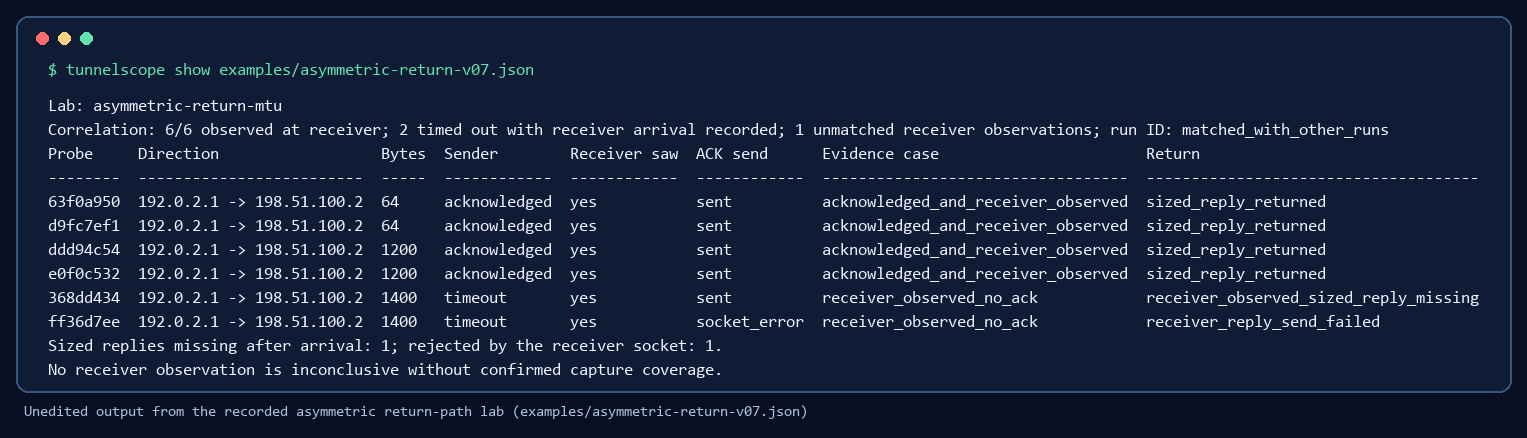
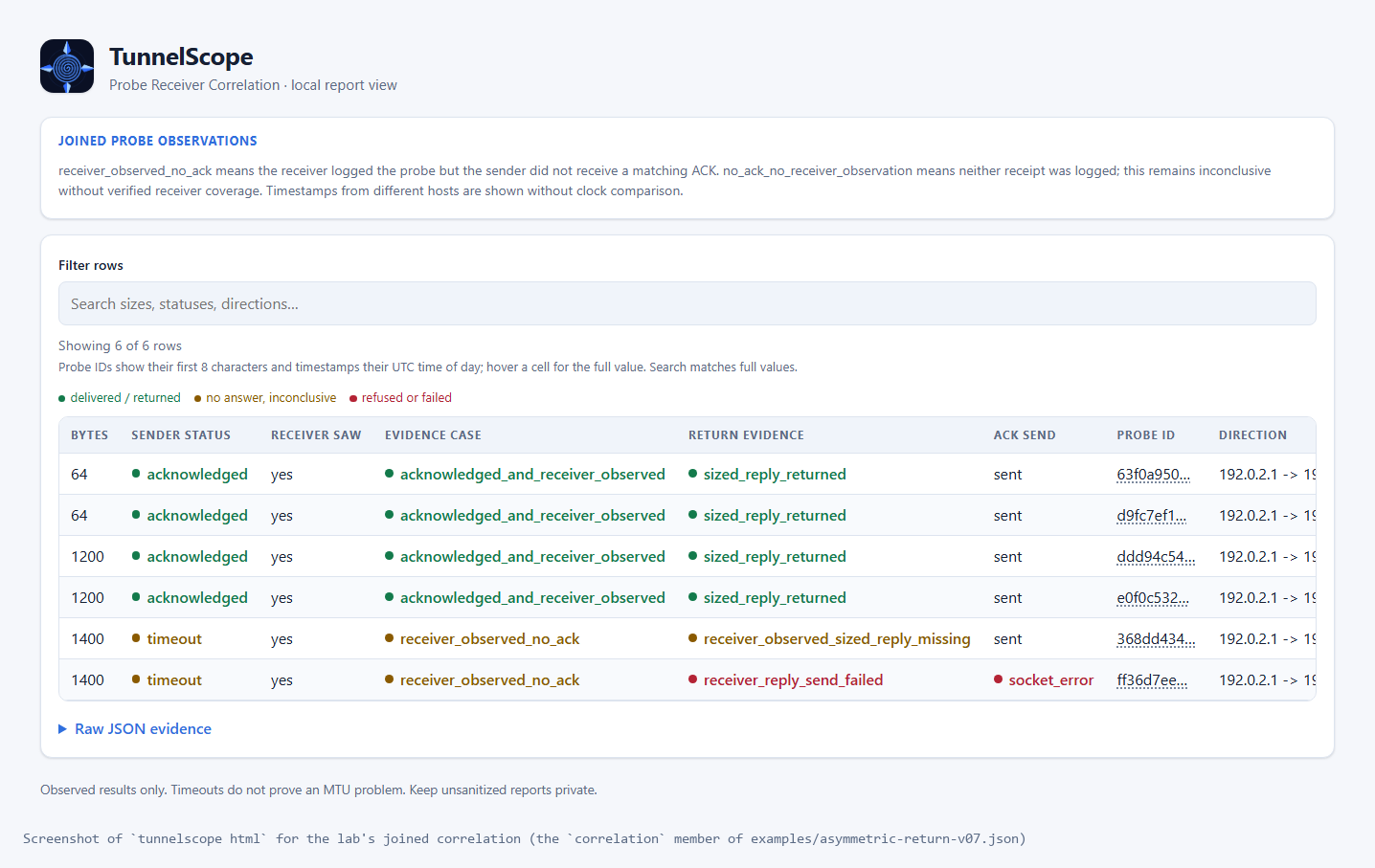
Both images come from a real run of the
asymmetric return-path lab
(Ubuntu under WSL2, 2026-11-05). The return link is 1280 bytes. Every
1400-byte probe reached the receiver; the same-sized replies did not make it
back, while a normal 24-byte ACK at 1400 bytes did. The lab gives the same
result over IPv6.
The images are rebuilt from the
checked-in report
by scripts/build_v07_images.py.
There is also a 30-second replay
of an OpenVPN return-path run and the report-sharing steps.
Quick start
This runs on one machine over loopback, with no root access and no network changes. On native Windows PowerShell, follow the Windows loopback guide instead. On Linux or WSL2, in an empty directory:
python3 -m venv .venv
source .venv/bin/activate
python -m pip install tunnelscope==0.9.6
Terminal 1, start the receiver:
tunnelscope receive --max-packets 2 --output receiver.json
Terminal 2 (same environment), once the receiver prints
Listening on 127.0.0.1:9471:
tunnelscope probe 127.0.0.1 --sizes 64,1200 --count 1 --output probe.json
The receiver stops after two probes. Join the two logs and open the result:
tunnelscope correlate probe.json receiver.json --output correlation.json --html correlation.html
tunnelscope show correlation.json
correlation.html opens in any browser. A receiver entry for a probe means
it arrived, even if the sender never got an ACK. A timeout on its own does
not mean there is an MTU problem. For two machines, see the
two-endpoint guide.
One command on a Linux sender
With a receiver already running on the other end of a path you control:
tunnelscope diagnose PEER_IP --min 1200 --max 1400 --count 2 --output diagnosis.json
diagnose runs three bounded passes in one sender direction: probes with the
don't-fragment bit set, the same sizes with fragmentation allowed, and a
size search between --min and --max. It writes JSON and HTML. Once the
receiver has saved its log, correlate joins all three passes into one
report. The diagnose guide
covers setup and how to read it.
Test the return direction
The normal ACK is 24 bytes. It proves the probe arrived, not that a packet of
the same size can travel back. With --sized-reply on both ends, the
receiver replies with a packet as large as the probe, never larger:
tunnelscope receive --bind B_IP --sized-reply --output receiver.json
tunnelscope probe B_IP --sizes 64,1200,1400 --count 2 --dont-fragment --sized-reply --output probe.json
tunnelscope correlate probe.json receiver.json --html correlation.html
The receiver can be Linux (WSL2 included) or Windows. search,
compare-fragmentation and diagnose take the same flag. The
sized-reply guide
lists every field. Run
tunnelscope sanitize
before you post a report anywhere, and
tunnelscope show REPORT --format markdown gives a
summary you can paste into an issue.
Reading the results
| Result | What it means |
|---|---|
acknowledged |
The payload arrived and the small ACK came back. |
packet_too_large |
Linux refused to send it because it was too big. ICMP data, when present, shows whether the limit was local or reported by a router. |
timeout |
No matching ACK arrived. The cause is unknown. |
sized_reply_received |
With --sized-reply: the payload arrived and a reply of the same size came back. |
receiver_observed_sized_reply_missing |
After correlate: the receiver got the probe and its socket accepted a same-sized reply, but the sender saw nothing before its deadline. Where it was lost is unknown. |
receiver_reply_send_unverified |
The receiver logged the probe, but its log has no outcome for the reply. TunnelScope does not guess whether a reply was sent. |
Payload sizes include the 24-byte TunnelScope header.
A few things the tool cannot tell you. An observed size interval is what got
through during the run, not a measured end-to-end path MTU. ICMP messages and
receiver logs are not authenticated. Clocks on different machines are never
compared. ping, tracepath, route tables and packet captures are still
worth having next to these reports.
Where it has been tested
| Setup | What was checked | Scope |
|---|---|---|
| Ubuntu ↔ Debian VMs over WireGuard | Both directions, receiver pairing, a 1252/1253-byte boundary | Local tunnel MTU, host-only link |
| Routed WireGuard | Matched ICMP when visible, inconclusive timeouts when blocked | 4 namespaces, one kernel |
| Routed OpenVPN and its return path | Matched ICMP, blocked search, missing sized replies joined with the receiver log | 3 namespaces, one kernel, IPv4 |
| Routed IPv6 feedback | Packet Too Big matched vs. blocked, receiver pairing | 3 namespaces, one kernel, in CI |
| Asymmetric return path | 1400-byte probes arrive, replies lost or rejected, small ACK returns | 3 namespaces, IPv4 and IPv6, in CI |
| Windows receiver from WSL2 (IPv6) | 3/3 small ACKs, 6/6 sized replies, 8/8 diagnosis replies per family | Two kernels, one physical host |
| Windows oversized replies | 1600-byte probes arrive; Windows refuses the same-sized reply (WSAEMSGSIZE) | Same host and guest, MTU 1500 |
| Kubernetes with Calico | 6/6 baseline deliveries each way, policy block and recovery | Two Minikube nodes, IP-in-IP |
All of these are controlled setups. Nobody has sent in a report from a real production VPN or a multi-hop physical path yet. If you can test one you are allowed to, the field report guide walks through collecting and sanitizing it, and issue #2 is where it would help most.
Docs
- Commands and report fields: usage and JSON reference, size search, fragmentation comparison, ICMP feedback, receiver logs, HTML view
- Sharing: sanitize, Markdown summaries, field reports
- Environments: Kubernetes lab, deployment notes, security boundaries
- History: release notes, v0.9 status, project history
Contributing
Starter tasks are tagged good first issue, and a field report counts as a contribution too. Read CONTRIBUTING.md first and only share synthetic or sanitized reports. CI runs on Linux and Windows with Python 3.10, 3.12 and 3.13. The unprivileged checks run with:
python -m unittest discover -s tests -v
The Linux network labs need root and an explicit opt-in, described in the usage reference.
1 maintainer

Metadata
1 maintainer
Release files for tunnelscope 0.9.6
For a detailed explanation of source distributions (sdists) and built distributions (wheels), please see the package formats documentation.
Source distribution (sdist)
| File | Size | Uploaded | Provenance | Actions |
|---|---|---|---|---|
| tunnelscope-0.9.6.tar.gz | 1.8 MB | With provenance | Details for tunnelscope-0.9.6.tar.gz |
Built distribution (wheel)
| File | Interpreter | ABI | Platform | Actions Reset |
|---|---|---|---|---|
| tunnelscope-0.9.6-py3-none-any.whl | Python 3 | none | any | Details for tunnelscope-0.9.6-py3-none-any.whl |
Total release size: 2.0 MB
Release files / tunnelscope-0.9.6.tar.gz
| Download URL | tunnelscope-0.9.6.tar.gz |
|---|---|
| Size | 1.8 MB |
| Tags | Source |
|
SHA-256 checksum How to use checksums |
9003965cf6aedce354adb9862758d6f13c3de08a1c8ddd4c35e64e9d9df36417
|
|
BLAKE2b-256 checksum How to use checksums |
5d753f908188e5c3818397ede37aa6d69016aa7139c0ca5f8254bb5eb01be85c
|
| Upload date | |
|
Uploaded using Trusted Publishing? What is trusted publishing? |
Yes |
| Uploaded via |
twine/7.0.0 CPython/3.13.16
|
Provenance
Provenance describes where a file came from. On PyPI, provenance is shared via attestations, which provide a verifiable record of the build or publishing details. View details, limitations and caveats.


PyPI Publish Attestation
PyPI verified that this artifact, at this checksum, originated from the publisher listed below.
Signed by GitHub Actions, verified by PyPI on Nov 9, 2026.
Transparency logRelease files / tunnelscope-0.9.6-py3-none-any.whl
| Download URL | tunnelscope-0.9.6-py3-none-any.whl |
|---|---|
| Size | 222.5 kB |
| Tags | Python 3 |
|
SHA-256 checksum How to use checksums |
28a24be0a441eb549622d01203298d41b0fa45370171b2d4d68ac0e93d3a9a5f
|
|
BLAKE2b-256 checksum How to use checksums |
04d43051cbe77905b1a53302545f78fecefc3486869617614c9d0179022ce115
|
| Upload date | |
|
Uploaded using Trusted Publishing? What is trusted publishing? |
Yes |
| Uploaded via |
twine/7.0.0 CPython/3.13.16
|
Provenance
Provenance describes where a file came from. On PyPI, provenance is shared via attestations, which provide a verifiable record of the build or publishing details. View details, limitations and caveats.
PyPI Publish Attestation
PyPI verified that this artifact, at this checksum, originated from the publisher listed below.
Signed by GitHub Actions, verified by PyPI on Nov 9, 2026.
Transparency logSecurity for tunnelscope 0.9.6
Provenance
Provenance describes where a file came from. On PyPI, provenance is shared via attestations, which provide a verifiable record of the build or publishing details. View details, limitations and caveats.
Full provenance
Both files in this release have been uploaded with provenance metadata.
Attestation for tunnelscope-0.9.6.tar.gz
PyPI Publish Attestation
PyPI verified that this artifact, at this checksum, originated from the publisher listed below.
Signed by GitHub Actions, verified by PyPI on Nov 9, 2026.
Transparency logA note on package security
PyPI is a repository for distributing packages, not a service for auditing them. While third-party security researchers and our staff do their best to detect and remove malicious packages, PyPI cannot guarantee the quality, security or suitability of any given package.
To learn more about protecting yourself from malicious actors, visit our package security documentation.














