
Claude Code and Codex Web UI

Project description
TwiCC
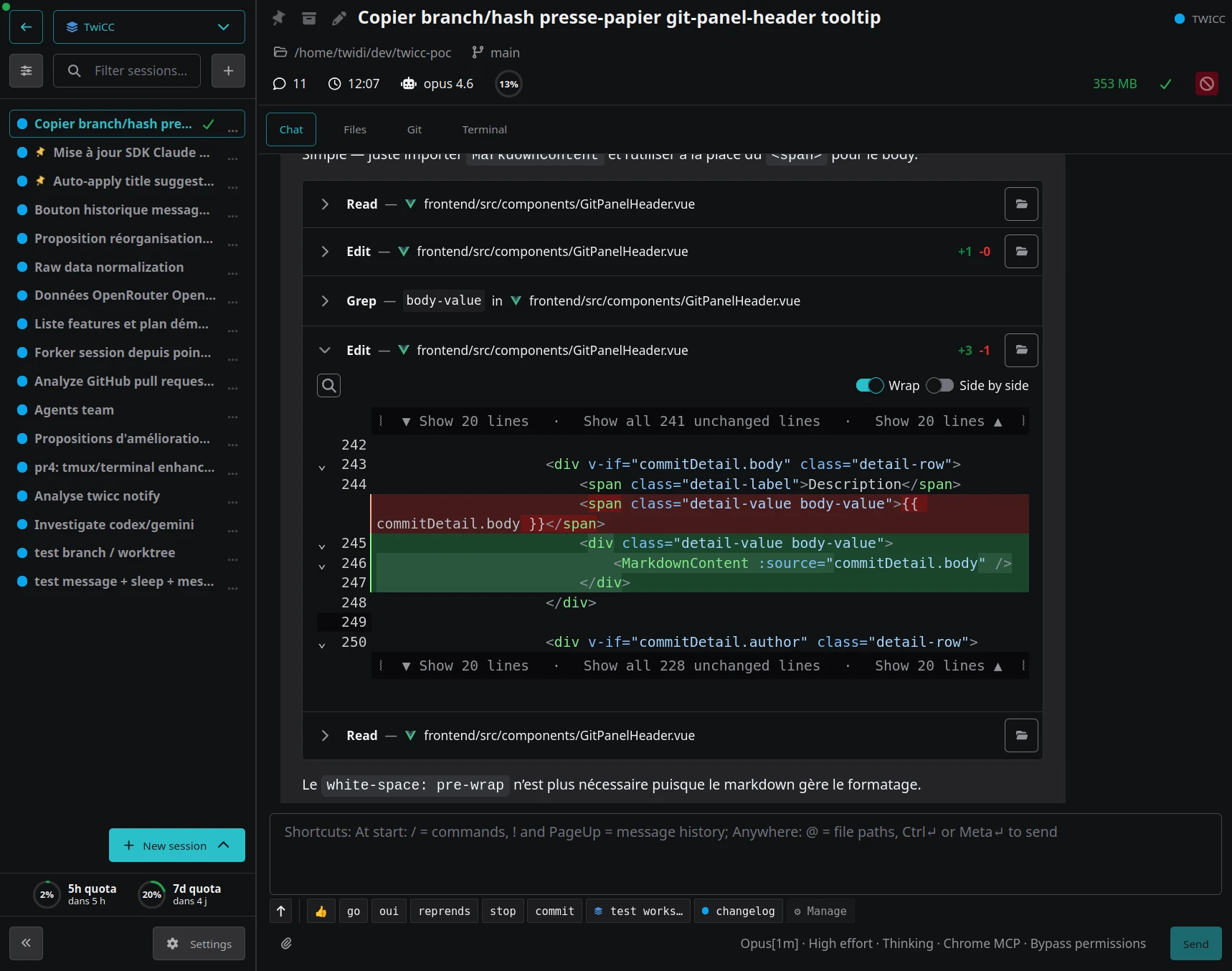
The Web Interface for Claude and Codex
A single self-hosted web interface for both Claude Code (Anthropic) and Codex (OpenAI). Browse projects and sessions, run agents, follow them in real time, track costs and quotas, and stay in control of your AI coding work — from desktop or mobile, in your browser.






Disclaimer
This is a personal project made by Twidi for his own needs. It is freely available and you are welcome to use it however you see fit.
That said, no support is guaranteed. Suggestions, issues, and pull requests are welcome, but there is no commitment to address them.
Note: the project was almost entirely vibe-coded, with general oversight from the author.
Quick start
uvx twicc@latest
Then open http://localhost:3500.
Don't have
uvx? It comes with uv, a fast Python package manager:curl -LsSf https://astral.sh/uv/install.sh | shA plain
pip install twiccin your own virtualenv also works.
Permanent install
If you use TwiCC regularly, install it as a persistent tool:
uv tool install twicc
twicc
Update with:
uv tool upgrade twicc
Features
Claude Code and Codex, side by side
- Both providers in one UI, using your existing credentials — nothing extra to set up
- Live conversation with full tool-use details, real-time streaming of assistant text and thinking
- Per-session agent control: model (Opus 4.8, Sonnet 4.6, …), context window (200K / 1M), effort, thinking, fast mode, permissions (including Claude Code's classifier-gated "auto" mode), with reusable presets
- Interactive tool approvals and provider questions, answered directly from the browser
- Persistent Claude Code cron jobs: scheduled tasks survive TwiCC restarts and are auto-renewed before their 7-day expiry — they would otherwise be lost on a Claude Code CLI restart
- Provider status monitoring (Anthropic and OpenAI status pages) with in-app outage notifications
Mobile-first, work from anywhere
- Fully responsive UI, designed for touch from the start
- Mobile-friendly terminal: touch selection, paste, proper scrollbar, scroll/select toggle, support for tmux and alternate-screen apps
- Extra keys bar (Essentials / More / F-keys) with modifiers (tap for one-shot, double-tap to lock), arrow keys, special characters, function keys
- User-defined key combos and reusable text snippets for the terminal
- Tunnel-ready: combined with a tunnel (Cloudflare Tunnel, ngrok, Tailscale Funnel, …), TwiCC turns a phone into a usable Claude or Codex frontend — see Remote access below
Productivity
- Command palette (Ctrl+K / Cmd+K): jump to any project, session, or workspace, change session settings, and trigger common actions from a single keyboard-driven menu
- Session switcher: hold Ctrl and tap the key above Tab (the backtick on QWERTY) to flip between your recently-visited sessions; add Shift to pick from the sessions shown in the sidebar instead
- Session list multi-select: select several sessions at once and apply batch actions — pin, mark read/unread, archive, and more
- External notifications: push to your devices via Apprise (ntfy, Pushover, Telegram, and 130+ other services), with a per-target "only when you're away" option
- Slash commands and file references:
/for Claude Code skills and commands,$for Codex skills,@for the file picker — all from the message input - Message snippets: reusable text snippets with placeholders, scoped globally or per-project, for the prompts you keep retyping
- Inline code comments: click a line number in a code block to annotate, then send a formatted review comment back to the agent — human review of AI-generated code, right from the browser
- Selection comments: select text in Chat, Files, Git, or Terminal to copy it or attach a comment, then send the selection and your note back to the agent, preformatted and ready to go
- Full-text search across all sessions (Ctrl+Shift+F), plus in-session search (Ctrl+F)
- Multiple simultaneous terminals, with optional custom
tmux.conf - Git integration: log, diffs (including side-by-side image diff), file browser, commit details
- Project and session archiving (including bulk archive of old sessions)
Costs, usage and activity
- Cost tracking per session and per project
- Quota graphs and burn rate for the Claude Code and Codex 5h / 7-day windows
- Extra usage alerts: get notified when a provider starts drawing on your paid extra-usage credits
- Activity heatmaps and stats — daily and weekly, per project, per workspace, and across all projects
Workspaces and projects
- Workspaces: group projects into named, color-coded buckets, with optional auto-add by directory pattern
- Workspace scoping: session list, search, snippets, and aggregated stats, all per workspace
- Workspace-level tabs: Files, Git, and Terminal, in addition to the per-project ones
- Git worktree support across the app: create a worktree in a couple of clicks, and existing ones are detected and surfaced, with their sessions, cost, and activity rolling up into the main repository
Self-aware: agent skills and CLI
TwiCC exposes a full twicc command-line interface — and a Claude Code / Codex plugin (auto-installed) whose skills wrap the same commands, so an agent can drive TwiCC from inside a running session. Either way you can inspect projects, workspaces, and sessions, run a full-text search, check usage and cost, and create, reply to, update, and control sessions and their live processes — every list/inspect command outputs JSON for scripting.
See SKILLS-AND-CLI.md for the full reference, or run twicc --help.
HTTP RPC API
The same CLI is also exposed over HTTP under /rpc/, so one TwiCC instance — or any HTTP client — can drive another over the network. Every command is auto-generated as a route from the CLI itself, so there is no separate API to keep in sync.
See RPC-API.md for authentication, the request/response shape, and the few HTTP-specific limitations (server-side absolute paths, base64 attachments, blocking waits).
Orchestration
A session can spawn other sessions, which can spawn their own, forming a tree of cooperating agents. A leader/manager/worker skill family lets one agent split a task into sub-tasks across spawned sessions (optionally hidden from the UI), coordinate them through a shared scratch space, and aggregate the results — without a human in the loop for each step.
See ORCHESTRATION.md.
How it works
TwiCC reads the JSONL data files written by each provider and indexes them into a local SQLite database (~/.twicc/db/data.sqlite). Claude Code sessions are read from ~/.claude/projects/; Codex sessions are read from ~/.codex/sessions/. Provider data files remain the source of truth — TwiCC never modifies them. Whether you use Claude Code or Codex directly from the terminal or through TwiCC, everything shows up in the same place.
When you start a session or send messages through TwiCC, it uses the provider SDK under the hood: the Claude Agent SDK for Claude Code and OpenAI's vendored Codex SDK for Codex. This means it uses your existing provider credentials and configuration — there is nothing extra to set up. The conversation data written by the provider is then picked up by TwiCC's file watcher and broadcast to the UI in real time over WebSocket.
On each startup, TwiCC detects changes and updates its database accordingly. While running, it watches the filesystem for new sessions and updates them in real time.
Remote access
The interface is fully usable from a mobile browser. Combined with a tunnel service like Cloudflare Tunnel, ngrok, or Tailscale Funnel, you can access TwiCC from anywhere and interact with Claude Code or Codex from your phone.
Important: if you expose TwiCC over the internet, enable password protection (see Configuration) and prefer a tunnel service with its own access control. TwiCC has no built-in access control beyond optional password protection.
Tip: on Android, the author uses Unexpected Keyboard for an even better terminal experience — it natively exposes Ctrl, Esc, Tab, and other keys that complement TwiCC's built-in keys bar.
Requirements
- Claude Code and/or Codex already configured locally
- For existing history: a
~/.claude/projects/directory created by Claude Code and/or a~/.codex/sessions/directory created by Codex
TwiCC needs Python 3.13+. If you install through uvx or uv tool install (recommended, see Quick start), uv will download and manage the right Python version for you — nothing to install by hand. If you go the pip install route, install Python 3.13 yourself first.
Configuration
All configuration goes through environment variables, set in ~/.twicc/.env:
| Variable | Default | Description |
|---|---|---|
TWICC_PORT |
3500 |
Server port |
TWICC_PASSWORD_HASH |
(empty) | Password hash to enable password protection (managed by twicc password set) |
TWICC_DATA_DIR |
~/.twicc/ |
Data directory (database, logs, settings) |
Password protection
Set, clear, or check the password interactively. Use the same invocation prefix as for launching TwiCC — twicc if you installed it permanently, uvx twicc for a one-off run, or uv run twicc from a source checkout:
twicc password set      # prompt for a password (with confirmation) and write it to .env
twicc password clear    # disable password protection
twicc password status   # show whether password protection is enabled
Restart TwiCC after setting or clearing the password for the change to take effect.
Platform support
TwiCC runs on Linux and macOS. There is no native Windows support — the codebase relies on Unix-specific APIs (PTY, process signals, process groups) that would require significant work to adapt, and the author does not have access to a Windows machine for development and testing.
WSL (Windows Subsystem for Linux) is the recommended path for Windows users. TwiCC has been reported to work correctly under WSL2. If you hit issues, please open an issue or a pull request.
FAQ
Can I use TwiCC while Claude Code or Codex is running?
Yes. TwiCC only reads provider data files and never modifies them.
Where is my data stored?
By default in ~/.twicc/. This includes the SQLite database, logs, and user settings. Set TWICC_DATA_DIR to change the location.
Where are the logs?
In ~/.twicc/logs/backend.log for the backend. This is the first file to check when troubleshooting.
How do I reset the database?
Delete ~/.twicc/db/data.sqlite* and restart TwiCC. It will rebuild from the provider source files.
Is this allowed by Anthropic?
For Claude Code sessions, TwiCC uses the official Claude Agent SDK with the Claude Code system prompt. This is permitted by Anthropic's terms of service.
Billing change on June 15, 2026: until that date, SDK usage is billed against the same plan quota as the regular Claude Code CLI. Starting June 15, 2026, Anthropic moves SDK usage to a separate, plan-specific credits quota dedicated to the SDK. In practice, TwiCC sessions will no longer share the Claude Code plan quota and may be more constrained depending on your plan tier — see Anthropic's documentation for details.
Is this allowed by OpenAI?
For Codex sessions, TwiCC uses OpenAI's Codex SDK (vendored — see docs/codex-vendoring.md) and the Codex CLI. OpenAI does not document any limitation on this kind of usage, and TwiCC sessions draw from the same plan quota as the regular Codex CLI.
How can I support this project?
If you find TwiCC useful, consider sponsoring me on GitHub — it means a lot and helps keep the project going.
Development
See CONTRIBUTING.md for development setup, devctl.py usage, building, and the release process. Conventions, architecture notes, and patterns live in AGENTS.md and CLAUDE.md. The Codex SDK vendoring is documented in docs/codex-vendoring.md.
License
MIT
Release history Release notifications | RSS feed


Download files
Download the file for your platform. If you're not sure which to choose, learn more about installing packages.
Source Distribution
Built Distribution
Filter files by name, interpreter, ABI, and platform.
If you're not sure about the file name format, learn more about wheel file names.
Copy a direct link to the current filters
File details
Details for the file twicc-1.8.3.tar.gz.
File metadata
- Download URL: twicc-1.8.3.tar.gz
- Upload date:
- Size: 13.4 MB
- Tags: Source
- Uploaded using Trusted Publishing? No
- Uploaded via: uv/0.8.11
File hashes
| Algorithm | Hash digest | |
|---|---|---|
| SHA256 |
bce8adc60f9da89b6bfb67698377cd606b81b6bd6833476cc0d9cb65fb9dbba9
|
|
| MD5 |
7bb7f920a95d8dc57f243b7412cb0555
|
|
| BLAKE2b-256 |
b7e5bd3f50637b43b573169ff8b72fe56565ce0f7eb616a54029c331437c57bd
|
File details
Details for the file twicc-1.8.3-py3-none-any.whl.
File metadata
- Download URL: twicc-1.8.3-py3-none-any.whl
- Upload date:
- Size: 7.9 MB
- Tags: Python 3
- Uploaded using Trusted Publishing? No
- Uploaded via: uv/0.8.11
File hashes
| Algorithm | Hash digest | |
|---|---|---|
| SHA256 |
c3d242b449272e526dcf844406668137d1cdff27180682be48204ea94855513f
|
|
| MD5 |
2e88223918766e5d3ce37b1a2b69955a
|
|
| BLAKE2b-256 |
b7caa205761e7e8e1a44a06511f16f5986a1fd276d137e555ee12ea239968f70
|






