
UAV API
HTTP REST API for controlling ArduPilot-compatible UAVs. Supports real drones via MAVLink and simulated drones via ArduPilot SITL. Supports ArduCopter and ArduPlane — see Vehicle Types below.
Features:
- Multi-vehicle: ArduCopter and ArduPlane, selected at startup via
--vehicle - Full flight control: arm, takeoff, land, RTL, speed configuration
- GPS and NED movement commands (fire-and-forget and blocking variants), heading control
- Rich telemetry: GPS, NED position, compass, battery, sensor health
- Mission scripting: upload, list, and execute
.py/.shscripts remotely (copter mode) - Gradys Ground Station integration: periodic GPS location push
- Visual feedback via Mission Planner or any MAVLink GCS
- Hardware peripherals: camera capture, servo PWM output (copter mode)
- Configurable logging per component
Table of Contents
- Documentation
- Installation
- Getting Started
- CLI Arguments Reference
- Extra Features
- Project Architecture
- Flying through scripts
- Testing
Documentation
This README covers installation, running the API, the CLI reference and the
example clients. Reference material lives under docs/:
| Document | Contents |
|---|---|
docs/api-specification.md |
The HTTP contract. Every endpoint's path, query/body schema and response shape. This is what the GrADyS ecosystem codes against — update it before changing an endpoint. |
docs/coordinate-frames.md |
GPS vs NED vs NED-velocity, why z is negative for altitude, and common MAVLink pitfalls. Read before writing movement logic. |
docs/plane-support.md |
Plane endpoint reference and how its behaviour differs from copter. |
docs/deployment.md |
Running the API as a systemd service on a companion computer, and fleet provisioning. |
Installation
Prerequisites
- Python 3.10+
- For simulated flights: ArduPilot repository built locally, and
xterminstalled — unless you pass--headless, which needs no X server at all.- Clone and build ArduPilot: https://ardupilot.org/dev/docs/where-to-get-the-code.html
- SITL setup guide: https://ardupilot.org/dev/docs/SITL-setup-landingpage.html
- ArduPilot's
Tools/autotestdirectory should be on yourPATHsosim_vehicle.pycan be found — see Registering ArduPilot in PATH. Otherwise, point the API at the repository with--ardupilot_path.
- For mission scripts:
tmuxinstalled. This applies on real drones too — each script runs in its own tmux session, in simulation and on hardware alike.
Installing from PyPI (recommended)
pip install uav-api
Restart your terminal after installation.
Installing from source (development)
git clone https://github.com/Project-GrADyS/uav_api
cd uav_api
pip install -e .
Restart your terminal after installation.
Getting Started
Running with a real drone
Connect your drone via UDP or USB, then start the API:
uav-api --port 8000 --uav_connection 127.0.0.1:17171 --connection_type udpin --sysid 1
The --connection_type controls the UDP direction:
udpin— API listens, drone connects to it (most common)udpout— API connects out to the droneusb— serial connection (set--uav_connectionto the serial device path, e.g./dev/ttyUSB0)
Deploying on hardware
The command above is for bringing a vehicle up by hand. For a companion
computer that should start the API automatically on boot, install it as a
systemd service — reference unit and config are in
packaging/:
Substitute the __USER__ / __VENV__ / __CONFIG__ / __HOME__ placeholders in
the unit, then:
sudo install -m 0644 packaging/systemd/uav-api.service /etc/systemd/system/
sudo systemctl daemon-reload
sudo systemctl enable --now uav-api
journalctl -u uav-api -f
The API creates its own working directories on startup — scripts_path,
script_logs, and the parent of log_path — so the deployment only has to make
sure the service user can write to them.
For a fleet of drones, use
gradys-fleet, which
provisions companion computers from a blank image and manages every vehicle's
identity, configuration and services from a single inventory. It also handles
gradys-embedded, pre-flight verification and post-flight data collection. It
renders the two files above per drone, so keep the copies in packaging/ in step
with the templates there.
scripts/install_service.shis deprecated. It assumes a machine that was already prepared by hand and is single-drone by construction.
See docs/deployment.md for the full guide — configuration
notes, why the unit is written the way it is, and troubleshooting.
Running in simulation (SITL)
This starts both ArduCopter SITL (in a new xterm window) and the API — see Running headless for the no-window variant:
uav-api --simulated --speedup 1 --port 8000 --sysid 1
SITL will bind to the address in --uav_connection (default 127.0.0.1:17171). The --speedup factor controls simulation speed (e.g. 5 = 5× real time). The --location argument sets the SITL home position (default AbraDF).
Running headless
--headless runs the same simulation without opening any window, so it works on a machine with no X server — CI, a remote box, or over SSH:
uav-api --simulated --headless --speedup 1 --port 8000 --sysid 1
This does three things, and all three are required:
- uav_api stops wrapping
sim_vehicle.pyin the terminal command (xterm -eby default, configurable with--terminal). - It removes
DISPLAY(along withSITL_RITW_TERMINAL,TMUX,STYandZELLIJ) from the environment it hands to SITL. ArduPilot'srun_in_terminal_window.shlaunches the vehicle binary in whatever terminal those variables point at, and only runs it in the background when none are set — without the scrub you would still get a window on a desktop. - It passes
--mavproxy-args=--daemon, so MAVProxy starts without an interactive shell. This one is not cosmetic: MAVProxy treats EOF on stdin as a request to quit, andsim_vehicle.pyexits when MAVProxy does, so a headless SITL without it dies within milliseconds of starting.
A consequence of (3): there is no MAV> prompt to type commands into. In headless mode the log file below is your only view into SITL.
Since there is no terminal to read, output is written to files instead:
| Output | Location |
|---|---|
sim_vehicle.py and MAVProxy |
~/.uav_api/logs/ardupilot_logs/sitl_<sysid>.log |
The vehicle binary (ArduCopter/ArduPlane) |
/tmp/<vehicle>.log, chosen by ArduPilot |
The vehicle binary's path is ArduPilot's choice, not uav_api's, and it does not include the sysid — several headless instances on one host will write over each other there. The per-sysid
sitl_<sysid>.logis unaffected.
Locating ArduPilot (--ardupilot_path)
Simulated mode launches SITL through ArduPilot's sim_vehicle.py script. How that script is located depends on whether --ardupilot_path is provided:
--ardupilot_path |
How sim_vehicle.py is resolved |
|---|---|
| omitted (default) | The bare command sim_vehicle.py is executed, so it is resolved through the PATH environment variable. This requires ArduPilot's Tools/autotest directory to be registered in PATH. |
| provided | The script is resolved explicitly as <ardupilot_path>/Tools/autotest/sim_vehicle.py. ~ is expanded, and PATH is ignored. |
# Default — sim_vehicle.py comes from PATH
uav-api --simulated --port 8000 --sysid 1

# Explicit — use this ArduPilot repository, regardless of PATH
uav-api --simulated --ardupilot_path ~/ardupilot --port 8000 --sysid 1
Use --ardupilot_path when ArduPilot is not on your PATH, or when you keep several ArduPilot checkouts and want to select one per API instance.
If neither applies — no
--ardupilot_pathand nosim_vehicle.pyonPATH— SITL exits immediately and the API aborts startup withSITL failed to initialize.
Registering ArduPilot in PATH
Append ArduPilot's Tools/autotest directory to PATH in your shell profile (~/.bashrc, or ~/.zshrc for zsh), replacing ~/ardupilot with your clone location:
echo 'export PATH=$PATH:$HOME/ardupilot/Tools/autotest' >> ~/.bashrc
source ~/.bashrc
ArduPilot's own environment installer (Tools/environment_install/install-prereqs-ubuntu.sh) adds this line for you, so if you followed the official SITL setup guide it is likely already done.
Verify it worked:
which sim_vehicle.py
# /home/<user>/ardupilot/Tools/autotest/sim_vehicle.py
If the command prints nothing, the directory is not on PATH — fix the export or pass --ardupilot_path instead.
Vehicle Types
The API supports two ArduPilot vehicles, selected at startup with --vehicle:
| Vehicle | Flag | Status |
|---|---|---|
| ArduCopter (QuadCopter) | --vehicle copter (default) |
Stable — full router surface; unit + SITL integration tests pass. |
| ArduPlane / QuadPlane | --vehicle plane |
Stable — smaller endpoint surface than copter; unit + SITL integration tests pass. |
Note: The plane endpoint surface is intentionally smaller than copter (no
/mission/*, no/peripherical/*, fewer movement endpoints). Covered by unit tests (tests/unit/plane_*_unit_test.py) and SITL integration modules (tests/plane_*_test.py). Full details indocs/plane-support.md.
Run as plane in simulation:
uav-api --vehicle plane --simulated --speedup 1 --port 8000 --sysid 1
This spawns ArduPlane SITL (instead of ArduCopter) and registers only the plane routers. Consumer URLs are unchanged — /command/arm, /movement/go_to_gps, /telemetry/gps work the same way; the endpoint set is smaller. Plane mode exposes:
/command/arm,/command/disarm,/command/takeoff?alt&pitch_deg&vtol,/command/land,/command/land_at?lat&long&alt&vtol,/command/rtl,/command/set_homePOST /movement/go_to_gps,POST /movement/go_to_gps_wait,GET /movement/stop/telemetry/general,/telemetry/gps,/telemetry/battery_info,/telemetry/sensor_status,/telemetry/error_info,/telemetry/home_info
Calls to copter-only routes (/mission/*, /peripherical/*, /movement/go_to_ned, etc.) return HTTP 404 in plane mode.
Logging in different vehicles
The CLI token used in --log_console and --debug is the vehicle-agnostic VEHICLE — the same flag value regardless of --vehicle. The internal logger that emits the records, however, is named after the vehicle: COPTER or PLANE. The console formatter prints [<logger>-<sysid>] as the prefix, so what you actually see depends on --vehicle:
# Copter (default)
uav-api --simulated --log_console VEHICLE ...
# console: [COPTER-1] INFO - Sending COMMAND_LONG ...

# Plane
uav-api --vehicle plane --simulated --log_console VEHICLE ...
# console: [PLANE-1] INFO - Sending COMMAND_LONG ...
In short: pass VEHICLE, expect to see COPTER or PLANE in the printed lines.
Using a configuration file
All arguments can be provided via an INI file:
[api]
port=8000
uav_connection=127.0.0.1:17171
connection_type=udpin
sysid=1

[simulated]
ardupilot_path=~/ardupilot
location=AbraDF
speedup=1

[logs]
log_console=[VEHICLE, UVICORN]
Run with:
uav-api --config /path/to/config.ini
Values in the config file override CLI arguments. The file is read after the command line is parsed, and every key it contains is written over the parsed value — so uav-api --config drone.ini --port 9000 still listens on the port set in the file.
Only write the keys you actually want to change; omitting a key gives you its default. In particular, do not write None as a value: INI values are read as strings, so log_path = None produces a log file literally named None rather than the default path.
Boolean keys (simulated, udp, headless) accept true/false, yes/no, on/off or 1/0, in any case. Anything else is rejected at startup rather than guessed at.
The config layer fails loudly instead of guessing: a --config path that doesn't exist or can't be read aborts startup (it used to silently fall back to defaults), a malformed INI file aborts with the parser's error, and a section other than [mode], [api], [logs], [simulated] or [udp] aborts naming the offender. A key that matches no argument is ignored with a warning on the SYSTEM logger.
Example config files for single and multi-UAV simulated setups are available at flight_examples/uavs/uav_1.ini and uav_2.ini. For a real drone, start from packaging/uav-api.ini.example.
ardupilot_pathis optional here too — drop the key to resolvesim_vehicle.pyfromPATH.
The mere presence of a
[simulated]section turns simulated mode on, whatever the section contains. An explicitsimulated = falsekey overrides that, since keys are applied after the section is detected — but a real-drone config is clearest with no[simulated]section at all.
Spawning programmatically
You can start the API from Python code using spawn_with_args, which runs the server in a background process:
from uav_api.run_api import spawn_with_args

# Start a simulated UAV API on port 8001
process = spawn_with_args([
    "--simulated",
    "--speedup", "5",
    "--port", "8001",
    "--sysid", "1",
])

# ... interact with the API at http://localhost:8001 ...

# Shut down
process.terminate()
process.join(timeout=15)
spawn_with_args accepts the same arguments as the uav-api CLI and returns a multiprocessing.Process. For a blocking call (e.g. when building your own entry point), use run_with_args instead:
from uav_api.run_api import run_with_args

# Blocks until the server is stopped (Ctrl+C)
run_with_args(["--port", "8000", "--sysid", "1"])
Verifying the API
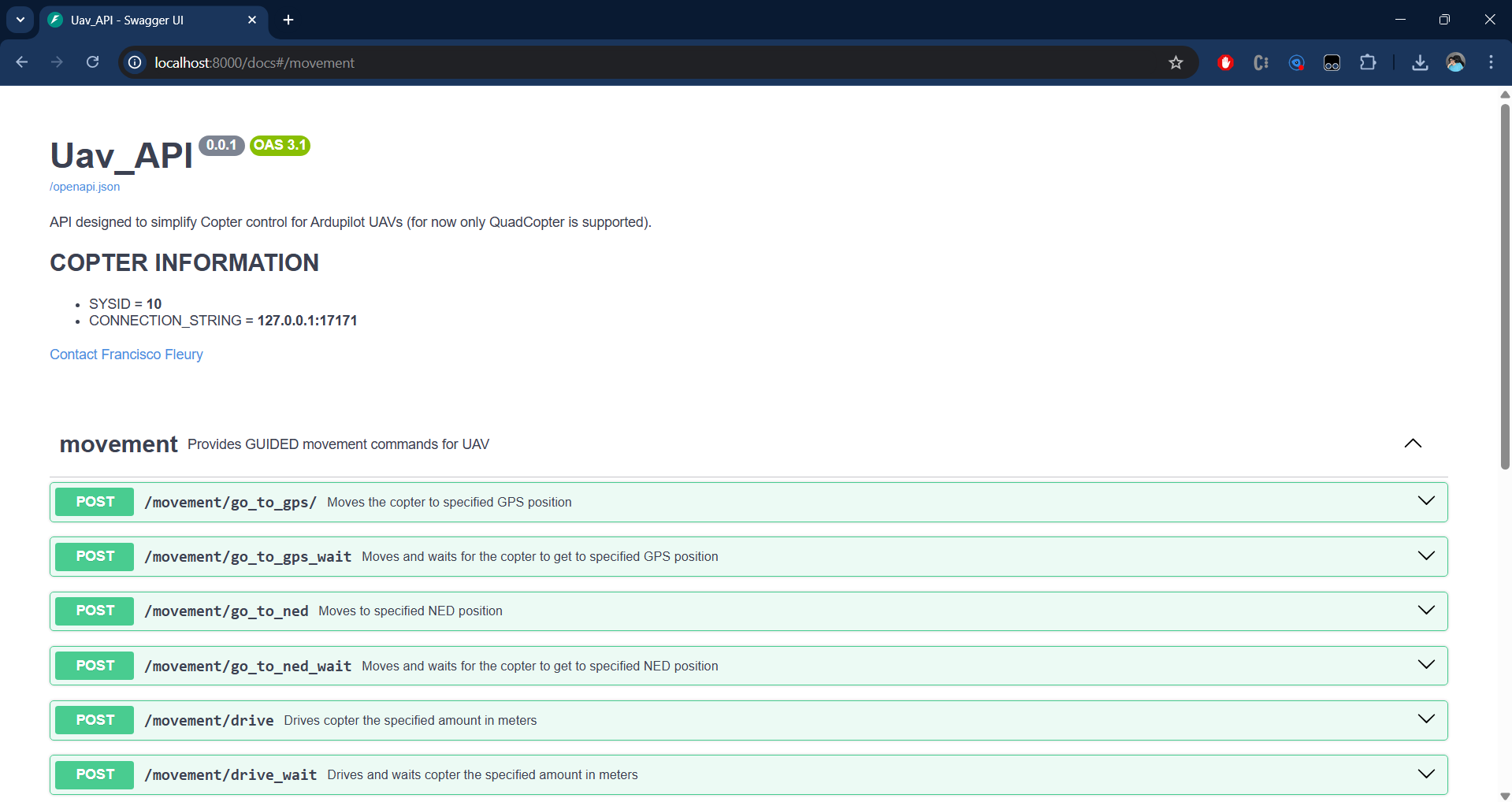
Open the interactive Swagger UI in your browser:
http://localhost:<port>/docs
As of 0.3.0 all routes declare response models — a consistent
device/id/resultenvelope — and flight-critical inputs (speeds, altitudes, GPS coordinates, servo PWM) are bounds-checked, returning 422 before anything reaches MAVLink. Seedocs/api-specification.mdfor the full contract.
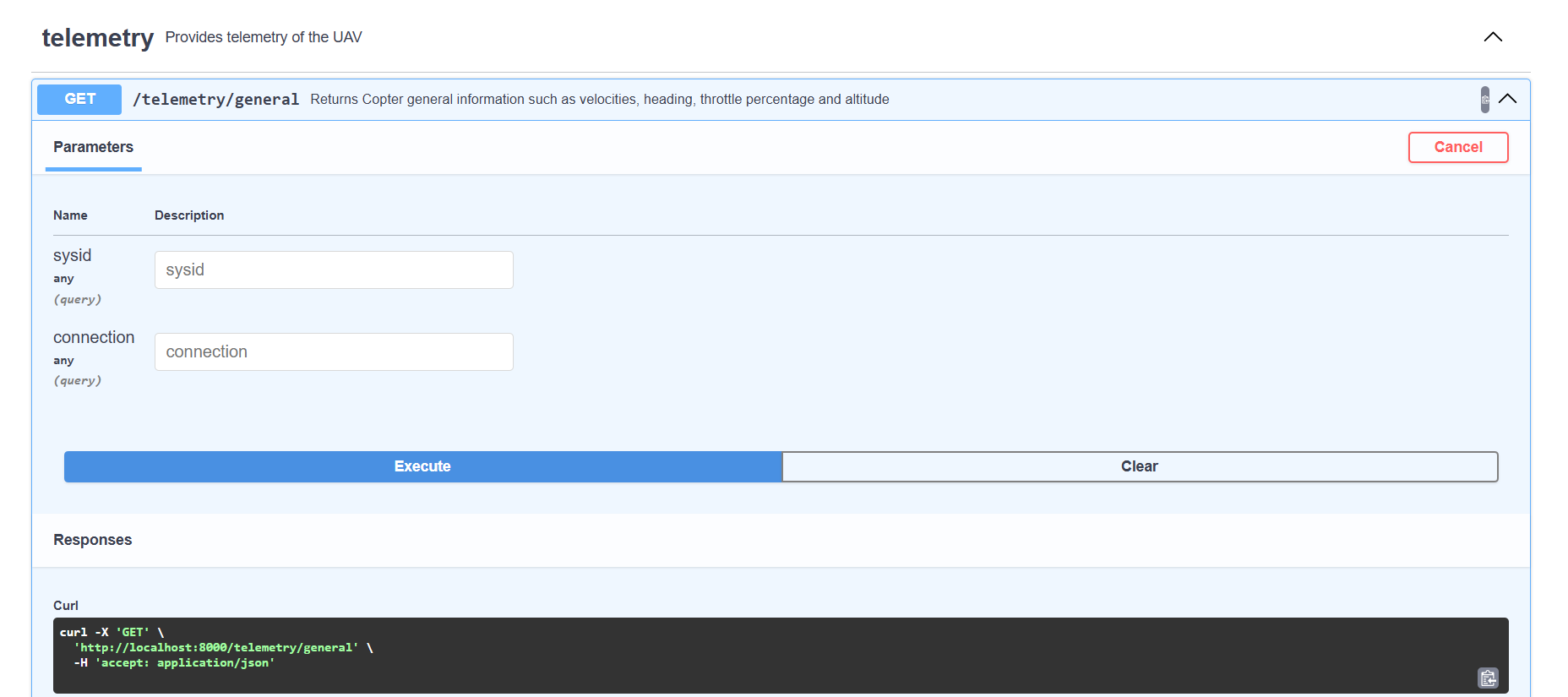
Scroll to the telemetry router and call GET /telemetry/general:
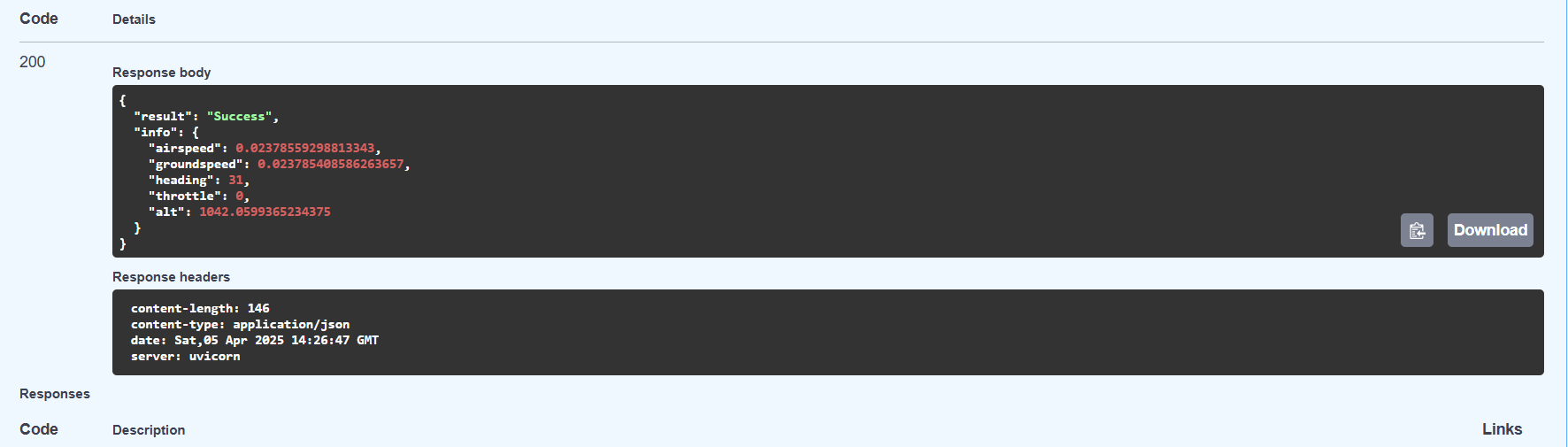
A successful response confirms the API is connected to the vehicle:
CLI Arguments Reference
All arguments can be passed on the command line or set in an INI config file. Run uav-api --help for a quick reference. Note that when both are used, values in the config file win.
General (all modes)
| Argument | Default | Description |
|---|---|---|
--config |
None | Path to INI config file ([api], [simulated], [logs] sections) |
--root_dir |
~/.uav_api |
Root directory for all runtime artifacts: logs/uav_logs, logs/ardupilot_logs, logs/script_logs, scripts/, certs/. Per-path arguments below override their derived defaults. |
--vehicle |
copter |
copter (default) or plane. Selects which routers register and which ArduPilot SITL spawns. See Vehicle Types. |
--port |
8000 | HTTP port the API listens on |
--sysid |
10 | MAVLink system ID; must match the drone's SYSID_THISMAV parameter |
--uav_connection |
127.0.0.1:17171 |
MAVLink address — host:port for UDP, or serial device path for USB |
--gradys_gs |
None | host:port of Gradys Ground Station — enables periodic GPS location push |
--scripts_path |
~/.uav_api/scripts |
Directory where uploaded scripts are saved and executed from (copter mode). Created at startup if missing. |
--python_path |
python3 |
Python binary used to run uploaded .py scripts |
Connection (real drone)
| Argument | Default | Description |
|---|---|---|
--connection_type |
udpin |
One of udpin, udpout, usb, tcp. udpin — API listens; udpout — API connects out; tcp — TCP client; usb — uav_connection is used raw as a serial device path (e.g. /dev/ttyACM0) |
Simulation only
| Argument | Default | Description |
|---|---|---|
--simulated |
off | Bare flag; presence spawns ArduPilot SITL alongside the API (binary is ArduCopter or ArduPlane depending on --vehicle). In config files use simulated = true/false |
--ardupilot_path |
None |
Path to local ArduPilot repository. When omitted, sim_vehicle.py is resolved from the PATH environment variable; when set, SITL is launched from <ardupilot_path>/Tools/autotest/sim_vehicle.py. See Locating ArduPilot. |
--location |
AbraDF |
Named home position for SITL (defined in ~/.config/ardupilot/locations.txt). The custom AbraDF entries are merged into that file at startup, preserving existing entries; an unknown name aborts startup when ArduPilot's built-in list is checkable (--ardupilot_path set), and warns otherwise. |
--speedup |
1 | SITL simulation time multiplier |
--gs_connection |
[] |
Extra host:port addresses SITL streams telemetry to (e.g. Mission Planner) |
--terminal |
xterm -e |
Terminal command SITL is wrapped in, following ArduPilot's SITL_RITW_TERMINAL convention (e.g. gnome-terminal --). Ignored with --headless. |
--headless |
false |
Run SITL without opening any terminal window; requires no X server. Output goes to ~/.uav_api/logs/ardupilot_logs/sitl_<sysid>.log. See Running headless. |
Logging
| Argument | Default | Description |
|---|---|---|
--log_console |
[] |
Components to print logs to console: VEHICLE UVICORN GRADYS_GS SCRIPT. VEHICLE is vehicle-agnostic — see Logging in different vehicles for the prefix actually printed. |
--log_path |
~/.uav_api/logs/uav_logs/uav_<sysid>.log |
File path to write all component logs combined. Its parent directory is created at startup. |
--debug |
[] |
Same component names as --log_console but at DEBUG verbosity |
--script_logs |
~/.uav_api/logs/script_logs |
Directory where script stdout/stderr are saved as timestamped .log files. Created at startup if missing. |
The API creates the directories it needs at startup —
scripts_path,script_logs, and the parent oflog_path— whether the path came fromroot_dirderivation or from a config file, expanding~along the way (mkdir -psemantics, so a pre-provisionedroot_dirsuch as a systemdStateDirectory=is fine). Nothing has to pre-create them for it. To relocate everything at once, set one key:root_dir = /var/lib/uav_api.
UDP/QUIC mode
| Argument | Default | Description |
|---|---|---|
--udp |
false |
Use Hypercorn with QUIC/HTTP3 (UDP) instead of Uvicorn (TCP) |
--certfile |
None | Path to TLS certificate PEM file. Auto-generated self-signed cert if omitted. |
--keyfile |
None | Path to TLS private key PEM file. Auto-generated if omitted. |
QUIC requires TLS. When --udp is set without --certfile/--keyfile, self-signed certs are auto-generated in ~/.uav_api/certs/.
Starting the API in UDP/QUIC mode:
uav-api --udp --simulated --port 8000 --sysid 1
Consuming the API over HTTP/3 (QUIC):
Since QUIC uses UDP and TLS, clients must support HTTP/3. Install niquests:
pip install niquests
import niquests

base_url = "https://localhost:8000"

session = niquests.Session(verify=False)
response = session.get(f"{base_url}/telemetry/general")
print(response.json())
session.close()
See the flight examples section below — all examples support HTTP/3 via the --h3 flag.
Note: The API uses HTTPS (not HTTP) in UDP mode because QUIC requires TLS. The Swagger UI at
https://localhost:<port>/docsalso works — your browser may warn about the self-signed certificate.
Extra Features
Gradys Ground Station Integration
When --gradys_gs <host:port> is set, the API starts a background coroutine that POSTs the vehicle's GPS position to the Gradys GS every second:
uav-api --port 8000 --sysid 1 --gradys_gs 192.168.1.10:5000
Each POST to http://<gradys_gs>/update-info/ includes: latitude, longitude, altitude, device type, a sequence number, and the API's own IP and port. This allows the Gradys ecosystem to track the UAV in real time.
Visual Feedback with Mission Planner
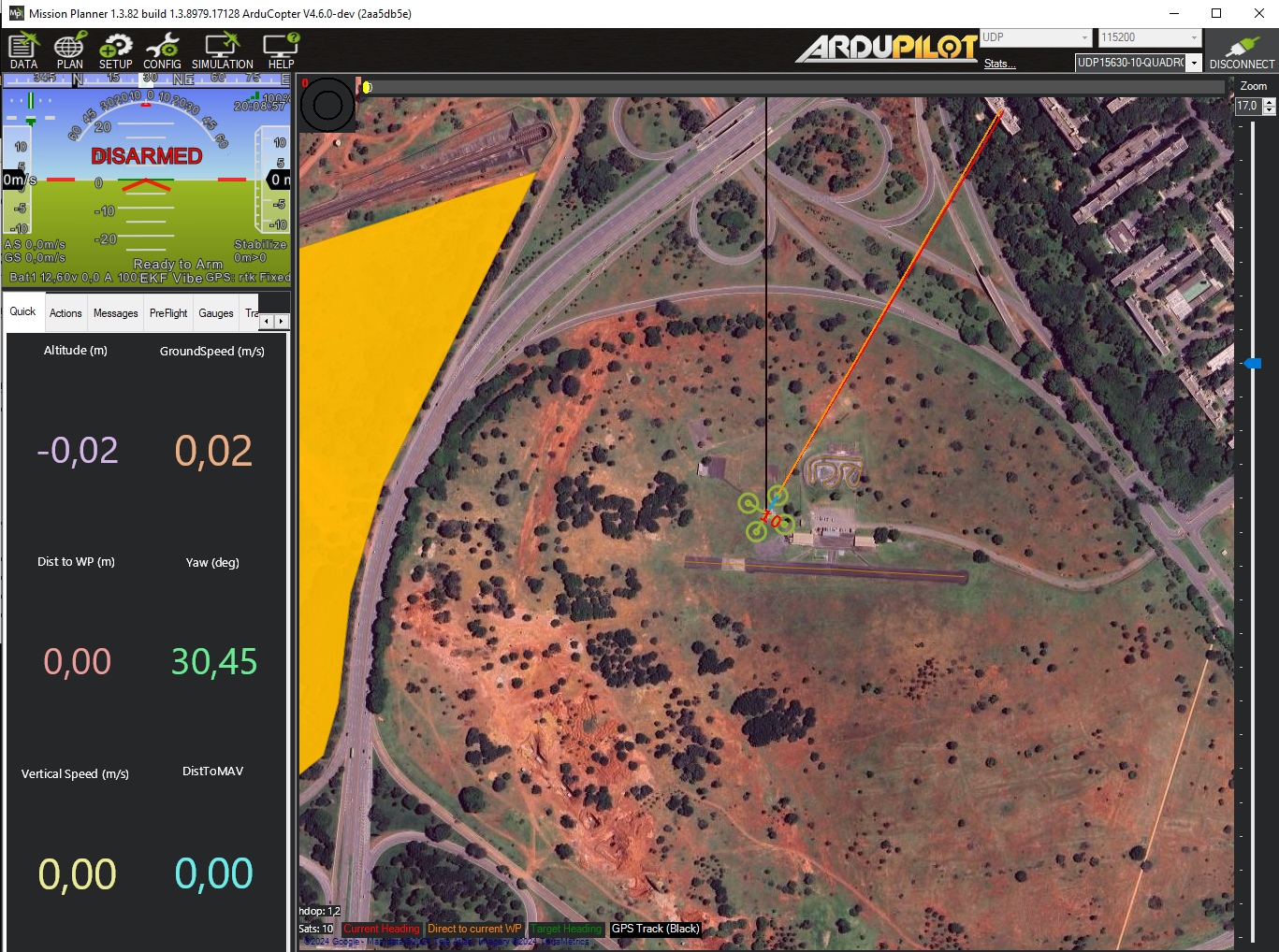
When running in simulated mode, use --gs_connection to stream MAVLink telemetry to Mission Planner (or any GCS software):
uav-api --simulated --sysid 1 --gs_connection [192.168.1.5:14550]
Connect Mission Planner to the specified UDP address to see live position, attitude, and flight data.
Logging System
Control what gets logged and where with the logging arguments:
# Print VEHICLE and UVICORN logs to console
uav-api --log_console VEHICLE UVICORN ...

# Write all logs to a file
uav-api --log_path ~/uav_api.log ...

# Enable DEBUG verbosity for the VEHICLE component
uav-api --debug VEHICLE ...

# Save script stdout/stderr to a directory
uav-api --script_logs ~/.uav_api/logs/script_logs ...
Available log components: VEHICLE, UVICORN, GRADYS_GS, SCRIPT. The VEHICLE token routes to the active vehicle's logger; the actual line prefix you see is [COPTER-<sysid>] or [PLANE-<sysid>] depending on --vehicle — see Logging in different vehicles.
The UVICORN token controls the ASGI server's own loggers on both paths: uvicorn on the default TCP server and hypercorn under --udp. Server console verbosity follows --debug UVICORN; without it the server logs at INFO.
Mission Script Management
The API can host and execute Python or shell scripts on the UAV's companion computer. This is useful for deploying autonomous mission logic remotely.
Upload a script:
POST /mission/upload-script (multipart form, field: file)
Accepts .py and .sh files. Saved to --scripts_path (default ~/.uav_api/scripts).
List uploaded scripts:
GET /mission/list-scripts
Execute a script:
POST /mission/execute-script/
Body: {"script_name": "my_script"}
Each execution gets its own tmux session named UAV_API_<sysid>-<script>-<timestamp> (the script's . is replaced with _). The session is owned by the script process — when the script exits, the session closes automatically. Re-running the same script while it is already running returns HTTP 400. Attach to a session for live output:
tmux attach -t UAV_API_1-my_script_py-20260528_143012
If --script_logs is set, stdout and stderr are saved as:
<script_logs>/<name>_<timestamp>_out.log
<script_logs>/<name>_<timestamp>_err.log
List currently running scripts:
GET /mission/running-scripts
Returns each running script along with its tmux session name, start timestamp, and log paths. Stopped entries are retained internally but not shown here.
Stop a running script:
POST /mission/stop-script/
Body: {"script_name": "my_script"}
Sends Ctrl+C to the tmux session (so the script can run any finally / atexit cleanup — e.g. land the drone), waits briefly, then kills the session. Returns HTTP 404 if the script is unknown to the API, or 400 if it is no longer running.
Clear uploaded scripts:
DELETE /mission/clear-scripts
Deletes all .py and .sh files from --scripts_path. Does not affect running scripts.
A background task in the API lifespan polls tmux every ~2s and marks scripts as
stoppedin an in-memory table as soon as their session ends, sorunning-scriptsalways reflects live state.
Camera Peripheral
Take a photo using a whitelisted camera CLI tool. The chosen tool must be installed on the system:
| Tool | Install | Notes |
|---|---|---|
fswebcam |
sudo apt install fswebcam |
USB webcams on Linux |
rpicam-still |
Pre-installed on Raspberry Pi OS Bookworm+ | Modern Raspberry Pi camera |
libcamera-still |
sudo apt install libcamera-apps |
Generic libcamera (Pi and other boards) |
Endpoint: GET /peripherical/take_photo
| Parameter | Default | Description |
|---|---|---|
command |
(required) | One of: fswebcam, rpicam-still, libcamera-still |
resolution |
1280x720 |
Capture resolution (WIDTHxHEIGHT) |
capture_time |
150 |
Warm-up / exposure delay in milliseconds |
focus_distance |
(none) | Disables autofocus, sets lens position to 1/focus_distance (meters, > 0). rpicam-still/libcamera-still only |
Examples:
# USB webcam with fswebcam
curl "http://localhost:8000/peripherical/take_photo?command=fswebcam" --output photo.jpg

# Raspberry Pi camera at 1920x1080
curl "http://localhost:8000/peripherical/take_photo?command=rpicam-still&resolution=1920x1080" --output photo.jpg

# libcamera with 500ms warm-up
curl "http://localhost:8000/peripherical/take_photo?command=libcamera-still&capture_time=500" --output photo.jpg
Returns the image as image/jpeg (Content-Disposition: attachment; filename="photo.jpg").
Servo Output
Send a PWM signal to a servo motor connected to one of the flight controller's actuator ports. Uses the MAVLink DO_SET_SERVO command.
Endpoint: POST /peripherical/servo_output
Request body:
| Field | Type | Description |
|---|---|---|
channel |
int | Servo channel (1-based, matches the flight controller actuator port) |
pwm |
int | PWM value in microseconds (typically 1000–2000) |
Example:
curl -X POST "http://localhost:8000/peripherical/servo_output" \
  -H "Content-Type: application/json" \
  -d '{"channel": 9, "pwm": 1500}'
Response:
{"device": "uav", "id": "1", "result": "Servo 9 set to 1500 PWM"}
Project Architecture
Module Map
| Path | Purpose |
|---|---|
uav_api/run_api.py |
CLI entry point — parses args, runs setup, launches uvicorn |
uav_api/api_app.py |
FastAPI app definition; conditional router registration by --vehicle; imports lifespan from lifespan.py |
uav_api/lifespan.py |
Async lifespan context manager — startup/shutdown of SITL, scripts watcher, and GS task, with partial-startup cleanup |
uav_api/vehicles/vehicle.py |
Shared Vehicle base — MAVLink connection, single receiver thread, subscriptions, common commands/waits |
uav_api/vehicles/copter.py |
Copter(Vehicle) — copter-specific GUIDED commands and movement |
uav_api/vehicles/plane.py |
Plane(Vehicle) — TAKEOFF-mode takeoff, loiter, QuadPlane helpers |
uav_api/args.py |
CLI argument parsing; config serialized to UAV_ARGS env var |
uav_api/routers/dependencies.py |
Vehicle/args singletons — init_copter/init_plane build them in the lifespan; get_copter_instance / get_plane_instance / get_args serve them via Depends() |
uav_api/gradys_gs.py |
Async coroutine that POSTs GPS location to Gradys GS every second |
uav_api/log.py |
Logger configuration; routes VEHICLE token to COPTER/PLANE logger based on --vehicle |
uav_api/setup.py |
Idempotent startup setup — creates the scripts, script-log and log directories (defaulted or configured) plus the ArduPilot locations file |
uav_api/routers/copter/command.py |
Copter endpoints: arm, takeoff, land, RTL, speed, home |
uav_api/routers/copter/movement.py |
Copter endpoints: go_to_gps, go_to_ned, drive, drive_body (fire-and-forget + blocking pairs), set_heading |
uav_api/routers/copter/telemetry.py |
Copter endpoints: GPS, NED, compass, battery, sensor status, home info |
uav_api/routers/plane/command.py |
Plane endpoints: arm, disarm, takeoff, land, land_at, RTL, set_home |
uav_api/routers/plane/movement.py |
Plane endpoints: go_to_gps, go_to_gps_wait, stop |
uav_api/routers/plane/telemetry.py |
Plane endpoints: general, GPS, battery, sensor status, error, home info |
uav_api/routers/common/mission.py |
Vehicle-agnostic endpoints (registered for copter): upload-script, list-scripts, execute-script, running-scripts, stop-script, clear-scripts |
uav_api/routers/common/peripherical.py |
Peripheral endpoints (registered for copter): take_photo, servo_output |
uav_api/classes/movement.py |
Pydantic models: Gps_pos, Local_pos, Body_pos, Local_velocity |
uav_api/classes/peripherical.py |
Pydantic model: Servo_output |
uav_api/classes/attitude.py |
Pydantic model: Attitude_target (used internally by Plane.set_attitude()) |
uav_api/classes/script.py |
Pydantic model: Script |
flight_examples/ |
Example client scripts and INI config files (Copter) |
packaging/systemd/uav-api.service |
Canonical systemd unit for running the API on a companion computer |
packaging/uav-api.ini.example |
Canonical real-drone INI config example |
scripts/install_service.sh |
Deprecated single-drone installer — see Deploying on hardware |
Processes and Coroutines
The application lifecycle is managed by a FastAPI @asynccontextmanager lifespan. The following are started on API startup and stopped on shutdown:
Always started
uvicorn HTTP server
Launched by uav_api/run_api.py. All processes below run within its lifetime.
MAVLink receiver thread
A dedicated daemon thread started by Vehicle.connect() — the only line of execution that reads the MAVLink connection. It keeps the latest-by-type message cache fresh, dispatches messages to subscription queues that request handlers wait on, and sends the GCS heartbeat. Stopped by vehicle.close() on shutdown, which also unblocks any in-flight waiters.
Conditional: simulated mode (--simulated)
ArduPilot SITL process
Spawned as xterm -e sim_vehicle.py -v {ArduCopter|ArduPlane} ... subprocess (the vehicle binary is chosen by --vehicle). Tagged with a unique environment variable (UAV_SITL_TAG=SITL_ID_<sysid>). On shutdown, all system processes carrying that tag are killed via psutil, ensuring clean teardown even if xterm spawned child processes.
Conditional: Gradys GS integration (--gradys_gs is set)
GS location push coroutine
An asyncio task running send_location_to_gradys_gs() (defined in uav_api/gradys_gs.py). POSTs the vehicle's GPS position to http://<gradys_gs>/update-info/ every second using a shared aiohttp.ClientSession. Task is cancelled and the session is closed on shutdown.
Dependency Injection
Module-level singletons in uav_api/routers/dependencies.py hold one Copter, one Plane, and one parsed args namespace (built in the lifespan via init_copter/init_plane). Routers pick the right one via FastAPI's Depends():
Depends(get_copter_instance)  # shared Copter (copter routers; one MAVLink connection)
Depends(get_plane_instance)   # shared Plane  (plane routers; one MAVLink connection)
Depends(get_scripts_table)    # table with script execution information
Depends(get_args)             # parsed CLI/config arguments
Only one vehicle singleton is instantiated per process — the one matching --vehicle. CLI arguments are serialized to JSON in the UAV_ARGS environment variable before uvicorn forks, allowing all processes to access the same configuration without re-parsing.
API Response Format
All successful responses follow a uniform envelope:
{"device": "uav", "id": "<sysid>", "result": "..."}
Telemetry endpoints add an "info": {...} field with the sensor data. All errors raise HTTP 500 with a descriptive "detail" string.
Flying through scripts
One of the perks of using UAV API is being able to quickly write scripts that control drone movement. Here are some examples.
Running examples
To run the following examples, start the API inside the flight_examples directory:
uav-api --config ./uavs/uav_1.ini
Note that this configuration file contains default values for parameters, change the values such that it matches your environment. You can also use your own configuration file or start the API through arguments.
Once the API is up and running, run one of the examples below in a new terminal instance. All examples run with zero arguments using sensible defaults, but every parameter is configurable via command-line flags.
Common Pattern
All flight examples share a helper module (flight_examples/flight_helpers.py) that provides:
add_common_args(parser)— adds--url,--altitude,--h3, and--certfileto any argparse parser, all with defaults.create_session(args)— returns arequests.Session(HTTP) orniquests.Session(HTTP/3 over QUIC when--h3is set).send_command(session, base_url, endpoint, ...)— sends GET/POST requests, checks status codes, and exits on failure.get_home_ned(session, base_url)/get_home_gps(session, base_url)— captures the current position as a home reference (call after arming, before takeoff).ned_relative_to_absolute(relative, home)— converts a home-relative NED point to absolute coordinates.wait_for_arrival(session, base_url, target, ...)— polls/telemetry/neduntil the drone is within tolerance of the target.setup_graceful_shutdown(session, base_url)— registers a Ctrl+C handler that sends RTL before exiting.
Key conventions:
- NED coordinates are specified relative to the home position (captured after arming, before takeoff). The script converts them to absolute coordinates when sending commands.
- GPS altitude is relative to the home altitude captured at startup.
- HTTP/3 is supported by all examples via the
--h3flag (requiresniquestsand TLS certs from the--udpmode). - Ctrl+C triggers RTL (Return to Launch) for safe shutdown.
Simple Takeoff and Landing
The simplest example — arm, take off, and land. This file is located at flight_examples/takeoff_land/takeoff_land.py.
"""Takeoff and land — the simplest flight example."""

import sys
import os
import argparse

sys.path.insert(0, os.path.join(os.path.dirname(__file__), ".."))
from flight_helpers import add_common_args, get_base_url, create_session, send_command, setup_graceful_shutdown

parser = argparse.ArgumentParser(description="Arm, take off, and land.")
add_common_args(parser)
args = parser.parse_args()

base_url = get_base_url(args)
session = create_session(args)
setup_graceful_shutdown(session, base_url)

# Arm
send_command(session, base_url, "/command/arm")
print("Vehicle armed.")

# Take off
send_command(session, base_url, "/command/takeoff", params={"alt": args.altitude})
print(f"Vehicle took off to {args.altitude}m.")

# Land
send_command(session, base_url, "/command/land")
print("Vehicle landed.")
NED Square
In this example the UAV flies a square pattern using home-relative NED coordinates. The square side length defaults to 20m and is configurable via --side. This file is located at flight_examples/ned_square/ned_square.py.
import sys
import os
import argparse

sys.path.insert(0, os.path.join(os.path.dirname(__file__), ".."))
from flight_helpers import (
    add_common_args, get_base_url, create_session, send_command,
    get_home_ned, ned_relative_to_absolute, setup_graceful_shutdown,
)

parser = argparse.ArgumentParser(description="Fly a square pattern using NED coordinates.")
add_common_args(parser)
parser.add_argument('--side', type=float, default=20,
                    help='Side length of the square in meters (default: 20)')
args = parser.parse_args()

base_url = get_base_url(args)
session = create_session(args)
setup_graceful_shutdown(session, base_url)

# Arm vehicle
send_command(session, base_url, "/command/arm")
print("Vehicle armed.")

# Capture home NED position after arming, before takeoff
home = get_home_ned(session, base_url)

# Take off
send_command(session, base_url, "/command/takeoff", params={"alt": args.altitude})
print(f"Vehicle took off to {args.altitude}m.")

# Define square waypoints as relative offsets from home
side = args.side
alt = -args.altitude
relative_points = [
    (side, side, alt),
    (side, -side, alt),
    (-side, -side, alt),
    (-side, side, alt),
]

# Fly the square
for rel in relative_points:
    absolute = ned_relative_to_absolute(rel, home)
    point_data = {"x": absolute[0], "y": absolute[1], "z": absolute[2]}
    send_command(session, base_url, "/movement/go_to_ned_wait", params=point_data, method="POST")
    print(f"Vehicle at absolute NED ({absolute[0]:.1f}, {absolute[1]:.1f}, {absolute[2]:.1f})")

# Return to launch
send_command(session, base_url, "/command/rtl")
print("Vehicle landed at launch.")
NED Square (Polling)
This example does the same thing as the last one but instead of using the blocking go_to_ned_wait endpoint, it uses the non-blocking go_to_ned and polls /telemetry/ned to check arrival. While more verbose, this approach allows your program to do other things while the UAV is in transit. This file is located at flight_examples/ned_square_polling/ned_square_polling.py.
import sys
import os
import argparse

sys.path.insert(0, os.path.join(os.path.dirname(__file__), ".."))
from flight_helpers import (
    add_common_args, get_base_url, create_session, send_command,
    get_home_ned, ned_relative_to_absolute, wait_for_arrival, setup_graceful_shutdown,
)

parser = argparse.ArgumentParser(description="Fly a square pattern using NED coordinates (polling version).")
add_common_args(parser)
parser.add_argument('--side', type=float, default=20,
                    help='Side length of the square in meters (default: 20)')
args = parser.parse_args()

base_url = get_base_url(args)
session = create_session(args)
setup_graceful_shutdown(session, base_url)

# Arm vehicle
send_command(session, base_url, "/command/arm")
print("Vehicle armed.")

# Capture home NED position after arming, before takeoff
home = get_home_ned(session, base_url)

# Take off
send_command(session, base_url, "/command/takeoff", params={"alt": args.altitude})
print(f"Vehicle took off to {args.altitude}m.")

# Define square waypoints as relative offsets from home
side = args.side
alt = -args.altitude
relative_points = [
    (side, side, alt),
    (side, -side, alt),
    (-side, -side, alt),
    (-side, side, alt),
]

# Fly the square using non-blocking go_to_ned + polling
for i, rel in enumerate(relative_points, start=1):
    absolute = ned_relative_to_absolute(rel, home)
    point_data = {"x": absolute[0], "y": absolute[1], "z": absolute[2]}
    print(f"\nWaypoint {i}: sending go_to_ned -> ({absolute[0]:.1f}, {absolute[1]:.1f}, {absolute[2]:.1f})")
    send_command(session, base_url, "/movement/go_to_ned", params=point_data, method="POST")
    arrived = wait_for_arrival(session, base_url, absolute, tolerance=1.0, timeout=120)
    if arrived:
        print(f"Waypoint {i}: arrived.")
    else:
        print(f"Waypoint {i}: timed out — aborting, sending RTL.")
        send_command(session, base_url, "/command/rtl")
        exit(1)

# Return to launch
send_command(session, base_url, "/command/rtl")
print("\nSquare complete — vehicle returning to launch.")
Make polygon with Go To
This example raises the drone to a height defined by the user and then, using the endpoint go_to_ned_wait, takes the drone to the vertices of regular polygons also to be defined by the user. These polygons have their center located at the point where the drone was raised and are always made vertically. Whenever a polygon is finished, the drone returns to the center before starting the next one.
The algorithm that maps the polygon points is found in the make_polygon_points function and works by inscribing a polygon with s vertices inside a circle of radius r and the NED coordinates of the center defined as offset. Since the polygon is inscribed, we know that its vertices are located on the perimeter of the circle, and since we also know that the polygon is regular, the vertices are equidistant, so we can find the angular distance of each vertex from $\frac{2\pi}{n}$. Now, numbering each vertex v from $v_{0}=0$ to $v_{n}=s-1$, we can find the angle of each one using the function:
$$\theta_{i}=v_{i}\frac{2\pi}{n}$$
Finally, knowing the angle of the vertices, the coordinates of the center, and knowing that the polygon must be drawn vertically, we can define the NED coordinates of the vertices as:
$$x_{i}=\sin(v_{i}\frac{2\pi}{n})+x_{offset}$$ $$y_{i}=y_{offset}$$ $$z_{i}=-\cos(v_{i}\frac{2\pi}{n})+z_{offset}$$
For example, to create a triangle, a square, and a pentagon inscribed in a circle with radius 3m at 4m height:
python go_to_polygon.py --sides 3 4 5 --radius 3 --height 4
All arguments have defaults (sides=4, radius=10, height=20), so running with no arguments creates a square.
This file is located at flight_examples/go_to_polygon/go_to_polygon.py.
import sys
import os
import math
from time import sleep
import argparse

sys.path.insert(0, os.path.join(os.path.dirname(__file__), ".."))
from flight_helpers import (
    add_common_args, get_base_url, create_session,
    send_command, setup_graceful_shutdown
)

SLEEP_TIME = 5


def make_polygon_points(r, s, offset):
    points = []
    for v in range(s):
        point = {
            "x": r*math.sin(v*2*math.pi/s) + offset["x"],
            "y": offset["y"],
            "z": -(r*math.cos(v*2*math.pi/s)) + offset["z"]
        }
        print(f"polygon point {v}: {point}")
        points.append(point)
    return(points)


# Get the user's arguments
parser = argparse.ArgumentParser()
add_common_args(parser)
parser.add_argument('--sides', type=int, nargs='+', default=[4])
parser.add_argument('--radius', type=int, default=10)
parser.add_argument('--height', type=int, default=20)
args = parser.parse_args()

# Ensures that the user defines a valid regular polygon
if 1 in args.sides or 2 in args.sides:
    print(f"Error: Polygon must have more than two sides!")
    exit()

# Failsafe: Ensure that the radius is smaller than the height of the perimeter's center
if args.radius >= args.height:
    print(f"Error: height value must be higher than the radius value!")
    exit()

base_url = get_base_url(args)
session = create_session(args)
setup_graceful_shutdown(session, base_url)

# Arming vehicle
send_command(session, base_url, "/command/arm")
print("Vehicle armed.")

# Get the NED coordinates of the initial position with the vehicle still on the ground
initial_result = send_command(session, base_url, "/telemetry/ned")
initial_pos = initial_result["info"]["position"]
print(f"Initial point: {initial_pos}")

# Taking off
send_command(session, base_url, "/command/takeoff", params={"alt": args.height})
print("Vehicle took off")

sleep(SLEEP_TIME)

# Get the NED coordinates of the center of the polygons
center_result = send_command(session, base_url, "/telemetry/ned")
center_pos = center_result["info"]["position"]
print(f"center point: {center_pos}")

# Failsafe: Ensures the drone has reached the desired altitude
if abs(center_pos["z"]-initial_pos["z"]) >= args.height+2 or abs(center_pos["z"]-initial_pos["z"]) <= args.height-2:
        print(f"Error: Vehicle did not reach the desired height.")
        send_command(session, base_url, "/command/land")
        print("Vehicle landed.")
        exit()

polygon_list = args.sides
for s in polygon_list:
    print(f"\n ---polygon {s}---------------------------------- \n")

    polygon_points = make_polygon_points(args.radius, s, center_pos)

    for point in polygon_points:
        send_command(session, base_url, "/movement/go_to_ned_wait", params=point, method="POST")
        print(f"\nGo to point: {point})")

        sleep(SLEEP_TIME)

        tele_ned_result = send_command(session, base_url, "/telemetry/ned")
        tele_ned_pos = tele_ned_result["info"]["position"]
        print(f"Vehicle at {tele_ned_pos})")

    # Return to center
    send_command(session, base_url, "/movement/go_to_ned_wait", params=center_pos, method="POST")
    print(f"\nVehicle going back to the center")

    sleep(SLEEP_TIME)
    print(f"Vehicle at the center")

# Landing
send_command(session, base_url, "/command/land")
print("\nVehicle landed.")
Make polygon with Drive
This example works the same way as the last one with one change: it uses the drive_wait endpoint to move the drone via relative trajectory vectors instead of absolute coordinates. The make_polygon_trajectory function computes edge vectors as deltas between consecutive polygon vertices:
$$x_{i}=r \cdot \sin(v_{i+1}\frac{2\pi}{n}) - r \cdot \sin(v_{i}\frac{2\pi}{n})$$ $$y_{i}=0$$ $$z_{i}=-(r \cdot \cos(v_{i+1}\frac{2\pi}{n}) - r \cdot \cos(v_{i}\frac{2\pi}{n}))$$
This file is located at flight_examples/drive_polygon/drive_polygon.py.
import sys
import os
import math
from time import sleep
import argparse

sys.path.insert(0, os.path.join(os.path.dirname(__file__), ".."))
from flight_helpers import (
    add_common_args, get_base_url, create_session,
    send_command, setup_graceful_shutdown
)

SLEEP_TIME = 5


def make_polygon_trajectory(r, l):
    vectors = []
    for n in range(l):
        vector = {
            "x": round(r * math.sin((n + 1) * 2 * math.pi / l) - r * math.sin(n * 2 * math.pi / l)),
            "y": 0,
            "z": -(round(r * math.cos((n + 1) * 2 * math.pi / l) - r * math.cos(n * 2 * math.pi / l)))
        }
        print(f"polygon vector {n}: {vector}")
        vectors.append(vector)

    return vectors


# Get the user's arguments
parser = argparse.ArgumentParser()
add_common_args(parser)
parser.add_argument('--sides', type=int, nargs='+', default=[4])
parser.add_argument('--radius', type=int, default=10)
parser.add_argument('--height', type=int, default=20)
args = parser.parse_args()

base_url = get_base_url(args)
session = create_session(args)
setup_graceful_shutdown(session, base_url)

# Validation
if 1 in args.sides or 2 in args.sides:
    print(f"Error: Polygon must have more than two sides!")
    exit()

if args.radius >= args.height:
    print(f"Error: height value must be higher than the radius value!")
    exit()

# Arming vehicle
send_command(session, base_url, "/command/arm")
print("Vehicle armed.")

initial_result = send_command(session, base_url, "/telemetry/ned")
initial_pos = initial_result["info"]["position"]
print(f"Initial point: {initial_pos}")

send_command(session, base_url, "/command/takeoff", params={"alt": args.height})
print("Vehicle took off")

sleep(SLEEP_TIME)

center_result = send_command(session, base_url, "/telemetry/ned")
center_pos = center_result["info"]["position"]
print(f"center point: {center_pos}")

# Altitude failsafe
if abs(center_pos["z"]-initial_pos["z"]) >= args.height+2 or abs(center_pos["z"]-initial_pos["z"]) <= args.height-2:
        print(f"Error: Vehicle did not reach the desired height.")
        send_command(session, base_url, "/command/land")
        print("Vehicle landed.")
        exit()

polygon_list = args.sides
for l in polygon_list:
    print(f"\n ---polygon {l}---------------------------------- \n")

    polygon_trajectory = make_polygon_trajectory(args.radius, l)

    for vector in polygon_trajectory:
        send_command(session, base_url, "/movement/drive_wait", params=vector, method="POST")
        print(f"\nTrajectory vector: {vector})")

        sleep(SLEEP_TIME)

        tele_ned_result = send_command(session, base_url, "/telemetry/ned")
        tele_ned_pos = tele_ned_result["info"]["position"]
        print(f"Vehicle at {tele_ned_pos})")

    # Return to center
    send_command(session, base_url, "/movement/go_to_ned_wait", params=center_pos, method="POST")
    print(f"\nVehicle going back to the center")

    sleep(SLEEP_TIME)
    print(f"Vehicle at the center")

# Landing
send_command(session, base_url, "/command/land")
print("\nVehicle landed.")
Delivery Mission Simulation
This example simulates a complete delivery cycle: home -> pickup -> delivery -> home. The drone uses the non-blocking go_to_ned endpoint with wait_for_arrival polling to check arrival via Euclidean distance:
$$d = \sqrt{(x_{target}-x_{current})^2 + (y_{target}-y_{current})^2 + (z_{target}-z_{current})^2}$$
Coordinates are home-relative NED. The script adds the home position to convert to absolute:
$$P_{target} = P_{home} + P_{input}$$
A SAFE_OFFSET (-2m) is added to the Down component during flight for safe cruise altitude. Pickup and delivery locations default to (10,0,-5) and (0,10,-5) but are configurable via --pickup and --delivery.
python delivery_simulation.py --pickup 1,3,-3 --delivery 0,2,-3
This file is located at flight_examples/delivery/delivery_simulation.py.
python delivery_simulation.py (runs with defaults: pickup=10,0,-5, delivery=0,10,-5)
"""Delivery simulation: pickup a package, fly to delivery point, return home."""

import sys
import os
import time
import argparse

sys.path.insert(0, os.path.join(os.path.dirname(__file__), ".."))

from flight_helpers import (
    add_common_args, get_base_url, create_session, send_command,
    get_home_ned, ned_relative_to_absolute, wait_for_arrival,
    setup_graceful_shutdown, euclidean_distance,
)

SLEEP_DURATION = 4
TAKEOFF_ALTITUDE = 5
SAFE_OFFSET = -2


def parse_ned(s):
    """Parse a 'N,E,D' string into a tuple of three floats."""
    parts = tuple(map(float, s.split(",")))
    if len(parts) != 3:
        raise argparse.ArgumentTypeError(f"Expected N,E,D format, got: {s}")
    return parts


def ensure_negative_altitude(ned):
    """Ensure the Down component is negative (above ground in NED)."""
    if ned[2] >= 0:
        print("Altitude must be negative in NED coordinates. Adjusted to negative value.")
        return (ned[0], ned[1], -abs(ned[2]))
    return ned


def go_to_relative(session, base_url, relative, home):
    """Navigate to a home-relative NED point with SAFE_OFFSET applied to Down."""
    target_abs = (
        relative[0] + home[0],
        relative[1] + home[1],
        relative[2] + home[2] + SAFE_OFFSET,
    )
    send_command(session, base_url, "/movement/go_to_ned",
                 params={"x": target_abs[0], "y": target_abs[1], "z": target_abs[2]},
                 method="POST")
    return target_abs


# --- Argument parsing ---
parser = argparse.ArgumentParser(
    description="Simulate a drone delivery: home -> pickup -> delivery -> home."
)
add_common_args(parser)
parser.add_argument("--pickup", type=str, default="10,0,-5",
                    help="Pickup location as N,E,D (default: 10,0,-5)")
parser.add_argument("--delivery", type=str, default="0,10,-5",
                    help="Delivery location as N,E,D (default: 0,10,-5)")
args = parser.parse_args()

pickup_location = ensure_negative_altitude(parse_ned(args.pickup))
delivery_location = ensure_negative_altitude(parse_ned(args.delivery))

base_url = get_base_url(args)
session = create_session(args)
setup_graceful_shutdown(session, base_url)

# --- Mission start ---
print(f"\nPickup:   {pickup_location}")
print(f"Delivery: {delivery_location}")

# Arm
print("Arming...")
send_command(session, base_url, "/command/arm")
time.sleep(SLEEP_DURATION)

# Get home location after arming, before takeoff
home = get_home_ned(session, base_url)
time.sleep(SLEEP_DURATION)

print(f"Takeoff to {TAKEOFF_ALTITUDE}m...")
send_command(session, base_url, "/command/takeoff", params={"alt": TAKEOFF_ALTITUDE})
time.sleep(SLEEP_DURATION)

# --- Leg 1: Home -> Pickup ---
print(f"Going to pickup location: {pickup_location}")
target_abs = go_to_relative(session, base_url, pickup_location, home)
time.sleep(SLEEP_DURATION)

if wait_for_arrival(session, base_url, target_abs):
    print("Drone arrived at pickup location.")
time.sleep(SLEEP_DURATION)

print("Landing to pick up package...")
send_command(session, base_url, "/command/land")
time.sleep(SLEEP_DURATION)

time.sleep(SLEEP_DURATION)

# Arm and take off again
print("Arming...")
send_command(session, base_url, "/command/arm")
time.sleep(SLEEP_DURATION)

print(f"Takeoff to {TAKEOFF_ALTITUDE}m...")
send_command(session, base_url, "/command/takeoff", params={"alt": TAKEOFF_ALTITUDE})
time.sleep(SLEEP_DURATION)

# --- Leg 2: Pickup -> Delivery ---
print(f"Going to delivery location: {delivery_location}")
target_abs = go_to_relative(session, base_url, delivery_location, home)
time.sleep(SLEEP_DURATION)

if wait_for_arrival(session, base_url, target_abs):
    print("Drone arrived at delivery location.")
time.sleep(SLEEP_DURATION)

print("Landing to deliver package...")
send_command(session, base_url, "/command/land")
time.sleep(SLEEP_DURATION)

time.sleep(SLEEP_DURATION)

# Arm and take off again
print("Arming...")
send_command(session, base_url, "/command/arm")
time.sleep(SLEEP_DURATION)

print(f"Takeoff to {TAKEOFF_ALTITUDE}m...")
send_command(session, base_url, "/command/takeoff", params={"alt": TAKEOFF_ALTITUDE})
time.sleep(SLEEP_DURATION)

# --- Leg 3: Delivery -> Home ---
home_relative = (0, 0, 0)
print(f"Returning to home...")
target_abs = go_to_relative(session, base_url, home_relative, home)
time.sleep(SLEEP_DURATION)

if wait_for_arrival(session, base_url, target_abs):
    print("Drone arrived near home location.")
time.sleep(SLEEP_DURATION)

print("Landing at home location...")
send_command(session, base_url, "/command/land")
time.sleep(SLEEP_DURATION)

print("Mission accomplished.")
GPS-Based Follower
This example tracks a leader drone using GPS coordinates instead of NED. It uses a setup/loop architecture: the setup phase captures home altitude, arms, and takes off; the loop phase continuously reads the leader's GPS and moves the follower with a configurable offset.
The core algorithm converts meter-based offsets into GPS coordinate deltas using Haversine approximation:
$$\Delta_{lat} = \frac{offset_{north}}{111111}$$
$$\Delta_{lon} = \frac{offset_{east}}{111111 \cdot \cos(lat_{leader})}$$
For altitude, relative altitude is calculated by subtracting the home altitude captured at setup:
$$alt_{target} = \max(2.0, (alt_{leader} - alt_{ground}) + offset_{alt})$$
All parameters are configurable via argparse: --leader-url, --offset-north, --offset-east, --offset-alt. Ctrl+C triggers RTL. The loop runs at 2Hz.
This file is located at flight_examples/gps_follower/gps_follower.py.
import math
import time
import sys
import os
import argparse

sys.path.insert(0, os.path.join(os.path.dirname(__file__), ".."))
from flight_helpers import (
    add_common_args, get_base_url, create_session,
    send_command, get_home_gps, setup_graceful_shutdown,
)


def parse_args():
    parser = argparse.ArgumentParser(description="GPS follower — tracks a leader drone with a configurable offset.")
    add_common_args(parser)
    parser.add_argument('--leader-url', type=str, default='localhost:8001',
                        help='Leader API host:port (default: localhost:8001)')
    parser.add_argument('--offset-north', type=float, default=-3,
                        help='North offset in meters; negative = behind (default: -3)')
    parser.add_argument('--offset-east', type=float, default=0,
                        help='East offset in meters (default: 0)')
    parser.add_argument('--offset-alt', type=float, default=2.0,
                        help='Altitude offset above leader in meters (default: 2.0)')
    return parser.parse_args()


def setup(session, base_url, leader_session, leader_base_url, altitude):
    """One-time setup: arm, capture home altitude, capture leader home altitude, and take off."""
    print("--- STARTING SETUP ---")

    # Arm the vehicle
    print("Arming the vehicle...")
    send_command(session, base_url, "/command/arm")

    # Capture home GPS after arming, before takeoff
    home = get_home_gps(session, base_url)
    home_alt = home[2]
    print(f"Follower home altitude captured: {home_alt:.1f}m")

    # Capture leader home GPS altitude (different barometer calibration)
    leader_home = get_home_gps(leader_session, leader_base_url)
    leader_home_alt = leader_home[2]
    print(f"Leader home altitude captured: {leader_home_alt:.1f}m")

    # Take off
    print(f"Taking off to {altitude}m...")
    send_command(session, base_url, "/command/takeoff", params={"alt": altitude})

    print("--- SETUP COMPLETE ---")
    return home_alt, leader_home_alt


def loop(session, base_url, leader_session, leader_base_url, home_alt, leader_home_alt, args):
    """Repeated loop: read leader position, compute offset, move follower."""
    try:
        data = send_command(leader_session, leader_base_url, "/telemetry/gps")
        l_pos = data["info"]["position"]

        leader_lat = float(l_pos["lat"])
        leader_lon = float(l_pos["lon"])
        leader_alt = float(l_pos["alt"])

        print(f"[Leader] Lat: {leader_lat:.6f}, Lon: {leader_lon:.6f}")

        # Compute target position with offset (Haversine approximation)
        delta_lat = args.offset_north / 111111.0
        delta_lon = args.offset_east / (111111.0 * math.cos(math.radians(leader_lat)))

        target_lat = leader_lat + delta_lat
        target_lon = leader_lon + delta_lon

        leader_relative_alt = leader_alt - leader_home_alt
        raw_target_alt = leader_relative_alt + args.offset_alt
        target_alt = max(2.0, raw_target_alt)

        fly_data = {"lat": target_lat, "long": target_lon, "alt": target_alt}
        send_command(session, base_url, "/movement/go_to_gps", params=fly_data, method="POST")

        print(f">> Moving follower to: {target_lat:.6f}, {target_lon:.6f}, alt={target_alt:.1f}m")

    except Exception as e:
        print(f"Loop error: {e}")

    time.sleep(0.5)


if __name__ == "__main__":
    args = parse_args()

    follower_base_url = get_base_url(args)
    scheme = "https" if args.h3 else "http"
    leader_base_url = f"{scheme}://{args.leader_url}"

    follower_session = create_session(args)
    leader_session = create_session(args)

    setup_graceful_shutdown(follower_session, follower_base_url)

    home_alt, leader_home_alt = setup(follower_session, follower_base_url,
                                      leader_session, leader_base_url, args.altitude)

    print("\n--- FOLLOWING LEADER (Ctrl+C to RTL and exit) ---\n")
    while True:
        loop(follower_session, follower_base_url,
             leader_session, leader_base_url, home_alt, leader_home_alt, args)
Testing
The test suite has two layers:
| Layer | Location | Needs | Command |
|---|---|---|---|
| Unit tests | tests/unit/ |
nothing beyond the dev extra | pytest -m "not sitl" |
| SITL integration tests | tests/*_test.py |
ArduPilot + tmux | pytest tests/<module>_test.py |
Three registered markers select subsets (--strict-markers is on):
sitl— spawns ArduPilot SITL; deselect with-m "not sitl"to run anywherecopter/plane— vehicle-specific tests; combine freely, e.g.:
pytest -m "copter and not sitl"   # copter unit tests only
pytest -m plane                   # every plane test (unit + SITL)
pytest -m "sitl and plane"        # plane SITL modules only
Vehicle-neutral tests (the app factory) carry no vehicle marker; the common mission/peripherical routers run on a copter app and carry the copter marker.
Setup
Install the package with the development extra (adds pytest, requests,
httpx and ruff):
pip install -e .[dev]
Unit tests (run anywhere)
The unit layer builds the FastAPI app with create_app() and a mocked
vehicle — no SITL, no MAVLink, no tmux — and pins the HTTP contract of every
router (copter and plane), including the MAVLink unit conversions in the
telemetry handlers and the mission-script lifecycle:
pytest -m "not sitl"
This is what CI runs on every pull request (see
.github/workflows/ci.yml), together with ruff check ..
SITL integration tests (local only)
Every module directly under tests/ spawns a real SITL-backed API server
(marked with the sitl pytest marker). Prerequisites:
- ArduPilot installed with
sim_vehicle.pyonPATH(or pass--ardupilot_path) — see Prerequisites tmux(used by the mission router)
Modules must run sequentially — every SITL instance shares the same
working directory (~/.uav_api/logs/ardupilot_logs) — so run them one at a
time, never with pytest-xdist:
pytest tests/copter_command_test.py
pytest tests/mission_test.py
pytest tests/copter_movement_test.py
pytest tests/peripherical_test.py
pytest tests/copter_telemetry_test.py
pytest tests/concurrency_test.py
pytest tests/plane_command_test.py
pytest tests/plane_movement_test.py
pytest tests/plane_telemetry_test.py
Each module owns a fixed port/sysid so state cannot leak between modules:
| Module | Port | Sysid | Vehicle |
|---|---|---|---|
copter_command_test |
8001 | 1 | copter |
mission_test |
8002 | 2 | copter |
copter_movement_test |
8003 | 3 | copter |
peripherical_test |
8004 | 4 | copter |
copter_telemetry_test |
8005 | 5 | copter |
concurrency_test |
8006 | 6 | copter |
plane_command_test |
8007 | 7 | plane |
plane_movement_test |
8008 | 8 | plane |
plane_telemetry_test |
8009 | 9 | plane |
SITL runs headless; if a module fails, SITL output is in
~/.uav_api/logs/ardupilot_logs/sitl_<sysid>.log and the API log is in
~/.uav_api/logs/uav_logs/uav_<sysid>.log.
Lint
ruff check .
1 maintainer

Release files for uav-api 0.3.0
For a detailed explanation of source distributions (sdists) and built distributions (wheels), please see the package formats documentation.
Source distribution (sdist)
| File | Size | Uploaded | |
|---|---|---|---|
| uav_api-0.3.0.tar.gz | 184.8 kB | Details |
Built distribution (wheel)
| File | Interpreter | ABI | Platform | Reset |
|---|---|---|---|---|
| uav_api-0.3.0-py3-none-any.whl | Python 3 | none | any | Details |
Total release size: 271.2 kB
Release files / uav_api-0.3.0.tar.gz
| Download URL | uav_api-0.3.0.tar.gz |
|---|---|
| Size | 184.8 kB |
| Tags | Source |
|
SHA-256 checksum How to use checksums |
b38907bb2f90672591270e718327724621079487dd13ab85c84b7f0730f99837
|
|
BLAKE2b-256 checksum How to use checksums |
bd9923dab6c7850db331c3a98ca7490c8cbbbdb1d29ed7256b53547b800d5950
|
| Upload date | |
|
Uploaded using Trusted Publishing? What is trusted publishing? |
Yes |
| Uploaded via |
twine/7.0.0 CPython/3.13.14
|
Provenance
Provenance describes where a file came from. On PyPI, provenance is shared via attestations, which provide a verifiable record of the build or publishing details. View details, limitations and caveats.


PyPI Publish Attestation
PyPI verified that this artifact, at this checksum, originated from the publisher listed below.
Signed by GitHub Actions, verified by PyPI on Aug 22, 2026.
Transparency logRelease files / uav_api-0.3.0-py3-none-any.whl
| Download URL | uav_api-0.3.0-py3-none-any.whl |
|---|---|
| Size | 86.4 kB |
| Tags | Python 3 |
|
SHA-256 checksum How to use checksums |
bf9b3c8e59fbbef09eeab33b4398759c6ffd4c5ac1edf109b5ad76609946e55e
|
|
BLAKE2b-256 checksum How to use checksums |
3e7591ceb30b0e1c98b8c7ab5561b9048f86edefff9ffa5aa03f581de7574dcd
|
| Upload date | |
|
Uploaded using Trusted Publishing? What is trusted publishing? |
Yes |
| Uploaded via |
twine/7.0.0 CPython/3.13.14
|
Provenance
Provenance describes where a file came from. On PyPI, provenance is shared via attestations, which provide a verifiable record of the build or publishing details. View details, limitations and caveats.
PyPI Publish Attestation
PyPI verified that this artifact, at this checksum, originated from the publisher listed below.
Signed by GitHub Actions, verified by PyPI on Aug 22, 2026.
Transparency log













