
Uav_api is a python package that provides a HTTP interface for MAVLink commands for ardupilot vehicles

Project description
UAV API
HTTP REST API for controlling ArduPilot-compatible UAVs (QuadCopters). Supports real drones via MAVLink and simulated drones via ArduPilot SITL.
Features:
- Full flight control: arm, takeoff, land, RTL, speed configuration
- GPS and NED movement commands (fire-and-forget and blocking variants), heading control
- Rich telemetry: GPS, NED position, compass, battery, sensor health
- Mission scripting: upload, list, and execute
.py/.shscripts remotely - Gradys Ground Station integration: periodic GPS location push
- Visual feedback via Mission Planner or any MAVLink GCS
- Hardware peripherals: camera capture, servo PWM output
- Configurable logging per component
Table of Contents
- Installation
- Getting Started
- CLI Arguments Reference
- Extra Features
- Project Architecture
- Flying through scripts
Installation
Prerequisites
- Python 3.8+
- For simulated flights: ArduPilot repository built locally, and
xterminstalled.- Clone and build ArduPilot: https://ardupilot.org/dev/docs/where-to-get-the-code.html
- SITL setup guide: https://ardupilot.org/dev/docs/SITL-setup-landingpage.html
Installing from PyPI (recommended)
pip install uav-api
Restart your terminal after installation.
Installing from source (development)
git clone https://github.com/Project-GrADyS/uav_api
cd uav_api
pip install -e .
Restart your terminal after installation.
Getting Started
Running with a real drone
Connect your drone via UDP or USB, then start the API:
uav-api --port 8000 --uav_connection 127.0.0.1:17171 --connection_type udpin --sysid 1
The --connection_type controls the UDP direction:
udpin— API listens, drone connects to it (most common)udpout— API connects out to the droneusb— serial connection (set--uav_connectionto the serial device path, e.g./dev/ttyUSB0)
Running in simulation (SITL)
This starts both ArduCopter SITL (in a new xterm window) and the API:
uav-api --simulated true --ardupilot_path ~/ardupilot --speedup 1 --port 8000 --sysid 1
SITL will bind to the address in --uav_connection (default 127.0.0.1:17171). The --speedup factor controls simulation speed (e.g. 5 = 5× real time). The --location argument sets the SITL home position (default AbraDF).
Using a configuration file
All arguments can be provided via an INI file:
[api]
port=8000
uav_connection=127.0.0.1:17171
connection_type=udpin
sysid=1

[simulated]
ardupilot_path=~/ardupilot
location=AbraDF
gs_connection=[]
speedup=1

[logs]
log_console=[]
log_path=None
debug=[]
script_logs=None
Run with:
uav-api --config /path/to/config.ini
CLI arguments always override values from the config file. Example config files for single and multi-UAV setups are available at flight_examples/uavs/uav_1.ini and uav_2.ini.
Spawning programmatically
You can start the API from Python code using spawn_with_args, which runs the server in a background process:
from uav_api.run_api import spawn_with_args

# Start a simulated UAV API on port 8001
process = spawn_with_args([
    "--simulated", "true",
    "--ardupilot_path", "~/ardupilot",
    "--speedup", "5",
    "--port", "8001",
    "--sysid", "1",
])

# ... interact with the API at http://localhost:8001 ...

# Shut down
process.terminate()
process.join(timeout=15)
spawn_with_args accepts the same arguments as the uav-api CLI and returns a multiprocessing.Process. For a blocking call (e.g. when building your own entry point), use run_with_args instead:
from uav_api.run_api import run_with_args

# Blocks until the server is stopped (Ctrl+C)
run_with_args(["--port", "8000", "--sysid", "1"])
Verifying the API
Open the interactive Swagger UI in your browser:
http://localhost:<port>/docs
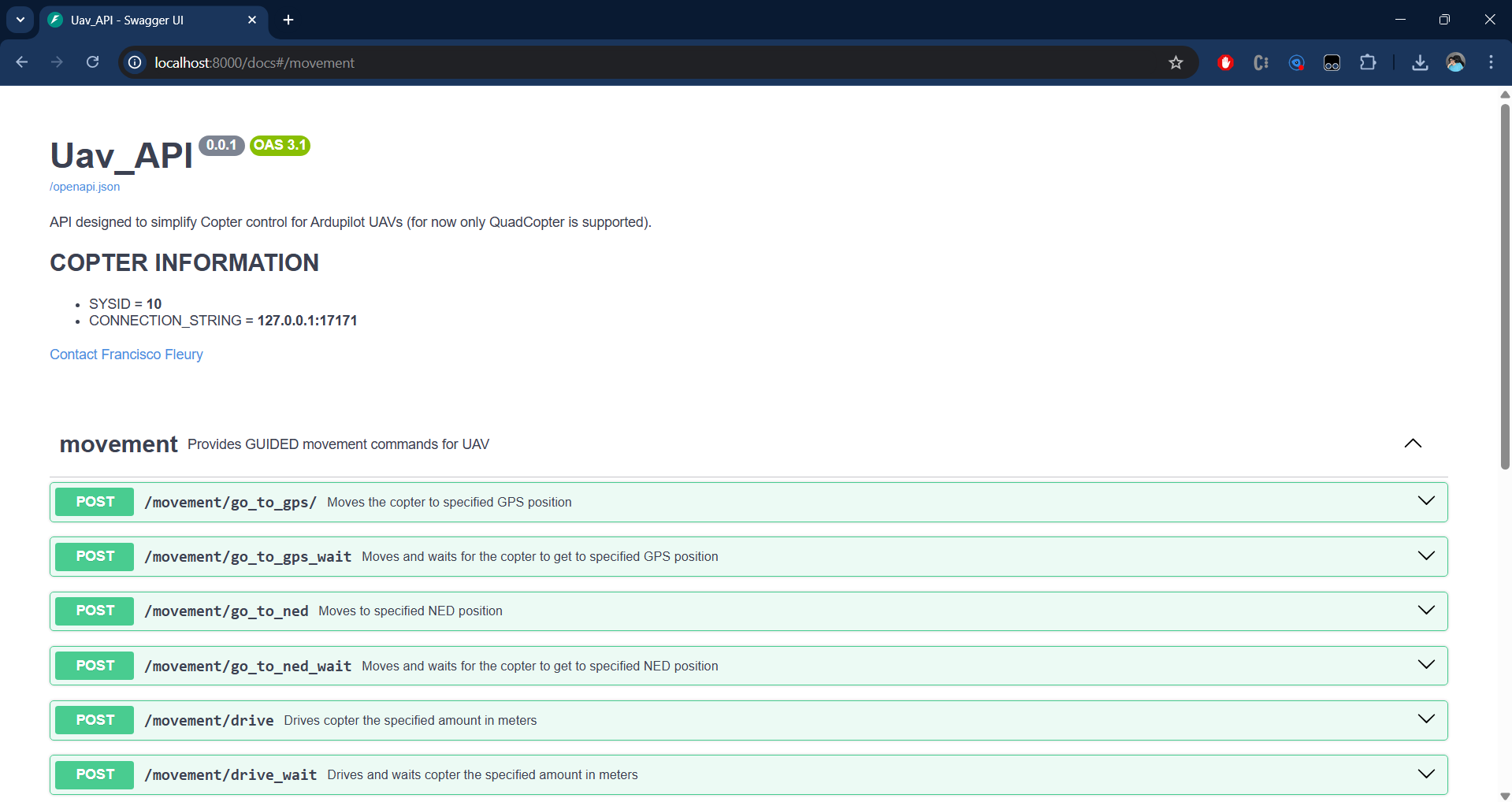
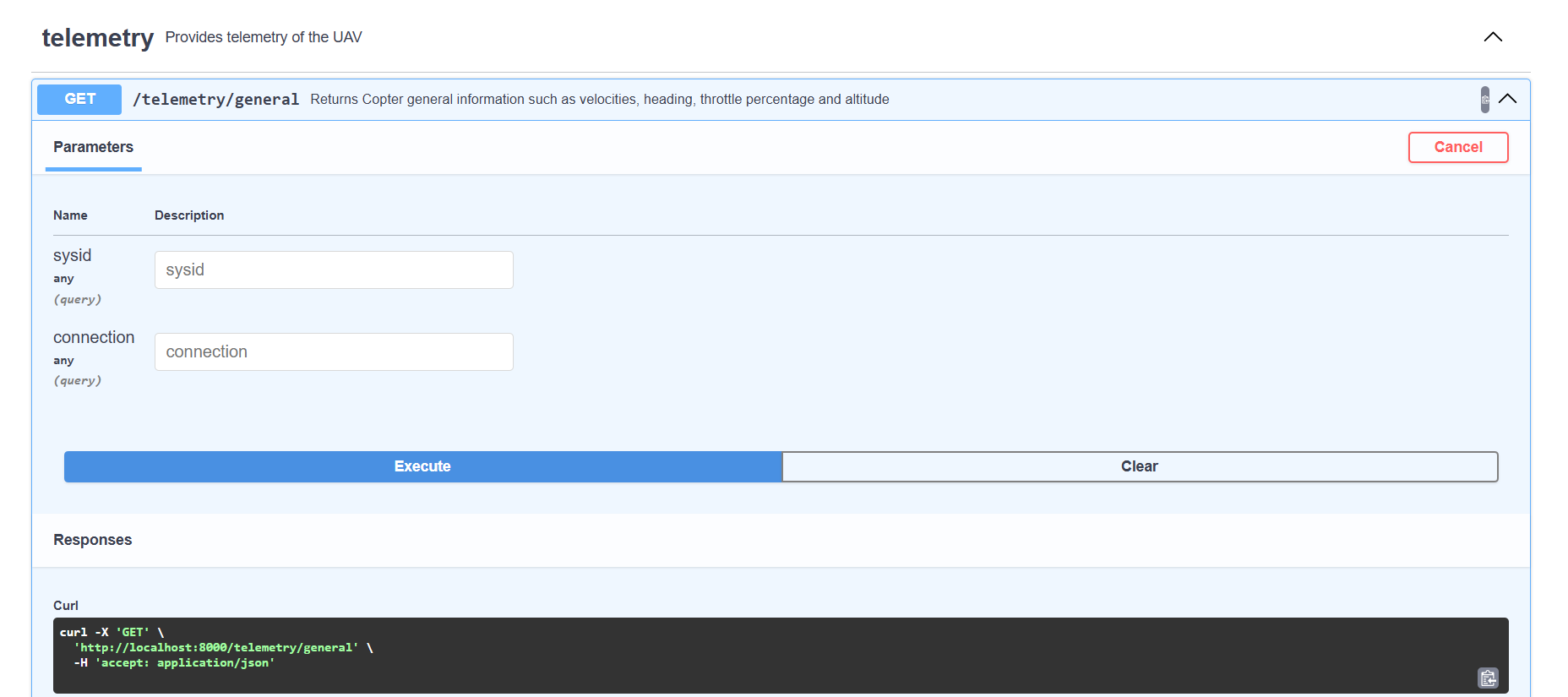
Scroll to the telemetry router and call GET /telemetry/general:
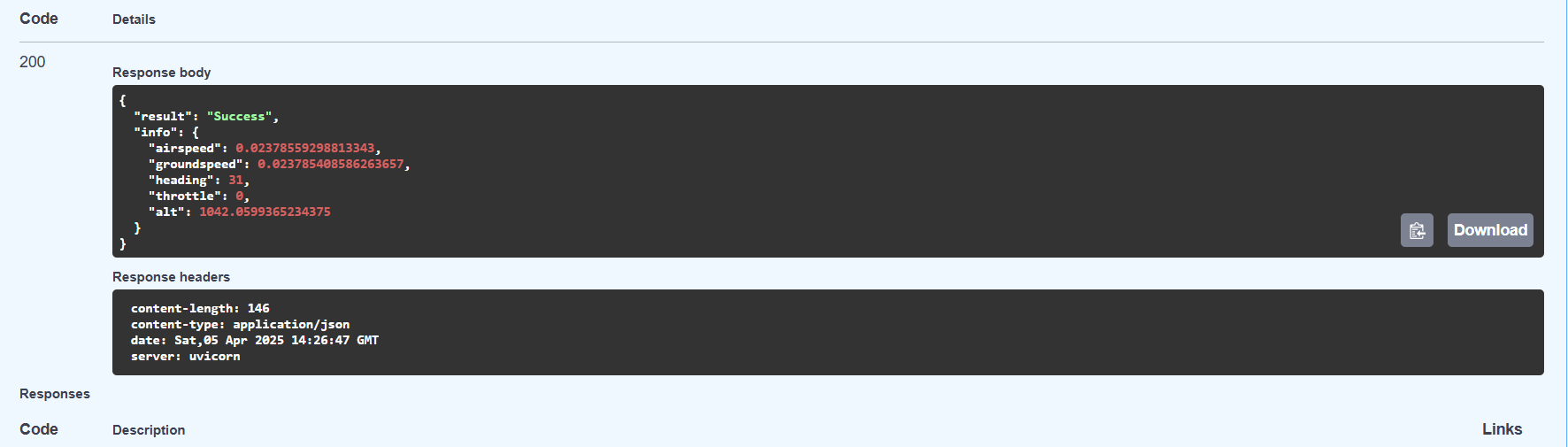
A successful response confirms the API is connected to the vehicle:
CLI Arguments Reference
All arguments can be passed on the command line or set in an INI config file. Run uav-api --help for a quick reference.
General (all modes)
| Argument | Default | Description |
|---|---|---|
--config |
None | Path to INI config file ([api], [simulated], [logs] sections) |
--port |
8000 | HTTP port the API listens on |
--sysid |
10 | MAVLink system ID; must match the drone's SYSID_THISMAV parameter |
--uav_connection |
127.0.0.1:17171 |
MAVLink address — host:port for UDP, or serial device path for USB |
--gradys_gs |
None | host:port of Gradys Ground Station — enables periodic GPS location push |
--scripts_path |
~/uav_scripts |
Directory where uploaded scripts are saved and executed from |
--python_path |
python3 |
Python binary used to run uploaded .py scripts |
Connection (real drone)
| Argument | Default | Description |
|---|---|---|
--connection_type |
udpin |
udpin — API listens; udpout — API connects out; usb — serial |
Simulation only
| Argument | Default | Description |
|---|---|---|
--simulated |
false |
Set to true to spawn ArduCopter SITL alongside the API |
--ardupilot_path |
~/ardupilot |
Path to local ArduPilot repository |
--location |
AbraDF |
Named home position for SITL (defined in ~/.config/ardupilot/locations.txt) |
--speedup |
1 | SITL simulation time multiplier |
--gs_connection |
[] |
Extra host:port addresses SITL streams telemetry to (e.g. Mission Planner) |
Logging
| Argument | Default | Description |
|---|---|---|
--log_console |
[] |
Components to print logs to console: COPTER API GRADYS_GS |
--log_path |
None | File path to write all component logs combined |
--debug |
[] |
Same component names as --log_console but at DEBUG verbosity |
--script_logs |
None | Directory where script stdout/stderr are saved as timestamped .log files |
UDP/QUIC mode
| Argument | Default | Description |
|---|---|---|
--udp |
false |
Use Hypercorn with QUIC/HTTP3 (UDP) instead of Uvicorn (TCP) |
--certfile |
None | Path to TLS certificate PEM file. Auto-generated self-signed cert if omitted. |
--keyfile |
None | Path to TLS private key PEM file. Auto-generated if omitted. |
QUIC requires TLS. When --udp is set without --certfile/--keyfile, self-signed certs are auto-generated in ~/uav_api_certs/.
Starting the API in UDP/QUIC mode:
uav-api --udp --simulated true --ardupilot_path ~/ardupilot --port 8000 --sysid 1
Consuming the API over HTTP/3 (QUIC):
Since QUIC uses UDP and TLS, clients must support HTTP/3. Install niquests:
pip install niquests
import niquests

base_url = "https://localhost:8000"

session = niquests.Session(verify=False)
response = session.get(f"{base_url}/telemetry/general")
print(response.json())
session.close()
See the flight examples section below — all examples support HTTP/3 via the --h3 flag.
Note: The API uses HTTPS (not HTTP) in UDP mode because QUIC requires TLS. The Swagger UI at
https://localhost:<port>/docsalso works — your browser may warn about the self-signed certificate.
Extra Features
Gradys Ground Station Integration
When --gradys_gs <host:port> is set, the API starts a background coroutine that POSTs the vehicle's GPS position to the Gradys GS every second:
uav-api --port 8000 --sysid 1 --gradys_gs 192.168.1.10:5000
Each POST to http://<gradys_gs>/update-info/ includes: latitude, longitude, altitude, device type, a sequence number, and the API's own IP and port. This allows the Gradys ecosystem to track the UAV in real time.
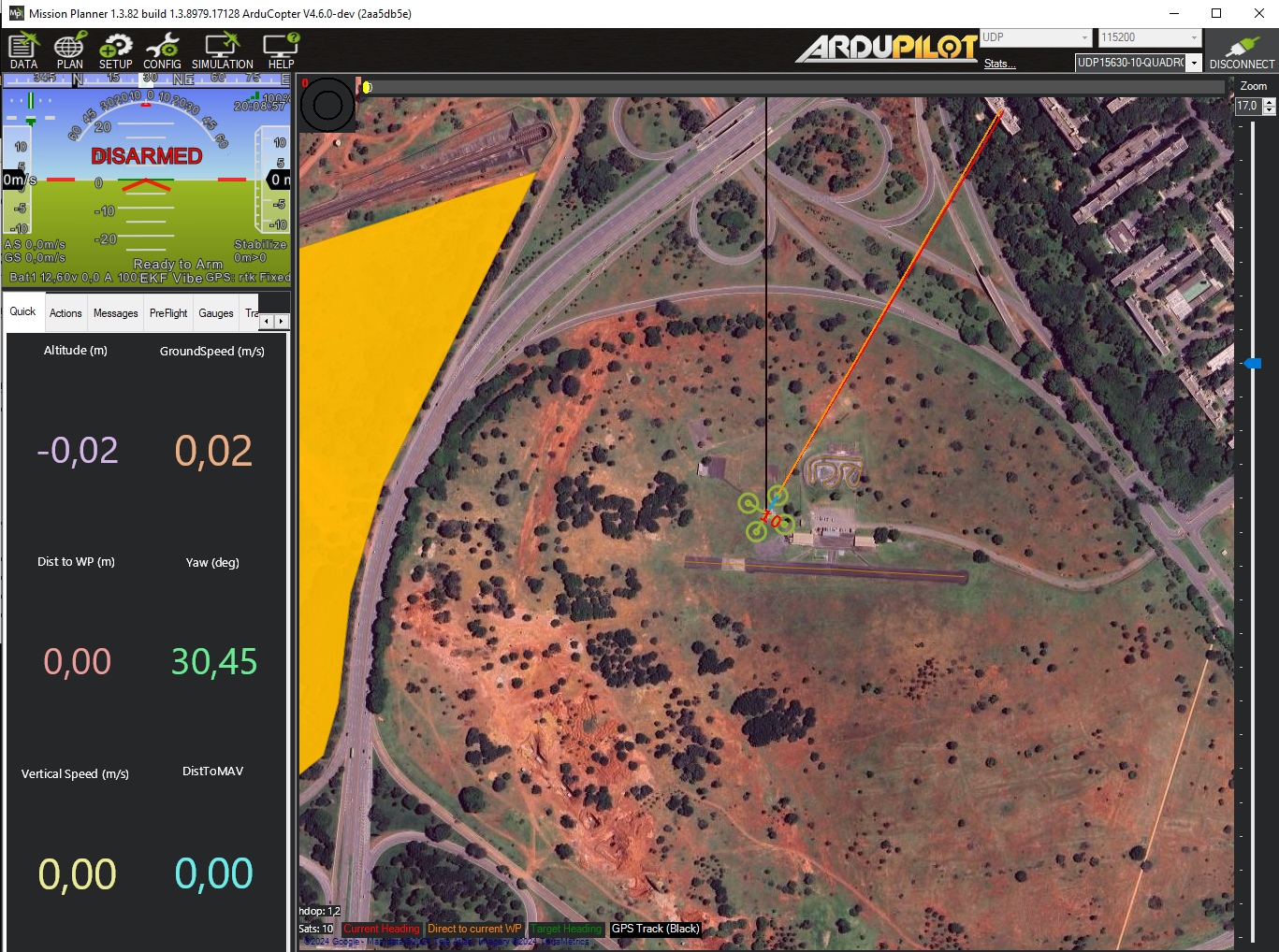
Visual Feedback with Mission Planner
When running in simulated mode, use --gs_connection to stream MAVLink telemetry to Mission Planner (or any GCS software):
uav-api --simulated true --ardupilot_path ~/ardupilot --sysid 1 --gs_connection [192.168.1.5:14550]
Connect Mission Planner to the specified UDP address to see live position, attitude, and flight data.
Logging System
Control what gets logged and where with the logging arguments:
# Print COPTER and API logs to console
uav-api --log_console COPTER API ...

# Write all logs to a file
uav-api --log_path ~/uav_api.log ...

# Enable DEBUG verbosity for the COPTER component
uav-api --debug COPTER ...

# Save script stdout/stderr to a directory
uav-api --script_logs ~/uav_api_logs/script_logs ...
Available log components: COPTER, API, GRADYS_GS.
Mission Script Management
The API can host and execute Python or shell scripts on the UAV's companion computer. This is useful for deploying autonomous mission logic remotely.
Upload a script:
POST /mission/upload-script (multipart form, field: file)
Accepts .py and .sh files. Saved to --scripts_path (default ~/uav_scripts).
List uploaded scripts:
GET /mission/list-scripts
Execute a script:
POST /mission/execute-script/
Body: {"script_name": "my_script"}
Scripts run in a persistent tmux session named api-script. If a script is already running, it is interrupted before the new one starts. Attach to the session for live output:
tmux attach -t api-script
If --script_logs is set, stdout and stderr are saved as:
<script_logs>/<name>_<timestamp>_out.log
<script_logs>/<name>_<timestamp>_err.log
Camera Peripheral
Take a photo using a whitelisted camera CLI tool. The chosen tool must be installed on the system:
| Tool | Install | Notes |
|---|---|---|
fswebcam |
sudo apt install fswebcam |
USB webcams on Linux |
rpicam-still |
Pre-installed on Raspberry Pi OS Bookworm+ | Modern Raspberry Pi camera |
libcamera-still |
sudo apt install libcamera-apps |
Generic libcamera (Pi and other boards) |
Endpoint: GET /peripherical/take_photo
| Parameter | Default | Description |
|---|---|---|
command |
(required) | One of: fswebcam, rpicam-still, libcamera-still |
resolution |
1280x720 |
Capture resolution (WIDTHxHEIGHT) |
capture_time |
150 |
Warm-up / exposure delay in milliseconds |
Examples:
# USB webcam with fswebcam
curl "http://localhost:8000/peripherical/take_photo?command=fswebcam" --output photo.jpg

# Raspberry Pi camera at 1920x1080
curl "http://localhost:8000/peripherical/take_photo?command=rpicam-still&resolution=1920x1080" --output photo.jpg

# libcamera with 500ms warm-up
curl "http://localhost:8000/peripherical/take_photo?command=libcamera-still&capture_time=500" --output photo.jpg
Returns the image as image/jpeg (Content-Disposition: attachment; filename="photo.jpg").
Servo Output
Send a PWM signal to a servo motor connected to one of the flight controller's actuator ports. Uses the MAVLink DO_SET_SERVO command.
Endpoint: POST /peripherical/servo_output
Request body:
| Field | Type | Description |
|---|---|---|
channel |
int | Servo channel (1-based, matches the flight controller actuator port) |
pwm |
int | PWM value in microseconds (typically 1000–2000) |
Example:
curl -X POST "http://localhost:8000/peripherical/servo_output" \
  -H "Content-Type: application/json" \
  -d '{"channel": 9, "pwm": 1500}'
Response:
{"device": "uav", "id": "1", "result": "Servo 9 set to 1500 PWM"}
Project Architecture
Module Map
| Path | Purpose |
|---|---|
uav_api/run_api.py |
CLI entry point — parses args, runs setup, launches uvicorn |
uav_api/api_app.py |
FastAPI app definition and lifespan (startup/shutdown logic) |
uav_api/copter.py |
Core vehicle abstraction — all MAVLink logic (~1850 lines) |
uav_api/args.py |
CLI argument parsing; config serialized to UAV_ARGS env var |
uav_api/router_dependencies.py |
Singleton Copter instance and args via Depends() |
uav_api/gradys_gs.py |
Async coroutine that POSTs GPS location to Gradys GS every second |
uav_api/log.py |
Logger configuration (file + console, per-component) |
uav_api/setup.py |
Idempotent home-directory setup (log dirs, scripts dir, ArduPilot config) |
uav_api/routers/command.py |
Endpoints: arm, takeoff, land, RTL, speed, home |
uav_api/routers/movement.py |
Endpoints: go_to_gps, go_to_ned, drive (fire-and-forget + blocking pairs), set_heading |
uav_api/routers/telemetry.py |
Endpoints: GPS, NED, compass, battery, sensor status, home info |
uav_api/routers/mission.py |
Endpoints: upload-script, list-scripts, execute-script |
uav_api/routers/peripherical.py |
Endpoints: take_photo, servo_output |
uav_api/classes/pos.py |
Pydantic models: GPS_pos, Local_pos |
uav_api/classes/peripherical.py |
Pydantic model: Servo_output |
uav_api/classes/script.py |
Pydantic model: Script |
flight_examples/ |
Example client scripts and INI config files |
Processes and Coroutines
The application lifecycle is managed by a FastAPI @asynccontextmanager lifespan. The following are started on API startup and stopped on shutdown:
Always started
uvicorn HTTP server
Launched by uav_api/run_api.py. All processes below run within its lifetime.
MAVLink drain loop
An asyncio task running copter.run_drain_mav_loop(). Continuously drains buffered MAVLink messages to prevent connection stalls. Cancelled on shutdown.
Conditional: simulated mode (--simulated true)
ArduCopter SITL process
Spawned as xterm -e sim_vehicle.py -v ArduCopter ... subprocess. Tagged with a unique environment variable (UAV_SITL_TAG=SITL_ID_<sysid>). On shutdown, all system processes carrying that tag are killed via psutil, ensuring clean teardown even if xterm spawned child processes.
Conditional: Gradys GS integration (--gradys_gs is set)
GS location push coroutine
An asyncio task running send_location_to_gradys_gs() (defined in uav_api/gradys_gs.py). POSTs the vehicle's GPS position to http://<gradys_gs>/update-info/ every second using a shared aiohttp.ClientSession. Task is cancelled and the session is closed on shutdown.
Dependency Injection
A single Copter instance and a single args namespace are held as module-level globals in uav_api/router_dependencies.py. All routers receive them via FastAPI's Depends():
Depends(get_copter_instance)  # shared Copter (one MAVLink connection)
Depends(get_args)             # parsed CLI/config arguments
CLI arguments are serialized to JSON in the UAV_ARGS environment variable before uvicorn forks, allowing all processes to access the same configuration without re-parsing.
API Response Format
All successful responses follow a uniform envelope:
{"device": "uav", "id": "<sysid>", "result": "..."}
Telemetry endpoints add an "info": {...} field with the sensor data. All errors raise HTTP 500 with a descriptive "detail" string.
Flying through scripts
One of the perks of using UAV API is being able to quickly write scripts that control drone movement. Here are some examples.
Running examples
To run the following examples, start the API inside the flight_examples directory:
uav-api --config ./uavs/uav_1.ini
Note that this configuration file contains default values for parameters, change the values such that it matches your environment. You can also use your own configuration file or start the API through arguments.
Once the API is up and running, run one of the examples below in a new terminal instance. All examples run with zero arguments using sensible defaults, but every parameter is configurable via command-line flags.
Common Pattern
All flight examples share a helper module (flight_examples/flight_helpers.py) that provides:
add_common_args(parser)— adds--url,--altitude,--h3, and--certfileto any argparse parser, all with defaults.create_session(args)— returns arequests.Session(HTTP) orniquests.Session(HTTP/3 over QUIC when--h3is set).send_command(session, base_url, endpoint, ...)— sends GET/POST requests, checks status codes, and exits on failure.get_home_ned(session, base_url)/get_home_gps(session, base_url)— captures the current position as a home reference (call after arming, before takeoff).ned_relative_to_absolute(relative, home)— converts a home-relative NED point to absolute coordinates.wait_for_arrival(session, base_url, target, ...)— polls/telemetry/neduntil the drone is within tolerance of the target.setup_graceful_shutdown(session, base_url)— registers a Ctrl+C handler that sends RTL before exiting.
Key conventions:
- NED coordinates are specified relative to the home position (captured after arming, before takeoff). The script converts them to absolute coordinates when sending commands.
- GPS altitude is relative to the home altitude captured at startup.
- HTTP/3 is supported by all examples via the
--h3flag (requiresniquestsand TLS certs from the--udpmode). - Ctrl+C triggers RTL (Return to Launch) for safe shutdown.
Simple Takeoff and Landing
The simplest example — arm, take off, and land. This file is located at flight_examples/takeoff_land/takeoff_land.py.
"""Takeoff and land — the simplest flight example."""

import sys
import os
import argparse

sys.path.insert(0, os.path.join(os.path.dirname(__file__), ".."))
from flight_helpers import add_common_args, get_base_url, create_session, send_command, setup_graceful_shutdown

parser = argparse.ArgumentParser(description="Arm, take off, and land.")
add_common_args(parser)
args = parser.parse_args()

base_url = get_base_url(args)
session = create_session(args)
setup_graceful_shutdown(session, base_url)

# Arm
send_command(session, base_url, "/command/arm")
print("Vehicle armed.")

# Take off
send_command(session, base_url, "/command/takeoff", params={"alt": args.altitude})
print(f"Vehicle took off to {args.altitude}m.")

# Land
send_command(session, base_url, "/command/land")
print("Vehicle landed.")
NED Square
In this example the UAV flies a square pattern using home-relative NED coordinates. The square side length defaults to 20m and is configurable via --side. This file is located at flight_examples/ned_square/ned_square.py.
import sys
import os
import argparse

sys.path.insert(0, os.path.join(os.path.dirname(__file__), ".."))
from flight_helpers import (
    add_common_args, get_base_url, create_session, send_command,
    get_home_ned, ned_relative_to_absolute, setup_graceful_shutdown,
)

parser = argparse.ArgumentParser(description="Fly a square pattern using NED coordinates.")
add_common_args(parser)
parser.add_argument('--side', type=float, default=20,
                    help='Side length of the square in meters (default: 20)')
args = parser.parse_args()

base_url = get_base_url(args)
session = create_session(args)
setup_graceful_shutdown(session, base_url)

# Arm vehicle
send_command(session, base_url, "/command/arm")
print("Vehicle armed.")

# Capture home NED position after arming, before takeoff
home = get_home_ned(session, base_url)

# Take off
send_command(session, base_url, "/command/takeoff", params={"alt": args.altitude})
print(f"Vehicle took off to {args.altitude}m.")

# Define square waypoints as relative offsets from home
side = args.side
alt = -args.altitude
relative_points = [
    (side, side, alt),
    (side, -side, alt),
    (-side, -side, alt),
    (-side, side, alt),
]

# Fly the square
for rel in relative_points:
    absolute = ned_relative_to_absolute(rel, home)
    point_data = {"x": absolute[0], "y": absolute[1], "z": absolute[2]}
    send_command(session, base_url, "/movement/go_to_ned_wait", params=point_data, method="POST")
    print(f"Vehicle at absolute NED ({absolute[0]:.1f}, {absolute[1]:.1f}, {absolute[2]:.1f})")

# Return to launch
send_command(session, base_url, "/command/rtl")
print("Vehicle landed at launch.")
NED Square (Polling)
This example does the same thing as the last one but instead of using the blocking go_to_ned_wait endpoint, it uses the non-blocking go_to_ned and polls /telemetry/ned to check arrival. While more verbose, this approach allows your program to do other things while the UAV is in transit. This file is located at flight_examples/ned_square_polling/ned_square_polling.py.
import sys
import os
import argparse

sys.path.insert(0, os.path.join(os.path.dirname(__file__), ".."))
from flight_helpers import (
    add_common_args, get_base_url, create_session, send_command,
    get_home_ned, ned_relative_to_absolute, wait_for_arrival, setup_graceful_shutdown,
)

parser = argparse.ArgumentParser(description="Fly a square pattern using NED coordinates (polling version).")
add_common_args(parser)
parser.add_argument('--side', type=float, default=20,
                    help='Side length of the square in meters (default: 20)')
args = parser.parse_args()

base_url = get_base_url(args)
session = create_session(args)
setup_graceful_shutdown(session, base_url)

# Arm vehicle
send_command(session, base_url, "/command/arm")
print("Vehicle armed.")

# Capture home NED position after arming, before takeoff
home = get_home_ned(session, base_url)

# Take off
send_command(session, base_url, "/command/takeoff", params={"alt": args.altitude})
print(f"Vehicle took off to {args.altitude}m.")

# Define square waypoints as relative offsets from home
side = args.side
alt = -args.altitude
relative_points = [
    (side, side, alt),
    (side, -side, alt),
    (-side, -side, alt),
    (-side, side, alt),
]

# Fly the square using non-blocking go_to_ned + polling
for i, rel in enumerate(relative_points, start=1):
    absolute = ned_relative_to_absolute(rel, home)
    point_data = {"x": absolute[0], "y": absolute[1], "z": absolute[2]}
    print(f"\nWaypoint {i}: sending go_to_ned -> ({absolute[0]:.1f}, {absolute[1]:.1f}, {absolute[2]:.1f})")
    send_command(session, base_url, "/movement/go_to_ned", params=point_data, method="POST")
    arrived = wait_for_arrival(session, base_url, absolute, tolerance=1.0, timeout=120)
    if arrived:
        print(f"Waypoint {i}: arrived.")
    else:
        print(f"Waypoint {i}: timed out — aborting, sending RTL.")
        send_command(session, base_url, "/command/rtl")
        exit(1)

# Return to launch
send_command(session, base_url, "/command/rtl")
print("\nSquare complete — vehicle returning to launch.")
Make polygon with Go To
This example raises the drone to a height defined by the user and then, using the endpoint go_to_ned_wait, takes the drone to the vertices of regular polygons also to be defined by the user. These polygons have their center located at the point where the drone was raised and are always made vertically. Whenever a polygon is finished, the drone returns to the center before starting the next one.
The algorithm that maps the polygon points is found in the make_polygon_points function and works by inscribing a polygon with s vertices inside a circle of radius r and the NED coordinates of the center defined as offset. Since the polygon is inscribed, we know that its vertices are located on the perimeter of the circle, and since we also know that the polygon is regular, the vertices are equidistant, so we can find the angular distance of each vertex from $\frac{2\pi}{n}$. Now, numbering each vertex v from $v_{0}=0$ to $v_{n}=s-1$, we can find the angle of each one using the function:
$$\theta_{i}=v_{i}\frac{2\pi}{n}$$
Finally, knowing the angle of the vertices, the coordinates of the center, and knowing that the polygon must be drawn vertically, we can define the NED coordinates of the vertices as:
$$x_{i}=\sin(v_{i}\frac{2\pi}{n})+x_{offset}$$ $$y_{i}=y_{offset}$$ $$z_{i}=-\cos(v_{i}\frac{2\pi}{n})+z_{offset}$$
For example, to create a triangle, a square, and a pentagon inscribed in a circle with radius 3m at 4m height:
python go_to_polygon.py --sides 3 4 5 --radius 3 --height 4
All arguments have defaults (sides=4, radius=10, height=20), so running with no arguments creates a square.
This file is located at flight_examples/go_to_polygon/go_to_polygon.py.
import sys
import os
import math
from time import sleep
import argparse

sys.path.insert(0, os.path.join(os.path.dirname(__file__), ".."))
from flight_helpers import (
    add_common_args, get_base_url, create_session,
    send_command, setup_graceful_shutdown
)

SLEEP_TIME = 5


def make_polygon_points(r, s, offset):
    points = []
    for v in range(s):
        point = {
            "x": r*math.sin(v*2*math.pi/s) + offset["x"],
            "y": offset["y"],
            "z": -(r*math.cos(v*2*math.pi/s)) + offset["z"]
        }
        print(f"polygon point {v}: {point}")
        points.append(point)
    return(points)


# Get the user's arguments
parser = argparse.ArgumentParser()
add_common_args(parser)
parser.add_argument('--sides', type=int, nargs='+', default=[4])
parser.add_argument('--radius', type=int, default=10)
parser.add_argument('--height', type=int, default=20)
args = parser.parse_args()

# Ensures that the user defines a valid regular polygon
if 1 in args.sides or 2 in args.sides:
    print(f"Error: Polygon must have more than two sides!")
    exit()

# Failsafe: Ensure that the radius is smaller than the height of the perimeter's center
if args.radius >= args.height:
    print(f"Error: height value must be higher than the radius value!")
    exit()

base_url = get_base_url(args)
session = create_session(args)
setup_graceful_shutdown(session, base_url)

# Arming vehicle
send_command(session, base_url, "/command/arm")
print("Vehicle armed.")

# Get the NED coordinates of the initial position with the vehicle still on the ground
initial_result = send_command(session, base_url, "/telemetry/ned")
initial_pos = initial_result["info"]["position"]
print(f"Initial point: {initial_pos}")

# Taking off
send_command(session, base_url, "/command/takeoff", params={"alt": args.height})
print("Vehicle took off")

sleep(SLEEP_TIME)

# Get the NED coordinates of the center of the polygons
center_result = send_command(session, base_url, "/telemetry/ned")
center_pos = center_result["info"]["position"]
print(f"center point: {center_pos}")

# Failsafe: Ensures the drone has reached the desired altitude
if abs(center_pos["z"]-initial_pos["z"]) >= args.height+2 or abs(center_pos["z"]-initial_pos["z"]) <= args.height-2:
        print(f"Error: Vehicle did not reach the desired height.")
        send_command(session, base_url, "/command/land")
        print("Vehicle landed.")
        exit()

polygon_list = args.sides
for s in polygon_list:
    print(f"\n ---polygon {s}---------------------------------- \n")

    polygon_points = make_polygon_points(args.radius, s, center_pos)

    for point in polygon_points:
        send_command(session, base_url, "/movement/go_to_ned_wait", params=point, method="POST")
        print(f"\nGo to point: {point})")

        sleep(SLEEP_TIME)

        tele_ned_result = send_command(session, base_url, "/telemetry/ned")
        tele_ned_pos = tele_ned_result["info"]["position"]
        print(f"Vehicle at {tele_ned_pos})")

    # Return to center
    send_command(session, base_url, "/movement/go_to_ned_wait", params=center_pos, method="POST")
    print(f"\nVehicle going back to the center")

    sleep(SLEEP_TIME)
    print(f"Vehicle at the center")

# Landing
send_command(session, base_url, "/command/land")
print("\nVehicle landed.")
Make polygon with Drive
This example works the same way as the last one with one change: it uses the drive_wait endpoint to move the drone via relative trajectory vectors instead of absolute coordinates. The make_polygon_trajectory function computes edge vectors as deltas between consecutive polygon vertices:
$$x_{i}=r \cdot \sin(v_{i+1}\frac{2\pi}{n}) - r \cdot \sin(v_{i}\frac{2\pi}{n})$$ $$y_{i}=0$$ $$z_{i}=-(r \cdot \cos(v_{i+1}\frac{2\pi}{n}) - r \cdot \cos(v_{i}\frac{2\pi}{n}))$$
This file is located at flight_examples/drive_polygon/drive_polygon.py.
import sys
import os
import math
from time import sleep
import argparse

sys.path.insert(0, os.path.join(os.path.dirname(__file__), ".."))
from flight_helpers import (
    add_common_args, get_base_url, create_session,
    send_command, setup_graceful_shutdown
)

SLEEP_TIME = 5


def make_polygon_trajectory(r, l):
    vectors = []
    for n in range(l):
        vector = {
            "x": round(r * math.sin((n + 1) * 2 * math.pi / l) - r * math.sin(n * 2 * math.pi / l)),
            "y": 0,
            "z": -(round(r * math.cos((n + 1) * 2 * math.pi / l) - r * math.cos(n * 2 * math.pi / l)))
        }
        print(f"polygon vector {n}: {vector}")
        vectors.append(vector)

    return vectors


# Get the user's arguments
parser = argparse.ArgumentParser()
add_common_args(parser)
parser.add_argument('--sides', type=int, nargs='+', default=[4])
parser.add_argument('--radius', type=int, default=10)
parser.add_argument('--height', type=int, default=20)
args = parser.parse_args()

base_url = get_base_url(args)
session = create_session(args)
setup_graceful_shutdown(session, base_url)

# Validation
if 1 in args.sides or 2 in args.sides:
    print(f"Error: Polygon must have more than two sides!")
    exit()

if args.radius >= args.height:
    print(f"Error: height value must be higher than the radius value!")
    exit()

# Arming vehicle
send_command(session, base_url, "/command/arm")
print("Vehicle armed.")

initial_result = send_command(session, base_url, "/telemetry/ned")
initial_pos = initial_result["info"]["position"]
print(f"Initial point: {initial_pos}")

send_command(session, base_url, "/command/takeoff", params={"alt": args.height})
print("Vehicle took off")

sleep(SLEEP_TIME)

center_result = send_command(session, base_url, "/telemetry/ned")
center_pos = center_result["info"]["position"]
print(f"center point: {center_pos}")

# Altitude failsafe
if abs(center_pos["z"]-initial_pos["z"]) >= args.height+2 or abs(center_pos["z"]-initial_pos["z"]) <= args.height-2:
        print(f"Error: Vehicle did not reach the desired height.")
        send_command(session, base_url, "/command/land")
        print("Vehicle landed.")
        exit()

polygon_list = args.sides
for l in polygon_list:
    print(f"\n ---polygon {l}---------------------------------- \n")

    polygon_trajectory = make_polygon_trajectory(args.radius, l)

    for vector in polygon_trajectory:
        send_command(session, base_url, "/movement/drive_wait", params=vector, method="POST")
        print(f"\nTrajectory vector: {vector})")

        sleep(SLEEP_TIME)

        tele_ned_result = send_command(session, base_url, "/telemetry/ned")
        tele_ned_pos = tele_ned_result["info"]["position"]
        print(f"Vehicle at {tele_ned_pos})")

    # Return to center
    send_command(session, base_url, "/movement/go_to_ned_wait", params=center_pos, method="POST")
    print(f"\nVehicle going back to the center")

    sleep(SLEEP_TIME)
    print(f"Vehicle at the center")

# Landing
send_command(session, base_url, "/command/land")
print("\nVehicle landed.")
Delivery Mission Simulation
This example simulates a complete delivery cycle: home -> pickup -> delivery -> home. The drone uses the non-blocking go_to_ned endpoint with wait_for_arrival polling to check arrival via Euclidean distance:
$$d = \sqrt{(x_{target}-x_{current})^2 + (y_{target}-y_{current})^2 + (z_{target}-z_{current})^2}$$
Coordinates are home-relative NED. The script adds the home position to convert to absolute:
$$P_{target} = P_{home} + P_{input}$$
A SAFE_OFFSET (-2m) is added to the Down component during flight for safe cruise altitude. Pickup and delivery locations default to (10,0,-5) and (0,10,-5) but are configurable via --pickup and --delivery.
python delivery_simulation.py --pickup 1,3,-3 --delivery 0,2,-3
This file is located at flight_examples/delivery/delivery_simulation.py.
python delivery_simulation.py (runs with defaults: pickup=10,0,-5, delivery=0,10,-5)
"""Delivery simulation: pickup a package, fly to delivery point, return home."""

import sys
import os
import time
import argparse

sys.path.insert(0, os.path.join(os.path.dirname(__file__), ".."))

from flight_helpers import (
    add_common_args, get_base_url, create_session, send_command,
    get_home_ned, ned_relative_to_absolute, wait_for_arrival,
    setup_graceful_shutdown, euclidean_distance,
)

SLEEP_DURATION = 4
TAKEOFF_ALTITUDE = 5
SAFE_OFFSET = -2


def parse_ned(s):
    """Parse a 'N,E,D' string into a tuple of three floats."""
    parts = tuple(map(float, s.split(",")))
    if len(parts) != 3:
        raise argparse.ArgumentTypeError(f"Expected N,E,D format, got: {s}")
    return parts


def ensure_negative_altitude(ned):
    """Ensure the Down component is negative (above ground in NED)."""
    if ned[2] >= 0:
        print("Altitude must be negative in NED coordinates. Adjusted to negative value.")
        return (ned[0], ned[1], -abs(ned[2]))
    return ned


def go_to_relative(session, base_url, relative, home):
    """Navigate to a home-relative NED point with SAFE_OFFSET applied to Down."""
    target_abs = (
        relative[0] + home[0],
        relative[1] + home[1],
        relative[2] + home[2] + SAFE_OFFSET,
    )
    send_command(session, base_url, "/movement/go_to_ned",
                 params={"x": target_abs[0], "y": target_abs[1], "z": target_abs[2]},
                 method="POST")
    return target_abs


# --- Argument parsing ---
parser = argparse.ArgumentParser(
    description="Simulate a drone delivery: home -> pickup -> delivery -> home."
)
add_common_args(parser)
parser.add_argument("--pickup", type=str, default="10,0,-5",
                    help="Pickup location as N,E,D (default: 10,0,-5)")
parser.add_argument("--delivery", type=str, default="0,10,-5",
                    help="Delivery location as N,E,D (default: 0,10,-5)")
args = parser.parse_args()

pickup_location = ensure_negative_altitude(parse_ned(args.pickup))
delivery_location = ensure_negative_altitude(parse_ned(args.delivery))

base_url = get_base_url(args)
session = create_session(args)
setup_graceful_shutdown(session, base_url)

# --- Mission start ---
print(f"\nPickup:   {pickup_location}")
print(f"Delivery: {delivery_location}")

# Arm
print("Arming...")
send_command(session, base_url, "/command/arm")
time.sleep(SLEEP_DURATION)

# Get home location after arming, before takeoff
home = get_home_ned(session, base_url)
time.sleep(SLEEP_DURATION)

print(f"Takeoff to {TAKEOFF_ALTITUDE}m...")
send_command(session, base_url, "/command/takeoff", params={"alt": TAKEOFF_ALTITUDE})
time.sleep(SLEEP_DURATION)

# --- Leg 1: Home -> Pickup ---
print(f"Going to pickup location: {pickup_location}")
target_abs = go_to_relative(session, base_url, pickup_location, home)
time.sleep(SLEEP_DURATION)

if wait_for_arrival(session, base_url, target_abs):
    print("Drone arrived at pickup location.")
time.sleep(SLEEP_DURATION)

print("Landing to pick up package...")
send_command(session, base_url, "/command/land")
time.sleep(SLEEP_DURATION)

time.sleep(SLEEP_DURATION)

# Arm and take off again
print("Arming...")
send_command(session, base_url, "/command/arm")
time.sleep(SLEEP_DURATION)

print(f"Takeoff to {TAKEOFF_ALTITUDE}m...")
send_command(session, base_url, "/command/takeoff", params={"alt": TAKEOFF_ALTITUDE})
time.sleep(SLEEP_DURATION)

# --- Leg 2: Pickup -> Delivery ---
print(f"Going to delivery location: {delivery_location}")
target_abs = go_to_relative(session, base_url, delivery_location, home)
time.sleep(SLEEP_DURATION)

if wait_for_arrival(session, base_url, target_abs):
    print("Drone arrived at delivery location.")
time.sleep(SLEEP_DURATION)

print("Landing to deliver package...")
send_command(session, base_url, "/command/land")
time.sleep(SLEEP_DURATION)

time.sleep(SLEEP_DURATION)

# Arm and take off again
print("Arming...")
send_command(session, base_url, "/command/arm")
time.sleep(SLEEP_DURATION)

print(f"Takeoff to {TAKEOFF_ALTITUDE}m...")
send_command(session, base_url, "/command/takeoff", params={"alt": TAKEOFF_ALTITUDE})
time.sleep(SLEEP_DURATION)

# --- Leg 3: Delivery -> Home ---
home_relative = (0, 0, 0)
print(f"Returning to home...")
target_abs = go_to_relative(session, base_url, home_relative, home)
time.sleep(SLEEP_DURATION)

if wait_for_arrival(session, base_url, target_abs):
    print("Drone arrived near home location.")
time.sleep(SLEEP_DURATION)

print("Landing at home location...")
send_command(session, base_url, "/command/land")
time.sleep(SLEEP_DURATION)

print("Mission accomplished.")
GPS-Based Follower
This example tracks a leader drone using GPS coordinates instead of NED. It uses a setup/loop architecture: the setup phase captures home altitude, arms, and takes off; the loop phase continuously reads the leader's GPS and moves the follower with a configurable offset.
The core algorithm converts meter-based offsets into GPS coordinate deltas using Haversine approximation:
$$\Delta_{lat} = \frac{offset_{north}}{111111}$$
$$\Delta_{lon} = \frac{offset_{east}}{111111 \cdot \cos(lat_{leader})}$$
For altitude, relative altitude is calculated by subtracting the home altitude captured at setup:
$$alt_{target} = \max(2.0, (alt_{leader} - alt_{ground}) + offset_{alt})$$
All parameters are configurable via argparse: --leader-url, --offset-north, --offset-east, --offset-alt. Ctrl+C triggers RTL. The loop runs at 2Hz.
This file is located at flight_examples/gps_follower/gps_follower.py.
import math
import time
import sys
import os
import argparse

sys.path.insert(0, os.path.join(os.path.dirname(__file__), ".."))
from flight_helpers import (
    add_common_args, get_base_url, create_session,
    send_command, get_home_gps, setup_graceful_shutdown,
)


def parse_args():
    parser = argparse.ArgumentParser(description="GPS follower — tracks a leader drone with a configurable offset.")
    add_common_args(parser)
    parser.add_argument('--leader-url', type=str, default='localhost:8001',
                        help='Leader API host:port (default: localhost:8001)')
    parser.add_argument('--offset-north', type=float, default=-3,
                        help='North offset in meters; negative = behind (default: -3)')
    parser.add_argument('--offset-east', type=float, default=0,
                        help='East offset in meters (default: 0)')
    parser.add_argument('--offset-alt', type=float, default=2.0,
                        help='Altitude offset above leader in meters (default: 2.0)')
    return parser.parse_args()


def setup(session, base_url, leader_session, leader_base_url, altitude):
    """One-time setup: arm, capture home altitude, capture leader home altitude, and take off."""
    print("--- STARTING SETUP ---")

    # Arm the vehicle
    print("Arming the vehicle...")
    send_command(session, base_url, "/command/arm")

    # Capture home GPS after arming, before takeoff
    home = get_home_gps(session, base_url)
    home_alt = home[2]
    print(f"Follower home altitude captured: {home_alt:.1f}m")

    # Capture leader home GPS altitude (different barometer calibration)
    leader_home = get_home_gps(leader_session, leader_base_url)
    leader_home_alt = leader_home[2]
    print(f"Leader home altitude captured: {leader_home_alt:.1f}m")

    # Take off
    print(f"Taking off to {altitude}m...")
    send_command(session, base_url, "/command/takeoff", params={"alt": altitude})

    print("--- SETUP COMPLETE ---")
    return home_alt, leader_home_alt


def loop(session, base_url, leader_session, leader_base_url, home_alt, leader_home_alt, args):
    """Repeated loop: read leader position, compute offset, move follower."""
    try:
        data = send_command(leader_session, leader_base_url, "/telemetry/gps")
        l_pos = data["info"]["position"]

        leader_lat = float(l_pos["lat"])
        leader_lon = float(l_pos["lon"])
        leader_alt = float(l_pos["alt"])

        print(f"[Leader] Lat: {leader_lat:.6f}, Lon: {leader_lon:.6f}")

        # Compute target position with offset (Haversine approximation)
        delta_lat = args.offset_north / 111111.0
        delta_lon = args.offset_east / (111111.0 * math.cos(math.radians(leader_lat)))

        target_lat = leader_lat + delta_lat
        target_lon = leader_lon + delta_lon

        leader_relative_alt = leader_alt - leader_home_alt
        raw_target_alt = leader_relative_alt + args.offset_alt
        target_alt = max(2.0, raw_target_alt)

        fly_data = {"lat": target_lat, "long": target_lon, "alt": target_alt}
        send_command(session, base_url, "/movement/go_to_gps", params=fly_data, method="POST")

        print(f">> Moving follower to: {target_lat:.6f}, {target_lon:.6f}, alt={target_alt:.1f}m")

    except Exception as e:
        print(f"Loop error: {e}")

    time.sleep(0.5)


if __name__ == "__main__":
    args = parse_args()

    follower_base_url = get_base_url(args)
    scheme = "https" if args.h3 else "http"
    leader_base_url = f"{scheme}://{args.leader_url}"

    follower_session = create_session(args)
    leader_session = create_session(args)

    setup_graceful_shutdown(follower_session, follower_base_url)

    home_alt, leader_home_alt = setup(follower_session, follower_base_url,
                                      leader_session, leader_base_url, args.altitude)

    print("\n--- FOLLOWING LEADER (Ctrl+C to RTL and exit) ---\n")
    while True:
        loop(follower_session, follower_base_url,
             leader_session, leader_base_url, home_alt, leader_home_alt, args)


Download files
Download the file for your platform. If you're not sure which to choose, learn more about installing packages.
Source Distribution
Built Distribution
Filter files by name, interpreter, ABI, and platform.
If you're not sure about the file name format, learn more about wheel file names.
Copy a direct link to the current filters
File details
Details for the file uav_api-0.1.3.tar.gz.
File metadata
- Download URL: uav_api-0.1.3.tar.gz
- Upload date:
- Size: 109.2 kB
- Tags: Source
- Uploaded using Trusted Publishing? No
- Uploaded via: twine/6.2.0 CPython/3.12.3
File hashes
| Algorithm | Hash digest | |
|---|---|---|
| SHA256 |
f04ca5196aa2686c7e6bc9c24b8457623490fd7cd9745bf5d9254653ebe8cc19
|
|
| MD5 |
af34bfa238113ddf300fd3202a30d456
|
|
| BLAKE2b-256 |
b1783cd4c248c02c9867e5871b410a7e476e64064ad96c363cf0b5e20daac46e
|
File details
Details for the file uav_api-0.1.3-py3-none-any.whl.
File metadata
- Download URL: uav_api-0.1.3-py3-none-any.whl
- Upload date:
- Size: 48.2 kB
- Tags: Python 3
- Uploaded using Trusted Publishing? No
- Uploaded via: twine/6.2.0 CPython/3.12.3
File hashes
| Algorithm | Hash digest | |
|---|---|---|
| SHA256 |
d09f760b36a0ec6fbc0331c54796a161540beccd4d25b90e017cbb907f2432bd
|
|
| MD5 |
aec6f63739cd411a4b80e78658b3c1e5
|
|
| BLAKE2b-256 |
6ec2c50e1fe66a358f3f8bf6877cc45798a9da960e20043b056d83d6d2569a51
|






