
Uav_api is a python package that provides a HTTP interface for MAVLink commands for ardupilot vehicles

Project description
Uav_control
This is the repository for Uav_control, an API for UAV autonomous flights. The Uav_control API enables UAV movement, telemetry and basic command execution such as RTL and TAKEOFF through HTTP requests, facilitating remote controlled flights, both programmatically and manually. In addition to that, Uav_control supports protocol execution for autonomous flights, oferring the same interface as gradysim-nextgen simulator. At last but not least, Uav_control can be used for simulations based on Ardupilot's SITL.
Installation
Prerequisites
Python 3.10 is required If simulated flights are intended, installing Ardupilot's codebase is necessary. To do that follow the instructions at https://ardupilot.org/dev/docs/where-to-get-the-code.html (Don't forget to build the environment after cloning). In addition to that, following the steps for running the SITL is also required, which are stated at https://ardupilot.org/dev/docs/SITL-setup-landingpage.html
Cloning the repository
To install Uav_control simply clone this repository.
git clone git@github.com:Project-GrADyS/uav_control.git
Install required packages
To install required python packages run the command bellow from the root folder of the repository:
pip3 install -r requirements.txt
Executing a Real flight
Starting Uav_control
To start the uav_control API, run the following command:
python3 uav_api.py --port [port for API] --uav_connection [ardupilot_connection] --connection_type [udpin or updout] --sysid [sysid for ardupilot]
Alternatively, you can use a configuration file in the .ini format.
This file is located at flight_examples/config.ini
[API]
port = 8020
uav_connection = 127.0.0.1:17171
connection_type = udpin
sysid = 12
And run the command:
python3 uav_api.py --config flight_examples/config.ini
To get better insight on the arguments for uav_api.py run the command bellow:
python3 uav_api --help
Testing API
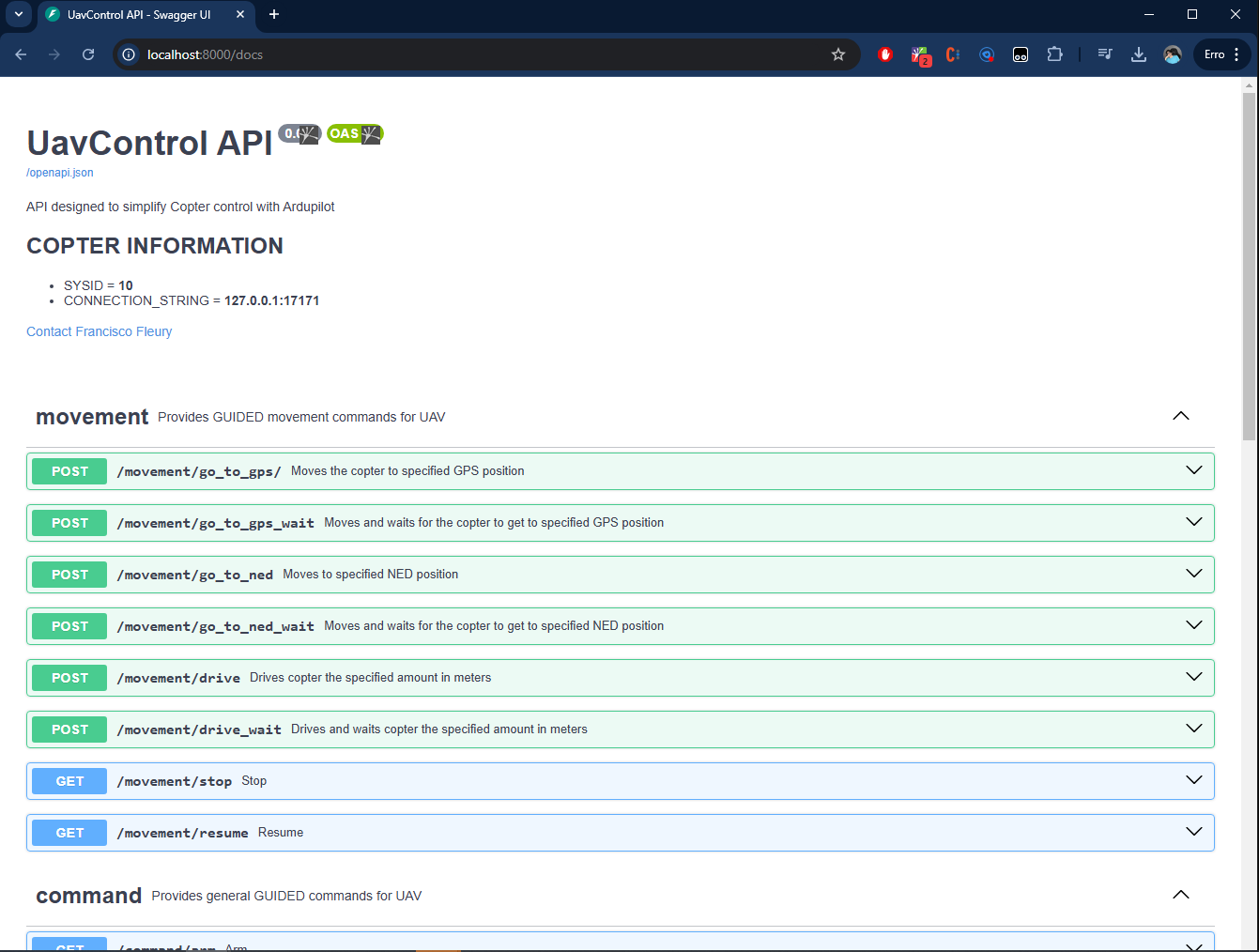
To verify the initialization of the API go to the endpoint localhost:[your_port]/docs.
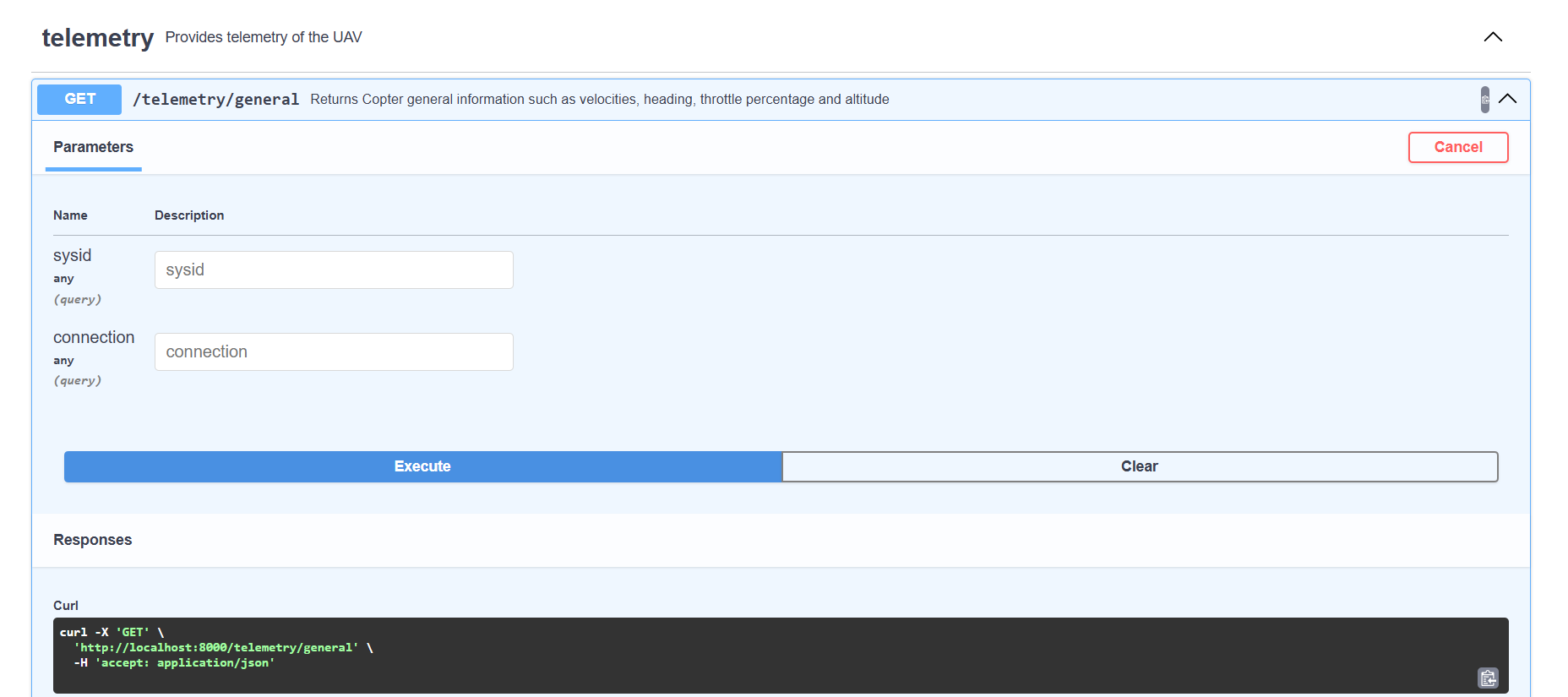
Once inside the web page, scroll to telemetry router and execute the telemetry/general endpoint.
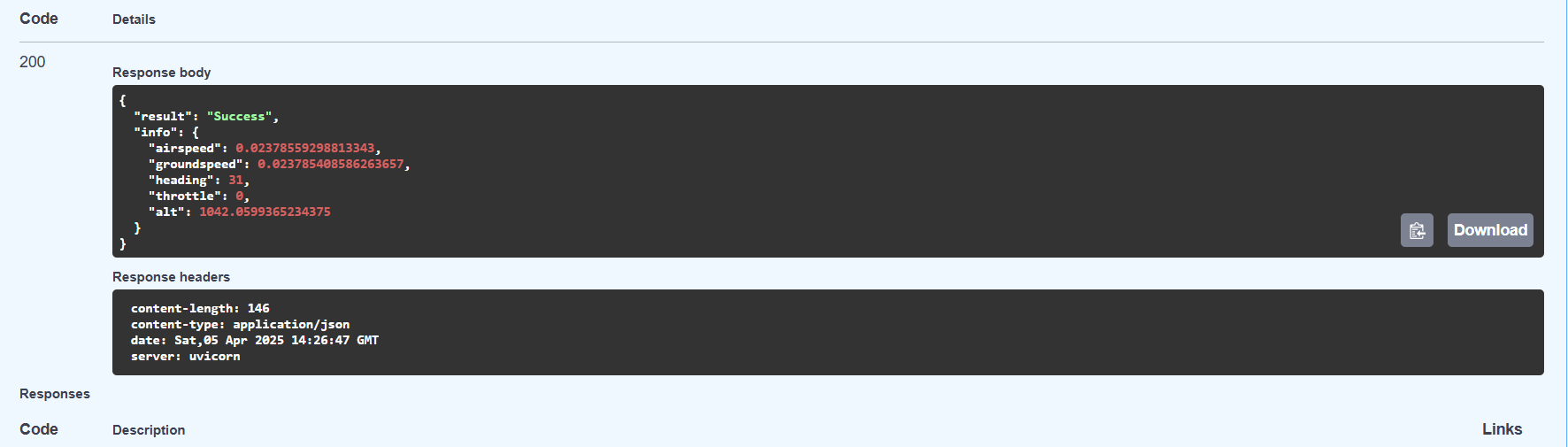
If everything is fine, the answer should look like this.
And that's it! You can start consuming the Uav_control API
Executing a Simulated flight
Starting Uav_control
To instantiate the API, run the script uav_api.py through the following command:
python3 uav_api.py --simulated true
This command initiates both the SITL, and the Uav_control API. The connection addres of the SITL instance is 127.0.0.1:17171 and the api is hosted at localhost:8000 by default but both of this parameters can be modified by arguments.
Testing and feedback
To manually test the api access the auto-generated swagger endpoint at http://localhost:8000/docs.
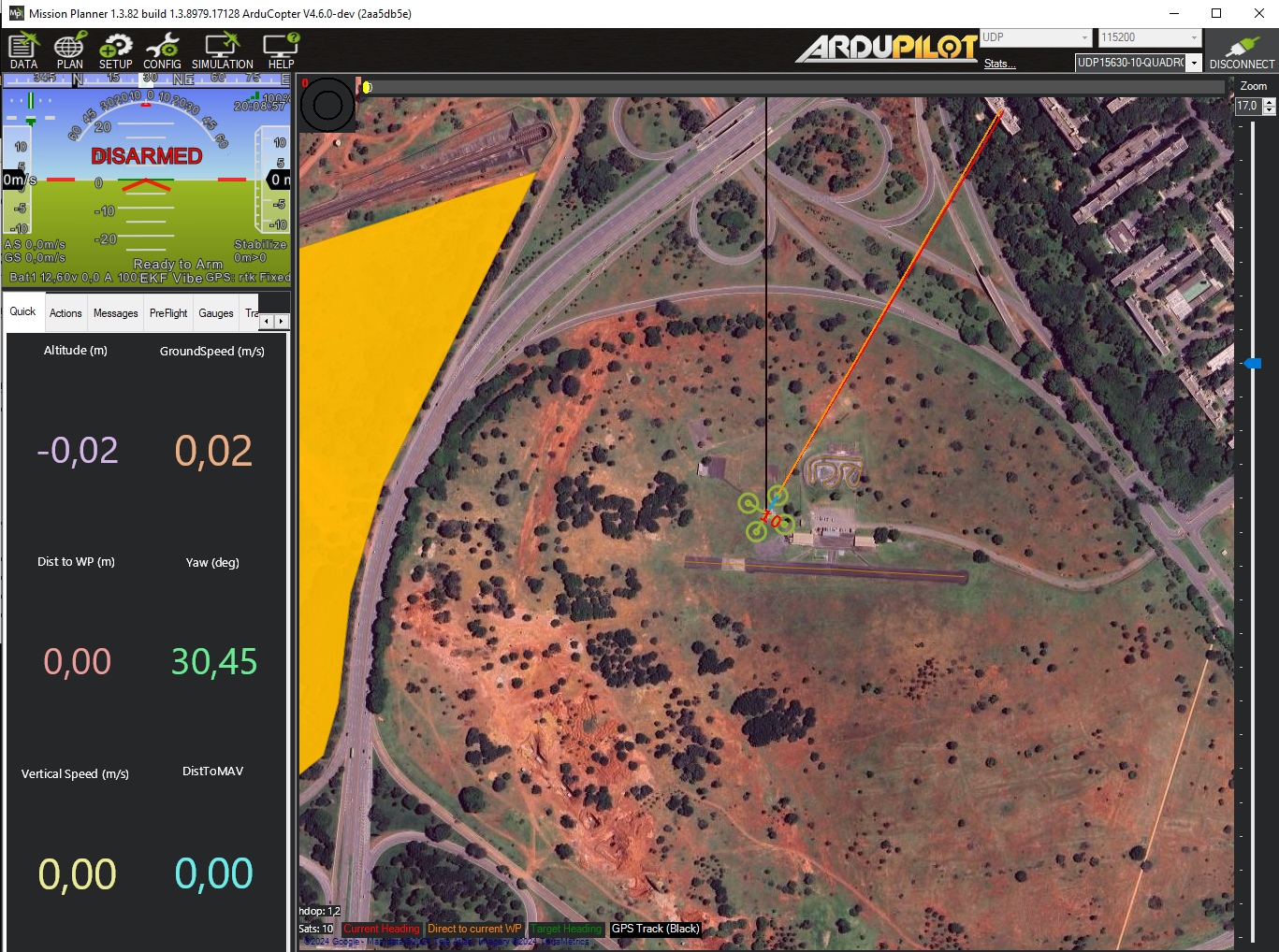
To get visual feedback of drone position and telemetry use Mission Planner, or any other ground station software of your preference, and connect to UDP port 15630 (for wsl users this may not work, check the parameters section for uav_api.py and search for gs_connection for more).
Flying through scripts
One of the perks of using Uav_control is simplifying UAV flights coordinated by scripts. Here are some examples:
Simple Takeoff and Landing
This file is located at flight_examples/takeoff_land.py
import requests
base_url = "http://localhost:8000"

# Arming vehicle
arm_result = requests.get(f"{base_url}/command/arm")
if arm_result.status_code != 200:
    print(f"Arm command fail. status_code={arm_result.status_code}")
    exit()
print("Vehicle armed.")

# Taking off
params = {"alt": 30}
takeoff_result = requests.get(f"{base_url}/command/takeoff", params=params)
if takeoff_result.status_code != 200:
    print(f"Take off command fail. status_code={takeoff_result.status_code}")
    exit()
print("Vehicle took off")

# Landing...
land_result = requests.get(f"{base_url}/command/land")
if land_result.status_code != 200:
    print(f"Land command fail. status_code={land_result.status_code}")
    exit()
print("Vehicle landed.")
NED Square
In this example the uav will move following a square with 100 meters side. This file is located at flight_examples/ned_square.
import requests
base_url = "http://localhost:8000"

# Arming vehicle
arm_result = requests.get(f"{base_url}/command/arm")
if arm_result.status_code != 200:
    print(f"Arm command fail. status_code={arm_result.status_code}")
    exit()
print("Vehicle armed.")

# Taking off
params = {"alt": 30}
takeoff_result = requests.get(f"{base_url}/command/takeoff", params=params)
if takeoff_result.status_code != 200:
    print(f"Take off command fail. status_code={takeoff_result.status_code}")
    exit()
print("Vehicle took off")

square_points = [
    (100, 100, -50),
    (100, -100, -50),
    (-100, -100, -50),
    (-100, 100, -50)
]

# Moving
for point in square_points:
    point_data = {
        "x": point[0],
        "y": point[1],
        "z": point[2]
    }
    point_result = requests.post(f"{base_url}/movement/go_to_ned_wait", json=point_data)
    if point_result.status_code != 200:
        print(f"Go_to_ned_wait command fail. status_code={point_result.status_code} point={point}")
        exit()
    print(f"Vehicle at ({point[0]}, {point[1]}, {point[2]})")

# Returning to launch
rtl_result = requests.get(f"{base_url}/command/rtl")
if rtl_result.status_code != 200:
    print(f"RTL command fail. status_code={rtl_result.status_code}")
    exit()
print("Vehicle landed at launch.")
NED Square (Polling)
This example does the same thing as the last one but this time instead of using the go_to_ned_wait endpoint we will take a polling aproach using go_to_ned. While more verbose, this way of verifying position allows your program to do other things while the uav has not arrived to the specified location. This file is located at flight_examples/ned_square_polling.py.
import requests
import time
import math

base_url = "http://localhost:8000"

def euclidean_distance(point1, point2):
    return math.sqrt((point1[0] - point2[0])**2 + (point1[1] - point2[1])**2 + (point1[2] - point2[2])**2)

def wait_for_point(point, max_error, timeout):
    start = time.time()
    while time.time() < start + timeout:
        ned_result = requests.get(f"{base_url}/telemetry/ned")
        if ned_result.status_code != 200:
            print(f"Ned telemetry fail. status_code={ned_result.status_code}")
            exit()
        ned_pos = ned_result.json()["info"]["position"]
        print(ned_pos)
        ned_point = (ned_pos["x"], ned_pos["y"], ned_pos["z"])
        distance = euclidean_distance(point, ned_point)
        if distance < max_error:
            return True
    return False


# Arming vehicle
arm_result = requests.get(f"{base_url}/command/arm")
if arm_result.status_code != 200:
    print(f"Arm command fail. status_code={arm_result.status_code}")
    exit()
print("Vehicle armed.")

# Taking off
params = {"alt": 30}
takeoff_result = requests.get(f"{base_url}/command/takeoff", params=params)
if takeoff_result.status_code != 200:
    print(f"Take off command fail. status_code={takeoff_result.status_code}")
    exit()
print("Vehicle took off")

square_points = [
    (100, 100, -50),
    (100, -100, -50),
    (-100, -100, -50),
    (-100, 100, -50)
]

# Moving
for point in square_points:
    point_data = {
        "x": point[0],
        "y": point[1],
        "z": point[2]
    }
    point_result = requests.post(f"{base_url}/movement/go_to_ned", json=point_data)
    if point_result.status_code != 200:
        print(f"Go_to_ned command fail. status_code={point_result.status_code} point={point}")
        exit()

    arrived = wait_for_point(point, max_error=3, timeout=60)
    if not arrived:
        print(f"Error while going to point {point}")
        exit()
    print(f"Vehicle at ({point[0]}, {point[1]}, {point[2]})")

# Returning to launch
rtl_result = requests.get(f"{base_url}/command/rtl")
if rtl_result.status_code != 200:
    print(f"RTL command fail. status_code={rtl_result.status_code}")
    exit()
print("Vehicle landed at launch.")


Download files
Download the file for your platform. If you're not sure which to choose, learn more about installing packages.
Source Distribution
Built Distribution
Filter files by name, interpreter, ABI, and platform.
If you're not sure about the file name format, learn more about wheel file names.
Copy a direct link to the current filters
File details
Details for the file uav_api-0.0.1.tar.gz.
File metadata
- Download URL: uav_api-0.0.1.tar.gz
- Upload date:
- Size: 83.0 kB
- Tags: Source
- Uploaded using Trusted Publishing? No
- Uploaded via: twine/6.1.0 CPython/3.12.3
File hashes
| Algorithm | Hash digest | |
|---|---|---|
| SHA256 |
99aa54909787b9f015f67f1e0da81036566bb9c32d577552bb30f9b52dadcacb
|
|
| MD5 |
0c3d066f0dc8634023a0b4ba40f7e6ae
|
|
| BLAKE2b-256 |
dc0bb7e7704b3658c0d0ac7d9f063402ba8b1320038c1d0e615f37a8d8664eb7
|
File details
Details for the file uav_api-0.0.1-py3-none-any.whl.
File metadata
- Download URL: uav_api-0.0.1-py3-none-any.whl
- Upload date:
- Size: 89.5 kB
- Tags: Python 3
- Uploaded using Trusted Publishing? No
- Uploaded via: twine/6.1.0 CPython/3.12.3
File hashes
| Algorithm | Hash digest | |
|---|---|---|
| SHA256 |
0a68c4404c6be1ec823cf844afe63ca1e9c44a28e290069dd7ee74ffb93adf68
|
|
| MD5 |
87531ef9f94c14ae7baec2d13dd1b9e1
|
|
| BLAKE2b-256 |
dc5e0f27d3f7bf05c7e0da30471792a6d50b43bb266d8464b2eb69ede7be80c8
|






